-
ROS系列(二):rosbag 中提取视频数据
一、环境安装
当前环境在上一篇文章的基础上进行配置。
ROS系列(一):【环境配置】rosbag 包安装_安装rosbag-CSDN博客
继续安装
sudo apt install ffmpegpython 包如下
pip install sensor_msgs --extra-index-url https://rospypi.github.io/simple/pip install geometry_msgs --extra-index-url https://rospypi.github.io/simple/pip install opencv-pythonpip install roslz4 --extra-index-url https://rospypi.github.io/simple/安装好环境后:
使用如下脚本:
- #!/usr/bin/env python3
- """
- rosbag2video.py
- rosbag to video file conversion tool
- by Abel Gabor 2019
- baquatelle@gmail.com
- requirements:
- sudo apt install python3-roslib python3-sensor-msgs python3-opencv ffmpeg
- based on the tool by Maximilian Laiacker 2016
- post@mlaiacker.de"""
- import roslib
- #roslib.load_manifest('rosbag')
- import rospy
- import rosbag
- import sys, getopt
- import os
- from sensor_msgs.msg import CompressedImage
- from sensor_msgs.msg import Image
- import cv2
- import numpy as np
- import shlex, subprocess
- MJPEG_VIDEO = 1
- RAWIMAGE_VIDEO = 2
- VIDEO_CONVERTER_TO_USE = "ffmpeg" # or you may want to use "avconv"
- def print_help():
- print('rosbag2video.py [--fps 25] [--rate 1] [-o outputfile] [-v] [-s] [-t topic] bagfile1 [bagfile2] ...')
- print()
- print('Converts image sequence(s) in ros bag file(s) to video file(s) with fixed frame rate using',VIDEO_CONVERTER_TO_USE)
- print(VIDEO_CONVERTER_TO_USE,'needs to be installed!')
- print()
- print('--fps Sets FPS value that is passed to',VIDEO_CONVERTER_TO_USE)
- print(' Default is 25.')
- print('-h Displays this help.')
- print('--ofile (-o) sets output file name.')
- print(' If no output file name (-o) is given the filename \'
.mp4\' is used and default output codec is h264.' - print(' Multiple image topics are supported only when -o option is _not_ used.')
- print(' ',VIDEO_CONVERTER_TO_USE,' will guess the format according to given extension.')
- print(' Compressed and raw image messages are supported with mono8 and bgr8/rgb8/bggr8/rggb8 formats.')
- print('--rate (-r) You may slow down or speed up the video.')
- print(' Default is 1.0, that keeps the original speed.')
- print('-s Shows each and every image extracted from the rosbag file (cv_bride is needed).')
- print('--topic (-t) Only the images from topic "topic" are used for the video output.')
- print('-v Verbose messages are displayed.')
- print('--prefix (-p) set a output file name prefix othervise \'bagfile1\' is used (if -o is not set).')
- print('--start Optional start time in seconds.')
- print('--end Optional end time in seconds.')
- class RosVideoWriter():
- def __init__(self, fps=25.0, rate=1.0, topic="", output_filename ="", display= False, verbose = False, start = rospy.Time(0), end = rospy.Time(sys.maxsize)):
- self.opt_topic = topic
- self.opt_out_file = output_filename
- self.opt_verbose = verbose
- self.opt_display_images = display
- self.opt_start = start
- self.opt_end = end
- self.rate = rate
- self.fps = fps
- self.opt_prefix= None
- self.t_first={}
- self.t_file={}
- self.t_video={}
- self.p_avconv = {}
- def parseArgs(self, args):
- opts, opt_files = getopt.getopt(args,"hsvr:o:t:p:",["fps=","rate=","ofile=","topic=","start=","end=","prefix="])
- for opt, arg in opts:
- if opt == '-h':
- print_help()
- sys.exit(0)
- elif opt == '-s':
- self.opt_display_images = True
- elif opt == '-v':
- self.opt_verbose = True
- elif opt in ("--fps"):
- self.fps = float(arg)
- elif opt in ("-r", "--rate"):
- self.rate = float(arg)
- elif opt in ("-o", "--ofile"):
- self.opt_out_file = arg
- elif opt in ("-t", "--topic"):
- self.opt_topic = arg
- elif opt in ("-p", "--prefix"):
- self.opt_prefix = arg
- elif opt in ("--start"):
- self.opt_start = rospy.Time(int(arg))
- if(self.opt_verbose):
- print("starting at",self.opt_start.to_sec())
- elif opt in ("--end"):
- self.opt_end = rospy.Time(int(arg))
- if(self.opt_verbose):
- print("ending at",self.opt_end.to_sec())
- else:
- print("opz:", opt,'arg:', arg)
- if (self.fps<=0):
- print("invalid fps", self.fps)
- self.fps = 1
- if (self.rate<=0):
- print("invalid rate", self.rate)
- self.rate = 1
- if(self.opt_verbose):
- print("using ",self.fps," FPS")
- return opt_files
- # filter messages using type or only the opic we whant from the 'topic' argument
- def filter_image_msgs(self, topic, datatype, md5sum, msg_def, header):
- if(datatype=="sensor_msgs/CompressedImage"):
- if (self.opt_topic != "" and self.opt_topic == topic) or self.opt_topic == "":
- print("############# COMPRESSED IMAGE ######################")
- print(topic,' with datatype:', str(datatype))
- print()
- return True;
- if(datatype=="theora_image_transport/Packet"):
- if (self.opt_topic != "" and self.opt_topic == topic) or self.opt_topic == "":
- print(topic,' with datatype:', str(datatype))
- print('!!! theora is not supported, sorry !!!')
- return False;
- if(datatype=="sensor_msgs/Image"):
- if (self.opt_topic != "" and self.opt_topic == topic) or self.opt_topic == "":
- print("############# UNCOMPRESSED IMAGE ######################")
- print(topic,' with datatype:', str(datatype))
- print()
- return True;
- return False;
- def write_output_video(self, msg, topic, t, video_fmt, pix_fmt = ""):
- # no data in this topic
- if len(msg.data) == 0 :
- return
- # initiate data for this topic
- if not topic in self.t_first :
- self.t_first[topic] = t # timestamp of first image for this topic
- self.t_video[topic] = 0
- self.t_file[topic] = 0
- # if multiple streams of images will start at different times the resulting video files will not be in sync
- # current offset time we are in the bag file
- self.t_file[topic] = (t-self.t_first[topic]).to_sec()
- # fill video file up with images until we reache the current offset from the beginning of the bag file
- while self.t_video[topic] < self.t_file[topic]/self.rate :
- if not topic in self.p_avconv:
- # we have to start a new process for this topic
- if self.opt_verbose :
- print("Initializing pipe for topic", topic, "at time", t.to_sec())
- if self.opt_out_file=="":
- out_file = self.opt_prefix + str(topic).replace("/", "_")+".mp4"
- else:
- out_file = self.opt_out_file
- if self.opt_verbose :
- print("Using output file ", out_file, " for topic ", topic, ".")
- if video_fmt == MJPEG_VIDEO :
- cmd = [VIDEO_CONVERTER_TO_USE, '-v', '1', '-stats', '-r',str(self.fps),'-c','mjpeg','-f','mjpeg','-i','-','-an',out_file]
- self.p_avconv[topic] = subprocess.Popen(cmd, stdin=subprocess.PIPE)
- if self.opt_verbose :
- print("Using command line:")
- print(cmd)
- elif video_fmt == RAWIMAGE_VIDEO :
- size = str(msg.width)+"x"+str(msg.height)
- cmd = [VIDEO_CONVERTER_TO_USE, '-v', '1', '-stats','-r',str(self.fps),'-f','rawvideo','-s',size,'-pix_fmt', pix_fmt,'-i','-','-an',out_file]
- self.p_avconv[topic] = subprocess.Popen(cmd, stdin=subprocess.PIPE)
- if self.opt_verbose :
- print("Using command line:")
- print(cmd)
- else :
- print("Script error, unknown value for argument video_fmt in function write_output_video.")
- exit(1)
- # send data to ffmpeg process pipe
- self.p_avconv[topic].stdin.write(msg.data)
- # next frame time
- self.t_video[topic] += 1.0/self.fps
- def addBag(self, filename):
- if self.opt_display_images:
- from cv_bridge import CvBridge, CvBridgeError
- bridge = CvBridge()
- cv_image = []
- if self.opt_verbose :
- print("Bagfile: {}".format(filename))
- if not self.opt_prefix:
- # create the output in the same folder and name as the bag file minu '.bag'
- self.opt_prefix = bagfile[:-4]
- #Go through the bag file
- bag = rosbag.Bag(filename)
- if self.opt_verbose :
- print("Bag opened.")
- # loop over all topics
- for topic, msg, t in bag.read_messages(connection_filter=self.filter_image_msgs, start_time=self.opt_start, end_time=self.opt_end):
- try:
- if msg.format.find("jpeg")!=-1 :
- if msg.format.find("8")!=-1 and (msg.format.find("rgb")!=-1 or msg.format.find("bgr")!=-1 or msg.format.find("bgra")!=-1 ):
- if self.opt_display_images:
- np_arr = np.fromstring(msg.data, np.uint8)
- cv_image = cv2.imdecode(np_arr, cv2.CV_LOAD_IMAGE_COLOR)
- self.write_output_video( msg, topic, t, MJPEG_VIDEO )
- elif msg.format.find("mono8")!=-1 :
- if self.opt_display_images:
- np_arr = np.fromstring(msg.data, np.uint8)
- cv_image = cv2.imdecode(np_arr, cv2.CV_LOAD_IMAGE_COLOR)
- self.write_output_video( msg, topic, t, MJPEG_VIDEO )
- elif msg.format.find("16UC1")!=-1 :
- if self.opt_display_images:
- np_arr = np.fromstring(msg.data, np.uint16)
- cv_image = cv2.imdecode(np_arr, cv2.CV_LOAD_IMAGE_COLOR)
- self.write_output_video( msg, topic, t, MJPEG_VIDEO )
- else:
- print('unsupported jpeg format:', msg.format, '.', topic)
- # has no attribute 'format'
- except AttributeError:
- try:
- pix_fmt=None
- if msg.encoding.find("mono8")!=-1 or msg.encoding.find("8UC1")!=-1:
- pix_fmt = "gray"
- if self.opt_display_images:
- cv_image = bridge.imgmsg_to_cv2(msg, "bgr8")
- elif msg.encoding.find("bgra")!=-1 :
- pix_fmt = "bgra"
- if self.opt_display_images:
- cv_image = bridge.imgmsg_to_cv2(msg, "bgr8")
- elif msg.encoding.find("bgr8")!=-1 :
- pix_fmt = "bgr24"
- if self.opt_display_images:
- cv_image = bridge.imgmsg_to_cv2(msg, "bgr8")
- elif msg.encoding.find("bggr8")!=-1 :
- pix_fmt = "bayer_bggr8"
- if self.opt_display_images:
- cv_image = bridge.imgmsg_to_cv2(msg, "bayer_bggr8")
- elif msg.encoding.find("rggb8")!=-1 :
- pix_fmt = "bayer_rggb8"
- if self.opt_display_images:
- cv_image = bridge.imgmsg_to_cv2(msg, "bayer_rggb8")
- elif msg.encoding.find("rgb8")!=-1 :
- pix_fmt = "rgb24"
- if self.opt_display_images:
- cv_image = bridge.imgmsg_to_cv2(msg, "bgr8")
- elif msg.encoding.find("16UC1")!=-1 :
- pix_fmt = "gray16le"
- else:
- print('unsupported encoding:', msg.encoding, topic)
- #exit(1)
- if pix_fmt:
- self.write_output_video( msg, topic, t, RAWIMAGE_VIDEO, pix_fmt )
- except AttributeError:
- # maybe theora packet
- # theora not supported
- if self.opt_verbose :
- print("Could not handle this format. Maybe thoera packet? theora is not supported.")
- pass
- if self.opt_display_images:
- cv2.imshow(topic, cv_image)
- key=cv2.waitKey(1)
- if key==1048603:
- exit(1)
- if self.p_avconv == {}:
- print("No image topics found in bag:", filename)
- bag.close()
- if __name__ == '__main__':
- #print()
- #print('rosbag2video, by Maximilian Laiacker 2020 and Abel Gabor 2019')
- #print()
- if len(sys.argv) < 2:
- print('Please specify ros bag file(s)!')
- print_help()
- sys.exit(1)
- else :
- videowriter = RosVideoWriter()
- try:
- opt_files = videowriter.parseArgs(sys.argv[1:])
- except getopt.GetoptError:
- print_help()
- sys.exit(2)
- # loop over all files
- for files in range(0,len(opt_files)):
- #First arg is the bag to look at
- bagfile = opt_files[files]
- videowriter.addBag(bagfile)
- print("finished")
使用方法介绍:
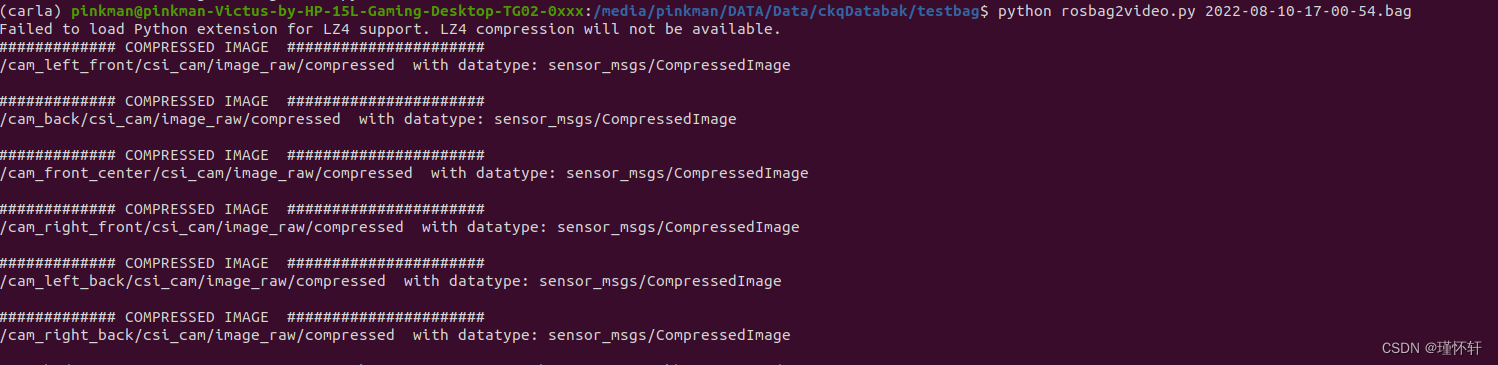
python rosbag2video.py XXX.bag
参数说明:
[–fps] :设置传递给ffmpeg的帧率,默认为25;
[-h]:显示帮助;
[–ofile]:设置输出文件名;
[–rate]:放慢或加快视频。默认值是1.0,保持原来的速度;
[-s]:显示从rosbag文件提取的每个图像;
[–topic]:仅来自“topic”的图像用于视频输出;
[-v]:显示详细消息;
[–prefix]:设置输出文件名前缀,否则使用“ bagfile1”(如果未设置-o);
[–start]:可选的开始时间(以秒为单位);
[–end]:可选结束时间,单位为秒;执行结果:

-
相关阅读:
SpringCloud之Sentinel
《web课程设计》用HTML CSS做一个简洁、漂亮的个人博客网站
如何将转换器应用于时序模型
docker 服务自动重启
【MySql进阶】索引详解(三):索引的使用和创建原则、索引失效、索引优化
论文阅读 Dynamic Graph Representation Learning Via Self-Attention Networks
c++ 程序通用多线程单例设计 c++ web 框架设计经验谈
【白帽子讲Web安全】第二章 浏览器安全
倩女幽魂手游攻略:云手机自动搬砖辅助教程!
(附源码)spring boot信佳玩具有限公司仓库管理系统 毕业设计 011553
- 原文地址:https://blog.csdn.net/ckq707718837/article/details/133853535