-
基于Seata的分布式事务方案
在Seata中,有4种分布式事务实现方案
XA、AT、TCC、Saga
其中XA利用了数据库的分布式事务特性,AT相当于框架去控制事务回滚。TCC手写三个方法,saga手写两个方法。
AT的性能和编写比较折中,是最常用的一种。TCC一些视频教程中介绍了单表单字段加中间表的方式存储过程数据,对于一次操作多个主子表数据的示例目前实现还是太繁琐了。
根据官方实例和相关视频简单写了下代码。
对于配置,能用默认的用默认,有示例配置的优先抄示例配置
1.加依赖
- <!-- 版本对应关系
- Alibaba 2021.0.5 对应 Seata 1.6.1
- https://github.com/alibaba/spring-cloud-alibaba/wiki/%E7%89%88%E6%9C%AC%E8%AF%B4%E6%98%8E
- 这里依赖不是 spring-cloud-alibaba-seata
- -->
- <dependency>
- <groupId>com.alibaba.cloud</groupId>
- <artifactId>spring-cloud-starter-alibaba-seata</artifactId>
- <version>2021.0.5.0</version>
- </dependency>
这里alibaba版本是2021.0.5所以spring-cloud-starter-alibaba-seata也用这个版本,注意版本对应
2.写配置
- seata:
- registry:
- type: nacos
- nacos:
- application: seata-server
- server-addr: 127.0.0.1:8848
- group: SEATA_GROUP
- cluster: default
- #事务组
- tx-service-group: default_tx_group
- service:
- #事务组和集群名称映射
- vgroup-mapping:
- default_tx_group: default
- data-source-proxy-mode: AT
注意,这里需要先配置好nacos和seata服务端,seata服务端早期是json配置的,新版的是yaml配置
seata服务端配置application.yml
- # Copyright 1999-2019 Seata.io Group.
- #
- # Licensed under the Apache License, Version 2.0 (the "License");
- # you may not use this file except in compliance with the License.
- # You may obtain a copy of the License at
- #
- # http://www.apache.org/licenses/LICENSE-2.0
- #
- # Unless required by applicable law or agreed to in writing, software
- # distributed under the License is distributed on an "AS IS" BASIS,
- # WITHOUT WARRANTIES OR CONDITIONS OF ANY KIND, either express or implied.
- # See the License for the specific language governing permissions and
- # limitations under the License.
- server:
- port: 7091
- spring:
- application:
- name: seata-server
- logging:
- config: classpath:logback-spring.xml
- file:
- path: ${log.home:${user.home}/logs/seata}
- extend:
- logstash-appender:
- destination: 127.0.0.1:4560
- kafka-appender:
- bootstrap-servers: 127.0.0.1:9092
- topic: logback_to_logstash
- console:
- user:
- username: seata
- password: seata
- seata:
- config:
- # support: nacos, consul, apollo, zk, etcd3
- type: file
- registry:
- # support: nacos, eureka, redis, zk, consul, etcd3, sofa
- type: nacos
- nacos:
- application: seata-server
- server-addr: 127.0.0.1:8848
- group: SEATA_GROUP
- namespace:
- cluster: default
- username:
- password:
- context-path:
- store:
- # support: file 、 db 、 redis
- mode: file
- # server:
- # service-port: 8091 #If not configured, the default is '${server.port} + 1000'
- security:
- secretKey: SeataSecretKey0c382ef121d778043159209298fd40bf3850a017
- tokenValidityInMilliseconds: 1800000
- ignore:
- urls: /,/**/*.css,/**/*.js,/**/*.html,/**/*.map,/**/*.svg,/**/*.png,/**/*.jpeg,/**/*.ico,/api/v1/auth/login
3.写代码
将主调用的方法注解@Transactional改为@GlobalTransactional,其他微服务方法无需更改。
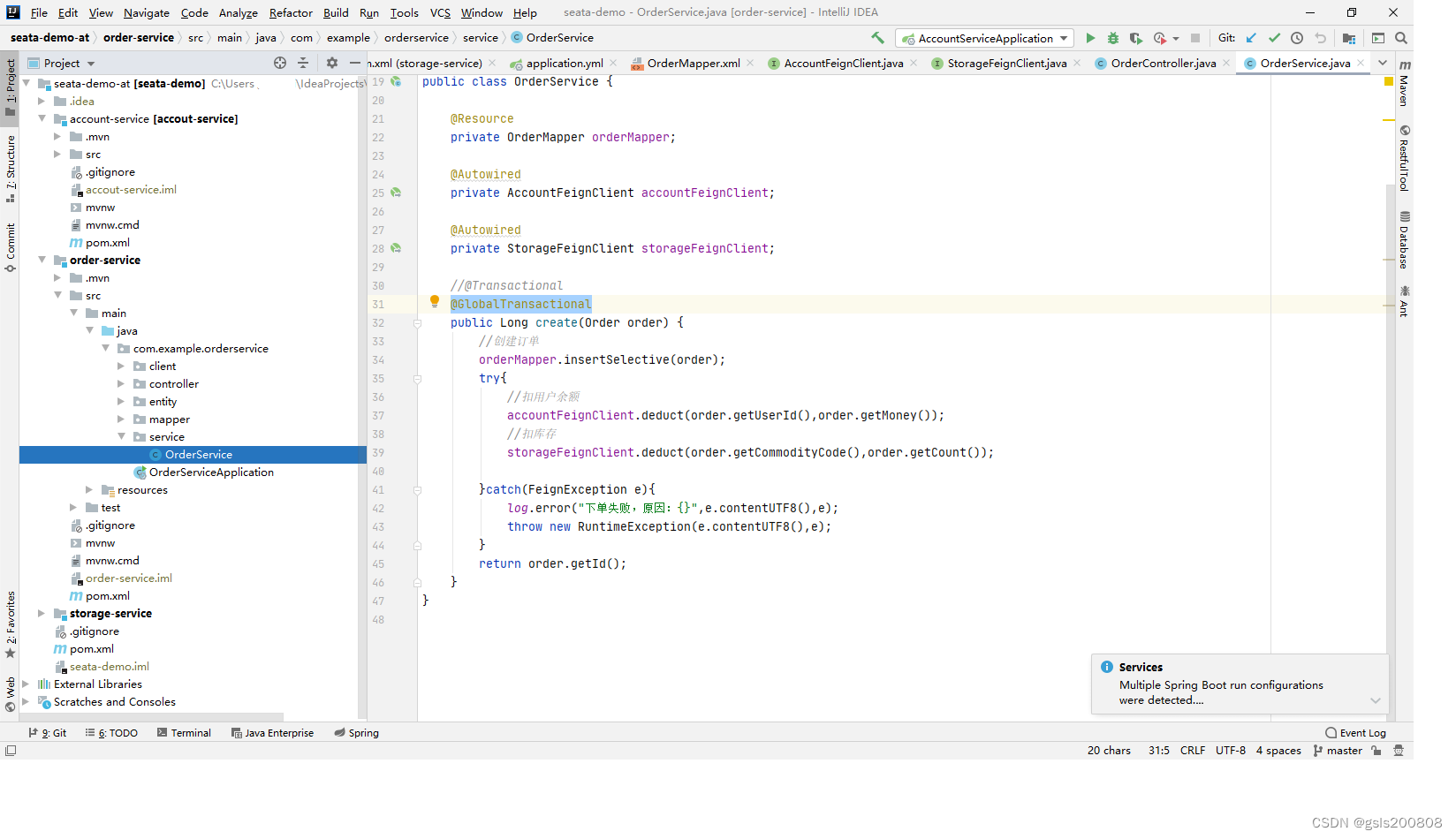
完整代码见顶部
-
相关阅读:
什么是机器学习中的正则化?
郁金香2021年游戏辅助技术中级班(六)
C. Swap Game(简单博弈)
简单工厂模式 和 工厂方法 和 抽象工厂的区别
网上智慧教育云vr实验室管理系统促进教学公平和普及
JSTL标签库
webpack react npm start报错解决 ERR_OSSL_EVP_UNSUPPORTED
Go基础13-理解Go语言代码块与作用域
消息队列MQ
Java通达信接口如何实现获取实时股票数据?
- 原文地址:https://blog.csdn.net/gsls200808/article/details/133829136
