-
通过jsoup抓取谷歌商店评分
背景
在谷歌上面发布包,有时候要看看评分,有时候会因为总总原因被下架,希望后台能够对评分进行预警,和下架预警
实现
测试地址: https://play.google.com/store/apps/details?id=com.tencent.mm
通过jsoup解析页面,然后获取评分;
这是获取评分的:
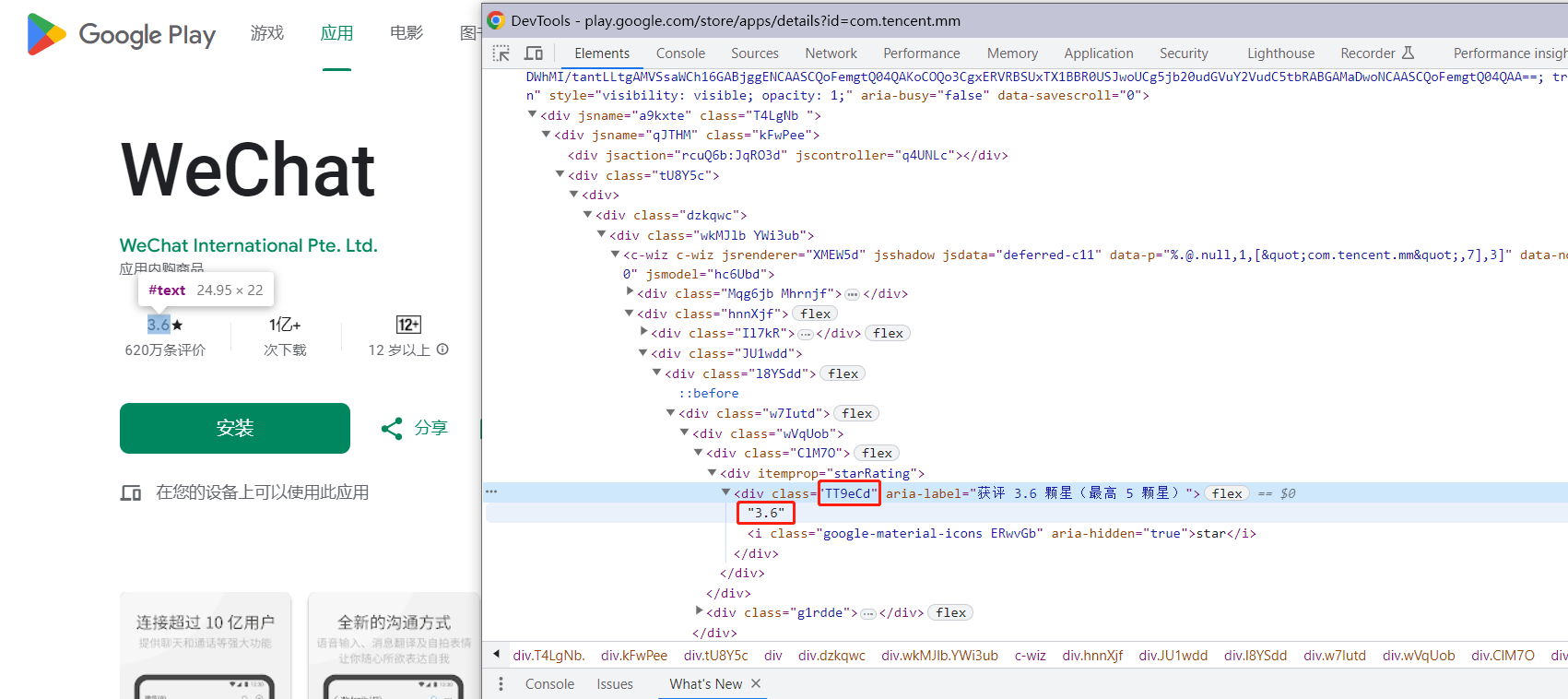
而判断包是否下架就直接判断返回的code码是否大于300,就算作下架了;
是否下架预警
public static void offline(String url) { // 1.解析网页(jsoup 解析返回的对象是浏览器Document对象) HttpResponse response = null; try { response = getHttpResponse(url); if (response.getStatusLine().getStatusCode() >= 300) { // 下架通知 log.error("谷歌App检测下架: {} ", url); } log.error("谷歌App检测下架: code码{} ", response.getStatusLine().getStatusCode()); } catch (Exception e) { log.error("谷歌App检测下架!!!url:{},异常:{}", url, e); //throw new RuntimeException(e); } finally { if (Objects.nonNull(response)) { try { EntityUtils.consume(response.getEntity()); } catch (IOException e) { //throw new RuntimeException(e); } } } }- 1
- 2
- 3
- 4
- 5
- 6
- 7
- 8
- 9
- 10
- 11
- 12
- 13
- 14
- 15
- 16
- 17
- 18
- 19
- 20
- 21
- 22
- 23
- 24
评分
public static Integer score(String url) { // 1.解析网页(jsoup 解析返回的对象是浏览器Document对象) HttpResponse response = null; try { response = getHttpResponse(url); if (response.getStatusLine().getStatusCode() < 300) { Document document = Jsoup.parse(EntityUtils.toString(response.getEntity(), Charsets.UTF_8)); // google商店的评分class Elements tt9eCd = document.getElementsByClass("TT9eCd"); if (CollectionUtils.isEmpty(tt9eCd)) { log.debug("google商店评分数据监控没有评分app:{}", url); return null; } return (int) (Double.parseDouble(tt9eCd.get(0).textNodes().get(0).text()) * 10); } } catch (Exception e) { e.printStackTrace(); log.error("google商店评分数据监控异常!!!url:{},异常:{}", url, e.toString()); //throw new RuntimeException(e); } finally { if (Objects.nonNull(response)) { try { EntityUtils.consume(response.getEntity()); } catch (IOException e) { //throw new RuntimeException(e); } } } return null; }- 1
- 2
- 3
- 4
- 5
- 6
- 7
- 8
- 9
- 10
- 11
- 12
- 13
- 14
- 15
- 16
- 17
- 18
- 19
- 20
- 21
- 22
- 23
- 24
- 25
- 26
- 27
- 28
- 29
- 30
总的工具类,测试
package com.study.springbootplus.util; import com.google.common.base.Charsets; import lombok.extern.slf4j.Slf4j; import org.apache.commons.collections.CollectionUtils; import org.apache.http.HttpResponse; import org.apache.http.client.HttpClient; import org.apache.http.client.config.RequestConfig; import org.apache.http.client.methods.HttpGet; import org.apache.http.impl.client.HttpClients; import org.apache.http.util.EntityUtils; import org.jsoup.Jsoup; import org.jsoup.nodes.Document; import org.jsoup.select.Elements; import java.io.IOException; import java.util.Objects; /** * @ClassName GooglePlayUtil * @Author yida * @Date 2023-08-21 17:04 * @Description GooglePlayUtil */ @Slf4j public class GooglePlayUtil { private static final HttpClient httpClient = HttpClients.custom() .setDefaultRequestConfig(RequestConfig.custom() .setConnectTimeout(3000) .setSocketTimeout(3000).build()) .build(); public static void main(String[] args) { System.setProperty("java.net.useSystemProxies", "true"); offline("https://play.google.com/store/apps/details?id=com.tencent.mm"); System.out.println("返回的分数:" + score("https://play.google.com/store/apps/details?id=com.tencent.mm")); } public static void offline(String url) { // 1.解析网页(jsoup 解析返回的对象是浏览器Document对象) HttpResponse response = null; try { response = getHttpResponse(url); if (response.getStatusLine().getStatusCode() >= 300) { // 下架通知 log.error("谷歌App检测下架: {} ", url); } log.error("谷歌App检测下架: code码{} ", response.getStatusLine().getStatusCode()); } catch (Exception e) { log.error("谷歌App检测下架!!!url:{},异常:{}", url, e); //throw new RuntimeException(e); } finally { if (Objects.nonNull(response)) { try { EntityUtils.consume(response.getEntity()); } catch (IOException e) { //throw new RuntimeException(e); } } } } public static Integer score(String url) { // 1.解析网页(jsoup 解析返回的对象是浏览器Document对象) HttpResponse response = null; try { response = getHttpResponse(url); if (response.getStatusLine().getStatusCode() < 300) { Document document = Jsoup.parse(EntityUtils.toString(response.getEntity(), Charsets.UTF_8)); // google商店的评分class Elements tt9eCd = document.getElementsByClass("TT9eCd"); if (CollectionUtils.isEmpty(tt9eCd)) { log.debug("google商店评分数据监控没有评分app:{}", url); return null; } return (int) (Double.parseDouble(tt9eCd.get(0).textNodes().get(0).text()) * 10); } } catch (Exception e) { e.printStackTrace(); log.error("google商店评分数据监控异常!!!url:{},异常:{}", url, e.toString()); //throw new RuntimeException(e); } finally { if (Objects.nonNull(response)) { try { EntityUtils.consume(response.getEntity()); } catch (IOException e) { //throw new RuntimeException(e); } } } return null; } public static HttpResponse getHttpResponse(String url) throws Exception { return httpClient.execute(new HttpGet(url)); } }- 1
- 2
- 3
- 4
- 5
- 6
- 7
- 8
- 9
- 10
- 11
- 12
- 13
- 14
- 15
- 16
- 17
- 18
- 19
- 20
- 21
- 22
- 23
- 24
- 25
- 26
- 27
- 28
- 29
- 30
- 31
- 32
- 33
- 34
- 35
- 36
- 37
- 38
- 39
- 40
- 41
- 42
- 43
- 44
- 45
- 46
- 47
- 48
- 49
- 50
- 51
- 52
- 53
- 54
- 55
- 56
- 57
- 58
- 59
- 60
- 61
- 62
- 63
- 64
- 65
- 66
- 67
- 68
- 69
- 70
- 71
- 72
- 73
- 74
- 75
- 76
- 77
- 78
- 79
- 80
- 81
- 82
- 83
- 84
- 85
- 86
- 87
- 88
- 89
- 90
- 91
- 92
- 93
- 94
- 95
- 96
- 97
- 98
- 99
- 100
- 101
- 102
测试结果:
返回的分数:36 -
相关阅读:
Go有哪些特殊的语言特性?
超强满血不收费的AI绘图教程来了(在线Stable Diffusion一键即用)
万字长文:FineBI面试题及参考答案详解
ClickHouse开发相关(UDAF)
传奇列表获取失败与登录器太老怎么解决
MQ - 22 Kafka集群架构设计与实现
c语言中的fread
设计模式之单例模式
C# 窗口事件
电磁场中的几种阻抗
- 原文地址:https://blog.csdn.net/qq_38366063/article/details/133829713
