-
【Pytorch】pytorch中保存模型的三种方式
【Pytorch】pytorch中保存模型的三种方式
1. torch保存模型相关的api
1.1 torch.save()
torch.save(obj, f, pickle_module=pickle, pickle_protocol=DEFAULT_PROTOCOL, _use_new_zipfile_serialization=True)- 1
参考自https://pytorch.org/docs/stable/generated/torch.save.html#torch-save
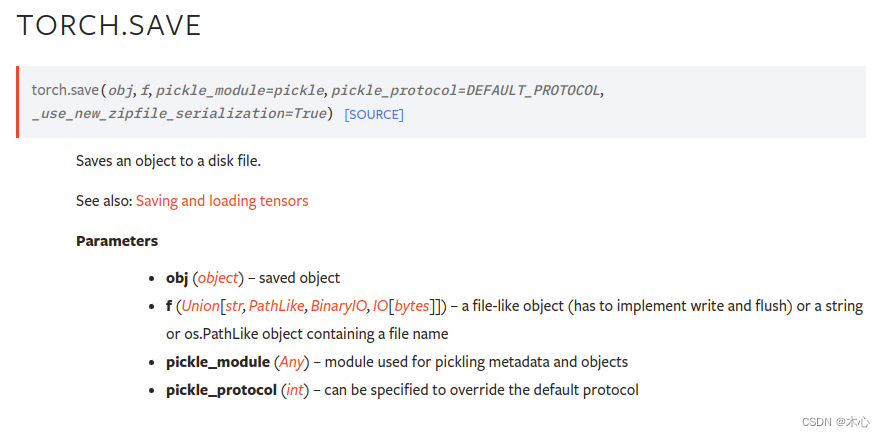
torch.save()的功能是保存一个序列化的目标到磁盘当中,该函数使用了Python中的pickle库用于序列化,具体参数的解释如下参数 功能 obj 需要保存的对象 f 指定保存的路径 pickle_module 用于 pickling 元数据和对象的模块 pickle_protocol 指定 pickle protocal 可以覆盖默认参数 常见用法
# dirctly save entiry model torch.save('model.pth') # save model'weights only torch.save(model.state_dict(), 'model_weights.pth') # save checkpoint checkpint = { 'model_state_dict': model.state_dict(), 'optimizer_state_dict': optimizer.state_dict(), 'loss': loss, 'epoch': epoch } torch.save(checkpoint, 'checkpoint_path.pth')- 1
- 2
- 3
- 4
- 5
- 6
- 7
- 8
- 9
- 10
- 11
- 12
1.2 torch.load()
torch.load(f, map_location=None, pickle_module=pickle, *, weights_only=False, mmap=None, **pickle_load_args)- 1
参考自https://pytorch.org/docs/stable/generated/torch.load.html#torch-load

torch.load()的功能是加载模型,使用python中的unpickle工具来反序列化对象,并且加载到对应的设备上,具体的参数解释如下参数 功能 f 对象的存放路径 map_location 需要映射到的设备 pickle_module 用于 unpickling 元数据和对象的模块 常见用法
# specify the device to use device = torch.device('cuda' if torch.cuda.is_available() else 'cpu') # load entiry model to cuda if available model = torch.load('whole_model.pth', map_location=device) # load model's weight to cuda if available model.load_state_dict(torch.load('model_weights.pth'), map_location=device) # load checkpoint checkpoint = torch.load('checkpoint_path.pth', map_location=device) # checkpoint加载出来就像个字典,预先保存的是否放置了什么内容,加载之后就可以这样来获取 loss = checkpoint['loss'] epoch = chekpoint['epoch'] model.load_state_dict(checkpoint['model_state_dict'] optimizer.load_state_dict(checkpoint['optimizer_state_dict']- 1
- 2
- 3
- 4
- 5
- 6
- 7
- 8
- 9
- 10
- 11
- 12
- 13
- 14
- 15
1.3 torch.nn.Module.load_state_dict()
torch.nn.Module.load_state_dict(state_dict, strict=True, assign=False)- 1
参考自https://pytorch.org/docs/stable/generated/torch.nn.Module.html#torch.nn.Module.load_state_dict

torch.nn.Module.load_state_dict()将参数和缓冲区从 state_dict 复制到此模块及其后代中。 如果 strict 为 True,则 state_dict 的键必须与该模块的 state_dict() 函数返回的键完全匹配。具体的参数描述如下参数 功能 state_dict 保存parameters和persistent buffers的字典 strict 是否强制要求state_dict中的key和model.state_dict返回的key严格一致 1.4 什么是state_dict()
torch.nn.Module.state_dict()- 1
参考自https://pytorch.org/docs/stable/generated/torch.nn.Module.html#torch.nn.Module.state_dict

其实state_dict可以理解为一种简单的Python Dictionary,其功能是将每层之间的参数进行一一映射并且存储在python的数据类型字典中。因此state_dict可以轻松地进行修改、保存等操作。
除了
torch.nn.Module拥有state_dict()方法之外,torch.optim.Optimizer也具有state_dict()方法。如下所示torch.optim.Optimizer.state_dict()- 1
参考自https://pytorch.org/docs/stable/generated/torch.optim.Optimizer.state_dict.html
1.4. 1 举个例子
import torch import torch.nn as nn import torch.nn.functional as F import torch.optim as optim class SimpleModel(nn.Module): def __init__(self, input_size, output_size): super(SimpleModel, self).__init__() self.fc1 = nn.Linear(input_size, 100) self.fc2 = nn.Linear(100, output_size) def forward(self, x): x = F.relu(self.fc1(x)) return self.fc2(x) if __name__ == "__main__": model = SimpleModel(10, 2) optimizer = optim.Adam(model.parameters(), lr=0.001) print("Check Model's State Dict:") for key, value in model.state_dict().items(): print(key, "\t", value.size()) print("Check Optimizer's State Dict:") for key, value in optimizer.state_dict().items(): print(key, "\t", value)- 1
- 2
- 3
- 4
- 5
- 6
- 7
- 8
- 9
- 10
- 11
- 12
- 13
- 14
- 15
- 16
- 17
- 18
- 19
- 20
- 21
- 22
- 23
- 24
- 25
- 26
- 27
- 28
输出的结果如下
Check Model's State Dict: fc1.weight torch.Size([100, 10]) fc1.bias torch.Size([100]) fc2.weight torch.Size([2, 100]) fc2.bias torch.Size([2]) Check Optimizer's State Dict: state {} param_groups [{'lr': 0.001, 'betas': (0.9, 0.999), 'eps': 1e-08, 'weight_decay': 0, 'amsgrad': False, 'maximize': False, 'foreach': None, 'capturable': False, 'differentiable': False, 'fused': None, 'params': [0, 1, 2, 3]}]- 1
- 2
- 3
- 4
- 5
- 6
- 7
- 8
2. pytorch模型文件后缀
常用的torch模型文件后缀有
.pt、.pth,这是最常见的PyTorch模型文件后缀,表示模型的权重、结构和状态字典(state_dict)都被保存在其中。torch.save(model.state_dict(), 'model_weights.pth') torch.save(model, 'full_model.pt')- 1
- 2
还有检查点后缀如
.ckpt、.checkpoint,这些后缀常被用于保存模型的检查点,包括权重和训练状态等。它们也可以表示模型的中间状态,以便在训练期间从中断的地方继续训练。checkpoint = { 'model_state_dict': model.state_dict(), 'optimizer_state_dict': optimizer.state_dict(), 'epoch': epoch, # 其他信息 } torch.save(checkpoint, 'model_checkpoint.ckpt')- 1
- 2
- 3
- 4
- 5
- 6
- 7
还有其他跨框架的数据结构例如
.h5,PyTorch的模型也可以保存为HDF5文件格式用于跨框架的数据交换,可以使用h5py库来进行读写import h5py with h5py.File('model.h5', 'w') as f: # 将模型参数逐一保存到HDF5文件 for name, param in model.named_parameters(): f.create_dataset(name, data=param.numpy())- 1
- 2
- 3
- 4
- 5
- 6
3. 存储整个模型
可以直接使用
torch.save()和torch.load()来加载和保存整个模型到文件中,这种方式保存了模型的所有权重、架构及其其他相关信息,即使不知道模型的结构也能够直接通过权重文件来加载模型3.1 直接保存整个模型
import torch import torch.nn as nn import torch.nn.functional as F import torch.optim as optim import os class SimpleModel(nn.Module): def __init__(self, input_size, output_size): super(SimpleModel, self).__init__() self.fc1 = nn.Linear(input_size, 256) self.fc2 = nn.Linear(256, 256) self.fc3 = nn.Linear(256, output_size) def forward(self, x): x = F.relu(self.fc1(x)) x = F.relu(self.fc2(x)) return self.fc3(x) if __name__ == "__main__": model = SimpleModel(10, 2) # specify the save path url = os.path.dirname(os.path.realpath(__file__)) + '/models/' # 如果路径不存在则创建 if not os.path.exists(url): os.makedirs(url) # specify the model save name model_name = 'simple_model.pth' # save the model to file torch.save(model, url + model_name)- 1
- 2
- 3
- 4
- 5
- 6
- 7
- 8
- 9
- 10
- 11
- 12
- 13
- 14
- 15
- 16
- 17
- 18
- 19
- 20
- 21
- 22
- 23
- 24
- 25
- 26
- 27
- 28
- 29
- 30
- 31
- 32
我们直接将模型保存到了当前文件夹下的
./models文件夹中,3.2 直接加载整个模型
由于我们已经保存了模型的所有相关信息,所以我们可以不知道模型的结构也能加载该模型,如下所示
import torch import torch.nn as nn import torch.nn.functional as F import torch.optim as optim import os class SimpleModel(nn.Module): def __init__(self, input_size, output_size): super(SimpleModel, self).__init__() self.fc1 = nn.Linear(input_size, 256) self.fc2 = nn.Linear(256, 256) self.fc3 = nn.Linear(256, output_size) def forward(self, x): x = F.relu(self.fc1(x)) x = F.relu(self.fc2(x)) return self.fc3(x) if __name__ == "__main__": device = torch.device('cuda' if torch.cuda.is_available() else 'cpu') # model = SimpleModel(10, 2) # specify the save path url = os.path.dirname(os.path.realpath(__file__)) + '/models/' # 如果路径不存在则创建 if not os.path.exists(url): os.makedirs(url) # specify the model save name model_name = 'simple_model.pth' # load the model if os.path.exists(url + model_name): model = torch.load(url + model_name, map_location=device) print("Success Load Model From:\n\t%s"%(url+model_name))- 1
- 2
- 3
- 4
- 5
- 6
- 7
- 8
- 9
- 10
- 11
- 12
- 13
- 14
- 15
- 16
- 17
- 18
- 19
- 20
- 21
- 22
- 23
- 24
- 25
- 26
- 27
- 28
- 29
- 30
- 31
- 32
- 33
- 34
- 35
- 36
- 37
- 38
- 39
成功加载了模型
4. 只保存模型的权重
4.1 保存模型权重
利用前面提到的
state_dict()方法来完成这一操作import torch import torch.nn as nn import torch.nn.functional as F import torch.optim as optim import os class SimpleModel(nn.Module): def __init__(self, input_size, output_size): super(SimpleModel, self).__init__() self.fc1 = nn.Linear(input_size, 256) self.fc2 = nn.Linear(256, 256) self.fc3 = nn.Linear(256, output_size) def forward(self, x): x = F.relu(self.fc1(x)) x = F.relu(self.fc2(x)) return self.fc3(x) if __name__ == "__main__": # specify device device = torch.device('cuda' if torch.cuda.is_available() else 'cpu') model = SimpleModel(10, 2) # specify the save path url = os.path.dirname(os.path.realpath(__file__)) + '/models/' # 如果路径不存在则创建 if not os.path.exists(url): os.makedirs(url) # specify the model save name model_name = 'simple_model_weights.pth' torch.save(model.state_dict(), url + model_name)- 1
- 2
- 3
- 4
- 5
- 6
- 7
- 8
- 9
- 10
- 11
- 12
- 13
- 14
- 15
- 16
- 17
- 18
- 19
- 20
- 21
- 22
- 23
- 24
- 25
- 26
- 27
- 28
- 29
- 30
- 31
- 32
- 33
- 34
- 35
- 36
我们直接将模型权重保存到了当前文件夹下的
./models文件夹中,4.2 读取模型权重
由于我们只保存了模型的权重信息,不知道模型的结构,所以必须要先实例化模型才行。
import torch import torch.nn as nn import torch.nn.functional as F import torch.optim as optim import os class SimpleModel(nn.Module): def __init__(self, input_size, output_size): super(SimpleModel, self).__init__() self.fc1 = nn.Linear(input_size, 256) self.fc2 = nn.Linear(256, 256) self.fc3 = nn.Linear(256, output_size) def forward(self, x): x = F.relu(self.fc1(x)) x = F.relu(self.fc2(x)) return self.fc3(x) if __name__ == "__main__": # specify device device = torch.device('cuda' if torch.cuda.is_available() else 'cpu') # get model model = SimpleModel(10, 2) # specify the save path url = os.path.dirname(os.path.realpath(__file__)) + '/models/' # 如果路径不存在则创建 if not os.path.exists(url): os.makedirs(url) # specify the model save name model_name = 'simple_model_weights.pth' if os.path.exists(url + model_name): model.load_state_dict(torch.load(url + model_name, map_location=device)) print("Success Load Model'weights From:\n\t%s"%(url+model_name))- 1
- 2
- 3
- 4
- 5
- 6
- 7
- 8
- 9
- 10
- 11
- 12
- 13
- 14
- 15
- 16
- 17
- 18
- 19
- 20
- 21
- 22
- 23
- 24
- 25
- 26
- 27
- 28
- 29
- 30
- 31
- 32
- 33
- 34
- 35
- 36
- 37
- 38
5. 使用Checkpoint保存中间结果
5.1 保存Checkpoint
import torch import torch.nn as nn import torch.optim as optim import numpy as np import os # 数据准备 x = torch.tensor(np.random.rand(100, 1), dtype=torch.float32) y = 3 * x + 2 + 0.1 * torch.randn(100, 1) # 定义模型 class SimpleLinearModel(nn.Module): def __init__(self): super(SimpleLinearModel, self).__init__() self.linear = nn.Linear(1, 1) def forward(self, x): return self.linear(x) if __name__=="__main__": # specify device device = torch.device('cuda' if torch.cuda.is_available() else 'cpu') # 实例化模型 model = SimpleLinearModel() # 定义损失函数和优化器 criterion = nn.MSELoss() optimizer = optim.SGD(model.parameters(), lr=0.01) # 训练循环 num_epochs = 1000 checkpoint_interval = 100 # 保存检查点的间隔 url = os.path.dirname(os.path.realpath(__file__))+'/models/' if not os.path.exists(url): os.makedirs(url) checkpoint_file = 'checkpoint.pth' # 检查点文件路径 for epoch in range(num_epochs): # 前向传播 outputs = model(x) loss = criterion(outputs, y) # 反向传播和优化 optimizer.zero_grad() loss.backward() optimizer.step() # 打印训练信息 if (epoch + 1) % checkpoint_interval == 0: print(f'Epoch [{epoch+1}/{num_epochs}], Loss: {loss.item():.4f}') # 保存检查点 checkpoint = { 'epoch': epoch + 1, 'model_state_dict': model.state_dict(), 'optimizer_state_dict': optimizer.state_dict(), 'loss': loss.item(), } torch.save(checkpoint, url+checkpoint_file)- 1
- 2
- 3
- 4
- 5
- 6
- 7
- 8
- 9
- 10
- 11
- 12
- 13
- 14
- 15
- 16
- 17
- 18
- 19
- 20
- 21
- 22
- 23
- 24
- 25
- 26
- 27
- 28
- 29
- 30
- 31
- 32
- 33
- 34
- 35
- 36
- 37
- 38
- 39
- 40
- 41
- 42
- 43
- 44
- 45
- 46
- 47
- 48
- 49
- 50
- 51
- 52
- 53
- 54
- 55
- 56
- 57
- 58
- 59
- 60
- 61
5.2 加载Checkpoint
import torch import torch.nn as nn import torch.optim as optim import numpy as np import os # 数据准备 x = torch.tensor(np.random.rand(100, 1), dtype=torch.float32) y = 3 * x + 2 + 0.1 * torch.randn(100, 1) # 定义模型 class SimpleLinearModel(nn.Module): def __init__(self): super(SimpleLinearModel, self).__init__() self.linear = nn.Linear(1, 1) def forward(self, x): return self.linear(x) if __name__=="__main__": # specify device device = torch.device('cuda' if torch.cuda.is_available() else 'cpu') # 实例化模型 model = SimpleLinearModel() # 定义损失函数和优化器 criterion = nn.MSELoss() optimizer = optim.SGD(model.parameters(), lr=0.01) # 训练循环 num_epochs = 1000 checkpoint_interval = 100 # 保存检查点的间隔 url = os.path.dirname(os.path.realpath(__file__))+'/models/' if not os.path.exists(url): os.makedirs(url) checkpoint_file = 'checkpoint.pth' # 检查点文件路径 # load from checkpoint checkpoint = torch.load(url+checkpoint_file) for key, value in checkpoint.items(): print(key, '-->', value) model.load_state_dict(checkpoint['model_state_dict']) optimizer.load_state_dict(checkpoint['optimizer_state_dict']) epoch = checkpoint['epoch'] loss = checkpoint['loss'] print('Loaded checkpoint from epoch %d. Loss %f' % (epoch, loss))- 1
- 2
- 3
- 4
- 5
- 6
- 7
- 8
- 9
- 10
- 11
- 12
- 13
- 14
- 15
- 16
- 17
- 18
- 19
- 20
- 21
- 22
- 23
- 24
- 25
- 26
- 27
- 28
- 29
- 30
- 31
- 32
- 33
- 34
- 35
- 36
- 37
- 38
- 39
- 40
- 41
- 42
- 43
- 44
- 45
- 46
- 47
- 48
输出如下
loss --> 0.01629752665758133 (test_ros_python) sjh@sjhR9000X:~/Documents/python_draft$ cd /home/sjh/Documents/python_draft ; /usr/bin/env /home/sjh/anaconda3/envs/metaRL/bin/python /home/sjh/.vscode/extensions/ms-python.python-2023.18.0/pythonFiles/lib/python/debugpy/adapter/../../debugpy/launcher 40897 -- /home/sjh/Documents/python_draft/check_checkpoint.py epoch --> 1000 model_state_dict --> OrderedDict([('linear.weight', tensor([[2.6938]])), ('linear.bias', tensor([2.1635]))]) optimizer_state_dict --> {'state': {0: {'momentum_buffer': None}, 1: {'momentum_buffer': None}}, 'param_groups': [{'lr': 0.01, 'momentum': 0, 'dampening': 0, 'weight_decay': 0, 'nesterov': False, 'maximize': False, 'foreach': None, 'differentiable': False, 'params': [0, 1]}]} loss --> 0.01629752665758133 Loaded checkpoint from epoch 1000. Loss 0.016298- 1
- 2
- 3
- 4
- 5
- 6
- 7
我们成功从断点处加载checkpoint, 可以再从这个断点处继续训练
Reference
-
相关阅读:
C语言学习笔记 —— 转换函数
Java使用Hutool工具包将汉字转换成汉语拼音
MySql的初识感悟,以及sql语句中的DDL和DML和DQL的基本语法
前端基础之《NodeJS(4)—Buffer缓冲区》
无胁科技-TVD每日漏洞情报-2022-9-16
Linux学习-44-虚拟内存、物理内存和swap分区的作用
Linux 常用文件和目录操作 (cat less head tail等)
Linux内存管理(三):内存与内存分布
第八章认识Express框架
MongoDB聚合运算符:$divide
- 原文地址:https://blog.csdn.net/qq_44940689/article/details/133824659