-
cartographer中的扫描匹配

cartographer中的扫描匹配
cartographer中使用了两种扫描匹配方法:CSM(相关性扫描匹配方法(暴力匹配))、ceres优化匹配方法
CSM可以简单地理解为暴力搜索,即每一个激光数据与子图里的每一个位姿进行匹配,直到找到最优位姿,进行三层for循环,不过谷歌采用多分辨率搜索的方式,来降低计算量。基于优化的方法是谷歌的ceres库来实现,原理就是构造误差函数,使其对最小化,其精度高,但是对初始值敏感。
扫描匹配在cartographer中的调用
在cartographer的前端local_trajectory_builder_2d中会对传入的点云数据做各种处理,在对点云数据进行体素滤波之后传给ScanMatch进行扫描匹配。
// 扫描匹配, 进行点云与submap的匹配 std::unique_ptr- 1
- 2
- 3
ScanMatch函数中调用real_time_correlative_scan_matcher_.Match函数进行相关性扫描匹配
调用ceres_scan_matcher_.Match函数使用ceres优化匹配
// 根据参数决定是否 使用correlative_scan_matching对先验位姿进行校准 if (options_.use_online_correlative_scan_matching()) { const double score = real_time_correlative_scan_matcher_.Match( pose_prediction, filtered_gravity_aligned_point_cloud, *matching_submap->grid(), &initial_ceres_pose); kRealTimeCorrelativeScanMatcherScoreMetric->Observe(score); } auto pose_observation = absl::make_unique- 1
- 2
- 3
- 4
- 5
- 6
- 7
- 8
- 9
- 10
- 11
- 12
- 13
- 14
- 15
ScanMatch函数
ScanMatch需要传入的参数:
time //点云时间 pose_prediction //先验位姿 filtered_gravity_aligned_point_cloud //匹配用的点云- 1
- 2
- 3
ScanMatch返回值:
std::unique_ptr- 1
首先判断submaps是否为空,为空的话直接返回传入的先验位姿pose_prediction
if (active_submaps_.submaps().empty()) { return absl::make_unique- 1
- 2
- 3
不为空,向下继续执行
将submaps的第一个子图赋值给matching_submap,用于匹配
std::shared_ptrmatching_submap = active_submaps_.submaps().front(); - 1
- 2
将传入的先验位姿赋值给matching_submap,作为ceres优化匹配的初始位姿
std::shared_ptrmatching_submap = active_submaps_.submaps().front(); - 1
- 2
根据配置文件的use_online_correlative_scan_matching参数,选择是否使用相关性匹配对先验位姿进行校准。
配置参数在src/cartographer/configuration_files/trajectory_builder_2d.lua文件中
-- 是否使用 real_time_correlative_scan_matcher 为ceres提供先验信息 -- 计算复杂度高 , 但是很鲁棒 , 在odom或者imu不准时依然能达到很好的效果 use_online_correlative_scan_matching = false, real_time_correlative_scan_matcher = { linear_search_window = 0.1, -- 线性搜索窗口的大小 angular_search_window = math.rad(20.), -- 角度搜索窗口的大小 -- 用于计算各部分score的权重 translation_delta_cost_weight = 1e-1, -- 平移 rotation_delta_cost_weight = 1e-1, -- 旋转 },- 1
- 2
- 3
- 4
- 5
- 6
- 7
- 8
- 9
- 10
若use_online_correlative_scan_matching参数选择为TRUE,就调用real_time_correlative_scan_matcher_.Match函数,进行相关性扫描匹配,校准先验位姿,返回的是匹配得分
if (options_.use_online_correlative_scan_matching()) { const double score = real_time_correlative_scan_matcher_.Match( pose_prediction, filtered_gravity_aligned_point_cloud, *matching_submap->grid(), &initial_ceres_pose); kRealTimeCorrelativeScanMatcherScoreMetric->Observe(score); }- 1
- 2
- 3
- 4
- 5
- 6
若use_online_correlative_scan_matching参数选择为FALSE,则直接使用传入的先验位姿pose_prediction作为ceres优化的初始位姿,调用ceres_scan_matcher_.Match函数进行ceres优化匹配
auto pose_observation = absl::make_unique- 1
- 2
- 3
- 4
- 5
- 6
- 7
相关性扫描匹配
相关性扫描匹配方法实现在real_time_correlative_scan_matcher_.Match这个函数
传入参数:
initial_pose_estimate //预测出来的先验位姿 point_cloud //用于匹配的点云 点云的原点位于local坐标系原点 grid //用于匹配的栅格地图- 1
- 2
- 3
输出的参数:
pose_estimate //校正后的位姿- 1
返回值:
double best_candidate.score //匹配得分- 1
代码步骤:
- 将点云旋转到预测的方向上
- 生成按照不同角度旋转后的点云集合
- 将旋转后的点云集合按照预测出的平移量进行平移,获取平移后的点在地图中的索引
- 生成所有的候选解
- 计算所有候选解的加权得分
- 获取最优解
- 将计算出的偏差量加上原始位姿获得校正后的位姿
step1. 将点云旋转到预测的方向上
传入的点云是经过变换到local坐标系原点的点云数据,需要将传入的点云数据进行旋转变换,变换到预测的方向上。
//获取初始位姿的角度即旋转量 const Eigen::Rotation2Dd initial_rotation = initial_pose_estimate.rotation(); //将点云数据进行坐标变换 const sensor::PointCloud rotated_point_cloud = sensor::TransformPointCloud( point_cloud, transform::Rigid3f::Rotation(Eigen::AngleAxisf( initial_rotation.cast().angle(), Eigen::Vector3f::UnitZ()))); - 1
- 2
- 3
- 4
- 5
- 6
- 7
根据配置参数初始化 SearchParameters数据结构,定义搜索的空间,包括平移的窗口和角度窗口
const SearchParameters search_parameters( options_.linear_search_window(), options_.angular_search_window(), rotated_point_cloud, grid.limits().resolution());- 1
- 2
- 3
参数还是前面说的那个配置文件中
这里是调用了SearchParameters的构造函数,进入SearchParameters的构造函数
// 求得 point_cloud 中雷达数据的 最大的值(最远点的距离) for (const sensor::RangefinderPoint& point : point_cloud) { const float range = point.position.head<2>().norm(); max_scan_range = std::max(range, max_scan_range); }- 1
- 2
- 3
- 4
- 5
计算论文中提到的角度分辨率

其中:d是雷达的最远距离,r是栅格的分辨率
求θ
根据余弦定理:
c o s θ = b 2 + c 2 − a 2 2 b c cosθ = \frac{b^2 + c^2 - a^2}{2bc} cosθ=2bcb2+c2−a2
则有
$$
cosθ = \frac{d^2 + d^2 - r^2}{2dd}= 1 - \frac{r^2}{2d^2}- 1
即 即 即
θ = arccos(1-\frac{r2}{2d2})
$$// 根据论文里的公式 求得角度分辨率 angular_perturbation_step_size const double kSafetyMargin = 1. - 1e-3; angular_perturbation_step_size = kSafetyMargin * std::acos(1. - common::Pow2(resolution) / (2. * common::Pow2(max_scan_range)));- 1
- 2
- 3
- 4
- 5
根据传入的角度搜索窗除以角度分辨率,就能够得到划分的角度个数范围
// 范围除以分辨率得到个数 num_angular_perturbations = std::ceil(angular_search_window / angular_perturbation_step_size);- 1
- 2
- 3
将划分得到的角度个数范围扩大2倍再加1,得到要生成的旋转点云的个数。划分得到的角度个数是一个正数,点云会从他的负的最小开始算,所以会乘以2倍,还有0所以会加1,就是点云的个数。
num_scans = 2 * num_angular_perturbations + 1;- 1
用传入的线性搜索窗除以分辨率可以得到xy方向的搜索范围,单位是栅格
const int num_linear_perturbations = std::ceil(linear_search_window / resolution);- 1
- 2
确定每一个点云的最大最小边界
linear_bounds.reserve(num_scans); for (int i = 0; i != num_scans; ++i) { linear_bounds.push_back( LinearBounds{-num_linear_perturbations, num_linear_perturbations, -num_linear_perturbations, num_linear_perturbations});- 1
- 2
- 3
- 4
- 5
step2. 生成按照不同角度旋转后的点云集合
const std::vector- 1
- 2
search_parameters存了需要旋转的点云的个数num_scans,乘以角分辨率之后就是不同的角度
进入GenerateRotatedScans函数
首先计算起始角度,划分得到的角度范围num_angular_perturbations是从负值到正值的,起始位置就从负的最小角开始,再乘以分辨率得到需要的角度
double delta_theta = -search_parameters.num_angular_perturbations * search_parameters.angular_perturbation_step_size;- 1
- 2
最后进行遍历,生成旋转不同角度后的点云集合
for (int scan_index = 0; scan_index < search_parameters.num_scans; ++scan_index, delta_theta += search_parameters.angular_perturbation_step_size) { // 将 point_cloud 绕Z轴旋转了delta_theta rotated_scans.push_back(sensor::TransformPointCloud( point_cloud, transform::Rigid3f::Rotation(Eigen::AngleAxisf( delta_theta, Eigen::Vector3f::UnitZ())))); }- 1
- 2
- 3
- 4
- 5
- 6
- 7
- 8
step3. 将旋转后的点云集合按照预测出的平移量进行平移, 获取平移后的点在地图中的索引
const std::vectordiscrete_scans = DiscretizeScans( grid.limits(), rotated_scans, Eigen::Translation2f(initial_pose_estimate.translation().x(), initial_pose_estimate.translation().y())); - 1
- 2
- 3
- 4
调用DiscretizeScans函数,将旋转后的点云集合按照预测出的平移量进行平移,获取平移后的点在地图中的索引
先定义一个DiscreteScan2D结构的变量 discrete_scans,用于存放平移后的点云在地图中的索引
然后申请相应点云数量的空间
std::vectordiscrete_scans; discrete_scans.reserve(scans.size()); - 1
- 2
进入第一层for循环,遍历每一个角度的点云
for (const sensor::PointCloud& scan : scans) { // discrete_scans中的每一个 DiscreteScan2D 的size设置为这一帧点云中所有点的个数 discrete_scans.emplace_back(); discrete_scans.back().reserve(scan.size()); ...}- 1
- 2
- 3
- 4
- 5
进入第二层for循环,对点云中的每个点进行平移,获取平移后的栅格索引
for (const sensor::RangefinderPoint& point : scan) { // 对scan中的每个点进行平移 const Eigen::Vector2f translated_point = Eigen::Affine2f(initial_translation) * point.position.head<2>(); // 将平移后的点 对应的栅格的索引放入discrete_scans discrete_scans.back().push_back( map_limits.GetCellIndex(translated_point)); }- 1
- 2
- 3
- 4
- 5
- 6
- 7
- 8
- 9
通过point.position.head<2>取出点云的x,y坐标,然后乘以一个平移量Affine2f(initial_translation),对这个点进行平移。
const Eigen::Vector2f translated_point = Eigen::Affine2f(initial_translation) * point.position.head<2>();- 1
- 2
通过平移后的点的坐标传入GetCellIndex函数,获得物理坐标在栅格地图中的栅格的索引
map_limits.GetCellIndex(translated_point));- 1
最后返回平移后的点在地图中的索引
return discrete_scans- 1
step4. 生成所有的候选解
std::vectorcandidates = GenerateExhaustiveSearchCandidates(search_parameters); - 1
- 2
进入GenerateExhaustiveSearchCandidates函数,首先获取所有候选解的个数
遍历经过旋转后的所有角度的点云,判断每一个角度上的点云会有多少种可能性,将其记录到num_candidates中。
首先计算x坐标上的点数,然后计算对应y坐标上的点数,将x乘以y得到总的可能性。
举例说明,假设栅格中的一个点在x方向有十个栅格的的距离,在y方向上有五个栅格的距离,那么他总共可平移的栅格就是50个,然后总共有8个点,那么所有的平移栅格就是400个。
for (int scan_index = 0; scan_index != search_parameters.num_scans; ++scan_index) { const int num_linear_x_candidates = (search_parameters.linear_bounds[scan_index].max_x - search_parameters.linear_bounds[scan_index].min_x + 1); const int num_linear_y_candidates = (search_parameters.linear_bounds[scan_index].max_y - search_parameters.linear_bounds[scan_index].min_y + 1); num_candidates += num_linear_x_candidates * num_linear_y_candidates; }- 1
- 2
- 3
- 4
- 5
- 6
- 7
- 8
- 9
- 10
然后生成候选解,首先遍历所有角度的点云个数,然后遍历所有的点云的x坐标,最后遍历每个x偏移量,y偏移量,最后将点云索引,x坐标,y坐标,配置参数传给 candidates 生成所有的候选解。
for (int scan_index = 0; scan_index != search_parameters.num_scans; ++scan_index) { for (int x_index_offset = search_parameters.linear_bounds[scan_index].min_x; x_index_offset <= search_parameters.linear_bounds[scan_index].max_x; ++x_index_offset) { for (int y_index_offset = search_parameters.linear_bounds[scan_index].min_y; y_index_offset <= search_parameters.linear_bounds[scan_index].max_y; ++y_index_offset) { candidates.emplace_back(scan_index, x_index_offset, y_index_offset, search_parameters); } } }- 1
- 2
- 3
- 4
- 5
- 6
- 7
- 8
- 9
- 10
- 11
- 12
- 13
- 14
最后检查得到的候选解的size是否等于候选解的个数num_candidates,相等就返回所有候选解
CHECK_EQ(candidates.size(), num_candidates); return candidates;- 1
- 2
step5. 计算所有候选解得加权得分
ScoreCandidates(grid, discrete_scans, search_parameters, &candidates);- 1
进入ScoreCandidates函数
遍历所有候选解,判断传入的地图类型(栅格地图(PROBABILITY_GRID)或三维点云地图(TSDF))
将点云在栅格地图中的索引,x、y的偏移量传给ComputeCandidateScore函数,计算每个栅格的得分。
for (Candidate2D& candidate : *candidates) { switch (grid.GetGridType()) { case GridType::PROBABILITY_GRID: candidate.score = ComputeCandidateScore( static_cast(grid), discrete_scans[candidate.scan_index], candidate.x_index_offset, candidate.y_index_offset); break; - 1
- 2
- 3
- 4
- 5
- 6
- 7
- 8
进入ComputeCandidateScore函数
遍历点云在栅格地图中的xy坐标,加上xy的偏移量得到点云的平移和旋转之后的在栅格地图中的坐标
for (const Eigen::Array2i& xy_index : discrete_scan) { // 对每个点都加上像素坐标的offset, 相当于对点云进行平移 const Eigen::Array2i proposed_xy_index(xy_index.x() + x_index_offset, xy_index.y() + y_index_offset);- 1
- 2
- 3
- 4
获取平移后的点云在栅格中占用的概率
const float probability = probability_grid.GetProbability(proposed_xy_index);- 1
- 2
将获得的所有点的占用概率累加,得到此候选解得概率得分
candidate_score += probability; }- 1
- 2
将累加得分除以点的个数,获得此候选解的平均得分,并返回
candidate_score /= static_cast(discrete_scan.size()); CHECK_GT(candidate_score, 0.f); return candidate_score; - 1
- 2
- 3
最后回到ScoreCandidates函数,对每个得分根据参数配置的平移和旋转的权重进行加权
candidate.score *= std::exp(-common::Pow2(std::hypot(candidate.x, candidate.y) * options_.translation_delta_cost_weight() + std::abs(candidate.orientation) * options_.rotation_delta_cost_weight()));- 1
- 2
- 3
- 4
- 5
step6. 获取最优解
使用std::max_element获取候选解中得分最高的一组最为最优解
const Candidate2D& best_candidate = *std::max_element(candidates.begin(), candidates.end());- 1
- 2
step7. 将计算出的偏差量加上原始位姿获得校正后的位姿
*pose_estimate = transform::Rigid2d( {initial_pose_estimate.translation().x() + best_candidate.x, initial_pose_estimate.translation().y() + best_candidate.y}, initial_rotation * Eigen::Rotation2Dd(best_candidate.orientation)); return best_candidate.score;- 1
- 2
- 3
- 4
- 5
基于ceres的扫描匹配
ceres基本原理
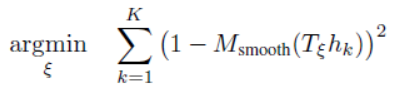
基于ceres的扫描匹配(即非线性优化)的实现在ceres_scan_matcher_.Match函数,代码文件位置:src/cartographer/cartographer/mapping/internal/2d/scan_matching/ceres_scan_matcher_2d.cc、.h
CreateCeresScanMatcherOptions2D的构造函数主要是对配置文件中的参数进行读取,主要还是在CeresScanMatcher2D类中实现。类CeresScanMatcher2D只定义了两个成员变量。 其中,options_ 用于记录扫描匹配器的相关配置,而变量ceres_solver_options_则是优化过程的配置。
CeresScanMatcher2D类的核心就在于Match这个函数的实现,这个函数的目的就是扫描匹配
在给定机器人的初始位姿估计initial_pose_estimate的情况下,尽可能的将扫描的点云数据point_cloud放置到栅格地图grid上, 同时返回优化后的位姿估计pose_estimate和优化迭代信息summary。而参数target_translation主要用于约束位姿估计的xy坐标, 在Local SLAM的业务主线调用该函数的时候传递的是位姿估计器的估计值,Cartographer认为优化后的机器人位置应当与该估计值的偏差不大。
输入参数:
* @param[in] target_translation 预测出来的先验位置, 只有xy * @param[in] initial_pose_estimate (校正后的)先验位姿, 有xy与theta * @param[in] point_cloud 用于匹配的点云 点云的原点位于local坐标系原点 * @param[in] grid 用于匹配的栅格地图- 1
- 2
- 3
- 4
输出参数:
* @param[out] pose_estimate 优化之后的位姿 * @param[out] summary 优化迭代信息- 1
- 2
首先是创建一个double数组,用于存放输入的初始位姿x,y和θ,然后创建一个problem的对象用于描述将要求解的问题。
double ceres_pose_estimate[3] = {initial_pose_estimate.translation().x(), initial_pose_estimate.translation().y(), initial_pose_estimate.rotation().angle()}; ceres::Problem problem;- 1
- 2
- 3
- 4
然后就是描述地图、平移和旋转的残差,在配置文件中为这三类来源定义了权重。
CHECK_GT(options_.occupied_space_weight(), 0.); problem.AddResidualBlock( CreateOccupiedSpaceCostFunction2D( options_.occupied_space_weight() / std::sqrt(static_cast(point_cloud.size())), point_cloud, grid), nullptr /* loss function */, ceres_pose_estimate); CHECK_GT(options_.translation_weight(), 0.); problem.AddResidualBlock( TranslationDeltaCostFunctor2D::CreateAutoDiffCostFunction( options_.translation_weight(), target_translation), // 平移的目标值, 没有使用校准后的平移(这里可能有点问题) nullptr /* loss function */, ceres_pose_estimate); // 平移的初值 // 旋转的残差, 固定了角度不变 CHECK_GT(options_.rotation_weight(), 0.); problem.AddResidualBlock( RotationDeltaCostFunctor2D::CreateAutoDiffCostFunction( options_.rotation_weight(), ceres_pose_estimate[2]), // 角度的目标值 nullptr /* loss function */, ceres_pose_estimate); // 角度的初值 - 1
- 2
- 3
- 4
- 5
- 6
- 7
- 8
- 9
- 10
- 11
- 12
- 13
- 14
- 15
- 16
- 17
- 18
- 19
- 20
- 21
Cartographer为三类不同的残差源分别定义了一个类,并通过其静态函数CreateAutoDiffCostFunction提供使用Ceres原生的自动求导方法的代价函数计算。
通过其中RotationDeltaCostFunctor2D类来看看CreateAutoDiffCostFunction这个函数的实现
CreateAutoDiffCostFunction是类RotationDeltaCostFunctor2D公开的静态成员。有两个参数,其中scaling_factor是角度偏差的权重,可以通过配置文件指定; target_angle则是参考角度, 实际的调用传参是优化之前的角度估计。该函数最终构造和返回的是Ceres的AutoDiffCostFunction对象,从第2行中的模板列表中可以看到类RotationDeltaCostFunctor2D只提供一个残差项,其参与优化的参数有3个。
class RotationDeltaCostFunctor2D { public: // 静态成员函数, 返回CostFunction static ceres::CostFunction* CreateAutoDiffCostFunction( const double scaling_factor, const double target_angle) { return new ceres::AutoDiffCostFunction< RotationDeltaCostFunctor2D, 1 /* residuals */, 3 /* pose variables */>( new RotationDeltaCostFunctor2D(scaling_factor, target_angle)); }- 1
- 2
- 3
- 4
- 5
- 6
- 7
- 8
- 9
templatebool operator()(const T* const pose, T* residual) const { residual[0] = scaling_factor_ * (pose[2] - angle_); return true; } - 1
- 2
- 3
- 4
- 5
左边是类RotationDeltaCostFunctor2D对运算符"()"的重载,在第四行中计算角度偏差量并乘上权重得到残差项的代价。 这里的scaling_factor_和angle_是在类RotationDeltaCostFunctor2D中定义的两个私有成员变量分别记录了权重和参考角度。它们通过构造函数和静态函数CreateAutoDiffCostFunction的传参赋值。
类TranslationDeltaCostFunctor2D和OccupiedSpaceCostFunction2D也是以相同的套路实现的,把构造函数定义成私有的,防止用户直接构造对象。 在静态函数CreateAutoDiffCostFunction中以这两个类型为基础构建AutoDiffCostFunction对象。类TranslationDeltaCostFunctor2D定义了成员变量x_和y_用于记录位移偏差量的参考坐标。 类OccupiedSpaceCostFunction2D则使用成员变量point_cloud_和grid_分别记录待匹配的激光点云数据和栅格地图。
左边是类TranslationDeltaCostFunctor2D对运算符"()"的重载,它有两个残差项的代价需要计算,分别对应着x轴和y轴上的偏差量。在第4,5行中计算位置偏差量并乘上权重(尺度因子)来更新对应残差项的代价。
// 平移量残差的计算, (pose[0] - x_)的平方ceres会自动加上 templatebool operator()(const T* const pose, T* residual) const { residual[0] = scaling_factor_ * (pose[0] - x_); residual[1] = scaling_factor_ * (pose[1] - y_); return true; } - 1
- 2
- 3
- 4
- 5
- 6
- 7
这里计算残差,都是基于使用的传感器预测的位姿很准的情况。
所以在调参的时候,如果传感器不是很好,位姿估计器不准确,可以适当的将地图的权重调的大于平移和旋转的权重。若是调参一直调不好,可以将计算平移和旋转的残差注释掉。
最后看看地图部分的残差
同样也是通过CreateAutoDiffCostFunction函数构建costFunction,他的构造是将地图的权重除以点云的数量,得到一个平均值,然后再进行传入,所以地图的权重就会被分散,当点云的数量越来越多时,地图的权重就会被分散的越来越小。
problem.AddResidualBlock( CreateOccupiedSpaceCostFunction2D( options_.occupied_space_weight() / std::sqrt(static_cast(point_cloud.size())), point_cloud, grid), nullptr /* loss function */, ceres_pose_estimate); - 1
- 2
- 3
- 4
- 5
- 6
下面是类OccupiedSpaceCostFunction2D对运算符"()"的重载。在函数的一开始,先把迭代查询的输入参数pose转换为坐标变换Tε用临时变量transform记录。
templatebool operator()(const T* const pose, T* residual) const { Eigen::Matrix rotation(pose[2]); Eigen::Matrix - 1
- 2
- 3
- 4
- 5
- 6
- 7
然后使用Ceres库原生提供的双三次插值迭代器。
const GridArrayAdapter adapter(grid_); ceres::BiCubicInterpolatorinterpolator(adapter); const MapLimits& limits = grid_.limits(); - 1
- 2
- 3
针对每个hit点计算对应的残差代价。
for (size_t i = 0; i < point_cloud_.size(); ++i) { // Note that this is a 2D point. The third component is a scaling factor. const Eigen::Matrix(kPadding), (limits.max().y() - world[1]) / limits.resolution() - 0.5 + static_cast (kPadding), &residual[i]); // free值越小, 表示占用的概率越大 residual[i] = scaling_factor_ * residual[i]; } - 1
- 2
- 3
- 4
- 5
- 6
- 7
- 8
- 9
- 10
- 11
- 12
- 13
- 14
- 15
- 16
- 17
参考:https://gaoyichao.com/Xiaotu/?book=Cartographer%E6%BA%90%E7%A0%81%E8%A7%A3%E8%AF%BB&title=%E5%9F%BA%E4%BA%8ECeres%E5%BA%93%E7%9A%84%E6%89%AB%E6%8F%8F%E5%8C%B9%E9%85%8D%E5%99%A8
使用ceres优化扫描匹配,除了要求hit点在占用栅格上出现的概率最大化之外, 还通过两个残差项约束了优化后的位姿估计在原始估计的附近。
总结
cartographer中使用了两种扫描匹配方法:CSM(相关性扫描匹配方法(暴力匹配))、ceres优化匹配方法
CSM可以简单地理解为暴力搜索,即每一个激光数据与子图里的每一个位姿进行匹配,直到找到最优位姿,进行三层for循环,不过谷歌采用多分辨率搜索的方式,来降低计算量。基于优化的方法是谷歌的ceres库来实现,原理就是构造误差函数,使其对最小化,其精度高,但是对初始值敏感。
在cartographer的前端local_trajectory_builder_2d中会对传入的点云数据做各种处理,在对点云数据进行体素滤波之后传给ScanMatch进行扫描匹配。
// 扫描匹配, 进行点云与submap的匹配 std::unique_ptr- 1
- 2
- 3
ScanMatch函数中调用real_time_correlative_scan_matcher_.Match函数进行相关性扫描匹配
eres%E5%BA%93%E7%9A%84%E6%89%AB%E6%8F%8F%E5%8C%B9%E9%85%8D%E5%99%A8
使用ceres优化扫描匹配,除了要求hit点在占用栅格上出现的概率最大化之外, 还通过两个残差项约束了优化后的位姿估计在原始估计的附近。
-
相关阅读:
论文阅读(17)---2022 CVPR SC2-PCR二阶相似性测度
通讯协议学习之路:IrDA协议协议理论
网站打不开的九个因素
你还在凭感觉来优化性能?
编译GCC遇到的“pthread.h” not found问题
Flink Yarn Per Job - 启动AM
鸿蒙HarmonyOS实战-ArkTS语言(基本语法)
JUnit 5 单元测试教程
Xshell连接不上创建的虚拟机
云数据库技术行业动态@2022-09-30
- 原文地址:https://blog.csdn.net/weixin_44088154/article/details/133828291
