-
Vue封装组件并发布到npm仓库
1. 环境准备
因为我们此次封装的是Vue组件,所以我们直接在Vue脚手架项目里面进行封装即可。
(1)初始化Vue项目
vue create lin-vue(2)运行项目
npm run serve
2. 组件封装
- 新建src/components文件夹
因为我们可能会封装多个组件,所以在src下面新建一个package文件夹用来存放所有需要上传的组件。

- 编写组件代码
- examples为测试目录,然后我们引用到App.vue组件里面验证一下,可以验证组件
2.3 使用Vue插件模式
这一步是封装组件中的重点,用到了Vue提供的一个公开方法:install。这个方法会在你使用
Vue.use(plugin)时被调用,这样使得我们的插件注册到了全局,在子组件的任何地方都可以使用。在src目录下新建index.js文件,代码如下:
- import LButton from "./components/button/index.vue";
- import LInput from "./components/input";
- const components = [LButton, LInput];
- const install = function (Vue) {
- if (install.installed) return;
- components.forEach((component) => Vue.component(component.name, component));
- };
- // 判断是否是直接引入文件,如果是,就不用调用 Vue.use()
- if (typeof window !== "undefined" && window.Vue) {
- install(window.Vue);
- }
- const API = {
- version: process.env.VERSION, // eslint-disable-line no-undef
- install,
- ...components,
- };
- export default API; // eslint-disable-line no-undef
3. 组件打包
到这里为止,我们的组件封建基本就完成了,当然组件封装成什么样得看自己得业务需求了,接下来我们就需要将组件进行打包了。
修改我们项目得package.json文件,配置打包命令:
"lib": "vue-cli-service build --target lib src/index.js --name lview --dest lib"
打包命令解释:
- --target lib 关键字 指定打包的目录
- --name 打包后的文件名字
- --dest 打包后的文件夹的名称
其它参数说明:
- name:引入时的使用的组件名称
- version:每次发布新版本时,必须更改版本号,不然推送会失败
- main:组件的入口
- publishConfig:私库地址
然后执行打包命令:
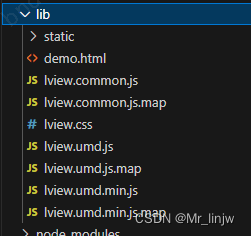
npm run lib打包执行完成后我们项目目录下就会多出一个lib文件夹,存放的是打包后的文件。
4.2 发布到npm仓库
(1)注册账号
想要发布到npm仓库,就必须要有一个账号,先去npm官网注册一个账号,注意记住用户名、密码和邮箱,发布的时候可能会用到,创建对应的公有组织(私有的要收费)
(2)设置npm源
有些小伙伴可能本地的npm镜像源采用的是淘宝镜像源或者其它的,如果想要发布npm包,我们得吧我们得npm源切换为官方得源,命令如下:
npm config set registry=https://registry.npmjs.org(3)登录npm
进入根目录目录,执行命令,运行登录命令之后输入
NPM 账号、密码、邮件- npm login
- Username: lin
- Password:
- Email: (this IS public) xxxxx@163.com
- Logged in as lin on https://registry.npmjs.org/.
这里会让你填写用户名等等,如果之前设置过即可跳过此步。
(4)发布npm
在pig-ui目录下执行命令:
- npm publish
- //发布失败的话请使用一下命令
- npm publish --access=public
4.3 发布到nexus私有仓库
搭建nexus仓库,设置好账号
- npm config set registry https://nexus.uddun.com/repository/group-npm/
- npm login -registry=https://nexus.uddun.com/repository/local-npm/
- -- Username: lin
- -- Password: ***
- -- email :xxx@163.com
- package.json --> version +0.0.1 // 修改版本号
- npm run lib // 打包组件
- npm publish // 发布组件
5. 从npm安装使用
如果是私库的话,需要配置私库地址,在根目录添加.npmrc文件,内容如下:
- registry=https://nexus.uddun.com/repository/group-npm/
- @lin-ui:registry=https://nexus.uddun.com/repository/group-npm/
然后在main.js引用注册,代码如下:
直接执行安装命令:
npm install @lin-ui/lview- import Lview from "@lin-ui/lview";
- import "@lin-ui/lview/lib/lview.css";
- Vue.use(Lview );
这里单独引用了css,就和element-ui一样需要单独引入样式文件。
-
相关阅读:
面试官考我useContext,我是这样回答的
基础IO —— Linux
服务网关Gateway_微服务中的应用
Docker常用命令
智慧灾备解决方案-最新全套文件
mysql in 禁止排序 按照in内容排序
----JAVA 继承----
Jconsole 开启远程连接遇到的一些坑
【微软技术栈】C#.NET 内存映射文件
C/C++:VSCode配置C++开发环境【Windows系统】
- 原文地址:https://blog.csdn.net/Mr_linjw/article/details/133826989
