-
Cesium从零开始开发
持续更新中
目录
1、下载安装部署
0.环境准备Node
1.下载安装
https://github.com/CesiumGS/cesium/releases/download/1.110/Cesium-1.110.zip- cd Cesium-1.110
- npm i
- node server.js
打开http://localhost:8080/Apps/HelloWorld.html

修改HelloWord.html 初始定位到中国,并设置token,token可以免费注册申请。
- <div id="cesiumContainer">div>
- <script>
- Cesium.Camera.DEFAULT_VIEW_RECTANGLE = Cesium.Rectangle.fromDegrees(
- 75.0, // 西经
- 0.0, // 南纬
- 140.0, // 东经
- 60.0 // 北纬
- );
- Cesium.Ion.defaultAccessToken="eyJhbGciOiJ..........."
- const viewer = new Cesium.Viewer("cesiumContainer");
- script>
2、隐藏主页控件
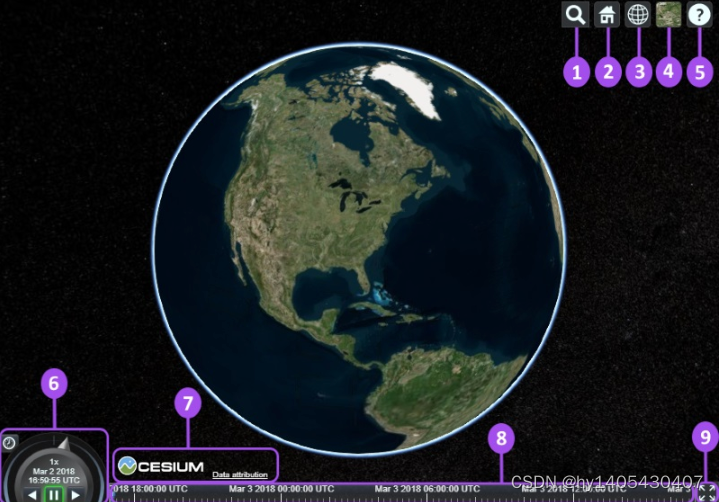
- Geocoder : A location search tool that flies the camera to queried location. Uses Bing Maps data by default.
- HomeButton : Flies the viewer back to a default view.
- SceneModePicker : Switches between 3D, 2D and Columbus View (CV) modes.
- BaseLayerPicker : Chooses the imagery and terrain to display on the globe.
- NavigationHelpButton : Displays the default camera controls.
- Animation : Controls the play speed for view animation.
- CreditsDisplay : Displays data attributions. Almost always required!
- Timeline : Indicates current time and allows users to jump to a specific time using the scrubber.
- FullscreenButton : Makes the Viewer fullscreen.
翻译
- Geocoder : 一种地理位置搜索工具,用于显示相机访问的地理位置。默认使用微软的Bing地图。
- HomeButton : 首页位置,点击之后将视图跳转到默认视角。
- SceneModePicker : 切换2D、3D 和 Columbus View (CV) 模式。
- BaseLayerPicker : 选择三维数字地球的底图(imagery and terrain)。
- NavigationHelpButton : 帮助提示,如何操作数字地球。
- Animation :控制视窗动画的播放速度。
- CreditsDisplay : 展示商标版权和数据源。
- Timeline : 展示当前时间和允许用户在进度条上拖动到任何一个指定的时间。
- FullscreenButton : 视察全屏按钮。
- var viewer = new Cesium.Viewer('cesiumContainer',{
- geocoder:false,
- homeButton:false,
- sceneModePicker:false,
- baseLayerPicker:false,
- navigationHelpButton:false,
- animation:false,
- timeline:false,
- fullscreenButton:false,
- vrButton:false
- });
- viewer._cesiumWidget._creditContainer.style.display="none"; //版权控件的显示隐藏
3、GeoJson数据加载和转换
以中国地图为例,首先需要获取json数据
- viewer.dataSources.add(Cesium.GeoJsonDataSource.load('./data/100000.json', {
- stroke: Cesium.Color.Red,
- fill: Cesium.Color.YELLOW.withAlpha(0),
- strokeWidth: 3,
- markerSymbol: '?',
- }));
如果使用shp格式,可能需要转换
或者安装npm install mapshaper
mapshaper ./*.shp -proj wgs84 -o myfile.geojson precision=0.0000001 -simplify 10%
4、常用方法
4.1获取经纬度
- // 点击图像时,consoloe输出经纬度
- let handler = new Cesium.ScreenSpaceEventHandler(viewer.scene.canvas);
- handler.setInputAction(function (event) {
- let cartesian = viewer.camera.pickEllipsoid(event.position);
- let cartographic = Cesium.Cartographic.fromCartesian(cartesian);
- let lng = Cesium.Math.toDegrees(cartographic.longitude); // 经度
- let lat = Cesium.Math.toDegrees(cartographic.latitude); // 纬度
- let alt = cartographic.height; // 高度,椭球面height永远等于0
- let coordinate = {
- longitude: Number(lng.toFixed(6)),
- latitude: Number(lat.toFixed(6)),
- altitude: Number(alt.toFixed(2))
- };
- console.log(coordinate);
- }, Cesium.ScreenSpaceEventType.LEFT_CLICK);
9999、参考资料
Cesium:入门教程(一)之 Hello World_cesium教程-CSDN博客
https://www.cnblogs.com/onsummer/p/14957839.html
entity API:Cesium三维地球上添加点、线、面、文字、图标(图片)、模型等标绘_cesium绘制贴地点图标-CSDN博客
-
相关阅读:
数据处理过程中的解决办法
深入了解Elasticsearch的CRUD:ES Java API之增删改查
基于Java实现的图片搜索系统
泛微E9开发 查询页面添加按钮,完成特定功能
【测试人生】浅谈游戏策划配置表检查的技术设计
leetcode - 823. Binary Trees With Factors
kubernetes-helm
kibana监控
GBase 8d的技术指标
【Linux】介绍 Docker 的基本概念和优势,以及在应用程序开发中的实际应用
- 原文地址:https://blog.csdn.net/hy1405430407/article/details/133811313