-
nginx的重定向
nginx重定向--rewrite重写功能介绍
rewrite 的功能介绍
rewrite功能就是,使用nginx提供的全局变量或自己设置的变量,结合正则表达式和标记位实现URL重写以及重定向。
比如:更换域名后需要保持旧的域名能跳转到新的域名上、某网页发生改变需要跳转到新的页面、网站防盗链等等需求。rewrite只能放在server{},location{},if{}中,并且默认只能对域名后边的除去传递的参数外的字符串起作用,
例如 http://www.yang.com/abc/bbs/index.php?a=1&b=2 只对/abc/bbs/index.php重写。
rewrite执行顺序
1.先执行server块的rewrite
2.执行location里面定义的rewrite
3.选定location中的rewrite
- 语法格式:rewrite
[flag] 正则表达式 :跳转内容或者路径 - [flag]:标志位 “标记”
- flag:表示支持rewrite的flag标记
- last:本条规则匹配完成后,继续向下匹配新的location URI规则
- rewrite zzr zzz last;
###flag标记说明###
last :本条规则匹配完成后,不终止重写后的url匹配,一般用在 server 和 if 中。
break :本条规则匹配完成即终止,终止重写后的url匹配,一般使用在 location 中。
redirect :返回302临时重定向,浏览器地址会显示跳转后的URL地址。
permanent :返回301永久重定向,浏览器地址栏会显示跳转后的URL地址。
rewrite使用案例-------1.基于域名的跳转
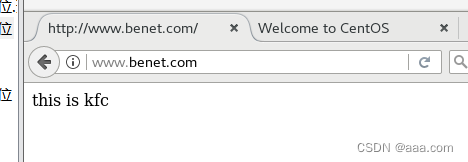
需求:www.kfc.com 公司业务变更,全部迁移到新的域名 www.benet.com代替,但是旧域名不能被废除,访问kfc可以跳转到benet,且匹配的uri不变。
- vim /nginx.conf
- server {
- listen 80;
- server_name www.kfc.com;
- charset utf-8;
- location / {
- if ($host = 'www.kfc.com') {
- #$host为rewrite全局变量,代表请求主机头字段或主机名
- rewrtie ^/(.*)$ http://www.benet.com/$1 permanent;
- "/" 后面所有的内容转换为 http://www.benet.com/$1 permanent;
- }
- root html;
- index index.html inde.htm
- }
访问域名一定要地址解析!!!!!!!!
echo '20.0.0.10 www.kfc.com www.bentet.com' >> /etc/hosts给页面编写内容


此时访问 www.kfc.com 会自动跳转到 www.benet.com
rewrite使用案例-------2.基于ip的跳转
公司业务新版本上线,用户访问网站同意显示在维护中,只有一个IP可以访问测试
- vim /nginx.conf
- server {
- listen 80;
- server_name www.kfc.com;
- #域名修改
- charset utf-8;
- #页面内容支持中文
- set $rewrite true;
- #设置标记是否合法
- if ( $remote_addr = "20.0.0.10") {
- #定义客户端的访问地址
- set $rewrite false;
- #如果是20.0.0.10,则不重写(rewrite)
- }
- if ( $rewrite = true ) {
- rewrite (.+) /error.html redirect
- #如果不是20.0.0.10,则重写
- #除了 20.0.0.10,其余都跳转error界面
- }
- location / {
- if ($host = 'www.kfc.com') {
- rewrite ^/(.*)$ http://www.benet.com/$1 permanent;
- }
- root html;
- index index.html index.htm;
- }
进入error.html 编写内容


此时我们用另一台(20.0.0.20来访问)虚拟机测试

error,无法连接
rewrite使用案例-------3. 基于目录下的PHP访问,通过PHP跳转新页面
- vim nginx.conf
- server {
- listen 80;
- server_name www.kfc.com;
- charset utf-8;
- location ~* /upload/.*\.php$ {
- 锁定 /upload以后的所有内容
- rewrite (.+) http://www.test.com permanent;
- 重写位 test.com
- }
- location / {
- root html;
- index index.html index.htm;
- }
- }
访问域名,一定要做域名解析!!!!

配置页面内容
访问内容正确
-
相关阅读:
windows编译zlmediakit
1、VIVADO软件bit文件和bin文件烧写方法
【UE5】显示或隐藏物体轮廓线
pyqt5移动鼠标时显示鼠标坐标
Python异步框架大战:FastAPI、Sanic、Tornado VS Go 的 Gin
【LeetCode】640. 求解方程
JavaWeb 学习笔记 6:会话跟踪
Jmeter系列-控制器Controllers的介绍(8)
【iOS-界面传值方式的比较】
压缩冗余信息
- 原文地址:https://blog.csdn.net/qq_51506982/article/details/133810958
