-
14. SpringBoot项目之数据保存到数据库
SpringBoot项目之数据保存到数据库
1. 创建数据库&表
本栏目前面文章中已经讲过MySql连接SqlYog以及创建数据库&表 —>传送门
2. 导入ORM依赖&配置
在pom.xml中导入
要更新maven环境<dependency> <groupId>org.mybatis.spring.boot</groupId> <artifactId>mybatis-spring-boot-starter</artifactId> <version>2.2.2</version> </dependency> <dependency> <groupId>mysql</groupId> <artifactId>mysql-connector-java</artifactId> <version>8.0.33</version> </dependency>- 1
- 2
- 3
- 4
- 5
- 6
- 7
- 8
- 9
- 10
- 11

在application.properties中加入# 应用服务 WEB 访问端口 8080 server.port=8080 # 配置数据库连接信息 spring.datasource.driver-class-name=com.mysql.cj.jdbc.Driver spring.datasource.url=jdbc:mysql://localhost:3380/db_stock_test?serverTimezone=UTC spring.datasource.username=root //mysql 安装时的用户名 spring.datasource.password=1234 //mysql 安装时的密码- 1
- 2
- 3
- 4
- 5
- 6
- 7
- 8
3. 创建Mapper与扫描

在stock下创建javabean软件包,在javabean软件包下创建StockBasicInfo类输入import lombok.Data; @Data public class StockBasicInfo { private Integer id; private String tushareCode; private String stockCode; private String stockName; private String locate; private String industry; private String market; private String list_date; }- 1
- 2
- 3
- 4
- 5
- 6
- 7
- 8
- 9
- 10
- 11
- 12
- 13
在stock下创建mapper软件包,在mapper软件包下创建StockMapper接口输入
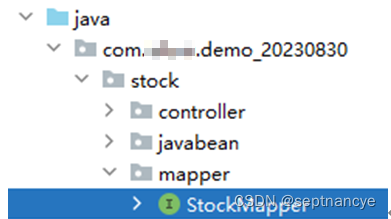
import org.apache.ibatis.annotations.Param; import org.springframework.stereotype.Repository; @Repository public interface StockMapper { //将股票信息保存到数据库 int saveStockBasicInfo(@Param("info") StockBasicInfo stockBasicInfo); }- 1
- 2
- 3
- 4
- 5
- 6
- 7
- 8
复制文件所在路径

Application程序配置,让Mapper可以被SpringBoot扫描到,进行管理import org.mybatis.spring.annotation.MapperScan; import org.springframework.boot.SpringApplication; import org.springframework.boot.autoconfigure.SpringBootApplication; import org.springframework.context.annotation.Bean; import org.springframework.web.client.RestTemplate; import springfox.documentation.swagger2.annotations.EnableSwagger2; @SpringBootApplication @EnableSwagger2 @MapperScan("com.demo_20230830.stock.mapper") public class Demo20230830Application { public static void main(String[] args) { SpringApplication.run(Demo20230830Application.class, args); } /** * 向spring注册RestTemplate工具 * @return */ @Bean public RestTemplate getRestTemplate(){ return new RestTemplate(); } }- 1
- 2
- 3
- 4
- 5
- 6
- 7
- 8
- 9
- 10
- 11
- 12
- 13
- 14
- 15
- 16
- 17
- 18
- 19
- 20
- 21
- 22
- 23
- 24
- 25
- 26
- 27
在service中测试它:
@Service public class StockService { @Autowired private StockMapper stockMapper; /** * 处理股票基本信息的json字符串 * @param json */ public void stockBasicJsonInfoHandler(String json){ //5、JSON转换 JSONObject jsonObject = JSONObject.parseObject(json); //获取请求id(测试用) String requestId = jsonObject.getString("request_id"); //获取本次的所有数据 JSONObject data = jsonObject.getJSONObject("data"); //获取表头(数组) JSONArray fields = data.getJSONArray("fields"); //fields.fori for (int i = 0; i < fields.size(); i++) { System.out.print(fields.get(i)+"\t\t"); } System.out.println(); //获取表格内部数据 JSONArray items = data.getJSONArray("items"); for (int i = 0; i < items.size(); i++) { JSONArray jsonArray = items.getJSONArray(i); //展示这一行的数据 for (int j = 0; j < jsonArray.size(); j++) { System.out.print(jsonArray.get(j)+"\t\t"); } System.out.println(); } System.out.println(stockMapper); } /** * 从CSV文件中读取股票信息 */ public void stockBasicInfoCSVHandler() { File file; try { file = ResourceUtils.getFile("classpath:csvdata/stock_basic.csv"); } catch (FileNotFoundException e) { throw new RuntimeException(e); } try ( FileReader reader = new FileReader(file); ) { CSVReader csvReader = new CSVReader(reader); List<String[]> list = csvReader.readAll(); for (String[] arr : list) { //展示某一行的数据 for (String s : arr) { System.out.print(s + "\t\t"); } System.out.println(); } } catch (FileNotFoundException e) { throw new RuntimeException(e); } catch (IOException e) { throw new RuntimeException(e); } catch (CsvException e) { throw new RuntimeException(e); } } }- 1
- 2
- 3
- 4
- 5
- 6
- 7
- 8
- 9
- 10
- 11
- 12
- 13
- 14
- 15
- 16
- 17
- 18
- 19
- 20
- 21
- 22
- 23
- 24
- 25
- 26
- 27
- 28
- 29
- 30
- 31
- 32
- 33
- 34
- 35
- 36
- 37
- 38
- 39
- 40
- 41
- 42
- 43
- 44
- 45
- 46
- 47
- 48
- 49
- 50
- 51
- 52
- 53
- 54
- 55
- 56
- 57
- 58
- 59
- 60
- 61
- 62
- 63
- 64
- 65
- 66
- 67
4. xml方式开发&配置

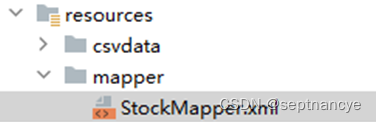

在StockMapper.xml中导入
- 1
- 2
- 3
- 4
- 5
- 6
- 7

application.properties中加入配置mapper.xml的路径# 应用服务 WEB 访问端口 server.port=8080 # 配置数据库连接信息 spring.datasource.driver-class-name=com.mysql.cj.jdbc.Driver spring.datasource.url=jdbc:mysql://localhost:3380/db_stock_test?serverTimezone=UTC spring.datasource.username=root spring.datasource.password=1234 #配置mapper.xml的路径 mybatis.mapper-locations=classpath:mapper/*.xml- 1
- 2
- 3
- 4
- 5
- 6
- 7
- 8
- 9
- 10
- 11
- 12
5. 保存数据到数据库
抓取实时数据保存数据库
MyController2控制器:
/** * 将股票基本信息从tushare平台获取,并保存数据库 */ @RequestMapping("/r8") public void r8(){ //1、封装map参数 HashMap<String, String> map = new HashMap<>(); map.put("api_name","stock_basic"); map.put("token","你自己的token"); //2、设置请求头信息 HttpHeaders httpHeaders = new HttpHeaders(); httpHeaders.setContentType(MediaType.APPLICATION_JSON); //3、封装头实体内容 HttpEntity<Map> entity = new HttpEntity<>(map, httpHeaders); //4、传递信息 String json = restTemplate.postForObject("http://api.tushare.pro", entity, String.class); //5、调用业务层,处理并展示json数据 stockService.saveStockBasicInfo(json); }- 1
- 2
- 3
- 4
- 5
- 6
- 7
- 8
- 9
- 10
- 11
- 12
- 13
- 14
- 15
- 16
- 17
- 18
- 19
- 20
StockService:
/** * 保存股票基本信息 * @param json */ public void saveStockBasicInfo(String json){ //5、JSON转换 JSONObject jsonObject = JSONObject.parseObject(json); //获取请求id(测试用) String requestId = jsonObject.getString("request_id"); //获取本次的所有数据 JSONObject data = jsonObject.getJSONObject("data"); //获取表格内部数据 JSONArray items = data.getJSONArray("items"); for (int i = 0; i < items.size(); i++) { JSONArray jsonArray = items.getJSONArray(i); StockBasicInfo stockBasicInfo = new StockBasicInfo(); stockBasicInfo.setTushareCode(jsonArray.getString(0)); stockBasicInfo.setStockCode(jsonArray.getString(1)); stockBasicInfo.setStockName(jsonArray.getString(2)); stockBasicInfo.setLocate(jsonArray.getString(3)); stockBasicInfo.setIndustry(jsonArray.getString(4)); stockBasicInfo.setMarket(jsonArray.getString(5)); stockBasicInfo.setList_date(jsonArray.getString(6)); int rows = stockMapper.saveStockBasicInfo(stockBasicInfo); System.out.println("保存成功了"+rows+"条,保存成功的数据是:"+stockBasicInfo); } }- 1
- 2
- 3
- 4
- 5
- 6
- 7
- 8
- 9
- 10
- 11
- 12
- 13
- 14
- 15
- 16
- 17
- 18
- 19
- 20
- 21
- 22
- 23
- 24
- 25
- 26
- 27
- 28
StockMapper.xml
<?xml version="1.0" encoding="UTF-8" ?> <!DOCTYPE mapper PUBLIC "-//mybatis.org//DTD Mapper 3.0//EN" "http://mybatis.org/dtd/mybatis-3-mapper.dtd"> <mapper namespace="com.demo_20230830.stock.mapper.StockMapper"> <insert id="saveStockBasicInfo"> insert into tb_stock_basic_info ( tushareCode, stockCode, stockName, locate, industry, market, list_date ) values( #{info.tushareCode}, #{info.stockCode}, #{info.stockName}, #{info.locate}, #{info.industry}, #{info.market}, #{info.list_date} ) <selectKey resultType="java.lang.Integer" keyProperty="info.id" order="AFTER"> select LAST_INSERT_ID() </selectKey> </insert> </mapper>- 1
- 2
- 3
- 4
- 5
- 6
- 7
- 8
- 9
- 10
- 11
- 12
- 13
- 14
- 15
- 16
- 17
- 18
- 19
- 20
- 21
- 22
- 23
- 24
- 25
- 26
- 27
- 28
- 29
小结: 1、数据库与数据表名字的同步 2、字段值同步- 1
- 2
- 3

3、令牌有效性问题 120积分的令牌,有效性一小时才能执行一次stock_basic 接口。 如果一小时执行了一次了,要么再等一个小时,要么使用积分更高的令牌。- 1
- 2
- 3
解析CSV历史数据保存数据库
1.准备好CSV文件
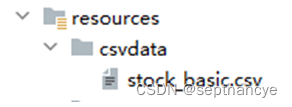
2. 编写controller/** * openCSV */ @RequestMapping("/r9") public void r9() { stockService.saveStockBasicInfoFromCSV(); }- 1
- 2
- 3
- 4
- 5
- 6
- 7
- 8
- 编写Service
/** * 通过CSV文件,将数据存入数据库 */ public void saveStockBasicInfoFromCSV() { File file; try { file = ResourceUtils.getFile("classpath:csvdata/stock_basic.csv"); } catch (FileNotFoundException e) { throw new RuntimeException(e); } try ( FileReader reader = new FileReader(file); ) { CSVReader csvReader = new CSVReader(reader); List<String[]> list = csvReader.readAll(); for (int i = 1; i < list.size(); i++) { String[] arr = list.get(i); StockBasicInfo stockBasicInfo = new StockBasicInfo(); stockBasicInfo.setTushareCode(arr[0]); stockBasicInfo.setStockCode(arr[1]); stockBasicInfo.setStockName(arr[2]); stockBasicInfo.setLocate(arr[3]); stockBasicInfo.setIndustry(arr[4]); stockBasicInfo.setMarket(arr[5]); stockBasicInfo.setList_date(arr[6]); int rows = stockMapper.saveStockBasicInfo(stockBasicInfo); System.out.println("保存成功了"+rows+"条,保存成功的数据是:"+stockBasicInfo); } } catch (FileNotFoundException e) { throw new RuntimeException(e); } catch (IOException e) { throw new RuntimeException(e); } catch (CsvException e) { throw new RuntimeException(e); } }- 1
- 2
- 3
- 4
- 5
- 6
- 7
- 8
- 9
- 10
- 11
- 12
- 13
- 14
- 15
- 16
- 17
- 18
- 19
- 20
- 21
- 22
- 23
- 24
- 25
- 26
- 27
- 28
- 29
- 30
- 31
- 32
- 33
- 34
- 35
- 36
- 37
4.Mapper上的一个案例完成了
-
相关阅读:
SE语法总结博文(附思维导图)
CSP-J第二轮试题-2022年-3题
redux-获取导航标题案例(+react-intl 国际化)
windows 部署多个tomcat详细步骤
双文对比,在线纯文本文档差异比较 API 接口
序列查询 CSP202112-1
虚幻引擎:UEC++如何对JSON文件进行读写?
Javascript中生成器函数和Generator对象的介绍与使用
MySQL精简复习
腾讯云短信告警
- 原文地址:https://blog.csdn.net/m0_58503202/article/details/133808239
