-
uni-app : 生成三位随机数、自定义全局变量、自定义全局函数、传参、多参数返回值
核心代码
- function generateRandomNumber() {
- const min = 100;
- const max = 999;
- // 生成 min 到 max 之间的随机整数
- // Math.random() 函数返回一个大于等于 0 且小于 1 的随机浮点数。通过将其乘以 (max - min + 1),我们得到一个大于等于 0 且小于等于 (max - min + 1) 的随机浮点数。
- // 接着,我们将结果舍去小数部分,即使用 Math.floor() 方法对结果进行向下取整。
- // 最后,我们加上 min,这样就将取整后的结果偏移为在 min 到 max 之间的随机整数。
- const randomNumber = Math.floor(Math.random() * (max - min + 1) + min);
- return randomNumber;
- }
这里我采用全局函数进行书写
自定义全局方法介绍
目录

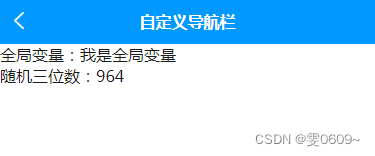
效果
全局文件代码(common.js)
- //定义全局变量
- const info = '我是全局变量'
- //定义全局函数
- //生成随机三位数
- function generateRandomNumber() {
- const min = 100;
- const max = 999;
- const randomNumber = Math.floor(Math.random() * (max - min + 1) + min);
- return randomNumber;
- }
- //导出
- module.exports = {
- generateRandomNumber,
- info
- }
主页面代码(index.vue)
- <template>
- <view>
- <view>{{info}}view>
- <view>{{random}}view>
- view>
- template>
- <script>
- import common from "../../utils/common.js"
- export default {
- data() {
- return {
- info:common.info,
- random:common.generateRandomNumber()
- }
- },
- methods: {
- }
- };
- script>
- <style>
- style>
1、引入文件
import common from "../../utils/common.js"
2、调用自定义全局变量
common.info
3、调用自定义全局函数
common.generateRandomNumber()
扩展 - 参数传递,返回值为多个数据
效果
主页面同上
打印结果

全局文件代码(common.js)
- //定义全局变量
- const info = '我是全局变量'
- //定义全局函数
- //生成随机三位数
- function generateRandomNumber() {
- const min = 100;
- const max = 999;
- const randomNumber = Math.floor(Math.random() * (max - min + 1) + min);
- return randomNumber;
- }
- //参数传递
- function parameters(a,b,c){
- return {
- a,b,c
- };
- }
- //导出
- module.exports = {
- generateRandomNumber,
- info,
- parameters
- }
return:返回多个参数
扩展
1、返回一个对象:
- function myFunction() {
- const result1 = 'hello';
- const result2 = 'world';
- const result3 = 123;
- return {
- value1: result1,
- value2: result2,
- value3: result3
- };
- }
- // 调用函数并获取返回值
- const { value1, value2, value3 } = myFunction();
- console.log(value1, value2, value3);
2、返回一个数组
- function myFunction() {
- const result1 = 'hello';
- const result2 = 'world';
- const result3 = 123;
- return [result1, result2, result3];
- }
- // 调用函数并获取返回值
- const [value1, value2, value3] = myFunction();
- console.log(value1, value2, value3);
主页面代码(index.vue)
- <template>
- <view>
- <view>全局变量:{{info}}view>
- <view>随机三位数:{{random}}view>
- view>
- template>
- <script>
- import common from "../../utils/common.js"
- export default {
- data() {
- return {
- info:common.info,
- random:common.generateRandomNumber()
- }
- },
- methods: {
- },
- onLoad() {
- //调用全局函数传参
- //这里传递的实参,分别对应形参中的a,b,c
- var parameters1 = 1;
- var parameters2 = 2;
- var parameters3 = 3;
- console.log(common.parameters(parameters1,parameters2,parameters3))
- }
- };
- script>
- <style>
- style>
引用方法时传递参数:common.parameters(parameters1,parameters2,parameters3)
-
相关阅读:
必看!2023年最新MSP开源应用程序指南电子书大揭秘
八、Nacos配置管理(统一配置管理、配置热更新、配置共享)
Security ❀ 安全设备学习规范(第二版)
【Head First 设计模式】-- 策略模式
基于SpringBoot的健身房管理系统
Linux ps -ef|grep去除 grep --color=auto信息
MySQL:查询时进行时间比较
phpstudy安装imagick扩展
HTML5基础:框架,文字,图片,表格,列表
矢量绘图软件源码定制开发,类似visio绘图,大量复合图元模板,可编程动态控制图元
- 原文地址:https://blog.csdn.net/weixin_46001736/article/details/133784342