-
Redis - php通过ssh方式连接到redis服务器
1.应用场景
主要用于使用php通过ssh方式连接到redis服务器,进行一些操作. 2.学习/操作
1.文档阅读
chatgpt
& 其他资料
2.整理输出
2.1 是什么
TBD
2.2 为什么需要「应用场景」
TBD
2.3 什么时候出现「历史发展」
TBD
2.4 怎么实践
TBD
php 通过ssh方式连接到redis服务器
要通过 SSH 方式连接到 Redis 服务器,可以使用 PHP 的
ssh2扩展和 Redis 扩展。首先,需要安装
ssh2扩展和 Redis 扩展。可以使用以下命令安装:- sudo apt-get install libssh2-1-dev
- sudo pecl install ssh2 redis
安装完成后,在 PHP 中加载这两个扩展:
- extension=ssh2.so
- extension=redis.so
然后,可以使用以下 PHP 代码连接到 Redis 服务器:
- // SSH 连接参数
- $ssh_host = 'ssh_host';
- $ssh_port = 22;
- $ssh_user = 'ssh_user';
- $ssh_pass = 'ssh_pass';
- // Redis 连接参数
- $redis_host = '127.0.0.1';
- $redis_port = 6379;
- $redis_auth = 'redis_auth';
- // SSH 连接
- $ssh = ssh2_connect($ssh_host, $ssh_port);
- ssh2_auth_password($ssh, $ssh_user, $ssh_pass);
- // Redis 连接
- $redis_sock = ssh2_tunnel($ssh, $redis_host, $redis_port);
- $redis = new Redis();
- $redis->connect('127.0.0.1', $redis_port);
- $redis->auth($redis_auth);
- // 使用 Redis
- $redis->set('foo', 'bar');
- echo $redis->get('foo');
- // 关闭 Redis 连接
- $redis->close();
- // 关闭 SSH 连接
- ssh2_exec($ssh, 'echo "done"');
- ssh2_exec($ssh, 'exit');
- ?>
以上代码中,首先通过 SSH 连接到 Redis 服务器,然后使用 Redis 扩展连接到 Redis 服务器。可以像使用本地 Redis 一样使用
$redis对象来进行 Redis 操作。需要注意的是,SSH 连接和 Redis 连接都需要进行关闭,可以使用
ssh2_exec()和$redis->close()方法来关闭连接。php 通过ssh 证书方式连接到redis服务器
要通过 SSH 证书方式连接到 Redis 服务器,可以使用 PHP 的
ssh2扩展和 Redis 扩展。首先,需要使用
ssh-keygen命令生成 SSH 密钥对。可以使用以下命令生成密钥对:ssh-keygen -t rsa -b 2048 -f mykey其中,
-t参数指定密钥类型为 RSA,-b参数指定密钥长度为 2048 位,-f参数指定密钥文件名为mykey。生成密钥对后,需要将公钥添加到 Redis 服务器的
authorized_keys文件中,以允许通过 SSH 证书方式连接。可以使用以下命令将公钥添加到authorized_keys文件中:cat mykey.pub | ssh user@server "mkdir -p ~/.ssh && cat >> ~/.ssh/authorized_keys"其中,
mykey.pub是公钥的文件名,user@server是 Redis 服务器的用户名和 IP 地址。然后,在 PHP 中使用以下代码连接到 Redis 服务器:
- // SSH 连接参数
- $ssh_host = 'ssh_host';
- $ssh_port = 22;
- $ssh_user = 'ssh_user';
- $ssh_key = 'mykey';
- // Redis 连接参数
- $redis_host = '127.0.0.1';
- $redis_port = 6379;
- $redis_auth = 'redis_auth';
- // SSH 连接
- $key = new \ssh2\RSA();
- $key->load(file_get_contents($ssh_key));
- $ssh = ssh2_connect($ssh_host, $ssh_port);
- ssh2_auth_pubkey_file($ssh, $ssh_user, $ssh_key . '.pub', $key);
- // Redis 连接
- $redis_sock = ssh2_tunnel($ssh, $redis_host, $redis_port);
- $redis = new Redis();
- $redis->connect('127.0.0.1', $redis_port);
- $redis->auth($redis_auth);
- // 使用 Redis
- $redis->set('foo', 'bar');
- echo $redis->get('foo');
- // 关闭 Redis 连接
- $redis->close();
- // 关闭 SSH 连接
- ssh2_exec($ssh, 'echo "done"');
- ssh2_exec($ssh, 'exit');
- ?>
以上代码中,首先加载私钥文件,并通过 SSH 连接到 Redis 服务器。然后使用 Redis 扩展连接到 Redis 服务器。可以像使用本地 Redis 一样使用
$redis对象来进行 Redis 操作。需要注意的是,SSH 连接和 Redis 连接都需要进行关闭,可以使用
ssh2_exec()和$redis->close()方法来关闭连接。后续补充
...
3.问题/补充
1. 通过ssh方式连接到redis服务器
ssh隧道, 秘钥认证方式
服务器自身上的redis server
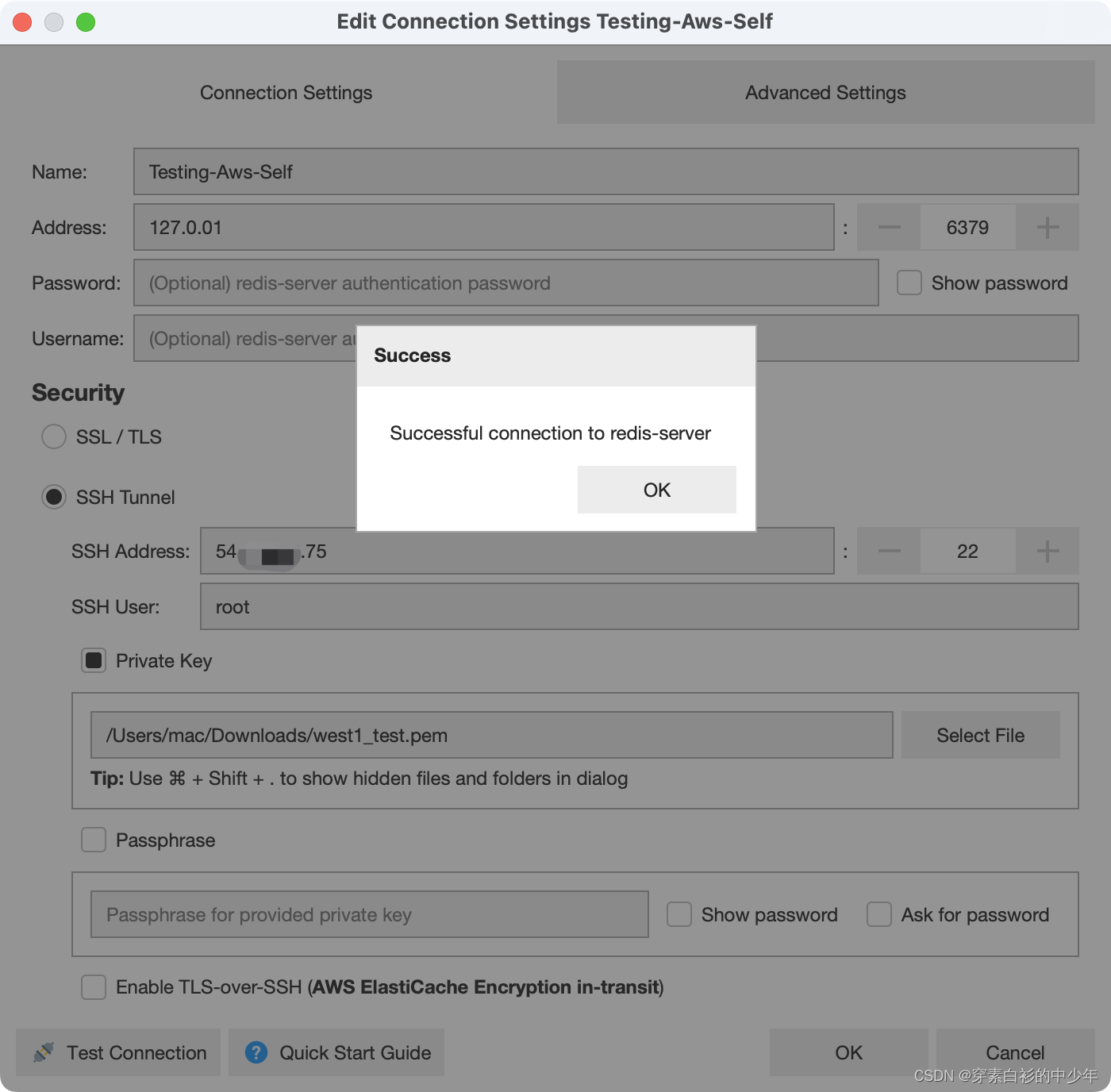
另外独立的服务器的redis server

ssh隧道 用户名密码方式
(这里连接到另外一台局域网内的服务器)

后续补充...
-
相关阅读:
CSDN21天学习挑战赛——封装(06)
判断文件是否为DICOM文件
【Java基础】什么是Java的注释?—21天学习计划打卡第一天
18.10 组复制常见问题
Linux用户和权限之一
Git 子模块
二叉树两个节点的最近公共祖先问题
【黑猩猩算法】基于加权反对技术和贪婪搜索进化黑猩猩优化算法求解多模态工程问题附matlab代码
D3JS简介
机器学习简述
- 原文地址:https://blog.csdn.net/william_n/article/details/130017834