-
【Vuex+ElementUI】Vuex中取值存值以及异步加载的使用
【Vuex+ElementUI】Vuex中取值存值以及异步加载的使用
一级目录
1.vuex的简介:
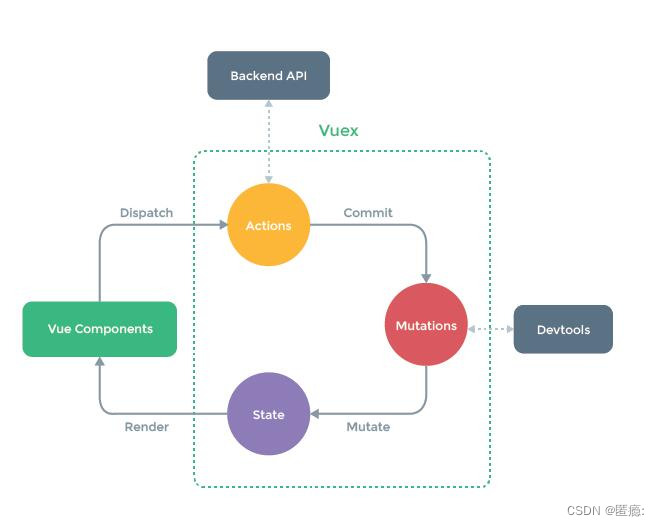
Vuex是一个专为Vue.js应用程序开发的状态管理模式。它可以解决多个组件之间共享状态的问题。在Vue.js中,组件之间的通信是通过props和事件来实现的,但是当应用变得复杂时,这种方式可能变得繁琐且不易维护。Vuex提供了一种集中式存储管理应用程序的方法。
Vuex的核心概念包括:
State(状态):应用程序的数据源,存储在一个单一的对象中。可以通过this.$store.state来访问。
Mutations(突变):用于修改状态的方法。它们是同步的函数,每个突变都有一个字符串类型的事件类型和一个回调函数。通过提交一个突变来改变状态,可以使用this.$store.commit来调用。
Actions(动作):类似于突变,但是可以包含异步操作。它们是通过调用一个动作来触发的,可以使用this.$store.dispatch来调用。动作可以通过commit方法来触发突变。
Getters(获取器):用于从状态中派生出新的状态。类似于计算属性,它们会根据状态的变化自动更新,并且可以缓存结果以提高性能。
Vuex的工作流程如下:
组件通过派发(dispatch)一个动作(action)来触发状态的改变。
动作中可以包含异步操作,例如发送Ajax请求。
动作通过提交(commit)一个突变(mutation)来改变状态。
突变是同步的,它实际地修改了状态。
当状态发生改变时,受状态影响的组件将自动重新渲染。
通过使用Vuex,我们可以更好地管理Vue.js应用程序的状态,提高代码的可维护性和复用性。
2.vuex使用步骤
- npm install vuex -S
npm i -S vuex@3.6.2
npm install vuex -S 是使用npm安装Vuex,并将其作为项目的依赖项。其中,-S(或者–save)选项表示将Vuex添加到package.json文件中的dependencies部分,以便在项目重新安装时自动安装相同版本。
npm i -S vuex@3.6.2 是使用npm安装指定版本的Vuex。其中,@3.6.2指定了要安装的具体版本号。使用-S(或者–save)选项同样会将Vuex添加到package.json文件中的dependencies部分。
根据情况来选择
2.1创建store模块,分别维护state/actions/mutations/getters
store
index.js
state.js
actions.js
mutations.js
getters.js- getters.js
export default{ geteduName:(state)=>{ return state.eduName; } }- 1
- 2
- 3
- 4
- 5
2 actions.js
export default { setNameAsyc: (context, payload) => { // state.eduName = payload.eduName setTimeout( function() { context.commit('setName', payload); }, 15000 ); }, setNameAjax: (context, payload) => { let _this=payload._this; let url =_this.axios.urls.VEX_AJAX; let params={ resturantName:payload.eduName } _this.axios.post(url, params).then(r => { }).catch(e => { }) } }- 1
- 2
- 3
- 4
- 5
- 6
- 7
- 8
- 9
- 10
- 11
- 12
- 13
- 14
- 15
- 16
- 17
- 18
- 19
- 20
- 21
- 22
- 23
- 24
- 25
- 26
3.index
import Vue from 'vue' import Vuex from 'vuex' import state from './state' import getters from './getters' import actions from './actions' import mutations from './mutations' Vue.use(Vuex) const store = new Vuex.Store({ state, getters, actions, mutations }) export default store- 1
- 2
- 3
- 4
- 5
- 6
- 7
- 8
- 9
- 10
- 11
- 12
- 13
- 14
- 15
4.mutations
export default{ setName:(state,payload)=>{ state.eduName=payload.eduName } }- 1
- 2
- 3
- 4
- 5
5.state
export default{ eduName:'猪猪教育' }- 1
- 2
- 3
- 在main.js中导入并使用store实例
// The Vue build version to load with the `import` command // (runtime-only or standalone) has been set in webpack.base.conf with an alias. import Vue from 'vue' // process.env.MOCK && require('@/mock') // 新添加1 import ElementUI from 'element-ui' // 新添加2,避免后期打包样式不同,要放在import App from './App';之前 import 'element-ui/lib/theme-chalk/index.css' import App from './App' import router from './router' import store from './store' Vue.config.productionTip = false import axios from '@/api/http' import VueAxios from 'vue-axios' Vue.use(VueAxios,axios) Vue.use(ElementUI) /* eslint-disable no-new */ new Vue({ el: '#app', router, store, data(){ return{ Bus:new Vue() } }, components: { App }, template: '' }) - 1
- 2
- 3
- 4
- 5
- 6
- 7
- 8
- 9
- 10
- 11
- 12
- 13
- 14
- 15
- 16
- 17
- 18
- 19
- 20
- 21
- 22
- 23
- 24
- 25
- 26
- 27
- 28
- 29
- 30
- 31
3.Vuex取值
<template> <div style="padding: 60px;"> <h1>第二个页面h1> <p>改变statte中得值p> <button @click="fun1">获取statebutton> 请输入最爱的人:<input v-model="msg" /> <button @click="fun2">改变statebutton> <button @click="fun3">改变statebutton> <button @click="fun4">请求后台button> div> template> <script> export default { data() { return { msg: 'kk' } }, methods: { fun1() { alert(this.$store.state.eduName); }, } } script> <style> style>- 1
- 2
- 3
- 4
- 5
- 6
- 7
- 8
- 9
- 10
- 11
- 12
- 13
- 14
- 15
- 16
- 17
- 18
- 19
- 20
- 21
- 22
- 23
- 24
- 25
- 26
- 27
- 28
- 29
- 30
- 31
- 32
- 33
- 34
- 35
- 36
这种写法不推荐,用getters,也是一样的
<template> <div> <h1>第一个页面h1> {{eduName}} div> template> <script> export default{ data (){ return{ msg:'小朱' } }, computed:{ eduName(){ return this.$store.state.eduName; } } } script> <style> style>- 1
- 2
- 3
- 4
- 5
- 6
- 7
- 8
- 9
- 10
- 11
- 12
- 13
- 14
- 15
- 16
- 17
- 18
- 19
- 20
- 21
- 22
- 23
- 24

4 Vuex存值
page1
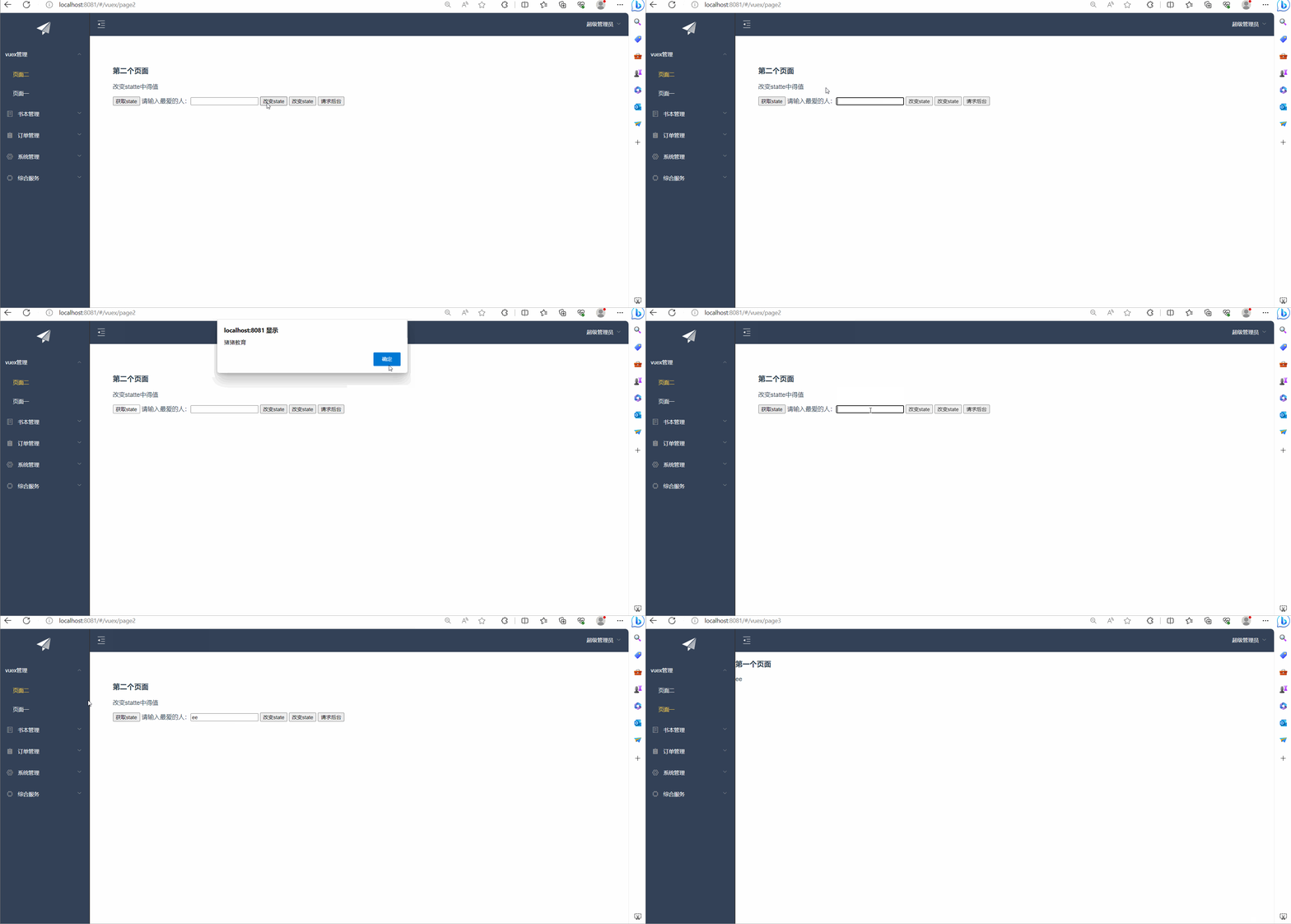
<template> <div style="padding: 60px;"> <h1>第二个页面h1> <p>改变statte中得值p> <button @click="fun1">获取statebutton> 请输入最爱的人:<input v-model="msg" /> <button @click="fun2">改变statebutton> div> template> <script> export default { data() { return { msg: 'kk' } }, methods: { fun1() { alert(this.$store.state.eduName); }, fun2() { this.$store.commit('setName', { eduName: this.msg }) }, } } script> <style> style>- 1
- 2
- 3
- 4
- 5
- 6
- 7
- 8
- 9
- 10
- 11
- 12
- 13
- 14
- 15
- 16
- 17
- 18
- 19
- 20
- 21
- 22
- 23
- 24
- 25
- 26
- 27
- 28
- 29
- 30
- 31
- 32
- 33
- 34
5. Vuex异步加载
<template> <div style="padding: 60px;"> <h1>第二个页面h1> <p>改变statte中得值p> <button @click="fun1">获取statebutton> 请输入最爱的人:<input v-model="msg" /> <button @click="fun2">改变statebutton> <button @click="fun3">改变statebutton> <button @click="fun4">请求后台button> div> template> <script> export default { data() { return { msg: 'kk' } }, methods: { fun1() { alert(this.$store.state.eduName); }, fun2() { this.$store.commit('setName', { eduName: this.msg }) }, fun3() { this.$store.dispatch('setNameAsyc', { eduName: this.msg }) }, } } script> <style> style>- 1
- 2
- 3
- 4
- 5
- 6
- 7
- 8
- 9
- 10
- 11
- 12
- 13
- 14
- 15
- 16
- 17
- 18
- 19
- 20
- 21
- 22
- 23
- 24
- 25
- 26
- 27
- 28
- 29
- 30
- 31
- 32
- 33
- 34
- 35
- 36
- 37
- 38
- 39
- 40
- 41
- 42
- 43
- 44
page2
<template> <div> <h1>第一个页面h1> {{eduName}} div> template> <script> export default{ data (){ return{ msg:'朱' } }, computed:{ eduName(){ // return this.$store.state.eduName; return this.$store.getters.geteduName; } } } script> <style> style>- 1
- 2
- 3
- 4
- 5
- 6
- 7
- 8
- 9
- 10
- 11
- 12
- 13
- 14
- 15
- 16
- 17
- 18
- 19
- 20
- 21
- 22
- 23
- 24
- 25

5.后台请求
export default { setNameAsyc: (context, payload) => { // state.eduName = payload.eduName setTimeout( function() { context.commit('setName', payload); }, 15000 ); }, setNameAjax: (context, payload) => { let _this=payload._this; let url =_this.axios.urls.VEX_AJAX; let params={ resturantName:payload.eduName } _this.axios.post(url, params).then(r => { }).catch(e => { }) } }- 1
- 2
- 3
- 4
- 5
- 6
- 7
- 8
- 9
- 10
- 11
- 12
- 13
- 14
- 15
- 16
- 17
- 18
- 19
- 20
- 21
- 22
- 23
- 24
- 25
- 26
- 27
<template> <div style="padding: 60px;"> <h1>第二个页面h1> <p>改变statte中得值p> <button @click="fun1">获取statebutton> 请输入最爱的人:<input v-model="msg" /> <button @click="fun2">改变statebutton> <button @click="fun3">改变statebutton> <button @click="fun4">请求后台button> div> template> <script> export default { data() { return { msg: 'kk' } }, methods: { fun1() { alert(this.$store.state.eduName); }, fun2() { this.$store.commit('setName', { eduName: this.msg }) }, fun3() { this.$store.dispatch('setNameAsyc', { eduName: this.msg }) }, fun4() { this.$store.dispatch('setNameAjax', { eduName: this.msg, _this:this }) }, } } script> <style> style>- 1
- 2
- 3
- 4
- 5
- 6
- 7
- 8
- 9
- 10
- 11
- 12
- 13
- 14
- 15
- 16
- 17
- 18
- 19
- 20
- 21
- 22
- 23
- 24
- 25
- 26
- 27
- 28
- 29
- 30
- 31
- 32
- 33
- 34
- 35
- 36
- 37
- 38
- 39
- 40
- 41
- 42
- 43
- 44
- 45
- 46
- 47
- 48
- 49
actions
/** * 对后台请求的地址的封装,URL格式如下: * 模块名_实体名_操作 */ export default { 'SERVER': 'http://localhost:8080/', //服务器 'SYSTEM_USER_DOLOGIN': '/user/userLogin', //登陆 'SYSTEM_USER_DOREG': '/user/userRegister', //注册 'SYSTEM_USER_MENUS': '/module/queryRootNode', //左侧 'BOOK_LIST': '/book/queryBookPager', //书籍列表 'BOOK_ADD': '/book/addBook', //书籍增加 'BOOK_UPD': '/book/editBook', //书籍修改 'BOOK_DEL': '/book/delBook', //书籍删除 'VEX_AJAX': '/vuex/queryVuex', //vuex 'getFullPath': k => { //获得请求的完整地址,用于mockjs测试时使用 return this.SERVER + this[k]; } }- 1
- 2
- 3
- 4
- 5
- 6
- 7
- 8
- 9
- 10
- 11
- 12
- 13
- 14
- 15
- 16
- 17
- 18
- 19
- 20
- 21
记得改
- npm install vuex -S
-
相关阅读:
嵌入式开发:关于嵌入式软件建模的5个经验
Node.js在携程的落地和最佳实践
Java核心类库之集合框架
springboot180基于spring boot的医院挂号就诊系统
简单搭建redis哨兵集群
什么是EventEmitter?它在Node.js中有什么作用?
计算机毕业设计Java的电影社区网站(源码+系统+mysql数据库+lw文档)
【ESXi 8】安装ESXi 8.0 虚拟机
java计算机毕业设计快递物流管理源程序+mysql+系统+lw文档+远程调试
艾美捷热转移稳定性检测试剂盒解决方案
- 原文地址:https://blog.csdn.net/m0_74018330/article/details/133780999
