-
kafka详解(三)
2.2 Kafka命令行操作

2.2.1 主题命令行操作
1)查看操作主题命令参数
[aa kafka]$ bin/kafka-topics.sh- 1

2)查看当前服务器中的所有topic (配置了环境变量不需要写bin/)[aa kafka]$ bin/kafka-topics.sh --bootstrap-server hadoop102:9092 --list 3)创建first topic [aa kafka]$ bin/kafka-topics.sh --bootstrap-server hadoop102:9092 --create --partitions 1 --replication-factor 3 --topic first [aa ~]$ kafka-topics.sh --bootstrap-server hadoop102:9092 --topic first --create --partitions 3 --replication-factor 3 选项说明: --topic 定义topic名 --replication-factor 定义副本数 --partitions 定义分区数- 1
- 2
- 3
- 4
- 5
- 6
- 7
- 8
- 9
4)查看first主题的详情
[aa kafka]$ bin/kafka-topics.sh --bootstrap-server hadoop102:9092 --describe --topic first [aa ~]$ kafka-topics.sh --bootstrap-server hadoop102:9092 --list first [aa ~]$ kafka-topics.sh --bootstrap-server hadoop102:9092 --topic first --describe Topic: first TopicId: 3pIfoppvRmq84FjACWzAgw PartitionCount: 3 ReplicationFactor: 3 Configs: segment.bytes=1073741824 Topic: first Partition: 0 Leader: 104 Replicas: 104,103,102 Isr: 104,103,102 Topic: first Partition: 1 Leader: 103 Replicas: 103,102,104 Isr: 103,102,104 Topic: first Partition: 2 Leader: 102 Replicas: 102,104,103 Isr: 102,104,103 [aa ~]$- 1
- 2
- 3
- 4
- 5
- 6
- 7
- 8
- 9
- 10
5)修改分区数(
注意:分区数只能增加,不能减少,如果减少会报错!)[a kafka]$ bin/kafka-topics.sh --bootstrap-server hadoop102:9092 --alter --topic first --partitions 3 [aa ~]$ kafka-topics.sh --bootstrap-server hadoop102:9092 --topic first --alter --partitions 4 [aa ~]$ kafka-topics.sh --bootstrap-server hadoop102:9092 --topic first --describe Topic: first TopicId: 3pIfoppvRmq84FjACWzAgw PartitionCount: 4 ReplicationFactor: 3 Configs: segment.bytes=1073741824 Topic: first Partition: 0 Leader: 104 Replicas: 104,103,102 Isr: 104,103,102 Topic: first Partition: 1 Leader: 103 Replicas: 103,102,104 Isr: 103,102,104 Topic: first Partition: 2 Leader: 102 Replicas: 102,104,103 Isr: 102,104,103 Topic: first Partition: 3 Leader: 104 Replicas: 104,103,102 Isr: 104,103,102- 1
- 2
- 3
- 4
- 5
- 6
- 7
- 8
- 9
[aa ~]$ kafka-topics.sh --bootstrap-server hadoop102:9092 --topic first --alter --partitions 2 Error while executing topic command : Topic currently has 4 partitions, which is higher than the requested 2. [2023-09-13 19:22:16,891] ERROR org.apache.kafka.common.errors.InvalidPartitionsException: Topic currently has 4 partitions, which is higher than the requested 2. (kafka.admin.TopicCommand$) [aa ~]$- 1
- 2
- 3
- 4
- 5
- 6
6)再次查看first主题的详情
[aa kafka]$ bin/kafka-topics.sh --bootstrap-server hadoop102:9092 --describe --topic first- 1
7)删除topic
[aa ~]$ kafka-topics.sh --bootstrap-server hadoop102:9092 --topic first --delete [aa ~]$ kafka-topics.sh --bootstrap-server hadoop102:9092 --list [aa ~]$- 1
- 2
- 3
- 4
- 5
2.2.2 生产者命令行操作
1)查看操作生产者命令参数 [aa kafka]$ bin/kafka-console-producer.sh- 1
- 2
- 3

2)发送消息[aa kafka]$ kafka-console-producer.sh --bootstrap-server hadoop102:9092 --topic first >111 >222 >333 >- 1
- 2
- 3
- 4
- 5
- 6
2.2.3 消费者命令行操作
[aa kafka]$ bin/kafka-console-consumer.sh- 1
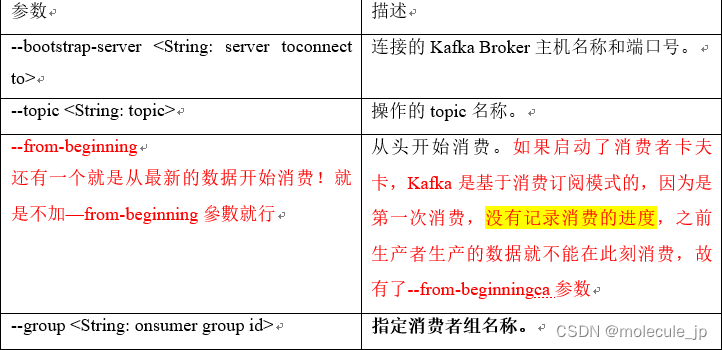
2)消费消息 [aa kafka]$ kafka-console-consumer.sh --bootstrap-server hadoop102:9092 --topic first --group test --from-beginning 111 222 333 还可以动态的生产和消费,比如102机器上输入 >444 103机器就会自动在结尾弹出 111 222 333 444- 1
- 2
- 3
- 4
- 5
- 6
- 7
- 8
- 9
- 10
- 11
- 12
- 13
Kafka生产者
生产者消息发送流程
3.1.1 发送原理
Kafka的producer发送消息采用的是异步发送的方式
在消息发送的过程中,涉及到了两个线程——main线程和Sender线程(两个线程是异步!),以及一个线程共享变量:RecordAccumulator。- 在main线程中创建了一个双端队列RecordAccumulator。main线程将消息发送给RecordAccumulator。
- Sender线程不断从RecordAccumulator中拉取消息发送到Kafka Broker。

main线程将外部数据包装成kafka要求的格式ProducerRecord,类似于Flume中的Event.网络中进行数据传输都会序列化(kryo框架)。
分区策略:涉及到生产者和消费者。生产者分区针对的是数据,消费者分区针对是分区怎么消费数据
。RecordAccumulator(一种堆内存缓冲区)达到两种标准之后就唤醒Sender进行发送!bachsize(同一个队列中,两个时间非常紧密的数据可以形成一个bachsize)一般就是数据洪峰的时候;linger.ms就是在数据量非常小的时候;默认值0代表来一条发一条;
sender发送也是异步发送,sender将RecordAccumulator中的数据包装成Request(一个批次包装成一个Request),sender发送Request1之后不等待响应就发送Request2,然后不等待响应就发送Request2,…Request5,Request6必须排队了。
sender发送过去的数据在Leader中应该是先存在线程对应的内存中,还没等到磁盘中存储数据落盘的一个时间点决定是不是回复ack为0,此时就是不安全,时延最低!。为1的时候就是数据落盘之后再发送ack,此时数据安全性有所提高,稍慢!注意此时的fllower还没有数据!完全保证数据安全,Leader和follwer都罗盘,回复-1
发送成功:清理网络客户端请求Request
线程共享变量中RecordAccumulator清理数据,因为只有32M。
发送失败:重试次数----int的最大值
Selector是负责决定将数据发送到集群的哪个分区!
注意:
中间涉及到数据的发送和拉取都是异步的!main线程放数据和sender拉取数据并发送两个过程异步!
一个队列只能发送到最右边的集群中的一个分区,假如有两个toptic,5个分区,就需要创建5个双端队列,队列内部才能形成批次(bachsize),所以只能发到一个分区!
-
相关阅读:
Vue学习笔记
好市多(Costco)验厂要求合集
vue 动态表单优秀案例
百度收录提交工具-免费主动提交百度快速收录软件
【MindSpore易点通】Transformer的注意力机制
第一篇:Spine 相关的基本知识点和术语
【机器学习】梯度下降法与牛顿法【Ⅲ】拟牛顿法
Java-day15(Java常用类)
常用的表格检测识别方法-表格区域检测方法(上)
【笔记】KMeans聚类算法
- 原文地址:https://blog.csdn.net/qq_37247026/article/details/133779860