-
【angular】TodoList小项目(已开源)
参考:https://segmentfault.com/a/1190000013519099
效果:
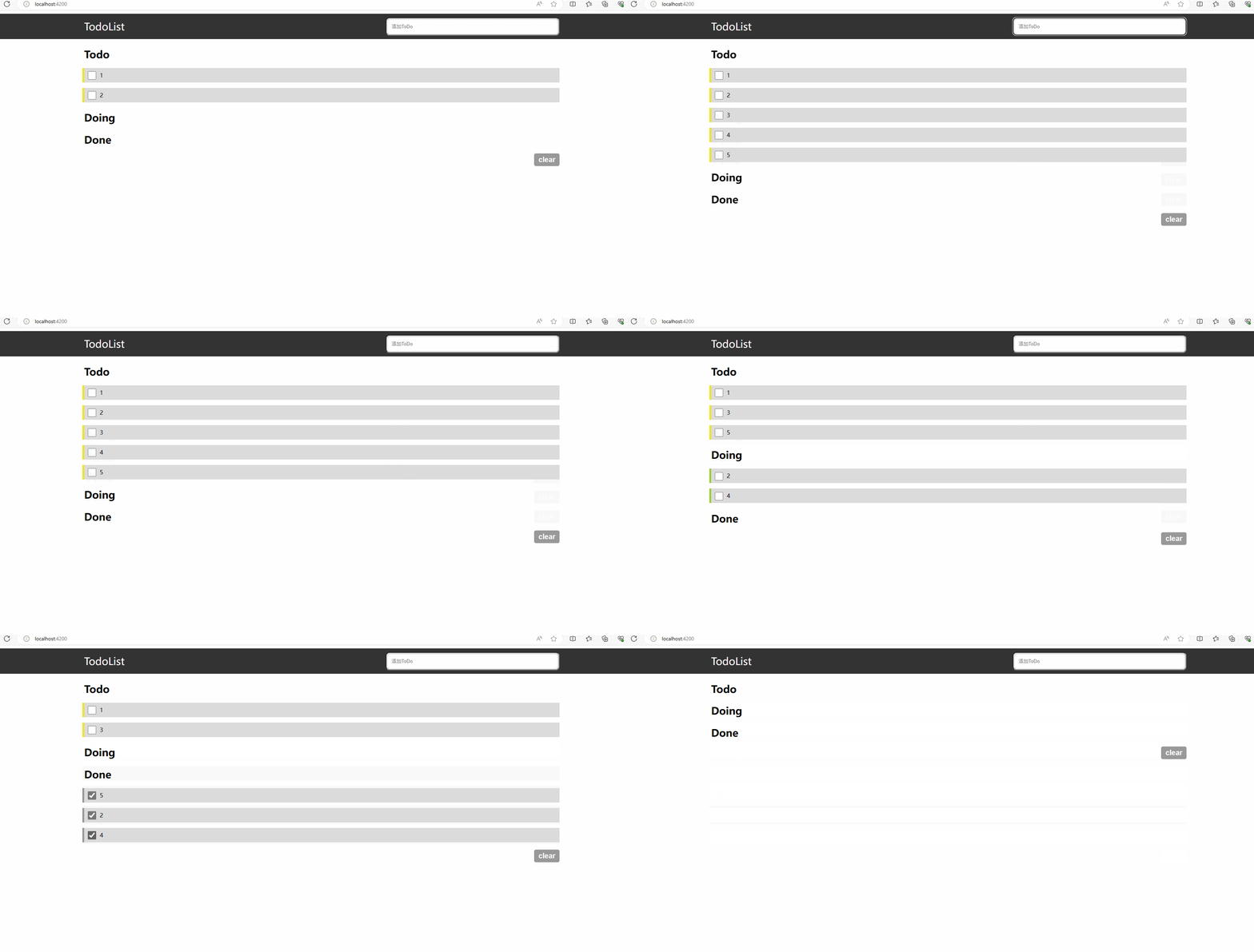
准备工作
创建项目:
ng new my-app导航到workspace 文件夹:
cd my-app启动这个项目:
ng serve --open创建组件:
ng generate component component/todoList组件的路径是:
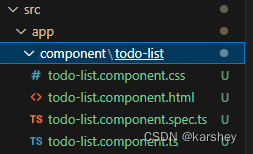
创建了组件后,要把它在根组件配置(
app.module.ts):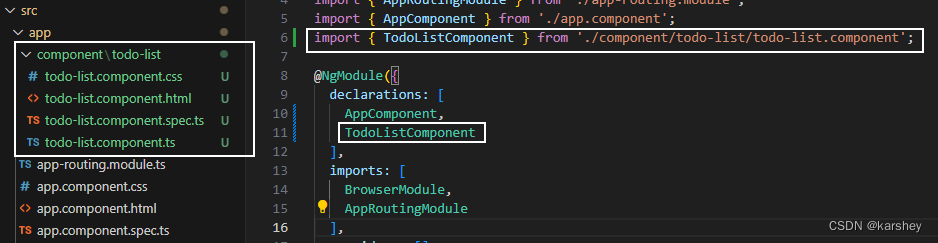
根据TS文件todo-list.component.ts,我们创建的todoList这个组件的名字叫做:app-todo-list。把组件引入到总页面中(app.component.html),启动服务看看。成功!到这里我们已经知道组件怎么创建和引用了。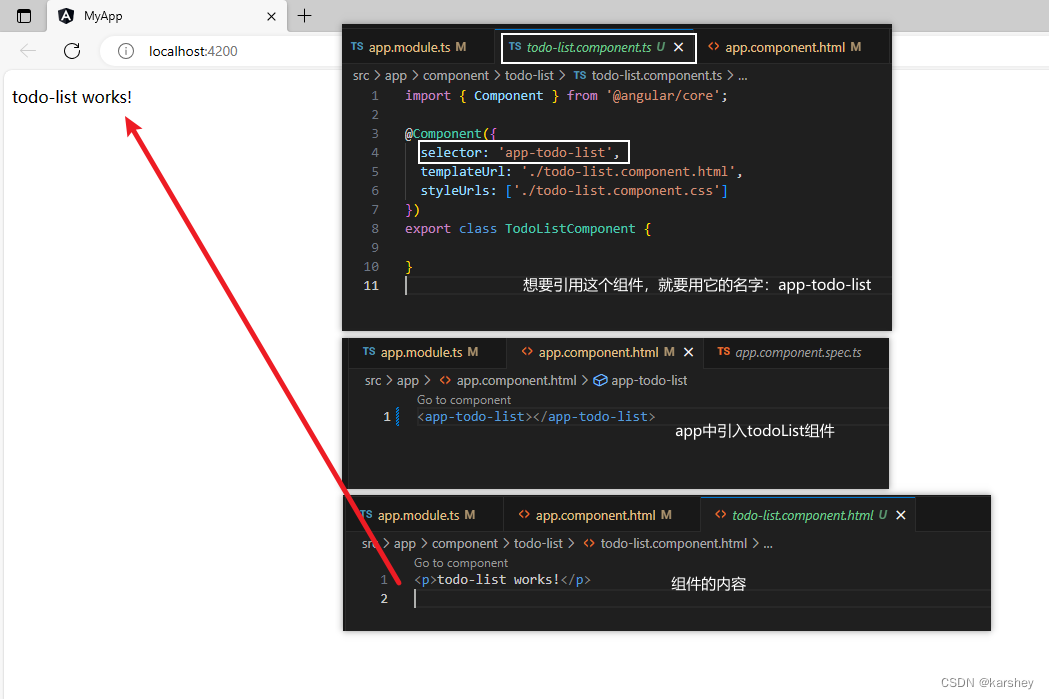
接下来开始写TodoList!header
效果:
<header> <section> <label for="title">TodoListlabel> <input type="text" placeholder="添加ToDo"> section> header>- 1
- 2
- 3
- 4
- 5
- 6
- 7
/* todo-list.component.css */ header { height: 70px; background-color: #333; } header section{ display: flex; justify-content: space-between; } section { margin: 0 auto; width: 70vw; } header section label { font-size: 28px; color: #fff; line-height: 70px; } header section input { width: 35%; margin: 10px 0; padding-left: 15px; border-radius: 10px; box-shadow: 0 1px 0 rgba(255,255,255,0.24), 0 1px 6px rgba(0,0,0,0.45) inset; }- 1
- 2
- 3
- 4
- 5
- 6
- 7
- 8
- 9
- 10
- 11
- 12
- 13
- 14
- 15
- 16
- 17
- 18
- 19
- 20
- 21
- 22
- 23
- 24
- 25
- 26
- 27
- 28
- 29
- 30
Todo、Doing、Done
样式(HTML+CSS)
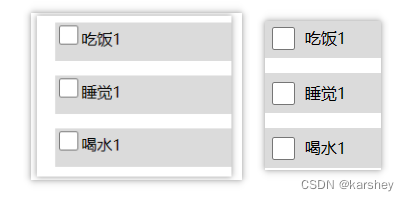
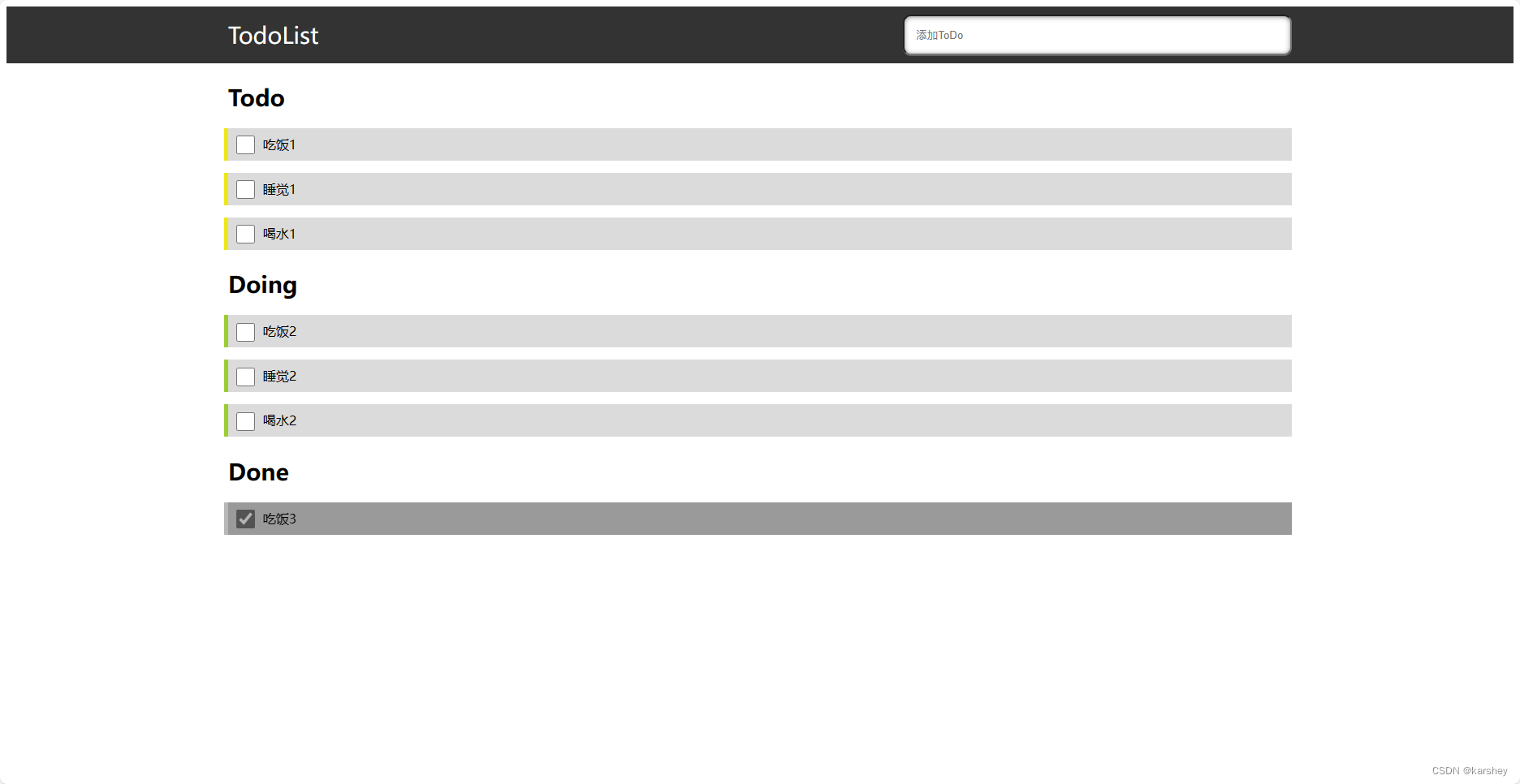
效果大致是这样:
一些细节复选框与文字对齐
.item .listItem input[type=checkbox] { width: 23px; height: 23px; /* 复选框与文字对齐 */ display: inline-block; vertical-align: middle; margin: 0 10px 2px; }- 1
- 2
- 3
- 4
- 5
- 6
- 7
- 8
给Done的item设置阴影
在item外面套一层mask,设置背景黑色。item设置opacity即可。
参考:css为图片添加一层蒙版_css给图片加一层蒙版-CSDN博客
<div class="item done"> <h2>Doneh2> <div class="list"> <div class="mask"> <div class="listItem"> <input type="checkbox">吃饭3 div> div> div> div>- 1
- 2
- 3
- 4
- 5
- 6
- 7
- 8
- 9
- 10
- 11
.done .listItem { box-shadow: -5px 0 0 0 #999999; opacity: 0.7; } .done .mask { background: #000; }- 1
- 2
- 3
- 4
- 5
- 6
- 7
- 8
最终代码
<header> <section> <label for="title">TodoListlabel> <input type="text" placeholder="添加ToDo"> section> header> <section> <div class="item todo"> <h2>Todoh2> <div class="list"> <div class="listItem"> <input type="checkbox">吃饭1 div> <div class="listItem"> <input type="checkbox">睡觉1 div> <div class="listItem"> <input type="checkbox">喝水1 div> div> div> <div class="item doing"> <h2>Doingh2> <div class="list"> <div class="listItem"> <input type="checkbox">吃饭2 div> <div class="listItem"> <input type="checkbox">睡觉2 div> <div class="listItem"> <input type="checkbox">喝水2 div> div> div> <div class="item done"> <h2>Doneh2> <div class="list"> <div class="mask"> <div class="listItem"> <input type="checkbox" checked="checked">吃饭3 div> div> div> div> section>- 1
- 2
- 3
- 4
- 5
- 6
- 7
- 8
- 9
- 10
- 11
- 12
- 13
- 14
- 15
- 16
- 17
- 18
- 19
- 20
- 21
- 22
- 23
- 24
- 25
- 26
- 27
- 28
- 29
- 30
- 31
- 32
- 33
- 34
- 35
- 36
- 37
- 38
- 39
- 40
- 41
- 42
- 43
- 44
- 45
- 46
- 47
- 48
- 49
/* todo-list.component.css */ header { height: 70px; background-color: #333; } header section { display: flex; justify-content: space-between; } section { margin: 0 auto; width: 70vw; } header section label { font-size: 28px; color: #fff; line-height: 70px; } header section input { width: 35%; margin: 10px 0; padding-left: 15px; border-radius: 10px; box-shadow: 0 1px 0 rgba(255, 255, 255, 0.24), 0 1px 6px rgba(0, 0, 0, 0.45) inset; } .item { margin: 20px 0; } .item h2 { color: #000; font-size: 28px; font-weight: 700; margin-bottom: 20px; } .item .listItem { background-color: #dbdbdb; margin: 15px 0; height: 40px; line-height: 40px; font-size: 16px; } .todo .listItem { box-shadow: -5px 0 0 0 #ede719; } .doing .listItem { box-shadow: -5px 0 0 0 yellowgreen; } .done .listItem { box-shadow: -5px 0 0 0 #999999; opacity: 0.7; } .done .mask { background: #000; } .item .listItem input[type=checkbox] { width: 23px; height: 23px; /* 复选框与文字对齐 */ display: inline-block; vertical-align: middle; margin: 0 10px 2px; }- 1
- 2
- 3
- 4
- 5
- 6
- 7
- 8
- 9
- 10
- 11
- 12
- 13
- 14
- 15
- 16
- 17
- 18
- 19
- 20
- 21
- 22
- 23
- 24
- 25
- 26
- 27
- 28
- 29
- 30
- 31
- 32
- 33
- 34
- 35
- 36
- 37
- 38
- 39
- 40
- 41
- 42
- 43
- 44
- 45
- 46
- 47
- 48
- 49
- 50
- 51
- 52
- 53
- 54
- 55
- 56
- 57
- 58
- 59
- 60
- 61
- 62
- 63
- 64
- 65
- 66
- 67
- 68
- 69
- 70
- 71
- 72
- 73
- 74
- 75
- 76
功能(TS)
将输入框内容加入todoList(addTodo)
定义数据,写addTodo方法。
//todo-list.component.ts export class TodoListComponent { public todo: any = '' //在input栏,即将加入todoList public todoList = [] as any; public doingList = [] as any; public doneList = [] as any; // 添加代办时间到todo addTodo(e: any) { // 回车 if (e.keyCode == 13) { this.todoList.push(this.todo) this.todo = '' } } }- 1
- 2
- 3
- 4
- 5
- 6
- 7
- 8
- 9
- 10
- 11
- 12
- 13
- 14
- 15
- 16
- 17
在html中绑定数据和时间:
输入框:
<header> <section> <label for="title">TodoListlabel> <input type="text" (keydown)="addTodo($event)" [(ngModel)]='todo' placeholder="添加ToDo"> section> header>- 1
- 2
- 3
- 4
- 5
- 6
- 7
todoList:
<div class="item todo"> <h2>Todoh2> <div class="list"> <div class="listItem" *ngFor="let item of todoList"> <input type="checkbox">{{item.todo}} div> div> div>- 1
- 2
- 3
- 4
- 5
- 6
- 7
- 8
遇到的问题与解决:
写addTodo方法:
TypeScript 错误 property does not exist on type Object - 掘金 (juejin.cn)
Parameter ‘xxx’ implicitly has an ‘any’ type的解决_implicitly has an ‘any’ type-CSDN博客在绑定[(ngModel)]=‘todo’:解决Angular报错 Can’t bind to ‘ngModel’ since it isn’t a known property of ‘input’-CSDN博客
将todoObj push进todoList:类型“{ name: any; value: string; }”的参数不能赋给类型“never”的参数。_类型“any”的参数不能赋给类型“never”的参数_干饭了干饭了1的博客-CSDN博客
将todo事件改到doing
功能:todo打勾(点击事件),它就加到doingList中。doing到done、done到todo以此类推。
// todo 改为doing todoChange(key: any) { this.doingList.push(this.todoList[key]) this.todoList.splice(key,1) }- 1
- 2
- 3
- 4
- 5
<div class="item todo"> <h2>Todoh2> <div class="list"> <div class="listItem" *ngFor="let item of todoList;let key=index"> <input type="checkbox" (click)="todoChange(key)">{{item}} div> div> div>- 1
- 2
- 3
- 4
- 5
- 6
- 7
- 8
刷新一下,发现页面中的数据都没了。如果想要保存页面数据,我们需要做以下操作。
服务
参考:angularcli 第七篇(service 服务) - 撑死的喵~ - 博客园 (cnblogs.com)
在控制台创建服务:
ng g service services/storage- 1
app.module.ts中引入创建的服务: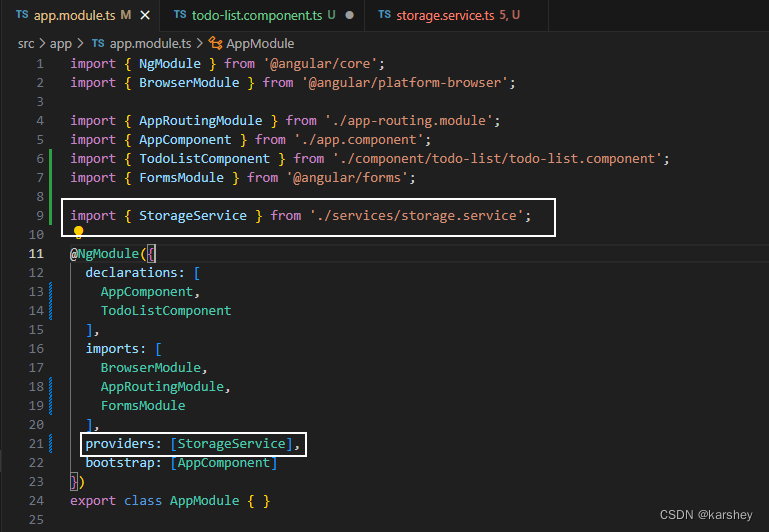
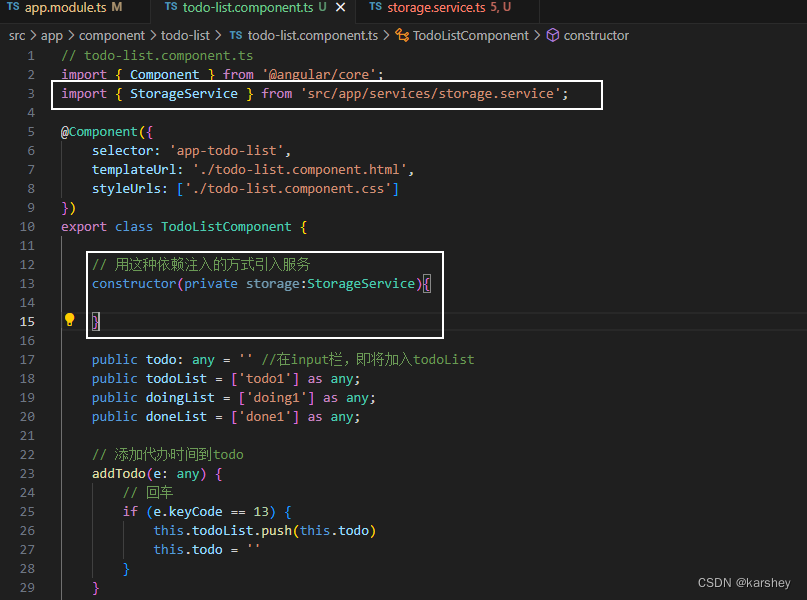
在要使用的页面引入和注入服务:
具体服务:可能的报错:ts报错:类型“string | null”的参数不能赋给类型“string”的参数。 不能将类型“null”分配给类型“string”。-CSDN博客
// storage.service.ts import { Injectable } from '@angular/core'; @Injectable({ providedIn: 'root', }) export class StorageService { constructor() {} setItem(key: any, value: any) { localStorage.setItem(key, JSON.stringify(value)); } getItem(key: any) { try { return JSON.parse(localStorage.getItem(key) || ''); } catch (Error) { console.log(Error); } } }- 1
- 2
- 3
- 4
- 5
- 6
- 7
- 8
- 9
- 10
- 11
- 12
- 13
- 14
- 15
- 16
- 17
- 18
- 19
- 20
在每个会修改todoList、doingList、doneList的代码下面加上对应的
this.storage.setItem('xx',this.xx),把数据存放在本地中。// 添加代办时间到todo addTodo(e: any) { // 回车 if (e.keyCode == 13) { this.todoList.push(this.todo) this.todo = '' this.storage.setItem('todoList',this.todoList) } } // todo 改为doing todoChange(key: any) { this.doingList.push(this.todoList[key]) this.todoList.splice(key,1) this.storage.setItem('todoList',this.todoList) this.storage.setItem('doingList',this.doingList) } // doing 改为done doingChange(key: any) { this.doneList.push(this.doingList[key]) this.doingList.splice(key,1) this.storage.setItem('doneList',this.doneList) this.storage.setItem('doingList',this.doingList) } // done 改为todo doneChange(key: any) { this.todoList.push(this.doneList[key]) this.doneList.splice(key,1) this.storage.setItem('todoList',this.todoList) this.storage.setItem('doneList',this.doneList) }- 1
- 2
- 3
- 4
- 5
- 6
- 7
- 8
- 9
- 10
- 11
- 12
- 13
- 14
- 15
- 16
- 17
- 18
- 19
- 20
- 21
- 22
- 23
- 24
- 25
- 26
- 27
- 28
- 29
- 30
- 31
- 32
- 33
大功告成!
参考
angularjs - 和我一起入坑,Angular入门,Angular版的ToDoList - 个人文章 - SegmentFault 思否
box-shadow 设置单边、多边阴影 - 掘金 (juejin.cn)
css为图片添加一层蒙版_css给图片加一层蒙版-CSDN博客
TypeScript 错误 property does not exist on type Object - 掘金 (juejin.cn)
Parameter ‘xxx’ implicitly has an ‘any’ type的解决_implicitly has an ‘any’ type-CSDN博客
angularcli 第七篇(service 服务) - 撑死的喵~ - 博客园 (cnblogs.com)
ts报错:类型“string | null”的参数不能赋给类型“string”的参数。 不能将类型“null”分配给类型“string”。-CSDN博客
开源
https://gitee.com/karshey/angular-todo-list
后续补充
这个小项目是一个菜鸟新人练手的项目,写的漏洞百出。漏洞包括但不限于:没有自定义类型Todo而是直接用string、没有对JSON.parse异常处理、没有单元测试…
谨慎阅读! -
相关阅读:
HTML5期末大作业:美妆网页主题网站设计——清新的手工肥皂网站展示(4页)HTML+CSS+JavaScript
金融时间序列预测方法合集:CNN、LSTM、随机森林、ARMA预测股票价格(适用于时序问题)、相似度计算、各类评判指标绘图(数学建模科研适用)
arm架构,django4.2.7适配达梦8数据库
MediaCodec_Analyze-2-config
Python零基础入门-10 标准库简介
momerymap mmap 存储映射I/O
基于Socket实现网络编程
Clion新增子模块库代码跳转
安全先行,合规的内外网文件摆渡要重点关注什么?
Java POI 读取 大数据量的Excel 实操
- 原文地址:https://blog.csdn.net/karshey/article/details/133746137