-
JFX11+Maven+IDEA 发布跨平台应用的完美解决方案
JFX11+Maven+IDEA 发布跨平台应用的完美解决方案 - 知乎
- <dependencies>
- <dependency>
- <groupId>org.openjfx</groupId>
- <artifactId>javafx-base</artifactId>
- <version>11</version>
- <classifier>linux</classifier>
- </dependency>
- <dependency>
- <groupId>org.openjfx</groupId>
- <artifactId>javafx-base</artifactId>
- <version>11</version>
- <classifier>win</classifier>
- </dependency>
- <dependency>
- <groupId>org.openjfx</groupId>
- <artifactId>javafx-controls</artifactId>
- <version>11</version>
- <classifier>linux</classifier>
- </dependency>
- <dependency>
- <groupId>org.openjfx</groupId>
- <artifactId>javafx-controls</artifactId>
- <version>11</version>
- <classifier>win</classifier>
- </dependency>
- <dependency>
- <groupId>org.openjfx</groupId>
- <artifactId>javafx-fxml</artifactId>
- <version>11</version>
- <classifier>linux</classifier>
- </dependency>
- <dependency>
- <groupId>org.openjfx</groupId>
- <artifactId>javafx-fxml</artifactId>
- <version>11</version>
- <classifier>win</classifier>
- </dependency>
- <dependency>
- <groupId>org.openjfx</groupId>
- <artifactId>javafx-graphics</artifactId>
- <version>11</version>
- <classifier>linux</classifier>
- </dependency>
- <dependency>
- <groupId>org.openjfx</groupId>
- <artifactId>javafx-graphics</artifactId>
- <version>11</version>
- <classifier>win</classifier>
- </dependency>
- </dependencies>
- <properties>
- <project.build.sourceEncoding>UTF-8</project.build.sourceEncoding>
- <maven.compiler.source>11</maven.compiler.source>
- <maven.compiler.target>11</maven.compiler.target>
- </properties
-------------------------------------------------------------------------------------------------------------------------------
原文
1 概述
前几天写了两篇关于JFX+IDEA打包跨平台应用的文章,这篇是使用IDEA自带功能打包的,这篇是使用Maven进行打包的,但是效果不太满意,因为从JDK9开始实现模块化,同时JFX部分从JDK中独立出来了,也就是说需要默认JDK不再自带JFX。这意味着外部依赖需要手动处理
module-info.java,这是一件非常麻烦的事情。1.1 不使用Maven
其实不使用
Maven也能打包发布跨平台JFX应用,但是没有使用Maven的话,虽然打包出来能直接运行无需jre环境,但是,管理依赖确实麻烦,在使用jlink打包一些外部的jar时,对于一些比较简单的jar还是比较舒服的,参照这里:
首先去下载jar,接着生成
module-info.java,然后使用jdeps检查依赖,添加对应的jar到路径中,编译生成module-info.java接着更新原来的jar即可。看起来简单,但是笔者碰到了okhttp这种jar,依赖简直环环相扣导致笔者放弃了这种方式。1.2 使用
Maven使用
Maven可以完美解决依赖问题,多亏强大的pom.xml,几行module-info.java,而且IDEA文档明确表明仅支持Java8的打包为jar: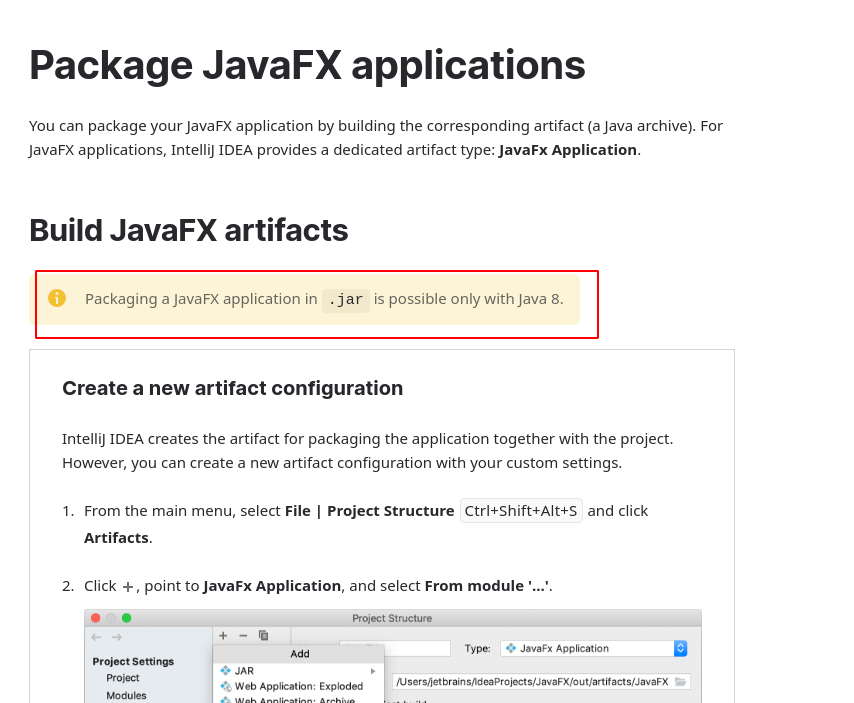
因此,这篇文章采取一种最简单的方式利用
Maven打包发布JFX11应用。2 新建
Maven工程
默认即可,问题不大。

3 添加依赖
- <dependencies>
- <dependency>
- <groupId>org.openjfx</groupId>
- <artifactId>javafx-base</artifactId>
- <version>11</version>
- <classifier>linux</classifier>
- </dependency>
- <dependency>
- <groupId>org.openjfx</groupId>
- <artifactId>javafx-base</artifactId>
- <version>11</version>
- <classifier>win</classifier>
- </dependency>
- <dependency>
- <groupId>org.openjfx</groupId>
- <artifactId>javafx-controls</artifactId>
- <version>11</version>
- <classifier>linux</classifier>
- </dependency>
- <dependency>
- <groupId>org.openjfx</groupId>
- <artifactId>javafx-controls</artifactId>
- <version>11</version>
- <classifier>win</classifier>
- </dependency>
- <dependency>
- <groupId>org.openjfx</groupId>
- <artifactId>javafx-fxml</artifactId>
- <version>11</version>
- <classifier>linux</classifier>
- </dependency>
- <dependency>
- <groupId>org.openjfx</groupId>
- <artifactId>javafx-fxml</artifactId>
- <version>11</version>
- <classifier>win</classifier>
- </dependency>
- <dependency>
- <groupId>org.openjfx</groupId>
- <artifactId>javafx-graphics</artifactId>
- <version>11</version>
- <classifier>linux</classifier>
- </dependency>
- <dependency>
- <groupId>org.openjfx</groupId>
- <artifactId>javafx-graphics</artifactId>
- <version>11</version>
- <classifier>win</classifier>
- </dependency>
- </dependencies>
需要在哪个平台在
classifier中指定即可。这里是Linux与win。同时指定编码与JDK:
- <properties>
- <project.build.sourceEncoding>UTF-8</project.build.sourceEncoding>
- <maven.compiler.source>11</maven.compiler.source>
- <maven.compiler.target>11</maven.compiler.target>
- </properties>
否则会报错:

4 新建Main
新建一个包再新建
Main.java、Launcher.java以及Main.fxml:
Main.java如下:- package com.test;
- import javafx.application.Application;
- import javafx.fxml.FXMLLoader;
- import javafx.scene.Parent;
- import javafx.scene.Scene;
- import javafx.stage.Stage;
- public class Main extends Application {
- public void start(Stage stage) throws Exception {
- Parent root = FXMLLoader.load(getClass().getResource("/Main.fxml"));
- Scene scene = new Scene(root);
- stage.setScene(scene);
- stage.setTitle("Hello World");
- stage.show();
- }
- public static void main(String[] args) {
- launch(args);
- }
- }
Launcher.java:- package com.test;
- public class Launcher {
- public static void main(String[] args) {
- Main.main(args);
- }
- }
Main.fxml:- <?xml version="1.0" encoding="UTF-8"?>
- <?import javafx.scene.control.*?>
- <?import javafx.scene.layout.*?>
- <?import javafx.scene.text.*?>
- <AnchorPane prefHeight="400.0" prefWidth="600.0" xmlns="http://javafx.com/javafx/10.0.2-internal"
- xmlns:fx="http://javafx.com/fxml/1" fx:controller="com.test.Main">
- <Label layoutX="228.0" layoutY="185.0" text="Hello World">
- <font>
- <Font size="25.0"/>
- </font>
- </Label>
- </AnchorPane>
注意
getResource中的fxml路径,Main.fxml文件放在resources下,直接通过根路径读取:getResource("/Main.fxml");5 添加运行配置
此时应该是没有运行配置的状态,点击
Add Configuration:
添加
Application:
添加
Launcher类作为Main class:
这时候
run就没问题了:
6 使用默认
Maven打包虽然现在可以运行了,但是,如果直接使用默认的
Maven打包的话:
在
target下有一个jar,直接右键运行:
会提示
no main manifest attribute:
也就是找不到
Manifest中入口类。jar实际上是一个class的压缩包,与zip的区别是jar包含了一个
MANIFEST.MF,MANIFEST.MF在META-INF下,一个示例文件如下: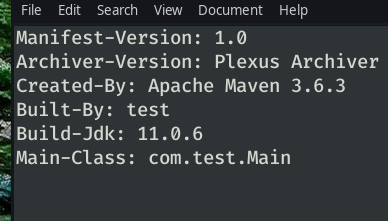
有点类似与键值对的格式,
MANIFEST.MF包含了jar文件的内容描述,并在运行时向JVM提供应用程序信息。注意该文件有严格的格式限制,比如第一行不能为空,行与行之间不能存在空行。一个暴力的解决办法是直接解压jar并修改里面的
MANIFEST.MF,添加Main-Class: com.test.Launcher但是这样会报找不到Application类的异常:

7 添加新的打包插件
理论上来说,只需要jar包内的相同目录下提供了javafx的jar或者class文件就不会抛出异常了,但是,如果依赖很多需要一个一个添加,这是一个痛苦的过程。
所以,为了优雅地解决这个问题,引入一个叫
maven-shade-plugin的插件即可:- <build>
- <plugins>
- <plugin>
- <groupId>org.apache.maven.plugins</groupId>
- <artifactId>maven-shade-plugin</artifactId>
- <version>3.2.2</version>
- <executions>
- <execution>
- <phase>package</phase>
- <goals>
- <goal>shade</goal>
- </goals>
- <configuration>
- <transformers>
- <transformer implementation="org.apache.maven.plugins.shade.resource.ManifestResourceTransformer">
- <mainClass>com.test.Launcher</mainClass>
- </transformer>
- </transformers>
- </configuration>
- </execution>
- </executions>
- </plugin>
- </plugins>
- </build>
最新版本请到官方Github查看,使用时只需要修改:
<mainClass>xxx.xxx.xxx</mainClass>修改为程序入口类。
8 打包
此时再从右侧栏打包选中
Maven,package即可:
但是会有警告:

因为一些class文件重复了,但是也提到了通常来说这是没有危害的并且可以跳过警告,或者修改
pom.xml去手动排除某些依赖。9 运行
直接在IDEA中右键运行或者-jar运行,可以看到没有异常了:

相比起原来自带的
Maven打包插件,主要是多了javafx的一些class以及对应平台所需要的一些动态库文件等,比如Windows上的.dll与Linux上的.so文件。
这样一个跨平台的JFX jar包就制作好了,只需
java -jar即可跨平台运行。
-
相关阅读:
ConfigMaps in K8s
【校招VIP】线上实习 推推 书籍详情模块 产品脑图周最佳
云计算学习笔记——第三章 计算虚拟化[二]
【Redis】关于过期数据清除的一些策略
实验18.RIP路由引入
矩阵置零(C++解法)
Java学习Go(入门)
单体应用、SOA架构、微服务架构的对比
未来 20 年 12 大发展趋势
ai智能机器人 okcc vos3000运营风控那些事
- 原文地址:https://blog.csdn.net/xiaoerbuyu1233/article/details/133693889
