-
Vue之ElementUI实现CUD(增删改)及表单验证

目录
前言
上期的博客中我与大家分享了有关Vue和ElementUI实现项目左侧的动态树形菜单栏及将数据从数据库拿到在前端与数据表格进行绑定交互,而且还实现了模糊查询和分页条的功能。今天的这期博客Vue之ElementUI实现CUD(增删改)及表单验证是居于上一期博客的数据表格的基础上实现增删改及表单验证的功能,希望大家能够耐心仔细阅读完,谢谢大家的支持。
一、CUD(增删改)功能实现
1. 配置CUD(增删改)功能的接口
在action.js文件中配置CUD(增删改)功能的请求接口方法,方便后续代码开发调用。

注意:在准备进行后续开发的时候,记得将src文件下的main.js文件中的process.env.MOCK && require('@/mock')即mockjs注释掉否则影响开发。
2. 编写新增窗体界面及完成新增功能
- <template>
- <div class="books" style="padding: 20px;">
- <el-form :inline="true" class="demo-form-inline">
- <el-form-item label="书籍名称">
- <el-input v-model="bookname" placeholder="书籍名称">el-input>
- el-form-item>
- <el-form-item>
- <el-button type="primary" @click="onSubmit">搜索el-button>
- <el-button type="primary" @click="open">新增el-button>
- el-form-item>
- el-form>
- <el-table :data="tableData" stripe style="width: 100%">
- <el-table-column prop="id" label="书籍编号" width="180">
- el-table-column>
- <el-table-column prop="bookname" label="书籍名称" width="180">
- el-table-column>
- <el-table-column prop="price" label="书籍价格">
- el-table-column>
- <el-table-column prop="booktype" label="书籍类型">
- el-table-column>
- el-table>
- <div class="block" style="padding: 20px;">
- <el-pagination @size-change="handleSizeChange" @current-change="handleCurrentChange" :current-page="page"
- :page-sizes="[10, 20, 30, 40]" :page-size="rows" layout="total, sizes, prev, pager, next, jumper"
- :total="total">
- el-pagination>
- div>
- <el-dialog :title="title" :visible.sync="dialogFormVisible" @close="clear">
- <el-form :model="book">
- <el-form-item label="书籍编号" :label-width="formLabelWidth">
- <el-input v-model="book.id" autocomplete="off">el-input>
- el-form-item>
- <el-form-item label="书籍名称" :label-width="formLabelWidth">
- <el-input v-model="book.bookname" autocomplete="off">el-input>
- el-form-item>
- <el-form-item label="书籍价格" :label-width="formLabelWidth">
- <el-input v-model="book.price" autocomplete="off">el-input>
- el-form-item>
- <el-form-item label="书籍类别" :label-width="formLabelWidth">
- <el-select v-model="book.booktype" placeholder="请选择活动区域">
- <el-option v-for="t in types" :label="t.name" :value="t.name" :key="'key_'+t.id">el-option>
- el-select>
- el-form-item>
- el-form>
- <div slot="footer" class="dialog-footer">
- <el-button @click="dialogFormVisible = false">取 消el-button>
- <el-button type="primary" @click="dosub">确 定el-button>
- div>
- el-dialog>
- div>
- template>
- <script>
- export default {
- data() {
- return {
- bookname: '',
- tableData: [],
- rows: 10,
- page: 1,
- total: 0,
- title: '新增窗体',
- dialogFormVisible: false,
- formLabelWidth: '100px',
- book: {
- id: '',
- bookname: '',
- price: '',
- booktype: ''
- },
- types: []
- }
- },
- methods: {
- // 提交
- dosub(){
- let url = this.axios.urls.Book_ADD;
- if(this.title == '编辑窗体'){
- url = this.axios.urls.Book_UPD;
- }
- let params = {
- id:this.book.id,
- bookname:this.book.bookname,
- price:this.book.price,
- booktype:this.book.booktype
- }
- this.axios.post(url, params).then(r => {
- console.log(r);
- this.clear();//关闭
- this.query({});//刷新
- }).catch(e => {
- })
- },
- // 初始化窗体
- clear() {
- this.dialogFormVisible = false;
- this.title='新增窗体';
- this.book={
- id: '',
- bookname: '',
- price: '',
- booktype: ''
- }
- },
- open() {
- // 待开窗体
- this.dialogFormVisible = true;
- },
- // 定义一个查询的方法,方便调用减少代码冗余
- query(params) {
- // 向后台请求数据的访问路径
- let url = this.axios.urls.BookList;
- this.axios.get(url, {
- params: params
- }).then(r => {
- console.log(r);
- this.tableData = r.data.rows;
- this.total = r.data.total;
- }).catch(e => {
- })
- },
- onSubmit() {
- let params = {
- bookname: this.bookname,
- }
- // 调用查询方法
- this.query(params);
- },
- handleSizeChange(r) { //当页大小发生变化
- // 输出查看
- console.log("当前页大小:" + r);
- let params = {
- bookname: this.bookname,
- rows: r,
- page: this.page
- }
- // 调用查询方法
- this.query(params);
- },
- handleCurrentChange(p) { //当当前页页码大小发生变化
- // 输出查看
- console.log("当前页码:" + p);
- let params = {
- bookname: this.bookname,
- page: p,
- rows: this.rows
- }
- // 调用查询方法
- this.query(params);
- }
- },
- created() {
- // 调用查询方法
- this.query({});
- this.types = [{
- id: 1,
- name: '爱情'
- }, {
- id: 2,
- name: '玄幻'
- }, {
- id: 3,
- name: '激情'
- }]
- }
- }
- script>
- <style>
- style>
注意事项:
记得在提交新增请求数据后,加上 this.clear();//关闭
this.query({});//刷新两行代码。效果

3. 编写编辑功能代码
添加操作栏
- <el-table-column label="操作">
- <template slot-scope="scope">
- <el-button size="mini" @click="open(scope.$index, scope.row)">编辑el-button>
- <el-button size="mini" type="danger" @click="handleDelete(scope.$index, scope.row)">删除el-button>
- template>
- el-table-column>

编写功能js代码
效果展示

4. 编写删除功能的代码及提示框
删除功能的方法
- del(idx, row) {
- this.$confirm('此操作将永久删除id为'+row.id+', 是否继续?', '提示', {
- confirmButtonText: '确定',
- cancelButtonText: '取消',
- type: 'warning'
- }).then(() => {
- let url = this.axios.urls.Book_DEL;
- this.axios.post(url, {id:row.id}).then(r => {
- console.log(r);
- this.$message({
- type: 'success',
- message: '删除成功!'
- });
- this.query({}); //刷新
- }).catch(e => {
- })
- }).catch(() => {
- this.$message({
- type: 'info',
- message: '已取消删除'
- });
- });
- },

展示效果
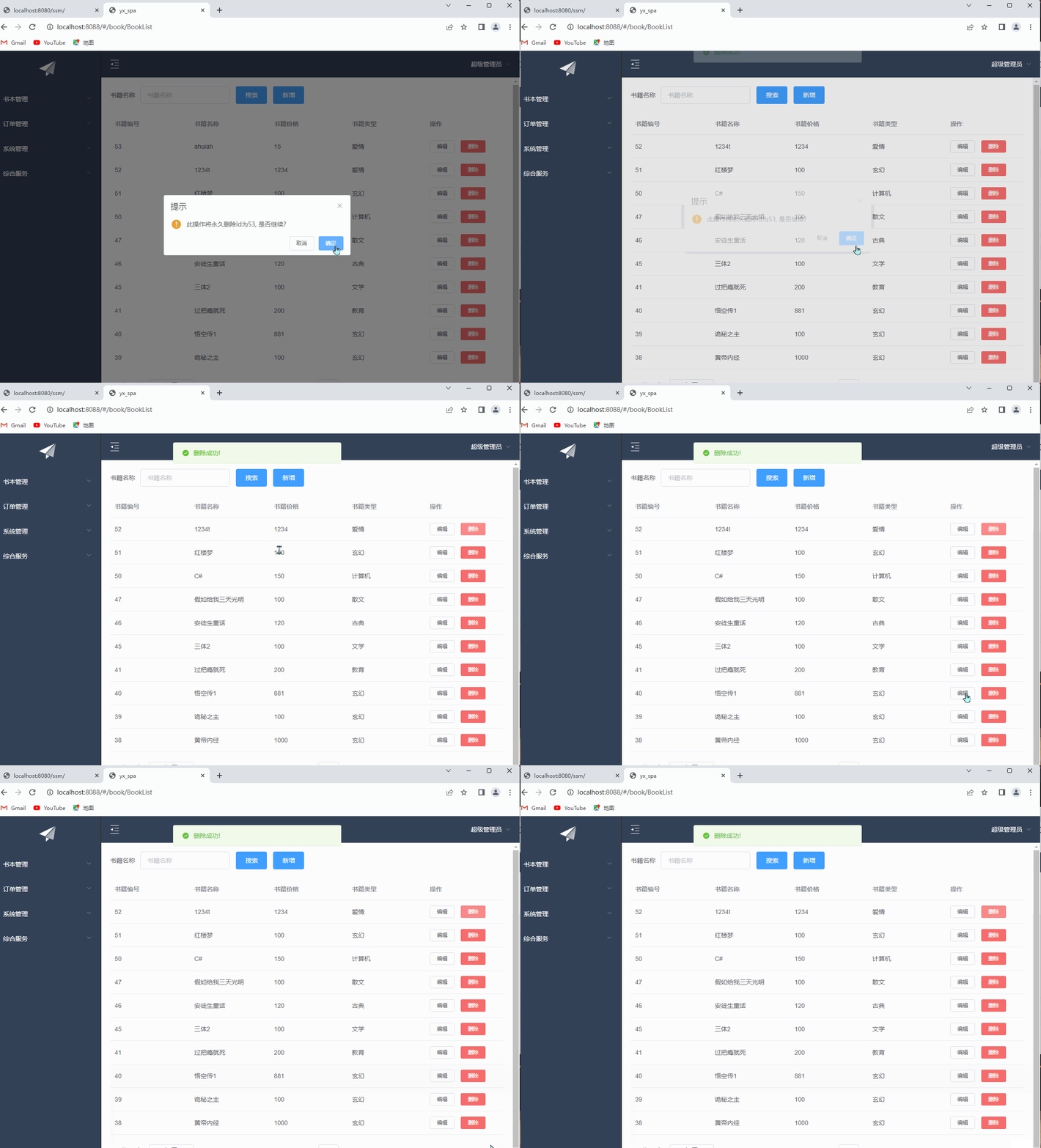
二、表单验证
在form表单中要包含:rules="rules" ref="ruleForm"代码。
Form 组件提供了表单验证的功能,只需要通过 属性传入约定的验证规则,并将 Form-Item 的 属性设置为需校验的字段名即可。校验规则参见 async-validator
rulesprop
功能js编写
规则
- rules: {
- bookname: [{
- required: true,
- message: '请输入书籍名称',
- trigger: 'blur'
- },
- {
- min: 3,
- max: 5,
- message: '长度在 1 到 9 个字符',
- trigger: 'blur'
- }
- ],
- price: [{
- required: true,
- message: '请输入书籍价格',
- trigger: 'blur'
- }],
- booktype: [{
- required: true,
- message: '请选择书籍类型',
- trigger: 'change'
- }]
- }

启用表单
- this.$refs[formName].validate((valid) => {
- if (valid) {
- alert('submit!');
- } else {
- console.log('error submit!!');
- return false;
- }
- });

效果

今天的分享到此结束,感谢支持,三连加关注就是对博主最大的支持。
-
相关阅读:
MATLAB|科研绘图|山脊图
jdk和cglib动态代理
React 入门使用 (官方文档向 Part2)
是谁还没听过杨氏矩阵~原理和实现代码都已经准备好了
GitHub平台 Bookget操作
【41. 最短编辑距离(线性DP)】
Nginx 的安装与使用(入门教程)
MES管理系统中的质量管理活动是什么
设计模式 —— 发布订阅模式
Qt Quick 之 QML 与 C++ 混合编程详解
- 原文地址:https://blog.csdn.net/weixin_74352229/article/details/133344786
