-
STM32单片机入门学习(五)-按钮控制LED
按钮和LED接线
LED负极接B12,正极接VCC
按钮一端接B13,一端接GND,按下为低电平,松开为高电平
如图:

主程序代码:main.c
- #include "stm32f10x.h"
- #include "Delay.h" //delay函数所在头文件
- #include "LED.h"
- #include "KEY.h"
- int main(void)
- {
- int isdown;
- LED_Init(); //初始化LED
- LED_OFF(); //默认LED灭
- KEY_Init(); //初始化KEY
- while(1)
- {
- isdown = Key_IsDown(); //循环判断按钮是否被按下
- if(isdown == 1)
- {
- LED_ON();
- }
- else
- {
- LED_OFF();
- }
- }
- }
LED.h和LED.c
LED.h
- #ifndef __LED_H
- #define __LED_H
- void LED_Init(void);
- void LED_ON(void);
- void LED_OFF(void);
- #endif
LED.c
- #include "stm32f10x.h"
- void LED_Init(void)
- {
- RCC_APB2PeriphClockCmd(RCC_APB2Periph_GPIOB, ENABLE); //设置时钟
- GPIO_InitTypeDef GPIOInitStruct;
- GPIOInitStruct.GPIO_Mode = GPIO_Mode_Out_PP; //推挽模式
- GPIOInitStruct.GPIO_Pin = GPIO_Pin_12; //B12
- GPIOInitStruct.GPIO_Speed = GPIO_Speed_50MHz;
- GPIO_Init(GPIOB, &GPIOInitStruct);
- GPIO_SetBits(GPIOB, GPIO_Pin_12); // 不亮
- }
- void LED_ON(void)
- {
- GPIO_ResetBits(GPIOB, GPIO_Pin_12); // 亮
- }
- void LED_OFF(void)
- {
- GPIO_SetBits(GPIOB, GPIO_Pin_12); // 不亮
- }
KEY.h和KEY.c
KEY.h
- #ifndef __KEY_H
- #define __KEY_H
- void KEY_Init(void);
- unsigned char Key_IsDown(void);
- #endif
KEY.c
- #include "stm32f10x.h"
- #include "Delay.h"
- //初始化KEY
- void KEY_Init(void)
- {
- RCC_APB2PeriphClockCmd(RCC_APB2Periph_GPIOB, ENABLE); //设置时钟
- GPIO_InitTypeDef GPIOInitStruct;
- GPIOInitStruct.GPIO_Mode = GPIO_Mode_IPU; //上拉模式
- GPIOInitStruct.GPIO_Pin = GPIO_Pin_13; //B13
- GPIOInitStruct.GPIO_Speed = GPIO_Speed_50MHz;
- GPIO_Init(GPIOB, &GPIOInitStruct);
- }
- //判断key是否被按下
- uint8_t Key_IsDown(void)
- {
- uint8_t isdown = 0;
- if(GPIO_ReadInputDataBit(GPIOB, GPIO_Pin_13) == 0) //判断是否按下
- {
- Delay_ms(20); //消抖
- if(GPIO_ReadInputDataBit(GPIOB, GPIO_Pin_13) == 0) //判断是否确实被按钮
- {
- isdown = 1;
- }
- else
- {
- isdown = 0;
- }
- }
- else
- {
- isdown = 0;
- }
- return isdown;
- ;
- }
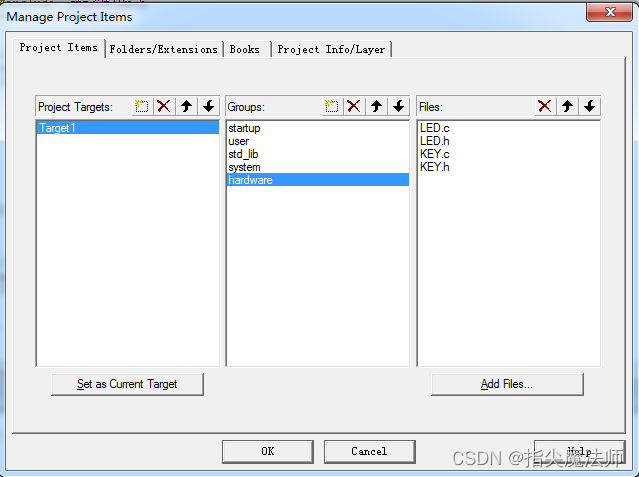
整体工程文件如下:


-
相关阅读:
[springboot专栏]redis分布式锁实现及常见问题解析
【Try to Hack】ip地址
-0001-11-30 00:00:00 如何处理返回‘-0001-11-30 00:00:00‘的MySQl null日期
RabbitMQ 简介
TiDB系列之:认识TiDB数据库,使用TiUP部署TiDB集群,同时部署TiCDC的详细步骤
Arm32进行远程调试
【数据结构】模拟实现string
Spring Boot 整合SpringSecurity和JWT和Redis实现统一鉴权认证
DDD - 一文读懂DDD领域驱动设计
1Panel 升级 Halo报错
- 原文地址:https://blog.csdn.net/veray/article/details/133713842
