-
Python操作Hive数据仓库
1、PyHive
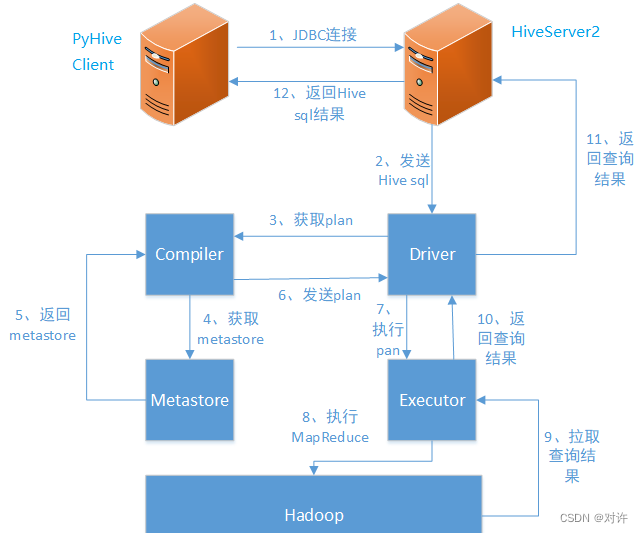
PyHive通过与HiveServer2通讯来操作Hive数据。当hiveserver2服务启动后,会开启10000的端口,对外提供服务,此时PyHive客户端通过JDBC连接hiveserver2进行Hive SQL操作
安装PyHive模块:
pip install pyhive- 1
前提条件:
1) 启动Hadoop集群

2) 使用
hiveserver2开启Hive的JDBC服务
基本使用:
import pandas as pd from pyhive import hive # 连接Hive服务端 conn = hive.Connection(host='bd91', port=10000, database='default') cursor = conn.cursor() # 执行HQL cursor.execute("select * from stu") # 转换为Pandas DataFrame columns = [col[0] for col in cursor.description] result = cursor.fetchall() df = pd.DataFrame(result, columns=columns) print(df.to_string())- 1
- 2
- 3
- 4
- 5
- 6
- 7
- 8
- 9
- 10
- 11
- 12
- 13
- 14
- 15
- 16
2、Impala
Python连接Hive也可以使用Impala查询引擎。Impala和Hive的通信方式与PyHive不同,Impala通过Thrift和Hive Metastore服务端建立连接,获取元数据信息,进而与HDFS交互

Thrift是一个轻量级、跨语言的RPC框架,主要用于服务间的RPC通信。Thrift由Facebook于2007年开发,2008年进入Apache开源项目
SASL模块是Python中用于实现SASL(Simple Authentication and Security Layer)认证的第三方库,提供了对各种SASL机制的支持,例如与Kafka、Hadoop等进行安全通信
经过验证,以下模块都是Python连接Hive的环境依赖:
pip install bitarray pip install bit_array pip install thrift pip install thriftpy pip install pure_sasl pip install --no-deps thrift-sasl==0.2.1- 1
- 2
- 3
- 4
- 5
- 6
安装Impala模块:
pip install impyla- 1
如果安装Impala报错:
ERROR: Failed building wheel for impyla- 1
则需要下载对应的whl文件安装:
Python扩展包whl文件下载:https://www.lfd.uci.edu/~gohlke/pythonlibs/
Ctrl+F查找需要的whl文件,点击下载对应版本安装:
pip install whl文件绝对路径- 1
基本使用:
from impala.dbapi import connect from impala.util import as_pandas # 连接Hive conn = connect(host='bd91', port=10000, auth_mechanism='PLAIN', user="root", password="123456", database="default") # 创建游标 cursor = conn.cursor() # 执行查询 cursor.execute("select * from stu") # 将结果转换为Pandas DataFrame df = as_pandas(cursor) print(df.to_string()) # 执行查询 cursor.execute("select * from hivecrud.s_log limit 3") # 结果转换为Pandas DataFrame df = as_pandas(cursor) print(df.to_string()) # 关闭连接 cursor.close() conn.close()- 1
- 2
- 3
- 4
- 5
- 6
- 7
- 8
- 9
- 10
- 11
- 12
- 13
- 14
- 15
- 16
- 17
- 18
- 19
- 20
结果如下:

-
相关阅读:
MySQL表名区分不区分大小写,规则是怎样
redis集群的三种方式
Java 18 介绍及其优势,高效利用
减少Spring Boot的JVM内存占用的Docker三种配置
【数据结构与算法】无重复字符的最长子串
如何批量为文件夹命名
Java 解决约瑟夫问题的示例代码
重学SpringBoot3-函数式Web
AIGC创作系统ChatGPT网站系统源码,支持最新GPT-4-Turbo模型
根据表名称快速查询表所有字段是否包含特定数据筛选
- 原文地址:https://blog.csdn.net/weixin_55629186/article/details/133716618