-
C#对字典容器Dictionary<TKey, TValue>内容进行XML序列化或反序列化报错解决方法
一、问题描述
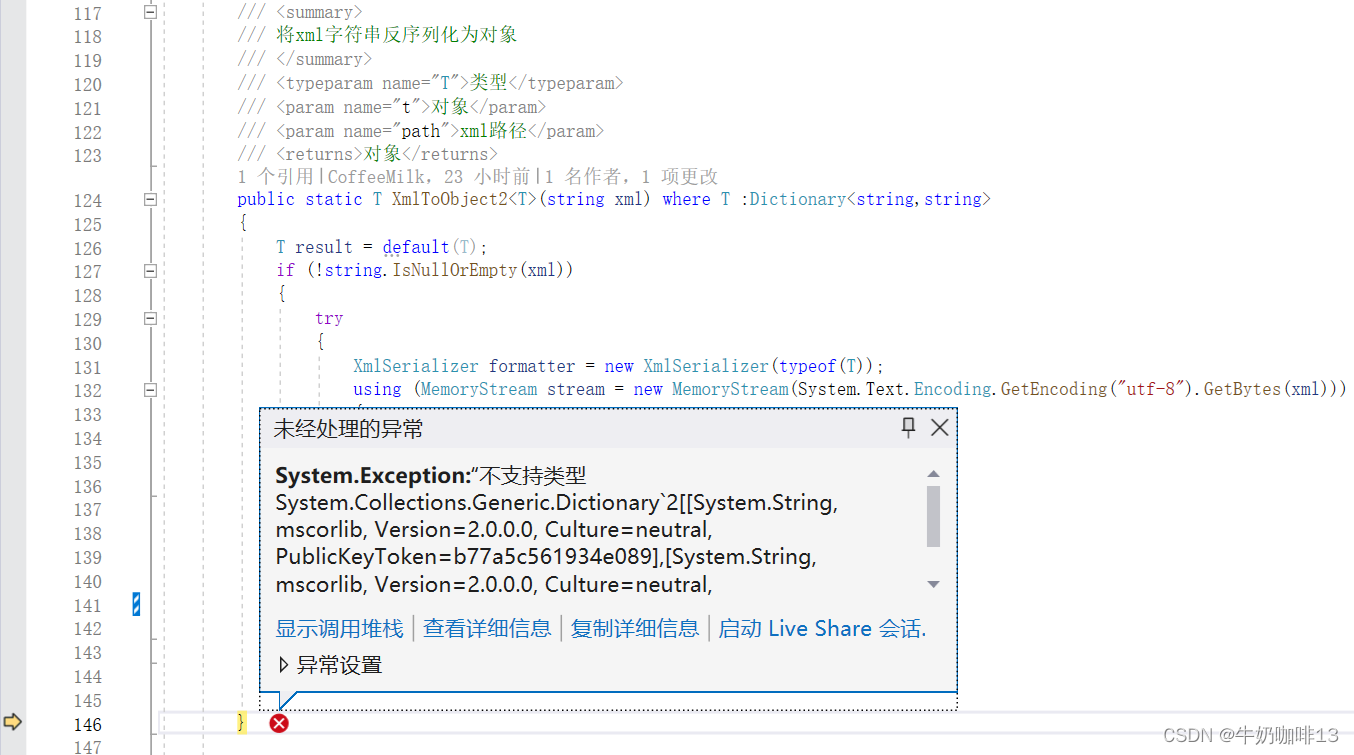
在使用C#对字典容器Dictionary

或反序列化操作时会报如下错误【System.Exception:“不支持类型 System.Collections.Generic.Dictionary`2[[System.String, mscorlib, Version=2.0.0.0, Culture=neutral, PublicKeyToken=b77a5c561934e089],[System.String, mscorlib, Version=2.0.0.0, Culture=neutral, PublicKeyToken=b77a5c561934e089]],因为它实现 IDictionary。”】如下图所示
二、问题分析
通过异常信息可以看到是由于XML序列化或反序列化程序导致报错,且该错误是由于IDictionary导致,通过反编译查看【System.Xml.Serialization.TypeScope】内容可以发现代码直接对IDictionary类型直接做返回异常处理,不让序列化或反序列化。

三、解决方法
1、创建一个新的类【DictionaryEx】,继承Dictionary
- using System.Collections.Generic;
- using System.Xml;
- using System.Xml.Schema;
- using System.Xml.Serialization;
- namespace Kernal
- {
- #region 可序列化字典类 + public class DictionaryEx
- ///
- /// 可序列化字典类
- ///
- ///
键泛型 - ///
值泛型 - [System.Serializable]
- public class DictionaryEx<TKey, TValue>
- : Dictionary<TKey, TValue>, IXmlSerializable
- {
- #region 构造函数
- #region 默认构造函数 + public DictionaryEx()
- ///
- /// 默认构造函数
- ///
- public DictionaryEx()
- : base()
- {
- }
- #endregion
- #region 构造函数 + public DictionaryEx(int capacity)
- ///
- /// 构造函数
- ///
- /// 可包含的初始元素数
- public DictionaryEx(int capacity)
- : base(capacity)
- {
- }
- #endregion
- #region 构造函数 + public DictionaryEx(IEqualityComparer
comparer) - ///
- /// 构造函数
- ///
- /// 比较键时要使用的 比较器 实现,或者为 null,以便为键类型使用默认的 比较器
- public DictionaryEx(IEqualityComparer
comparer ) - : base(comparer)
- {
- }
- #endregion
- #region 构造函数 + public DictionaryEx(IDictionary
- ///
- /// 构造函数
- ///
- /// 初始数据
- public DictionaryEx(IDictionary
- : base(dictionary)
- {
- }
- #endregion
- #region 构造函数 + public DictionaryEx(int capacity, IEqualityComparer
comparer) - ///
- /// 构造函数
- ///
- /// 可包含的初始元素数
- /// 比较键时要使用的 比较器 实现,或者为 null,以便为键类型使用默认的 比较器
- public DictionaryEx(int capacity, IEqualityComparer
comparer ) - : base(capacity, comparer)
- {
- }
- #endregion
- #region 构造函数 + public DictionaryEx(IDictionary
comparer) - ///
- /// 构造函数
- ///
- /// 初始数据
- /// 比较键时要使用的 比较器 实现,或者为 null,以便为键类型使用默认的 比较器
- public DictionaryEx(IDictionary
comparer - : base(dictionary, comparer)
- {
- }
- #endregion
- #endregion
- #region 取得概要 + public XmlSchema GetSchema()
- ///
- /// 取得概要
- /// 注:根据MSDN的文档,此方法为保留方法,一定返回 null。
- ///
- ///
Xml概要 - public XmlSchema GetSchema()
- {
- return null;
- }
- #endregion
- #region 从 XML 对象中反序列化生成本对象 + public void ReadXml(XmlReader reader)
- ///
- /// 从 XML 对象中反序列化生成本对象
- ///
- /// 包含反序列化对象的 XmlReader 流
- public void ReadXml(XmlReader reader)
- {
- XmlSerializer keySerializer = new XmlSerializer(typeof(TKey));
- XmlSerializer valueSerializer = new XmlSerializer(typeof(TValue));
- bool wasEmpty = reader.IsEmptyElement;
- reader.Read();
- if (wasEmpty) return;
- while (reader.NodeType != XmlNodeType.EndElement)
- {
- reader.ReadStartElement("Item");
- reader.ReadStartElement("Key");
- TKey key = (TKey)keySerializer.Deserialize(reader);
- reader.ReadEndElement();
- reader.ReadStartElement("Value");
- TValue value = (TValue)valueSerializer.Deserialize(reader);
- reader.ReadEndElement();
- this.Add(key, value);
- reader.ReadEndElement();
- reader.MoveToContent();
- }
- reader.ReadEndElement();
- }
- #endregion
- #region 将本对象序列化为 XML 对象 + public void WriteXml(XmlWriter writer)
- ///
- /// 将本对象序列化为 XML 对象
- ///
- /// 待写入的 XmlWriter 对象
- public void WriteXml(XmlWriter writer)
- {
- XmlSerializer keySerializer = new XmlSerializer(typeof(TKey));
- XmlSerializer valueSerializer = new XmlSerializer(typeof(TValue));
- foreach (TKey key in this.Keys)
- {
- writer.WriteStartElement("Item");
- writer.WriteStartElement("Key");
- keySerializer.Serialize(writer, key);
- writer.WriteEndElement();
- writer.WriteStartElement("Value");
- TValue value = this[key];
- valueSerializer.Serialize(writer, value);
- writer.WriteEndElement();
- writer.WriteEndElement();
- }
- }
- #endregion
- }
- #endregion
- }
2、将原来使用Dictionary的类替换为DictionaryEx类
- ///
- /// 保存语言信息
- ///
- private bool SaveFileExpandNameList(DictionaryEx<string,string> languageInfoDic, string languageFilePathAndName)
- {
- bool success = false;
- if (languageInfoDic != null && languageInfoDic.Count >= 0)
- {
- //将对象序列化为xml字符串
- string strXml = XmlHelper.ObjectToXml2(languageInfoDic);
- if (!string.IsNullOrEmpty(strXml))
- {
- //先清空文件
- FileOPC.Clear(languageFilePathAndName);
- //保存Json字符串文件(覆盖写入)
- success = FileOPC.OverWrite(languageFilePathAndName, strXml);
- }
- }
- return success;
- }
- ///
- /// 获取语言信息
- ///
- ///
返回语言信息字典 - private DictionaryEx<string, string> GetLanguageInfo(string languageFilePathAndName)
- {
- if (string.IsNullOrEmpty(languageFilePathAndName)) return null;
- DictionaryEx<string, string> languageInfoDic = new DictionaryEx<string, string>();
- //读取xml文件字符串
- string strXml = FileOPC.Read(languageFilePathAndName);
- //读取xml文件并序列化为对象
- languageInfoDic = XmlHelper.XmlToObject2
- return languageInfoDic;
- }
3、序列化DictionaryEx<TKey, TValue>容器内容的XML内容如下所示:

-
相关阅读:
你有了解过这些架构设计,架构知识体系吗?(架构书籍推荐)
多目标优化算法:基于非支配排序的小龙虾优化算法(NSCOA)MATLAB
Redis篇---第七篇
nginx常用命令
什么是向量嵌入?
Field extension
apache-atlas-hbase-hook源码分析
BUG:ERROR: Could not find a version that satisfies the requirement cython
Go语言知识查漏补缺|基本数据类型
pthread_detach函数的应用
- 原文地址:https://blog.csdn.net/xiaochenXIHUA/article/details/133716997
