-
Maven 构建Java项目
Maven 使用原型 archetype 插件创建项目。要创建一个简单的 Java 应用,我们将使用 maven-archetype-quickstart 插件。
在下面的例子中,我们将在 C:\MVN 文件夹下创建一个基于 maven 的 java 应用项目。
命令格式如下:
mvn archetype:generate "-DgroupId=com.companyname.bank" "-DartifactId=consumerBanking" "-DarchetypeArtifactId=maven-archetype-quickstart" "-DinteractiveMode=false"参数说明:
- -DgroupId: 组织名,公司网址的反写 + 项目名称
- -DartifactId: 项目名-模块名
- -DarchetypeArtifactId: 指定 ArchetypeId,maven-archetype-quickstart,创建一个简单的 Java 应用
- -DinteractiveMode: 是否使用交互模式
生成的文件夹结构如下:
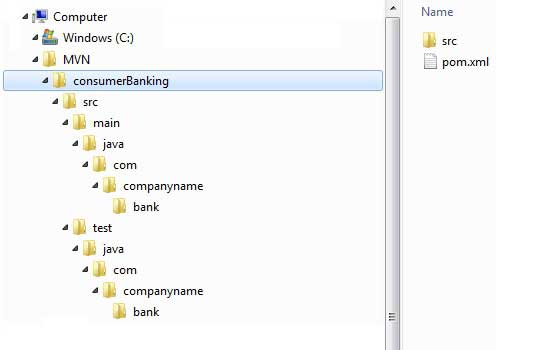
各个文件夹说明:
文件夹结构
描述
consumerBanking
包含 src 文件夹和 pom.xml
src/main/java contains
java 代码文件在包结构下(com/companyName/bank)。
src/main/java test
测试代码文件在包结构下(com/companyName/bank)。
src/main/resources
包含了 图片 / 属性 文件(在上面的例子中,我们需要手动创建这个结构)。
在 C:\MVN\consumerBanking\src\main\java\com\companyname\bank 文件夹中,可以看到一个 App.java,代码如下:
App.java
- package com.companyname.bank;
- /**
- * Hello world!
- *
- */
- public class App
- {
- public static void main( String[] args )
- {
- System.out.println( "Hello World!" );
- }
- }
打开 C:\MVN\consumerBanking\src\test\java\com\companyname\bank 文件夹,可以看到 Java 测试文件 AppTest.java。
AppTest.java
- package com.companyname.bank;
- import junit.framework.Test;
- import junit.framework.TestCase;
- import junit.framework.TestSuite;
- /**
- * Unit test for simple App.
- */
- public class AppTest extends TestCase
- {
- /**
- * Create the test case
- *
- * @param testName name of the test case
- */
- public AppTest( String testName )
- {
- super( testName );
- }
- /**
- * @return the suite of tests being tested
- */
- public static Test suite()
- {
- return new TestSuite( AppTest.class );
- }
- /**
- * Rigourous Test :-)
- */
- public void testApp()
- {
- assertTrue( true );
- }
- }
接下来的开发过程中我们只需要按照上面表格中提到的结构放置好,其他的事情 Maven 帮我们将会搞定。
-
相关阅读:
Excel 从多个文件提取指定的多行(固定行)进行汇总的工具
阿里云服务器公网带宽如何修改?
考华为认证有没有用,哪里可以考?
Python OpenCV #1 - OpenCV介绍
2023-09-20 Teaching Note for Class 1
表单相关元素
自定义注解实现多数据源+实现原理分析_02
C# 第五章『面向对象』◆第10节:委托
Pod 健康检查和服务可用性检查
【数据结构】c++栈的应用:波兰式、逆波兰式和中缀表达式计算器
- 原文地址:https://blog.csdn.net/h4241778/article/details/133710091
