-
自定义View的布局
1 自定义View的种类
1.1 继承XxxView,改写它们的尺寸:重写onMeasure()
1.2 继承View,对自定义View进行尺寸计算:重写onMeasure()
1.3 继承ViewGroup,自定义Layout:重写onMeasure()和onLayout()
2 自定义View的流程
View和ViewGroup的自定义流程基本相同,区别是View只需要绘制自己,而ViewGroup不仅要绘制自己,还要绘制其子View,因此ViewGroup的自定义绘制是重点。
View.java部分源码:
package android.view; @UiThread public class View implements Drawable.Callback, KeyEvent.Callback, AccessibilityEventSource { // 省略代码 /** * Implement this to do your drawing. * * @param canvas the canvas on which the background will be drawn */ protected void onDraw(@NonNull Canvas canvas) {// 该方法为空实现 } public void layout(int l, int t, int r, int b) { // 省略代码 } protected void onLayout(boolean changed, int left, int top, int right, int bottom) {// 该方法为空实现 } public final void measure(int widthMeasureSpec, int heightMeasureSpec) { // 省略代码 } protected void onMeasure(int widthMeasureSpec, int heightMeasureSpec) { setMeasuredDimension( getDefaultSize(getSuggestedMinimumWidth(), widthMeasureSpec), getDefaultSize(getSuggestedMinimumHeight(), heightMeasureSpec) ); } protected final void setMeasuredDimension(int measuredWidth, int measuredHeight) { boolean optical = isLayoutModeOptical(this); if (optical != isLayoutModeOptical(mParent)) { Insets insets = getOpticalInsets(); int opticalWidth = insets.left + insets.right; int opticalHeight = insets.top + insets.bottom; measuredWidth += optical ? opticalWidth : -opticalWidth; measuredHeight += optical ? opticalHeight : -opticalHeight; } setMeasuredDimensionRaw(measuredWidth, measuredHeight); } private void setMeasuredDimensionRaw(int measuredWidth, int measuredHeight) { mMeasuredWidth = measuredWidth; mMeasuredHeight = measuredHeight; mPrivateFlags |= PFLAG_MEASURED_DIMENSION_SET; } public static int resolveSize(int size, int measureSpec) { return resolveSizeAndState(size, measureSpec, 0) & MEASURED_SIZE_MASK; } public static int resolveSizeAndState(int size, int measureSpec, int childMeasuredState) { final int specMode = MeasureSpec.getMode(measureSpec); final int specSize = MeasureSpec.getSize(measureSpec); final int result; switch (specMode) { case MeasureSpec.AT_MOST: if (specSize < size) { result = specSize | MEASURED_STATE_TOO_SMALL; } else { result = size; } break; case MeasureSpec.EXACTLY: result = specSize; break; case MeasureSpec.UNSPECIFIED: default: result = size; } return result | (childMeasuredState & MEASURED_STATE_MASK); } // 省略代码 }- 1
- 2
- 3
- 4
- 5
- 6
- 7
- 8
- 9
- 10
- 11
- 12
- 13
- 14
- 15
- 16
- 17
- 18
- 19
- 20
- 21
- 22
- 23
- 24
- 25
- 26
- 27
- 28
- 29
- 30
- 31
- 32
- 33
- 34
- 35
- 36
- 37
- 38
- 39
- 40
- 41
- 42
- 43
- 44
- 45
- 46
- 47
- 48
- 49
- 50
- 51
- 52
- 53
- 54
- 55
- 56
- 57
- 58
- 59
- 60
- 61
- 62
- 63
- 64
- 65
- 66
- 67
- 68
- 69
- 70
- 71
- 72
- 73
- 74
- 75
- 76
- 77
- 78
- 79
- 80
ViewGroup.java部分源码,它没有onDraw()、measure()、onMeasure()这个三个方法:
package android.view; @UiThread public abstract class ViewGroup extends View implements ViewParent, ViewManager { // 省略代码 @Override public final void layout(int l, int t, int r, int b) { if (!mSuppressLayout && (mTransition == null || !mTransition.isChangingLayout())) { if (mTransition != null) { mTransition.layoutChange(this); } super.layout(l, t, r, b); } else { // record the fact that we noop'd it; request layout when transition finishes mLayoutCalledWhileSuppressed = true; } } @Override protected abstract void onLayout(boolean changed, int l, int t, int r, int b); // 省略代码 }- 1
- 2
- 3
- 4
- 5
- 6
- 7
- 8
- 9
- 10
- 11
- 12
- 13
- 14
- 15
- 16
- 17
- 18
- 19
- 20
- 21
- 22
- 23
- 24
一套完整的自定义View涉及测量、布局和绘制这三个步骤,分别对应onMeasure()、onLayout()、onDraw()。
2.1 onMeasure()
它是View.java中的方法,用于测量当前控件的大小,为正式布局提供建议(是否使用要看onLayout()的逻辑)。
它是View树自顶向下的遍历,每个View在循环过程中将尺寸细节往下传递,当测量过程完成之后,所有的View都保存了自己的尺寸。
测量完成后,要通过setMeasuredDimension(width, height)设置给系统。
setMeasuredDimension()提供的测量结果只是为布局提供建议的,最终的取用与否要看layout()。2.2 onLayout()
onLayout():使用layout()对所有子控件布局。它也是自顶向下的,每个父View负责通过计算好的尺寸放置它的子View。
getMeasuredWidth()与getWidth()的区别:
1、getMeasuredWidth()在measure()过程结束后就可以获取到宽度值,getWidth()要在layout()过程结束后才能获取到宽度值。
2、getMeasuredWidth()中的值是通过setMeasuredDimension()来进行设置的,而getWidth()中的值是通过layout()来设置的。如果在调用layout()时传入的宽度值不与getMeasuredWidth()的返回值相同,那么getMeasuredWidth()与getWidth()的返回值就不一样了,否则它们的值可能是一样的。
2.3 onDraw()
onDraw():根据布局的位置绘图
2.4 获取子控件的margin值
如果要自定义ViewGroup支持子控件的layout_margin参数,则自定义的ViewGroup类必须重写generateLayoutParams(),且在函数中返回一个ViewGroup.MarginLayoutParams派生类对象。
注意,View.java中没有generateLayoutParams()、MarginLayoutParams。ViewGroup部分源码:
package android.view; @UiThread public abstract class ViewGroup extends View implements ViewParent, ViewManager { // 省略代码 public LayoutParams generateLayoutParams(AttributeSet attrs) { return new LayoutParams(getContext(), attrs); } protected LayoutParams generateLayoutParams(ViewGroup.LayoutParams p) { return p; } protected LayoutParams generateDefaultLayoutParams() { return new LayoutParams(LayoutParams.WRAP_CONTENT, LayoutParams.WRAP_CONTENT); } protected void measureChildWithMargins( View child, int parentWidthMeasureSpec, int widthUsed, int parentHeightMeasureSpec, int heightUsed ) { final MarginLayoutParams lp = (MarginLayoutParams) child.getLayoutParams(); final int childWidthMeasureSpec = getChildMeasureSpec( parentWidthMeasureSpec, mPaddingLeft + mPaddingRight + lp.leftMargin + lp.rightMargin + widthUsed, lp.width ); final int childHeightMeasureSpec = getChildMeasureSpec( parentHeightMeasureSpec, mPaddingTop + mPaddingBottom + lp.topMargin + lp.bottomMargin + heightUsed, lp.height ); child.measure(childWidthMeasureSpec, childHeightMeasureSpec); } public static class LayoutParams { // 省略代码 public LayoutParams(Context c, AttributeSet attrs) { TypedArray a = c.obtainStyledAttributes(attrs, R.styleable.ViewGroup_Layout); setBaseAttributes( a, R.styleable.ViewGroup_Layout_layout_width, R.styleable.ViewGroup_Layout_layout_height ); a.recycle(); } public LayoutParams(int width, int height) { this.width = width; this.height = height; } public LayoutParams(LayoutParams source) { this.width = source.width; this.height = source.height; } /** * Used internally by MarginLayoutParams. * @hide */ @UnsupportedAppUsage LayoutParams() { //空参构造 } protected void setBaseAttributes(TypedArray a, int widthAttr, int heightAttr) { width = a.getLayoutDimension(widthAttr, "layout_width"); height = a.getLayoutDimension(heightAttr, "layout_height"); } // 省略代码 } public static class MarginLayoutParams extends ViewGroup.LayoutParams { // 省略代码 // 其中一个构造方法 public MarginLayoutParams(Context c, AttributeSet attrs) { super(); TypedArray a = c.obtainStyledAttributes(attrs, R.styleable.ViewGroup_MarginLayout); setBaseAttributes( a, R.styleable.ViewGroup_MarginLayout_layout_width, R.styleable.ViewGroup_MarginLayout_layout_height ); int margin = a.getDimensionPixelSize(com.android.internal.R.styleable.ViewGroup_MarginLayout_layout_margin, -1); if (margin >= 0) { leftMargin = margin; topMargin = margin; rightMargin= margin; bottomMargin = margin; } else { int horizontalMargin = a.getDimensionPixelSize( R.styleable.ViewGroup_MarginLayout_layout_marginHorizontal, -1); int verticalMargin = a.getDimensionPixelSize( R.styleable.ViewGroup_MarginLayout_layout_marginVertical, -1); if (horizontalMargin >= 0) { leftMargin = horizontalMargin; rightMargin = horizontalMargin; } else { leftMargin = a.getDimensionPixelSize( R.styleable.ViewGroup_MarginLayout_layout_marginLeft, UNDEFINED_MARGIN); if (leftMargin == UNDEFINED_MARGIN) { mMarginFlags |= LEFT_MARGIN_UNDEFINED_MASK; leftMargin = DEFAULT_MARGIN_RESOLVED; } rightMargin = a.getDimensionPixelSize( R.styleable.ViewGroup_MarginLayout_layout_marginRight, UNDEFINED_MARGIN); if (rightMargin == UNDEFINED_MARGIN) { mMarginFlags |= RIGHT_MARGIN_UNDEFINED_MASK; rightMargin = DEFAULT_MARGIN_RESOLVED; } } startMargin = a.getDimensionPixelSize( R.styleable.ViewGroup_MarginLayout_layout_marginStart, DEFAULT_MARGIN_RELATIVE); endMargin = a.getDimensionPixelSize( R.styleable.ViewGroup_MarginLayout_layout_marginEnd, DEFAULT_MARGIN_RELATIVE); if (verticalMargin >= 0) { topMargin = verticalMargin; bottomMargin = verticalMargin; } else { topMargin = a.getDimensionPixelSize( R.styleable.ViewGroup_MarginLayout_layout_marginTop, DEFAULT_MARGIN_RESOLVED); bottomMargin = a.getDimensionPixelSize( R.styleable.ViewGroup_MarginLayout_layout_marginBottom, DEFAULT_MARGIN_RESOLVED); } if (isMarginRelative()) { mMarginFlags |= NEED_RESOLUTION_MASK; } } final boolean hasRtlSupport = c.getApplicationInfo().hasRtlSupport(); final int targetSdkVersion = c.getApplicationInfo().targetSdkVersion; if (targetSdkVersion < JELLY_BEAN_MR1 || !hasRtlSupport) { mMarginFlags |= RTL_COMPATIBILITY_MODE_MASK; } // Layout direction is LTR by default mMarginFlags |= LAYOUT_DIRECTION_LTR; a.recycle(); } // 省略代码 } // 省略代码 }- 1
- 2
- 3
- 4
- 5
- 6
- 7
- 8
- 9
- 10
- 11
- 12
- 13
- 14
- 15
- 16
- 17
- 18
- 19
- 20
- 21
- 22
- 23
- 24
- 25
- 26
- 27
- 28
- 29
- 30
- 31
- 32
- 33
- 34
- 35
- 36
- 37
- 38
- 39
- 40
- 41
- 42
- 43
- 44
- 45
- 46
- 47
- 48
- 49
- 50
- 51
- 52
- 53
- 54
- 55
- 56
- 57
- 58
- 59
- 60
- 61
- 62
- 63
- 64
- 65
- 66
- 67
- 68
- 69
- 70
- 71
- 72
- 73
- 74
- 75
- 76
- 77
- 78
- 79
- 80
- 81
- 82
- 83
- 84
- 85
- 86
- 87
- 88
- 89
- 90
- 91
- 92
- 93
- 94
- 95
- 96
- 97
- 98
- 99
- 100
- 101
- 102
- 103
- 104
- 105
- 106
- 107
- 108
- 109
- 110
- 111
- 112
- 113
- 114
- 115
- 116
- 117
- 118
- 119
- 120
- 121
- 122
- 123
- 124
- 125
- 126
- 127
- 128
- 129
- 130
- 131
- 132
- 133
- 134
- 135
- 136
- 137
- 138
- 139
- 140
- 141
- 142
- 143
- 144
- 145
- 146
- 147
- 148
- 149
- 150
- 151
- 152
- 153
- 154
- 155
- 156
- 157
- 158
- 159
- 160
- 161
- 162
- 163
- 164
- 165
- 166
重写方法:
/** * 父容器生成 子view 的布局LayoutParams; * 一句话道出LayoutParams的本质:LayoutParams是Layout提供给其中的Children使用的。 * 如果要自定义ViewGroup支持子控件的layout_margin参数,则自定义的ViewGroup类必须重载generateLayoutParams()函数, * 并且在该函数中返回一个ViewGroup.MarginLayoutParams派生类对象,这样才能使用margin参数。 */ @Override protected LayoutParams generateLayoutParams(LayoutParams p) { return new MarginLayoutParams(p); } @Override public LayoutParams generateLayoutParams(AttributeSet attrs) { return new MarginLayoutParams(getContext(), attrs); } @Override protected LayoutParams generateDefaultLayoutParams() { return new MarginLayoutParams(LayoutParams.MATCH_PARENT, LayoutParams.MATCH_PARENT); }- 1
- 2
- 3
- 4
- 5
- 6
- 7
- 8
- 9
- 10
- 11
- 12
- 13
- 14
- 15
- 16
- 17
- 18
- 19
- 20
注意,如果在onLayout()中根据margin来布局,那么在onMeasure()中计算container大小时,要加上layout_margin参数,否则会导致container太小而控件显示不全的问题。即在onMeasure()和onLayout()中都需要考虑margin。
为什么要重写generateLayoutParams()呢?
因为默认的generateLayoutParams()只会提取layout_width和layout_height的值,只有MarginLayoutParams()才具有提取margin值的功能,具体可参见其源码。3 继承XxxView
继承已有的View,如ImageView,简单改写它们的尺寸:重写onMeasure()
1、重写onMeasure()
2、用getMeasuredWidth()和getMeasuredHeight()获取到测量出的尺寸
3、计算出最终需要的尺寸
4、用setMeasuredDimension(width, height)保存结果Talk is cheap. Show me the code.
package com.example.customview.layoutsize import android.content.Context import android.util.AttributeSet import androidx.appcompat.widget.AppCompatImageView import kotlin.math.min /** * 直接继承自一个ImageView */ class SquareImageView(context: Context, attrs: AttributeSet?) : AppCompatImageView(context, attrs) { override fun onMeasure(widthMeasureSpec: Int, heightMeasureSpec: Int) { super.onMeasure(widthMeasureSpec, heightMeasureSpec) val size = min(measuredWidth, measuredHeight) setMeasuredDimension(size, size) } }- 1
- 2
- 3
- 4
- 5
- 6
- 7
- 8
- 9
- 10
- 11
- 12
- 13
- 14
- 15
- 16
- 17
- 18
- 19
布局中直接引用
<androidx.constraintlayout.widget.ConstraintLayout xmlns:android="http://schemas.android.com/apk/res/android" xmlns:app="http://schemas.android.com/apk/res-auto" xmlns:tools="http://schemas.android.com/tools" android:layout_width="match_parent" android:layout_height="match_parent" tools:context=".MainActivity"> <com.example.customview.layoutsize.SquareImageView android:src="@drawable/tech" android:layout_width="200dp" android:layout_height="200dp" app:layout_constraintBottom_toBottomOf="parent" app:layout_constraintEnd_toEndOf="parent" app:layout_constraintStart_toStartOf="parent" app:layout_constraintTop_toTopOf="parent" /> androidx.constraintlayout.widget.ConstraintLayout>- 1
- 2
- 3
- 4
- 5
- 6
- 7
- 8
- 9
- 10
- 11
- 12
- 13
- 14
- 15
- 16
- 17
- 18
效果图

4 继承View
直接继承View,对自定义View完全进行自定义尺寸计算:重写onMeasure()
1、重写onMeasure()
2、计算出自己的尺寸
3、用resolveSize()或者resolveSizeAndState()修正结果
4、使用setMeasuredDimension(width, height)保存结果Talk is cheap. Show me the code.
package com.example.customview.layoutsize import android.content.Context import android.graphics.Canvas import android.graphics.Paint import android.util.AttributeSet import android.view.View import com.example.customview.func.dp /** * 直接继承自View */ private val RADIUS = 100.dp private val PADDING = 100.dp class CircleView(context: Context?, attrs: AttributeSet?) : View(context, attrs) { private val paint = Paint(Paint.ANTI_ALIAS_FLAG) override fun onMeasure(widthMeasureSpec: Int, heightMeasureSpec: Int) { val size = ((PADDING + RADIUS) * 2).toInt() val width = resolveSize(size, widthMeasureSpec) val height = resolveSize(size, heightMeasureSpec) setMeasuredDimension(width, height) } override fun onDraw(canvas: Canvas) { super.onDraw(canvas) canvas.drawCircle(PADDING + RADIUS, PADDING + RADIUS, RADIUS, paint) } }- 1
- 2
- 3
- 4
- 5
- 6
- 7
- 8
- 9
- 10
- 11
- 12
- 13
- 14
- 15
- 16
- 17
- 18
- 19
- 20
- 21
- 22
- 23
- 24
- 25
- 26
- 27
- 28
- 29
- 30
- 31
布局引用
<androidx.constraintlayout.widget.ConstraintLayout xmlns:android="http://schemas.android.com/apk/res/android" xmlns:app="http://schemas.android.com/apk/res-auto" xmlns:tools="http://schemas.android.com/tools" android:layout_width="match_parent" android:layout_height="match_parent" tools:context=".MainActivity"> <com.example.customview.layoutsize.CircleView android:layout_width="wrap_content" android:layout_height="wrap_content" app:layout_constraintBottom_toBottomOf="parent" app:layout_constraintEnd_toEndOf="parent" app:layout_constraintStart_toStartOf="parent" app:layout_constraintTop_toTopOf="parent" /> androidx.constraintlayout.widget.ConstraintLayout>- 1
- 2
- 3
- 4
- 5
- 6
- 7
- 8
- 9
- 10
- 11
- 12
- 13
- 14
- 15
- 16
- 17
效果图

5 继承ViewGroup
直接继承ViewGroup,自定义Layout:重写onMeasure()和onLayout()
1、重写onMeasure()
1.1 遍历每个子View,测量子View
1.1.1 测量完成后,得出子View的实际位置和尺寸,并暂时保存
1.1.2 有些子View可能需要重新测量
1.2 测量出所有子View的位置和尺寸后,计算自己的尺寸,并用setMeasuredDimension(width, height)保存
2、重写onLayout()
2.1 遍历每个子View,调用它们的layout()方法将位置和尺寸传给它们Talk is cheap. Show me the code.
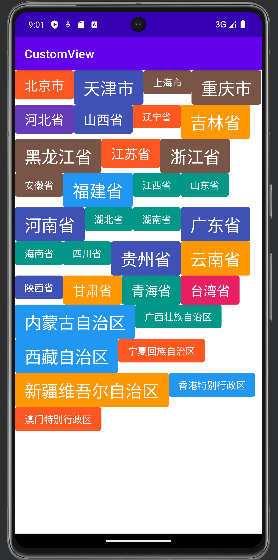
5.1 未处理margin属性
先画一个ColoredTextView
package com.example.customview.layoutlayout import android.content.Context import android.graphics.Canvas import android.graphics.Color import android.graphics.Paint import android.util.AttributeSet import androidx.appcompat.widget.AppCompatTextView import com.example.customview.func.dp import java.util.Random private val COLORS = intArrayOf( Color.parseColor("#E91E63"), Color.parseColor("#673AB7"), Color.parseColor("#3F51B5"), Color.parseColor("#2196F3"), Color.parseColor("#009688"), Color.parseColor("#FF9800"), Color.parseColor("#FF5722"), Color.parseColor("#795548") ) /** * 给定不同大小的字体 */ //private val TEXT_SIZES = intArrayOf(22, 22, 22) private val TEXT_SIZES = intArrayOf(16, 22, 28) private val CORNER_RADIUS = 4.dp private val X_PADDING = 16.dp.toInt() private val Y_PADDING = 8.dp.toInt() class ColoredTextView(context: Context, attrs: AttributeSet?) : AppCompatTextView(context, attrs) { private var paint = Paint(Paint.ANTI_ALIAS_FLAG) private val random = Random() init { setTextColor(Color.WHITE) textSize = TEXT_SIZES[random.nextInt(3)].toFloat() paint.color = COLORS[random.nextInt(COLORS.size)] setPadding(X_PADDING, Y_PADDING, X_PADDING, Y_PADDING) } override fun onDraw(canvas: Canvas) { canvas.drawRoundRect( 0f, 0f, width.toFloat(), height.toFloat(), CORNER_RADIUS, CORNER_RADIUS, paint ) super.onDraw(canvas) } }- 1
- 2
- 3
- 4
- 5
- 6
- 7
- 8
- 9
- 10
- 11
- 12
- 13
- 14
- 15
- 16
- 17
- 18
- 19
- 20
- 21
- 22
- 23
- 24
- 25
- 26
- 27
- 28
- 29
- 30
- 31
- 32
- 33
- 34
- 35
- 36
- 37
- 38
- 39
- 40
- 41
- 42
- 43
- 44
- 45
- 46
- 47
- 48
- 49
- 50
- 51
- 52
- 53
- 54
- 55
- 56
- 57
自定义TagLayout,用于展示多个ColoredTextView
package com.example.customview.layoutlayout import android.content.Context import android.graphics.Rect import android.util.AttributeSet import android.view.ViewGroup import androidx.core.view.children import kotlin.math.max /** * 注意:本例未处理TextView的宽、高的margin,因此效果图中的TextView会挤在一起 */ class TagLayout(context: Context?, attrs: AttributeSet?) : ViewGroup(context, attrs) { /** * 子View集合 */ private val childrenBounds = mutableListOf<Rect>() /** * 1、重写onMeasure() */ override fun onMeasure(widthMeasureSpec: Int, heightMeasureSpec: Int) { // 非当前行的历史最大行宽 var widthUsed = 0 // 非当前行的累积行高(每行不断累加,不重置) var heightUsed = 0 // 当前行行宽(当前行已绘制的子View累加,换行时重置) var lineWidthUsed = 0 // 当前行最大行高(换行时重置) var lineMaxHeight = 0 // 当前期望行宽的尺寸 val specWidthSize = MeasureSpec.getSize(widthMeasureSpec) // 当前期望行宽的模式 val specWidthMode = MeasureSpec.getMode(widthMeasureSpec) // 1.1 遍历每个子View,测量子View for ((index, child) in children.withIndex()) { // 1.1.1 测量单行子View的实际位置和尺寸 measureChildWithMargins(child, widthMeasureSpec, 0, heightMeasureSpec, heightUsed) // 处理换行 if (specWidthMode != MeasureSpec.UNSPECIFIED && lineWidthUsed + child.measuredWidth > specWidthSize) { lineWidthUsed = 0 heightUsed += lineMaxHeight lineMaxHeight = 0 measureChildWithMargins(child, widthMeasureSpec, 0, heightMeasureSpec, heightUsed) } /* 第一次childrenBounds为空,index = childrenBounds.size,需要添加。 再往后index < childrenBounds.size,故不会出现大于的情况。 即该条件只会执行一次,因此可以写在for循环中。 */ if (index >= childrenBounds.size) { childrenBounds.add(Rect()) } // 1.1.1 测量完成后,暂时保存子View的实际位置和尺寸 val childBounds = childrenBounds[index] childBounds.set( lineWidthUsed, heightUsed, lineWidthUsed + child.measuredWidth, heightUsed + child.measuredHeight ) lineWidthUsed += child.measuredWidth widthUsed = max(widthUsed, lineWidthUsed) lineMaxHeight = max(lineMaxHeight, child.measuredHeight) } // 1.2 测量出所有子View的位置和尺寸后,计算自己的尺寸,并用setMeasuredDimension(width, height)保存 val selfWidth = widthUsed val selfHeight = heightUsed + lineMaxHeight setMeasuredDimension(selfWidth, selfHeight) } /** * 2、重写onLayout() */ override fun onLayout(changed: Boolean, l: Int, t: Int, r: Int, b: Int) { // 2.1 遍历每个子View,调用它们的layout()方法将位置和尺寸传给它们 for ((index, child) in children.withIndex()) { val childBounds = childrenBounds[index] child.layout(childBounds.left, childBounds.top, childBounds.right, childBounds.bottom) } } /** * measureChildWithMargins()的源码中有以下代码进行强转, * final MarginLayoutParams lp = (MarginLayoutParams) child.getLayoutParams(); * 重写generateLayoutParams()后可避免强转时报错 */ override fun generateLayoutParams(attrs: AttributeSet?): LayoutParams { return MarginLayoutParams(context, attrs) } }- 1
- 2
- 3
- 4
- 5
- 6
- 7
- 8
- 9
- 10
- 11
- 12
- 13
- 14
- 15
- 16
- 17
- 18
- 19
- 20
- 21
- 22
- 23
- 24
- 25
- 26
- 27
- 28
- 29
- 30
- 31
- 32
- 33
- 34
- 35
- 36
- 37
- 38
- 39
- 40
- 41
- 42
- 43
- 44
- 45
- 46
- 47
- 48
- 49
- 50
- 51
- 52
- 53
- 54
- 55
- 56
- 57
- 58
- 59
- 60
- 61
- 62
- 63
- 64
- 65
- 66
- 67
- 68
- 69
- 70
- 71
- 72
- 73
- 74
- 75
- 76
- 77
- 78
- 79
- 80
- 81
- 82
- 83
- 84
- 85
- 86
- 87
- 88
- 89
- 90
- 91
- 92
- 93
- 94
- 95
- 96
- 97
- 98
布局文件
<com.example.customview.layoutlayout.TagLayout xmlns:android="http://schemas.android.com/apk/res/android" android:layout_width="match_parent" android:layout_height="match_parent"> <com.example.customview.layoutlayout.ColoredTextView android:layout_width="wrap_content" android:layout_height="wrap_content" android:text="北京市" /> <com.example.customview.layoutlayout.ColoredTextView android:layout_width="wrap_content" android:layout_height="wrap_content" android:text="天津市" /> <com.example.customview.layoutlayout.ColoredTextView android:layout_width="wrap_content" android:layout_height="wrap_content" android:text="上海市" /> <com.example.customview.layoutlayout.ColoredTextView android:layout_width="wrap_content" android:layout_height="wrap_content" android:text="重庆市" /> <com.example.customview.layoutlayout.ColoredTextView android:layout_width="wrap_content" android:layout_height="wrap_content" android:text="河北省" /> <com.example.customview.layoutlayout.ColoredTextView android:layout_width="wrap_content" android:layout_height="wrap_content" android:text="山西省" /> <com.example.customview.layoutlayout.ColoredTextView android:layout_width="wrap_content" android:layout_height="wrap_content" android:text="辽宁省" /> <com.example.customview.layoutlayout.ColoredTextView android:layout_width="wrap_content" android:layout_height="wrap_content" android:text="吉林省" /> <com.example.customview.layoutlayout.ColoredTextView android:layout_width="wrap_content" android:layout_height="wrap_content" android:text="黑龙江省" /> <com.example.customview.layoutlayout.ColoredTextView android:layout_width="wrap_content" android:layout_height="wrap_content" android:text="江苏省" /> <com.example.customview.layoutlayout.ColoredTextView android:layout_width="wrap_content" android:layout_height="wrap_content" android:text="浙江省" /> <com.example.customview.layoutlayout.ColoredTextView android:layout_width="wrap_content" android:layout_height="wrap_content" android:text="安徽省" /> <com.example.customview.layoutlayout.ColoredTextView android:layout_width="wrap_content" android:layout_height="wrap_content" android:text="福建省" /> <com.example.customview.layoutlayout.ColoredTextView android:layout_width="wrap_content" android:layout_height="wrap_content" android:text="江西省" /> <com.example.customview.layoutlayout.ColoredTextView android:layout_width="wrap_content" android:layout_height="wrap_content" android:text="山东省" /> <com.example.customview.layoutlayout.ColoredTextView android:layout_width="wrap_content" android:layout_height="wrap_content" android:text="河南省" /> <com.example.customview.layoutlayout.ColoredTextView android:layout_width="wrap_content" android:layout_height="wrap_content" android:text="湖北省" /> <com.example.customview.layoutlayout.ColoredTextView android:layout_width="wrap_content" android:layout_height="wrap_content" android:text="湖南省" /> <com.example.customview.layoutlayout.ColoredTextView android:layout_width="wrap_content" android:layout_height="wrap_content" android:text="广东省" /> <com.example.customview.layoutlayout.ColoredTextView android:layout_width="wrap_content" android:layout_height="wrap_content" android:text="海南省" /> <com.example.customview.layoutlayout.ColoredTextView android:layout_width="wrap_content" android:layout_height="wrap_content" android:text="四川省" /> <com.example.customview.layoutlayout.ColoredTextView android:layout_width="wrap_content" android:layout_height="wrap_content" android:text="贵州省" /> <com.example.customview.layoutlayout.ColoredTextView android:layout_width="wrap_content" android:layout_height="wrap_content" android:text="云南省" /> <com.example.customview.layoutlayout.ColoredTextView android:layout_width="wrap_content" android:layout_height="wrap_content" android:text="陕西省" /> <com.example.customview.layoutlayout.ColoredTextView android:layout_width="wrap_content" android:layout_height="wrap_content" android:text="甘肃省" /> <com.example.customview.layoutlayout.ColoredTextView android:layout_width="wrap_content" android:layout_height="wrap_content" android:text="青海省" /> <com.example.customview.layoutlayout.ColoredTextView android:layout_width="wrap_content" android:layout_height="wrap_content" android:text="台湾省" /> <com.example.customview.layoutlayout.ColoredTextView android:layout_width="wrap_content" android:layout_height="wrap_content" android:text="内蒙古自治区" /> <com.example.customview.layoutlayout.ColoredTextView android:layout_width="wrap_content" android:layout_height="wrap_content" android:text="广西壮族自治区" /> <com.example.customview.layoutlayout.ColoredTextView android:layout_width="wrap_content" android:layout_height="wrap_content" android:text="西藏自治区" /> <com.example.customview.layoutlayout.ColoredTextView android:layout_width="wrap_content" android:layout_height="wrap_content" android:text="宁夏回族自治区" /> <com.example.customview.layoutlayout.ColoredTextView android:layout_width="wrap_content" android:layout_height="wrap_content" android:text="新疆维吾尔自治区" /> <com.example.customview.layoutlayout.ColoredTextView android:layout_width="wrap_content" android:layout_height="wrap_content" android:text="香港特别行政区" /> <com.example.customview.layoutlayout.ColoredTextView android:layout_width="wrap_content" android:layout_height="wrap_content" android:text="澳门特别行政区" /> com.example.customview.layoutlayout.TagLayout>- 1
- 2
- 3
- 4
- 5
- 6
- 7
- 8
- 9
- 10
- 11
- 12
- 13
- 14
- 15
- 16
- 17
- 18
- 19
- 20
- 21
- 22
- 23
- 24
- 25
- 26
- 27
- 28
- 29
- 30
- 31
- 32
- 33
- 34
- 35
- 36
- 37
- 38
- 39
- 40
- 41
- 42
- 43
- 44
- 45
- 46
- 47
- 48
- 49
- 50
- 51
- 52
- 53
- 54
- 55
- 56
- 57
- 58
- 59
- 60
- 61
- 62
- 63
- 64
- 65
- 66
- 67
- 68
- 69
- 70
- 71
- 72
- 73
- 74
- 75
- 76
- 77
- 78
- 79
- 80
- 81
- 82
- 83
- 84
- 85
- 86
- 87
- 88
- 89
- 90
- 91
- 92
- 93
- 94
- 95
- 96
- 97
- 98
- 99
- 100
- 101
- 102
- 103
- 104
- 105
- 106
- 107
- 108
- 109
- 110
- 111
- 112
- 113
- 114
- 115
- 116
- 117
- 118
- 119
- 120
- 121
- 122
- 123
- 124
- 125
- 126
- 127
- 128
- 129
- 130
- 131
- 132
- 133
- 134
- 135
- 136
- 137
- 138
- 139
- 140
- 141
- 142
- 143
- 144
- 145
- 146
- 147
- 148
- 149
- 150
- 151
- 152
- 153
- 154
- 155
- 156
- 157
- 158
- 159
- 160
- 161
- 162
- 163
- 164
- 165
- 166
- 167
- 168
- 169
- 170
- 171
- 172
- 173
- 174
- 175
- 176
效果图(没有处理margin,所以挤在一起)
5.2 处理marigin
给每个ColoredTextView添加一个margin属性,如
<com.example.customview.layoutlayout.ColoredTextView android:layout_width="wrap_content" android:layout_height="wrap_content" android:layout_margin="4dp" android:text="北京市" />- 1
- 2
- 3
- 4
- 5
设置margin后的代码,改动较小,可对比查看
package com.example.customview.layoutlayout import android.content.Context import android.graphics.Rect import android.util.AttributeSet import android.view.ViewGroup import androidx.core.view.children import kotlin.math.max /** * 设置了TextView的margin,仅修改了onMeasure()中的部分参数,其余代码未改动 */ class TagLayout(context: Context?, attrs: AttributeSet?) : ViewGroup(context, attrs) { /** * 子View集合 */ private val childrenBounds = mutableListOf<Rect>() /** * 1、重写onMeasure() */ override fun onMeasure(widthMeasureSpec: Int, heightMeasureSpec: Int) { // 非当前行的历史最大行宽 var widthUsed = 0 // 非当前行的累积行高(每行不断累加,不重置) var heightUsed = 0 // 当前行行宽(当前行已绘制的子View累加,换行时重置) var lineWidthUsed = 0 // 当前行最大行高(换行时重置) var lineMaxHeight = 0 // 当前期望行宽的尺寸 val specWidthSize = MeasureSpec.getSize(widthMeasureSpec) // 当前期望行宽的模式 val specWidthMode = MeasureSpec.getMode(widthMeasureSpec) // 1.1 遍历每个子View,测量子View for ((index, child) in children.withIndex()) { // 1.1.1 测量单行子View的实际位置和尺寸 measureChildWithMargins(child, widthMeasureSpec, 0, heightMeasureSpec, heightUsed) // 设置margin var mlp: MarginLayoutParams = child.layoutParams as MarginLayoutParams var childWidth = child.measuredWidth + mlp.leftMargin + mlp.rightMargin var childHeight = child.measuredHeight + mlp.topMargin + mlp.bottomMargin // 处理换行 if (specWidthMode != MeasureSpec.UNSPECIFIED && lineWidthUsed + childWidth > specWidthSize) { lineWidthUsed = 0 heightUsed += lineMaxHeight lineMaxHeight = 0 measureChildWithMargins(child, widthMeasureSpec, 0, heightMeasureSpec, heightUsed) } /* 第一次childrenBounds为空,index = childrenBounds.size,需要添加。 再往后index < childrenBounds.size,故不会出现大于的情况。 即该条件只会执行一次,因此可以写在for循环中。 */ if (index >= childrenBounds.size) { childrenBounds.add(Rect()) } // 1.1.1 测量完成后,暂时保存子View的实际位置和尺寸 val childBounds = childrenBounds[index] childBounds.set( lineWidthUsed + mlp.leftMargin, heightUsed + mlp.topMargin, lineWidthUsed + childWidth, heightUsed + childHeight ) lineWidthUsed += childWidth widthUsed = max(widthUsed, lineWidthUsed) lineMaxHeight = max(lineMaxHeight, childHeight) } // 1.2 测量出所有子View的位置和尺寸后,计算自己的尺寸,并用setMeasuredDimension(width, height)保存 val selfWidth = widthUsed val selfHeight = heightUsed + lineMaxHeight setMeasuredDimension(selfWidth, selfHeight) } /** * 2、重写onLayout() */ override fun onLayout(changed: Boolean, l: Int, t: Int, r: Int, b: Int) { // 2.1 遍历每个子View,调用它们的layout()方法将位置和尺寸传给它们 for ((index, child) in children.withIndex()) { val childBounds = childrenBounds[index] child.layout(childBounds.left, childBounds.top, childBounds.right, childBounds.bottom) } } /** * measureChildWithMargins()的源码中有以下代码进行强转, * final MarginLayoutParams lp = (MarginLayoutParams) child.getLayoutParams(); * 重写generateLayoutParams()后可避免强转时报错 */ override fun generateLayoutParams(attrs: AttributeSet?): LayoutParams { return MarginLayoutParams(context, attrs) } }- 1
- 2
- 3
- 4
- 5
- 6
- 7
- 8
- 9
- 10
- 11
- 12
- 13
- 14
- 15
- 16
- 17
- 18
- 19
- 20
- 21
- 22
- 23
- 24
- 25
- 26
- 27
- 28
- 29
- 30
- 31
- 32
- 33
- 34
- 35
- 36
- 37
- 38
- 39
- 40
- 41
- 42
- 43
- 44
- 45
- 46
- 47
- 48
- 49
- 50
- 51
- 52
- 53
- 54
- 55
- 56
- 57
- 58
- 59
- 60
- 61
- 62
- 63
- 64
- 65
- 66
- 67
- 68
- 69
- 70
- 71
- 72
- 73
- 74
- 75
- 76
- 77
- 78
- 79
- 80
- 81
- 82
- 83
- 84
- 85
- 86
- 87
- 88
- 89
- 90
- 91
- 92
- 93
- 94
- 95
- 96
- 97
- 98
- 99
- 100
- 101
- 102
- 103
添加margin后的效果图:

添加margin,且统一字体大小:

参考文献
[1] 扔物线官网
[2] 启舰.Android自定义控件开发入门与实战[M].北京:电子工业出版社,2018微信公众号:TechU

-
相关阅读:
go radix tree
HDMI 输出实验
基于华为云服务器Docker nginx安装和配置挂载
【苹果群发推】iMessage推送这是促进服务器的Apple消息
APS选型时需要考虑哪些因素?
DP之背包基础
机器视觉知识讲的深不如讲的透
齐岳离子液体[C1MIm]SbF6/cas:885624-41-9/1,3-二甲基咪唑六氟锑酸盐/分子式:C5H9F6N2Sb
【JavaSE】类与对象(下)this引用是什么?构造方法是什么?
mybatis
- 原文地址:https://blog.csdn.net/ykmeory/article/details/133361799
