-
Flutter横屏实践

1、Flutter设置横屏
// 强制横屏 SystemChrome.setPreferredOrientations([ DeviceOrientation.landscapeLeft, DeviceOrientation.landscapeRight ]); // 强制竖屏 SystemChrome.setPreferredOrientations( [DeviceOrientation.portraitUp, DeviceOrientation.portraitDown]);- 1
- 2
- 3
- 4
- 5
- 6
- 7
- 8
另外建议
1、把所有横竖屏调用封装到一个方法中,便于维护
2、开启放super后面,关闭放super前面
void initState() { super.initState(); AppUtil().setScreenLandscape(true); } void dispose() { AppUtil().setScreenLandscape(false); super.dispose(); }- 1
- 2
- 3
- 4
- 5
- 6
- 7
- 8
- 9
- 10
- 11
2、原生设置横屏
在实践过程中发现ios偶尔有横屏转不过来的现象,如果你也遇到了可以考虑原生设置横屏。
android原生
if (screenLandscape) { // 设置屏幕为横向 activity.setRequestedOrientation(ActivityInfo.SCREEN_ORIENTATION_LANDSCAPE); } else { // 设置屏幕为纵向 activity.setRequestedOrientation(ActivityInfo.SCREEN_ORIENTATION_PORTRAIT); }- 1
- 2
- 3
- 4
- 5
- 6
- 7
如果需要相机、相册等系统应用也能横屏,可以打开允许自动旋转权限
// 检查是否打开自动屏幕旋转 public static boolean checkAutoRotate(Activity activity) { // android系统设置权限 if (!Settings.System.canWrite(activity)) { activity.runOnUiThread(() -> Toast.makeText(activity, "请允许修改系统设置权限!", Toast.LENGTH_SHORT).show()); // 没有系统设置权限 -> 跳转到系统设置页面 new Thread(() -> { try { sleep(500); } catch (InterruptedException e) { throw new RuntimeException(e); } Intent intent = new Intent(Settings.ACTION_MANAGE_WRITE_SETTINGS); intent.setData(Uri.parse("package:" + activity.getPackageName())); activity.startActivityForResult(intent, 1); }).start(); return false; } else { // 有系统设置权限 -> 打开手机屏幕方向自动旋转(参数备注:1为开,0为关) Settings.System.putInt(activity.getContentResolver(), Settings.System.ACCELEROMETER_ROTATION, 1); return true; } }- 1
- 2
- 3
- 4
- 5
- 6
- 7
- 8
- 9
- 10
- 11
- 12
- 13
- 14
- 15
- 16
- 17
- 18
- 19
- 20
- 21
- 22
- 23
ios原生
NSDictionary *dict = call.arguments; bool screenLandscape = [dict[@"screenLandscape"] boolValue]; UIInterfaceOrientation val = screenLandscape ? UIInterfaceOrientationLandscapeLeft : UIInterfaceOrientationPortrait; [weakSelf ll_interfaceOrientation:val]; result([JYJUtils dictionaryToJson:@{}]);- 1
- 2
- 3
- 4
- 5
3、横竖屏适配
横竖屏适配在flutter端实现,我这里只需要横屏,因此检测到竖屏会再次调用切换横屏
OrientationBuilder( builder: (context, orientation) { if (orientation == Orientation.portrait) { return PortraitPage(); } else { return LandscapePage(); } }, ) // 竖屏 PortraitPage() { AppUtil().setScreenLandscape(true); return Column( mainAxisSize: MainAxisSize.max, children: [ CustomBar( title: _titleString(longTitle: true), ), Expanded( child: Center( child: Text('请旋转横屏使用'), ), ), ], ); } // 横屏 LandscapePage() { final double statusBarHeight = Platform.isIOS ? 35 : MediaQuery.of(context).padding.top; return Container( margin: EdgeInsets.only(top: statusBarHeight, left: 30, right: 30), ); }- 1
- 2
- 3
- 4
- 5
- 6
- 7
- 8
- 9
- 10
- 11
- 12
- 13
- 14
- 15
- 16
- 17
- 18
- 19
- 20
- 21
- 22
- 23
- 24
- 25
- 26
- 27
- 28
- 29
- 30
- 31
- 32
- 33
- 34
- 35
- 36
4、flutter 横屏android没有铺满
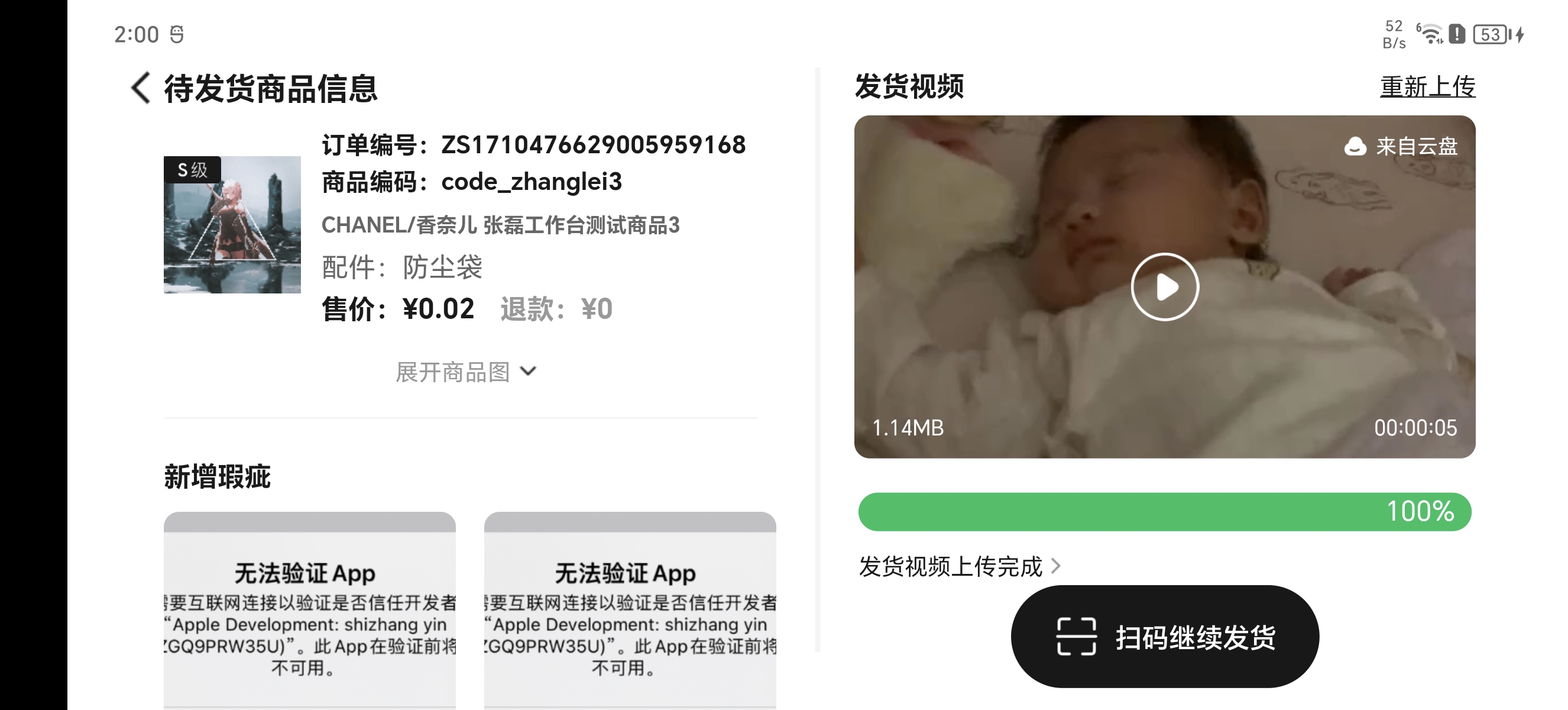
解决办法
打开项目下android/app/src/main/res/values/styles.xml添加
<item name="android:windowLayoutInDisplayCutoutMode">shortEdgesitem>- 1
<resources> <style name="LaunchTheme" parent="@android:style/Theme.Light.NoTitleBar">- "android:windowBackground"
>@drawable/launch_background style> <style name="NormalTheme" parent="@android:style/Theme.Light.NoTitleBar">- "android:windowBackground"
>?android:colorBackground- "android:windowLayoutInDisplayCutoutMode"
>shortEdges style> resources>LaunchTheme下为启动页配置,NormalTheme下为普通页面配置- 1
- 2
- 3
- 4
- 5
- 6
- 7
- 8
- 9
- 10
-
相关阅读:
关于vue跳转,以及如果写框架时候,保留左边和顶部
CLR的GC工作模式介绍(Workstation和Server)
Glide源码解析二---into方法
C++ list的模拟实现
美团笔试2022.8.6
ArcGIS:如何制作数据统计图?
PKDGAN: Private Knowledge Distillation with Generative Adversarial Networks
【debian】常用指令
使用Grpc实现高性能PHP RPC服务
Ubuntu 配置 Github 的 SSH keys
- 原文地址:https://blog.csdn.net/liuxingyuzaixian/article/details/133643904
