-
基于SpringBoot的网上超市系统
基于SpringBoot的网上超市系统的设计与实现
- 开发语言:Java
- 数据库:MySQL
- 技术:SpringBoot+MyBatis
- 工具:IDEA/Ecilpse、Navicat、Maven
【主要功能】
-
角色:用户、管理员
-
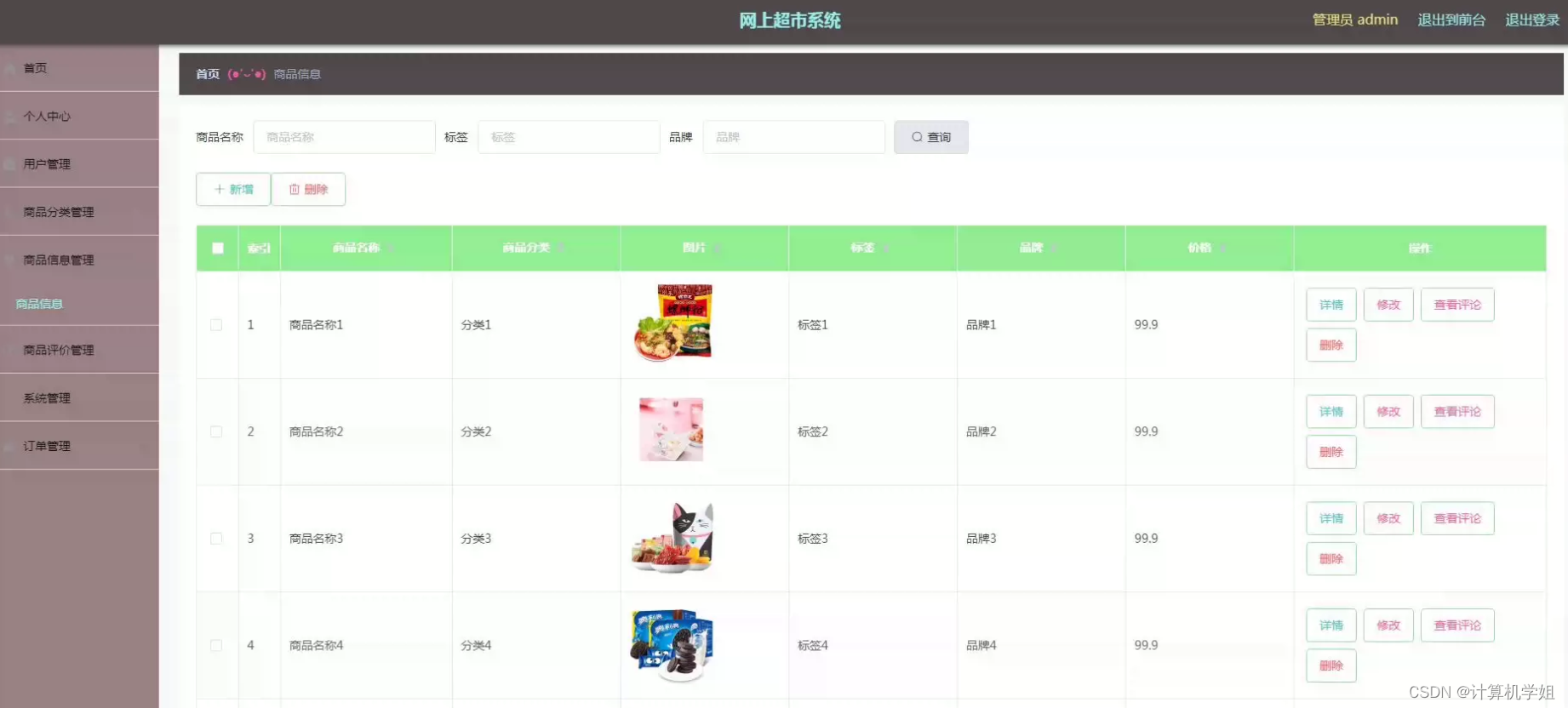
管理员:个人中心、用户管理、商品分类管理、商品信息管理、商品评价管理、系统管理、订单管理、管理员登录等。
-
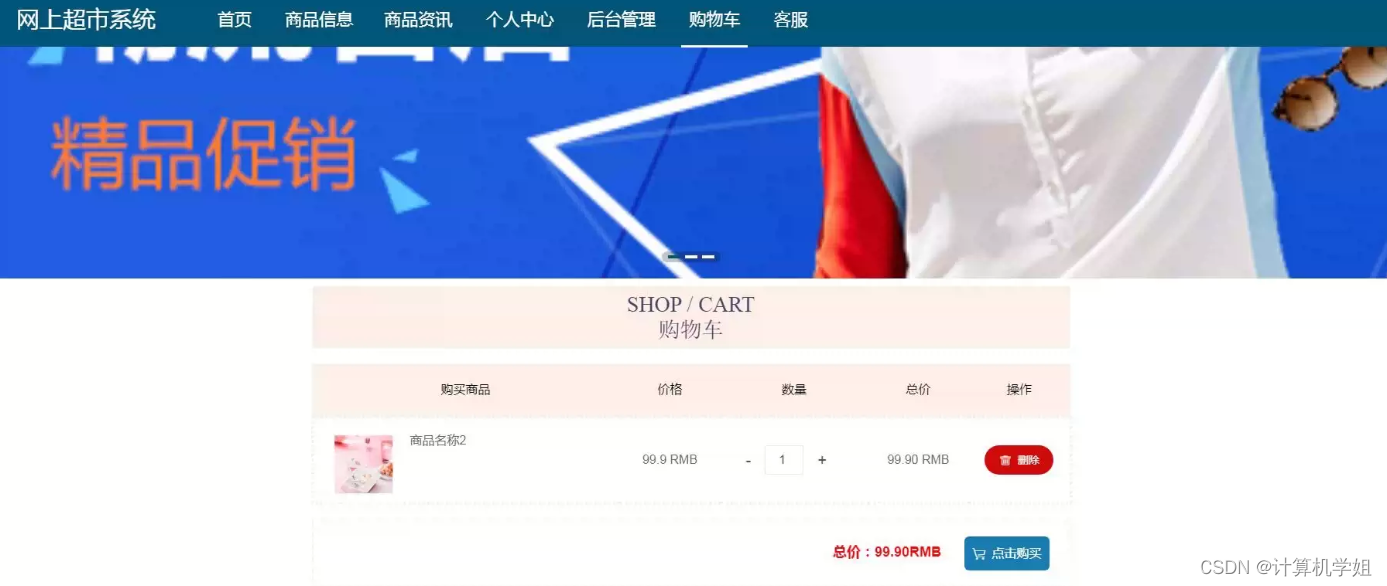
用户:商品信息、商品资讯、购物车、我的订单、联系客服、个人中心、商品评价管理、我的收藏管理、注册登录等。
系统展示
商品详情

购物车
管理员界面
商品管理
用户管理

摘要
随着互联网的快速发展,网上购物已经成为人们生活中不可或缺的一部分。为了满足消费者日益增长的网购需求,各种电子商务平台如雨后春笋般涌现。本文介绍了一种基于SpringBoot框架开发的网上超市系统,旨在提供一种便捷、高效、安全的在线购物体验。该系统采用了SpringBoot作为后端框架,以其快速开发和简化配置的特性,实现了系统的快速迭代和维护。前端界面采用了现代化的Web技术,如HTML5、CSS3和JavaScript,以确保用户可以在各种设备上流畅浏览和购物。系统还充分利用了响应式设计,以适应不同屏幕尺寸和分辨率,从而为用户提供一致的用户体验。网上超市系统的核心功能包括商品管理、购物车管理、订单管理和用户管理。商品管理模块允许管理员添加、编辑和删除商品信息,包括商品名称、价格、库存等。购物车管理模块允许用户将所需商品添加到购物车,随时查看购物车中的商品和总金额,并进行结算。订单管理模块允许用户查看历史订单、订单状态以及订单详情。用户管理模块允许用户注册、登录、修改个人信息等操作,以提供个性化的服务。为了确保系统的安全性,网上超市系统实施了用户身份认证和授权机制,防止未授权访问和数据泄露。同时,系统还采用了支付安全协议,以保障用户的支付信息安全。此外,系统还实施了数据备份和恢复机制,以应对意外数据丢失的情况。
研究意义
基于SpringBoot的网上超市系统的研究具有重要的实际意义和科研价值,以下是一些研究意义的方面:
-
满足现代消费需求: 随着互联网的普及,人们对于便捷、高效、安全的网购体验的需求日益增长。这个系统的研究和开发可以满足消费者的现代购物需求,提供更好的购物体验。
-
促进电子商务发展: 电子商务已经成为全球经济的一个重要组成部分。该系统的开发和优化有助于推动电子商务行业的进一步发展,为在线商家和消费者创造更多商机。
-
技术创新: 通过采用现代化的Web技术和响应式设计,该系统在技术上具有创新性。研究人员可以在系统的基础上进行技术创新和改进,推动Web应用开发领域的进步。
-
商业机会: 基于该系统的研究和开发可以为企业提供商业机会。在线超市、零售商和电子商务平台可以利用该系统构建自己的网上商店,提供更好的购物体验,吸引更多客户。
-
数据分析和决策支持: 该系统可以生成大量的交易数据和用户行为数据。这些数据可以用于市场分析、用户行为分析和销售预测,有助于企业制定更明智的战略和决策。
-
教育和培训: 该系统可以用于教育和培训目的。学生和开发人员可以使用它来学习SpringBoot框架、Web开发技术以及电子商务系统的设计和开发。
-
社会影响: 基于SpringBoot的网上超市系统可以促进社会的数字化转型,降低线下购物的时间和成本,减少交通拥堵,有助于可持续发展。
总之,该系统的研究对于满足现代消费者需求、促进电子商务发展、推动技术创新、提供商业机会以及为数据分析和决策支持等方面都具有重要的研究意义和实际应用价值。它有望在多个领域产生积极的影响。
代码展示
package com.controller; import java.io.File; import java.math.BigDecimal; import java.net.URL; import java.text.SimpleDateFormat; import com.alibaba.fastjson.JSONObject; import java.util.*; import org.springframework.beans.BeanUtils; import javax.servlet.http.HttpServletRequest; import org.springframework.web.context.ContextLoader; import javax.servlet.ServletContext; import com.service.TokenService; import com.utils.*; import java.lang.reflect.InvocationTargetException; import com.service.DictionaryService; import org.apache.commons.lang3.StringUtils; import com.annotation.IgnoreAuth; import org.slf4j.Logger; import org.slf4j.LoggerFactory; import org.springframework.beans.factory.annotation.Autowired; import org.springframework.stereotype.Controller; import org.springframework.web.bind.annotation.*; import com.baomidou.mybatisplus.mapper.EntityWrapper; import com.baomidou.mybatisplus.mapper.Wrapper; import com.entity.*; import com.entity.view.*; import com.service.*; import com.utils.PageUtils; import com.utils.R; import com.alibaba.fastjson.*; /** * 公告 * 后端接口 * @author * @email */ @RestController @Controller @RequestMapping("/news") public class NewsController { private static final Logger logger = LoggerFactory.getLogger(NewsController.class); @Autowired private NewsService newsService; @Autowired private TokenService tokenService; @Autowired private DictionaryService dictionaryService; //级联表service @Autowired private YonghuService yonghuService; /** * 后端列表 */ @RequestMapping("/page") public R page(@RequestParam Map<String, Object> params, HttpServletRequest request){ logger.debug("page方法:,,Controller:{},,params:{}",this.getClass().getName(),JSONObject.toJSONString(params)); String role = String.valueOf(request.getSession().getAttribute("role")); if(StringUtil.isEmpty(role)) return R.error(511,"权限为空"); else if("用户".equals(role)) params.put("yonghuId",request.getSession().getAttribute("userId")); if(params.get("orderBy")==null || params.get("orderBy")==""){ params.put("orderBy","id"); } PageUtils page = newsService.queryPage(params); //字典表数据转换 List<NewsView> list =(List<NewsView>)page.getList(); for(NewsView c:list){ //修改对应字典表字段 dictionaryService.dictionaryConvert(c, request); } return R.ok().put("data", page); } /** * 后端详情 */ @RequestMapping("/info/{id}") public R info(@PathVariable("id") Long id, HttpServletRequest request){ logger.debug("info方法:,,Controller:{},,id:{}",this.getClass().getName(),id); NewsEntity news = newsService.selectById(id); if(news !=null){ //entity转view NewsView view = new NewsView(); BeanUtils.copyProperties( news , view );//把实体数据重构到view中 //修改对应字典表字段 dictionaryService.dictionaryConvert(view, request); return R.ok().put("data", view); }else { return R.error(511,"查不到数据"); } } /** * 后端保存 */ @RequestMapping("/save") public R save(@RequestBody NewsEntity news, HttpServletRequest request){ logger.debug("save方法:,,Controller:{},,news:{}",this.getClass().getName(),news.toString()); String role = String.valueOf(request.getSession().getAttribute("role")); if(StringUtil.isEmpty(role)) return R.error(511,"权限为空"); Wrapper<NewsEntity> queryWrapper = new EntityWrapper<NewsEntity>() .eq("news_name", news.getNewsName()) .eq("news_types", news.getNewsTypes()) ; logger.info("sql语句:"+queryWrapper.getSqlSegment()); NewsEntity newsEntity = newsService.selectOne(queryWrapper); if(newsEntity==null){ news.setInsertTime(new Date()); news.setCreateTime(new Date()); newsService.insert(news); return R.ok(); }else { return R.error(511,"表中有相同数据"); } } /** * 后端修改 */ @RequestMapping("/update") public R update(@RequestBody NewsEntity news, HttpServletRequest request){ logger.debug("update方法:,,Controller:{},,news:{}",this.getClass().getName(),news.toString()); String role = String.valueOf(request.getSession().getAttribute("role")); Wrapper<NewsEntity> queryWrapper = new EntityWrapper<NewsEntity>() .notIn("id",news.getId()) .andNew() .eq("news_name", news.getNewsName()) .eq("news_types", news.getNewsTypes()) ; logger.info("sql语句:"+queryWrapper.getSqlSegment()); NewsEntity newsEntity = newsService.selectOne(queryWrapper); if("".equals(news.getNewsPhoto()) || "null".equals(news.getNewsPhoto())){ news.setNewsPhoto(null); } if(newsEntity==null){ newsService.updateById(news);//根据id更新 return R.ok(); }else { return R.error(511,"表中有相同数据"); } } /** * 删除 */ @RequestMapping("/delete") public R delete(@RequestBody Integer[] ids){ logger.debug("delete:,,Controller:{},,ids:{}",this.getClass().getName(),ids.toString()); newsService.deleteBatchIds(Arrays.asList(ids)); return R.ok(); } /** * 批量上传 */ @RequestMapping("/batchInsert") public R save( String fileName){ logger.debug("batchInsert方法:,,Controller:{},,fileName:{}",this.getClass().getName(),fileName); try { List<NewsEntity> newsList = new ArrayList<>();//上传的东西 Map<String, List<String>> seachFields= new HashMap<>();//要查询的字段 Date date = new Date(); int lastIndexOf = fileName.lastIndexOf("."); if(lastIndexOf == -1){ return R.error(511,"该文件没有后缀"); }else{ String suffix = fileName.substring(lastIndexOf); if(!".xls".equals(suffix)){ return R.error(511,"只支持后缀为xls的excel文件"); }else{ URL resource = this.getClass().getClassLoader().getResource("static/upload/" + fileName);//获取文件路径 File file = new File(resource.getFile()); if(!file.exists()){ return R.error(511,"找不到上传文件,请联系管理员"); }else{ List<List<String>> dataList = PoiUtil.poiImport(file.getPath());//读取xls文件 dataList.remove(0);//删除第一行,因为第一行是提示 for(List<String> data:dataList){ //循环 NewsEntity newsEntity = new NewsEntity(); newsList.add(newsEntity); //把要查询是否重复的字段放入map中 } //查询是否重复 newsService.insertBatch(newsList); return R.ok(); } } } }catch (Exception e){ return R.error(511,"批量插入数据异常,请联系管理员"); } } /** * 前端列表 */ @IgnoreAuth @RequestMapping("/list") public R list(@RequestParam Map<String, Object> params, HttpServletRequest request){ logger.debug("list方法:,,Controller:{},,params:{}",this.getClass().getName(),JSONObject.toJSONString(params)); // 没有指定排序字段就默认id倒序 if(StringUtil.isEmpty(String.valueOf(params.get("orderBy")))){ params.put("orderBy","id"); } PageUtils page = newsService.queryPage(params); //字典表数据转换 List<NewsView> list =(List<NewsView>)page.getList(); for(NewsView c:list) dictionaryService.dictionaryConvert(c, request); //修改对应字典表字段 return R.ok().put("data", page); } /** * 前端详情 */ @RequestMapping("/detail/{id}") public R detail(@PathVariable("id") Long id, HttpServletRequest request){ logger.debug("detail方法:,,Controller:{},,id:{}",this.getClass().getName(),id); NewsEntity news = newsService.selectById(id); if(news !=null){ //entity转view NewsView view = new NewsView(); BeanUtils.copyProperties( news , view );//把实体数据重构到view中 //修改对应字典表字段 dictionaryService.dictionaryConvert(view, request); return R.ok().put("data", view); }else { return R.error(511,"查不到数据"); } } /** * 前端保存 */ @RequestMapping("/add") public R add(@RequestBody NewsEntity news, HttpServletRequest request){ logger.debug("add方法:,,Controller:{},,news:{}",this.getClass().getName(),news.toString()); Wrapper<NewsEntity> queryWrapper = new EntityWrapper<NewsEntity>() .eq("news_name", news.getNewsName()) .eq("news_types", news.getNewsTypes()) ; logger.info("sql语句:"+queryWrapper.getSqlSegment()); NewsEntity newsEntity = newsService.selectOne(queryWrapper); if(newsEntity==null){ news.setInsertTime(new Date()); news.setCreateTime(new Date()); newsService.insert(news); return R.ok(); }else { return R.error(511,"表中有相同数据"); } } }- 1
- 2
- 3
- 4
- 5
- 6
- 7
- 8
- 9
- 10
- 11
- 12
- 13
- 14
- 15
- 16
- 17
- 18
- 19
- 20
- 21
- 22
- 23
- 24
- 25
- 26
- 27
- 28
- 29
- 30
- 31
- 32
- 33
- 34
- 35
- 36
- 37
- 38
- 39
- 40
- 41
- 42
- 43
- 44
- 45
- 46
- 47
- 48
- 49
- 50
- 51
- 52
- 53
- 54
- 55
- 56
- 57
- 58
- 59
- 60
- 61
- 62
- 63
- 64
- 65
- 66
- 67
- 68
- 69
- 70
- 71
- 72
- 73
- 74
- 75
- 76
- 77
- 78
- 79
- 80
- 81
- 82
- 83
- 84
- 85
- 86
- 87
- 88
- 89
- 90
- 91
- 92
- 93
- 94
- 95
- 96
- 97
- 98
- 99
- 100
- 101
- 102
- 103
- 104
- 105
- 106
- 107
- 108
- 109
- 110
- 111
- 112
- 113
- 114
- 115
- 116
- 117
- 118
- 119
- 120
- 121
- 122
- 123
- 124
- 125
- 126
- 127
- 128
- 129
- 130
- 131
- 132
- 133
- 134
- 135
- 136
- 137
- 138
- 139
- 140
- 141
- 142
- 143
- 144
- 145
- 146
- 147
- 148
- 149
- 150
- 151
- 152
- 153
- 154
- 155
- 156
- 157
- 158
- 159
- 160
- 161
- 162
- 163
- 164
- 165
- 166
- 167
- 168
- 169
- 170
- 171
- 172
- 173
- 174
- 175
- 176
- 177
- 178
- 179
- 180
- 181
- 182
- 183
- 184
- 185
- 186
- 187
- 188
- 189
- 190
- 191
- 192
- 193
- 194
- 195
- 196
- 197
- 198
- 199
- 200
- 201
- 202
- 203
- 204
- 205
- 206
- 207
- 208
- 209
- 210
- 211
- 212
- 213
- 214
- 215
- 216
- 217
- 218
- 219
- 220
- 221
- 222
- 223
- 224
- 225
- 226
- 227
- 228
- 229
- 230
- 231
- 232
- 233
- 234
- 235
- 236
- 237
- 238
- 239
- 240
- 241
- 242
- 243
- 244
- 245
- 246
- 247
- 248
- 249
- 250
- 251
- 252
- 253
- 254
- 255
- 256
- 257
- 258
- 259
- 260
- 261
- 262
- 263
- 264
- 265
- 266
- 267
- 268
- 269
- 270
- 271
- 272
- 273
- 274
- 275
- 276
- 277
- 278
- 279
- 280
- 281
- 282
- 283
数据库设计
基于SpringBoot的网上超市系统的数据库设计是该系统成功实现的关键之一。以下是一个简单的数据库设计示例,包括表的结构和它们之间的关系。
-
用户表 (User)
- 用户ID (UserID) - 主键
- 用户名 (Username)
- 密码 (Password) - 可能需要加密存储
- 电子邮件 (Email)
- 手机号码 (Phone)
- 地址 (Address)
- 注册时间 (RegistrationTime)
-
商品表 (Product)
- 商品ID (ProductID) - 主键
- 商品名称 (ProductName)
- 商品描述 (ProductDescription)
- 商品价格 (Price)
- 商品库存 (Stock)
-
购物车表 (ShoppingCart)
- 购物车ID (CartID) - 主键
- 用户ID (UserID) - 外键,关联到用户表
- 商品ID (ProductID) - 外键,关联到商品表
- 数量 (Quantity)
-
订单表 (Order)
- 订单ID (OrderID) - 主键
- 用户ID (UserID) - 外键,关联到用户表
- 订单日期 (OrderDate)
- 订单状态 (OrderStatus) - 如待付款、已付款、已发货等
- 订单总金额 (TotalAmount)
-
订单详情表 (OrderDetail)
- 订单详情ID (OrderDetailID) - 主键
- 订单ID (OrderID) - 外键,关联到订单表
- 商品ID (ProductID) - 外键,关联到商品表
- 商品数量 (Quantity)
- 商品单价 (UnitPrice)
- 商品小计 (Subtotal)
这是一个简单的数据库设计示例,可以根据实际需求进行扩展和优化。数据库表之间的关系需要根据业务逻辑建立,例如,用户和购物车之间是一对多的关系,一个用户可以有多个购物车记录;订单和订单详情之间是一对多的关系,一个订单可以包含多个订单详情。
总结
总之,基于SpringBoot的网上超市系统为用户提供了一种方便、高效和安全的网购体验,满足了现代生活中的购物需求。它的快速开发和维护特性使其成为电子商务行业的有力工具,有望为在线购物行业的进一步发展做出贡献。
-
相关阅读:
【PAT甲级 - C++题解】1049 Counting Ones
4位密码锁可修改密码及错误报警VHDL
3.6研究代码(2)
codeforces:D. Chip Move【dp + 逆向思维考虑】
QT webengine显示HTML简单示例
力扣94二叉树的中序遍历
MySQL(基础篇)——函数、约束
网络安全(黑客)自学
web:[极客大挑战 2019]Havefun
gitlab访问报错: Whoops, GitLab is taking too much time to respond
- 原文地址:https://blog.csdn.net/2301_78335941/article/details/133578865
