-
【QT】Qt Application Manager启动应用源码分析
Qt Application Manager启动应用源码分析
- Qt Application Manager(以下简称QTAM)是QT推出的一款应用管理程序,可以把它简单理解成Android的Launcher+SystemUI。但是,QTAM又集成了Wayland功能,并且自身实现了一套Compositor。QTAM以多进程启动情况下(默认),其地位相当于 Launcher+SystemUI+Compositor。
- 关于QTAM的基本介绍可以参考《Qt Application Manager简介》
启用应用
-
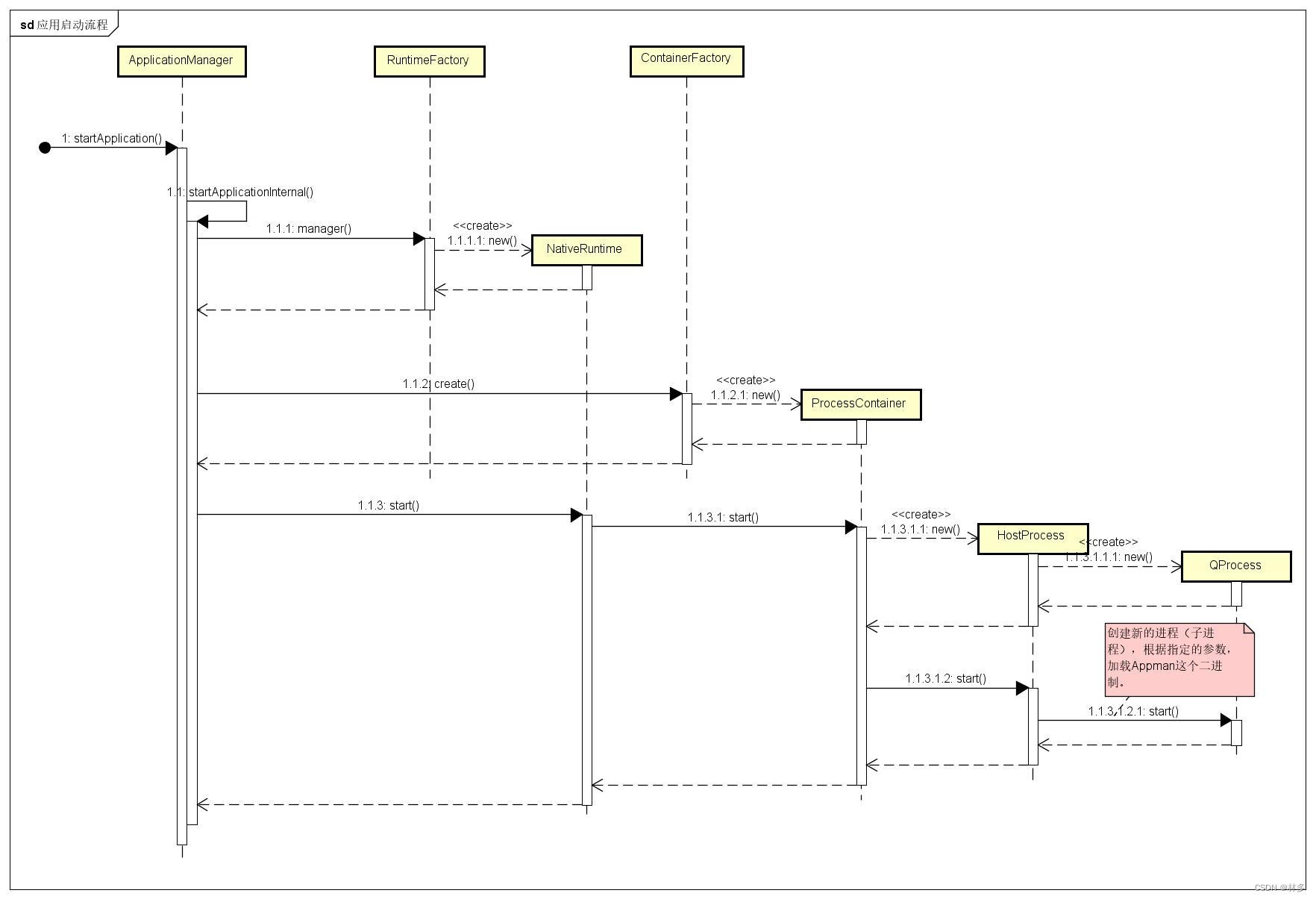
QTAM作为一款应用管理程序,适用于嵌入式端(如车载)应用。利用QT开发的应用程序只需要简单适配一下QTAM的规范,可以大幅度减少开发一套应用管理程序的成本。同时QTAM支持QML方式。应用管理最基本的功能,是应用的启动。下面基于QTAM 6.2.2版本进行分析。
-
启动应用的接口ApplicationManager:: startApplication,该接口可以以C++或QML的形式调用(下述摘取了部分源码)
// src\manager-lib\applicationmanager.h class ApplicationManager : public QAbstractListModel { Q_OBJECT Q_CLASSINFO("D-Bus Interface", "io.qt.ApplicationManager") Q_CLASSINFO("AM-QmlType", "QtApplicationManager.SystemUI/ApplicationManager 2.0 SINGLETON") public: // 通过C++和QML互相调用的方式,QML端也可以调用到该接口。 // 关于QML调用C++,网上文章比较多可自行百度。 Q_SCRIPTABLE bool startApplication(const QString &id, const QString &documentUrl = QString()); } // src\manager-lib\applicationmanager.cpp bool ApplicationManager::startApplication(const QString &id, const QString &documentUrl) { try { return startApplicationInternal(id, documentUrl); } catch (const Exception &e) { qCWarning(LogSystem) << e.what(); return false; } } // src\manager-lib\applicationmanager.cpp bool ApplicationManager::startApplicationInternal(const QString &appId, const QString &documentUrl, const QString &documentMimeType, const QString &debugWrapperSpecification, const QVector<int> &stdioRedirections) Q_DECL_NOEXCEPT_EXPR(false) { // 根据appid,获取到应用信息。appid唯一标识应用 Application *app = fromId(appId); // 获取应用的RunTime,Runtime可以理解为应用运行时。QTAM提供多种Runtime,比如NativeRuntime、QML Runtime等。 AbstractRuntime *runtime = app->currentRuntime(); auto runtimeManager = runtime ? runtime->manager() : RuntimeFactory::instance()->manager(app->runtimeName()); if (!runtimeManager) throw Exception("No RuntimeManager found for runtime: %1").arg(app->runtimeName()); // 判断QtAM运行的是多进程模式,还是单进程模式(默认为多进程模式,即每个应用以单独的进程启动) bool inProcess = runtimeManager->inProcess(); // 判断当前rimtime的状态。 应用的状态为 StartingUp-> Running -> ShuttingDown -> NotRunning // 第一次启动时,这里为NotRunning if (runtime) { switch (runtime->state()) { case Am::StartingUp: case Am::Running: if (!debugWrapperCommand.isEmpty()) { throw Exception("Application %1 is already running - cannot start with debug-wrapper: %2") .arg(app->id(), debugWrapperSpecification); } // documentUrl为应用入口。比如一个QML文件。 if (!documentUrl.isNull()) runtime->openDocument(documentUrl, documentMimeType); else if (!app->documentUrl().isNull()) runtime->openDocument(app->documentUrl(), documentMimeType); // 激活App emitActivated(app); return true; case Am::ShuttingDown: return false; case Am::NotRunning: break; } } // container指应用运行上下文(Context) AbstractContainer *container = nullptr; QString containerId; // 如果是多进程模式 if (!inProcess) { if (d->containerSelectionConfig.isEmpty()) { // 默认使用ProcessContainer containerId = qSL("process"); } else { // check config file for (const auto &it : qAsConst(d->containerSelectionConfig)) { const QString &key = it.first; const QString &value = it.second; bool hasAsterisk = key.contains(qL1C('*')); if ((hasAsterisk && key.length() == 1) || (!hasAsterisk && key == app->id()) || QRegularExpression(QRegularExpression::wildcardToRegularExpression(key)).match(app->id()).hasMatch()) { containerId = value; break; } } } if (d->containerSelectionFunction.isCallable()) { QJSValueList args = { QJSValue(app->id()), QJSValue(containerId) }; containerId = d->containerSelectionFunction.call(args).toString(); } if (!ContainerFactory::instance()->manager(containerId)) throw Exception("No ContainerManager found for container: %1").arg(containerId); } bool attachRuntime = false; if (!runtime) { if (!inProcess) { // 快启动模式,可以理解为预先启动几个(有上限)的Runtime+Contianer,预先加载了一些资源。 if (QuickLauncher::instance()) { // 该情况比较特殊,不考虑。 } if (!container) { // 创建Container container = ContainerFactory::instance()->create(containerId, app, stdioRedirections, debugEnvironmentVariables, debugWrapperCommand); } else { container->setApplication(app); } if (!container) { qCCritical(LogSystem) << "ERROR: Couldn't create Container for Application (" << app->id() <<")!"; return false; } if (runtime) attachRuntime = true; } if (!runtime) runtime = RuntimeFactory::instance()->create(container, app); if (runtime) emit internalSignals.newRuntimeCreated(runtime); } if (!runtime) { qCCritical(LogSystem) << "ERROR: Couldn't create Runtime for Application (" << app->id() <<")!"; return false; } // 绑定信号与槽。监听应用状态变化。 connect(runtime, &AbstractRuntime::stateChanged, this, [this, app](Am::RunState newRuntimeState) { app->setRunState(newRuntimeState); emit applicationRunStateChanged(app->id(), newRuntimeState); emitDataChanged(app, QVector<int> { IsRunning, IsStartingUp, IsShuttingDown }); }); // 加载应用入口。 if (!documentUrl.isNull()) runtime->openDocument(documentUrl, documentMimeType); else if (!app->documentUrl().isNull()) runtime->openDocument(app->documentUrl(), documentMimeType); if (inProcess) { // 如果是单进程模式(以线程方式启动应用) bool ok = runtime->start(); if (ok) emitActivated(app); else runtime->deleteLater(); return ok; } else { // We can only start the app when both the container and the windowmanager are ready. // Using a state-machine would be one option, but then we would need that state-machine // object plus the per-app state. Relying on 2 lambdas is the easier choice for now. // 多进程模式下,QTAM需要完成了Compositor初始化,才可以启动应用。 auto doStartInContainer = [this, app, attachRuntime, runtime]() -> bool { // 首次启动应用默认走 runtime->start() bool successfullyStarted = attachRuntime ? runtime->attachApplicationToQuickLauncher(app) : runtime->start(); if (successfullyStarted) emitActivated(app); else runtime->deleteLater(); // ~Runtime() will clean app->nonAliased()->m_runtime return successfullyStarted; }; auto tryStartInContainer = [container, doStartInContainer]() -> bool { if (container->isReady()) { // Since the container is already ready, start the app immediately return doStartInContainer(); } else { // We postpone the starting of the application to a later point in time, // since the container is not ready yet # if defined(Q_CC_MSVC) qApp->connect(container, &AbstractContainer::ready, doStartInContainer); // MSVC cannot distinguish between static and non-static overloads in lambdas # else connect(container, &AbstractContainer::ready, doStartInContainer); #endif return true; } }; if (isWindowManagerCompositorReady()) { return tryStartInContainer(); } else { connect(this, &ApplicationManager::windowManagerCompositorReadyChanged, tryStartInContainer); return true; } } }- 1
- 2
- 3
- 4
- 5
- 6
- 7
- 8
- 9
- 10
- 11
- 12
- 13
- 14
- 15
- 16
- 17
- 18
- 19
- 20
- 21
- 22
- 23
- 24
- 25
- 26
- 27
- 28
- 29
- 30
- 31
- 32
- 33
- 34
- 35
- 36
- 37
- 38
- 39
- 40
- 41
- 42
- 43
- 44
- 45
- 46
- 47
- 48
- 49
- 50
- 51
- 52
- 53
- 54
- 55
- 56
- 57
- 58
- 59
- 60
- 61
- 62
- 63
- 64
- 65
- 66
- 67
- 68
- 69
- 70
- 71
- 72
- 73
- 74
- 75
- 76
- 77
- 78
- 79
- 80
- 81
- 82
- 83
- 84
- 85
- 86
- 87
- 88
- 89
- 90
- 91
- 92
- 93
- 94
- 95
- 96
- 97
- 98
- 99
- 100
- 101
- 102
- 103
- 104
- 105
- 106
- 107
- 108
- 109
- 110
- 111
- 112
- 113
- 114
- 115
- 116
- 117
- 118
- 119
- 120
- 121
- 122
- 123
- 124
- 125
- 126
- 127
- 128
- 129
- 130
- 131
- 132
- 133
- 134
- 135
- 136
- 137
- 138
- 139
- 140
- 141
- 142
- 143
- 144
- 145
- 146
- 147
- 148
- 149
- 150
- 151
- 152
- 153
- 154
- 155
- 156
- 157
- 158
- 159
- 160
- 161
- 162
- 163
- 164
- 165
- 166
- 167
- 168
- 169
- 170
- 171
- 172
- 173
- 174
- 175
- 176
- 177
- 178
- 179
- 180
- 181
- 182
- 183
- 184
- 185
- 186
- 187
- 188
- 189
- 190
- 191
- 192
- 193
- 194
- 195
- 196
- 197
- 198
- 199
- 200
- 201
- 202
- 203
- 上面的代码中,主要就是通过AppID获取应用对象(包含应用信息)、创建应用Runtime、创建应用Container(Context)、加载应用入口(比如QML文件)、调用RunTime启动应用。加载应用入口文件,实际上会调用QML引擎解析QML文件。这里主要关注RunTime如何将应用进程启动。
- 多进程默认情况下,走NativeRuntime。
// src\manager-lib\nativeruntime.cpp bool NativeRuntime::start() { // 首次启动时,状态为 Am::NotRunning switch (state()) { case Am::StartingUp: case Am::Running: return true; case Am::ShuttingDown: return false; case Am::NotRunning: break; } // 初始化OpenGL配置 if (m_app) openGLConfig = m_app->info()->openGLConfiguration(); if (openGLConfig.isEmpty()) openGLConfig = manager()->systemOpenGLConfiguration(); if (!openGLConfig.isEmpty()) uiConfig.insert(qSL("opengl"), openGLConfig); // 获取Icon QString iconThemeName = manager()->iconThemeName(); QStringList iconThemeSearchPaths = manager()->iconThemeSearchPaths(); if (!iconThemeName.isEmpty()) uiConfig.insert(qSL("iconThemeName"), iconThemeName); if (!iconThemeSearchPaths.isEmpty()) uiConfig.insert(qSL("iconThemeSearchPaths"), iconThemeSearchPaths); QVariantMap config = { { qSL("logging"), loggingConfig }, { qSL("baseDir"), QDir::currentPath() }, { qSL("runtimeConfiguration"), configuration() }, { qSL("securityToken"), qL1S(securityToken().toHex()) }, { qSL("dbus"), dbusConfig } }; if (!m_startedViaLauncher && !m_isQuickLauncher) config.insert(qSL("systemProperties"), systemProperties()); if (!uiConfig.isEmpty()) config.insert(qSL("ui"), uiConfig); QMap<QString, QString> env = { { qSL("QT_QPA_PLATFORM"), qSL("wayland") }, { qSL("QT_IM_MODULE"), QString() }, // Applications should use wayland text input { qSL("QT_SCALE_FACTOR"), QString() }, // do not scale wayland clients { qSL("AM_CONFIG"), QString::fromUtf8(QtYaml::yamlFromVariantDocuments({ config })) }, { qSL("QT_WAYLAND_SHELL_INTEGRATION"), qSL("xdg-shell")}, }; // 判断DLT(一种日志服务)是否开启。 if (!Logging::isDltEnabled()) { // sadly we still need this, since we need to disable DLT as soon as possible env.insert(qSL("AM_NO_DLT_LOGGING"), qSL("1")); } // 获取环境变量(QT也有自己的一套环境变量) for (QMapIterator<QString, QVariant> it(configuration().value(qSL("environmentVariables")).toMap()); it.hasNext(); ) { it.next(); if (!it.key().isEmpty()) env.insert(it.key(), it.value().toString()); } QStringList args; if (!m_startedViaLauncher) { args.append(variantToStringList(m_app->runtimeParameters().value(qSL("arguments")))); // 获取启动参数 if (!m_document.isNull()) args << qSL("--start-argument") << m_document; // 如果DLT没有开启的话 if (!Logging::isDltEnabled()) args << qSL("--no-dlt-logging"); } else { if (m_isQuickLauncher) args << qSL("--quicklaunch"); args << QString::fromLocal8Bit(ProcessTitle::placeholderArgument); // must be last argument } emit signaler()->aboutToStart(this); // 调用Container,启动应用 m_process = m_container->start(args, env, config); if (!m_process) return false; // 绑定信号,获得应用状态。 QObject::connect(m_process, &AbstractContainerProcess::started, this, &NativeRuntime::onProcessStarted); QObject::connect(m_process, &AbstractContainerProcess::errorOccured, this, &NativeRuntime::onProcessError); QObject::connect(m_process, &AbstractContainerProcess::finished, this, &NativeRuntime::onProcessFinished); // 到此默认认为应用已经启动。通过上面的三个绑定信号操作,可以更新状态。 setState(Am::StartingUp); return true; }- 1
- 2
- 3
- 4
- 5
- 6
- 7
- 8
- 9
- 10
- 11
- 12
- 13
- 14
- 15
- 16
- 17
- 18
- 19
- 20
- 21
- 22
- 23
- 24
- 25
- 26
- 27
- 28
- 29
- 30
- 31
- 32
- 33
- 34
- 35
- 36
- 37
- 38
- 39
- 40
- 41
- 42
- 43
- 44
- 45
- 46
- 47
- 48
- 49
- 50
- 51
- 52
- 53
- 54
- 55
- 56
- 57
- 58
- 59
- 60
- 61
- 62
- 63
- 64
- 65
- 66
- 67
- 68
- 69
- 70
- 71
- 72
- 73
- 74
- 75
- 76
- 77
- 78
- 79
- 80
- 81
- 82
- 83
- 84
- 85
- 86
- 87
- 88
- 89
- 90
- 91
- 92
- 93
- 94
- 95
- 96
- 97
- 98
- 99
- 100
- 101
- 102
- 103
- Runtime调用Container启动应用,默认情况下走ProcessContainer,这里会调用QProcess创建出应用进程。
// src\manager-lib\processcontainer.cpp AbstractContainerProcess *ProcessContainer::start(const QStringList &arguments, const QMap<QString, QString> &runtimeEnvironment, const QVariantMap &amConfig) { // m_program 是 Appman 这个二进制程序。是QTAM提供的用来加载应用的程序。 if (!QFile::exists(m_program)) { qCWarning(LogSystem) << "Program" << m_program << "not found"; return nullptr; } // 创建HostProcess,通过它创建出进程。 HostProcess *process = new HostProcess(); process->setWorkingDirectory(m_baseDirectory); process->setProcessEnvironment(penv); process->setStopBeforeExec(configuration().value(qSL("stopBeforeExec")).toBool()); process->setStdioRedirections(m_stdioRedirections); QString command = m_program; QStringList args = arguments; if (!m_debugWrapperCommand.isEmpty()) { auto cmd = DebugWrapper::substituteCommand(m_debugWrapperCommand, m_program, arguments); command = cmd.takeFirst(); args = cmd; } qCDebug(LogSystem) << "Running command:" << command << "arguments:" << args; // 实际上,第一个参数是Appman这个二进程程序的路径。 // 例如: /system/bin/Appman // 调用HostProcess启动应用 process->start(command, args); m_process = process; setControlGroup(configuration().value(qSL("defaultControlGroup")).toString()); return process; } // src\manager-lib\processcontainer.cpp void HostProcess::start(const QString &program, const QStringList &arguments) { // 绑定各种状态信号 connect(m_process, &QProcess::started, this, [this]() { // we to cache the pid in order to have it available after the process crashed m_pid = m_process->processId(); emit started(); }); connect(m_process, &QProcess::errorOccurred, this, [this](QProcess::ProcessError error) { emit errorOccured(static_cast<Am::ProcessError>(error)); }); connect(m_process, static_cast<void (QProcess::*)(int,QProcess::ExitStatus)>(&QProcess::finished), this, [this](int exitCode, QProcess::ExitStatus exitStatus) { emit finished(exitCode, static_cast<Am::ExitStatus>(exitStatus)); }); connect(m_process, &QProcess::stateChanged, this, [this](QProcess::ProcessState newState) { emit stateChanged(static_cast<Am::RunState>(newState)); }); #if defined(Q_OS_UNIX) // make sure that the redirection fds do not have a close-on-exec flag, since we need them // in the child process. for (int fd : qAsConst(m_stdioRedirections)) { if (fd < 0) continue; int flags = fcntl(fd, F_GETFD); if (flags & FD_CLOEXEC) fcntl(fd, F_SETFD, flags & ~FD_CLOEXEC); } #endif // QProcess *m_process; // 调用QProcess的start函数,这个类会根据入参启动进程。 // 参数Program是 Appman这个二进制程序。 // 参数arguments作为入参,传给Appman这个二进制程序。 // 到此应用进程就启动起来了。 m_process->start(program, arguments); #if defined(Q_OS_UNIX) // we are forked now and the child process has received a copy of all redirected fds // now it's time to close our fds, since we don't need them anymore (plus we would block // the tty where they originated from) for (int fd : qAsConst(m_stdioRedirections)) { if (fd >= 0) ::close(fd); } #endif }- 1
- 2
- 3
- 4
- 5
- 6
- 7
- 8
- 9
- 10
- 11
- 12
- 13
- 14
- 15
- 16
- 17
- 18
- 19
- 20
- 21
- 22
- 23
- 24
- 25
- 26
- 27
- 28
- 29
- 30
- 31
- 32
- 33
- 34
- 35
- 36
- 37
- 38
- 39
- 40
- 41
- 42
- 43
- 44
- 45
- 46
- 47
- 48
- 49
- 50
- 51
- 52
- 53
- 54
- 55
- 56
- 57
- 58
- 59
- 60
- 61
- 62
- 63
- 64
- 65
- 66
- 67
- 68
- 69
- 70
- 71
- 72
- 73
- 74
- 75
- 76
- 77
- 78
- 79
- 80
- 81
- 82
- 83
- 84
- 85
- 86
- 87
- 88
- 89
- 上述代码中,实际上利用了QProcess这个,将Appman(二进制程序)和入参(比如应用的QML启动文件)作为参数。通过QProcess创建了新的进程,启动了应用程序。
从上述代码中,可以看出QTAM多进程模式下,是通过QProcess创建了子进程来加载AppMan(可以理解为Applauncher),根据入参(应用的QML文件)启动了应用。并且监听了QProcess的状态 ,用来设置对应的应用状态。
其实很多应用管理模块,启用应用的大概思路也是这样的。这种思路,在新规AppManager模块时可作为借鉴。
-
相关阅读:
搭建灾情快速分析系统 | Bigemap助力防灾减灾重点工作
QT .pro 拷贝文件---windows版本
dubbo漫谈(一)
零售经营“新赛道” ——基于手机银行APP专区调研的客群精细化运营分析报告
项目实战 | Excel导出(三)——Excel导出样式
Spring Gateway基础知识总结
[附源码]Python计算机毕业设计Django学生在线考试系统
K8s集群初始化遇到的问题
ceph分布式存储部署
初探UAF漏洞
- 原文地址:https://blog.csdn.net/zxc024000/article/details/133561618
