-
SpringBoot大文件上传实现分片、断点续传
大文件上传流程
- 客户端计算文件的哈希值,客户端将哈希值发送给服务端,服务端检查数据库或文件系统中是否已存在相同哈希值的文件,如果存在相同哈希值的文件,则返回秒传成功结果,如果不存在相同哈希值的文件,则进行普通的文件上传流程。
- 客户端将要上传的大文件切割成固定大小的切片,客户端将每个切片逐个上传给服务端。服务端接收到每个切片后,暂存或保存在临时位置,当所有切片上传完毕时,服务端将这些切片合并成完整的文件。
- 客户端记录上传进度,包括已上传的切片以及每个切片的上传状态。客户端将上传进度信息发送给服务端。如果客户端上传中断或失败,重新连接后发送上传进度信息给服务端。服务端根据上传进度信息确定断点位置,并继续上传剩余的切片。服务端接收切片后,将其暂存或保存在临时位置,当所有切片上传完毕时,服务端将这些切片合并成完整的文件。

数据库部分
创建分片数据表和文件数据表
- create table if not exists file_chunk
- (
- id bigint unsigned auto_increment
- primary key,
- file_name varchar(255) null comment '文件名',
- chunk_number int null comment '当前分片,从1开始',
- chunk_size bigint null comment '分片大小',
- current_chunk_size bigint null comment '当前分片大小',
- total_size bigint null comment '文件总大小',
- total_chunk int null comment '总分片数',
- identifier varchar(128) null comment '文件校验码,md5',
- relative_path varchar(255) null comment '相对路径',
- create_by varchar(128) null comment '创建者',
- create_time datetime default CURRENT_TIMESTAMP not null comment '创建时间',
- update_by varchar(128) null comment '更新人',
- update_time datetime default CURRENT_TIMESTAMP not null on update CURRENT_TIMESTAMP comment '更新时间'
- )
- comment '文件块存储';
- create table if not exists file_storage
- (
- id bigint auto_increment comment '主键'
- primary key,
- real_name varchar(128) null comment '文件真实姓名',
- file_name varchar(128) null comment '文件名',
- suffix varchar(32) null comment '文件后缀',
- file_path varchar(255) null comment '文件路径',
- file_type varchar(255) null comment '文件类型',
- size bigint null comment '文件大小',
- identifier varchar(128) null comment '检验码 md5',
- create_by varchar(128) null comment '创建者',
- create_time datetime default CURRENT_TIMESTAMP not null comment '创建时间',
- update_by varchar(128) null comment '更新人',
- update_time datetime default CURRENT_TIMESTAMP not null on update CURRENT_TIMESTAMP comment '更新时间'
- )
- comment '文件存储表';
后端部分
引入依赖
- <dependency>
- <groupId>org.springframework.boot</groupId>
- <artifactId>spring-boot-starter-thymeleaf</artifactId>
- </dependency>
- <dependency>
- <groupId>cn.hutool</groupId>
- <artifactId>hutool-all</artifactId>
- <version>5.7.22</version>
- </dependency>
- <dependency>
- <groupId>com.alibaba</groupId>
- <artifactId>fastjson</artifactId>
- <version>1.2.47</version>
- </dependency>
- <dependency>
- <groupId>org.springframework.boot</groupId>
- <artifactId>spring-boot-starter-data-redis</artifactId>
- </dependency>
- <!-- 数据库-->
- <dependency>
- <groupId>mysql</groupId>
- <artifactId>mysql-connector-java</artifactId>
- <version>${mysql.version}</version>
- </dependency>
- <dependency>
- <groupId>com.baomidou</groupId>
- <artifactId>mybatis-plus-boot-starter</artifactId>
- <version>3.5.1</version>
- </dependency>
properties文件配置
- # 设置服务器上传最大文件大小为1g
- spring.servlet.multipart.max-file-size=1GB
- spring.servlet.multipart.max-request-size=1GB
- # 数据库连接
- spring.datasource.url=jdbc:mysql://127.0.0.1:3306/big-file?serverTimezone=GMT%2B8&useUnicode=true&characterEncoding=utf8&autoReconnect=true&allowMultiQueries=true
- spring.datasource.username=root
- spring.datasource.password=root123
- spring.datasource.driver-class-name=com.mysql.cj.jdbc.Driver
- spring.datasource.hikari.pool-name=HikariCPDatasource
- spring.datasource.hikari.minimum-idle=5
- spring.datasource.hikari.idle-timeout=180000
- spring.datasource.hikari.maximum-pool-size=10
- spring.datasource.hikari.auto-commit=true
- spring.datasource.hikari.max-lifetime=1800000
- spring.datasource.hikari.connection-timeout=30000
- spring.datasource.hikari.connection-test-query=SELECT 1
- # redis连接
- spring.redis.host=xx.xx.xx.xx
- spring.redis.port=6379
- spring.redis.timeout=10s
- spring.redis.password=123
- # 配置thymeleaf模板
- spring.thymeleaf.cache=false
- spring.thymeleaf.prefix=classpath:/templates/
- spring.thymeleaf.suffix=.html
- # 文件存储位置
- file.path=D:\\tmp\\file
- # 分片大小设为20 * 1024 * 1024 kb
- file.chunk-size=20971520
model
返回给前端的vo判断是否已经上传过,是就秒传,不是就分片上传
- import lombok.Data;
- import java.util.List;
- /**
- * 检验返回给前端的vo
- */
- @Data
- public class CheckResultVo {
- /**
- * 是否已上传
- */
- private Boolean uploaded;
- private String url;
- private List
uploadedChunks; - }
接收前端发送过来的分片
- import lombok.Data;
- import org.springframework.web.multipart.MultipartFile;
- /**
- * 接收前端传过来的参数
- * 配合前端上传方法接收参数,参考官方文档
- * https://github.com/simple-uploader/Uploader/blob/develop/README_zh-CN.md#%E6%9C%8D%E5%8A%A1%E7%AB%AF%E5%A6%82%E4%BD%95%E6%8E%A5%E5%8F%97%E5%91%A2
- */
- @Data
- public class FileChunkDto {
- /**
- * 当前块的次序,第一个块是 1,注意不是从 0 开始的
- */
- private Integer chunkNumber;
- /**
- * 文件被分成块的总数。
- */
- private Integer totalChunks;
- /**
- * 分块大小,根据 totalSize 和这个值你就可以计算出总共的块数。注意最后一块的大小可能会比这个要大
- */
- private Long chunkSize;
- /**
- * 当前要上传块的大小,实际大小
- */
- private Long currentChunkSize;
- /**
- * 文件总大小
- */
- private Long totalSize;
- /**
- * 这个就是每个文件的唯一标示
- */
- private String identifier;
- /**
- * 文件名
- */
- private String filename;
- /**
- * 文件夹上传的时候文件的相对路径属性
- */
- private String relativePath;
- /**
- * 文件
- */
- private MultipartFile file;
- }
数据库分片的实体类
- import lombok.Data;
- import java.io.Serializable;
- import java.time.LocalDateTime;
- /**
- * 文件块存储(FileChunk)表实体类
- */
- @Data
- public class FileChunk implements Serializable {
- /**主键**/
- private Long id;
- /**文件名**/
- private String fileName;
- /**当前分片,从1开始**/
- private Integer chunkNumber;
- /**分片大小**/
- private Long chunkSize;
- /**当前分片大小**/
- private Long currentChunkSize;
- /**文件总大小**/
- private Long totalSize;
- /**总分片数**/
- private Integer totalChunk;
- /**文件标识 md5校验码**/
- private String identifier;
- /**相对路径**/
- private String relativePath;
- /**创建者**/
- private String createBy;
- /**创建时间**/
- private LocalDateTime createTime;
- /**更新人**/
- private String updateBy;
- /**更新时间**/
- private LocalDateTime updateTime;
- }
数据库的文件的实体类
- import lombok.Data;
- import java.io.Serializable;
- import java.time.LocalDateTime;
- /**
- * 文件存储表(FileStorage)表实体类
- */
- @Data
- public class FileStorage implements Serializable {
- /**主键**/
- private Long id;
- /**文件真实姓名**/
- private String realName;
- /**文件名**/
- private String fileName;
- /**文件后缀**/
- private String suffix;
- /**文件路径**/
- private String filePath;
- /**文件类型**/
- private String fileType;
- /**文件大小**/
- private Long size;
- /**检验码 md5**/
- private String identifier;
- /**创建者**/
- private String createBy;
- /**创建时间**/
- private LocalDateTime createTime;
- /**更新人**/
- private String updateBy;
- /**更新时间**/
- private LocalDateTime updateTime;
- }
Mapper层
操作分片的数据库的mapper
- import com.baomidou.mybatisplus.core.mapper.BaseMapper;
- import com.example.demo.model.FileChunk;
- import org.apache.ibatis.annotations.Mapper;
- /**
- * 文件块存储(FileChunk)表数据库访问层
- */
- @Mapper
- public interface FileChunkMapper extends BaseMapper
{ - }
操作文件的数据库的mapper
- import com.baomidou.mybatisplus.core.mapper.BaseMapper;
- import com.example.demo.model.FileStorage;
- import org.apache.ibatis.annotations.Mapper;
- /**
- * 文件存储表(FileStorage)表数据库访问层
- */
- @Mapper
- public interface FileStorageMapper extends BaseMapper
{ - }
Service层
操作数据库文件分片表的service接口
- import com.baomidou.mybatisplus.extension.service.IService;
- import com.example.demo.model.CheckResultVo;
- import com.example.demo.model.FileChunk;
- import com.example.demo.model.FileChunkDto;
- /**
- * 文件块存储(FileChunk)表服务接口
- */
- public interface FileChunkService extends IService
{ - /**
- * 校验文件
- * @param dto 入参
- * @return obj
- */
- CheckResultVo check(FileChunkDto dto);
- }
操作数据库文件表的service接口
- import com.baomidou.mybatisplus.extension.service.IService;
- import com.example.demo.model.FileChunkDto;
- import com.example.demo.model.FileStorage;
- import javax.servlet.http.HttpServletRequest;
- import javax.servlet.http.HttpServletResponse;
- /**
- * 文件存储表(FileStorage)表服务接口
- */
- public interface FileStorageService extends IService
{ - /**
- * 文件上传接口
- * @param dto 入参
- * @return
- */
- Boolean uploadFile(FileChunkDto dto);
- /**
- * 下载文件
- * @param identifier
- * @param request
- * @param response
- */
- void downloadByIdentifier(String identifier, HttpServletRequest request, HttpServletResponse response);
- }
Impl层
操作数据库文件分片表的impl
- import com.baomidou.mybatisplus.core.conditions.query.LambdaQueryWrapper;
- import com.baomidou.mybatisplus.extension.service.impl.ServiceImpl;
- import com.example.demo.mapper.FileChunkMapper;
- import com.example.demo.model.CheckResultVo;
- import com.example.demo.model.FileChunk;
- import com.example.demo.model.FileChunkDto;
- import com.example.demo.service.FileChunkService;
- import org.springframework.stereotype.Service;
- import java.util.ArrayList;
- import java.util.List;
- /**
- * 文件块存储(FileChunk)表服务实现类
- */
- @Service
- public class FileChunkServiceImpl extends ServiceImpl
- @Override
- public CheckResultVo check(FileChunkDto dto) {
- CheckResultVo vo = new CheckResultVo();
- // 1. 根据 identifier 查找数据是否存在
- List
list = this.list(new LambdaQueryWrapper () - .eq(FileChunk::getIdentifier, dto.getIdentifier())
- .orderByAsc(FileChunk::getChunkNumber)
- );
- // 如果是 0 说明文件不存在,则直接返回没有上传
- if (list.size() == 0) {
- vo.setUploaded(false);
- return vo;
- }
- // 如果不是0,则拿到第一个数据,查看文件是否分片
- // 如果没有分片,那么直接返回已经上穿成功
- FileChunk fileChunk = list.get(0);
- if (fileChunk.getTotalChunk() == 1) {
- vo.setUploaded(true);
- return vo;
- }
- // 处理分片
- ArrayList
uploadedFiles = new ArrayList<>(); - for (FileChunk chunk : list) {
- uploadedFiles.add(chunk.getChunkNumber());
- }
- vo.setUploadedChunks(uploadedFiles);
- return vo;
- }
- }
操作数据库文件表的impl
- import cn.hutool.core.bean.BeanUtil;
- import cn.hutool.core.io.FileUtil;
- import com.baomidou.mybatisplus.core.conditions.query.LambdaQueryWrapper;
- import com.baomidou.mybatisplus.extension.service.impl.ServiceImpl;
- import com.example.demo.mapper.FileStorageMapper;
- import com.example.demo.model.FileChunk;
- import com.example.demo.model.FileChunkDto;
- import com.example.demo.model.FileStorage;
- import com.example.demo.service.FileChunkService;
- import com.example.demo.service.FileStorageService;
- import com.example.demo.util.BulkFileUtil;
- import com.example.demo.util.RedisCache;
- import lombok.SneakyThrows;
- import lombok.extern.slf4j.Slf4j;
- import org.springframework.beans.factory.annotation.Value;
- import org.springframework.stereotype.Service;
- import org.springframework.web.multipart.MultipartFile;
- import javax.annotation.Resource;
- import javax.servlet.http.HttpServletRequest;
- import javax.servlet.http.HttpServletResponse;
- import java.io.File;
- import java.io.IOException;
- import java.io.RandomAccessFile;
- import java.util.Arrays;
- import java.util.List;
- import java.util.stream.IntStream;
- /**
- * 文件存储表(FileStorage)表服务实现类
- */
- @Service
- @Slf4j
- public class FileStorageServiceImpl extends ServiceImpl
- @Resource
- private RedisCache redisCache;
- /**
- * 默认分块大小
- */
- @Value("${file.chunk-size}")
- public Long defaultChunkSize;
- /**
- * 上传地址
- */
- @Value("${file.path}")
- private String baseFileSavePath;
- @Resource
- FileChunkService fileChunkService;
- @Override
- public Boolean uploadFile(FileChunkDto dto) {
- // 简单校验,如果是正式项目,要考虑其他数据的校验
- if (dto.getFile() == null) {
- throw new RuntimeException("文件不能为空");
- }
- String fullFileName = baseFileSavePath + File.separator + dto.getFilename();
- Boolean uploadFlag;
- // 如果是单文件上传
- if (dto.getTotalChunks() == 1) {
- uploadFlag = this.uploadSingleFile(fullFileName, dto);
- } else {
- // 分片上传
- uploadFlag = this.uploadSharding(fullFileName, dto);
- }
- // 如果本次上传成功则存储数据到 表中
- if (uploadFlag) {
- this.saveFile(dto, fullFileName);
- }
- return uploadFlag;
- }
- @SneakyThrows
- @Override
- public void downloadByIdentifier(String identifier, HttpServletRequest request, HttpServletResponse response) {
- FileStorage file = this.getOne(new LambdaQueryWrapper
() - .eq(FileStorage::getIdentifier, identifier));
- if (BeanUtil.isNotEmpty(file)) {
- File toFile = new File(baseFileSavePath + File.separator + file.getFilePath());
- BulkFileUtil.downloadFile(request, response, toFile);
- } else {
- throw new RuntimeException("文件不存在");
- }
- }
- /**
- * 分片上传方法
- * 这里使用 RandomAccessFile 方法,也可以使用 MappedByteBuffer 方法上传
- * 可以省去文件合并的过程
- *
- * @param fullFileName 文件名
- * @param dto 文件dto
- */
- private Boolean uploadSharding(String fullFileName, FileChunkDto dto) {
- // try 自动资源管理
- try (RandomAccessFile randomAccessFile = new RandomAccessFile(fullFileName, "rw")) {
- // 分片大小必须和前端匹配,否则上传会导致文件损坏
- long chunkSize = dto.getChunkSize() == 0L ? defaultChunkSize : dto.getChunkSize().longValue();
- // 偏移量, 意思是我从拿一个位置开始往文件写入,每一片的大小 * 已经存的块数
- long offset = chunkSize * (dto.getChunkNumber() - 1);
- // 定位到该分片的偏移量
- randomAccessFile.seek(offset);
- // 写入
- randomAccessFile.write(dto.getFile().getBytes());
- } catch (IOException e) {
- log.error("文件上传失败:" + e);
- return Boolean.FALSE;
- }
- return Boolean.TRUE;
- }
- private Boolean uploadSingleFile(String fullFileName, FileChunkDto dto) {
- try {
- File localPath = new File(fullFileName);
- dto.getFile().transferTo(localPath);
- return Boolean.TRUE;
- } catch (IOException e) {
- throw new RuntimeException(e);
- }
- }
- private void saveFile(FileChunkDto dto, String fileName) {
- FileChunk chunk = BeanUtil.copyProperties(dto, FileChunk.class);
- chunk.setFileName(dto.getFilename());
- chunk.setTotalChunk(dto.getTotalChunks());
- fileChunkService.save(chunk);
- // 这里每次上传切片都存一下缓存,
- redisCache.setCacheListByOne(dto.getIdentifier(), dto.getChunkNumber());
- // 如果所有快都上传完成,那么在文件记录表中存储一份数据
- List
chunkList = redisCache.getCacheList(dto.getIdentifier()); - Integer totalChunks = dto.getTotalChunks();
- int[] chunks = IntStream.rangeClosed(1, totalChunks).toArray();
- // 从缓存中查看是否所有块上传完成,
- if (IntStream.rangeClosed(1, totalChunks).allMatch(chunkList::contains)) {
- // 所有分片上传完成,组合分片并保存到数据库中
- String name = dto.getFilename();
- MultipartFile file = dto.getFile();
- FileStorage fileStorage = new FileStorage();
- fileStorage.setRealName(file.getOriginalFilename());
- fileStorage.setFileName(fileName);
- fileStorage.setSuffix(FileUtil.getSuffix(name));
- fileStorage.setFileType(file.getContentType());
- fileStorage.setSize(dto.getTotalSize());
- fileStorage.setIdentifier(dto.getIdentifier());
- fileStorage.setFilePath(dto.getRelativePath());
- this.save(fileStorage);
- }
- }
- }
Util工具类
文件相关的工具类
- import lombok.extern.slf4j.Slf4j;
- import org.apache.tomcat.util.http.fileupload.IOUtils;
- import sun.misc.BASE64Encoder;
- import javax.servlet.http.HttpServletRequest;
- import javax.servlet.http.HttpServletResponse;
- import java.io.File;
- import java.io.FileInputStream;
- import java.io.IOException;
- import java.io.UnsupportedEncodingException;
- import java.net.URLEncoder;
- /**
- * 文件相关的处理
- */
- @Slf4j
- public class BulkFileUtil {
- /**
- * 文件下载
- * @param request
- * @param response
- * @param file
- * @throws UnsupportedEncodingException
- */
- public static void downloadFile(HttpServletRequest request, HttpServletResponse response, File file) throws UnsupportedEncodingException {
- response.setCharacterEncoding(request.getCharacterEncoding());
- response.setContentType("application/octet-stream");
- FileInputStream fis = null;
- String filename = filenameEncoding(file.getName(), request);
- try {
- fis = new FileInputStream(file);
- response.setHeader("Content-Disposition", String.format("attachment;filename=%s", filename));
- IOUtils.copy(fis, response.getOutputStream());
- response.flushBuffer();
- } catch (Exception e) {
- log.error(e.getMessage(), e);
- } finally {
- if (fis != null) {
- try {
- fis.close();
- } catch (IOException e) {
- log.error(e.getMessage(), e);
- }
- }
- }
- }
- /**
- * 适配不同的浏览器,确保文件名字正常
- *
- * @param filename
- * @param request
- * @return
- * @throws UnsupportedEncodingException
- */
- public static String filenameEncoding(String filename, HttpServletRequest request) throws UnsupportedEncodingException {
- // 获得请求头中的User-Agent
- String agent = request.getHeader("User-Agent");
- // 根据不同的客户端进行不同的编码
- if (agent.contains("MSIE")) {
- // IE浏览器
- filename = URLEncoder.encode(filename, "utf-8");
- } else if (agent.contains("Firefox")) {
- // 火狐浏览器
- BASE64Encoder base64Encoder = new BASE64Encoder();
- filename = "=?utf-8?B?" + base64Encoder.encode(filename.getBytes("utf-8")) + "?=";
- } else {
- // 其它浏览器
- filename = URLEncoder.encode(filename, "utf-8");
- }
- return filename;
- }
- }
redis的工具类
- import org.springframework.beans.factory.annotation.Autowired;
- import org.springframework.data.redis.core.BoundSetOperations;
- import org.springframework.data.redis.core.HashOperations;
- import org.springframework.data.redis.core.RedisTemplate;
- import org.springframework.data.redis.core.ValueOperations;
- import org.springframework.stereotype.Component;
- import java.util.*;
- import java.util.concurrent.TimeUnit;
- /**
- * spring redis 工具类
- *
- **/
- @Component
- public class RedisCache
- {
- @Autowired
- public RedisTemplate redisTemplate;
- /**
- * 缓存数据
- *
- * @param key 缓存的键值
- * @param data 待缓存的数据
- * @return 缓存的对象
- */
- public
long setCacheListByOne(final String key, final T data) - {
- Long count = redisTemplate.opsForList().rightPush(key, data);
- if (count != null && count == 1) {
- redisTemplate.expire(key, 60, TimeUnit.SECONDS);
- }
- return count == null ? 0 : count;
- }
- /**
- * 获得缓存的list对象
- *
- * @param key 缓存的键值
- * @return 缓存键值对应的数据
- */
- public
List getCacheList(final String key) - {
- return redisTemplate.opsForList().range(key, 0, -1);
- }
- }
响应体工具类
- import lombok.Data;
- import java.io.Serializable;
- @Data
- public class ResponseResult
implements Serializable { - private Boolean success;
- private Integer code;
- private String msg;
- private T data;
- public ResponseResult() {
- this.success=true;
- this.code = HttpCodeEnum.SUCCESS.getCode();
- this.msg = HttpCodeEnum.SUCCESS.getMsg();
- }
- public ResponseResult(Integer code, T data) {
- this.code = code;
- this.data = data;
- }
- public ResponseResult(Integer code, String msg, T data) {
- this.code = code;
- this.msg = msg;
- this.data = data;
- }
- public ResponseResult(Integer code, String msg) {
- this.code = code;
- this.msg = msg;
- }
- public ResponseResult error(Integer code, String msg) {
- this.success=false;
- this.code = code;
- this.msg = msg;
- return this;
- }
- public static ResponseResult ok(Object data) {
- ResponseResult result = new ResponseResult();
- result.setData(data);
- return result;
- }
- }
controller层
返回对应的页面
- import org.springframework.stereotype.Controller;
- import org.springframework.web.bind.annotation.GetMapping;
- import org.springframework.web.bind.annotation.PathVariable;
- import org.springframework.web.bind.annotation.RequestMapping;
- /**
- * 返回对于页面
- */
- @Controller
- @RequestMapping("/page")
- public class PageController {
- @GetMapping("/{path}")
- public String toPage(@PathVariable String path) {
- return path;
- }
- }
文件上传接口
- import com.example.demo.model.CheckResultVo;
- import com.example.demo.model.FileChunkDto;
- import com.example.demo.service.FileChunkService;
- import com.example.demo.service.FileStorageService;
- import com.example.demo.util.ResponseResult;
- import org.springframework.web.bind.annotation.*;
- import javax.annotation.Resource;
- import javax.servlet.http.HttpServletRequest;
- import javax.servlet.http.HttpServletResponse;
- import java.io.IOException;
- /**
- * 文件存储表(FileStorage)表控制层
- */
- @RestController
- @RequestMapping("fileStorage")
- public class FileStorageController {
- @Resource
- private FileStorageService fileStorageService;
- @Resource
- private FileChunkService fileChunkService;
- /**
- * 本接口为校验接口,即上传前,先根据本接口查询一下 服务器是否存在该文件
- * @param dto 入参
- * @return vo
- */
- @GetMapping("/upload")
- public ResponseResult
checkUpload(FileChunkDto dto) { - return ResponseResult.ok(fileChunkService.check(dto));
- }
- /**
- * 本接口为实际上传接口
- * @param dto 入参
- * @param response response 配合前端返回响应的状态码
- * @return boolean
- */
- @PostMapping("/upload")
- public ResponseResult
upload(FileChunkDto dto, HttpServletResponse response) { - try {
- Boolean status = fileStorageService.uploadFile(dto);
- if (status) {
- return ResponseResult.ok("上传成功");
- } else {
- response.setStatus(HttpServletResponse.SC_INTERNAL_SERVER_ERROR);
- return ResponseResult.error("上传失败");
- }
- } catch (Exception e) {
- // 这个code 是根据前端组件的特性来的,也可以自己定义规则
- response.setStatus(HttpServletResponse.SC_INTERNAL_SERVER_ERROR);
- return ResponseResult.error("上传失败");
- }
- }
- /**
- * 下载接口,这里只做了普通的下载
- * @param request req
- * @param response res
- * @param identifier md5
- * @throws IOException 异常
- */
- @GetMapping(value = "/download/{identifier}")
- public void downloadByIdentifier(HttpServletRequest request, HttpServletResponse response, @PathVariable("identifier") String identifier) throws IOException {
- fileStorageService.downloadByIdentifier(identifier, request, response);
- }
- }
前端部分
下载插件
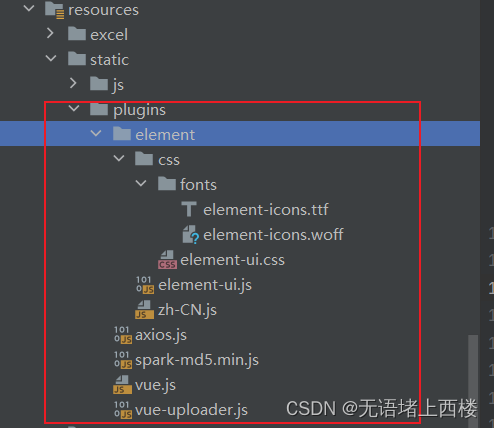
vue.js
element-ui.js
axios.js
vue-uploader.js
spark-md5.min.js
zh-CN.js
页面部分
页面主要结构

插件引入
- html>
- <html xmlns:th="http://www.thymeleaf.org">
- <head th:fragment="base">
- <meta charset="utf-8">
- <meta name="viewport" content="width=device-width, initial-scale=1, maximum-scale=1">
- <script th:src="@{/plugins/vue.js}" type="text/javascript">script>
- <script th:src="@{/plugins/element/element-ui.js}" type="text/javascript">script>
- <link th:href="@{/plugins/element/css/element-ui.css}" rel="stylesheet" type="text/css">
- <script th:src="@{/plugins/axios.js}" type="text/javascript">script>
- <script th:src="@{/plugins/vue-uploader.js}" type="text/javascript">script>
- <script th:src="@{/plugins/spark-md5.min.js}" type="text/javascript">script>
- <script th:src="@{/plugins/element/zh-CN.js}">script>
- <script type="text/javascript">
- ELEMENT.locale(ELEMENT.lang.zhCN)
- // 添加响应拦截器
- axios.interceptors.response.use(response => {
- if (response.request.responseType === 'blob') {
- return response
- }
- // 对响应数据做点什么
- const res = response.data
- if (!!res && res.code === 1) { // 公共处理失败请求
- ELEMENT.Message({message: "异常:" + res.msg, type: "error"})
- return Promise.reject(new Error(res.msg || 'Error'));
- } else {
- return res
- }
- }, function (error) {
- // 对响应错误做点什么
- return Promise.reject(error);
- });
- script>
- head>
- html>
上传文件主页
- html>
- <html lang="en" xmlns:th="http://www.thymeleaf.org" xmlns="http://www.w3.org/1999/html">
- <head>
- <meta charset="UTF-8">
- <title>大文件上传title>
- <head th:include="/base::base"><title>title>head>
- <link href="upload.css" rel="stylesheet" type="text/css">
- head>
- <body>
- <div id="app">
- <uploader
- ref="uploader"
- :options="options"
- :autoStart="false"
- :file-status-text="fileStatusText"
- @file-added="onFileAdded"
- @file-success="onFileSuccess"
- @file-error="onFileError"
- @file-progress="onFileProgress"
- class="uploader-example"
- >
- <uploader-unsupport>uploader-unsupport>
- <uploader-drop>
- <p>拖动文件到这里上传p>
- <uploader-btn>选择文件uploader-btn>
- uploader-drop>
- <uploader-list>
- <el-collapse v-model="activeName" accordion>
- <el-collapse-item title="文件列表" name="1">
- <ul class="file-list">
- <li v-for="file in uploadFileList" :key="file.id">
- <uploader-file :file="file" :list="true" ref="uploaderFile">
- <div slot-scope="props" style="display: flex;align-items: center;height: 100%;">
- <el-progress
- style="width: 85%"
- :stroke-width="18"
- :show-text="true"
- :text-inside="true"
- :format="e=> showDetail(e,props)"
- :percentage="percentage(props)"
- :color="e=>progressColor(e,props)">
- el-progress>
- <el-button :icon="icon" circle v-if="props.paused || props.isUploading"
- @click="pause(file)" size="mini">el-button>
- <el-button icon="el-icon-close" circle @click="remove(file)"
- size="mini">el-button>
- <el-button icon="el-icon-download" circle v-if="props.isComplete"
- @click="download(file)"
- size="mini">el-button>
- div>
- uploader-file>
- li>
- <div class="no-file" v-if="!uploadFileList.length">
- <i class="icon icon-empty-file">i> 暂无待上传文件
- div>
- ul>
- el-collapse-item>
- el-collapse>
- uploader-list>
- uploader>
- div>
- <script>
- // 分片大小,20MB
- const CHUNK_SIZE = 20 * 1024 * 1024;
- new Vue({
- el: '#app',
- data() {
- return {
- options: {
- // 上传地址
- target: "/fileStorage/upload",
- // 是否开启服务器分片校验。默认为 true
- testChunks: true,
- // 真正上传的时候使用的 HTTP 方法,默认 POST
- uploadMethod: "post",
- // 分片大小
- chunkSize: CHUNK_SIZE,
- // 并发上传数,默认为 3
- simultaneousUploads: 3,
- /**
- * 判断分片是否上传,秒传和断点续传基于此方法
- * 这里根据实际业务来 用来判断哪些片已经上传过了 不用再重复上传了 [这里可以用来写断点续传!!!]
- * 检查某个文件块是否已经上传到服务器,并根据检查结果返回布尔值。
- * chunk 表示待检查的文件块,是一个对象类型包含 offset 和 blob 两个字段。offset 表示该块在文件中的偏移量blob 表示该块对应的二进制数据
- * message 则表示服务器返回的响应消息,是一个字符串类型。
- */
- checkChunkUploadedByResponse: (chunk, message) => {
- console.log("message", message)
- // message是后台返回
- let messageObj = JSON.parse(message);
- let dataObj = messageObj.data;
- if (dataObj.uploaded !== null) {
- return dataObj.uploaded;
- }
- // 判断文件或分片是否已上传,已上传返回 true
- // 这里的 uploadedChunks 是后台返回
- // 判断 data.uploadedChunks 数组(或空数组)中是否包含 chunk.offset + 1 的值。
- // chunk.offset + 1 表示当前文件块在整个文件中的排序位置(从 1 开始计数),
- // 如果该值存在于 data.uploadedChunks 中,则说明当前文件块已经上传过了,返回 true,否则返回 false。
- return (dataObj.uploadedChunks || []).indexOf(chunk.offset + 1) >= 0;
- },
- parseTimeRemaining: function (timeRemaining, parsedTimeRemaining) {
- //格式化时间
- return parsedTimeRemaining
- .replace(/\syears?/, "年")
- .replace(/\days?/, "天")
- .replace(/\shours?/, "小时")
- .replace(/\sminutes?/, "分钟")
- .replace(/\sseconds?/, "秒");
- },
- },
- // 修改上传状态
- fileStatusTextObj: {
- success: "上传成功",
- error: "上传错误",
- uploading: "正在上传",
- paused: "停止上传",
- waiting: "等待中",
- },
- uploadFileList: [],
- collapse: true,
- activeName: 1,
- icon: `el-icon-video-pause`
- }
- },
- methods: {
- onFileAdded(file, event) {
- console.log("eeeee",event)
- // event.preventDefault();
- this.uploadFileList.push(file);
- console.log("file :>> ", file);
- // 有时 fileType为空,需截取字符
- console.log("文件类型:" + file.fileType + "文件大小:" + file.size + "B");
- // 1. todo 判断文件类型是否允许上传
- // 2. 计算文件 MD5 并请求后台判断是否已上传,是则取消上传
- console.log("校验MD5");
- this.getFileMD5(file, (md5) => {
- if (md5 !== "") {
- // 修改文件唯一标识
- file.uniqueIdentifier = md5;
- // 请求后台判断是否上传
- // 恢复上传
- file.resume();
- }
- });
- },
- onFileSuccess(rootFile, file, response, chunk) {
- console.log("上传成功", rootFile, file, response, chunk);
- // 这里可以做一些上传成功之后的事情,比如,如果后端需要合并的话,可以通知到后端合并
- },
- onFileError(rootFile, file, message, chunk) {
- console.log("上传出错:" + message, rootFile, file, message, chunk);
- },
- onFileProgress(rootFile, file, chunk) {
- console.log(`当前进度:${Math.ceil(file._prevProgress * 100)}%`);
- },
- // 计算文件的MD5值
- getFileMD5(file, callback) {
- let spark = new SparkMD5.ArrayBuffer();
- let fileReader = new FileReader();
- //获取文件分片对象(注意它的兼容性,在不同浏览器的写法不同)
- let blobSlice =
- File.prototype.slice ||
- File.prototype.mozSlice ||
- File.prototype.webkitSlice;
- // 当前分片下标
- let currentChunk = 0;
- // 分片总数(向下取整)
- let chunks = Math.ceil(file.size / CHUNK_SIZE);
- // MD5加密开始时间
- let startTime = new Date().getTime();
- // 暂停上传
- file.pause();
- loadNext();
- // fileReader.readAsArrayBuffer操作会触发onload事件
- fileReader.onload = function (e) {
- // console.log("currentChunk :>> ", currentChunk);
- // 通过 e.target.result 获取到当前分片的内容,并将其追加到 MD5 计算实例 spark 中,以便后续计算整个文件的 MD5 值。
- spark.append(e.target.result);
- // 通过比较当前分片的索引 currentChunk 是否小于总分片数 chunks 判断是否还有下一个分片需要读取。
- if (currentChunk < chunks) {
- // 如果存在下一个分片,则将当前分片索引递增并调用 loadNext() 函数加载下一个分片;
- currentChunk++;
- loadNext();
- } else {
- // 否则,表示所有分片已经读取完毕,可以进行最后的 MD5 计算。
- // 该文件的md5值
- let md5 = spark.end();
- console.log(
- `MD5计算完毕:${md5},耗时:${new Date().getTime() - startTime} ms.`
- );
- // 回调传值md5
- callback(md5);
- }
- };
- fileReader.onerror = function () {
- this.$message.error("文件读取错误");
- file.cancel();
- };
- // 加载下一个分片
- function loadNext() {
- // start 的计算方式为当前分片的索引乘以分片大小 CHUNK_SIZE
- const start = currentChunk * CHUNK_SIZE;
- // end 的计算方式为 start 加上 CHUNK_SIZE,但如果超过了文件的总大小,则取文件的大小作为结束位置。
- const end = start + CHUNK_SIZE >= file.size ? file.size : start + CHUNK_SIZE;
- // 文件分片操作,读取下一分片(fileReader.readAsArrayBuffer操作会触发onload事件)
- // 通过调用 blobSlice.call(file.file, start, end) 方法获取当前分片的 Blob 对象,即指定开始和结束位置的文件分片。
- // 接着,使用 fileReader.readAsArrayBuffer() 方法读取该 Blob 对象的内容,从而触发 onload 事件,继续进行文件的处理
- fileReader.readAsArrayBuffer(blobSlice.call(file.file, start, end));
- }
- },
- // 上传状态文本
- fileStatusText(status, response) {
- if (status === "md5") {
- return "校验MD5";
- } else {
- return this.fileStatusTextObj[status];
- }
- },
- // 点击暂停
- pause(file, id) {
- console.log("file :>> ", file);
- console.log("id :>> ", id);
- if (file.paused) {
- file.resume();
- this.icon = 'el-icon-video-pause'
- } else {
- this.icon = 'el-icon-video-play'
- file.pause();
- }
- },
- // 点击删除
- remove(file) {
- this.uploadFileList.findIndex((item, index) => {
- if (item.id === file.id) {
- this.$nextTick(() => {
- this.uploadFileList.splice(index, 1);
- });
- }
- });
- },
- showDetail(percentage, props) {
- let fileName = props.file.name;
- let isComplete = props.isComplete
- let formatUpload = this.formatFileSize(props.uploadedSize, 2);
- let fileSize = `${props.formatedSize}`;
- let timeRemaining = !isComplete ? ` 剩余时间:${props.formatedTimeRemaining}` : ''
- let uploaded = !isComplete ? ` 已上传:${formatUpload} / ${fileSize}` : ` 大小:${fileSize}`
- let speed = !isComplete ? ` 速度:${props.formatedAverageSpeed}` : ''
- if (props.error) {
- return `${fileName} \t 上传失败`
- }
- return `${fileName} \t ${speed} \t ${uploaded} \t ${timeRemaining} \t 进度:${percentage} %`;
- },
- // 显示进度
- percentage(props) {
- let progress = props.progress.toFixed(2) * 100;
- return progress - 1 < 0 ? 0 : progress;
- },
- // 控制下进度条的颜色 ,异常的情况下显示红色
- progressColor(e, props) {
- if (props.error) {
- return `#f56c6c`
- }
- if (e > 0) {
- return `#1989fa`
- }
- },
- // 点击下载
- download(file, id) {
- console.log("file:>> ", file);
- window.location.href = `/fileStorage/download/${file.uniqueIdentifier}`;
- },
- formatFileSize(bytes, decimalPoint = 2) {
- if (bytes == 0) return "0 Bytes";
- let k = 1000,
- sizes = ["Bytes", "KB", "MB", "GB", "TB", "PB", "EB", "ZB", "YB"],
- i = Math.floor(Math.log(bytes) / Math.log(k));
- return (
- parseFloat((bytes / Math.pow(k, i)).toFixed(decimalPoint)) + " " + sizes[i]
- );
- }
- },
- })
- script>
- body>
- html>
上传页面对应的样式
- .uploader-example {
- width: 880px;
- padding: 15px;
- margin: 40px auto 0;
- font-size: 12px;
- box-shadow: 0 0 10px rgba(0, 0, 0, 0.4);
- }
- .uploader-example .uploader-btn {
- margin-right: 4px;
- }
- .uploader-example .uploader-list {
- max-height: 440px;
- overflow: auto;
- overflow-x: hidden;
- overflow-y: auto;
- }
- #global-uploader {
- position: fixed;
- z-index: 20;
- right: 15px;
- bottom: 15px;
- width: 550px;
- }
- .uploader-file {
- height: 90px;
- }
- .uploader-file-meta {
- display: none !important;
- }
- .operate {
- flex: 1;
- text-align: right;
- }
- .file-list {
- position: relative;
- height: 300px;
- overflow-x: hidden;
- overflow-y: auto;
- background-color: #fff;
- padding: 0px;
- margin: 0 auto;
- transition: all 0.5s;
- }
- .uploader-file-size {
- width: 15% !important;
- }
- .uploader-file-status {
- width: 32.5% !important;
- text-align: center !important;
- }
- li {
- background-color: #fff;
- list-style-type: none;
- }
- .no-file {
- position: absolute;
- top: 50%;
- left: 50%;
- transform: translate(-50%, -50%);
- font-size: 16px;
- }
- .uploader-file-name {
- width: 36% !important;
- }
- .uploader-file-actions {
- float: right !important;
- }
- /deep/ .el-progress-bar {
- width: 95%;
- }
测试
访问localhost:7125/page/index.html

选择上传文件

上传成功
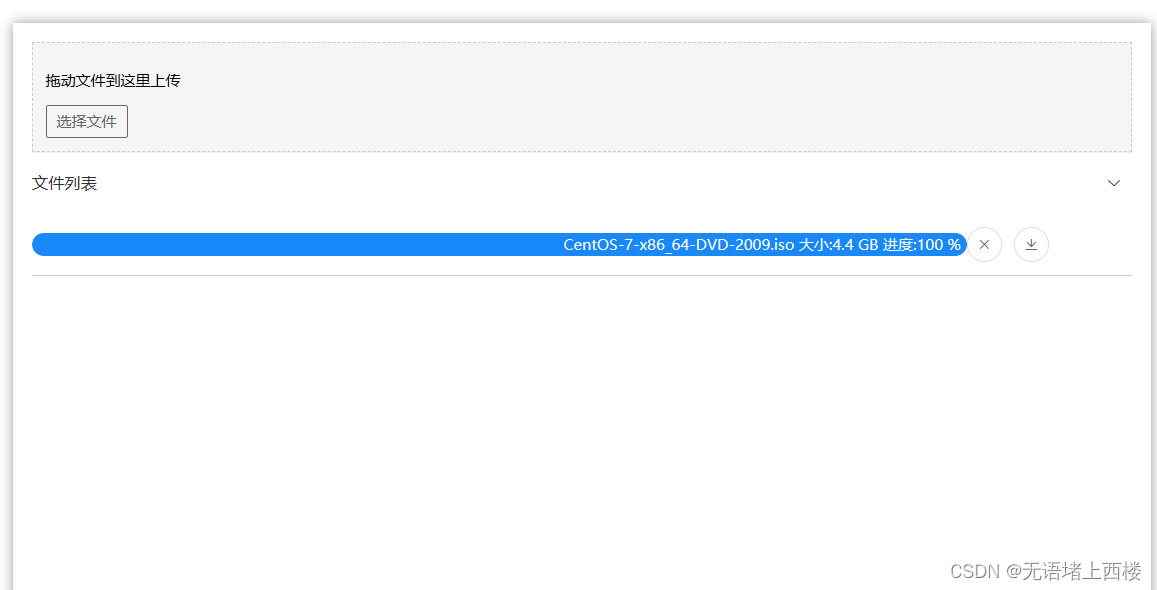 上传文件目录
-
相关阅读:
使用docker在linux上部署MySQL
一种视频防抖的车辆检测算法
failed to parse field [name] of type [text] in document with id ‘1‘
流媒体中relay和forword的区别
MR直播实例(混合现实直播)高品质企业直播
2022高教社杯辅导 答疑 选题 代码 思路 全国大学生数学建模竞赛
stable diffussion web ui安装
机器学习基础
1000套HTML5期末大作业——电影我不是药神响应式页面带轮播(4页)
Capture One Studio for Mac:打造完美影像的利器
- 原文地址:https://blog.csdn.net/qq_63431773/article/details/133563174
