-
TextAttack配置中遇到的问题(TAADpapers)
运行TAADpapers的TextAttack和OpenAttack(已解决连不上hub如何运行)
本文主要解决的问题:TextAttack和OpenAttack在连不上Huggingface时如何运行成功?
本文可行的前提:能科学上网(需要手动在Huggingface上下载相关数据集或者模型)建议使用openattack,啥都能改(大概)

1. TextAttack配置(已成功运行第一个案例)
1.1 运行TextAttack时提示:no model named lru
安装lru时报错详情:
(textattack-master) G:\xxx\TextAttack-master>pip install lru Collecting lru Using cached lru-0.1.tar.gz (1.1 kB) Preparing metadata (setup.py) ... error error: subprocess-exited-with-error × python setup.py egg_info did not run successfully. │ exit code: 1 ╰─> [9 lines of output] Traceback (most recent call last): File "" , line 36, in <module> File "" , line 34, in <module> File "C:\Users\user\AppData\Local\Temp\pip-install-ol85bcqc\lru_2da420766b1d47d693126f3791a2d882\setup.py", line 2, in <module> from lru import __version__ as version File "C:\Users\user\AppData\Local\Temp\pip-install-ol85bcqc\lru_2da420766b1d47d693126f3791a2d882\lru.py", line 18 raise KeyError, key ^ SyntaxError: invalid syntax [end of output] note: This error originates from a subprocess, and is likely not a problem with pip. error: metadata-generation-failed × Encountered error while generating package metadata. ╰─> See above for output. note: This is an issue with the package mentioned above, not pip. hint: See above for details.- 1
- 2
- 3
- 4
- 5
- 6
- 7
- 8
- 9
- 10
- 11
- 12
- 13
- 14
- 15
- 16
- 17
- 18
- 19
- 20
- 21
- 22
- 23
- 24
- 25
- 26
- 27
- 28
- 29
解决:pip install lru-dict
1.2 运行TextAttack找不到stopwords
Resource stopwords not found. Please use the NLTK Downloader to obtain the resource: >>> import nltk >>> nltk.download('stopwords') For more information see: https://www.nltk.org/data.html Attempted to load corpora/stopwords Searched in: - 'C:\\Users\\user/nltk_data' - 'E:\\Anaconda\\envs\\TextAttack-master\\nltk_data' - 'E:\\Anaconda\\envs\\TextAttack-master\\share\\nltk_data' - 'E:\\Anaconda\\envs\\TextAttack-master\\lib\\nltk_data' - 'C:\\Users\\user\\AppData\\Roaming\\nltk_data' - 'C:\\nltk_data' - 'D:\\nltk_data' - 'E:\\nltk_data' **********************************************************************- 1
- 2
- 3
- 4
- 5
- 6
- 7
- 8
- 9
- 10
- 11
- 12
- 13
- 14
- 15
- 16
- 17
- 18
- 19
- 20
- 21
解决: 从网站nltk_data下载stopwords.zip放入类似“C:\Users\user\AppData\Roaming\nltk_data\corpora”里 (放到corpora文件夹下)
1.3 运行TextAttack连不上hugging face
1.3.1 运行案例
python -m textattack attack --model bert-base-uncased-sst2 --recipe textfooler --num-examples 10- 1
1.3.2 报错(无glue数据集)
raise ConnectionError(f"Couldn't reach '{path}' on the Hub ({type(e).__name__})") ConnectionError: Couldn't reach 'glue' on the Hub (ConnectionError)- 1
- 2
1.3.3 科学上网(没用)
原因猜测:代码没改到requests的参数,等同于Python没使用代理
raise ConnectionError(f"Couldn't reach '{path}' on the Hub ({type(e).__name__})") ConnectionError: Couldn't reach 'glue' on the Hub (SSLError)- 1
- 2
1.3.4 解决:把需要的文件下载到本地
首先,我们先对huggingface使用进行回顾:Hugging Face快速入门(重点讲解模型(Transformers)和数据集部分(Datasets))

1.3.4.1 下载glue数据集:
uu们,我是在openattack里,把glue数据集下载到本地后,运行成功相关代码,然后在缓存位置生成了缓存文件,textattack也可以用


需要的自取哈:csdn的0积分资源1.3.4.2 关于模型(下载textattack/distilbert-base-cased-CoLA 并放到合适位置)
报错如下
OSError: We couldn't connect to 'https://huggingface.co' to load this file, couldn't find it in the cached files and it looks like textattack/distilbert-base-cased -CoLA is not the path to a directory containing a file named config.json. Checkout your internet connection or see how to run the library in offline mode at 'https://huggingface.co/docs/transformers/installation#offline-mode'. #翻译一下:用不了huggingface,缺textattack/distilbert-base-cased-CoLA的 config.json- 1
- 2
- 3
- 4
- 5
解决:科学一下,去相应网址下载config.json (作者全部下载了… 泥萌试试~)

下完后,放在TextAttack-master/textattack/distilbert-base-cased-CoLA 下,就能跑起来了!

2. openattack也连不上hub(已成功运行demo.py)
背景:以第一个案例 demo.py 为例
报错:缺sst数据集
解决方法:科学后,将sst数据集下载到本地,从本地加载(数据集和模型)2.1 将数据集下载到本地后读取
2.1.1 报错(连不上huggingface,下不了sst数据集)
2.1.2 下载数据集到本地(参考1.3.4的教程,在huggingface的dataset里搜sst)
作者下载到OpenAttack-master/download(自定义文件夹)中

2.1.3 找到相应代码,修改数据集加载路径为本地
PS:load_dataset的第一个参数path可以是本地路径,如果本地没有,就去huggingface
所以直接改成本地路径就行啦(使用自己的路径哈~),如下# 源代码,需要连huggingface # dataset = datasets.load_dataset("sst", split="train[:100]").map(function=dataset_mapping) # 将sst数据集下载到本地,我放在当前目录的download文件夹下 dataset = datasets.load_dataset("./download/sst",split="train[:100]").map(function=dataset_mapping)- 1
- 2
- 3
- 4
其它代码 Chinese.py 修改参考
# dataset = datasets.load_dataset("amazon_reviews_multi",'zh',split="train[:20]").map(function=dataset_mapping) dataset = datasets.load_dataset("../download/amazon_reviews_multi",'zh',split="train[:20]").map(function=dataset_mapping)- 1
- 2
- 3
2.2 将模型下载到本地后读取
2.2.1 报错(连不上huggingface,下不了gpt2模型)
2.2.2 下载模型到本地(参考1.3.4的教程,在huggingface的model里搜gpt2)
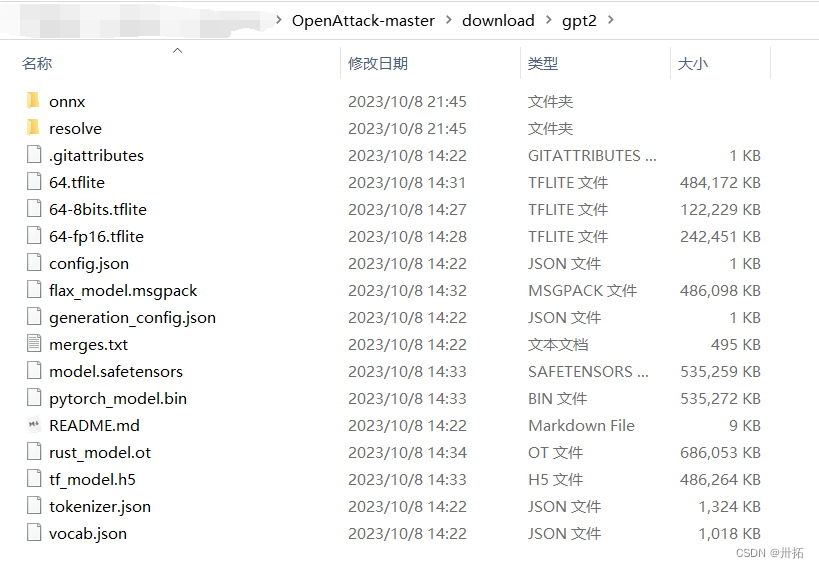
2.2.3 找到相应代码,修改模型加载路径为本地
举个例子
#此处的相关方法(from_pretrained)可以直接指定路径 #self.tokenizer = transformers.GPT2TokenizerFast.from_pretrained("gpt2") #self.lm = transformers.GPT2LMHeadModel.from_pretrained("gpt2") self.tokenizer = transformers.GPT2TokenizerFast.from_pretrained("./download/gpt2") self.lm = transformers.GPT2LMHeadModel.from_pretrained("./download/gpt2")- 1
- 2
- 3
- 4
- 5
再来个例子
# 此处的相关方法(from_pretrained)需要加:repo_type="model" tokenizer = transformers.AutoTokenizer.from_pretrained("../download/echarlaix/bert-base-uncased-sst2-acc91.1-d37-hybrid",repo_type="model") # 这里就不需要了 model = transformers.AutoModelForSequenceClassification.from_pretrained("../download/echarlaix/bert-base-uncased-sst2-acc91.1-d37-hybrid", num_labels=2, output_hidden_states=False) # 报错提示的很明显,根据报错解决问题~- 1
- 2
- 3
- 4
- 5
3. 补充
3.1 不出意外,其它案例也可以运行~
3.2 修改huggingface默认缓存路径(默认C盘太难顶)
——————————————————————————————————
TextAttackTextAttack: A Framework for Adversarial Attacks, Data Augmentation, and Adversarial Training in NLP. John Morris, Eli Lifland, Jin Yong Yoo, Jake Grigsby, Di Jin, Yanjun Qi. EMNLP 2020 Demo. [website] [doc] [pdf]OpenAttack OpenAttack: An Open-source Textual Adversarial Attack Toolkit. Guoyang Zeng, Fanchao Qi, Qianrui Zhou, Tingji Zhang, Bairu Hou, Yuan Zang, Zhiyuan Liu, Maosong Sun. ACL-IJCNLP 2021 Demo. [website] [doc] [pdf]
便捷下载huggingface仓库文件方式:如何批量下载hugging face模型和数据集文件
关于huggingface介绍:Hugging Face快速入门(重点讲解模型(Transformers)和数据集部分(Datasets)) -
相关阅读:
Gitea+Jenkins+webhooks-前端自动化部署
TI mmWave radar sensors Tutorial 笔记 | Module 5: Angle Estimation
大厂频繁联手,NFT 与 GameFi 的融合能带来哪些新叙事?
LeetCode 394. 字符串解码
脚手架安装
Docker Compose 容器编排
达梦数据库MAIN表空间导致磁盘满问题的处理和总结
uniapp小程序更新逻辑,按实际开发为主
【JavaWeb篇】三分钟学会HTTP协议(面试必会)
c语言练习87:合并两个有序数组
- 原文地址:https://blog.csdn.net/weixin_45426939/article/details/133563472
