-
学校项目培训之Carla仿真平台之Carla学习内容
一、Blender
Blender入门:https://www.bilibili.com/video/BV1fb4y1e7PD/
Blender导入骨骼:https://www.bilibili.com/video/BV1hc41157nL
做一个车:https://www.bilibili.com/video/BV1hY411q7w2收获:
学习Blender建模的使用,从案例中学习:建模/动画/雕刻/渲染等,仍在不断的学习当中。
对于车辆等大型物件的建模,还需要一些完整的三视图。


Blender子弹冲击
Blender积木组合
二、Roadrunner
收获:
在roadrunner中构建道路场景使得路网的设置进程加快。

三、Blender中导入汽车骨骼
carla仿真器搭建及特定车辆模型的导入
里面有两个视频,无声的看小车的骨骼构建,有声的看小车导入UE:
How to add a vehicle/truck in carla using Unreal Engine Editor 4 + Blender for beginners
How to rig vehicle in Blender 2.8 for UE4 [No Sound] _ Blender 2.8, Unreal Engine 4
建议先做一个简单的小车学习导入流程,汽车做的太豪华,导入的时候没卡出来以下过程中,每个步骤有编译的的地方点一下,有保存的地方点一下
如果出现:
1.在物理资产文件中骨骼显示不完全的情况:考虑车轮太小了。
2.在运行时出现车辆一刹车就翻车的情况:考虑车辆不符合动力学模型,将其长度拉长一些。-
UE4中导入小车的fbx

-
在物理资产中设置骨骼

进入编辑:


-
添加动画蓝图,直接去现有的车辆动画蓝图复制过来
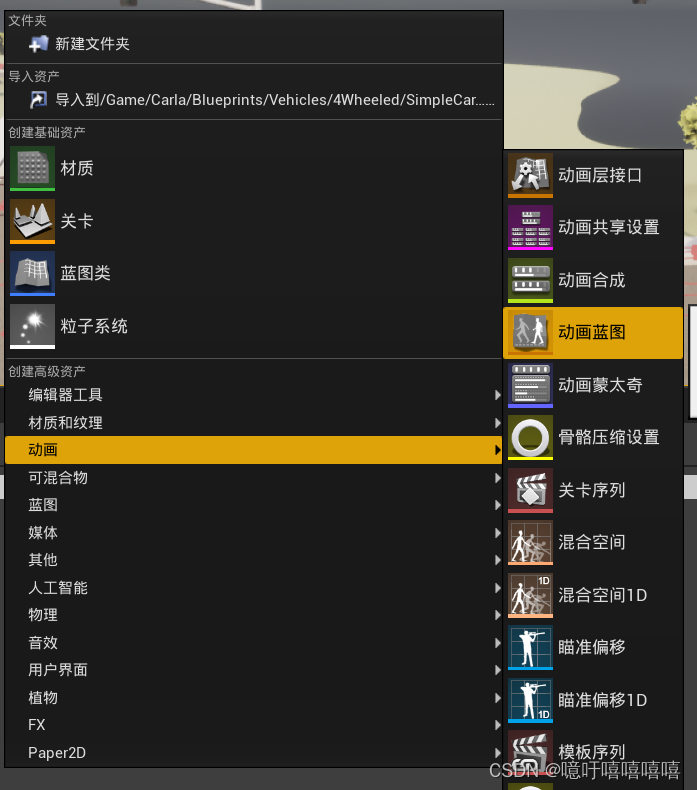


进入编辑:
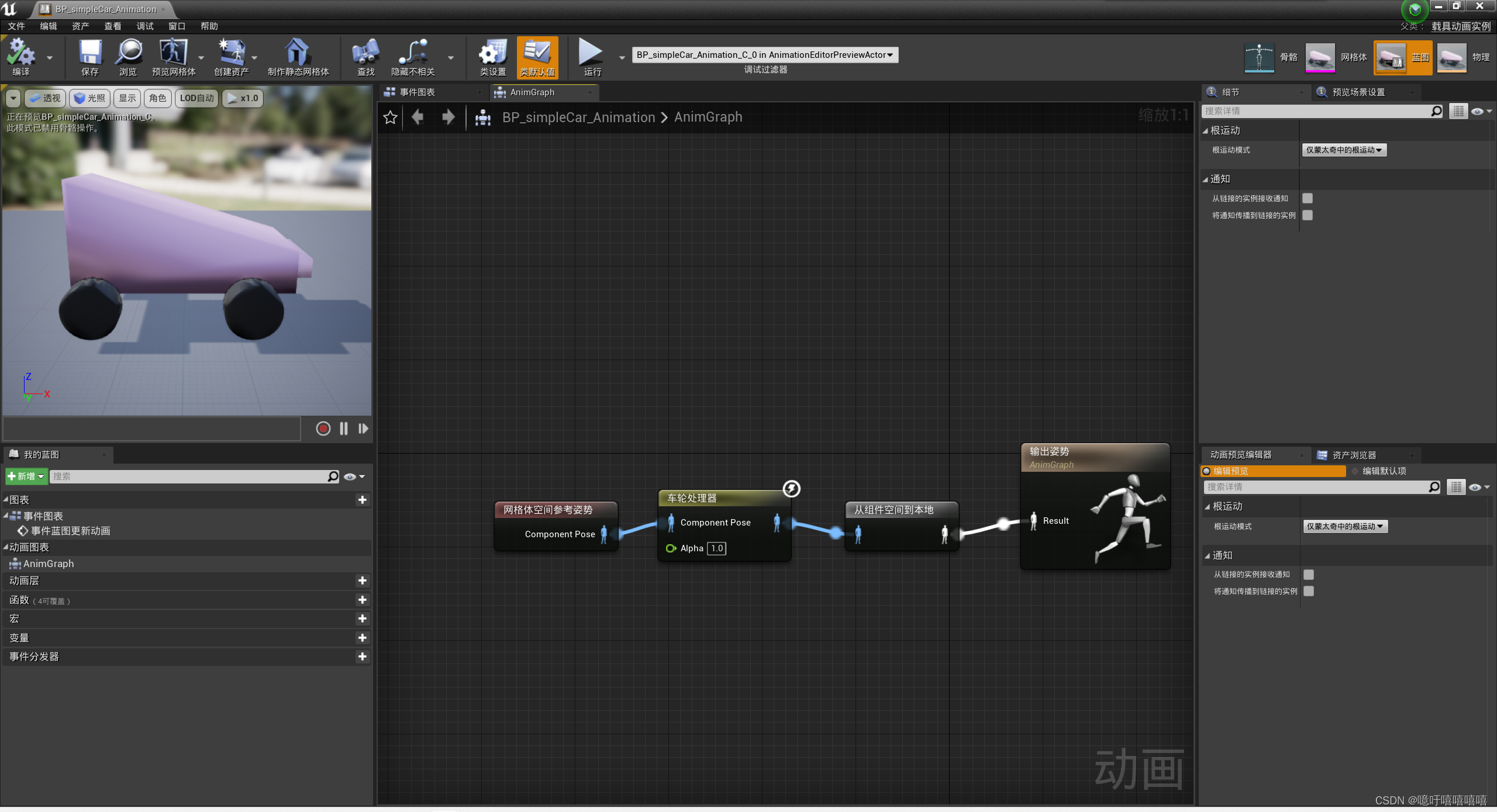
-
添加轮子的蓝图
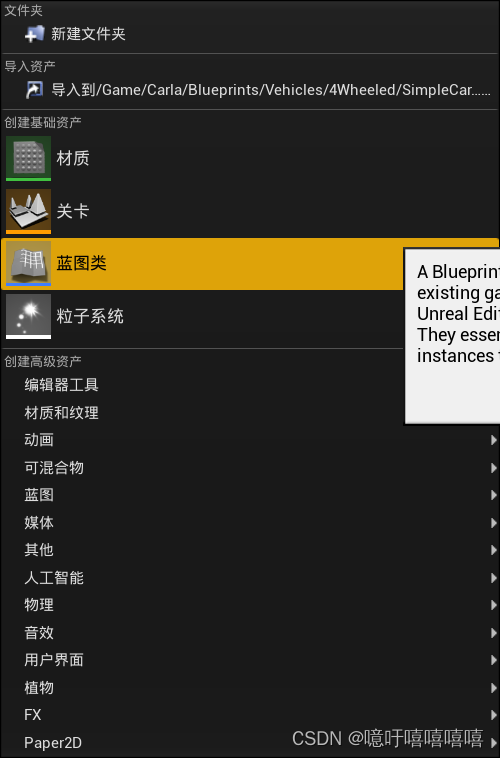

进入编辑:
前轮胎:
后轮胎: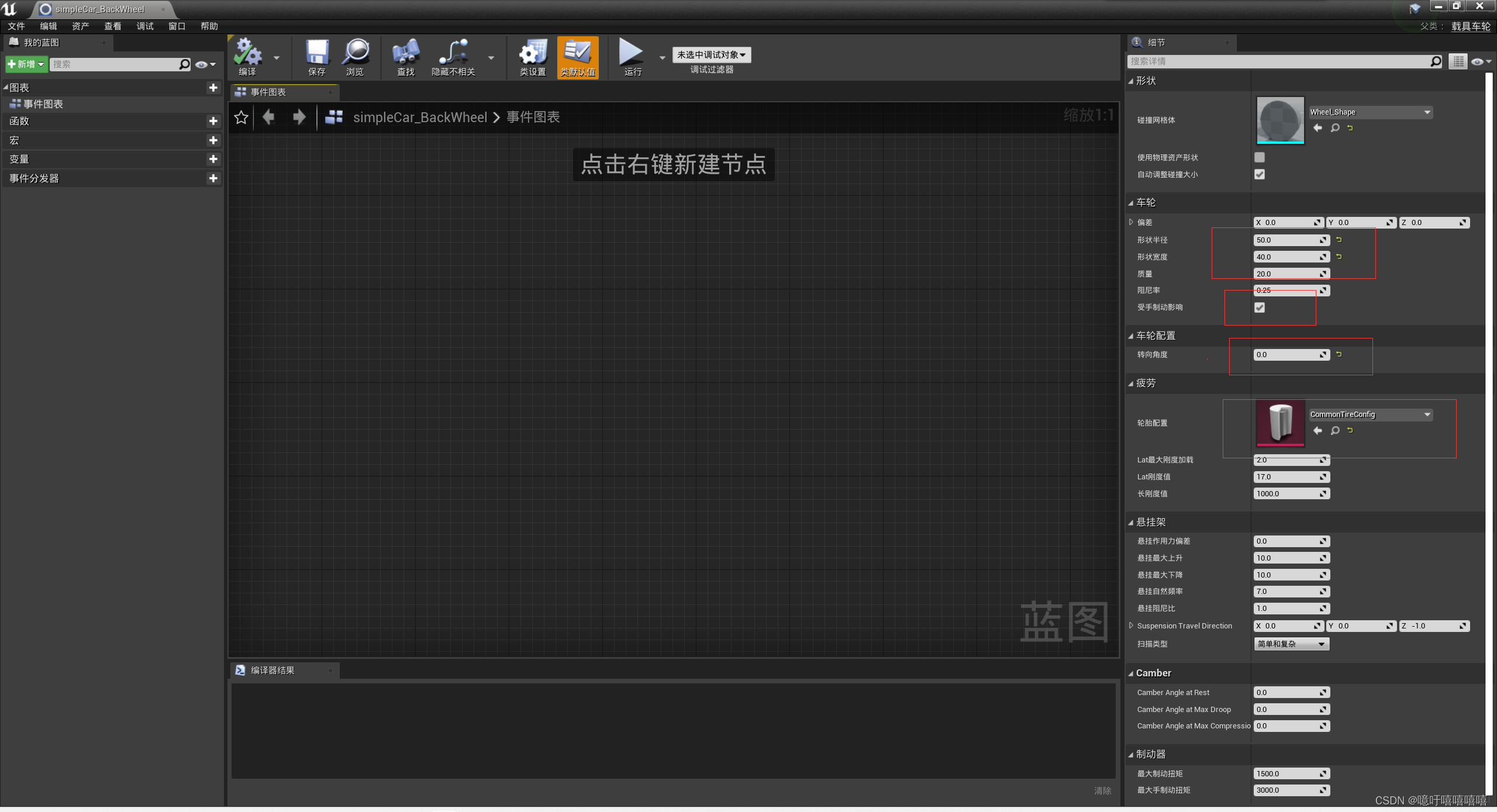
-
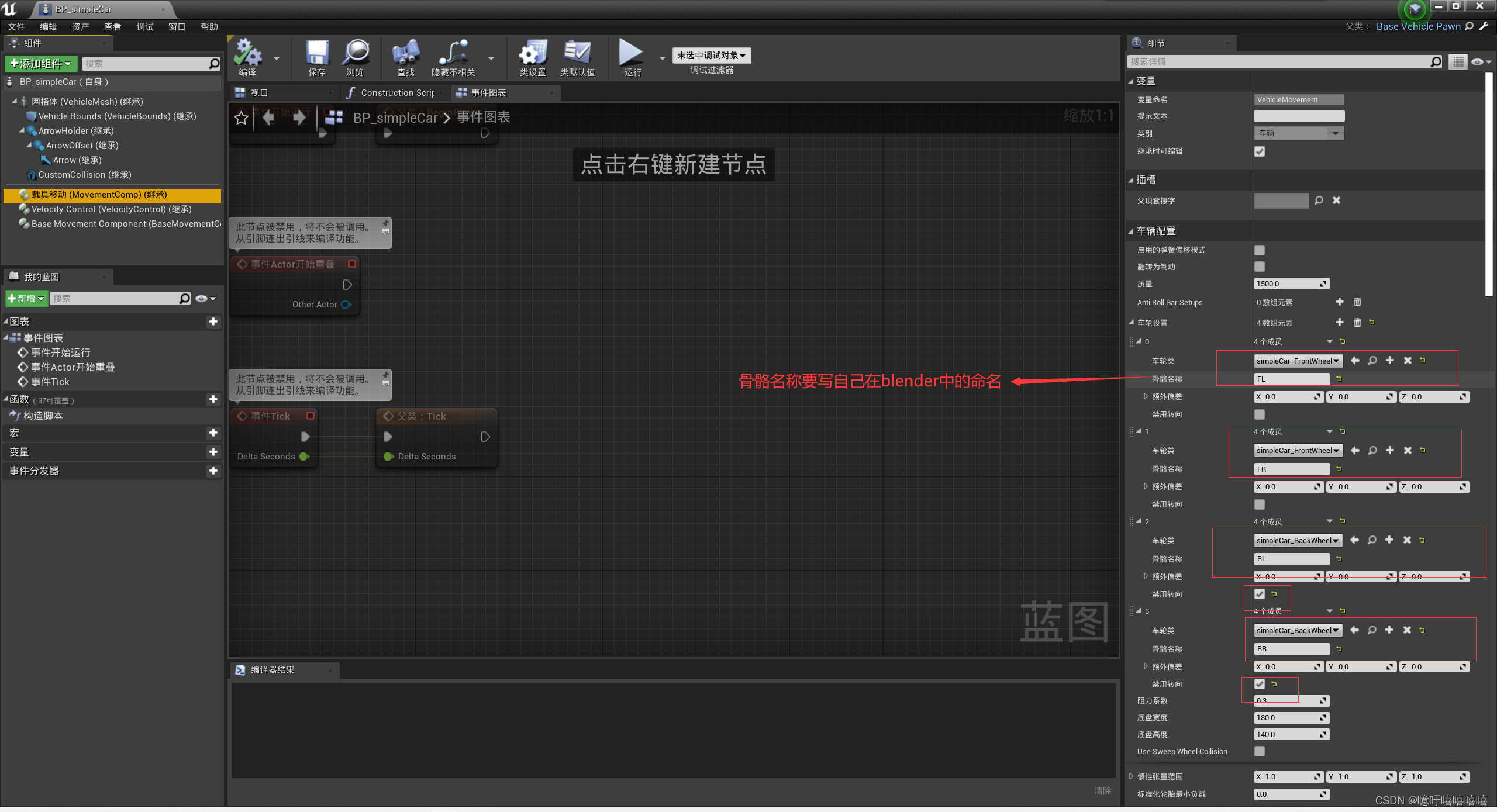
新建汽车蓝图类

进入编辑:

-
编辑汽车资产库

进入编辑:
(这里写错了,是 SimpleCar和SimpleCar01) 好了,此时就可以运行看看了。
python manual_control.py --filter SimplerCar01- 1
四、小车等待红绿灯code
# ============================================================================== # -- find carla module --------------------------------------------------------- # ============================================================================== import glob import math import os import random import sys try: sys.path.append(glob.glob('../carla/dist/carla-*%d.%d-%s.egg' % ( sys.version_info.major, sys.version_info.minor, 'win-amd64' if os.name == 'nt' else 'linux-x86_64'))[0]) except IndexError: pass import carla def hld(world, vehicle, vehicle_max_speed): global vehicle_current_location global way_near_point global distance_to_intersection # if vehicle: # # 获取汽车当前位置 # vehicle_current_location = vehicle.get_location() # # 使用Carla的道路地图获取最近的路口(交叉口)Waypoint # waypoint_location = world.get_map().get_waypoint(vehicle_current_location).transform.location # # 使用Waypoint的distance属性获取距离路口的距离 # print(vehicle_current_location) # print(waypoint_location) # distance_to_intersection = math.sqrt((vehicle_current_location.x - waypoint_location.x) ** 2 + ( # vehicle_current_location.y - waypoint_location.y) ** 2) # print("The neaerest way point's distance is:", distance_to_intersection, "meters") # else: # print("_________________Not found the vehicle !_________________") # return # 获取汽车的速度 vehicle_current_velocity = vehicle.get_velocity() vehicle_current_speed = vehicle_current_velocity.length() # 线速度 print("vehicle_current_speed______", vehicle_current_speed) # 判断汽车当前是否处于红绿灯影响范围 if vehicle.is_at_traffic_light(): # 获取红绿灯 traffic_light = vehicle.get_traffic_light() print("traffic_light.get_state()______", traffic_light.get_state()) # 如果前方是红灯并且距离路口只有0.5m了,制动汽车 if traffic_light and traffic_light.get_state() == carla.TrafficLightState.Red: print("红灯请停车!") # target_velocity = max(vehicle_current_speed - 5.0, 0.0) # 以5m/s的速度减速, vehicle.apply_control(carla.VehicleControl(throttle=-0.0, steer=0, brake=1.0)) # 如果前方是绿灯 elif traffic_light and traffic_light.get_state() == carla.TrafficLightState.Green: # 如果当前是静止的状态,则让汽车启动 if vehicle_current_speed == 0.0: print("绿灯请行驶!") vehicle.apply_control(carla.VehicleControl(throttle=1.0, steer=0.0, brake=0.0)) # 如果当前是行驶状态并且速度大于最大速度限制的一半,则让其保持当前速度行驶 elif vehicle_current_speed > (vehicle_max_speed / 2.0): print("路口请缓行!") vehicle.apply_control(carla.VehicleControl(throttle=0.0, steer=0.0, brake=0.0)) # 其他情况,则保持当前速度行驶 else : print("绿灯请缓行!") vehicle.apply_control(carla.VehicleControl(throttle=0.5, steer=0.0, brake=0.0)) # 如果前方是黄灯,则汽车开始制动 elif traffic_light and traffic_light.get_state() == carla.TrafficLightState.Yellow: print("黄灯请停车!") vehicle.apply_control(carla.VehicleControl(throttle=0.0, steer=0.0, brake=1.0)) else: print("直线行驶中~~~") # 如果汽车的速度超过了最大速度,则让他保持当前速度行驶 speed_tolerance = 0.5 # 设置速度容忍范围,可以根据需要调整 # 计算油门值,使车辆保持在最大速度附近 if vehicle_current_speed < vehicle_max_speed - speed_tolerance: # print("start throttle") throttle = 1.0 # 假设油门力度为1.0 else: # print("stop throttle") throttle = 0.0 # 达到最大速度时,停止加油门 vehicle.apply_control(carla.VehicleControl(throttle=throttle, steer=0.0, brake=0.0)) def main(): actor_list = [] client = carla.Client('127.0.0.1', 2000) client.set_timeout(2.0) try: # 获取世界 world = client.get_world() # 创建汽车蓝图 # vehicle_blueprint = random.choice(world.get_blueprint_library().filter('vehicle.*')) # 选用自定义小车蓝图 vehicle_blueprint = world.get_blueprint_library().filter('vehicle.simplecar.simplecar') # vehicle_spawn_points = random.choice(world.get_map().get_spawn_points()) vehicle_spawn_points = carla.Transform( carla.Location(x=20.235275, y=13.414804, z=0.600000), # 设置初始位置的x、y和z坐标 carla.Rotation(pitch=0.000000, yaw=-179.840790, roll=0.000000) # 设置初始方向的pitch、yaw和roll角度 ) print("vehicle_spawn_points: ",vehicle_spawn_points) vehicle = world.spawn_actor(vehicle_blueprint, vehicle_spawn_points) # 设置最大车速 vehicle_max_speed = 7.0 actor_list.append(vehicle) # 创建相机蓝图 camera_blueprint = world.get_blueprint_library().find('sensor.camera.rgb') camera_spawn_points = carla.Transform(carla.Location(x=-5, z=4), carla.Rotation(pitch=-20)) camera = world.spawn_actor(camera_blueprint, camera_spawn_points, attach_to=vehicle) # camera.listen(lambda image: image.save_to_disk(os.path.join('_out', '%06d.png' % image.frame))) actor_list.append(camera) while True: # 设置相机视角 world.get_spectator().set_transform(camera.get_transform()) hld(world, vehicle, vehicle_max_speed) # 优化循环性能 world.tick() finally: client.apply_batch([carla.command.DestroyActor(x) for x in actor_list]) print("All the actors have already been destroied !") if __name__ == "__main__": main()- 1
- 2
- 3
- 4
- 5
- 6
- 7
- 8
- 9
- 10
- 11
- 12
- 13
- 14
- 15
- 16
- 17
- 18
- 19
- 20
- 21
- 22
- 23
- 24
- 25
- 26
- 27
- 28
- 29
- 30
- 31
- 32
- 33
- 34
- 35
- 36
- 37
- 38
- 39
- 40
- 41
- 42
- 43
- 44
- 45
- 46
- 47
- 48
- 49
- 50
- 51
- 52
- 53
- 54
- 55
- 56
- 57
- 58
- 59
- 60
- 61
- 62
- 63
- 64
- 65
- 66
- 67
- 68
- 69
- 70
- 71
- 72
- 73
- 74
- 75
- 76
- 77
- 78
- 79
- 80
- 81
- 82
- 83
- 84
- 85
- 86
- 87
- 88
- 89
- 90
- 91
- 92
- 93
- 94
- 95
- 96
- 97
- 98
- 99
- 100
- 101
- 102
- 103
- 104
- 105
- 106
- 107
- 108
- 109
- 110
- 111
- 112
- 113
- 114
- 115
- 116
- 117
- 118
- 119
- 120
- 121
- 122
- 123
- 124
- 125
- 126
- 127
- 128
- 129
- 130
- 131
- 132
- 133
- 134
- 135
- 136
- 137
- 138
五、两个小车跟车code
import carla import math import random import time # 创建CARLA仿真客户端 client = carla.Client('127.0.0.1', 2000) client.set_timeout(2.0) actor_list=[] try: # ======================================获取CARLA世界和地图====================================== world = client.get_world() blueprint_library = world.get_blueprint_library() map = world.get_map() # ======================================创建两辆车====================================== # 位置设置 # spawn_points = map.get_spawn_points() spawn_points = carla.Transform( carla.Location(x=20.235275, y=13.414804, z=0.600000), # 设置初始位置的x、y和z坐标 carla.Rotation(pitch=0.000000, yaw=-179.840790, roll=0.000000) # 设置初始方向的pitch、yaw和roll角度 ) # 主车 # vehicle_bp1 = blueprint_library.filter('vehicle')[0] # vehicle_bp1.set_attribute('color', '255,0,0') # 自定义小车 vehicle_bp1 = blueprint_library.find('vehicle.simplecar.simplecar') # vehicle1_spawn_point = random.choice(spawn_points) vehicle1_spawn_point = spawn_points vehicle1 = world.spawn_actor(vehicle_bp1, vehicle1_spawn_point) # 跟车 # vehicle_bp2 = blueprint_library.filter('vehicle')[0] # vehicle_bp2.set_attribute('color', '0,0,255') # 自定义小车 vehicle_bp2 = blueprint_library.find('vehicle.simplecar3.simplecar3') vehicle2_spawn_point = carla.Transform(vehicle1_spawn_point.location + carla.Location(x=10.0),carla.Rotation(pitch=0.000000, yaw=-179.840790, roll=0.000000)) vehicle2 = world.spawn_actor(vehicle_bp2, vehicle2_spawn_point) # 设置车辆的初始速度 vehicle1.apply_control(carla.VehicleControl(throttle=0.5, steer=0, brake=0)) # 车1的初始速度为10 m/s vehicle2.apply_control(carla.VehicleControl(throttle=0, steer=0, brake=0)) actor_list.append(vehicle1) actor_list.append(vehicle2) # # 给两个车设置自动驾驶 # vehicle1.set_autopilot(True) # vehicle2.set_autopilot(True) # ======================================创建相机蓝图====================================== camera_blueprint = world.get_blueprint_library().find('sensor.camera.rgb') camera_transform = carla.Transform(carla.Location(x=-5, z=4), carla.Rotation(pitch=-10)) camera1 = world.spawn_actor(camera_blueprint, camera_transform, attach_to=vehicle1) camera2 = world.spawn_actor(camera_blueprint, camera_transform, attach_to=vehicle2) # camera.listen(lambda image: image.save_to_disk(os.path.join('_out', '%06d.png' % image.frame))) actor_list.append(camera1) actor_list.append(camera2) # ======================================定义跟车参数====================================== desired_distance = 20.0 # 期望的跟车距离 max_velocity = 1.0 # 最大速度 (m/s) while True: # 设置相机视角 world.get_spectator().set_transform(camera2.get_transform()) # 获取车辆的位置 location1 = vehicle1.get_location() location2 = vehicle2.get_location() # 计算车辆之间的距离 distance = math.sqrt((location1.x - location2.x)**2 + (location1.y - location2.y)**2) # 计算车辆2的期望速度,使其保持在期望跟车距离内 target_speed = 0.0 if desired_distance > distance else max_velocity # 设置车辆2的速度 vehicle2.apply_control(carla.VehicleControl(throttle=target_speed, steer=0, brake=0)) # 打印信息 print(f"Distance between vehicles: {distance:.2f} m, Target Speed for Vehicle 2: {vehicle2.get_velocity().length():.2f} m/s") world.tick() finally: client.apply_batch([carla.command.DestroyActor(x) for x in actor_list]) print("All the actors have already been destroied !")- 1
- 2
- 3
- 4
- 5
- 6
- 7
- 8
- 9
- 10
- 11
- 12
- 13
- 14
- 15
- 16
- 17
- 18
- 19
- 20
- 21
- 22
- 23
- 24
- 25
- 26
- 27
- 28
- 29
- 30
- 31
- 32
- 33
- 34
- 35
- 36
- 37
- 38
- 39
- 40
- 41
- 42
- 43
- 44
- 45
- 46
- 47
- 48
- 49
- 50
- 51
- 52
- 53
- 54
- 55
- 56
- 57
- 58
- 59
- 60
- 61
- 62
- 63
- 64
- 65
- 66
- 67
- 68
- 69
- 70
- 71
- 72
- 73
- 74
- 75
- 76
- 77
- 78
- 79
- 80
- 81
- 82
- 83
- 84
- 85
- 86
- 87
- 88
- 89
六、前车实现等红绿灯+后车实现跟车code
import glob import math import os import random import sys try: sys.path.append(glob.glob('../carla/dist/carla-*%d.%d-%s.egg' % ( sys.version_info.major, sys.version_info.minor, 'win-amd64' if os.name == 'nt' else 'linux-x86_64'))[0]) except IndexError: pass import carla # ======================================后车执行跟车逻辑====================================== def follow(vehicle1, vehicle2, max_speed, desired_distance,): # 获取车辆的位置 location1 = vehicle1.get_location() location2 = vehicle2.get_location() # 获取汽车的速度 vehicle2_current_velocity = vehicle2.get_velocity() vehicle2_current_speed = vehicle2_current_velocity.length() # 线速度 # 计算车辆之间的距离 distance = math.sqrt((location1.x - location2.x) ** 2 + (location1.y - location2.y) ** 2) # 设置车辆2的速度 if desired_distance>distance: vehicle2.apply_control(carla.VehicleControl(throttle=0.0, steer=0, brake=0)) else: # 如果汽车的速度超过了最大速度,则让他保持当前速度行驶 speed_tolerance = 0 # 设置速度容忍范围,可以根据需要调整 # 计算油门值,使车辆保持在最大速度附近 if vehicle2_current_speed < max_speed - speed_tolerance or desired_distance>distance: # print("start throttle") throttle = 1.0 # 假设油门力度为1.0 else: # print("stop throttle") throttle = 0.1 # 达到最大速度时,停止加油门 vehicle2.apply_control(carla.VehicleControl(throttle=throttle, steer=0.0, brake=0.0)) # 打印信息 print( f"Distance between vehicles: {distance:.2f} m, Target Speed for Vehicle 2: {vehicle2.get_velocity().length():.2f} m/s") # ======================================主车执行红绿灯逻辑====================================== def hld(world, vehicle, vehicle_max_speed): global vehicle_current_location global way_near_point global distance_to_intersection # if vehicle: # # 获取汽车当前位置 # vehicle_current_location = vehicle.get_location() # # 使用Carla的道路地图获取最近的路口(交叉口)Waypoint # waypoint_location = world.get_map().get_waypoint(vehicle_current_location).transform.location # # 使用Waypoint的distance属性获取距离路口的距离 # print(vehicle_current_location) # print(waypoint_location) # distance_to_intersection = math.sqrt((vehicle_current_location.x - waypoint_location.x) ** 2 + ( # vehicle_current_location.y - waypoint_location.y) ** 2) # print("The neaerest way point's distance is:", distance_to_intersection, "meters") # else: # print("_________________Not found the vehicle !_________________") # return # 获取汽车的速度 vehicle_current_velocity = vehicle.get_velocity() vehicle_current_speed = vehicle_current_velocity.length() # 线速度 print("vehicle_current_speed______", vehicle_current_speed) # 判断汽车当前是否处于红绿灯影响范围 if vehicle.is_at_traffic_light(): # 获取红绿灯 traffic_light = vehicle.get_traffic_light() print("traffic_light.get_state()______", traffic_light.get_state()) # 如果前方是红灯并且距离路口只有0.5m了,制动汽车 if traffic_light and traffic_light.get_state() == carla.TrafficLightState.Red: print("红灯请停车!") # target_velocity = max(vehicle_current_speed - 5.0, 0.0) # 以5m/s的速度减速, vehicle.apply_control(carla.VehicleControl(throttle=-0.0, steer=0, brake=1.0)) # 如果前方是绿灯 elif traffic_light and traffic_light.get_state() == carla.TrafficLightState.Green: # 如果当前是静止的状态,则让汽车启动 if vehicle_current_speed == 0.0: print("绿灯请行驶!") vehicle.apply_control(carla.VehicleControl(throttle=1.0, steer=0.0, brake=0.0)) # 如果当前是行驶状态并且速度大于最大速度限制的一半,则让其保持当前速度行驶 elif vehicle_current_speed > (vehicle_max_speed / 2.0): print("路口请缓行!") vehicle.apply_control(carla.VehicleControl(throttle=0.0, steer=0.0, brake=0.0)) # 其他情况,则保持当前速度行驶 else: print("绿灯请缓行!") vehicle.apply_control(carla.VehicleControl(throttle=0.5, steer=0.0, brake=0.0)) # 如果前方是黄灯,则汽车开始制动 elif traffic_light and traffic_light.get_state() == carla.TrafficLightState.Yellow: print("黄灯请停车!") vehicle.apply_control(carla.VehicleControl(throttle=0.0, steer=0.0, brake=1.0)) else: print("直线行驶中~~~") # 如果汽车的速度超过了最大速度,则让他保持当前速度行驶 speed_tolerance = 0.5 # 设置速度容忍范围,可以根据需要调整 # 计算油门值,使车辆保持在最大速度附近 if vehicle_current_speed < vehicle_max_speed - speed_tolerance: # print("start throttle") throttle = 1.0 # 假设油门力度为1.0 else: # print("stop throttle") throttle = 0.0 # 达到最大速度时,停止加油门 vehicle.apply_control(carla.VehicleControl(throttle=throttle, steer=0.0, brake=0.0)) # 创建CARLA仿真客户端 client = carla.Client('127.0.0.1', 2000) client.set_timeout(2.0) actor_list = [] try: # ======================================获取CARLA世界和地图====================================== world = client.get_world() blueprint_library = world.get_blueprint_library() map = world.get_map() # ======================================创建两辆车====================================== # 位置设置 # spawn_points = map.get_spawn_points() # vehicle1_spawn_point = random.choice(spawn_points) # print(vehicle1_spawn_point) # 自定义小车位置 spawn_points = carla.Transform( carla.Location(x=400, y=-0.6, z=4.000000), carla.Rotation(pitch=0.000000, yaw=-180, roll=0.000000)) vehicle1_spawn_point = spawn_points print(vehicle1_spawn_point) # 主车 # vehicle_bp1 = blueprint_library.filter('vehicle')[0] # vehicle_bp1.set_attribute('color', '255,0,0') # 自定义小车 vehicle_bp1 = blueprint_library.find('vehicle.simplecar.simplecar') vehicle1 = world.spawn_actor(vehicle_bp1, vehicle1_spawn_point) # 跟车 # vehicle_bp2 = blueprint_library.filter('vehicle')[0] # vehicle_bp2.set_attribute('color', '0,0,255') # 自定义小车 vehicle_bp2 = blueprint_library.find('vehicle.simplecar3.simplecar3') vehicle2_spawn_point = carla.Transform(vehicle1_spawn_point.location + carla.Location(x=10.0), carla.Rotation(pitch=0.000000, yaw=-180, roll=0.000000)) vehicle2 = world.spawn_actor(vehicle_bp2, vehicle2_spawn_point) # 设置车辆的初始速度 vehicle1.apply_control(carla.VehicleControl(throttle=0.5, steer=0, brake=0)) # 车1的初始速度为10 m/s vehicle2.apply_control(carla.VehicleControl(throttle=0, steer=0, brake=0)) actor_list.append(vehicle1) actor_list.append(vehicle2) # # 给两个车设置自动驾驶 # vehicle1.set_autopilot(True) # vehicle2.set_autopilot(True) # ======================================创建相机蓝图====================================== camera_blueprint = world.get_blueprint_library().find('sensor.camera.rgb') camera_transform = carla.Transform(carla.Location(x=-5, z=4), carla.Rotation(pitch=-10)) camera1 = world.spawn_actor(camera_blueprint, camera_transform, attach_to=vehicle1) camera2 = world.spawn_actor(camera_blueprint, camera_transform, attach_to=vehicle2) # camera.listen(lambda image: image.save_to_disk(os.path.join('_out', '%06d.png' % image.frame))) actor_list.append(camera1) actor_list.append(camera2) # ======================================定义跟车参数====================================== desired_distance = 15.0 # 期望的跟车距离 max_velocity = 1.0 # 最大速度 (m/s) max_speed = 7.0 # 最大速度 (m/s) while True: # 设置相机视角 world.get_spectator().set_transform(camera2.get_transform()) # 主车执行红绿灯 hld(world, vehicle1, max_speed) # 后车执行跟车 follow(vehicle1, vehicle2, max_speed, desired_distance) world.tick() finally: client.apply_batch([carla.command.DestroyActor(x) for x in actor_list]) print("All the actors have already been destroied !")- 1
- 2
- 3
- 4
- 5
- 6
- 7
- 8
- 9
- 10
- 11
- 12
- 13
- 14
- 15
- 16
- 17
- 18
- 19
- 20
- 21
- 22
- 23
- 24
- 25
- 26
- 27
- 28
- 29
- 30
- 31
- 32
- 33
- 34
- 35
- 36
- 37
- 38
- 39
- 40
- 41
- 42
- 43
- 44
- 45
- 46
- 47
- 48
- 49
- 50
- 51
- 52
- 53
- 54
- 55
- 56
- 57
- 58
- 59
- 60
- 61
- 62
- 63
- 64
- 65
- 66
- 67
- 68
- 69
- 70
- 71
- 72
- 73
- 74
- 75
- 76
- 77
- 78
- 79
- 80
- 81
- 82
- 83
- 84
- 85
- 86
- 87
- 88
- 89
- 90
- 91
- 92
- 93
- 94
- 95
- 96
- 97
- 98
- 99
- 100
- 101
- 102
- 103
- 104
- 105
- 106
- 107
- 108
- 109
- 110
- 111
- 112
- 113
- 114
- 115
- 116
- 117
- 118
- 119
- 120
- 121
- 122
- 123
- 124
- 125
- 126
- 127
- 128
- 129
- 130
- 131
- 132
- 133
- 134
- 135
- 136
- 137
- 138
- 139
- 140
- 141
- 142
- 143
- 144
- 145
- 146
- 147
- 148
- 149
- 150
- 151
- 152
- 153
- 154
- 155
- 156
- 157
- 158
- 159
- 160
- 161
- 162
- 163
- 164
- 165
- 166
- 167
- 168
- 169
- 170
- 171
- 172
- 173
- 174
- 175
- 176
- 177
- 178
- 179
- 180
- 181
- 182
- 183
- 184
- 185
- 186
- 187
- 188
- 189
- 190
- 191
- 192
- 193
- 194
- 195
- 196
七、跟车+红绿灯+roadRunner+有红灯停下绿灯减速实现效果
跟车+红绿灯+roadRunner+有红灯停下效果 15m
注意,这个实现效果暂且仅限于车辆直线行动中
八、blender建模导入UE5
Blender放入UE5
八、UE4学习
【虚幻4教程05】UE4零基础入门到独立游戏开发【蓝图基础篇】
UE4 ——使用动画蓝图及混合空间(实现控制人物站立、走、跑效果)UE4蓝图动画学习,任务跑步+升降电梯
-
-
相关阅读:
YbtOJ「基础算法」第3章 二分算法
【SpringBoot】必须掌握的45个注解
Linux·inout子系统框架
字符串的扩展
阿里P8架构师Spring源码阅读心得,都记录在这份PDF文档里面了
ThreadLocal的底层原理
Tomcat性能监控
c语言:sprintf() 函数用法示例
GitHub上超牛的Java进阶教程,Java核心技术及大公司架构案例汇总
C++ 函数重载
- 原文地址:https://blog.csdn.net/Wu_JingYi0829/article/details/133164384
