-
ArcGIS Engine:实现Shp/Mxd数据的加载、图层的简单查询
本博客参考:BiliBili UP主 <羊羊旸> : Arcgis Engine学习
目录
01 加载控件以及控件的基本信息等调整


下面是整个软件的布局:

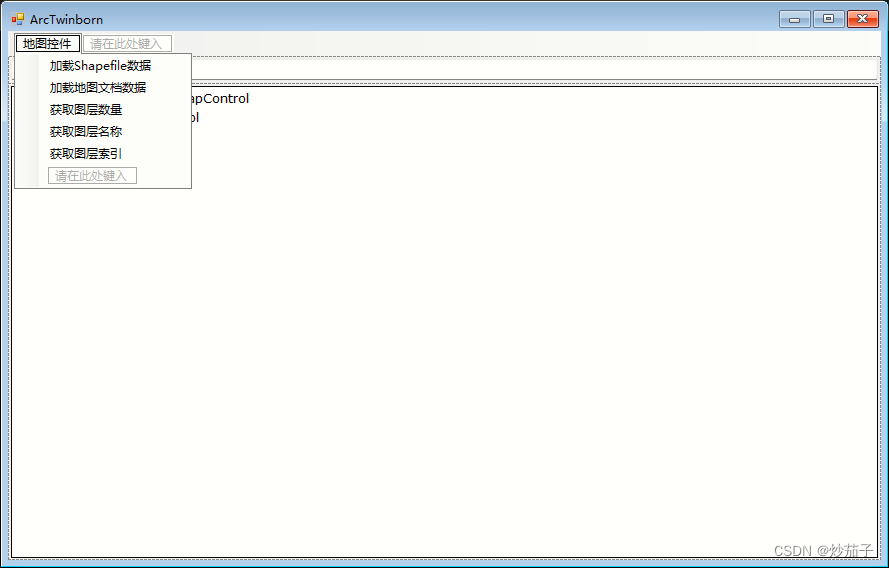
02 编写 <菜单-地图控件> 中各个子工具的代码
2.1 加载Shapefile数据-代码
双击进入<加载Shapefile数据>的点击事件中(实际上就是点击了该工具会发生什么事情,这一部分事情放在一个函数中让你自由发挥)
using System.IO; // 与路径的处理相关(在本程序中), 为了使用其中的Path类(其是静态的)使用下面中的Path类需要添加上述引用:
- private void 加载Shapefile数据ToolStripMenuItem_Click(object sender, EventArgs e)
- {
- // 创建一个文件对话框实例获取用户选择的Shp文件
- OpenFileDialog openFileDialog = new OpenFileDialog();
- openFileDialog.Title = "加载Shapefile数据"; // 文件对话框的标题
- openFileDialog.Filter = "Shapefile(*.shp)|*.shp|asa|*.*"; // |前面为描述性信息, 后面为通配符
- openFileDialog.Multiselect = false; // 不允许选择多个文件
- if (openFileDialog.ShowDialog() == DialogResult.OK) // 其中openFileDialog.ShowDialog()执行打开文件对话框并返回相关值, 这里判断是否为
- {
- string shapefile_path = openFileDialog.FileName;
- try
- {
- string shapefile_dir = Path.GetDirectoryName(shapefile_path);
- string shapefile_name = Path.GetFileName(shapefile_path);
- MainMapControl.AddShapeFile(shapefile_dir, shapefile_name);
- // 上面分别传入Shp文件所在文件夹的目录和Shp文件的文件名.
- MessageBox.Show(string.Format("加载Shapefile数据成功:\n {0}", shapefile_name), "加载成功", MessageBoxButtons.OK, MessageBoxIcon.Information);
- }
- catch (Exception ex)
- {
- //MessageBox.Show($"加载Shapefile数据成失败: {ex.Message}", "");
- MessageBox.Show(string.Format("加载Shapefile数据失败:\n {0}", ex.Message), "加载失败", MessageBoxButtons.OK, MessageBoxIcon.Error);
- }
- }
- }
前面都比较常规, 首先先实例化一个OpenFileDialog类用于创建一个文件对话窗口,类似下面这种 :

这样用户才可以选择想要的文件,但是这个不需要我们自己从头去弄,调用人家写好的就好了。
发现了一个这个MessageBox.Show:
传入四个参数(也可以就传入一个字符串,其他都不管等等也可行,看重载方法有没有写)分别是弹出窗口的内容、弹出窗口标题或者说是窗口的说明性描述性信息、弹出窗口的按钮(我加入了一个OK按钮)、弹出窗口的图标(我这里是如果正常加载就是普通信息的图标,否则是错误的图标),如下:


2.2 加载地图文档数据-代码
- private void 加载地图文档数据ToolStripMenuItem_Click(object sender, EventArgs e)
- {
- OpenFileDialog openFileDialog = new OpenFileDialog(); // 实例化一个文件对话框对象
- openFileDialog.Title = "加载地图文档"; // 文件对话框的标题
- openFileDialog.Filter = "地图文档(.mxd)|*.mxd"; // 前面为描述性信息, 后面为通配符
- if (openFileDialog.ShowDialog() == DialogResult.OK) // 文件对话框打开, 并判断文件对话框是否已经选择了文件(==OK)
- {
- string mxd_path = openFileDialog.FileName; // 获取文件对话框所选择的文件的名称
- try
- {
- string mxd_name = Path.GetFileName(mxd_path);
- MainMapControl.LoadMxFile(mxd_path);
- MessageBox.Show(string.Format("加载地图文档成功:\n {0}", mxd_name), "加载成功", MessageBoxButtons.OK, MessageBoxIcon.Information);
- // 在这里调用获取图层数量的函数
- 获取图层数量ToolStripMenuItem_Click(sender, e);
- }
- catch (Exception ex)
- {
- MessageBox.Show(string.Format("加载地图文档失败:\n {0}", ex.Message), "加载失败", MessageBoxButtons.OK, MessageBoxIcon.Error);
- }
- }
- }
与前面类似,这里不再详细描述,对于其中的
- // 在这里调用获取图层数量的函数
- 获取图层数量ToolStripMenuItem_Click(sender, e);
请看后续代码中该函数的编写.
2.3 获取图层数量-代码
- private void 获取图层数量ToolStripMenuItem_Click(object sender, EventArgs e)
- {
- int layers_amount = MainMapControl.LayerCount; // 获取当前显示在Mapcontrol中的所有要素数量
- textBox.Text = string.Format("当前图层数量: {0}", layers_amount);
- }
2.4 获取图层名称-代码
此处使用ILayer类需要添加引用:
using ESRI.ArcGIS.Carto; // 用于地图和图层操作,此处为使用其中的ILayer类- private void 获取图层名称ToolStripMenuItem_Click(object sender, EventArgs e)
- {
- //if (int.TryParse(textBox.Text, out int layer_ix))
- int layer_ix;
- if (int.TryParse(textBox.Text, out layer_ix))
- {
- ILayer layer = MainMapControl.get_Layer(layer_ix);
- textBox.Text = string.Format("索引为{0}的图层名称为: {1}", layer_ix, layer.Name);
- }
- else
- {
- MessageBox.Show(string.Format("不存在索引为: <{0}>\n 请重新输入", textBox.Text));
- textBox.Text = "";
- }
- }
2.5 获取图层索引-代码
- private void 获取图层索引ToolStripMenuItem_Click(object sender, EventArgs e)
- {
- bool layer_exist = false;
- for (int ix = 0; ix < MainMapControl.LayerCount; ix++)
- {
- string layer_name = MainMapControl.get_Layer(ix).Name;
- if (layer_name == textBox.Text)
- {
- textBox.Text = string.Format("当前图层 <{0}> 的索引为: {1}", layer_name, ix);
- layer_exist = true;
- break;
- }
- }
- if (!layer_exist)
- {
- MessageBox.Show("当前图层 <{0}> 不存在, 请重新输入", textBox.Text);
- textBox.Text = "";
- }
- }
2.6 完整代码
- using System;
- using System.Collections.Generic;
- using System.ComponentModel;
- using System.Data;
- using System.Drawing;
- using System.Linq;
- using System.Text;
- using System.Threading.Tasks;
- using System.Windows.Forms;
- using System.IO; // 与路径的处理相关(在本程序中), 为了使用其中的Path类(其是静态的)
- using ESRI.ArcGIS.Carto; // 为了使用其中的ILayer类
- namespace BasicBStation
- {
- public partial class Form1 : Form
- {
- public Form1()
- {
- ESRI.ArcGIS.RuntimeManager.Bind(ESRI.ArcGIS.ProductCode.EngineOrDesktop); // 确保ArcGIS版本清晰, 否则报错.
- InitializeComponent();
- }
- private void 加载Shapefile数据ToolStripMenuItem_Click(object sender, EventArgs e)
- {
- // 创建一个文件对话框实例获取用户选择的Shp文件
- OpenFileDialog openFileDialog = new OpenFileDialog();
- openFileDialog.Title = "加载Shapefile数据"; // 文件对话框的标题
- openFileDialog.Filter = "Shapefile(*.shp)|*.shp|asa|*.*"; // |前面为描述性信息, 后面为通配符
- openFileDialog.Multiselect = false; // 不允许选择多个文件
- if (openFileDialog.ShowDialog() == DialogResult.OK) // 其中openFileDialog.ShowDialog()执行打开文件对话框并返回相关值, 这里判断是否为
- {
- string shapefile_path = openFileDialog.FileName;
- try
- {
- string shapefile_dir = Path.GetDirectoryName(shapefile_path);
- string shapefile_name = Path.GetFileName(shapefile_path);
- MainMapControl.AddShapeFile(shapefile_dir, shapefile_name);
- // 上面分别传入Shp文件所在文件夹的目录和Shp文件的文件名.
- MessageBox.Show(string.Format("加载Shapefile数据成功:\n {0}", shapefile_name), "加载成功", MessageBoxButtons.OK, MessageBoxIcon.Information);
- }
- catch (Exception ex)
- {
- //MessageBox.Show($"加载Shapefile数据成失败: {ex.Message}", "");
- MessageBox.Show(string.Format("加载Shapefile数据失败:\n {0}", ex.Message), "加载失败", MessageBoxButtons.OK, MessageBoxIcon.Error);
- }
- }
- }
- private void 加载地图文档数据ToolStripMenuItem_Click(object sender, EventArgs e)
- {
- OpenFileDialog openFileDialog = new OpenFileDialog(); // 实例化一个文件对话框对象
- openFileDialog.Title = "加载地图文档"; // 文件对话框的标题
- openFileDialog.Filter = "地图文档(.mxd)|*.mxd"; // 前面为描述性信息, 后面为通配符
- if (openFileDialog.ShowDialog() == DialogResult.OK) // 文件对话框打开, 并判断文件对话框是否已经选择了文件(==OK)
- {
- string mxd_path = openFileDialog.FileName; // 获取文件对话框所选择的文件的名称
- try
- {
- string mxd_name = Path.GetFileName(mxd_path);
- MainMapControl.LoadMxFile(mxd_path);
- MessageBox.Show(string.Format("加载地图文档成功:\n {0}", mxd_name), "加载成功", MessageBoxButtons.OK, MessageBoxIcon.Information);
- // 在这里调用获取图层数量的函数
- 获取图层数量ToolStripMenuItem_Click(sender, e);
- }
- catch (Exception ex)
- {
- MessageBox.Show(string.Format("加载地图文档失败:\n {0}", ex.Message), "加载失败", MessageBoxButtons.OK, MessageBoxIcon.Error);
- }
- }
- }
- private void 获取图层数量ToolStripMenuItem_Click(object sender, EventArgs e)
- {
- int layers_amount = MainMapControl.LayerCount; // 获取当前显示在Mapcontrol中的所有要素数量
- textBox.Text = string.Format("当前图层数量: {0}", layers_amount);
- }
- private void 获取图层名称ToolStripMenuItem_Click(object sender, EventArgs e)
- {
- //if (int.TryParse(textBox.Text, out int layer_ix))
- int layer_ix;
- if (int.TryParse(textBox.Text, out layer_ix))
- {
- ILayer layer = MainMapControl.get_Layer(layer_ix);
- textBox.Text = string.Format("索引为{0}的图层名称为: {1}", layer_ix, layer.Name);
- }
- else
- {
- MessageBox.Show(string.Format("不存在索引为: <{0}>\n 请重新输入", textBox.Text));
- textBox.Text = "";
- }
- }
- private void 获取图层索引ToolStripMenuItem_Click(object sender, EventArgs e)
- {
- bool layer_exist = false;
- for (int ix = 0; ix < MainMapControl.LayerCount; ix++)
- {
- string layer_name = MainMapControl.get_Layer(ix).Name;
- if (layer_name == textBox.Text)
- {
- textBox.Text = string.Format("当前图层 <{0}> 的索引为: {1}", layer_name, ix);
- layer_exist = true;
- break;
- }
- }
- if (!layer_exist)
- {
- MessageBox.Show("当前图层 <{0}> 不存在, 请重新输入", textBox.Text);
- textBox.Text = "";
- }
- }
- }
- }
由于时间问题,实在没有精力一一说明代码的详情,可以多看视频(视频和本博客代码稍有出入) 。
03 简单演示


时间精力有限,其他功能不再一一演示。
-
相关阅读:
设计模式代码实现(java)
RabbitMQ工作模式——Topics模式
2023最新SSM计算机毕业设计选题大全(附源码+LW)之java医院疫情管理系统4f9a9
【单片机】新建工程stm大量报错
Python中json.loads()无法解析单引号字符串问题的两种解决方法
解析java中的文件字节输出流
Spring基础(十):AOP概念和原理
ThreadLocal for Golang
设计模式-观察者模式
CountDownLatch翻车后,我建议用CompletableFuture改造下
- 原文地址:https://blog.csdn.net/m0_63001937/article/details/133531938