-
【Python】基于OpenCV人脸追踪、手势识别控制的求生之路FPS游戏操作
【Python】基于OpenCV人脸追踪、手势识别控制的求生之路FPS游戏操作
视频:
基于OpenCV人脸追踪、手势识别控制的求实之路FPS游戏操作
手势识别
采用MediaPipe模块来完成手势识别 同时通过计算各个关键点与手掌平面的角度来判断手指是否弯曲、伸展

如上图为各个关键点的ID序号比如蜘蛛侠手势:
elif (angle_list[0]<thr_angle_s) and (angle_list[1]<thr_angle_s) and (angle_list[2]>thr_angle) and (angle_list[3]>thr_angle) and (angle_list[4]<thr_angle_s): gesture_str = "Spider-Man"- 1
- 2
就是判断拇指 食指 小指伸展 其他闭合

【优秀课设】基于OpenCV+MediaPipe的手势识别(数字、石头剪刀布等手势识别)def vector_2d_angle(v1,v2): ''' 求解二维向量的角度 ''' v1_x=v1[0] v1_y=v1[1] v2_x=v2[0] v2_y=v2[1] try: angle_= math.degrees(math.acos((v1_x*v2_x+v1_y*v2_y)/(((v1_x**2+v1_y**2)**0.5)*((v2_x**2+v2_y**2)**0.5)))) except: angle_ =65535. if angle_ > 180.: angle_ = 65535. return angle_ def hand_angle(hand_): ''' 获取对应手相关向量的二维角度,根据角度确定手势 ''' angle_list = [] #---------------------------- thumb 大拇指角度 angle_ = vector_2d_angle( ((int(hand_[0][0])- int(hand_[2][0])),(int(hand_[0][1])-int(hand_[2][1]))), ((int(hand_[3][0])- int(hand_[4][0])),(int(hand_[3][1])- int(hand_[4][1]))) ) angle_list.append(angle_) #---------------------------- index 食指角度 angle_ = vector_2d_angle( ((int(hand_[0][0])-int(hand_[6][0])),(int(hand_[0][1])- int(hand_[6][1]))), ((int(hand_[7][0])- int(hand_[8][0])),(int(hand_[7][1])- int(hand_[8][1]))) ) angle_list.append(angle_) #---------------------------- middle 中指角度 angle_ = vector_2d_angle( ((int(hand_[0][0])- int(hand_[10][0])),(int(hand_[0][1])- int(hand_[10][1]))), ((int(hand_[11][0])- int(hand_[12][0])),(int(hand_[11][1])- int(hand_[12][1]))) ) angle_list.append(angle_) #---------------------------- ring 无名指角度 angle_ = vector_2d_angle( ((int(hand_[0][0])- int(hand_[14][0])),(int(hand_[0][1])- int(hand_[14][1]))), ((int(hand_[15][0])- int(hand_[16][0])),(int(hand_[15][1])- int(hand_[16][1]))) ) angle_list.append(angle_) #---------------------------- pink 小拇指角度 angle_ = vector_2d_angle( ((int(hand_[0][0])- int(hand_[18][0])),(int(hand_[0][1])- int(hand_[18][1]))), ((int(hand_[19][0])- int(hand_[20][0])),(int(hand_[19][1])- int(hand_[20][1]))) ) angle_list.append(angle_) return angle_list def h_gesture(angle_list): ''' # 二维约束的方法定义手势 # fist five gun love one six three thumbup yeah ''' thr_angle = 65. #手指闭合则大于这个值(大拇指除外) thr_angle_thumb = 53. #大拇指闭合则大于这个值 thr_angle_s = 49. #手指张开则小于这个值 gesture_str = "Unknown" if 65535. not in angle_list: if (angle_list[0]>thr_angle_thumb) and (angle_list[1]>thr_angle) and (angle_list[2]>thr_angle) and (angle_list[3]>thr_angle) and (angle_list[4]>thr_angle): gesture_str = "0" elif (angle_list[0]>thr_angle_thumb) and (angle_list[1]<thr_angle_s) and (angle_list[2]>thr_angle) and (angle_list[3]>thr_angle) and (angle_list[4]>thr_angle): gesture_str = "1" elif (angle_list[0]>thr_angle_thumb) and (angle_list[1]<thr_angle_s) and (angle_list[2]<thr_angle_s) and (angle_list[3]>thr_angle) and (angle_list[4]>thr_angle): gesture_str = "2" elif (angle_list[0]>thr_angle_thumb) and (angle_list[1]<thr_angle_s) and (angle_list[2]<thr_angle_s) and (angle_list[3]<thr_angle_s) and (angle_list[4]>thr_angle): gesture_str = "3" elif (angle_list[0]>thr_angle_thumb) and (angle_list[1]<thr_angle_s) and (angle_list[2]<thr_angle_s) and (angle_list[3]<thr_angle_s) and (angle_list[4]<thr_angle_s): gesture_str = "4" elif (angle_list[0]<thr_angle_s) and (angle_list[1]<thr_angle_s) and (angle_list[2]<thr_angle_s) and (angle_list[3]<thr_angle_s) and (angle_list[4]<thr_angle_s): gesture_str = "5" elif (angle_list[0]<thr_angle_s) and (angle_list[1]>thr_angle) and (angle_list[2]>thr_angle) and (angle_list[3]>thr_angle) and (angle_list[4]<thr_angle_s): gesture_str = "6" elif (angle_list[0]<thr_angle_s) and (angle_list[1]<thr_angle_s) and (angle_list[2]>thr_angle) and (angle_list[3]>thr_angle) and (angle_list[4]>thr_angle): gesture_str = "8" elif (angle_list[0]>thr_angle_thumb) and (angle_list[1]>thr_angle) and (angle_list[2]>thr_angle) and (angle_list[3]>thr_angle) and (angle_list[4]<thr_angle_s): gesture_str = "Pink Up" elif (angle_list[0]<thr_angle_s) and (angle_list[1]>thr_angle) and (angle_list[2]>thr_angle) and (angle_list[3]>thr_angle) and (angle_list[4]>thr_angle): gesture_str = "Thumb Up" elif (angle_list[0]>thr_angle_thumb) and (angle_list[1]>thr_angle) and (angle_list[2]<thr_angle_s) and (angle_list[3]>thr_angle) and (angle_list[4]>thr_angle): gesture_str = "Fuck" elif (angle_list[0]>thr_angle_thumb) and (angle_list[1]>thr_angle) and (angle_list[2]<thr_angle_s) and (angle_list[3]<thr_angle_s) and (angle_list[4]<thr_angle_s): gesture_str = "Princess" elif (angle_list[0]<thr_angle_s) and (angle_list[1]<thr_angle_s) and (angle_list[2]<thr_angle_s) and (angle_list[3]>thr_angle) and (angle_list[4]>thr_angle): gesture_str = "Bye" elif (angle_list[0]<thr_angle_s) and (angle_list[1]<thr_angle_s) and (angle_list[2]>thr_angle) and (angle_list[3]>thr_angle) and (angle_list[4]<thr_angle_s): gesture_str = "Spider-Man" elif (angle_list[0]>thr_angle_thumb) and (angle_list[1]<thr_angle_s) and (angle_list[2]>thr_angle) and (angle_list[3]>thr_angle) and (angle_list[4]<thr_angle_s): gesture_str = "Rock'n'Roll" return gesture_str def hand_detect(): global q global kill_all_flag global cam_img bye_flag = 0 bye_time = time.time() hand_jugg = None gesture_str = None while True: time.sleep(0.1) while q==0: time.sleep(0.1) frame = cv2.cvtColor(cam_img, cv2.COLOR_BGR2RGB) results = hands.process(frame) if results.multi_handedness: for hand_label in results.multi_handedness: hand_jugg=str(hand_label).split('"')[1]+" Hand" print(hand_jugg) # cv2.putText(faceImg,hand_jugg,(50,200),0,1.3,(0,0,255),2) if results.multi_hand_landmarks: for hand_landmarks in results.multi_hand_landmarks: # mp_drawing.draw_landmarks(faceImg, hand_landmarks, mp_hands.HAND_CONNECTIONS) hand_local = [] for i in range(21): x = hand_landmarks.landmark[i].x*frame.shape[1] y = hand_landmarks.landmark[i].y*frame.shape[0] hand_local.append((x,y)) if hand_local: angle_list = hand_angle(hand_local) gesture_str = h_gesture(angle_list) print(gesture_str) # cv2.putText(faceImg,gesture_str,(50,100),0,1.3,(0,0,255),2) if gesture_str == "Bye": if bye_flag == 0: bye_flag = 1 elif bye_flag == 1 and time.time() - bye_time >= 3: kill_all_flag = 1 q = 1 print("Good-Bye") else: bye_flag = 1 else: Keyborad(hand_jugg,gesture_str) bye_flag = 0 hand_jugg = None gesture_str = None if q == 1: break if kill_all_flag == 1: break return- 1
- 2
- 3
- 4
- 5
- 6
- 7
- 8
- 9
- 10
- 11
- 12
- 13
- 14
- 15
- 16
- 17
- 18
- 19
- 20
- 21
- 22
- 23
- 24
- 25
- 26
- 27
- 28
- 29
- 30
- 31
- 32
- 33
- 34
- 35
- 36
- 37
- 38
- 39
- 40
- 41
- 42
- 43
- 44
- 45
- 46
- 47
- 48
- 49
- 50
- 51
- 52
- 53
- 54
- 55
- 56
- 57
- 58
- 59
- 60
- 61
- 62
- 63
- 64
- 65
- 66
- 67
- 68
- 69
- 70
- 71
- 72
- 73
- 74
- 75
- 76
- 77
- 78
- 79
- 80
- 81
- 82
- 83
- 84
- 85
- 86
- 87
- 88
- 89
- 90
- 91
- 92
- 93
- 94
- 95
- 96
- 97
- 98
- 99
- 100
- 101
- 102
- 103
- 104
- 105
- 106
- 107
- 108
- 109
- 110
- 111
- 112
- 113
- 114
- 115
- 116
- 117
- 118
- 119
- 120
- 121
- 122
- 123
- 124
- 125
- 126
- 127
- 128
- 129
- 130
- 131
- 132
- 133
- 134
- 135
- 136
- 137
- 138
- 139
- 140
- 141
- 142
- 143
- 144
- 145
- 146
- 147
- 148
- 149
- 150
- 151
- 152
- 153
- 154
- 155
- 156
- 157
- 158
人脸追踪
【优秀毕设V2.0】基于树莓派的OpenCV-Python摄像头人脸追踪及手势识别、网络地址推流及远程控制系统(多功能系统、含演示视频)
此部分简单易懂
就是靠识别人脸的位置 然后再判断位置就可以了def track(): global q global kill_all_flag global cam_img global left_point global right_point while True: time.sleep(0.1) while q==0: time.sleep(0.05) gray = cv2.cvtColor(cam_img,cv2.COLOR_BGR2GRAY) faceRects = classifier.detectMultiScale(gray,scaleFactor=1.2,minNeighbors=3,minSize=(32, 32)) if len(faceRects): x,y,w,h = faceRects[0] # 框选出人脸 最后一个参数2是框线宽度 # cv2.rectangle(faceImg,(x, y), (x + w, y + h), (0,255,0), 2) central_point = x+w/2 if central_point > left_point: print("Right") Mouse(1) elif central_point < right_point: print("Left") Mouse(2) else: Mouse(0) if q == 1: print("S") break if kill_all_flag == 1: break return- 1
- 2
- 3
- 4
- 5
- 6
- 7
- 8
- 9
- 10
- 11
- 12
- 13
- 14
- 15
- 16
- 17
- 18
- 19
- 20
- 21
- 22
- 23
- 24
- 25
- 26
- 27
- 28
- 29
- 30
- 31
- 32
- 33
- 34
- 35
- 36
- 37
- 38
键盘控制
采用pyautogui库来进行
以下两个函数分别是鼠标移动和键盘操作def Mouse(flag): print(flag) if flag==1: pyautogui.moveTo(100, 100, duration=0.25) pass elif flag==2: pyautogui.moveRel(-50, 0, duration=0.25) pass def Keyborad(hand_jugg,gesture_str): print(hand_jugg,gesture_str) if hand_jugg=="Right Hand": if gesture_str=="1": pyautogui.click() elif gesture_str=="2": pyautogui.click(button='right') elif gesture_str=="4": pyautogui.mouseDown() elif gesture_str=="5": pyautogui.mouseUp()- 1
- 2
- 3
- 4
- 5
- 6
- 7
- 8
- 9
- 10
- 11
- 12
- 13
- 14
- 15
- 16
- 17
- 18
- 19
整体代码
整体代码将三个部分整合起来 并且用多线程的方式 将摄像头获取、人脸追踪、手势识别跑起来 互不影响
# -*- coding: utf-8 -*- """ Created on Sun Sep 10 10:54:53 2023 @author: ZHOU """ import cv2 import threading import mediapipe as mp import math import time import pyautogui pyautogui.FAILSAFE = True # 启用自动防故障功能,左上角的坐标为(0,0),将鼠标移到屏幕的左上角,来抛出failSafeException异常 global q q = 0 global kill_all_flag kill_all_flag = 0 cap = cv2.VideoCapture(0) # 开启摄像头 classifier = cv2.CascadeClassifier('./haarcascade_frontalface_alt2.xml') global cam_img ok, cam_img = cap.read() # 读取摄像头图像 if ok is False: q = 1 kill_all_flag = 1 print('无法读取到摄像头!') high=cam_img.shape[0] width=cam_img.shape[1] global left_point global right_point left_point = width/2+width*0.04 right_point = width/2-width*0.04 mp_drawing = mp.solutions.drawing_utils mp_hands = mp.solutions.hands hands = mp_hands.Hands(static_image_mode=False,max_num_hands=1,min_detection_confidence=0.6,min_tracking_confidence=0.75) def Mouse(flag): print(flag) if flag==1: # pyautogui.moveTo(100, 100, duration=0.25) pass elif flag==2: # pyautogui.moveRel(-50, 0, duration=0.25) pass def Keyborad(hand_jugg,gesture_str): print(hand_jugg,gesture_str) if hand_jugg=="Right Hand": if gesture_str=="1": pyautogui.click() elif gesture_str=="2": pyautogui.click(button='right') elif gesture_str=="4": pyautogui.mouseDown() elif gesture_str=="5": pyautogui.mouseUp() def vector_2d_angle(v1,v2): ''' 求解二维向量的角度 ''' v1_x=v1[0] v1_y=v1[1] v2_x=v2[0] v2_y=v2[1] try: angle_= math.degrees(math.acos((v1_x*v2_x+v1_y*v2_y)/(((v1_x**2+v1_y**2)**0.5)*((v2_x**2+v2_y**2)**0.5)))) except: angle_ =65535. if angle_ > 180.: angle_ = 65535. return angle_ def hand_angle(hand_): ''' 获取对应手相关向量的二维角度,根据角度确定手势 ''' angle_list = [] #---------------------------- thumb 大拇指角度 angle_ = vector_2d_angle( ((int(hand_[0][0])- int(hand_[2][0])),(int(hand_[0][1])-int(hand_[2][1]))), ((int(hand_[3][0])- int(hand_[4][0])),(int(hand_[3][1])- int(hand_[4][1]))) ) angle_list.append(angle_) #---------------------------- index 食指角度 angle_ = vector_2d_angle( ((int(hand_[0][0])-int(hand_[6][0])),(int(hand_[0][1])- int(hand_[6][1]))), ((int(hand_[7][0])- int(hand_[8][0])),(int(hand_[7][1])- int(hand_[8][1]))) ) angle_list.append(angle_) #---------------------------- middle 中指角度 angle_ = vector_2d_angle( ((int(hand_[0][0])- int(hand_[10][0])),(int(hand_[0][1])- int(hand_[10][1]))), ((int(hand_[11][0])- int(hand_[12][0])),(int(hand_[11][1])- int(hand_[12][1]))) ) angle_list.append(angle_) #---------------------------- ring 无名指角度 angle_ = vector_2d_angle( ((int(hand_[0][0])- int(hand_[14][0])),(int(hand_[0][1])- int(hand_[14][1]))), ((int(hand_[15][0])- int(hand_[16][0])),(int(hand_[15][1])- int(hand_[16][1]))) ) angle_list.append(angle_) #---------------------------- pink 小拇指角度 angle_ = vector_2d_angle( ((int(hand_[0][0])- int(hand_[18][0])),(int(hand_[0][1])- int(hand_[18][1]))), ((int(hand_[19][0])- int(hand_[20][0])),(int(hand_[19][1])- int(hand_[20][1]))) ) angle_list.append(angle_) return angle_list def h_gesture(angle_list): ''' # 二维约束的方法定义手势 # fist five gun love one six three thumbup yeah ''' thr_angle = 65. #手指闭合则大于这个值(大拇指除外) thr_angle_thumb = 53. #大拇指闭合则大于这个值 thr_angle_s = 49. #手指张开则小于这个值 gesture_str = "Unknown" if 65535. not in angle_list: if (angle_list[0]>thr_angle_thumb) and (angle_list[1]>thr_angle) and (angle_list[2]>thr_angle) and (angle_list[3]>thr_angle) and (angle_list[4]>thr_angle): gesture_str = "0" elif (angle_list[0]>thr_angle_thumb) and (angle_list[1]<thr_angle_s) and (angle_list[2]>thr_angle) and (angle_list[3]>thr_angle) and (angle_list[4]>thr_angle): gesture_str = "1" elif (angle_list[0]>thr_angle_thumb) and (angle_list[1]<thr_angle_s) and (angle_list[2]<thr_angle_s) and (angle_list[3]>thr_angle) and (angle_list[4]>thr_angle): gesture_str = "2" elif (angle_list[0]>thr_angle_thumb) and (angle_list[1]<thr_angle_s) and (angle_list[2]<thr_angle_s) and (angle_list[3]<thr_angle_s) and (angle_list[4]>thr_angle): gesture_str = "3" elif (angle_list[0]>thr_angle_thumb) and (angle_list[1]<thr_angle_s) and (angle_list[2]<thr_angle_s) and (angle_list[3]<thr_angle_s) and (angle_list[4]<thr_angle_s): gesture_str = "4" elif (angle_list[0]<thr_angle_s) and (angle_list[1]<thr_angle_s) and (angle_list[2]<thr_angle_s) and (angle_list[3]<thr_angle_s) and (angle_list[4]<thr_angle_s): gesture_str = "5" elif (angle_list[0]<thr_angle_s) and (angle_list[1]>thr_angle) and (angle_list[2]>thr_angle) and (angle_list[3]>thr_angle) and (angle_list[4]<thr_angle_s): gesture_str = "6" elif (angle_list[0]<thr_angle_s) and (angle_list[1]<thr_angle_s) and (angle_list[2]>thr_angle) and (angle_list[3]>thr_angle) and (angle_list[4]>thr_angle): gesture_str = "8" elif (angle_list[0]>thr_angle_thumb) and (angle_list[1]>thr_angle) and (angle_list[2]>thr_angle) and (angle_list[3]>thr_angle) and (angle_list[4]<thr_angle_s): gesture_str = "Pink Up" elif (angle_list[0]<thr_angle_s) and (angle_list[1]>thr_angle) and (angle_list[2]>thr_angle) and (angle_list[3]>thr_angle) and (angle_list[4]>thr_angle): gesture_str = "Thumb Up" elif (angle_list[0]>thr_angle_thumb) and (angle_list[1]>thr_angle) and (angle_list[2]<thr_angle_s) and (angle_list[3]>thr_angle) and (angle_list[4]>thr_angle): gesture_str = "Fuck" elif (angle_list[0]>thr_angle_thumb) and (angle_list[1]>thr_angle) and (angle_list[2]<thr_angle_s) and (angle_list[3]<thr_angle_s) and (angle_list[4]<thr_angle_s): gesture_str = "Princess" elif (angle_list[0]<thr_angle_s) and (angle_list[1]<thr_angle_s) and (angle_list[2]<thr_angle_s) and (angle_list[3]>thr_angle) and (angle_list[4]>thr_angle): gesture_str = "Bye" elif (angle_list[0]<thr_angle_s) and (angle_list[1]<thr_angle_s) and (angle_list[2]>thr_angle) and (angle_list[3]>thr_angle) and (angle_list[4]<thr_angle_s): gesture_str = "Spider-Man" elif (angle_list[0]>thr_angle_thumb) and (angle_list[1]<thr_angle_s) and (angle_list[2]>thr_angle) and (angle_list[3]>thr_angle) and (angle_list[4]<thr_angle_s): gesture_str = "Rock'n'Roll" return gesture_str def hand_detect(): global q global kill_all_flag global cam_img bye_flag = 0 bye_time = time.time() hand_jugg = None gesture_str = None while True: time.sleep(0.1) while q==0: time.sleep(0.1) frame = cv2.cvtColor(cam_img, cv2.COLOR_BGR2RGB) results = hands.process(frame) if results.multi_handedness: for hand_label in results.multi_handedness: hand_jugg=str(hand_label).split('"')[1]+" Hand" print(hand_jugg) # cv2.putText(faceImg,hand_jugg,(50,200),0,1.3,(0,0,255),2) if results.multi_hand_landmarks: for hand_landmarks in results.multi_hand_landmarks: # mp_drawing.draw_landmarks(faceImg, hand_landmarks, mp_hands.HAND_CONNECTIONS) hand_local = [] for i in range(21): x = hand_landmarks.landmark[i].x*frame.shape[1] y = hand_landmarks.landmark[i].y*frame.shape[0] hand_local.append((x,y)) if hand_local: angle_list = hand_angle(hand_local) gesture_str = h_gesture(angle_list) print(gesture_str) # cv2.putText(faceImg,gesture_str,(50,100),0,1.3,(0,0,255),2) if gesture_str == "Bye": if bye_flag == 0: bye_flag = 1 elif bye_flag == 1 and time.time() - bye_time >= 3: kill_all_flag = 1 q = 1 print("Good-Bye") else: bye_flag = 1 else: Keyborad(hand_jugg,gesture_str) bye_flag = 0 hand_jugg = None gesture_str = None if q == 1: break if kill_all_flag == 1: break return def track(): global q global kill_all_flag global cam_img global left_point global right_point while True: time.sleep(0.1) while q==0: time.sleep(0.05) gray = cv2.cvtColor(cam_img,cv2.COLOR_BGR2GRAY) faceRects = classifier.detectMultiScale(gray,scaleFactor=1.2,minNeighbors=3,minSize=(32, 32)) if len(faceRects): x,y,w,h = faceRects[0] # 框选出人脸 最后一个参数2是框线宽度 # cv2.rectangle(faceImg,(x, y), (x + w, y + h), (0,255,0), 2) central_point = x+w/2 if central_point > left_point: print("Right") Mouse(1) elif central_point < right_point: print("Left") Mouse(2) else: Mouse(0) if q == 1: print("S") break if kill_all_flag == 1: break return def img_main(): global q global kill_all_flag global cam_img thread_track = threading.Thread(target=track) thread_track.setDaemon(True) thread_track.start() thread_hand = threading.Thread(target=hand_detect) thread_hand.setDaemon(True) thread_hand.start() while True: time.sleep(0.1) while q==0: cam_img = cv2.flip(cap.read()[1],1) cv2.imshow("video_feed",cam_img) # 展示图像 if q == 1: # 通过esc键退出摄像 q = 1 print("暂停程序") cv2.destroyAllWindows() break if cv2.waitKey(10) == 27: kill_all_flag = 1 q = 1 print("结束程序") cv2.destroyAllWindows() break if kill_all_flag == 1: break cap.release() print("全部退出") return def main(): img_main() time.sleep(1) print("已退出所有程序") return if __name__ == "__main__": main()- 1
- 2
- 3
- 4
- 5
- 6
- 7
- 8
- 9
- 10
- 11
- 12
- 13
- 14
- 15
- 16
- 17
- 18
- 19
- 20
- 21
- 22
- 23
- 24
- 25
- 26
- 27
- 28
- 29
- 30
- 31
- 32
- 33
- 34
- 35
- 36
- 37
- 38
- 39
- 40
- 41
- 42
- 43
- 44
- 45
- 46
- 47
- 48
- 49
- 50
- 51
- 52
- 53
- 54
- 55
- 56
- 57
- 58
- 59
- 60
- 61
- 62
- 63
- 64
- 65
- 66
- 67
- 68
- 69
- 70
- 71
- 72
- 73
- 74
- 75
- 76
- 77
- 78
- 79
- 80
- 81
- 82
- 83
- 84
- 85
- 86
- 87
- 88
- 89
- 90
- 91
- 92
- 93
- 94
- 95
- 96
- 97
- 98
- 99
- 100
- 101
- 102
- 103
- 104
- 105
- 106
- 107
- 108
- 109
- 110
- 111
- 112
- 113
- 114
- 115
- 116
- 117
- 118
- 119
- 120
- 121
- 122
- 123
- 124
- 125
- 126
- 127
- 128
- 129
- 130
- 131
- 132
- 133
- 134
- 135
- 136
- 137
- 138
- 139
- 140
- 141
- 142
- 143
- 144
- 145
- 146
- 147
- 148
- 149
- 150
- 151
- 152
- 153
- 154
- 155
- 156
- 157
- 158
- 159
- 160
- 161
- 162
- 163
- 164
- 165
- 166
- 167
- 168
- 169
- 170
- 171
- 172
- 173
- 174
- 175
- 176
- 177
- 178
- 179
- 180
- 181
- 182
- 183
- 184
- 185
- 186
- 187
- 188
- 189
- 190
- 191
- 192
- 193
- 194
- 195
- 196
- 197
- 198
- 199
- 200
- 201
- 202
- 203
- 204
- 205
- 206
- 207
- 208
- 209
- 210
- 211
- 212
- 213
- 214
- 215
- 216
- 217
- 218
- 219
- 220
- 221
- 222
- 223
- 224
- 225
- 226
- 227
- 228
- 229
- 230
- 231
- 232
- 233
- 234
- 235
- 236
- 237
- 238
- 239
- 240
- 241
- 242
- 243
- 244
- 245
- 246
- 247
- 248
- 249
- 250
- 251
- 252
- 253
- 254
- 255
- 256
- 257
- 258
- 259
- 260
- 261
- 262
- 263
- 264
- 265
- 266
- 267
- 268
- 269
- 270
- 271
- 272
- 273
- 274
- 275
- 276
- 277
- 278
- 279
- 280
- 281
- 282
- 283
- 284
- 285
- 286
- 287
- 288
- 289
- 290
- 291
- 292
- 293
- 294
- 295
- 296
- 297
- 298
- 299
- 300
- 301
- 302
- 303
- 304
- 305
- 306
- 307
- 308
- 309
- 310
- 311
- 312
- 313
附录:列表的赋值类型和py打包
列表赋值
BUG复现
闲来无事写了个小程序 代码如下:
# -*- coding: utf-8 -*- """ Created on Fri Nov 19 19:47:01 2021 @author: 16016 """ a_list = ['0','1','2','3','4','5','6','7','8','9','10','11','12','13','14','15'] #print(len(a_list)) #b_list = ['','','','','','','','','','','','','','','',''] c_list = [[],[],[],[],[],[],[],[],[],[],[],[],[],[],[],[]] #for i in range(16): if len(a_list): for j in range(16): a_list[j]=str(a_list[j])+'_'+str(j) print("序号:",j) print('a_list:\n',a_list) c_list[j]=a_list print('c_list[0]:\n',c_list[0]) print('\n') # b_list[j]=a_list[7],a_list[8] # print(b_list[j]) # 写入到Excel: #print(c_list,'\n')- 1
- 2
- 3
- 4
- 5
- 6
- 7
- 8
- 9
- 10
- 11
- 12
- 13
- 14
- 15
- 16
- 17
- 18
- 19
- 20
- 21
- 22
- 23
- 24
- 25
- 26
我在程序中 做了一个16次的for循环 把列表a的每个值后面依次加上"_"和循环序号
比如循环第x次 就是把第x位加上_x 这一位变成x_x 我在输出测试中 列表a的每一次输出也是对的
循环16次后列表a应该变成[‘0_0’, ‘1_1’, ‘2_2’, ‘3_3’, ‘4_4’, ‘5_5’, ‘6_6’, ‘7_7’, ‘8_8’, ‘9_9’, ‘10_10’, ‘11_11’, ‘12_12’, ‘13_13’, ‘14_14’, ‘15_15’] 这也是对的同时 我将每一次循环时列表a的值 写入到空列表c中 比如第x次循环 就是把更改以后的列表a的值 写入到列表c的第x位
第0次循环后 c[0]的值应该是[‘0_0’, ‘1’, ‘2’, ‘3’, ‘4’, ‘5’, ‘6’, ‘7’, ‘8’, ‘9’, ‘10’, ‘11’, ‘12’, ‘13’, ‘14’, ‘15’] 这也是对的
但是在第1次循环以后 c[0]的值就一直在变 变成了c[x]的值
相当于把c_list[0]变成了c_list[1]…以此类推 最后得出的列表c的值也是每一项完全一样
我不明白这是怎么回事
我的c[0]只在第0次循环时被赋值了 但是后面它的值跟着在改变如图:

第一次老出bug 赋值以后 每次循环都改变c[0]的值 搞了半天都没搞出来
无论是用appen函数添加 还是用二维数组定义 或者增加第三个空数组来过渡 都无法解决代码改进
后来在我华科同学的指导下 突然想到赋值可以赋的是个地址 地址里面的值一直变化 导致赋值也一直变化 于是用第二张图的循环套循环深度复制实现了
代码如下:
# -*- coding: utf-8 -*- """ Created on Fri Nov 19 19:47:01 2021 @author: 16016 """ a_list = ['0','1','2','3','4','5','6','7','8','9','10','11','12','13','14','15'] #print(len(a_list)) #b_list = ['','','','','','','','','','','','','','','',''] c_list = [[],[],[],[],[],[],[],[],[],[],[],[],[],[],[],[]] #for i in range(16): if len(a_list): for j in range(16): a_list[j]=str(a_list[j])+'_'+str(j) print("序号:",j) print('a_list:\n',a_list) for i in range(16): c_list[j].append(a_list[i]) print('c_list[0]:\n',c_list[0]) print('\n') # b_list[j]=a_list[7],a_list[8] # print(b_list[j]) # 写入到Excel: print(c_list,'\n')- 1
- 2
- 3
- 4
- 5
- 6
- 7
- 8
- 9
- 10
- 11
- 12
- 13
- 14
- 15
- 16
- 17
- 18
- 19
- 20
- 21
- 22
- 23
- 24
- 25
- 26
- 27
解决了问题
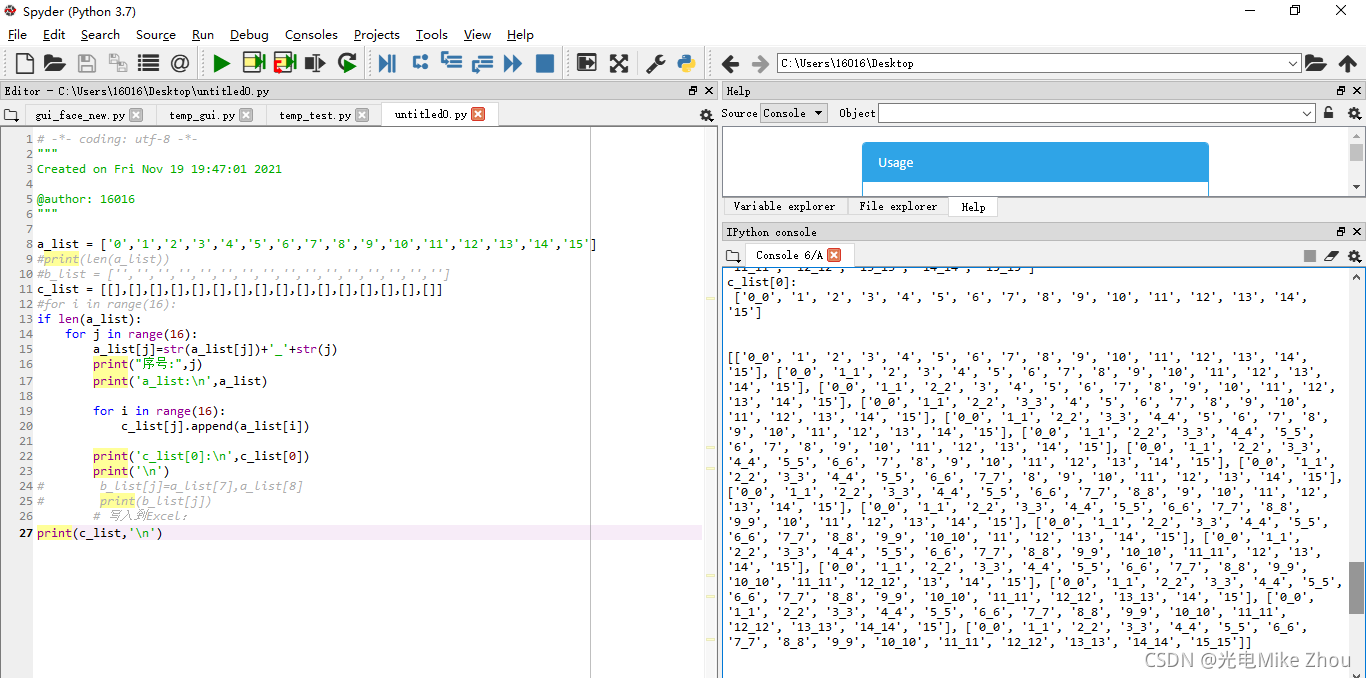
优化
第三次是请教了老师 用copy函数来赋真值
代码如下:
# -*- coding: utf-8 -*- """ Created on Fri Nov 19 19:47:01 2021 @author: 16016 """ a_list = ['0','1','2','3','4','5','6','7','8','9','10','11','12','13','14','15'] #print(len(a_list)) #b_list = ['','','','','','','','','','','','','','','',''] c_list = [[],[],[],[],[],[],[],[],[],[],[],[],[],[],[],[]] #for i in range(16): if len(a_list): for j in range(16): a_list[j]=str(a_list[j])+'_'+str(j) print("序号:",j) print('a_list:\n',a_list) c_list[j]=a_list.copy() print('c_list[0]:\n',c_list[0]) print('\n') # b_list[j]=a_list[7],a_list[8] # print(b_list[j]) # 写入到Excel: #print(c_list,'\n')- 1
- 2
- 3
- 4
- 5
- 6
- 7
- 8
- 9
- 10
- 11
- 12
- 13
- 14
- 15
- 16
- 17
- 18
- 19
- 20
- 21
- 22
- 23
- 24
- 25
- 26
同样能解决问题
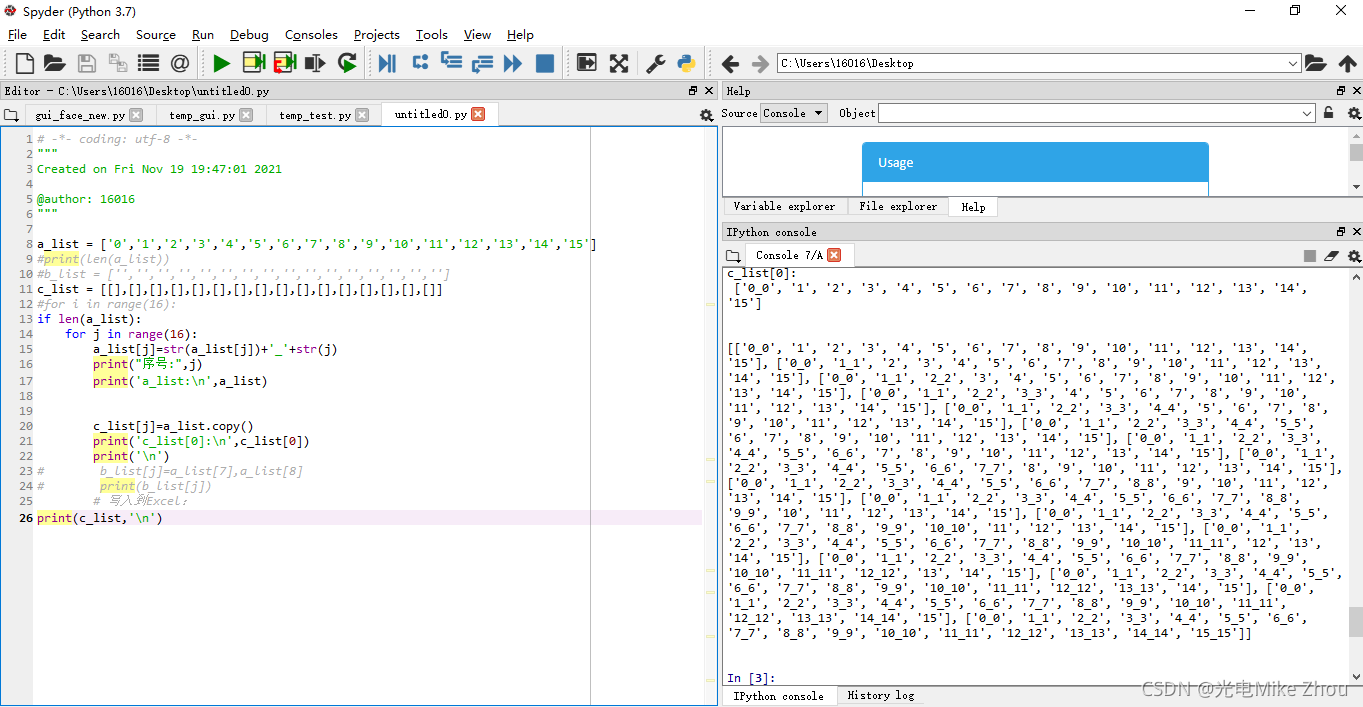
最后得出问题 就是指针惹的祸!a_list指向的是个地址 而不是值 a_list[i]指向的才是单个的值 copy()函数也是复制值而不是地址
如果这个用C语言来写 就直观一些了 难怪C语言是基础 光学Python不学C 遇到这样的问题就解决不了
C语言yyds Python是什么垃圾弱智语言
总结
由于Python无法单独定义一个值为指针或者独立的值 所以只能用列表来传送
只要赋值是指向一个列表整体的 那么就是指向的一个指针内存地址 解决方法只有一个 那就是将每个值深度复制赋值(子列表内的元素提取出来重新依次连接) 或者用copy函数单独赋值如图测试:
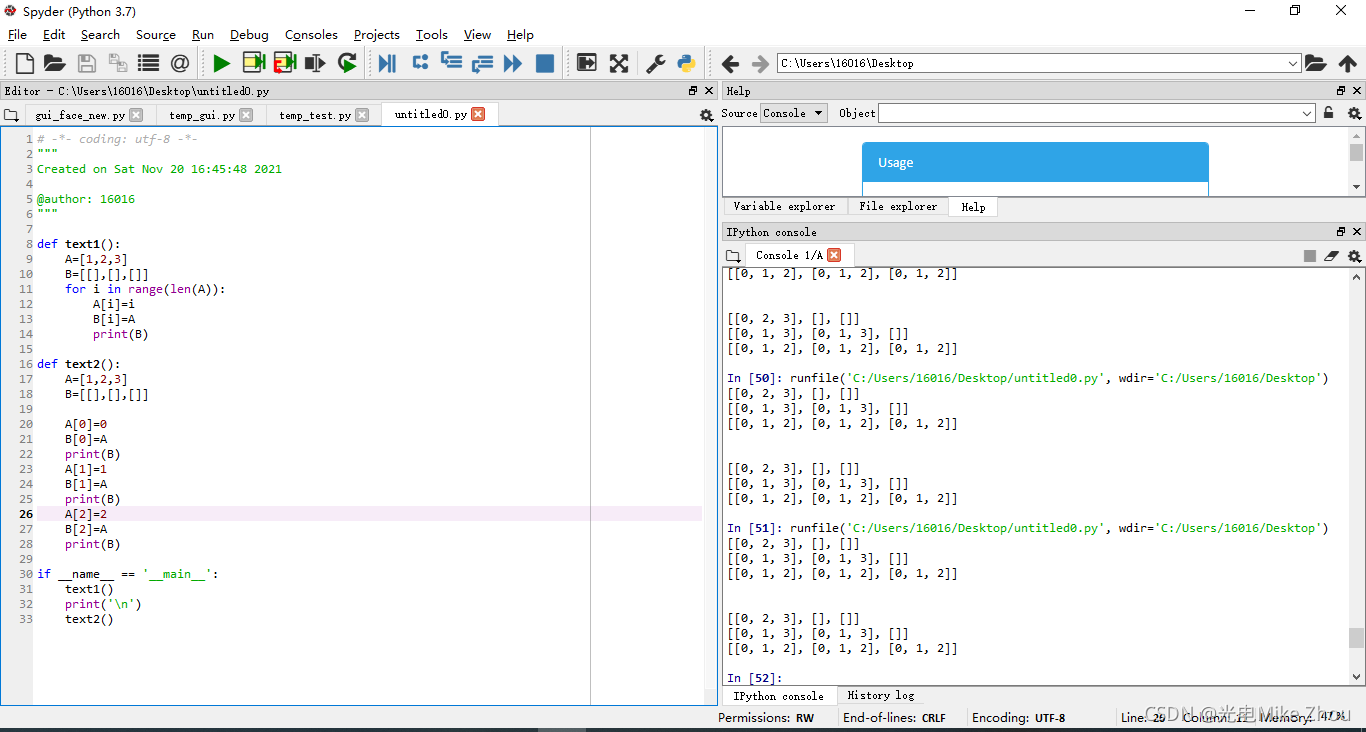
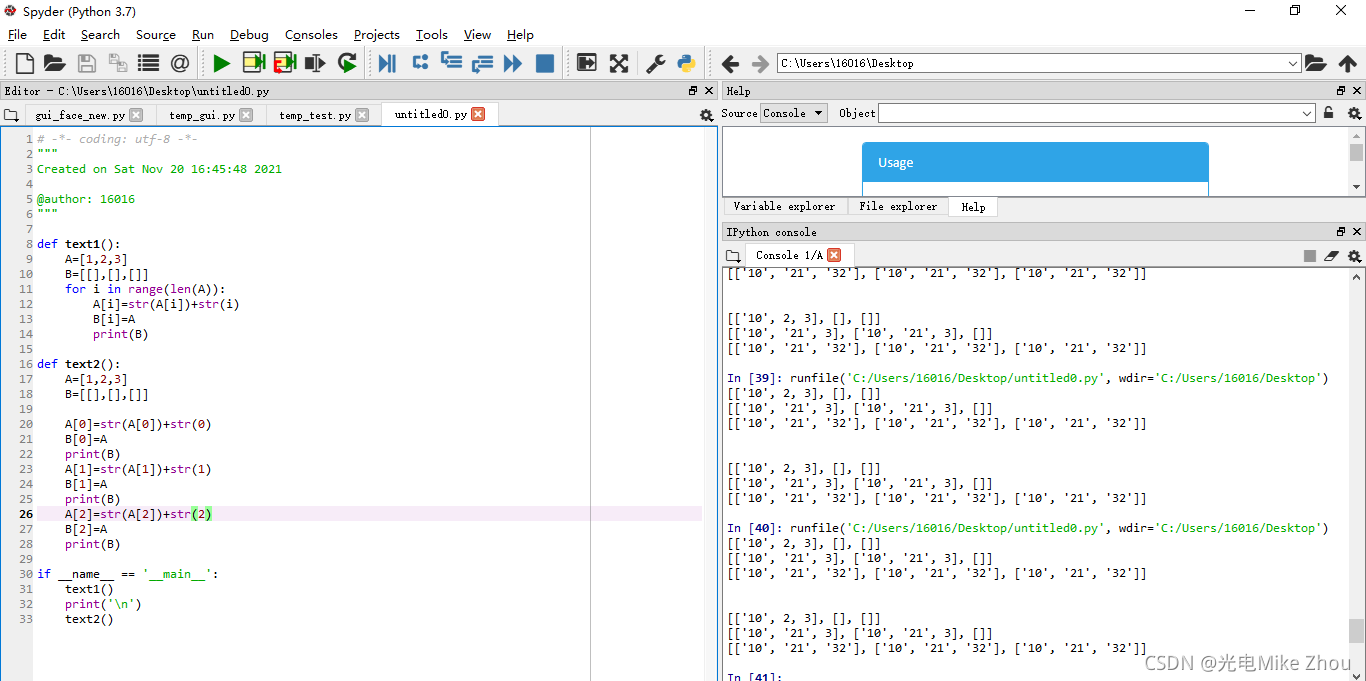
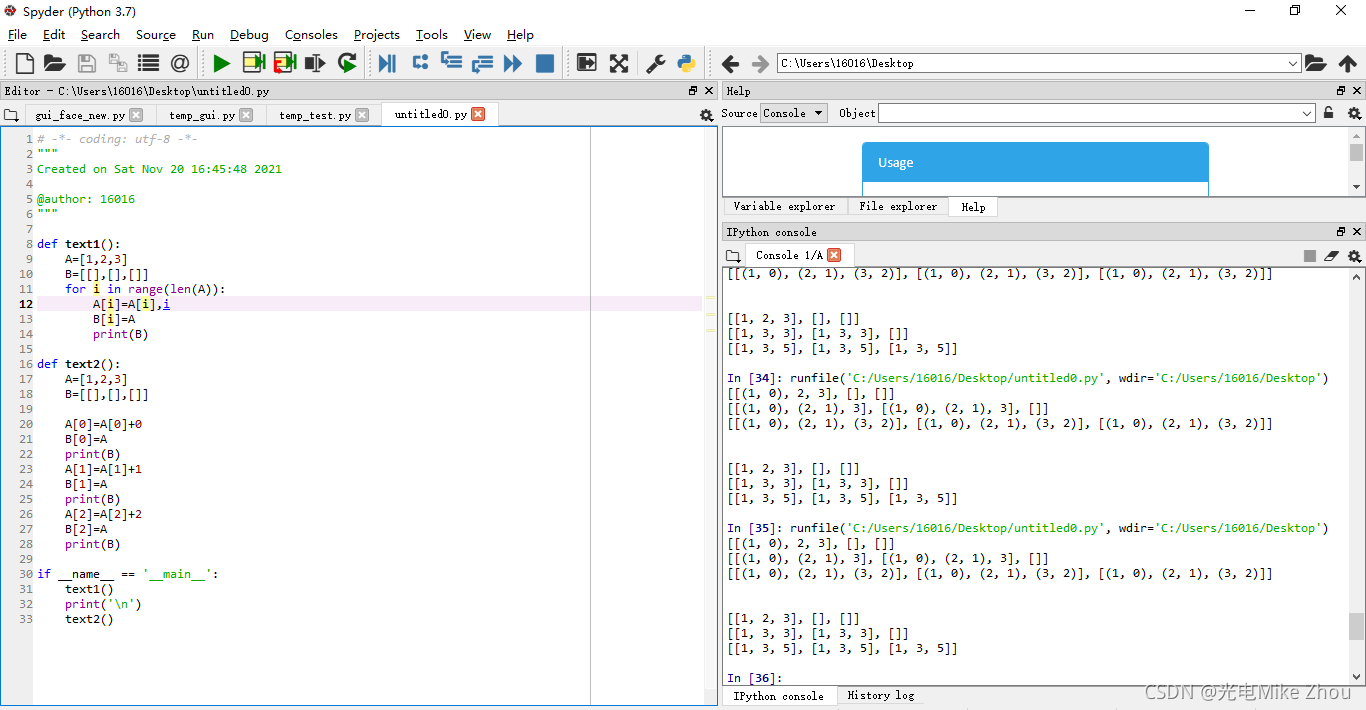
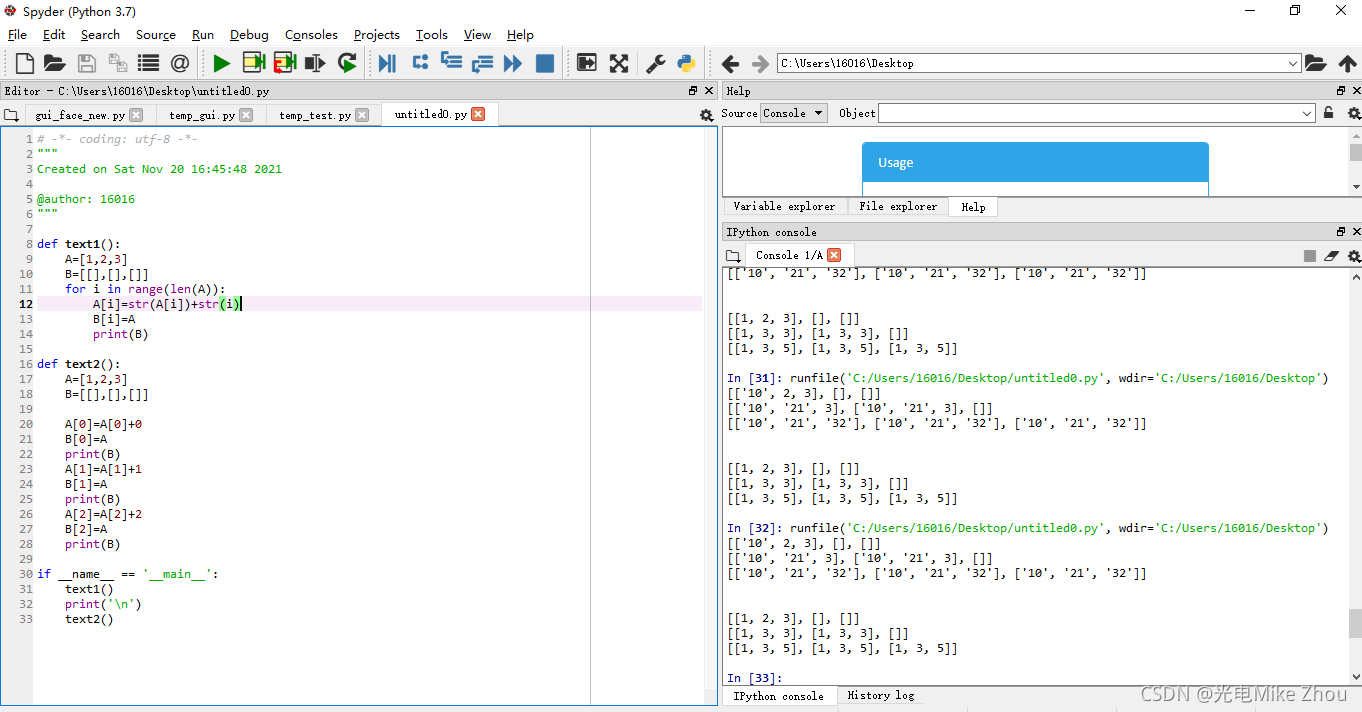
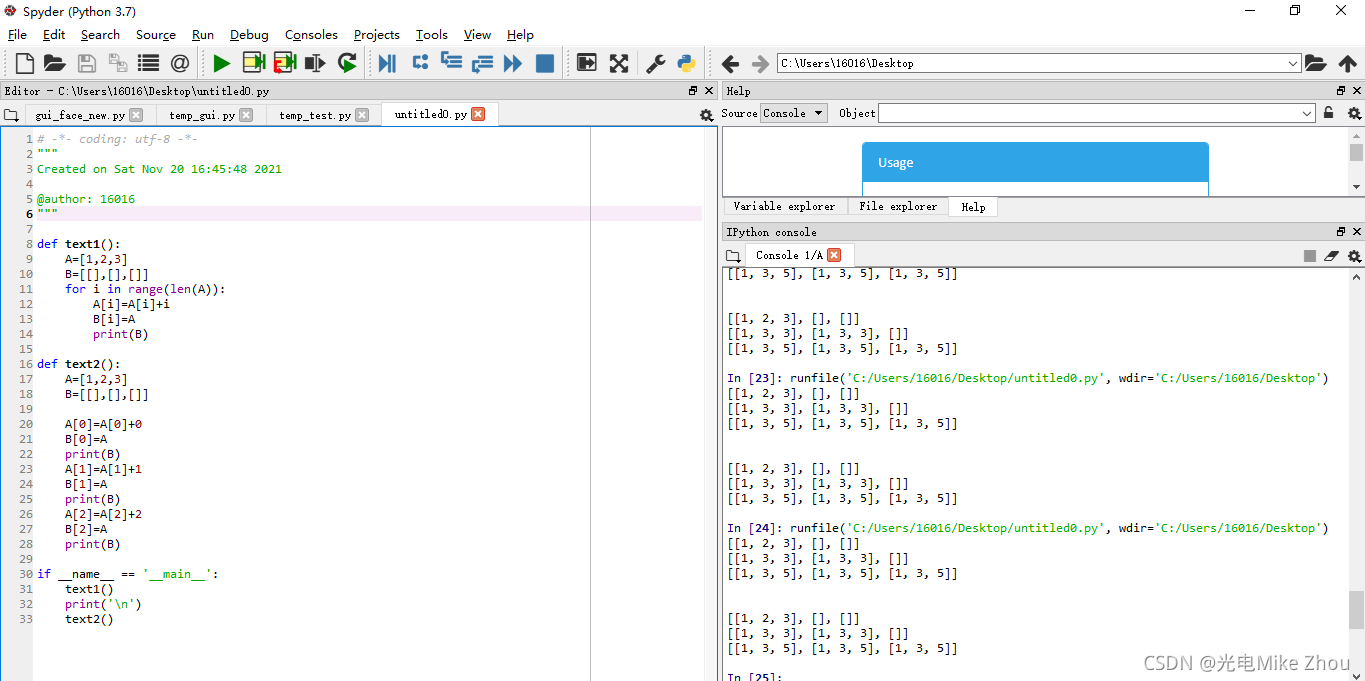
部分代码:# -*- coding: utf-8 -*- """ Created on Sat Nov 20 16:45:48 2021 @author: 16016 """ def text1(): A=[1,2,3] B=[[],[],[]] for i in range(len(A)): A[i]=A[i]+i B[i]=A print(B) def text2(): A=[1,2,3] B=[[],[],[]] A[0]=A[0]+0 B[0]=A print(B) A[1]=A[1]+1 B[1]=A print(B) A[2]=A[2]+2 B[2]=A print(B) if __name__ == '__main__': text1() print('\n') text2()- 1
- 2
- 3
- 4
- 5
- 6
- 7
- 8
- 9
- 10
- 11
- 12
- 13
- 14
- 15
- 16
- 17
- 18
- 19
- 20
- 21
- 22
- 23
- 24
- 25
- 26
- 27
- 28
- 29
- 30
- 31
- 32
- 33
py打包
Pyinstaller打包exe(包括打包资源文件 绝不出错版)
依赖包及其对应的版本号
PyQt5 5.10.1
PyQt5-Qt5 5.15.2
PyQt5-sip 12.9.0pyinstaller 4.5.1
pyinstaller-hooks-contrib 2021.3Pyinstaller -F setup.py 打包exe
Pyinstaller -F -w setup.py 不带控制台的打包
Pyinstaller -F -i xx.ico setup.py 打包指定exe图标打包
打包exe参数说明:
-F:打包后只生成单个exe格式文件;
-D:默认选项,创建一个目录,包含exe文件以及大量依赖文件;
-c:默认选项,使用控制台(就是类似cmd的黑框);
-w:不使用控制台;
-p:添加搜索路径,让其找到对应的库;
-i:改变生成程序的icon图标。
如果要打包资源文件
则需要对代码中的路径进行转换处理
另外要注意的是 如果要打包资源文件 则py程序里面的路径要从./xxx/yy换成xxx/yy 并且进行路径转换
但如果不打包资源文件的话 最好路径还是用作./xxx/yy 并且不进行路径转换def get_resource_path(relative_path): if hasattr(sys, '_MEIPASS'): return os.path.join(sys._MEIPASS, relative_path) return os.path.join(os.path.abspath("."), relative_path)- 1
- 2
- 3
- 4
- 5
而后再spec文件中的datas部分加入目录
如:a = Analysis(['cxk.py'], pathex=['D:\\Python Test\\cxk'], binaries=[], datas=[('root','root')], hiddenimports=[], hookspath=[], hooksconfig={}, runtime_hooks=[], excludes=[], win_no_prefer_redirects=False, win_private_assemblies=False, cipher=block_cipher, noarchive=False)- 1
- 2
- 3
- 4
- 5
- 6
- 7
- 8
- 9
- 10
- 11
- 12
- 13
而后直接Pyinstaller -F setup.spec即可
如果打包的文件过大则更改spec文件中的excludes 把不需要的库写进去(但是已经在环境中安装了的)就行
这些不要了的库在上一次编译时的shell里面输出
比如:
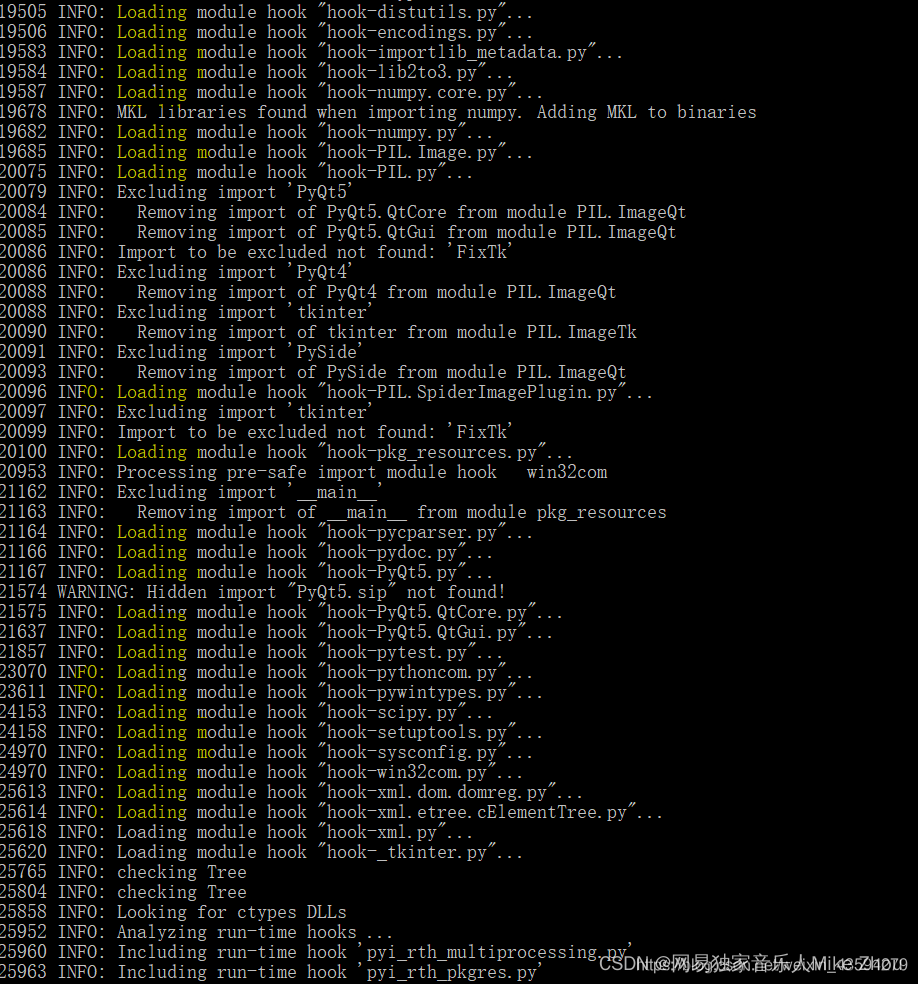
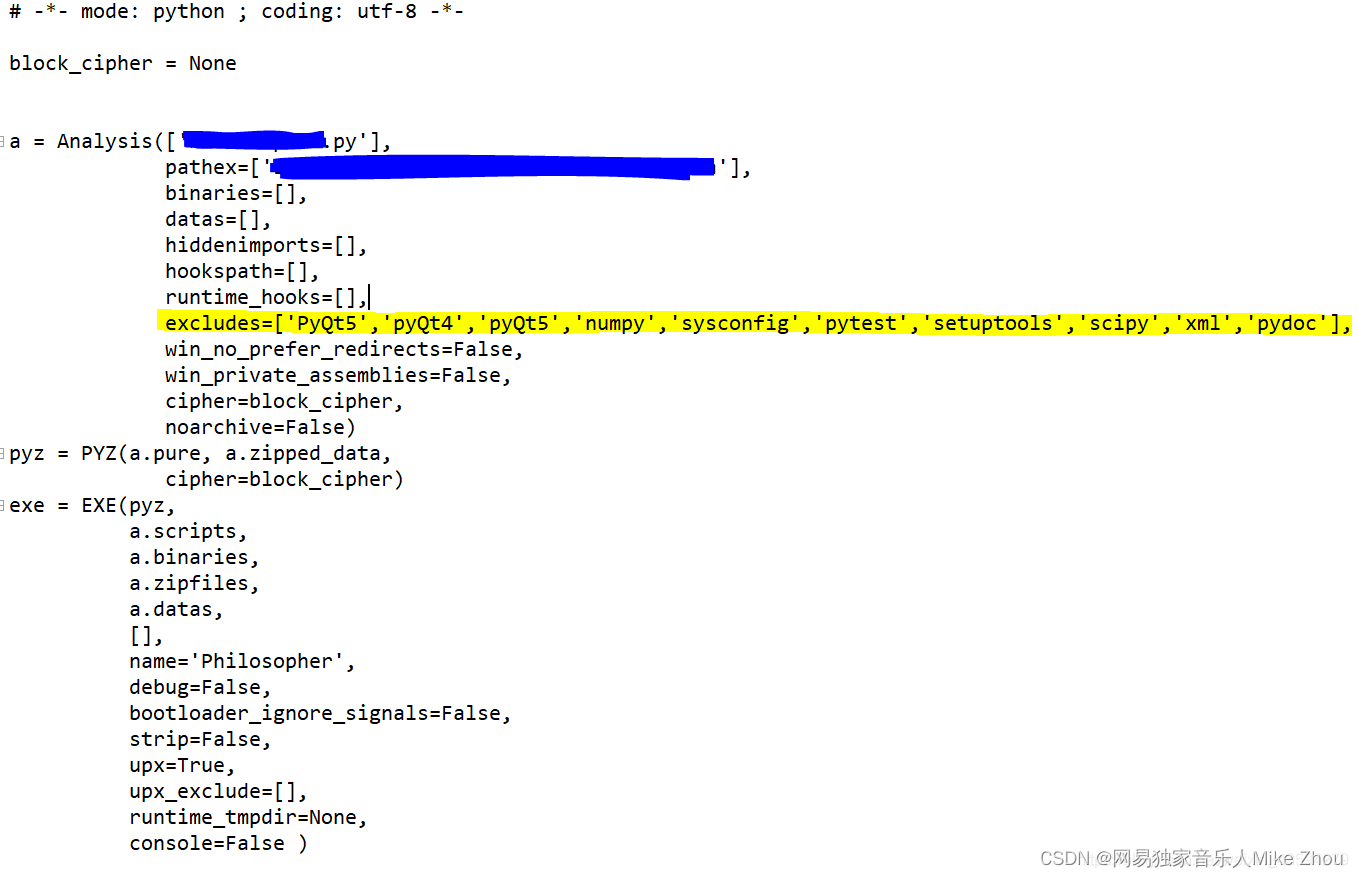
然后用pyinstaller --clean -F 某某.spec -
相关阅读:
雷军的演讲以及产品发布
实战三十一:基于LightGCN推荐算法的推荐系统详细教程(代码+数据)
JavaScript 67 JavaScript HTML DOM 67.7 JavaScript HTML DOM - 改变 CSS
mysql排名函数示例
2022年密码测评理论与关键技术前沿论坛|海泰方圆分享密码应用改造典型方案
页面设计都有哪些好用的工具推荐?
蓝桥杯 Java k倍区间
第08篇:巧用Spring之Data Binding数据绑定
Baidu && 搜狐面经
不同的度量调整效果
- 原文地址:https://blog.csdn.net/weixin_53403301/article/details/133437254