-
Linux 权限相关例题练习
目录
1、当用户redhat对/testdir目录无写权限时,该目录下的只读文件file1是否可修改和删除?
2、复制/etc/fstab文件到/var/tmp下,设置文件所有者为redhat,有读写权限,所属组为cxk组,有读写权限,其他人无权限编辑
4.让普通用户有能力使用cat文件阅读/etc/shadow文件
5.创建/tmp/aaaa/目录,该目录中的文件只能文件拥有者可以删除
一、前期准备工作:
1)新建redhat用户
- [root@localhost ~]# useradd redhat
- [root@localhost ~]# echo 123 | passwd --stdin redhat
- Changing password for user redhat.
- passwd: all authentication tokens updated successfully.
2)新建testdir目录及其file1
- [redhat@localhost ~]$ mkdir testdir
- [redhat@localhost ~]$ chmod u="r-x" testdir
- [redhat@localhost ~]$ cd testdir
- [redhat@localhost testdir]$ touch file1
- [redhat@localhost testdir]$ ll
- total 0
- -rw-r--r--. 1 redhat redhat 0 Sep 25 21:46 file1
- [redhat@localhost testdir]$ chmod u="r--" file1
- [redhat@localhost testdir]$ ll
- total 0
- -r--r--r--. 1 redhat redhat 0 Sep 25 21:46 file1
二、例题详解
1、当用户redhat对/testdir目录无写权限时,该目录下的只读文件file1是否可修改和删除?
修改:(尝试修改文件的属主)————失败
- [redhat@localhost testdir]$ chown root file1
- chown: changing ownership of 'file1': Operation not permitted
删除:——失败
- [redhat@localhost testdir]$ ll
- total 0
- -r--r--r--. 1 redhat redhat 0 Sep 25 21:52 file1
- [redhat@localhost testdir]$ rm -f file1
- rm: cannot remove 'file1': Permission denied
因此, 当用户redhat对/testdir目录无写权限时,该目录下的只读文件file1不可修改和删除
若对目录有写权限和执行权限,则对file1不能修改但可以删除
2、复制/etc/fstab文件到/var/tmp下,设置文件所有者为redhat,有读写权限,所属组为cxk组,有读写权限,其他人无权限
- [redhat@localhost testdir]$ cp /etc/fstab /var/tmp
- [redhat@localhost testdir]$ ll /var/tmp
- total 4
- -rw-r--r--. 1 redhat redhat 579 Sep 25 21:59 fstab
- ...
- # 设置文件所有者
- [redhat@localhost /]$ sudo chown redhat:cxk /var/tmp/fstab
由于Redhat无法成功创建cxk组,在网上查找资料后,要加上sudo命令,但Redhat也没有权限进行sudo,故给Redhat加上sudo权限
- [redhat@localhost tmp]$ groupadd -g 1004 cxk
- groupadd: Permission denied. # 无法成功创建cxk
- groupadd: cannot lock /etc/group; try again later.
- [redhat@localhost /]$ sudo groupadd cxk
- [sudo] password for redhat:
- redhat is not in the sudoers file. This incident will be reported. # 无使用sudo权限
修改 /etc/sudoers 配置文件,使Redhat有权限使用sudo命令
- [redhat@localhost /]$ su
- Password:
- [root@localhost /]# vi /etc/sudoers
- [root@localhost /]# exit
- exit
- [redhat@localhost /]$
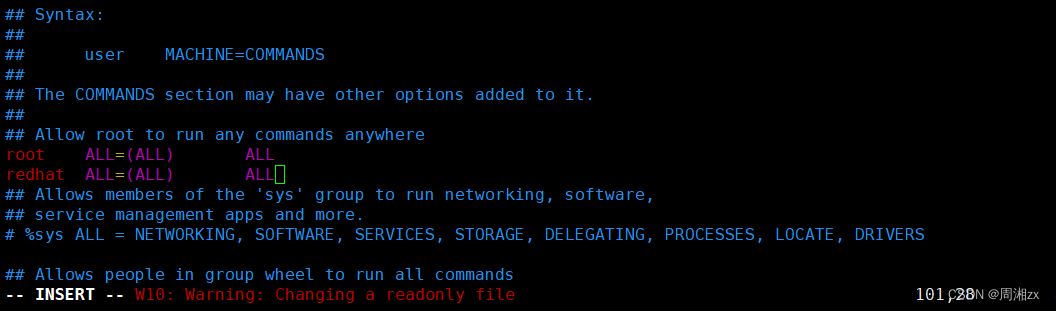
此时可成功创建cxk
- [redhat@localhost /]$ sudo groupadd cxk
- [redhat@localhost /]$ cat /etc/group
- ...
- cxk:x:1112:
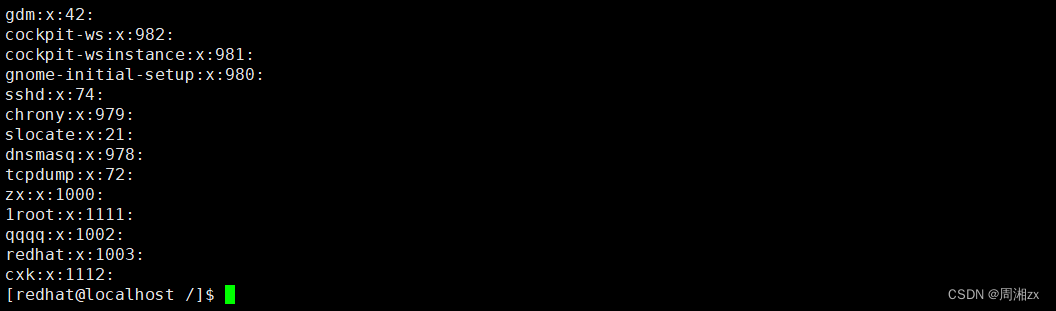
设置文件所有者:

此时redhat、cxk分别对fstab有读写操作和读操作
修改如下:
设置redhat有读写权限,cxk组有读写权限,其他人无权限
- [redhat@localhost tmp]$ chmod g+w fstab
- [redhat@localhost tmp]$ chmod o-r fstab

3、要求在/tmp/testdir里创建的新文件自动属于g1组,组g2的成员如alice能对这些新文件有读写权限,组g3的成员如tom只能对新文件有读权限,其他用户(不属于g1,g2,g3)不能访问这个文件夹
- #创建g1,g2,g3组
- [redhat@localhost /]$ sudo groupadd g1
- [redhat@localhost /]$ sudo groupadd g2
- [redhat@localhost /]$ sudo groupadd g3
- [redhat@localhost testdir]$ sudo useradd -G g2 alice
- [redhat@localhost testdir]$ sudo useradd -G g3 tom
- #创建testdir目录
- [redhat@localhost tmp]$ mkdir testdir
- #再在testdir中创建data
- [redhat@localhost testdir]$ mkdir data
- [redhat@localhost testdir]$ sudo chgrp g1 data
- [redhat@localhost testdir]$ chmod g+s data
- [redhat@localhost testdir]$ setfacl -m g:g2:rw data
- [redhat@localhost testdir]$ setfacl -m g:g3:r data
- [redhat@localhost testdir]$ chmod o=- data
- [redhat@localhost testdir]$ getfacl data #查看data相关信息

4.让普通用户有能力使用cat文件阅读/etc/shadow文件
普通用户在未提权前无法查看 /etc/shadow文件
- [redhat@localhost var]$ cat /etc/shadow
- cat: /etc/shadow: Permission denied

5.创建/tmp/aaaa/目录,该目录中的文件只能文件拥有者可以删除
- # 创建目录
- [redhat@localhost tmp]$ mkdir aaaa
- # 给满权限
- [redhat@localhost tmp]$ chmod 777 aaaa/
- [redhat@localhost tmp]$ ll aaaa/ -d
- drwxrwxrwx. 2 redhat redhat 6 Sep 26 09:49 aaaa/
- # 设置Sticky Bit权限
- [redhat@localhost tmp]$ chmod a=rwxrwxrwt aaaa/
- [redhat@localhost tmp]$ ll aaaa/ -d
- drwxrwxrwt. 2 redhat redhat 6 Sep 26 09:49 aaaa/

- # 在aaaa中创建a文件
- [redhat@localhost tmp]$ cd aaaa
- [redhat@localhost aaaa]$ touch a
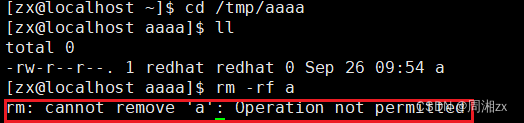
- # 其他用户zx对该文件进行删除操作,删除失败
- [zx@localhost ~]$ cd /tmp/aaaa
- [zx@localhost aaaa]$ ll
- total 0
- -rw-r--r--. 1 redhat redhat 0 Sep 26 09:54 a
- [zx@localhost aaaa]$ rm -rf a
- rm: cannot remove 'a': Operation not permitted
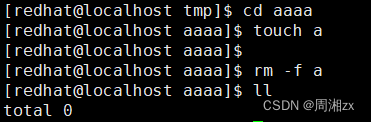
- # 原用户redhat进行操作,删除成功!
- [redhat@localhost aaaa]$ rm -f a
- [redhat@localhost aaaa]$ ll
- total 0
-
相关阅读:
C++11闭包函数的几种实现方法
软考-系统架构师-计算机与网络基础知识-数据库系统基础知识
信道复用技术
9、学习MySQL DELETE 语句
EN 13859-2防水用柔性薄板—CE认证
STM32笔记-AD模数转换
微服务实战系列之Sentinel
Redis——Java客户端配置
vue3.2封装一个listTable组件
Pytest自动化测试实战之执行参数
- 原文地址:https://blog.csdn.net/weixin_68256171/article/details/133281036
