-
ili9431液晶 tft_espi图形库演示 时钟、天气、滚动、气象图标
米思齐tft_spi模块库演示程序。心知天气、阿里云时钟、WiFi信号强度检测、1分钟滚屏、更新天气时间为15分钟、加入天气图标。更新天气次数。断网检测 。此程序为tft_eSPI图形库演示、如感觉好可以自行优化。
ili9431tft_espi库是用于ESP32和ESP8266芯片的TFT LCD驱动程序库,可用于控制ILI9341和ILI9431 TFT显示屏。以下是配置ili9431tft_espi库的步骤:
-
下载并安装Arduino IDE。
-
在Arduino IDE中,导航到“文件”>“首选项”>“附加开发板管理器网址”并输入以下网址:
https://dl.espressif.com/dl/package_esp32_index.json,http://arduino.esp8266.com/stable/package_esp8266com_index.json
-
点击“确定”按钮,关闭“首选项”窗口。
-
导航到“工具”>“开发板”>“开发板管理器”。
-
在搜索栏中输入“ESP32”或“ESP8266”,然后选择相应的开发板并安装。
-
连接ILI9341或ILI9431 TFT显示屏到ESP32或ESP8266芯片。
-
在Arduino IDE中,打开一个示例程序(例如:ILI9431test)。
-
在示例程序中,确保指定正确的引脚连接和显示屏类型:
#define TFT_DC 15
#define TFT_CS 14
#define TFT_RST -1
#define TFT_MOSI 23
#define TFT_CLK 18
#define TFT_MISO -1ESP_ILI9341 tft = ESP_ILI9341(TFT_CS, TFT_DC, TFT_RST, TFT_MOSI, TFT_CLK, TFT_MISO);
-
上传示例程序到开发板。
-
测试ILI9341或ILI9431 TFT显示屏是否能够正常工作。
程序图 mixly1.20版本,其它版本未测

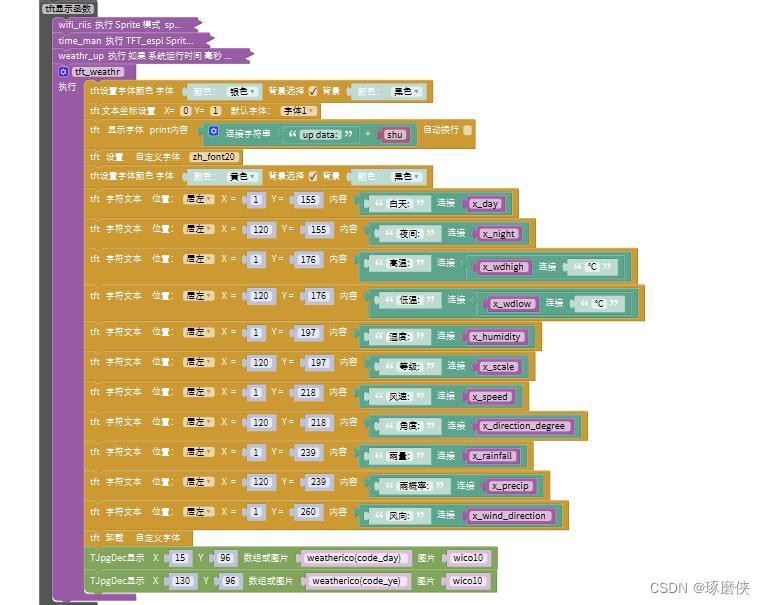

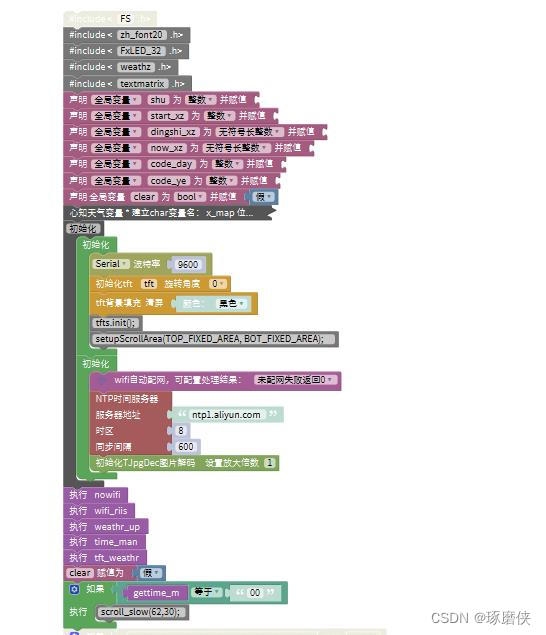
完整代码如下:
#include#include #include #include #include #include #include #include #include #include #include #include volatile int shu; volatile int start_xz; volatile unsigned long dingshi_xz; volatile unsigned long now_xz; volatile int code_day; volatile int code_ye; volatile bool clear; int8_t timeZone = 8; const PROGMEM char *ntpServer = "ntp1.aliyun.com"; char x_map[4] = "" ; char x_night[12] = "" ; char code_night[4] = "" ; char x_day[12] = "" ; char iconday[4] = "" ; char x_wdhigh[6] = "" ; char x_wdlow[6] = "" ; char x_humidity[5] = "" ; char x_wind_direction[20] = "" ; char x_direction_degree[5] = "" ; char x_scale[3] = "" ; char x_speed[5] = "" ; char x_rainfall[6] = "" ; char x_precip[6] = "" ; TFT_eSPI tft = TFT_eSPI(); bool tft_output(int16_t x, int16_t y, uint16_t w, uint16_t h, uint16_t* bitmap) { if (y >= tft.height()) return 0; tft.pushImage(x, y, w, h, bitmap); return 1; } void dispaly_clear() { if (clear == false) { tft.fillScreen(TFT_BLACK); clear = true; } } void nowifi() { int num = 0; while (!(WiFi.status() == WL_CONNECTED)) { dispaly_clear(); tft.drawRect(28,98,180,11,TFT_WHITE); tft.fillRect(30,100,num,7,TFT_YELLOW); tft.loadFont(zh_font20); tft.setCursor(70,120); tft.setTextColor(TFT_GREEN,TFT_BLACK); tft.println("网络失败!!"); tft.setCursor(60,150); tft.print("请配置网络!!!"); tft.unloadFont();//卸载字库占用内存 delay(80); num++; if (num >= 178) { num = 0; tft.fillScreen(TFT_BLACK); } if (WiFi.status() == WL_CONNECTED == 1) { tft.fillScreen(TFT_BLACK); break; } } } void shibai() { tft.fillScreen(TFT_BLACK); tft.loadFont(zh_font20); tft.setCursor(30,120); tft.setTextColor(TFT_PURPLE,TFT_BLACK); tft.print("请配置 wifi 网络"); tft.unloadFont();//卸载字库占用内存 } String getzhenshu(int zhs) { String s = ""; if (zhs < 10) { s = String("0") + String(zhs); } else { s = zhs; } return s; } uint8_t getwifiriis() { uint32_t db = WiFi.RSSI(); if (db <= -100) { return 0; } else if (db >= -50) { return 100;} else { return (2 * (db + 100)); } return db; } String getday_yyr() { String s = ""; s = String(NTP.getDateYear()) + String("年") + String(getzhenshu(NTP.getDateMonth())) + String("月") + String(getzhenshu(NTP.getDateDay())) + String("日"); return s; } String gettime_m() { String s = ""; s = String(getzhenshu(NTP.getTimeSecond())); return s; } String gettime_hf() { String s = ""; s = String(getzhenshu(NTP.getTimeHour24())) + String(":") + String(getzhenshu(NTP.getTimeMinute())); return s; } String getweek() { String s = ""; switch (NTP.getDateWeekday()) { case 1: s = "星期一"; break; case 2: s = "星期二"; break; case 3: s = "星期三"; break; case 4: s = "星期四"; break; case 5: s = "星期五"; break; case 6: s = "星期六"; break; case 7: s = "星期日"; break; default: break; } return s; } TFT_eSprite spr = TFT_eSprite(&tft); TFT_eSprite clk = TFT_eSprite(&tft); void tft_weathr() { tft.setTextColor(TFT_SILVER ,TFT_BLACK); tft.setCursor(0,1,1); tft.print(String("up data:") + String(shu)); tft.loadFont(zh_font20); tft.setTextColor(TFT_YELLOW,TFT_BLACK); tft.drawString(String("白天:") + String(x_day),1,155); tft.drawString(String("夜间:") + String(x_night),120,155); tft.drawString(String("高温:") + String(String(x_wdhigh) + String("℃")),1,176); tft.drawString(String("低温:") + String(String(x_wdlow) + String("℃")),120,176); tft.drawString(String("湿度:") + String(x_humidity),1,197); tft.drawString(String("等级:") + String(x_scale),120,197); tft.drawString(String("风速:") + String(x_speed),1,218); tft.drawString(String("角度:") + String(x_direction_degree),120,218); tft.drawString(String("雨量:") + String(x_rainfall),1,239); tft.drawString(String("雨概率:") + String(x_precip),120,239); tft.drawString(String("风向:") + String(x_wind_direction),1,260); tft.unloadFont();//卸载字库占用内存 TJpgDec.drawJpg(15,96,weatherico(code_day), sizeof(wico10)); TJpgDec.drawJpg(130,96,weatherico(code_ye), sizeof(wico10)); } void weathr_up() { // 40分钟更新一次 if (millis() - dingshi_xz > 1500000 || start_xz == 0) { dingshi_xz = millis(); shu++; String weather; WiFiClient client; HTTPClient http; BearSSL::WiFiClientSecure wificlient; wificlient.setInsecure(); http.begin(client,"http://api.seniverse.com/v3/weather/daily.json?key=你的心知天气密钥&location=ip&language=zh-Hans&unit=c&start=0&days=1"); int httpCode = http.GET(); if (httpCode > 0) { Serial.printf("[HTTP] GET... code: %d", httpCode); Serial.println(); if (httpCode == HTTP_CODE_OK) { String payload = http.getString(); weather += payload; } } http.end(); delay(10); StaticJsonDocument<1024> doc; DeserializationError error = deserializeJson(doc,weather); if (error) { Serial.print(F("deserializeJson() failed: ")); Serial.println(error.f_str()); return; } JsonObject results_0 = doc["results"][0];; JsonObject results_0_location = results_0["location"];; strcpy(x_map , results_0_location["name"]); JsonObject results_0_daily_0 = results_0["daily"][0];; strcpy(x_day , results_0_daily_0["text_day"]); strcpy(iconday , results_0_daily_0["code_day"]); strcpy(x_night , results_0_daily_0["text_night"]); strcpy(code_night , results_0_daily_0["code_night"]); strcpy(x_wdhigh , results_0_daily_0["high"]); strcpy(x_wdlow , results_0_daily_0["low"]); strcpy(x_humidity , results_0_daily_0["humidity"]); // 风向 东南西北风 // 风向文字 strcpy(x_wind_direction , results_0_daily_0["wind_direction"]); // 风向角度,范围0~360 strcpy(x_direction_degree , results_0_daily_0["wind_direction_degree"]); // 风力等级 strcpy(x_scale , results_0_daily_0["wind_scale"]); // 风速/m strcpy(x_speed , results_0_daily_0["wind_speed"]); // 降水量,0.00 单位mm strcpy(x_rainfall , results_0_daily_0["rainfall"]); // 降水量,0.00 单位mm strcpy(x_precip , results_0_daily_0["precip"]); tft.fillScreen(TFT_BLACK); start_xz = 1; if (NTP.getTimeHour24() == 0) { shu = 0; } } } void time_man() { clk.setColorDepth(8); clk.loadFont(zh_font20); clk.createSprite(140,21); clk.fillSprite(TFT_BLACK); clk.setTextDatum(CC_DATUM); clk.setTextColor(TFT_YELLOW,TFT_BLACK); clk.drawString((getday_yyr()),68,11); clk.pushSprite(50,14); clk.deleteSprite(); clk.unloadFont(); clk.setColorDepth(8); clk.setTextFont(7); clk.createSprite(135,48); clk.fillSprite(TFT_BLACK); clk.setTextDatum(CC_DATUM); clk.setTextColor(TFT_GREEN,TFT_BLACK); clk.drawString((gettime_hf()),67,24); clk.pushSprite(20,42); clk.deleteSprite(); clk.unloadFont(); clk.setColorDepth(8); clk.loadFont(zh_font20); clk.createSprite(61,21); clk.fillSprite(TFT_BLACK); clk.setTextDatum(CC_DATUM); clk.setTextColor(TFT_WHITE,TFT_BLACK); clk.drawString((getweek()),30,11); clk.pushSprite(173,40); clk.deleteSprite(); clk.unloadFont(); clk.setColorDepth(8); clk.loadFont(FxLED_32); clk.createSprite(38,30); clk.fillSprite(TFT_BLACK); clk.setTextDatum(CC_DATUM); clk.setTextColor(TFT_ORANGE,TFT_BLACK); clk.drawString((gettime_m()),19,16); clk.pushSprite(160,59); clk.deleteSprite(); clk.unloadFont(); } void wifi_riis() { spr.setColorDepth(8); spr.createSprite(10,10); spr.fillSprite(TFT_BLACK); spr.setTextDatum(CC_DATUM); for(int i = 0;i<4;i ++){ for(int j = 0;j<(2 * (i + 1));j++){ if (getwifiriis() > i * 25 || j == 0) { spr.drawPixel((2 + 2 * i),(8 - j),TFT_GREEN); } } } spr.pushSprite(231,1); spr.deleteSprite(); clk.setColorDepth(8); clk.setTextFont(1); clk.createSprite(22,10); clk.fillSprite(TFT_BLACK); clk.setTextDatum(CC_DATUM); clk.setTextColor(TFT_WHITE,TFT_BLACK); clk.drawString(String(((String)(getwifiriis()))) + String("%"),11,5); clk.pushSprite(207,1); clk.deleteSprite(); clk.unloadFont(); } void setup(){ shu = 0; start_xz = 0; dingshi_xz = 0; now_xz = 0; code_day = 0; code_ye = 0; clear = false; Serial.begin(9600); tft.begin(); tft.setRotation(0); tft.fillScreen(TFT_BLACK); tfts.init(); setupScrollArea(TOP_FIXED_AREA, BOT_FIXED_AREA); WiFi.mode(WIFI_STA); int cnt = 0; while (WiFi.status() != WL_CONNECTED) { delay(500); Serial.print("."); if (cnt++ >= 10){ WiFi.beginSmartConfig(); while (1) { delay(1000); if (WiFi.smartConfigDone()) { Serial.println(); Serial.println("SmartConfig: Success"); break; } Serial.print("|"); shibai();//无判断条件:可不创建函数。加判断条件:请创建shibai();。 } } } WiFi.printDiag(Serial); Serial.println(WiFi.localIP()); Serial.println("网络配置成功。可以上网啦!"); NTP.setInterval (600); NTP.setNTPTimeout (1500); NTP.begin (ntpServer, timeZone, false); TJpgDec.setJpgScale(1); TJpgDec.setSwapBytes(true); TJpgDec.setCallback(tft_output); } void loop(){ code_day = atoi(iconday); code_ye = atoi(code_night); nowifi(); wifi_riis(); weathr_up(); time_man(); tft_weathr(); clear = false; if (String((gettime_m())).equals(String("00"))) { scroll_slow(62,30); } } - 1
- 2
- 3
- 4
- 5
- 6
- 7
- 8
- 9
- 10
- 11
- 12
- 13
- 14
- 15
- 16
- 17
- 18
- 19
- 20
- 21
- 22
- 23
- 24
- 25
- 26
- 27
- 28
- 29
- 30
- 31
- 32
- 33
- 34
- 35
- 36
- 37
- 38
- 39
- 40
- 41
- 42
- 43
- 44
- 45
- 46
- 47
- 48
- 49
- 50
- 51
- 52
- 53
- 54
- 55
- 56
- 57
- 58
- 59
- 60
- 61
- 62
- 63
- 64
- 65
- 66
- 67
- 68
- 69
- 70
- 71
- 72
- 73
- 74
- 75
- 76
- 77
- 78
- 79
- 80
- 81
- 82
- 83
- 84
- 85
- 86
- 87
- 88
- 89
- 90
- 91
- 92
- 93
- 94
- 95
- 96
- 97
- 98
- 99
- 100
- 101
- 102
- 103
- 104
- 105
- 106
- 107
- 108
- 109
- 110
- 111
- 112
- 113
- 114
- 115
- 116
- 117
- 118
- 119
- 120
- 121
- 122
- 123
- 124
- 125
- 126
- 127
- 128
- 129
- 130
- 131
- 132
- 133
- 134
- 135
- 136
- 137
- 138
- 139
- 140
- 141
- 142
- 143
- 144
- 145
- 146
- 147
- 148
- 149
- 150
- 151
- 152
- 153
- 154
- 155
- 156
- 157
- 158
- 159
- 160
- 161
- 162
- 163
- 164
- 165
- 166
- 167
- 168
- 169
- 170
- 171
- 172
- 173
- 174
- 175
- 176
- 177
- 178
- 179
- 180
- 181
- 182
- 183
- 184
- 185
- 186
- 187
- 188
- 189
- 190
- 191
- 192
- 193
- 194
- 195
- 196
- 197
- 198
- 199
- 200
- 201
- 202
- 203
- 204
- 205
- 206
- 207
- 208
- 209
- 210
- 211
- 212
- 213
- 214
- 215
- 216
- 217
- 218
- 219
- 220
- 221
- 222
- 223
- 224
- 225
- 226
- 227
- 228
- 229
- 230
- 231
- 232
- 233
- 234
- 235
- 236
- 237
- 238
- 239
- 240
- 241
- 242
- 243
- 244
- 245
- 246
- 247
- 248
- 249
- 250
- 251
- 252
- 253
- 254
- 255
- 256
- 257
- 258
- 259
- 260
- 261
- 262
- 263
- 264
- 265
- 266
- 267
- 268
- 269
- 270
- 271
- 272
- 273
- 274
- 275
- 276
- 277
- 278
- 279
- 280
- 281
- 282
- 283
- 284
- 285
- 286
- 287
- 288
- 289
- 290
- 291
- 292
- 293
- 294
- 295
- 296
- 297
- 298
- 299
- 300
- 301
- 302
- 303
- 304
- 305
- 306
- 307
- 308
- 309
- 310
- 311
- 312
- 313
- 314
- 315
- 316
- 317
- 318
- 319
- 320
- 321
- 322
- 323
- 324
- 325
- 326
- 327
- 328
- 329
- 330
- 331
- 332
- 333
- 334
- 335
- 336
- 337
- 338
- 339
- 340
- 341
- 342
- 343
- 344
- 345
- 346
- 347
- 348
- 349
- 350
- 351
- 352
- 353
- 354
- 355
- 356
- 357
- 358
- 359
- 360
- 361
- 362
- 363
- 364
- 365
- 366
- 367
- 368
- 369
- 370
- 371
- 372
- 373
- 374
- 375
- 376
- 377
- 378
- 379
效果演示

#include
//自制中文字库 #include
//段码时间小字库 #include
//气象图标 #include
//滚屏 #include
//图片库 如用arduino IDE需将上边库文件放到一个文件夹下即可编译。
如用mixly 米思齐编译器 上边文件必须放在这安装目录下。如:D:\Mixly1.20back\arduino\portable\sketchbook\libraries\Fonts 。Fonts这为新建文件夹名字。

总之比较麻烦,按步骤操作。打包送喜欢爱折腾的你。
注意这里: http.begin(client,“http://api.seniverse.com/v3/weather/daily.json?key=你的心知天气密钥&location=ip&language=zh-Hans&unit=c&start=0&days=1”);
下载地址:https://download.csdn.net/download/lnwqh/88388748
有问题可以私信或留言,没事点点赞或留个言多交流。哈哈哈
-
-
相关阅读:
ENVI:如何进行遥感图像的分类?(支持向量机模型)
算法金 | 再见!!!K-means
【MySql实战--日志系统:一条SQL更新语句是如何执行的?】
ArcGIS API for JavaScript实现要素服务query接口的功能
qt-mvvm代码分析
前端打印添加当前页和总页数
设计原则-开闭原则
【Vue 组件化开发 三】父组件给子组件传递数据、组件通信(父传子、子传父)、父访问子(children、ref)、动态组件(is、component)
uniapp开发小程序-工作笔记
MySQL-0-概述-介绍和安装以及MySQL数据模型
- 原文地址:https://blog.csdn.net/lnwqh/article/details/133466401
