-
【Django 笔记】第一个demo
1. pip 安装

2. django 指令

- D:\software\python3\anconda3\Lib\site-packages\django\bin>django-admin
- Type 'django-admin help
' for help on a specific subcommand. - Available subcommands:
- [django]
- check
- compilemessages
- createcachetable
- dbshell
- diffsettings
- dumpdata
- flush
- inspectdb
- loaddata
- makemessages
- makemigrations
- migrate
- runserver
- sendtestemail
- shell
- showmigrations
- sqlflush
- sqlmigrate
- sqlsequencereset
- squashmigrations
- startapp
- startproject
- test
- testserver
- Note that only Django core commands are listed as settings are not properly configured (error: Requested setting INSTALLED_APPS, but settings are not configured. You must either define the environment variable DJANGO_SETTINGS_MODULE or call settings.configure() before accessing settings.).
3.创建项目
- D:\software\python3\anconda3\Lib\site-packages\django\bin>django-admin startproject guest
- CommandError: [WinError 5] 拒绝访问。: 'D:\\software\\python3\\anconda3\\Lib\\site-packages\\django\\bin\\guest

python - Django creating new project - access is denied - Stack Overflow
问题解决 ;
选择其他路径创建,不要再 'D:\\software\\python3\\anconda3\\Lib\\site-packages\\django\\bin下执行命令


4 目录结构 :
 查看 manange 提供的命令
- E:\data\python\djaongo_prj>cd guest
- E:\data\python\djaongo_prj\guest> python manage.py
- Type 'manage.py help
' for help on a specific subcommand. - Available subcommands:
- [auth]
- changepassword
- createsuperuser
- [contenttypes]
- remove_stale_contenttypes
- [django]
- check
- compilemessages
- createcachetable
- dbshell
- diffsettings
- dumpdata
- flush
- inspectdb
- loaddata
- makemessages
- makemigrations
- migrate
- sendtestemail
- shell
- showmigrations
- sqlflush
- sqlmigrate
- sqlsequencereset
- squashmigrations
- startapp
- startproject
- test
- testserver
- [sessions]
- clearsessions
- [staticfiles]
- collectstatic
- findstatic
- runserver
- E:\data\python\djaongo_prj\guest>
官方命令文档 : django-admin and manage.py | Django documentation | Django
5.创建应用 sign
E:\data\python\djaongo_prj\guest>python manage.py startapp sign


运行 :
python manager.py runserver
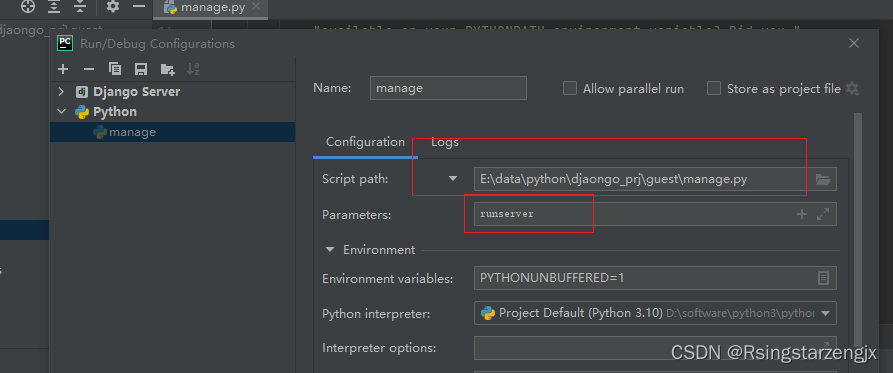

如果运行失败可能出现端口占用 : python manager.py runserver 127.0.0.1:8001 运行
127.0.0.1 表示本机的IP地址 8001: 是端口
guest/settings.py 添加项目 sign
- INSTALLED_APPS = [
- 'django.contrib.admin',
- 'django.contrib.auth',
- 'django.contrib.contenttypes',
- 'django.contrib.sessions',
- 'django.contrib.messages',
- 'django.contrib.staticfiles',
- 'sign'
- ]
6显示 Hello Django!
guest/urls.py
url(r'^index/$', views.index), # 添加 index 、路径配置
- """guest URL Configuration
- The `urlpatterns` list routes URLs to views. For more information please see:
- https://docs.djangoproject.com/en/2.2/topics/http/urls/
- Examples:
- Function views
- 1. Add an import: from my_app import views
- 2. Add a URL to urlpatterns: path('', views.home, name='home')
- Class-based views
- 1. Add an import: from other_app.views import Home
- 2. Add a URL to urlpatterns: path('', Home.as_view(), name='home')
- Including another URLconf
- 1. Import the include() function: from django.urls import include, path
- 2. Add a URL to urlpatterns: path('blog/', include('blog.urls'))
- """
- from django.conf.urls import url
- from django.contrib import admin
- from django.urls import path
- from sign import views
- urlpatterns = [
- url(r'^admin/', admin.site.urls),
- url(r'^index/$', views.index), # 添加 index 、路径配置
- ]
sign/views.py
- from django.shortcuts import render
- # Create your views here.
- from django.http import HttpResponse
- # 定义inex 函数,通过HttpResponse 类向客户端返回字符创
- def index(request):
- return HttpResponse("Hello Django!")
7.使用模版
创建 templates (文件名称不要随便改django 默认从这个路径下找html)
sign/templates/index.html
- <!DOCTYPE html>
- <html lang="en">
- <head>
- <meta charset="UTF-8">
- <title>Title</title>
- <h1> Hello Django!<h1>
- </head>
- <body>
- </body>
- </html>
8.修改 sign/views.py
return render(request,"index.html") 使用 render函数
- from django.shortcuts import render
- # Create your views here.
- from django.http import HttpResponse
- # 定义inex 函数,通过HttpResponse 类向客户端返回字符创
- def index(request):
- #return HttpResponse("Hello Django!") # 使用Django 的render函数
- return render(request,"index.html")
Django 工作流


-
相关阅读:
vue3 响应式 API 之 ref
【笔试】2022/9/4 网易互联网开发岗满分
人脸识别技术与人证合一智能闸机的剖析
ESP8266-Arduino编程实例-TDS(溶解固体总量)水质传感器驱动
单分散Eu3+-PS荧光微球/吸附荧光素生物素化聚苯乙烯微球/包覆TiO2粉体的制备方式
脚本是什么意思?有什么特点?与RPA有哪些区别?
科技论文写作
【kotlin】Kotlin学习:run、with、apply、also、let的区别
2024年了,如何从 0 搭建一个 Electron 应用
台积电嘲讽英特尔CEO:不可能超越我们了,安心退休吧
- 原文地址:https://blog.csdn.net/oDianZi1234567/article/details/133427989
