-
WebGL笔记:绘制矩形面的几种方式以及封装封装多边形对象来绘制不同图形
绘制矩形面
- 可以绘制的面只有三角面,要绘制矩形面的话,只能用两个三角形去拼
1 ) 使用 三角带 TRIANGLE_STRIP 绘制矩形

-
回顾一下之前的规律:
- 第一个三角形:v0>v1>v2
- 第偶数个三角形:以上一个三角形的第二条边+下一个点为基础,以和第二条边相反的方向绘制三角形
- 第奇数个三角形:以上一个三角形的第三条边+下一个点为基础,以和第二条边相反的方向绘制三角形
-
关键顶点绘制数据
const vertices = new Float32Array([ -0.2, 0.2, -0.2,-0.2, 0.2, 0.2, 0.2,-0.2, ])- 1
- 2
- 3
- 4
- 5
- 6
-
绘制:
gl.drawArrays(gl.TRIANGLE_STRIP, 0, 4)
2 ) 使用 三角带 TRIANGLE_FAN 绘制矩形
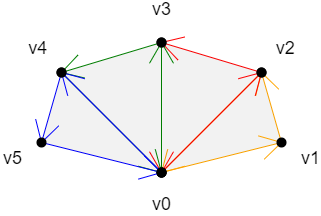
-
回顾一下之前的规律:
- v0>v1>v2: 以上一个三角形的第三条边+下一个点为基础,按照和第三条边相反的顺序,绘制三角形
- v0>v2>v3: 同上
- v0>v3>v4: 同上
- v0>v4>v5: 同上
-
基于此,设计顶点关键数据
const vertices = new Float32Array([ -0.2, -0.2, 0.2, -0.2, 0.2, 0.2, -0.2, 0.2 ])- 1
- 2
- 3
- 4
- 5
- 6
-
绘制:
gl.drawArrays(gl.TRIANGLE_FAN, 0, 4)
3 )使用独立三角形,绘制矩形
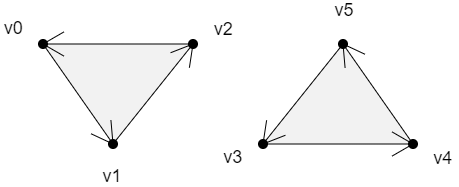
-
绘制规律
- 这里就是普通的三角形,画了2个,需要6个点
- 上面两个面的绘制顺序是: v0>v1>v2,v3>v4>v5
-
顶点关键数据
const vertices = new Float32Array([ -0.2, 0.2, -0.2, -0.2, 0.2, 0.2, 0.2, 0.2, -0.2, -0.2, 0.2, -0.2 ])- 1
- 2
- 3
- 4
- 5
- 6
- 7
- 8
可以根据自己的需求,绘制各种各样的图形
封装多边形对象
1 )封装一个Poly 对象,用于绘制多边形
const defAttr = () => ({ gl: null, vertices: [], geoData: [], size: 2, attrName: 'a_Position', count: 0, types: ['POINTS'], }) export default class Poly { constructor(attr) { Object.assign(this,defAttr(),attr) this.init() } init() { const { attrName, size, gl } = this; if(!gl) return const vertexBuffer = gl.createBuffer() gl.bindBuffer(gl.ARRAY_BUFFER, vertexBuffer) this.updateBuffer() const a_Position = gl.getAttribLocation(gl.program,attrName) gl.vertexAttribPointer(a_Position, size, gl.FLOAT, false, 0, 0) gl.enableVertexAttribArray(a_Position) } addVertice(...params) { this.vertices.push(...params) this.updateBuffer() } popVertice() { const { vertices, size }=this const len = vertices.length vertices.splice(len-size,len) this.updateCount() } setVertice(ind,...params) { const { vertices, size }=this const i = ind * size params.forEach((param,paramInd) => { vertices[i+paramInd] = param }) } updateBuffer() { const { gl,vertices } = this this.updateCount() gl.bufferData(gl.ARRAY_BUFFER, new Float32Array(vertices), gl.STATIC_DRAW) } updateCount() { this.count = this.vertices.length / this.size } updateVertices(params) { const { geoData } = this const vertices = [] geoData.forEach(data => { params.forEach(key => { vertices.push(data[key]) }) }) this.vertices=vertices } draw(types = this.types) { const { gl, count } = this for(let type of types) { gl.drawArrays(gl[type],0,count); } } }- 1
- 2
- 3
- 4
- 5
- 6
- 7
- 8
- 9
- 10
- 11
- 12
- 13
- 14
- 15
- 16
- 17
- 18
- 19
- 20
- 21
- 22
- 23
- 24
- 25
- 26
- 27
- 28
- 29
- 30
- 31
- 32
- 33
- 34
- 35
- 36
- 37
- 38
- 39
- 40
- 41
- 42
- 43
- 44
- 45
- 46
- 47
- 48
- 49
- 50
- 51
- 52
- 53
- 54
- 55
- 56
- 57
- 58
- 59
- 60
- 61
- 62
- 63
- 64
- 65
- 66
- 67
-
属性
- gl webgl上下文对象
- vertices 顶点数据集合,在被赋值的时候会做两件事
- 更新count 顶点数量,数据运算尽量不放渲染方法里
- 向缓冲区内写入顶点数据
- geoData 模型数据,对象数组,可解析出 vertices 顶点数据
- size 顶点分量的数目
- positionName 代表顶点位置的attribute 变量名
- count 顶点数量
- types 绘图方式,可以用多种方式绘图
-
方法
- init() 初始化方法,建立缓冲对象,并将其绑定到webgl 上下文对象上,然后向其中写入顶点数据。将缓冲对象交给attribute变量,并开启attribute 变量的批处理功能。
- addVertice() 添加顶点
- popVertice() 删除最后一个顶点
- setVertice() 根据索引位置设置顶点
- updateBuffer() 更新缓冲区数据,同时更新顶点数量
- updateCount() 更新顶点数量
- updateVertices() 基于geoData 解析出vetices 数据
- draw() 绘图方法
2 )应用1
const poly = new Poly({ gl, vertices:[0, 0.2] }) poly.draw(['POINTS']) setTimeout(()=>{ poly.addVertice(-0.2, -0.1); gl.clear(gl.COLOR_BUFFER_BIT); poly.draw(['POINTS']) }, 1000) setTimeout(()=>{ gl.clear(gl.COLOR_BUFFER_BIT); poly.draw(['POINTS','LINE_STRIP']) }, 2000)- 1
- 2
- 3
- 4
- 5
- 6
- 7
- 8
- 9
- 10
- 11
- 12
- 13
- 14
- 15
- 16
- 17
3 )应用2
// 实例化多边形 const poly = new Poly({ gl, types:['POINTS','LINE_STRIP'] }) // 鼠标点击事件 canvas.addEventListener("click", (event) => { const { x,y } = getMousePosInWebgl(event, canvas); poly.addVertice(x,y); gl.clear(gl.COLOR_BUFFER_BIT); poly.draw(); });- 1
- 2
- 3
- 4
- 5
- 6
- 7
- 8
- 9
- 10
- 11
- 12
- 13
-
相关阅读:
SpringBean面试题
OpenGL - Normal Mapping
【CF679B】Bear and Tower of Cubes
Auto.js中的脚本引擎
UE5发布时出现SDK NOT Setup错误解决方法
自然语言处理应用(三):微调BERT
Linux进程内核栈
[错题]电路维修
java计算机毕业设计在线课程教学大纲系统源码+系统+lw+数据库+调试运行
vue中页面跳转白屏的解决方式,同一路由地址,参数不同跳转白屏的解决方式
- 原文地址:https://blog.csdn.net/Tyro_java/article/details/133433453
