-
【JavaScript】jstree使用以及本地化
概述
jstree 是一个基于 jQuery 的强大的树形结构插件,用于在网页中创建交互式的树形视图。它提供了丰富的功能和灵活的配置选项,可以用于展示层级结构的数据,例如文件系统、组织结构、导航菜单等。
例子
以下是一个简单的使用 jstree 的例子:
- html>
- <html>
- <head>
- <title>jstree Exampletitle>
- <link rel="stylesheet" href="https://cdnjs.cloudflare.com/ajax/libs/jstree/3.2.1/themes/default/style.min.css" />
- head>
- <body>
- <div id="jstree">div>
- <script src="https://cdnjs.cloudflare.com/ajax/libs/jquery/3.6.0/jquery.min.js">script>
- <script src="https://cdnjs.cloudflare.com/ajax/libs/jstree/3.2.1/jstree.min.js">script>
- <script>
- $(function () {
- // 创建 jstree
- $('#jstree').jstree({
- 'core': {
- 'data': [
- {
- 'text': 'Node 1',
- 'children': [
- { 'text': 'Child 1' },
- { 'text': 'Child 2' }
- ]
- },
- {
- 'text': 'Node 2'
- }
- ]
- }
- });
- });
- script>
- body>
- html>
在上述例子中,我们首先引入了 jstree 的 CSS 和 JavaScript 文件。然后,在页面中创建了一个
元素,用于容纳 jstree。在 JavaScript 部分,我们使用 $('#jstree').jstree({}) 初始化了一个 jstree,通过传递一个配置对象来定义树的结构和行为。在这个例子中,我们简单地创建了两个节点和两个子节点。您可以根据需要进一步配置 jstree 的外观和行为,例如设置节点的图标、添加事件处理程序、加载远程数据等。jstree 提供了丰富的 API 和事件,可以满足各种需求。
扩展
请注意,上述例子中使用的是 jstree 的 CDN 链接,您也可以下载 jstree 的文件并在本地使用。此外,您可能需要根据实际情况调整 jstree 的版本和相关依赖的链接地址。
- html>
- <html lang="en">
- <head>
- <meta charset="UTF-8">
- <title>Documenttitle>
- <link rel="stylesheet" href="./plugins/themes/default/style.min.css"/>
- <link rel="stylesheet" href="./plugins/themes/default-dark/style.min.css">
- head>
- <body>
- <div id="jstree">div>
- <script src=".\plugins\jquery3.3.1.min.js">script>
- <script src=".\plugins\jstree.min.js">script>
- <script type="text/javascript">
- $(function () {
- //当DOM准备好时创建一个jstree实例
- $('#jstree').jstree({
- //core 存储核心的所有默认值
- 'core': {
- //data 数据配置:在这里可以传递HTML字符串或JSON数组
- 'data': [
- {
- 'id': 'ajson1',
- 'parent': '#',// # 根目录
- 'icon': 'jstree-folder',//jstree-folder 文件夹图标(默认图标)
- 'text': '学校',
- "state": {
- "opened": true //默认打开文件夹
- }
- },
- {
- 'id': 'ajson2',
- 'parent': 'ajson1',
- 'text': '七年级'
- },
- {
- 'id': 'ajson3',
- 'parent': 'ajson1',
- 'text': '八年级'
- },
- {
- 'id': 'ajson4',
- 'parent': 'ajson1',
- 'text': '九年级'
- },
- {
- 'id': 'ajson6',
- 'parent': 'ajson2',
- 'icon': 'jstree-file',//jstree-file 文件图标
- 'text': '张三'
- },
- {
- 'id': 'ajson7',
- 'parent': 'ajson2',
- 'icon': 'jstree-file',
- 'text': '李四'
- },
- {
- 'id': 'ajson8',
- 'parent': 'ajson2',
- 'icon': 'jstree-file',
- 'text': '王五'
- }
- ]
- }
- });
- });
- script>
- body>
- html>
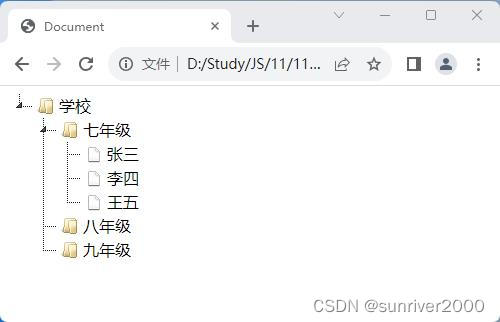
效果:
- 相关阅读:
Java的Lambda表达式学习笔记:使用lambda表达式
【TcaplusDB知识库】TcaplusDB-tcaplusadmin工具介绍
从零开始搞基建(5)——代码质量
记一次 .NET某工控视觉自动化系统 卡死分析
HTML拖拽
浅谈Coroutine使用方法
【TypeScript】为什么要选择 TypeScript?
Ubuntu下Nginx配置ModSecurity详细思路及过程
Javaweb05-Ajax
目的和目标的差异|丰田自动工程完结的目的、目标、应用化的意义和明确
- 原文地址:https://blog.csdn.net/sunriver2000/article/details/133431135
