-
7、如何使用Flink中的窗口(Window算子)
目录
4、怎样使用 Flink中的 Window Assigners
5、怎样使用 Flink中的 Window Funcation
5.4、增量聚合的 ProcessWindowFunction
7.2、设置窗口延迟关闭 - allowedLateness
7.3、使用侧输出流获取迟到的数据 - sideOutputLateData
1、如何理解 Flink中的窗口(window)
Flink中的窗口好像一个桶,可以根据不同的时间语义,将无界流中的数据分配到指定的桶中去,再通过 水位线或者处理时间 触发对桶中的数据进行计算
其目的就是为了将无限的数据 根据指定的规则进行切分成有限的数据进行计算

2、Flink中窗口的类型

2.1 根据上游DataStream类型分类
按键分区窗口(Keyed Windows) :
基于KeyedStream做窗口操作,窗口计算会在多个并行子任务上同时执行,相同的key的数据会进入到同一个窗口中去。
非按键分区-Non-Keyed Windows :
基于DataStream做窗口操作,流上的数据会进入同一窗口中,只能有一个Task处理(不推荐这种方式)

2.2 根据驱动类型分类
时间窗口(Time Window):
通过指定的时间语义的时间点来定义窗口的开始和结束,流中的数据被分配到哪个窗口中,也由数据上的时间标识来决定,当接收到带有结束时间标识的数据时,将触发窗口计算,并销毁窗口
计数窗口(Count Window):
窗口的大小由数据个数来限制,当窗口内接收的数据个数到达窗口大小时,将触发窗口计算,并销毁窗口

2.3 根据进入到窗口数据的分发规则分类
滚动窗口(Tumbling Windows):
滚动窗口的大小是固定的,且各自范围之间不重叠。 比如说,如果你指定了滚动窗口的大小为 5 分钟,那么每 5 分钟就会有一个窗口被计算,且一个新的窗口被创建(如下图所示)

滑动窗口(Sliding Windows):
滑动窗口的 assigner 分发元素到指定大小的窗口,窗口大小通过 window size 参数设置。 滑动窗口需要一个额外的滑动距离(window slide)参数来控制生成新窗口的频率。 因此,如果 slide 小于窗口大小,滑动窗口可以允许窗口重叠。这种情况下,一个元素可能会被分发到多个窗口。
比如说,你设置了大小为 10 分钟,滑动距离 5 分钟的窗口,你会在每 5 分钟得到一个新的窗口, 里面包含之前 10 分钟到达的数据(如下图所示)

会话窗口(Session Windows):
与滚动窗口和滑动窗口不同,会话窗口不会相互重叠,且没有固定的开始或结束时间。 会话窗口在一段时间没有收到数据之后会关闭,即在一段不活跃的间隔之后。 会话窗口的 assigner 可以设置固定的会话间隔(session gap)或 用 session gap extractor 函数来动态地定义多长时间算作不活跃。 当超出了不活跃的时间段,当前的会话就会关闭,并且将接下来的数据分发到新的会话窗口。

全局窗口(Global Windows):
全局窗口的 assigner 将拥有相同 key 的所有数据分发到一个全局窗口。 这样的窗口模式仅在你指定了自定义的 trigger 时有用。 否则,计算不会发生,因为全局窗口没有天然的终点去触发其中积累的数据。

3、怎样使用 Flink中的 Window算子

Keyed Windows API :
- stream
- .keyBy(...) <- 仅 keyed 窗口需要
- .window(...) <- 必填项:"assigner" 指定窗口类型
- [.trigger(...)] <- 可选项:"trigger" 指定触发器
- [.evictor(...)] <- 可选项:"evictor" 指定移除器
- [.allowedLateness(...)] <- 可选项:"lateness" 指定窗口延迟关闭时间
- [.sideOutputLateData(...)] <- 可选项:"output tag"
- .reduce/aggregate/apply() <- 必填项:"function" 指定窗口聚合函数
- [.getSideOutput(...)] <- 可选项:"output tag" 指定侧输出流(用来接收迟到数据)
Non-Keyed Windows API :
- stream
- .windowAll(...) <- 必填项:"assigner" 指定窗口类型
- [.trigger(...)] <- 可选项:"trigger" 指定触发器
- [.evictor(...)] <- 可选项:"evictor" 指定移除器
- [.allowedLateness(...)] <- 可选项:"lateness" 指定窗口延迟关闭时间
- [.sideOutputLateData(...)] <- 可选项:"output tag" 指定侧输出流(用来接收迟到数据)
- .reduce/aggregate/apply() <- 必填项:"function" 指定窗口聚合函数
- [.getSideOutput(...)] <- 可选项:"output tag"
4、怎样使用 Flink中的 Window Assigners
功能说明:
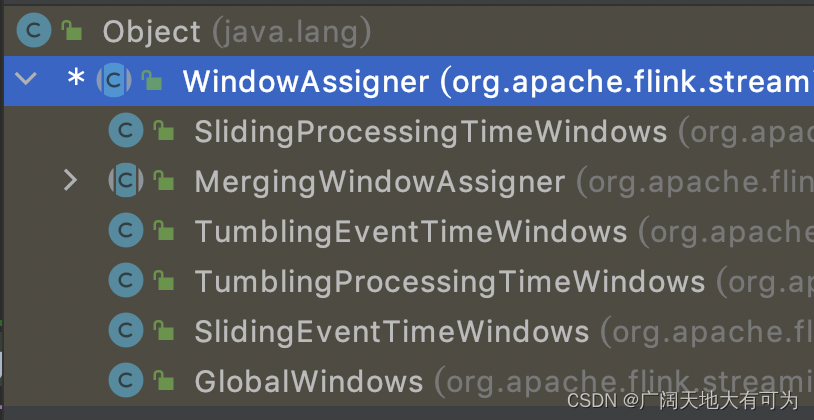
通过stream.window(WindowAssigner) 来指定 窗口的类型
4.1、基于处理时间的滑动窗口
使用场景:
每隔x秒统计近y秒内的数据(y>x)
代码示例:
- /*
- * TODO 基于处理时间的滑动窗口
- * 每2秒计算最近10秒内的数据
- * */
- public class SlidingProcessingTimeWindow {
- public static void main(String[] args) throws Exception {
- // 1.获取执行环境
- StreamExecutionEnvironment env = StreamExecutionEnvironment.getExecutionEnvironment();
- env.setParallelism(3);
- // 2.将socket作为数据源(开启socket端口: nc -lk 9999)
- // TODO Window:KeyedStream → WindowedStream
- Window(env);
- // TODO WindowAll:DataStream → AllWindowedStream
- //WindowAll(env);
- // 3.触发程序执行
- env.execute();
- }
- // TODO Keyed Windows
- private static void Window(StreamExecutionEnvironment env) {
- env
- .socketTextStream("localhost", 9999)
- .map(new MapFunction
- @Override
- public Tuple2 map(String value) throws Exception {
- return new Tuple2(value.split(",")[0], Long.parseLong(value.split(",")[1]));
- }
- }
- )
- .keyBy(value -> value.f0)
- // 滑动窗口,窗口长度10s,滑动步长2s
- .window(SlidingProcessingTimeWindows.of(Time.seconds(10), Time.seconds(2)))
- .process(new ShowProcessWindowFunction())
- .print()
- ;
- }
- // TODO Non-Keyed Windows
- private static void WindowAll(StreamExecutionEnvironment env) {
- env
- .socketTextStream("localhost", 9999)
- .map(new MapFunction
- @Override
- public Tuple2 map(String value) throws Exception {
- return new Tuple2(value.split(",")[0], Long.parseLong(value.split(",")[1]));
- }
- }
- )
- // 滑动窗口,窗口长度5s,滑动步长2s
- .windowAll(SlidingProcessingTimeWindows.of(Time.seconds(5), Time.seconds(2)))
- .process(new ShowProcessAllWindowFunction())
- .print()
- ;
- }
- }
4.2、基于处理时间的滚动窗口
使用场景:
计算固定时间段内的数据
代码示例:
- /*
- * TODO 基于处理时间的滚动窗口
- * 计算每小时内的用户访问数
- * */
- public class TumblingProcessingTimeWindow {
- public static void main(String[] args) throws Exception {
- // 1.获取执行环境
- StreamExecutionEnvironment env = StreamExecutionEnvironment.getExecutionEnvironment();
- env.setParallelism(3);
- // 2.将socket作为数据源(开启socket端口: nc -lk 9999)
- // TODO Window:KeyedStream → WindowedStream
- //Window(env);
- // TODO WindowAll:DataStream → AllWindowedStream
- WindowAll(env);
- // 3.触发程序执行
- env.execute();
- }
- // TODO Keyed Windows
- private static void Window(StreamExecutionEnvironment env) {
- env
- .socketTextStream("localhost", 9999)
- .map(new MapFunction
- @Override
- public Tuple2 map(String value) throws Exception {
- return new Tuple2(value.split(",")[0], Long.parseLong(value.split(",")[1]));
- }
- }
- )
- .keyBy(value -> value.f0)
- // 滚动窗口,窗口长度5s
- .window(TumblingProcessingTimeWindows.of(Time.seconds(5)))
- .process(new ShowProcessWindowFunction())
- .print()
- ;
- }
- // TODO Non-Keyed Windows
- private static void WindowAll(StreamExecutionEnvironment env) {
- env
- .socketTextStream("localhost", 9999)
- .map(new MapFunction
- @Override
- public Tuple2 map(String value) throws Exception {
- return new Tuple2(value.split(",")[0], Long.parseLong(value.split(",")[1]));
- }
- }
- )
- // 滚动窗口,窗口长度5s
- .windowAll(TumblingProcessingTimeWindows.of(Time.seconds(5)))
- .process(new ShowProcessAllWindowFunction())
- .print()
- ;
- }
- }
4.3、基于处理时间的会话窗口
使用场景:
计算指定时间间隔内的数据
代码示例:
- /*
- * TODO 基于处理时间的会话窗口
- * 相邻两个元素的处理时间间隔 大于指定会话周期 触发窗口计算
- * */
- public class ProcessingTimeSessionWindow {
- public static void main(String[] args) throws Exception {
- // 1.获取执行环境
- StreamExecutionEnvironment env = StreamExecutionEnvironment.getExecutionEnvironment();
- env.setParallelism(3);
- // 2.将socket作为数据源(开启socket端口: nc -lk 9999)
- // TODO Window:KeyedStream → WindowedStream
- //Window(env);
- // TODO WindowAll:DataStream → AllWindowedStream
- WindowAll(env);
- // 3.触发程序执行
- env.execute();
- }
- // TODO Keyed Windows
- private static void Window(StreamExecutionEnvironment env) {
- env
- .socketTextStream("localhost", 9999)
- .map(new MapFunction
- @Override
- public Tuple2 map(String value) throws Exception {
- return new Tuple2(value.split(",")[0], Long.parseLong(value.split(",")[1]));
- }
- }
- )
- .keyBy(value -> value.f0)
- // 会话窗口,超时间隔5s
- .window(ProcessingTimeSessionWindows.withGap(Time.seconds(5)))
- .process(new ShowProcessWindowFunction())
- .print()
- ;
- }
- // TODO Non-Keyed Windows
- private static void WindowAll(StreamExecutionEnvironment env) {
- env
- .socketTextStream("localhost", 9999)
- .map(new MapFunction
- @Override
- public Tuple2 map(String value) throws Exception {
- return new Tuple2(value.split(",")[0], Long.parseLong(value.split(",")[1]));
- }
- }
- )
- // 会话窗口,超时间隔5s
- .windowAll(ProcessingTimeSessionWindows.withGap(Time.seconds(5)))
- .process(new ShowProcessAllWindowFunction())
- .print()
- ;
- }
- }
4.4、基于事件时间的滑动窗口
代码示例:
- /*
- * TODO 基于事件时间的滑动窗口
- * 每2秒计算一次最近10秒内的数据
- * */
- public class SlidingEventTimeWindow {
- public static void main(String[] args) throws Exception {
- // 1.获取执行环境
- StreamExecutionEnvironment env = StreamExecutionEnvironment.getExecutionEnvironment();
- env.setParallelism(3);
- // 2.将socket作为数据源(开启socket端口: nc -lk 9999)
- // TODO Window:KeyedStream → WindowedStream
- Window(env);
- // TODO WindowAll:DataStream → AllWindowedStream
- //WindowAll(env);
- // 3.触发程序执行
- env.execute();
- }
- // TODO Keyed Windows
- private static void Window(StreamExecutionEnvironment env) {
- env
- .socketTextStream("localhost", 9999)
- .map(new MapFunction
- @Override
- public Tuple2 map(String value) throws Exception {
- return new Tuple2(value.split(",")[0], Long.parseLong(value.split(",")[1]));
- }
- }
- )
- .assignTimestampsAndWatermarks(
- WatermarkStrategy
- .
- .withTimestampAssigner((element, recordTimestamp) -> element.f1)
- )
- .keyBy(value -> value.f0)
- // 滚动窗口,窗口长度10s,滑动步长2s
- .window(SlidingEventTimeWindows.of(Time.seconds(5), Time.seconds(1)))
- .process(new ShowProcessWindowFunction())
- .print()
- ;
- }
- // TODO Non-Keyed Windows
- private static void WindowAll(StreamExecutionEnvironment env) {
- env
- .socketTextStream("localhost", 9999)
- .map(new MapFunction
- @Override
- public Tuple2 map(String value) throws Exception {
- return new Tuple2(value.split(",")[0], Long.parseLong(value.split(",")[1]));
- }
- }
- )
- .assignTimestampsAndWatermarks(
- WatermarkStrategy
- //.
- .
- .withTimestampAssigner(
- (Tuple2
- //System.out.println("Step1:extractTimestamp-从事件数据中提取时间戳");
- return element.f1;
- }
- )
- //.withIdleness(Duration.ofSeconds(5)) //空闲等待5s
- )
- .keyBy(value -> value.f0)
- // 滑动窗口,窗口长度10s,滑动步长2s
- .windowAll(SlidingEventTimeWindows.of(Time.seconds(5), Time.seconds(2)))
- .process(new ShowProcessAllWindowFunction())
- .print()
- ;
- }
- }
4.5、基于事件时间的滚动窗口
代码示例:
- /*
- * TODO 基于事件时间的滚动窗口
- * 计算每个窗口周期内的数据(计算每小时内的用户访问数)
- * */
- public class TumblingEventTimeWindow {
- public static void main(String[] args) throws Exception {
- // 1.获取执行环境
- StreamExecutionEnvironment env = StreamExecutionEnvironment.getExecutionEnvironment();
- env.setParallelism(3);
- // 2.将socket作为数据源(开启socket端口: nc -lk 9999)
- // TODO Window:KeyedStream → WindowedStream
- //Window(env);
- // TODO WindowAll:DataStream → AllWindowedStream
- WindowAll(env);
- // 3.触发程序执行
- env.execute();
- }
- // TODO Keyed Windows
- private static void Window(StreamExecutionEnvironment env) {
- env
- .socketTextStream("localhost", 9999)
- .map(new MapFunction
- @Override
- public Tuple2 map(String value) throws Exception {
- return new Tuple2(value.split(",")[0], Long.parseLong(value.split(",")[1]));
- }
- }
- )
- .assignTimestampsAndWatermarks(
- WatermarkStrategy
- .
- .withTimestampAssigner((element, recordTimestamp) -> element.f1)
- )
- .keyBy(value -> value.f0)
- // 滚动窗口,窗口长度5s
- .window(TumblingEventTimeWindows.of(Time.seconds(5)))
- .process(new ShowProcessWindowFunction())
- .print()
- ;
- }
- // TODO Non-Keyed Windows
- private static void WindowAll(StreamExecutionEnvironment env) {
- env
- .socketTextStream("localhost", 9999)
- .map(new MapFunction
- @Override
- public Tuple2 map(String value) throws Exception {
- return new Tuple2(value.split(",")[0], Long.parseLong(value.split(",")[1]));
- }
- }
- )
- .assignTimestampsAndWatermarks(
- WatermarkStrategy
- .
- .withTimestampAssigner((element, recordTimestamp) -> element.f1)
- )
- .keyBy(value -> value.f0)
- // 滚动窗口,窗口长度5s
- .windowAll(TumblingEventTimeWindows.of(Time.seconds(5)))
- .process(new ShowProcessAllWindowFunction())
- .print()
- ;
- }
- }
4.6、基于事件时间的会话窗口
代码示例:
- /*
- * TODO 基于会话时间的会话窗口
- * 相邻两个元素的处理时间间隔 大于指定会话周期 触发窗口计算
- * */
- public class EventTimeSessionWindow {
- public static void main(String[] args) throws Exception {
- // 1.获取执行环境
- StreamExecutionEnvironment env = StreamExecutionEnvironment.getExecutionEnvironment();
- env.setParallelism(1);
- // 2.将socket作为数据源(开启socket端口: nc -lk 9999)
- // TODO Window:KeyedStream → WindowedStream
- // Window(env);
- // TODO WindowAll:DataStream → AllWindowedStream
- WindowAll(env);
- // 3.触发程序执行
- env.execute();
- }
- // TODO Keyed Windows
- private static void Window(StreamExecutionEnvironment env) {
- env
- .socketTextStream("localhost", 9999)
- .map(new MapFunction
- @Override
- public Tuple2 map(String value) throws Exception {
- return new Tuple2(value.split(",")[0], Long.parseLong(value.split(",")[1]));
- }
- }
- )
- .assignTimestampsAndWatermarks(
- WatermarkStrategy
- .
- .withTimestampAssigner((element, recordTimestamp) -> element.f1)
- )
- .keyBy(value -> value.f0)
- // 会话窗口,超时间隔5s
- .window(EventTimeSessionWindows.withGap(Time.seconds(5)))
- .process(new ShowProcessWindowFunction())
- .print()
- ;
- }
- // TODO Non-Keyed Windows
- private static void WindowAll(StreamExecutionEnvironment env) {
- env
- .socketTextStream("localhost", 9999)
- .map(new MapFunction
- @Override
- public Tuple2 map(String value) throws Exception {
- return new Tuple2(value.split(",")[0], Long.parseLong(value.split(",")[1]));
- }
- }
- )
- .assignTimestampsAndWatermarks(
- WatermarkStrategy
- .
- .withTimestampAssigner((element, recordTimestamp) -> element.f1)
- )
- // 会话窗口,超时间隔5s
- .windowAll(EventTimeSessionWindows.withGap(Time.seconds(5)))
- .process(new ShowProcessAllWindowFunction())
- .print()
- ;
- }
- }
4.7、计数窗口
代码示例:
- // TODO 计数窗口
- public class countWindow {
- public static void main(String[] args) throws Exception {
- // 1.获取执行环境
- StreamExecutionEnvironment env = StreamExecutionEnvironment.getExecutionEnvironment();
- env.setParallelism(3);
- // 2.将socket作为数据源(开启socket端口: nc -lk 9999)
- // TODO Window:KeyedStream → WindowedStream
- // Window(env);
- // TODO countWindowAll:DataStream → AllWindowedStream
- countWindowAll(env);
- // 3.触发程序执行
- env.execute();
- }
- // TODO Keyed Windows
- private static void Window(StreamExecutionEnvironment env) {
- env
- .socketTextStream("localhost", 9999)
- .map(new MapFunction
- @Override
- public Tuple2 map(String value) throws Exception {
- return new Tuple2(value.split(",")[0], Long.parseLong(value.split(",")[1]));
- }
- }
- )
- .keyBy(value -> value.f0)
- // TODO 滚动窗口,窗口长度=5个元素
- //.countWindow(5)
- // TODO 滑动窗口,窗口长度=5个元素,滑动步长=2个元素 (每当进入两个数据,就统计下窗口内最五个数据)
- .countWindow(5,2)
- .process(
- new ProcessWindowFunction
- @Override
- public void process(String s, ProcessWindowFunction
out) - // 当前水位线
- long watermark = context.currentWatermark();
- // 当前处理时间
- long processingTime = context.currentProcessingTime();
- // 窗口开始时间
- // 窗口结束时间
- // 计算窗口内数据数量
- long count = elements.spliterator().estimateSize();
- String record = "key=" + s
- + " 包含" + count + "条数据===>" + elements.toString()
- + " 当前Watermark:" + watermark
- + " 当前processingTime:" + processingTime;
- out.collect(record);
- }
- }
- )
- .print()
- ;
- }
- // TODO Non-Keyed Windows
- private static void countWindowAll(StreamExecutionEnvironment env) {
- env
- .socketTextStream("localhost", 9999)
- .map(new MapFunction
- @Override
- public Tuple2 map(String value) throws Exception {
- return new Tuple2(value.split(",")[0], Long.parseLong(value.split(",")[1]));
- }
- }
- )
- // TODO 滚动窗口,窗口长度=5个元素
- .countWindowAll(5)
- // TODO 滑动窗口,窗口长度=5个元素,滑动步长=2个元素 (每当进入两个数据,就统计下窗口内最近的五个数据)
- //.countWindowAll(5,2)
- .process(
- new ProcessAllWindowFunction
- @Override
- public void process(ProcessAllWindowFunction
out) - // 当前水位线
- // 当前处理时间
- // 窗口开始时间
- // 窗口结束时间
- // 计算窗口内数据数量
- long count = elements.spliterator().estimateSize();
- String record = "窗口包含" + count + "条数据===>" + elements.toString();
- out.collect(record);
- }
- }
- )
- .print()
- ;
- }
- }
5、怎样使用 Flink中的 Window Funcation
窗口函数的作用:
窗口函数定义了当窗口触发后,对窗口内数据的计算逻辑
窗口函数的分类:

5.1、ReduceFunction
函数功能:
将两条数据合并成一条数据,输入和输出的数据类型必须相同

代码示例:
- /*
- * TODO 增量聚合函数:ReduceFunction
- * 特点:
- * 1.增量聚合:进入窗口一条数据,就会被计算一次(调用reduce方法),但是不会立刻输出(只会更新状态)
- * 2.第一条数据进入窗口后,不会调用 reduce 方法
- * 3.数据类型不能改变:输入数据类型 = 输出数据类型 = `中间累加器数据类型`
- * 4.窗口触发计算时,才会输出窗口的计算结果
- * */
- public class ReduceFunctions {
- public static void main(String[] args) throws Exception {
- // 1.获取执行环境
- StreamExecutionEnvironment env = StreamExecutionEnvironment.getExecutionEnvironment();
- env.setParallelism(3);
- // 2.将socket作为数据源(开启socket端口: nc -lk 9999)
- env
- .socketTextStream("localhost", 9999)
- .map(new MapFunction
- @Override
- public Tuple2 map(String value) throws Exception {
- return new Tuple2(value.split(",")[0], Long.parseLong(value.split(",")[1]));
- }
- }
- )
- .keyBy(value -> value.f0)
- // TODO 指定窗口类型:滚动计数窗口,窗口长度=5个元素
- .countWindow(5)
- // TODO 对窗口内的元素求和
- .reduce(
- new ReduceFunction
- /**
- * @param value1 参与聚合的第一个值,也就是累加器的值
- * @param value2 参与聚合的第二个值,也就是新进入窗口的时间数据
- * @return
- * @throws Exception
- */
- @Override
- public Tuple2
- System.out.println("触发计算:" + value1 + " ," + value2);
- long sum = value1.f1 + value2.f1;
- return new Tuple2<>(value1.f0, sum);
- }
- }
- )
- .print()
- ;
- // 3.触发程序执行
- env.execute();
- }
- }
5.2、AggregateFunction
函数功能:
将两条数据合并成一条数据,输入和输出的数据类型可以不同

代码示例:
- /*
- * TODO 增量聚合函数:AggregateFunction
- * 特点:
- * 1.增量聚合:进入窗口一条数据,就会被计算一次(调用add方法),但是不会立刻输出(只会更累加器的状态)
- * 2.窗口内的第一条数据进入后,会创建窗口,创建累加器并初始化
- * 3.窗口触发计算时,才会输出窗口的计算结果(调用getResult方法)
- * 4.数据类型可以不同:输入数据类型、输出数据类型、累加器数据类型
- * 泛型参数:
- * AggregateFunction
- * @IN : 输入数据类型
- * @ACC : 累加器数据类型
- * @OUT : 输出数据类型
- *
- * */
- public class AggregateFunctions {
- public static void main(String[] args) throws Exception {
- // 1.获取执行环境
- StreamExecutionEnvironment env = StreamExecutionEnvironment.getExecutionEnvironment();
- env.setParallelism(3);
- // 2.将socket作为数据源(开启socket端口: nc -lk 9999)
- env
- .socketTextStream("localhost", 9999)
- .map(new MapFunction
- @Override
- public Tuple2 map(String value) throws Exception {
- return new Tuple2(value.split(",")[0], Long.parseLong(value.split(",")[1]));
- }
- }
- )
- .keyBy(value -> value.f0)
- // TODO 指定窗口类型:滚动计数窗口,窗口长度=5个元素
- .countWindow(5)
- // TODO 对窗口内的元素求和
- .aggregate(
- new AggregateFunction
- /**
- * 创建累加器,并对累加器做初始化操作
- * @return
- */
- @Override
- public Integer createAccumulator() {
- System.out.println("创建累加器");
- return 0;
- }
- /**
- * 事件数据与累加器的Merge逻辑,用来更新累加器状态
- * 进入一条数据,调用一次
- * @param value The value to add
- * @param accumulator The accumulator to add the value to
- * @return
- */
- @Override
- public Integer add(Tuple2
- System.out.println("调用add方法,value=" + value + " 当前累加器:" + accumulator);
- return accumulator + 1;
- }
- /**
- * 获取累加器的状态值,窗口触发时调用
- * @param accumulator The accumulator of the aggregation
- * @return
- */
- @Override
- public String getResult(Integer accumulator) {
- System.out.println("调用getResult 方法");
- return accumulator.toString();
- }
- /**
- * 合并窗口逻辑(只有sessionWindow才会用的)
- * @param a An accumulator to merge
- * @param b Another accumulator to merge
- * @return
- */
- @Override
- public Integer merge(Integer a, Integer b) {
- System.out.println("调用merge方法");
- return null;
- }
- }
- )
- .print()
- ;
- // 3.触发程序执行
- env.execute();
- }
- }
5.3、ProcessWindowFunction
函数功能:
将窗口内所有的数据缓存到Iterable,在窗口触发后对所有数据进行计算

代码示例:
- /*
- * TODO 全窗口函数:ProcessWindowFunction
- * 特点:
- * 1.窗口触发时才会调用一次process方法,对窗口内的数据统一计算
- * 泛型参数说明:
- * ProcessWindowFunction
- * @IN : 输入数据类型
- * @OUT : 输出数据类型
- * @KEY : key的数据类型
- * @W : window类型(时间窗口、计数窗口)
- * 上下文对象说明:
- * 时间信息:currentProcessingTime()、currentWatermark()
- * 状态信息:windowState()、globalState()
- * 侧输出流:
- * 窗口信息:window()
- * 重点说明:
- * 由于WindowFunction会存储窗口内的所有数据,当窗口内数量特别大时,慎用
- * 思考:
- * 1.什么时候需要使用全窗口函数呢?
- * 计算平均数、计算中位数
- * */
- public class ProcessWindowFunctions {
- public static void main(String[] args) throws Exception {
- // 1.获取执行环境
- StreamExecutionEnvironment env = StreamExecutionEnvironment.getExecutionEnvironment();
- env.setParallelism(3);
- // 2.将socket作为数据源(开启socket端口: nc -lk 9999)
- // TODO 基于处理时间的 滚动时间窗口,窗口长度10秒
- timewindow(env);
- // TODO 计数窗口
- //countwindow(env);
- // 3.触发程序执行
- env.execute();
- }
- private static void timewindow(StreamExecutionEnvironment env) {
- env
- .socketTextStream("localhost", 9999)
- .map(new MapFunction
- @Override
- public Tuple2 map(String value) throws Exception {
- return new Tuple2(value.split(",")[0], Long.parseLong(value.split(",")[1]));
- }
- }
- )
- .keyBy(value -> value.f0)
- // TODO 指定窗口类型:基于处理时间的 滚动时间窗口,窗口长度5秒
- .window(TumblingProcessingTimeWindows.of(Time.seconds(10)))
- // TODO 对窗口内的元素求和
- .process(
- new ProcessWindowFunction
- /**
- * @param s 窗口中所属的key
- * @param context 上下文对象
- * @param elements 窗口中存储的数据
- * @param out 采集器,用来向下游发送数据
- * @throws Exception
- */
- @Override
- public void process(String s, ProcessWindowFunction
out) - // 通过窗口对象,获取窗口的范围信息
- long startTs = context.window().getStart();
- long endTs = context.window().getEnd();
- String windowStart = DateFormatUtils.format(startTs, "yyyy-MM-dd HH:mm:ss.SSS");
- String windowEnd = DateFormatUtils.format(endTs, "yyyy-MM-dd HH:mm:ss.SSS");
- long count = elements.spliterator().estimateSize();
- // 当前处理数据
- long currentProcessingTime = context.currentProcessingTime();
- String currentProcessingTimeS = DateFormatUtils.format(endTs, "yyyy-MM-dd HH:mm:ss.SSS");
- // 当前水位线
- long currentWatermark = context.currentWatermark();
- out.collect("key=" + s + ",的窗口[" + windowStart + "," + windowEnd + ") 包含" + count + "条数据 ===> " + elements.toString() + " 当前处理时间:" + currentProcessingTimeS);
- }
- }
- )
- .print()
- ;
- }
- private static void countwindow(StreamExecutionEnvironment env) {
- env
- .socketTextStream("localhost", 9999)
- .map(new MapFunction
- @Override
- public Tuple2 map(String value) throws Exception {
- return new Tuple2(value.split(",")[0], Long.parseLong(value.split(",")[1]));
- }
- }
- )
- .keyBy(value -> value.f0)
- // TODO 指定窗口类型:计数窗口,窗口长度为5
- .countWindow(5)
- // TODO 对窗口内的元素求和
- .process(
- new ProcessWindowFunction
- /**
- * @param s 窗口中所属的key
- * @param context 上下文对象
- * @param elements 窗口中存储的数据
- * @param out 采集器,用来向下游发送数据
- * @throws Exception
- */
- @Override
- public void process(String s, ProcessWindowFunction
out) - // 通过窗口对象,获取窗口的范围信息
- long count = elements.spliterator().estimateSize();
- // 当前处理数据
- long currentProcessingTime = context.currentProcessingTime();
- String currentProcessingTimeS = DateFormatUtils.format(currentProcessingTime, "yyyy-MM-dd HH:mm:ss.SSS");
- // 当前水位线
- long currentWatermark = context.currentWatermark();
- out.collect("key=" + s + ",的窗口 包含" + count + "条数据 ===> " + elements.toString() + " 当前处理时间:" + currentProcessingTimeS);
- }
- }
- )
- .print()
- ;
- }
- }
5.4、增量聚合的 ProcessWindowFunction
函数功能:既可以使用 ReduceFunction或AggregateFunction 增量聚合功能又可以使用 ProcessWindowFunction 中的元数据信息(窗口信息、水位线信息)
代码示例:
- /*
- * TODO 全窗口函数:ProcessWindowFunction
- * 特点:
- * 1.窗口触发时才会调用一次process方法,对窗口内的数据统一计算
- * 泛型参数说明:
- * ProcessWindowFunction
- * @IN : 输入数据类型
- * @OUT : 输出数据类型
- * @KEY : key的数据类型
- * @W : window类型(时间窗口、计数窗口)
- * 上下文对象说明:
- * 时间信息:currentProcessingTime()、currentWatermark()
- * 状态信息:windowState()、globalState()
- * 侧输出流:
- * 窗口信息:window()
- * 重点说明:
- * 由于WindowFunction会存储窗口内的所有数据,当窗口内数量特别大时,慎用
- * 思考:
- * 1.什么时候需要使用全窗口函数呢?
- * 计算平均数、计算中位数
- * */
- public class ReduceAggredateProcessWindowFunctions {
- public static void main(String[] args) throws Exception {
- // 1.获取执行环境
- StreamExecutionEnvironment env = StreamExecutionEnvironment.getExecutionEnvironment();
- env.setParallelism(3);
- // 2.将socket作为数据源(开启socket端口: nc -lk 9999)
- // TODO 基于处理时间的 滚动时间窗口,窗口长度10秒
- // TODO 使用 ReduceFunction + ProcessWindowFunction 增量聚合
- //reduceAndProcessWindowFunction(env);
- // TODO 使用 AggregateFunction + ProcessWindowFunction 增量聚合
- aggreateAndProcessWindowFunction(env);
- // 3.触发程序执行
- env.execute();
- }
- private static void reduceAndProcessWindowFunction(StreamExecutionEnvironment env) {
- env
- .socketTextStream("localhost", 9999)
- .map(new MapFunction
- @Override
- public Tuple2 map(String value) throws Exception {
- return new Tuple2(value.split(",")[0], Long.parseLong(value.split(",")[1]));
- }
- }
- )
- .keyBy(value -> value.f0)
- // TODO 指定窗口类型:基于处理时间的 滚动时间窗口,窗口长度5秒
- .window(TumblingProcessingTimeWindows.of(Time.seconds(10)))
- // TODO 获取窗口中的最小元素和窗口的开始时间、结束时间
- .reduce(
- new ReduceFunction
- /**
- * @param value1 参与聚合的第一个值,也就是累加器的值
- * @param value2 参与聚合的第二个值,也就是新进入窗口的时间数据
- * @return
- * @throws Exception
- */
- @Override
- public Tuple2
- System.out.println("触发计算:" + value1 + " ," + value2);
- long min = Math.min(value1.f1, value2.f1);
- return new Tuple2<>(value1.f0, min);
- }
- }
- , new ProcessWindowFunction
- /**
- * @param s 窗口中所属的key
- * @param context 上下文对象
- * @param elements 窗口中存储的数据
- * @param out 采集器,用来向下游发送数据
- * @throws Exception
- */
- @Override
- public void process(String s, ProcessWindowFunction
out) - // 通过窗口对象,获取窗口的范围信息
- long startTs = context.window().getStart();
- long endTs = context.window().getEnd();
- String windowStart = DateFormatUtils.format(startTs, "yyyy-MM-dd HH:mm:ss.SSS");
- String windowEnd = DateFormatUtils.format(endTs, "yyyy-MM-dd HH:mm:ss.SSS");
- long count = elements.spliterator().estimateSize();
- // 当前处理数据
- long currentProcessingTime = context.currentProcessingTime();
- String currentProcessingTimeS = DateFormatUtils.format(endTs, "yyyy-MM-dd HH:mm:ss.SSS");
- // 当前水位线
- long currentWatermark = context.currentWatermark();
- out.collect("key=" + s + ",的窗口[" + windowStart + "," + windowEnd + ") 包含" + count + "条数据 ===> " + elements.toString() + " 当前处理时间:" + currentProcessingTimeS);
- }
- }
- )
- .print()
- ;
- }
- private static void aggreateAndProcessWindowFunction(StreamExecutionEnvironment env) {
- env
- .socketTextStream("localhost", 9999)
- .map(new MapFunction
- @Override
- public Tuple2 map(String value) throws Exception {
- return new Tuple2(value.split(",")[0], Long.parseLong(value.split(",")[1]));
- }
- }
- )
- .keyBy(value -> value.f0)
- // TODO 指定窗口类型:基于处理时间的 滚动时间窗口,窗口长度5秒
- .window(TumblingProcessingTimeWindows.of(Time.seconds(10)))
- // TODO 计算窗口内数据平均值并与窗口对应的key一同输出
- .aggregate(
- new AggregateFunction
- /**
- * @return
- */
- @Override
- public Tuple2
- return new Tuple2
- }
- /**
- * @param value The value to add
- * @param accumulator The accumulator to add the value to
- * @return
- */
- @Override
- public Tuple2
- return new Tuple2
- }
- /**
- * @param accumulator The accumulator of the aggregation
- * @return
- */
- @Override
- public Double getResult(Tuple2
- return (double) (accumulator.f0 * 1.0000 / accumulator.f1);
- }
- /**
- * @param a An accumulator to merge
- * @param b Another accumulator to merge
- * @return
- */
- @Override
- public Tuple2
- return null;
- }
- }
- ,new ProcessWindowFunction
- /**
- * @param s The key for which this window is evaluated.
- * @param context The context in which the window is being evaluated.
- * @param elements The elements in the window being evaluated.
- * @param out A collector for emitting elements.
- * @throws Exception
- */
- @Override
- public void process(String s, ProcessWindowFunction
elements, Collector out) - // 通过窗口对象,获取窗口的范围信息
- long startTs = context.window().getStart();
- long endTs = context.window().getEnd();
- String windowStart = DateFormatUtils.format(startTs, "yyyy-MM-dd HH:mm:ss.SSS");
- String windowEnd = DateFormatUtils.format(endTs, "yyyy-MM-dd HH:mm:ss.SSS");
- long count = elements.spliterator().estimateSize();
- // 当前处理数据
- long currentProcessingTime = context.currentProcessingTime();
- String currentProcessingTimeS = DateFormatUtils.format(endTs, "yyyy-MM-dd HH:mm:ss.SSS");
- // 当前水位线
- long currentWatermark = context.currentWatermark();
- out.collect("key=" + s + ",的窗口[" + windowStart + "," + windowEnd + ") 包含" + count + "条数据 ===> " + elements.toString() + " 当前处理时间:" + currentProcessingTimeS);
- }
- }
- )
- .print()
- ;
- }
- }
6、Flink中的 Window的生命周期
窗口什么时候创建?
当窗口所属的第一条数据到达时,窗口会被创建
窗口什么时候删除?
当 水位线 或者 processing time 超过窗口的结束时间戳 + allowedLateness时,窗口会被删除
窗口什么时候被触发计算?
当定义的触发器触发时, window function 会处理窗口内的数据
默认触发器:
当 水位线 或者 processing time 超过窗口的结束时间戳时,窗口会被计算

6.1、触发器 - Triggers
触发器的作用:
Trigger决定了一个窗口(由 window assigner 定义)何时可以被 window function 处理内置 Trigger:

自定义 Triggers:
- Trigger 接口:
- // 每个元素被加入窗口时调用
- @Override
- public TriggerResult onElement(Tuple2
- // 在注册的 event-time timer 触发时调用
- @Override
- public TriggerResult onProcessingTime(long time, GlobalWindow window, TriggerContext ctx)
- // 在注册的 processing-time timer 触发时调用
- @Override
- public TriggerResult onEventTime(long time, GlobalWindow window, TriggerContext ctx)
- // 对应窗口被移除时所需的逻辑
- @Override
- public void clear(GlobalWindow window, TriggerContext ctx)
- TriggerResult:
- CONTINUE: 什么也不做
- FIRE: 触发计算
- PURGE: 清空窗口内的元素
- FIRE_AND_PURGE: 触发计算,计算结束后清空窗口内的元素
代码示例:
- // TODO 自定义触发器
- public class Triggers {
- public static void main(String[] args) throws Exception {
- // 1.获取执行环境
- StreamExecutionEnvironment env = StreamExecutionEnvironment.getExecutionEnvironment();
- env.setParallelism(3);
- // 2.将socket作为数据源(开启socket端口: nc -lk 9999)
- // TODO Window:KeyedStream → WindowedStream
- // countWindow(env);
- // TODO countWindowAll:DataStream → AllWindowedStream
- timeWindow(env);
- // 3.触发程序执行
- env.execute();
- }
- // TODO 基于 计数窗口 的触发器
- private static void countWindow(StreamExecutionEnvironment env) {
- env
- .socketTextStream("localhost", 9999)
- .map(new MapFunction
- @Override
- public Tuple2 map(String value) throws Exception {
- return new Tuple2(value.split(",")[0], Long.parseLong(value.split(",")[1]));
- }
- }
- )
- .keyBy(value -> value.f0)
- // TODO 滚动窗口,窗口长度=5个元素
- //.countWindow(5)
- // TODO 滑动窗口,窗口长度=5个元素,滑动步长=2个元素 (每当进入两个数据,就统计下窗口内最五个数据)
- .countWindow(5, 2)
- .trigger(
- new Trigger
- @Override
- public TriggerResult onElement(Tuple2
- System.out.println("调用onElement方法");
- if (element.f1 == 999) {
- return TriggerResult.FIRE;
- } else {
- return TriggerResult.CONTINUE;
- }
- }
- @Override
- public TriggerResult onProcessingTime(long time, GlobalWindow window, TriggerContext ctx) throws Exception {
- System.out.println("调用onProcessingTime方法");
- return null;
- }
- @Override
- public TriggerResult onEventTime(long time, GlobalWindow window, TriggerContext ctx) throws Exception {
- System.out.println("调用onEventTime方法");
- return null;
- }
- @Override
- public void clear(GlobalWindow window, TriggerContext ctx) throws Exception {
- System.out.println("调用clear方法");
- }
- }
- )
- .process(
- new ProcessWindowFunction
- @Override
- public void process(String s, ProcessWindowFunction
out) - // 当前水位线
- long watermark = context.currentWatermark();
- // 当前处理时间
- long processingTime = context.currentProcessingTime();
- // 窗口开始时间
- // 窗口结束时间
- // 计算窗口内数据数量
- long count = elements.spliterator().estimateSize();
- String record = "key=" + s
- + " 包含" + count + "条数据===>" + elements.toString()
- + " 当前Watermark:" + watermark
- + " 当前processingTime:" + processingTime;
- out.collect(record);
- }
- }
- )
- .print()
- ;
- }
- // TODO 基于 处理时间窗口 的触发器
- private static void timeWindow(StreamExecutionEnvironment env) {
- env
- .socketTextStream("localhost", 9999)
- .map(new MapFunction
- @Override
- public Tuple2 map(String value) throws Exception {
- return new Tuple2(value.split(",")[0], Long.parseLong(value.split(",")[1]));
- }
- }
- )
- .keyBy(value -> value.f0)
- // 滚动窗口,窗口长度5s
- .window(TumblingProcessingTimeWindows.of(Time.seconds(10)))
- .trigger(
- new Trigger
- @Override
- public TriggerResult onElement(Tuple2
- System.out.println("调用onElement方法");
- return TriggerResult.CONTINUE;
- }
- @Override
- public TriggerResult onProcessingTime(long time, TimeWindow window, TriggerContext ctx) throws Exception {
- System.out.println("调用onProcessingTime方法");
- return TriggerResult.FIRE;
- }
- @Override
- public TriggerResult onEventTime(long time, TimeWindow window, TriggerContext ctx) throws Exception {
- System.out.println("调用onEventTime方法");
- return TriggerResult.CONTINUE;
- }
- @Override
- public void clear(TimeWindow window, TriggerContext ctx) throws Exception {
- System.out.println("调用clear方法");
- }
- }
- )
- .process(new ShowProcessWindowFunction())
- .print()
- ;
- }
- }
6.2、移除器 - Evictors
移除器的作用:
Evictor 可以在 trigger 触发后、调用窗口函数之前或之后从窗口中删除元素
内置 Evictors :
CountEvictor(元素个数) :一旦窗口中的元素超过这个数量,多余的元素会从窗口缓存的开头移除
DeltaEvictor :接收
DeltaFunction和threshold参数,计算最后一个元素与窗口缓存中所有元素的差值, 并移除差值大于或等于threshold的元素TimeEvictor :接收
interval参数,以毫秒表示。 它会找到窗口中元素的最大 timestampmax_ts并移除比max_ts - interval小的所有元素代码示例:
- public class Evictors {
- public static void main(String[] args) throws Exception {
- // 1.获取执行环境
- StreamExecutionEnvironment env = StreamExecutionEnvironment.getExecutionEnvironment();
- env.setParallelism(3);
- env
- .socketTextStream("localhost", 9999)
- .map(new MapFunction
- @Override
- public Tuple2 map(String value) throws Exception {
- return new Tuple2(value.split(",")[0], Long.parseLong(value.split(",")[1]));
- }
- }
- )
- .keyBy(value -> value.f0)
- // TODO 滚动窗口,窗口长度=5个元素
- .countWindow(5)
- .evictor(CountEvictor.of(2L))
- .process(
- new ProcessWindowFunction
- @Override
- public void process(String s, ProcessWindowFunction
out) - // 当前水位线
- long watermark = context.currentWatermark();
- // 当前处理时间
- long processingTime = context.currentProcessingTime();
- // 窗口开始时间
- // 窗口结束时间
- // 计算窗口内数据数量
- long count = elements.spliterator().estimateSize();
- String record = "key=" + s
- + " 包含" + count + "条数据===>" + elements.toString()
- + " 当前Watermark:" + watermark
- + " 当前processingTime:" + processingTime;
- out.collect(record);
- }
- }
- )
- .print()
- ;
- // 3.触发程序执行
- env.execute();
- }
- }
7、对迟到数据的处理
在使用 event-time 窗口时,数据可能会迟到,默认情况下,watermark 一旦越过窗口结束的 timestamp,迟到的数据就会被直接丢弃,Flink中提供多种多处理迟到数据的策略。
7.1、生成水位线时,设置最大乱序时间
在生成 watermark 时,设置一个可容忍的最大乱序时间,保证窗口计算被延迟执行,保证更多的迟到的数据能够进入窗口
注意:迟到的数据超过了设置的最大乱序时间,将会被丢弃
- WatermarkStrategy
- .
- .withTimestampAssigner((element,recordTimestamp) -> element.f1);
7.2、设置窗口延迟关闭 - allowedLateness
可以通过 window.allowedLateness 来设置窗口延迟关闭的时间
allowedLateness 默认为0
表示 当watermark 或 processing time 超过 窗口结束的timestamp时,触发计算 并销毁窗口
allowedLateness 大于0时
表示 当watermark 或 processing time 超过 窗口结束的timestamp时,会触发计算 但是并不会销毁窗口
而是当 窗口结束的timestamp + allowedLateness 的数据到来后,才会销毁窗口
并且 每次接收到迟到的数据后 都会触发窗口计算代码示例:
- public class AllowedLateness {
- public static void main(String[] args) throws Exception {
- // 1.获取执行环境
- StreamExecutionEnvironment env = StreamExecutionEnvironment.getExecutionEnvironment();
- env.setParallelism(1);
- // 2.将socket作为数据源(开启socket端口: nc -lk 9999)
- env
- .socketTextStream("localhost", 9999)
- .map(new MapFunction
- @Override
- public Tuple2 map(String value) throws Exception {
- return new Tuple2(value.split(",")[0], Long.parseLong(value.split(",")[1]));
- }
- }
- )
- .assignTimestampsAndWatermarks(
- WatermarkStrategy
- .
- .withTimestampAssigner((element, recordTimestamp) -> element.f1)
- )
- .keyBy(value -> value.f0)
- // 滚动窗口,窗口长度5s
- .window(TumblingEventTimeWindows.of(Time.seconds(5)))
- // 窗口延迟10s关闭
- .allowedLateness(Time.seconds(10))
- .process(new ShowProcessWindowFunction())
- .print()
- ;
- // 3.触发程序执行
- env.execute();
- }
- }
运行结果:


7.3、使用侧输出流获取迟到的数据 - sideOutputLateData
在 Flink中可以使用 侧输出流-OutputTag 来获取窗口中迟到的数据
代码示例:
- // TODO 使用侧流接收迟到的数据
- public class UseSideOutputReceiveLatedata {
- public static void main(String[] args) throws Exception {
- // 1.获取执行环境
- StreamExecutionEnvironment env = StreamExecutionEnvironment.getExecutionEnvironment();
- env.setParallelism(1);
- // 声明 OutputTag 对象,用来接收迟到的数据
- OutputTag
- // 2.将socket作为数据源(开启socket端口: nc -lk 9999)
- SingleOutputStreamOperator
processDataStream = env - .socketTextStream("localhost", 9999)
- .map(new MapFunction
- @Override
- public Tuple2 map(String value) throws Exception {
- return new Tuple2(value.split(",")[0], Long.parseLong(value.split(",")[1]));
- }
- }
- )
- .assignTimestampsAndWatermarks(
- WatermarkStrategy
- .
- .withTimestampAssigner((element, recordTimestamp) -> element.f1)
- )
- .keyBy(value -> value.f0)
- // 滚动窗口,窗口长度5s
- .window(TumblingEventTimeWindows.of(Time.seconds(5)))
- .sideOutputLateData(outputTag)
- .process(new ShowProcessWindowFunction());
- // 输出主流
- processDataStream.print("主流输出");
- // 从主流获取侧输出流,打印迟到的数据
- processDataStream.getSideOutput(outputTag).printToErr("关窗后的迟到数据");
- // 3.触发程序执行
- env.execute();
- }
- }
运行结果:


-
相关阅读:
判断当前shell版本
TBarCode SDK 11.15.1 Crack
k8s笔记资源限制,亲和和性 污点和容忍
el-popover和el-tooltip样式修改(普通的组件样式修改方法,对popover是不生效的)
解决Windows 10更新安装失败的问题
TS以及webpack的es module
Pytest教程:Fixture详解
如何在 Ubuntu 22.04.1 上安装并使用 PostgreSQL 14.5?
开源多系统启动工具-ventoy
「实用技巧」后端如何使用 Eolink Apikit 快速调试接口?
- 原文地址:https://blog.csdn.net/weixin_42845827/article/details/131541254