-
Android shape记录
之前一直觉得dataPath很好用,可以画各种矢量图。今天发现用shape画图也不错,记录一下自己用shape画的图。

一般使用shape就是定义形状、stroke边、solid内部、corners圆角等,代码
- <?xml version ="1.0" encoding ="utf-8"?>
- <shape xmlns:android="http://schemas.android.com/apk/res/android"
- android:shape="rectangle">
- <corners
- android:radius="@dimen/dp_10" />
- <solid
- android:color="?attr/colorBgKey" />
- <stroke android:width="@dimen/dp_1" android:color="@color/black"/>
- </shape>
然后,shape也可以处理一下复杂一点的。
、
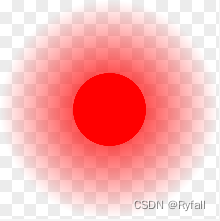
这其实是画两层,一层是一个渐变圆,一层是是个实心圆。
shape分层就需要用到 layer-list 每一层用 item 包裹,在 item 中写具体的shape。其中item可以指定width、height、top、left、right、bottom来控制每一层的位置。
代码如下
- <?xml version="1.0" encoding="utf-8"?>
- <layer-list xmlns:android="http://schemas.android.com/apk/res/android">
- <item
- android:width="@dimen/dp_30"
- android:height="@dimen/dp_30">
- <shape android:shape="oval">
- <gradient
- android:centerX="50%"
- android:centerY="50%"
- android:endColor="#00FF0000"
- android:gradientRadius="50%"
- android:startColor="#FFFF0000"
- android:type="radial" />
- </shape>
- </item>
- <item
- android:width="@dimen/dp_10"
- android:height="@dimen/dp_10" android:top="@dimen/dp_10" android:left="@dimen/dp_10">
- <shape android:shape="oval">
- <solid android:color="#FFFF0000"/>
- </shape>
- </item>
- </layer-list>
下面是一个拍照背景图片

也是用到layer-list,代码如下
- <?xml version ="1.0" encoding ="utf-8"?>
- <layer-list xmlns:android="http://schemas.android.com/apk/res/android">
- <item>
- <shape android:shape="rectangle">
- <stroke
- android:width="@dimen/dp_5"
- android:color="?attr/colorBorder"
- android:dashWidth="@dimen/dp_10"
- android:dashGap="@dimen/dp_10" />
- <corners android:radius="@dimen/dp_15" />
- <solid android:color="?attr/colorBg" />
- </shape>
- </item>
- <item
- android:left="@dimen/dp_50"
- android:right="@dimen/dp_50">
- <shape android:shape="line">
- <stroke
- android:width="@dimen/dp_5"
- android:color="?attr/colorBorder" />
- </shape>
- </item>
- <item
- android:left="@dimen/dp_50"
- android:right="@dimen/dp_50">
- <rotate android:fromDegrees="90">
- <shape android:shape="line">
- <stroke
- android:width="@dimen/dp_5"
- android:color="?attr/colorBorder" />
- </shape>
- </rotate>
- </item>
- </layer-list>
-
相关阅读:
MTK平台Metadata的加载(4)—Q版本后
Unirech阿里云国际版云服务器代充-使用Python批量创建实例
GIS前端编程-地理事件动态模拟
第十届全球云计算大会 | 华云数据荣获“2013-2022十周年特别贡献奖”
产品思维训练 | 小程序分类管理将有什么影响?
XXL-JOB源码梳理——一文理清XXL-JOB实现方案
mysql源码分析——InnoDB的内存应用整体架构源码
Github Fork仓库的冲突与同步管理
ISO14708-3:2017中关于有源植入物对非电离辐射的防护
文本摘要简介
- 原文地址:https://blog.csdn.net/Ryfall/article/details/133386563
