-
react create-react-app v5 从零搭建(使用 npm run eject)
前言:
好久没用 create-react-app做项目了,这次为了个h5项目,就几个页面,决定自己搭建一个(ps:mmp 好久没用,搭建的时候遇到一堆问题)。
我之前都是使用 umi 。后台管理系统的项目 使用 antd-pro框架。实际上antd-pro 是基于umi搭建集成的框架。里面封装好了各种东西,开箱即用。
如果不想暴露 eject 可以参考 :
react create-react-app v5 从零搭建项目 不暴露 eject读本篇文章建议 打开 csdn的目录功能,可以让你更快捷的找到你需要的配置:

我的环境如下:
create-react-app v5"axios": "^1.5.0", "http-proxy-middleware": "^2.0.6", "react": "^18.2.0", "react-dom": "^18.2.0", "react-router": "^6.16.0", "react-router-dom": "^6.16.0",- 1
- 2
- 3
- 4
- 5
- 6
v5刚出来没多久,v4的话问题就很少,基本稳定了!如果你不想用v5 可以安装指定版本的 create-react-app 。
搭建过程:
一、创建项目:
安装Node 和 npm: Node >= 14.0.0 和 npm >= 5.6npx install -g create-react-app- 1
- 2
npx create-react-app my-app- 1

npx 不是拼写错误 —— 它是 npm 5.2+ 附带的 package 运行工具。二、配置各种必备的东西
npm start 运行 看到下图就说明项目创建成功了!

运行 npm run eject 此命令一旦运行不可逆!!!
如果不想 用这种方式可以参考:
react create-react-app v5 从零搭建项目 不运行 eject配置less:
1.安装 less和less-loader
npm install less less-loader --save-dev- 1
2.找到 config/webpack.config.js 添加less规则代码如下:
const lessRegex = /\.less$/; const lessModuleRegex = /\.module\.less$/;- 1
- 2

3.搜索oneOf,在oneOf数组中添加以下代码://less 配置 { test: lessRegex, exclude: lessModuleRegex, use: getStyleLoaders( { importLoaders: 2, sourceMap: isEnvProduction ? shouldUseSourceMap : isEnvDevelopment, }, "less-loader" ), sideEffects: true, }, //less 模块化配置 { test: lessModuleRegex, use: getStyleLoaders( { importLoaders: 2, sourceMap: isEnvProduction ? shouldUseSourceMap : isEnvDevelopment, modules: { getLocalIdent: getCSSModuleLocalIdent, }, }, "less-loader" ), },- 1
- 2
- 3
- 4
- 5
- 6
- 7
- 8
- 9
- 10
- 11
- 12
- 13
- 14
- 15
- 16
- 17
- 18
- 19
- 20
- 21
- 22
- 23
- 24
- 25
- 26
- 27
- 28
- 29
- 30
- 31

要放到 sass-loader下面,位置不对可能不生效

我一开始放到了这里(错误示范)就不生效。

4.重新 npm start(修改 webpack.config.js里的东西 都要重新运行,别忘记保存!!!)
然后 直接 import ‘./App.less’ 或者 模块化引入 import styles from “./index.module.less”(当然 App.less 也要改成 App.module.less)。

看到 和 App.css运行的效果一样则说明配置成功。配置路由:
1.下载 react-router-dom
npm install react-router-dom- 1
2.App.js 里 写上如下代码:
import React from "react"; import { BrowserRouter, Routes, Route } from "react-router-dom"; import routes from './routes'; const App = () => { console.log(routes) return ( <BrowserRouter> <Routes> {routes.map((route) => ( <Route key={route.path} path={route.path} element={route.component} /> ))} {/*} /> */} </Routes> </BrowserRouter> ); }; export default App; - 1
- 2
- 3
- 4
- 5
- 6
- 7
- 8
- 9
- 10
- 11
- 12
- 13
- 14
- 15
- 16
- 17
- 18

遇到 Uncaught TypeError: Cannot read properties of null (reading ‘useRef‘) 报错可以看:
react create-react-app 配置路由报错(Uncaught TypeError: Cannot read properties of null (reading ‘useRef‘))
3.index.js里写上:import React from 'react'; import ReactDOM from 'react-dom/client'; import './index.css'; import App from './App'; import reportWebVitals from './reportWebVitals'; const root = ReactDOM.createRoot(document.getElementById('root')); root.render( <React.StrictMode> <App /> </React.StrictMode> ); // If you want to start measuring performance in your app, pass a function // to log results (for example: reportWebVitals(console.log)) // or send to an analytics endpoint. Learn more: https://bit.ly/CRA-vitals reportWebVitals();- 1
- 2
- 3
- 4
- 5
- 6
- 7
- 8
- 9
- 10
- 11
- 12
- 13
- 14
- 15
- 16
- 17

4.在src下新建一个 routes.js文件 写上:
// 导入你的页面组件 import Home from './pages'; //可以用 path:"*" 写个 404页面,我暂时不需要 const routes = [ { path: "/", component: <Home/>} ]; export default routes;- 1
- 2
- 3
- 4
- 5
- 6
- 7
- 8

运行看到 Home组件里的东西就说明成功了。之后可以在 scr/router.js里导入其他组件 写上 path和routers就行了。注意:react-router-dom v6 和v5 api不太一样,比如 v5 把 Route 上是 component v6是element。具体写法 建议参考 你所用的版本 文档!
如果遇到了Uncaught TypeError: Cannot read properties of null (reading ‘useRef‘) 报错,可以看react create-react-app v5 配置路由(报错及注意事项)
配置axios:
1.安装 axios
cnpm install axios --save- 1
2.src/utils 新建一个 request.js文件(没有utils就新建一个目录然后再建一个request.js)
3.request代码如下:
这个是最简单的配置了,你可以根据自己的需求配置 请求拦截里的东西。import axios from 'axios' // axios的配置文件, 可以在这里去区分开发环境和生产环境等全局一些配置 const devBaseUrl = 'http://api.k780.com/' const proBaseUrl = 'http://xxxxx.com/' // process.env返回的是一个包含用户的环境信息,它可以去区分是开发环境还是生产环境 export const BASE_URL = process.env.NODE_ENV === 'development' ? devBaseUrl : proBaseUrl export const TIMEOUT = 5000 var request = axios.create({ baseURL:BASE_URL,//基准地址 timeout:TIMEOUT }) //拦截请求 request.interceptors.request.use((config)=>{ return config }) //拦截响应 request.interceptors.response.use((response)=>{ return response },function (error){ //对响应的错误做点什么 return Promise.reject(error); } ) export default request;- 1
- 2
- 3
- 4
- 5
- 6
- 7
- 8
- 9
- 10
- 11
- 12
- 13
- 14
- 15
- 16
- 17
- 18
- 19
- 20
- 21
- 22
- 23
- 24
- 25
- 26
- 27
- 28
- 29
使用时就是:
import request from "@/utils/request"; request.get("/api/fund_home/select_by_fund?fund=1001").then(res=>{ console.log(res); })- 1
- 2
- 3
- 4
当然 你也可以不叫 request 你可以叫 $axios 全看自己。
上面我给的配置说最简单的,一般来说 需要在 请求拦截里加上一些判断比如 错误提示,根据code值提示一下。可以借用 ui库的message组件 message.error(xxx)。还有 如果你需要加上token 还得统一加上token。比如:我就在响应拦截里做了统一处理,status =200 并且 respnse.data.code=000000时才代表数据成功返回(这个需要根据你自己的接口规范来定)。否则 就需要 提示错误信息。Toast是antd-mobile里的,你可以根据自己需求变。
//拦截响应 request.interceptors.response.use( (response) => { console.log(response, "res"); if (response && response.status == "200") { if (response.data && response.data.code == "000000") { //接口成功才返回数据 return Promise.resolve(response.data); } else { Toast.show({ content: response.data&&response.data.message, duration:2000, position: "top", }); } }else{ return Promise.reject(response.message) } }, function (error) { //对响应的错误做点什么 Toast.show({ content: '网络异常', duration: 0, position: 'top', }) return Promise.reject(error); } );- 1
- 2
- 3
- 4
- 5
- 6
- 7
- 8
- 9
- 10
- 11
- 12
- 13
- 14
- 15
- 16
- 17
- 18
- 19
- 20
- 21
- 22
- 23
- 24
- 25
- 26
- 27
- 28
- 29
还需呀注意的时使用 axios的时候一定要用catch捕获一下错误,要不然接口出错一定会导致页面直接有个遮罩层显示错误信息。
比如:
接口超时了,页面直接显示错误信息,但其实应该是显示页面才对,这样太影响用户体验了。
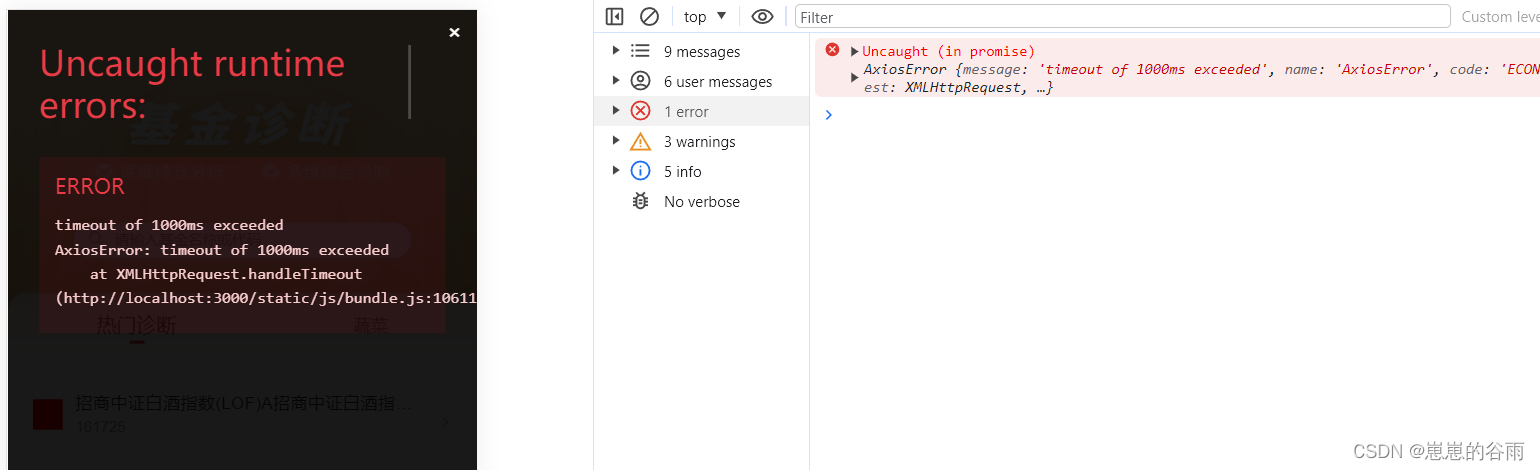
可以用的时候then后面加个catch,就不会直接显示在页面上了。request .get("/api/fund_home/select_by_fund", { params: { fund: "混合", }, }) .then((res) => { console.log(res); }) // .catch((error) => { // console.log(error); // });- 1
- 2
- 3
- 4
- 5
- 6
- 7
- 8
- 9
- 10
- 11
- 12
抽出到servers(模块化):
不过一般 项目里都会抽出来一个server模块(umi、antd-pro都是这样的),这样更加简洁。1.在 src目录新建一个servers目录。
2.在 src/servers新建一个文件。
这个文件名 对应的就是模块名,比如:我现在写的是home页,那我就新建 home.js 。 后面写 其他模块就新建对应的js就行。
3.在 home.js里引入 封装好的 request,写上axios请求。
大致如下:你需要根据你自己的实际需求来写(@代表src,这个需要配置一下,如过你没配置就用相对路径引入就行)。import request from "@/utils/request"; export function getList(params) { return request({ url: "/api/fund_home/select_by_fund", method: "get", params }); }- 1
- 2
- 3
- 4
- 5
- 6
- 7
- 8
- 9
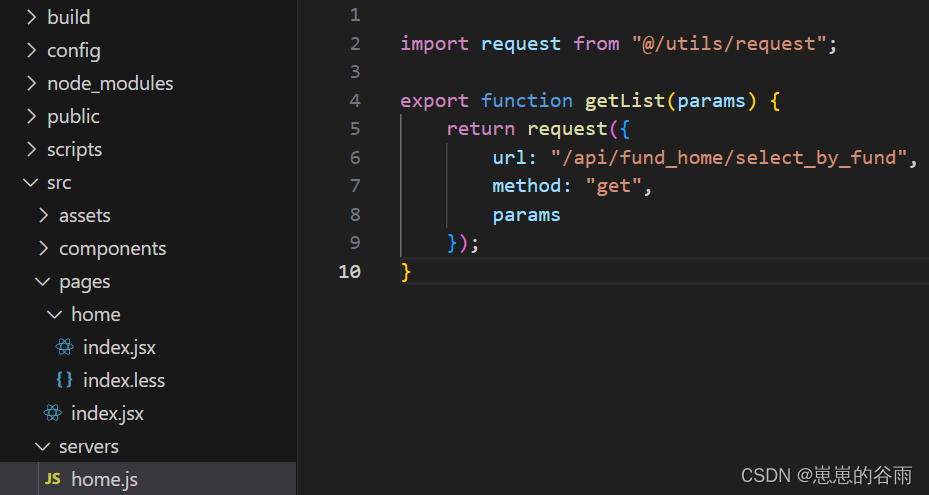
然后就可以在 home页里使用了。
import {getList} from "@/servers/home"; getList({fund:"混合"}).then((res) => { console.log(res); }) .catch((error) => { console.log(error); });- 1
- 2
- 3
- 4
- 5
- 6
- 7
配置Proxy代理:
使用 http-proxy-middleware
1.安装http-proxy-middlewarenpm install http-proxy-middleware --save- 1
2.在src目录新建一个setupProxy.js
代码大致如下:
然后 请求接口时以/api/xx就会自动走代理。const { createProxyMiddleware } = require('http-proxy-middleware'); module.exports = function(app) { app.use( '/api', createProxyMiddleware({ target: 'http://localhost:8000', changeOrigin: true, // pathRewrite: { // '^/api': '/', // }, }) ); };- 1
- 2
- 3
- 4
- 5
- 6
- 7
- 8
- 9
- 10
- 11
- 12
- 13
- 14
具体配置可以参考:React create-react-app 里配置代理(解决跨域)
配置 px2rem:
具体请看:react create-react-app v5配置 px2rem (暴露 eject方式)
配置别名 src可以用 @ :
1.在 config/webpack.config.js里搜索 alias 然后 加上
"@": paths.appSrc,- 1

2.在 App.js里测试一下,引入 app的样式文件,我是 App.less。
import ‘@/App.less’;

3.重新运行 npm start 如果,样式确实生效了就说明,配置对了。
配置按需加载:
按需加载ui库时因为ui库是less写的样式,所以配置时,需要先配置 less,上文中有步骤,ui库按需加载建议看官网文档,都会有方法和步骤及注意事项,其实现在 很多 ui库都支持 Tree Shaking ,v5也支持所以只要是ui库支持,那么就不用配置按需加载!!!
Create React App v5 默认支持 Tree Shaking。Tree Shaking 是一项优化技术,用于在打包过程中只包含实际使用的代码,减少最终打包文件的体积。
在 Create React App v5 的构建配置中,通过使用 Babel 和 webpack 的相关插件和配置,可以自动启用 Tree Shaking 功能。
具体来说,Create React App v5 使用了以下插件和配置来支持 Tree Shaking:Babel 默认配置:Create React App v5 的默认 Babel 配置中使用了 @babel/preset-env,它会根据目标浏览器的兼容性要求,自动转译代码并进行 Tree Shaking。
webpack 配置:Create React App v5 配置了优化选项 sideEffects: false,在 production 环境中默认启用了 Tree Shaking。这使得 webpack 在打包时可以识别出未使用的代码并进行排除。
总结来说,Create React App v5 默认启用了 Tree Shaking,以帮助优化打包文件的体积。你无需额外进行配置即可享受 Tree Shaking 的好处。antd-mobile无需配置手动按需加载
antd-mobile 按需加载

其实 antd 高版本也自带按需加载 可以不用配置(下面的代码只是个 演示,你如果有其他 ui库 或者 插件需要按需加载可以按照下面的步骤来):

antd 官方链接 按需加载react-vant 也是:
react-vant官网

如果你有其他插件需要配置可以参考这个步骤来:
这几种方式都需要 babel-plugin-import 支持,所以没有的话需要先安装!!!webpack.config.js配置:
1.找到 config/webpack.config.js 然后 搜索 oneOf 在下面加一个配置,然后找到babel-loader(直接搜索babel-loader也行,然后找到js\jsx的配置),给起plugins加一个配置
plugins: [ // 添加以下配置 [ "import", { "libraryName": "react-vant", "libraryDirectory": "es", "style": true } ] ]- 1
- 2
- 3
- 4
- 5
- 6
- 7
- 8
- 9
- 10
- 11
完整配置:
{ test: /\.(js|mjs|jsx|ts|tsx)$/, include: paths.appSrc, loader: require.resolve('babel-loader'), options: { customize: require.resolve( 'babel-preset-react-app/webpack-overrides' ), presets: [ [ require.resolve('babel-preset-react-app'), { runtime: hasJsxRuntime ? 'automatic' : 'classic', }, ], ], plugins: [ isEnvDevelopment && shouldUseReactRefresh && require.resolve('react-refresh/babel'), // 添加以下配置 [ "import", { "libraryName": "react-vant", "libraryDirectory": "es", "style": true } ] ].filter(Boolean), // This is a feature of `babel-loader` for webpack (not Babel itself). // It enables caching results in ./node_modules/.cache/babel-loader/ // directory for faster rebuilds. cacheDirectory: true, // See #6846 for context on why cacheCompression is disabled cacheCompression: false, compact: isEnvProduction, }, },- 1
- 2
- 3
- 4
- 5
- 6
- 7
- 8
- 9
- 10
- 11
- 12
- 13
- 14
- 15
- 16
- 17
- 18
- 19
- 20
- 21
- 22
- 23
- 24
- 25
- 26
- 27
- 28
- 29
- 30
- 31
- 32
- 33
- 34
- 35
- 36
- 37
- 38
- 39
- 40

.babelrc里配置(推荐)
还可以按照antd-mobile 官网的方式来,就不需要在 webpack里配置了。可以使用 babel-plugin-import 来进行自动语法转换。可以在 .babelrc 中这样配置:
使用 .babelrc 文件进行配置需要确保项目的 Babel 版本在 7.x 及以上。如果你的项目使用的是较旧的 Babel 版本,则无法支持使用 .babelrc 进行配置,需要改用 babel.config.js 文件进行配置。{ "plugins": [ ["import", { "libraryName": "antd-mobile", "libraryDirectory": "es/components", "style": false}] ] }- 1
- 2
- 3
- 4
- 5

babel.config.js 这样配置:
module.exports 和export default应该都行。
package.json里babel配置(推荐)
1.在 package.json 文件中找到 “babel” 字段,如果没有请自行添加该字段。
2.在 “babel” 字段中添加 “plugins” 字段,并将 “plugins” 字段的值设置为一个数组,用于配置 babel 插件。
3.在 “plugins” 数组中添加 “import” 插件,并将其配置为按需加载。具体配置如下:
只添加 plugins就行,如果默认有其他配置,在后面加上就行。{ "babel": { "plugins": [ [ "import", { "libraryName": "react-vant", "style": true } ] ] } }- 1
- 2
- 3
- 4
- 5
- 6
- 7
- 8
- 9
- 10
- 11
- 12
- 13
注意:
.babelrc里配置 和package.json 这两个方式会冲突,会报:
Parsing error: Multiple configuration files found. Please remove one:
package.json
D:\fund_demo.babelrc

这个错误通常是由于同时存在多个配置文件引起的,包括 package.json 和 .babelrc 等。Create React App 的默认配置中只支持使用一个配置文件来定义 Babel 相关的配置。解决方案就是只保留一个配置:要不就直接在package.json里配置,要不就 把package.json的babel删掉都放在.babelrc.

静态资源图片之类的可以在src下新建assets目录:
在 src新建文件夹assets。然后新建img可以存放图片。 新建 js,css可以存放静态的js和css。
其实放public里也可以:
在create-react-app中,assets目录和public目录都可以用来存放静态资源,但它们之间有一些区别。
assets目录是我们自己创建的,通常放置一些与组件紧密相关的静态资源,如图片、样式文件等。这些资源在Webpack打包时会被处理和压缩,并与代码一起打包到最终的构建文件中。在组件中引用这些资源时,需要使用import关键字进行导入。public目录是在创建React应用时默认生成的,用于放置一些通用的静态资源,如HTML文件、favicon.ico文件等。这些资源在Webpack打包时不会被处理和压缩,并且会被直接复制到最终的构建文件中。在组件中引用这些资源时,需要使用相对路径进行引用。
总的来说,assets目录和public目录都可以用来存放静态资源,但它们在处理和使用静态资源时有所不同。因此,我们需要根据实际情况选择合适的目录来存放静态资源。大白话就是 ,public里的文件打包会直接被复制到 dist里,assets则不会。
打包部署到非根目录:
create-react-app v5 打包配置(部署到非根目录)
使用环境变量
react 使用环境变量的方法和步骤(dotenv-cli 实现使用环境变量步骤)
打包去掉 map文件
注意严格模式(StrictMode)会导致开发环境接口请求两次
React中StrictMode严格模式,导致开发环境,接口会请求两次或多次( useEffect 请求多次)
我的 webpack.config.js完整的配置:
你可以参考对比:
'use strict'; const fs = require('fs'); const path = require('path'); const webpack = require('webpack'); const resolve = require('resolve'); const HtmlWebpackPlugin = require('html-webpack-plugin'); const CaseSensitivePathsPlugin = require('case-sensitive-paths-webpack-plugin'); const InlineChunkHtmlPlugin = require('react-dev-utils/InlineChunkHtmlPlugin'); const TerserPlugin = require('terser-webpack-plugin'); const MiniCssExtractPlugin = require('mini-css-extract-plugin'); const CssMinimizerPlugin = require('css-minimizer-webpack-plugin'); const { WebpackManifestPlugin } = require('webpack-manifest-plugin'); const InterpolateHtmlPlugin = require('react-dev-utils/InterpolateHtmlPlugin'); const WorkboxWebpackPlugin = require('workbox-webpack-plugin'); const ModuleScopePlugin = require('react-dev-utils/ModuleScopePlugin'); const getCSSModuleLocalIdent = require('react-dev-utils/getCSSModuleLocalIdent'); const ESLintPlugin = require('eslint-webpack-plugin'); const paths = require('./paths'); const modules = require('./modules'); const getClientEnvironment = require('./env'); const ModuleNotFoundPlugin = require('react-dev-utils/ModuleNotFoundPlugin'); const ForkTsCheckerWebpackPlugin = process.env.TSC_COMPILE_ON_ERROR === 'true' ? require('react-dev-utils/ForkTsCheckerWarningWebpackPlugin') : require('react-dev-utils/ForkTsCheckerWebpackPlugin'); const ReactRefreshWebpackPlugin = require('@pmmmwh/react-refresh-webpack-plugin'); const createEnvironmentHash = require('./webpack/persistentCache/createEnvironmentHash'); //px2rem的配置 const px2rem = require("postcss-plugin-px2rem"); const px2remOpts = { rootValue: 37.5, //这个值定义了1rem应该等于多少像素。在这里,1rem等于37.5 exclude: /(node_module)/, //这是一个正则表达式,用于指定哪些文件应该被排除在转换之外。在这里,所有在'node_module'目录下的文件都将被排除。 // mediaQuery: false, //这个选项表示是否应该在媒体查询中转换px单位。在这里,它被设置为false,意味着媒体查询中的px单位将不会被转换 // minPixelValue: 3, //这个选项表示应该转换的最小px值。在这里,只有px值大于或等于3的才会被转换 }; // Source maps are resource heavy and can cause out of memory issue for large source files. const shouldUseSourceMap = process.env.GENERATE_SOURCEMAP !== 'false'; const reactRefreshRuntimeEntry = require.resolve('react-refresh/runtime'); const reactRefreshWebpackPluginRuntimeEntry = require.resolve( '@pmmmwh/react-refresh-webpack-plugin' ); const babelRuntimeEntry = require.resolve('babel-preset-react-app'); const babelRuntimeEntryHelpers = require.resolve( '@babel/runtime/helpers/esm/assertThisInitialized', { paths: [babelRuntimeEntry] } ); const babelRuntimeRegenerator = require.resolve('@babel/runtime/regenerator', { paths: [babelRuntimeEntry], }); // Some apps do not need the benefits of saving a web request, so not inlining the chunk // makes for a smoother build process. const shouldInlineRuntimeChunk = process.env.INLINE_RUNTIME_CHUNK !== 'false'; const emitErrorsAsWarnings = process.env.ESLINT_NO_DEV_ERRORS === 'true'; const disableESLintPlugin = process.env.DISABLE_ESLINT_PLUGIN === 'true'; const imageInlineSizeLimit = parseInt( process.env.IMAGE_INLINE_SIZE_LIMIT || '10000' ); // Check if TypeScript is setup const useTypeScript = fs.existsSync(paths.appTsConfig); // Check if Tailwind config exists const useTailwind = fs.existsSync( path.join(paths.appPath, 'tailwind.config.js') ); // Get the path to the uncompiled service worker (if it exists). const swSrc = paths.swSrc; // style files regexes const cssRegex = /\.css$/; const cssModuleRegex = /\.module\.css$/; const sassRegex = /\.(scss|sass)$/; const sassModuleRegex = /\.module\.(scss|sass)$/; const lessRegex = /\.less$/; const lessModuleRegex = /\.module\.less$/; const hasJsxRuntime = (() => { if (process.env.DISABLE_NEW_JSX_TRANSFORM === 'true') { return false; } try { require.resolve('react/jsx-runtime'); return true; } catch (e) { return false; } })(); // This is the production and development configuration. // It is focused on developer experience, fast rebuilds, and a minimal bundle. module.exports = function (webpackEnv) { const isEnvDevelopment = webpackEnv === 'development'; const isEnvProduction = webpackEnv === 'production'; // Variable used for enabling profiling in Production // passed into alias object. Uses a flag if passed into the build command const isEnvProductionProfile = isEnvProduction && process.argv.includes('--profile'); // We will provide `paths.publicUrlOrPath` to our app // as %PUBLIC_URL% in `index.html` and `process.env.PUBLIC_URL` in JavaScript. // Omit trailing slash as %PUBLIC_URL%/xyz looks better than %PUBLIC_URL%xyz. // Get environment variables to inject into our app. const env = getClientEnvironment(paths.publicUrlOrPath.slice(0, -1)); const shouldUseReactRefresh = env.raw.FAST_REFRESH; // common function to get style loaders const getStyleLoaders = (cssOptions, preProcessor) => { const loaders = [ isEnvDevelopment && require.resolve('style-loader'), isEnvProduction && { loader: MiniCssExtractPlugin.loader, // css is located in `static/css`, use '../../' to locate index.html folder // in production `paths.publicUrlOrPath` can be a relative path options: paths.publicUrlOrPath.startsWith('.') ? { publicPath: '../../' } : {}, }, { loader: require.resolve('css-loader'), options: cssOptions, }, { // Options for PostCSS as we reference these options twice // Adds vendor prefixing based on your specified browser support in // package.json loader: require.resolve('postcss-loader'), options: { postcssOptions: { // Necessary for external CSS imports to work // https://github.com/facebook/create-react-app/issues/2677 ident: 'postcss', config: false, plugins: !useTailwind ? [ 'postcss-flexbugs-fixes', [ 'postcss-preset-env', { autoprefixer: { flexbox: 'no-2009', }, stage: 3, }, ], [ px2rem(px2remOpts) ], // Adds PostCSS Normalize as the reset css with default options, // so that it honors browserslist config in package.json // which in turn let's users customize the target behavior as per their needs. 'postcss-normalize', ] : [ 'tailwindcss', 'postcss-flexbugs-fixes', [ 'postcss-preset-env', { autoprefixer: { flexbox: 'no-2009', }, stage: 3, }, ], ], }, sourceMap: isEnvProduction ? shouldUseSourceMap : isEnvDevelopment, } } ].filter(Boolean); if (preProcessor) { loaders.push( { loader: require.resolve('resolve-url-loader'), options: { sourceMap: isEnvProduction ? shouldUseSourceMap : isEnvDevelopment, root: paths.appSrc, }, }, { loader: require.resolve(preProcessor), options: { sourceMap: true, }, } ); } return loaders; }; return { target: ['browserslist'], // Webpack noise constrained to errors and warnings stats: 'errors-warnings', mode: isEnvProduction ? 'production' : isEnvDevelopment && 'development', // Stop compilation early in production bail: isEnvProduction, devtool: isEnvProduction ? shouldUseSourceMap ? 'source-map' : false : isEnvDevelopment && 'cheap-module-source-map', // These are the "entry points" to our application. // This means they will be the "root" imports that are included in JS bundle. entry: paths.appIndexJs, output: { // The build folder. path: paths.appBuild, // Add /* filename */ comments to generated require()s in the output. pathinfo: isEnvDevelopment, // There will be one main bundle, and one file per asynchronous chunk. // In development, it does not produce real files. filename: isEnvProduction ? 'static/js/[name].[contenthash:8].js' : isEnvDevelopment && 'static/js/bundle.js', // There are also additional JS chunk files if you use code splitting. chunkFilename: isEnvProduction ? 'static/js/[name].[contenthash:8].chunk.js' : isEnvDevelopment && 'static/js/[name].chunk.js', assetModuleFilename: 'static/media/[name].[hash][ext]', // webpack uses `publicPath` to determine where the app is being served from. // It requires a trailing slash, or the file assets will get an incorrect path. // We inferred the "public path" (such as / or /my-project) from homepage. publicPath: paths.publicUrlOrPath, // Point sourcemap entries to original disk location (format as URL on Windows) devtoolModuleFilenameTemplate: isEnvProduction ? info => path .relative(paths.appSrc, info.absoluteResourcePath) .replace(/\\/g, '/') : isEnvDevelopment && (info => path.resolve(info.absoluteResourcePath).replace(/\\/g, '/')), }, cache: { type: 'filesystem', version: createEnvironmentHash(env.raw), cacheDirectory: paths.appWebpackCache, store: 'pack', buildDependencies: { defaultWebpack: ['webpack/lib/'], config: [__filename], tsconfig: [paths.appTsConfig, paths.appJsConfig].filter(f => fs.existsSync(f) ), }, }, infrastructureLogging: { level: 'none', }, optimization: { minimize: isEnvProduction, minimizer: [ // This is only used in production mode new TerserPlugin({ terserOptions: { parse: { // We want terser to parse ecma 8 code. However, we don't want it // to apply any minification steps that turns valid ecma 5 code // into invalid ecma 5 code. This is why the 'compress' and 'output' // sections only apply transformations that are ecma 5 safe // https://github.com/facebook/create-react-app/pull/4234 ecma: 8, }, compress: { ecma: 5, warnings: false, // Disabled because of an issue with Uglify breaking seemingly valid code: // https://github.com/facebook/create-react-app/issues/2376 // Pending further investigation: // https://github.com/mishoo/UglifyJS2/issues/2011 comparisons: false, // Disabled because of an issue with Terser breaking valid code: // https://github.com/facebook/create-react-app/issues/5250 // Pending further investigation: // https://github.com/terser-js/terser/issues/120 inline: 2, }, mangle: { safari10: true, }, // Added for profiling in devtools keep_classnames: isEnvProductionProfile, keep_fnames: isEnvProductionProfile, output: { ecma: 5, comments: false, // Turned on because emoji and regex is not minified properly using default // https://github.com/facebook/create-react-app/issues/2488 ascii_only: true, }, }, }), // This is only used in production mode new CssMinimizerPlugin(), ], }, resolve: { // This allows you to set a fallback for where webpack should look for modules. // We placed these paths second because we want `node_modules` to "win" // if there are any conflicts. This matches Node resolution mechanism. // https://github.com/facebook/create-react-app/issues/253 modules: ['node_modules', paths.appNodeModules].concat( modules.additionalModulePaths || [] ), // These are the reasonable defaults supported by the Node ecosystem. // We also include JSX as a common component filename extension to support // some tools, although we do not recommend using it, see: // https://github.com/facebook/create-react-app/issues/290 // `web` extension prefixes have been added for better support // for React Native Web. extensions: paths.moduleFileExtensions .map(ext => `.${ext}`) .filter(ext => useTypeScript || !ext.includes('ts')), alias: { // Support React Native Web // https://www.smashingmagazine.com/2016/08/a-glimpse-into-the-future-with-react-native-for-web/ 'react-native': 'react-native-web', // Allows for better profiling with ReactDevTools ...(isEnvProductionProfile && { 'react-dom$': 'react-dom/profiling', 'scheduler/tracing': 'scheduler/tracing-profiling', }), "@": paths.appSrc, ...(modules.webpackAliases || {}), }, plugins: [ // Prevents users from importing files from outside of src/ (or node_modules/). // This often causes confusion because we only process files within src/ with babel. // To fix this, we prevent you from importing files out of src/ -- if you'd like to, // please link the files into your node_modules/ and let module-resolution kick in. // Make sure your source files are compiled, as they will not be processed in any way. new ModuleScopePlugin(paths.appSrc, [ paths.appPackageJson, reactRefreshRuntimeEntry, reactRefreshWebpackPluginRuntimeEntry, babelRuntimeEntry, babelRuntimeEntryHelpers, babelRuntimeRegenerator, ]), ], }, module: { strictExportPresence: true, rules: [ // Handle node_modules packages that contain sourcemaps shouldUseSourceMap && { enforce: 'pre', exclude: /@babel(?:\/|\\{1,2})runtime/, test: /\.(js|mjs|jsx|ts|tsx|css)$/, loader: require.resolve('source-map-loader'), }, { // "oneOf" will traverse all following loaders until one will // match the requirements. When no loader matches it will fall // back to the "file" loader at the end of the loader list. oneOf: [ // TODO: Merge this config once `image/avif` is in the mime-db // https://github.com/jshttp/mime-db { test: [/\.avif$/], type: 'asset', mimetype: 'image/avif', parser: { dataUrlCondition: { maxSize: imageInlineSizeLimit, }, }, }, // "url" loader works like "file" loader except that it embeds assets // smaller than specified limit in bytes as data URLs to avoid requests. // A missing `test` is equivalent to a match. { test: [/\.bmp$/, /\.gif$/, /\.jpe?g$/, /\.png$/], type: 'asset', parser: { dataUrlCondition: { maxSize: imageInlineSizeLimit, }, }, }, { test: /\.svg$/, use: [ { loader: require.resolve('@svgr/webpack'), options: { prettier: false, svgo: false, svgoConfig: { plugins: [{ removeViewBox: false }], }, titleProp: true, ref: true, }, }, { loader: require.resolve('file-loader'), options: { name: 'static/media/[name].[hash].[ext]', }, }, ], issuer: { and: [/\.(ts|tsx|js|jsx|md|mdx)$/], }, }, // Process application JS with Babel. // The preset includes JSX, Flow, TypeScript, and some ESnext features. { test: /\.(js|mjs|jsx|ts|tsx)$/, include: paths.appSrc, loader: require.resolve('babel-loader'), options: { customize: require.resolve( 'babel-preset-react-app/webpack-overrides' ), presets: [ [ require.resolve('babel-preset-react-app'), { runtime: hasJsxRuntime ? 'automatic' : 'classic', }, ], ], plugins: [ isEnvDevelopment && shouldUseReactRefresh && require.resolve('react-refresh/babel'), [ "import", { "libraryName": "react-vant", "libraryDirectory": "es", "style": true } ] ].filter(Boolean), // This is a feature of `babel-loader` for webpack (not Babel itself). // It enables caching results in ./node_modules/.cache/babel-loader/ // directory for faster rebuilds. cacheDirectory: true, // See #6846 for context on why cacheCompression is disabled cacheCompression: false, compact: isEnvProduction, }, }, // Process any JS outside of the app with Babel. // Unlike the application JS, we only compile the standard ES features. { test: /\.(js|mjs)$/, exclude: /@babel(?:\/|\\{1,2})runtime/, loader: require.resolve('babel-loader'), options: { babelrc: false, configFile: false, compact: false, presets: [ [ require.resolve('babel-preset-react-app/dependencies'), { helpers: true }, ], ], cacheDirectory: true, // See #6846 for context on why cacheCompression is disabled cacheCompression: false, // Babel sourcemaps are needed for debugging into node_modules // code. Without the options below, debuggers like VSCode // show incorrect code and set breakpoints on the wrong lines. sourceMaps: shouldUseSourceMap, inputSourceMap: shouldUseSourceMap }, }, // "postcss" loader applies autoprefixer to our CSS. // "css" loader resolves paths in CSS and adds assets as dependencies. // "style" loader turns CSS into JS modules that inject
