-
Shiro高级及SaaS-HRM的认证授权
Shiro在SpringBoot工程的应用
Apache Shiro是一个功能强大、灵活的,开源的安全框架。它可以干净利落地处理身份验证、授权、企业会话管理和加密。越来越多的企业使用Shiro作为项目的安全框架,保证项目的平稳运行。
在之前的讲解中只是单独的使用shiro,方便学员对shiro有一个直观且清晰的认知,我们今天就来看一下shiro在springBoot工程中如何使用以及其他特性
案例说明
使用springBoot构建应用程序,整合shiro框架完成用户认证与授权。
数据库表
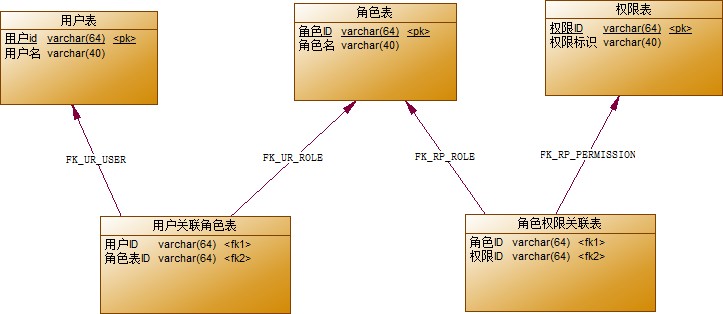
基本工程结构
导入资料中准备的基本工程代码,此工程中实现了基本用户角色权限的操作。我们只需要在此工程中添加Shiro相关的操作代码即可
整合Shiro
spring和shiro的整合依赖
- <dependency>
- <groupId>org.apache.shiro</groupId>
- <artifactId>shiro-spring</artifactId>
- <version>1.3.2</version>
- </dependency>
- <dependency>
- <groupId>org.apache.shiro</groupId>
- <artifactId>shiro-core</artifactId>
- <version>1.3.2</version>
- </dependency>
修改登录方法
认证:身份认证/登录,验证用户是不是拥有相应的身份。基于shiro的认证,shiro需要采集到用户登录数据使用subject的login方法进入realm完成认证工作。
- @RequestMapping(value="/login")
- public String login(String username,String password) {
- try{
- Subject subject = SecurityUtils.getSubject();
- UsernamePasswordToken uptoken = new UsernamePasswordToken(username,password);
- subject.login(uptoken);
- return "登录成功";
- }catch (Exception e) {
- return "用户名或密码错误";
- }
- }
自定义realm
Realm域:Shiro从Realm获取安全数据(如用户、角色、权限),就是说SecurityManager要验证用户身份,那么 它需要从Realm获取相应的用户进行比较以确定用户身份是否合法;也需要从Realm得到用户相应的角色/权限进行验证用户是否能进行操作;可以把Realm看成DataSource,即安全数据源
- package cn.itcast.shiro.realm;
- import cn.itcast.shiro.domain.Permission;
- import cn.itcast.shiro.domain.Role;
- import cn.itcast.shiro.domain.User;
- import cn.itcast.shiro.service.UserService;
- import org.apache.shiro.authc.*;
- import org.apache.shiro.authz.AuthorizationInfo;
- import org.apache.shiro.authz.SimpleAuthorizationInfo;
- import org.apache.shiro.crypto.hash.Md5Hash;
- import org.apache.shiro.realm.AuthorizingRealm;
- import org.apache.shiro.subject.PrincipalCollection;
- import org.springframework.beans.factory.annotation.Autowired;
- import java.util.HashSet;
- import java.util.Set;
- /**
- * 自定义的realm
- */
- public class CustomRealm extends AuthorizingRealm {
- public void setName(String name) {
- super.setName("customRealm");
- }
- @Autowired
- private UserService userService;
- /**
- * 授权方法
- * 操作的时候,判断用户是否具有响应的权限
- * 先认证 -- 安全数据
- * 再授权 -- 根据安全数据获取用户具有的所有操作权限
- *
- *
- */
- protected AuthorizationInfo doGetAuthorizationInfo(PrincipalCollection principalCollection) {
- //1.获取已认证的用户数据
- User user = (User) principalCollection.getPrimaryPrincipal();//得到唯一的安全数据
- //2.根据用户数据获取用户的权限信息(所有角色,所有权限)
- SimpleAuthorizationInfo info = new SimpleAuthorizationInfo();
- Set<String> roles = new HashSet<>();//所有角色
- Set<String> perms = new HashSet<>();//所有权限
- for (Role role : user.getRoles()) {
- roles.add(role.getName());
- for (Permission perm : role.getPermissions()) {
- perms.add(perm.getCode());
- }
- }
- info.setStringPermissions(perms);
- info.setRoles(roles);
- return info;
- }
- /**
- * 认证方法
- * 参数:传递的用户名密码
- */
- protected AuthenticationInfo doGetAuthenticationInfo(AuthenticationToken authenticationToken) throws AuthenticationException {
- //1.获取登录的用户名密码(token)
- UsernamePasswordToken upToken = (UsernamePasswordToken) authenticationToken;
- String username = upToken.getUsername();
- String password = new String( upToken.getPassword());
- //2.根据用户名查询数据库
- User user = userService.findByName(username);
- //3.判断用户是否存在或者密码是否一致
- if(user != null && user.getPassword().equals(password)) {
- //4.如果一致返回安全数据
- //构造方法:安全数据,密码,realm域名
- SimpleAuthenticationInfo info = new SimpleAuthenticationInfo(user,user.getPassword(),this.getName());
- return info;
- }
- //5.不一致,返回null(抛出异常)
- return null;
- }
- public static void main(String[] args) {
- System.out.println(new Md5Hash("123456","wangwu",3).toString());
- }
- }
Shiro的配置
SecurityManager 是 Shiro 架构的心脏,用于协调内部的多个组件完成全部认证授权的过程。例如通过调用realm 完成认证与登录。使用基于springboot的配置方式完成SecurityManager,Realm的装配
- package cn.itcast.shiro;
- import cn.itcast.shiro.realm.CustomRealm;
- import cn.itcast.shiro.session.CustomSessionManager;
- import org.apache.shiro.mgt.SecurityManager;
- import org.apache.shiro.spring.security.interceptor.AuthorizationAttributeSourceAdvisor;
- import org.apache.shiro.spring.web.ShiroFilterFactoryBean;
- import org.apache.shiro.web.mgt.DefaultWebSecurityManager;
- import org.apache.shiro.web.session.mgt.DefaultWebSessionManager;
- import org.crazycake.shiro.RedisCacheManager;
- import org.crazycake.shiro.RedisManager;
- import org.crazycake.shiro.RedisSessionDAO;
- import org.springframework.beans.factory.annotation.Value;
- import org.springframework.context.annotation.Bean;
- import org.springframework.context.annotation.Configuration;
- import java.util.LinkedHashMap;
- import java.util.Map;
- @Configuration
- public class ShiroConfiguration {
- //1.创建realm
- @Bean
- public CustomRealm getRealm() {
- return new CustomRealm();
- }
- //2.创建安全管理器
- @Bean
- public SecurityManager getSecurityManager(CustomRealm realm) {
- DefaultWebSecurityManager securityManager = new DefaultWebSecurityManager();
- securityManager.setRealm(realm);
- //将自定义的会话管理器注册到安全管理器中
- securityManager.setSessionManager(sessionManager());
- //将自定义的redis缓存管理器注册到安全管理器中
- securityManager.setCacheManager(cacheManager());
- return securityManager;
- }
- //3.配置shiro的过滤器工厂
- /**
- * 再web程序中,shiro进行权限控制全部是通过一组过滤器集合进行控制
- *
- */
- @Bean
- public ShiroFilterFactoryBean shiroFilter(SecurityManager securityManager) {
- //1.创建过滤器工厂
- ShiroFilterFactoryBean filterFactory = new ShiroFilterFactoryBean();
- //2.设置安全管理器
- filterFactory.setSecurityManager(securityManager);
- //3.通用配置(跳转登录页面,为授权跳转的页面)
- filterFactory.setLoginUrl("/autherror?code=1");//跳转url地址
- filterFactory.setUnauthorizedUrl("/autherror?code=2");//未授权的url
- //4.设置过滤器集合
- /**
- * 设置所有的过滤器:有顺序map
- * key = 拦截的url地址
- * value = 过滤器类型
- *
- */
- Map<String,String> filterMap = new LinkedHashMap<>();
- //filterMap.put("/user/home","anon");//当前请求地址可以匿名访问
- //具有某中权限才能访问
- //使用过滤器的形式配置请求地址的依赖权限
- //filterMap.put("/user/home","perms[user-home]"); //不具备指定的权限,跳转到setUnauthorizedUrl地址
- //使用过滤器的形式配置请求地址的依赖角色
- //filterMap.put("/user/home","roles[系统管理员]");
- filterMap.put("/user/**","authc");//当前请求地址必须认证之后可以访问
- filterFactory.setFilterChainDefinitionMap(filterMap);
- return filterFactory;
- }
- @Value("${spring.redis.host}")
- private String host;
- @Value("${spring.redis.port}")
- private int port;
- /**
- * 1.redis的控制器,操作redis
- */
- public RedisManager redisManager() {
- RedisManager redisManager = new RedisManager();
- redisManager.setHost(host);
- redisManager.setPort(port);
- return redisManager;
- }
- /**
- * 2.sessionDao
- */
- public RedisSessionDAO redisSessionDAO() {
- RedisSessionDAO sessionDAO = new RedisSessionDAO();
- sessionDAO.setRedisManager(redisManager());
- return sessionDAO;
- }
- /**
- * 3.会话管理器
- */
- public DefaultWebSessionManager sessionManager() {
- CustomSessionManager sessionManager = new CustomSessionManager();
- sessionManager.setSessionDAO(redisSessionDAO());
- return sessionManager;
- }
- /**
- * 4.缓存管理器
- */
- public RedisCacheManager cacheManager() {
- RedisCacheManager redisCacheManager = new RedisCacheManager();
- redisCacheManager.setRedisManager(redisManager());
- return redisCacheManager;
- }
- //开启对shior注解的支持
- @Bean
- public AuthorizationAttributeSourceAdvisor authorizationAttributeSourceAdvisor(SecurityManager securityManager) {
- AuthorizationAttributeSourceAdvisor advisor = new AuthorizationAttributeSourceAdvisor();
- advisor.setSecurityManager(securityManager);
- return advisor;
- }
- }
shiro中的过滤器
Filter
解释
anon
无参,开放权限,可以理解为匿名用户或游客
authc
无参,需要认证
logout
无参,注销,执行后会直接跳转到 shiroFilterFactoryBean.setLoginUrl(); 设置的
url
authcBasic
无参,表示 httpBasic 认证
user
无参,表示必须存在用户,当登入操作时不做检查
ssl
无参,表示安全的URL请求,协议为 https
perms[user]
参数可写多个,表示需要某个或某些权限才能通过,多个参数时写 perms[“user, admin”],当有多个参数时必须每个参数都通过才算通过
roles[admin]
参数可写多个,表示是某个或某些角色才能通过,多个参数时写 roles[“admin,user”], 当有多个参数时必须每个参数都通过才算通过
rest[user]
根据请求的方法,相当于 perms[user:method],其中 method 为 post,get,delete 等
port[8081]
当请求的URL端口不是8081时,跳转到当前访问主机HOST的8081端口
注意:anon, authc, authcBasic, user 是第一组认证过滤器,perms, port, rest, roles, ssl 是第二组授权过滤器,要通过授权过滤器,就先要完成登陆认证操作(即先要完成认证才能前去寻找授权) 才能走第二组授权器(例如访问需要 roles 权限的 url,如果还没有登陆的话,会直接跳转到shiroFilterFactoryBean.setLoginUrl(); 设置的 url )
骚戴理解:shiro的权限控制都是通过一大堆的过滤器来实现的,常用的过滤器就四个,分别是anon、authc、perms[user]、roles[admin],anon就是公开的,没限制,authc就是必须登录,perms[user]就是权限里必须有user这个字符才可以访问,roles[admin]就是角色里必须有admin这个角色才可以访问
授权
授权:即权限验证,验证某个已认证的用户是否拥有某个权限;即判断用户是否能做事情
shiro支持基于过滤器的授权方式也支持注解的授权方式
基于配置的授权
在shiro中可以使用过滤器的方式配置目标地址的请求权限
- //配置请求连接过滤器配置
- //匿名访问(所有人员可以使用)
- filterMap.put("/user/home", "anon");
- //具有指定权限访问
- filterMap.put("/user/find", "perms[user-find]");
- //认证之后访问(登录之后可以访问)
- filterMap.put("/user/**", "authc");
- //具有指定角色可以访问
- filterMap.put("/user/**", "roles[系统管理员]");
基于配置的方式进行授权,一旦操作用户不具备操作权限,目标地址不会被执行。会跳转到指定的url连接地址(也就是下面代码设置的路径)。所以需要在连接地址中更加友好的处理未授权的信息提示
- filterFactory.setLoginUrl("/autherror?code=1");//跳转url地址
- filterFactory.setUnauthorizedUrl("/autherror?code=2");//未授权的url
基于注解的授权
RequiresPermissions
配置到方法上,表明执行此方法必须具有指定的权限
- //查询
- @RequiresPermissions(value = "user-find")
- public String find() {
- return "查询用户成功";
- }
RequiresRoles
配置到方法上,表明执行此方法必须具有指定的角色
- //查询
- @RequiresRoles(value = "系统管理员")
- public String find() {
- return "查询用户成功";
- }
基于注解的配置方式进行授权,一旦操作用户不具备操作权限,目标方法不会被执行,而且会抛出
AuthorizationException 异常。所以需要做好统一异常处理完成未授权处理
- 使用注解的话要在配置类中配置一个Bean
- //开启对shior注解的支持
- @Bean
- public AuthorizationAttributeSourceAdvisor authorizationAttributeSourceAdvisor(SecurityManager securityManager) {
- AuthorizationAttributeSourceAdvisor advisor = new AuthorizationAttributeSourceAdvisor();
- advisor.setSecurityManager(securityManager);
- return advisor;
- }
Shiro中的会话管理
在shiro里所有的用户的会话信息都会由Shiro来进行控制,shiro提供的会话可以用于JavaSE/JavaEE环境,不依赖 于任何底层容器,可以独立使用,是完整的会话模块。通过Shiro的会话管理器(SessionManager)进行统一的会话管理
什么是shiro的会话管理
SessionManager(会话管理器):管理所有Subject的session包括创建、维护、删除、失效、验证等工作。SessionManager是顶层组件,由SecurityManager管理
shiro提供了三个默认实现:
- DefaultSessionManager:用于JavaSE环境
- ServletContainerSessionManager(默认):用于Web环境,直接使用servlet容器的会话。
- DefaultWebSessionManager(自定义):用于web环境,自己维护会话(自己维护着会话,直接废弃了Servlet容器的会话管理)。
在web程序中,通过shiro的Subject.login()方法登录成功后,用户的认证信息实际上是保存在HttpSession中的通过如下代码验证。
- //登录成功后,打印所有session内容
- @RequestMapping(value="/show")
- public String show(HttpSession session) {
- // 获取session中所有的键值
- Enumeration<?> enumeration = session.getAttributeNames();
- // 遍历enumeration中的
- while (enumeration.hasMoreElements()) {
- // 获取session键值
- String name = enumeration.nextElement().toString();
- // 根据键值取session中的值
- Object value = session.getAttribute(name);
- // 打印结果
- System.out.println("" + name + "=" + value + "
/n"); - }
- return "查看session成功";
- }
应用场景分析
在分布式系统或者微服务架构下,都是通过统一的认证中心进行用户认证。如果使用默认会话管理,用户信息只会 保存到一台服务器上。那么其他服务就需要进行会话的同步。

会话管理器可以指定sessionId的生成以及获取方式。通过sessionDao完成模拟session存入,取出等操作
Shiro结合redis的统一会话管理
步骤分析

构建环境
使用开源组件Shiro-Redis可以方便的构建shiro与redis的整合工程。
- <dependency>
- <groupId>org.crazycake</groupId>
- <artifactId>shiro-redis</artifactId>
- <version>3.0.0</version>
- </dependency>
在springboot配置文件中添加redis配置
- redis:
- host: 127.0.0.1
- port: 6379
自定义shiro会话管理器
- package cn.itcast.shiro.session;
- import org.apache.shiro.web.servlet.ShiroHttpServletRequest;
- import org.apache.shiro.web.session.mgt.DefaultWebSessionManager;
- import org.apache.shiro.web.util.WebUtils;
- import org.springframework.util.StringUtils;
- import javax.servlet.ServletRequest;
- import javax.servlet.ServletResponse;
- import java.io.Serializable;
- /**
- * 自定义的sessionManager
- */
- public class CustomSessionManager extends DefaultWebSessionManager {
- /**
- * 头信息中具有sessionid
- * 请求头:Authorization: sessionid
- *
- * 指定sessionId的获取方式
- */
- protected Serializable getSessionId(ServletRequest request, ServletResponse response) {
- //获取请求头Authorization中的数据
- String id = WebUtils.toHttp(request).getHeader("Authorization");
- if(StringUtils.isEmpty(id)) {
- //如果没有携带,生成新的sessionId
- return super.getSessionId(request,response);
- }else{
- //返回sessionId;
- request.setAttribute(ShiroHttpServletRequest.REFERENCED_SESSION_ID_SOURCE, "header");
- request.setAttribute(ShiroHttpServletRequest.REFERENCED_SESSION_ID, id);
- request.setAttribute(ShiroHttpServletRequest.REFERENCED_SESSION_ID_IS_VALID, Boolean.TRUE);
- return id;
- }
- }
- }
配置Shiro基于redis的会话管理
在Shiro配置类 配置cn.itcast.shiro.ShiroConfiguration
- 配置shiro的RedisManager,通过shiro-redis包提供的RedisManager统一对redis操作
- @Value("${spring.redis.host}")
- private String host;
- @Value("${spring.redis.port}")
- private int port;
- //配置shiro redisManager
- public RedisManager redisManager() {
- RedisManager redisManager = new RedisManager();
- redisManager.setHost(host);
- redisManager.setPort(port);
- return redisManager;
- }
- Shiro内部有自己的本地缓存机制,为了更加统一方便管理,全部替换redis实现
- //配置Shiro的缓存管理器
- //使用redis实现
- public RedisCacheManager cacheManager() {
- RedisCacheManager redisCacheManager = new RedisCacheManager();
- redisCacheManager.setRedisManager(redisManager());
- return redisCacheManager;
- }
- 配置SessionDao,使用shiro-redis实现的基于redis的sessionDao
- /**
- * RedisSessionDAO shiro sessionDao层的实现 通过redis
- * 使用的是shiro-redis开源插件
- */
- public RedisSessionDAO redisSessionDAO() {
- RedisSessionDAO redisSessionDAO = new RedisSessionDAO();
- redisSessionDAO.setRedisManager(redisManager());
- return redisSessionDAO;
- }
- 配置会话管理器,指定sessionDao的依赖关系
- /**
- * 3.会话管理器
- */
- public DefaultWebSessionManager sessionManager() {
- CustomSessionManager sessionManager = new CustomSessionManager();
- sessionManager.setSessionDAO(redisSessionDAO());
- return sessionManager;
- }
- 统一交给SecurityManager管理
- //配置安全管理器
- @Bean
- public SecurityManager securityManager(CustomRealm realm) {
- //使用默认的安全管理器
- DefaultWebSecurityManager securityManager = new DefaultWebSecurityManager(realm);
- // 自定义session管理 使用redis
- securityManager.setSessionManager(sessionManager());
- // 自定义缓存实现 使用redis
- securityManager.setCacheManager(cacheManager());
- //将自定义的realm交给安全管理器统一调度管理
- securityManager.setRealm(realm);
- return securityManager;
- }
SaaS-HRM中的认证授权
需求分析
实现基于Shiro的SaaS平台的统一权限管理。我们的SaaS-HRM系统是基于微服务构建,所以在使用Shiro鉴权的时候,就需要将认证信息保存到统一的redis服务器中完成。这样,每个微服务都可以通过指定cookie中的sessionid获取公共的认证信息。
搭建环境
导入依赖
父工程导入Shiro的依赖
- <dependency>
- <groupId>org.apache.shiro</groupId>
- <artifactId>shiro-spring</artifactId>
- <version>1.3.2</version>
- </dependency>
- <dependency>
- <groupId>org.apache.shiro</groupId>
- <artifactId>shiro-core</artifactId>
- <version>1.3.2</version>
- </dependency>
- <dependency>
- <groupId>org.crazycake</groupId>
- <artifactId>shiro-redis</artifactId>
- <version>3.0.0</version>
- </dependency>
配置值对象
不需要存入redis太多的用户数据,和获取用户信息的返回对象一致即可,需要实现AuthCachePrincipali接口
- @Setter
- @Getter
- public class ProfileResult implements Serializable,AuthCachePrincipal {
- private String mobile;
- private String username;
- private String company;
- private String companyId;
- private Map<String,Object> roles = new HashMap<>();
- //省略
- }
骚戴理解:通过将authcacheprincipal接口的实现添加到profileresult类中,该类的实例对象可以用作身份验证系统的凭据,并缓存在身份验证高速缓存中,以提高身份验证效率。同时可序列化则表示它可以被网络传输或者持久化到数据库中。简单来说就是使用shiro认证,也就是登录校验的时候会传入一个安全数据存储到shiro的会话中,其实就是存在内存中,然后这个安全数据是对象的话要实现authcacheprincipal这个接口!!!看下面的代码就知道了ProfileResult就是这个安全数据!!!
- //认证方法
- protected AuthenticationInfo doGetAuthenticationInfo(AuthenticationToken authenticationToken) throws AuthenticationException {
- //1.获取用户的手机号和密码
- UsernamePasswordToken upToken = (UsernamePasswordToken) authenticationToken;
- String mobile = upToken.getUsername();
- String password = new String( upToken.getPassword());
- //2.根据手机号查询用户
- User user = userService.findByMobile(mobile);
- //3.判断用户是否存在,用户密码是否和输入密码一致
- if(user != null && user.getPassword().equals(password)) {
- //4.构造安全数据并返回(安全数据:用户基本数据,权限信息 profileResult)
- ProfileResult result = null;
- if("user".equals(user.getLevel())) {
- result = new ProfileResult(user);
- }else {
- Map map = new HashMap();
- if("coAdmin".equals(user.getLevel())) {
- map.put("enVisible","1");
- }
- List<Permission> list = permissionService.findAll(map);
- result = new ProfileResult(user,list);
- }
- //构造方法:安全数据,密码,realm域名
- SimpleAuthenticationInfo info = new SimpleAuthenticationInfo(result,user.getPassword(),this.getName());
- return info;
- }
- //返回null,会抛出异常,标识用户名和密码不匹配
- return null;
- }
- }
配置未认证controller
为了在多个微服务中使用,配置公共的未认证未授权的Controller
- @RestController
- @CrossOrigin
- public class ErrorController {
- //公共错误跳转
- @RequestMapping(value="autherror")
- public Result autherror(int code) {
- return code ==1?new Result(ResultCode.UNAUTHENTICATED):new Result(ResultCode.UNAUTHORISE);
- }
- }
骚戴理解:上面这个控制器是跟下面配置类中的两行代码并肩作战的,也就是如果校验权限发现有权限就会跳转到/autherror?code=1,权限不足就跳到/autherror?code=2
- //3.通用配置(跳转登录页面,未授权跳转的页面)
- filterFactory.setLoginUrl("/autherror?code=1");//跳转url地址
- filterFactory.setUnauthorizedUrl("/autherror?code=2");//未授权的url
自定义的公共异常处理器
- package com.ihrm.common.handler;
- import com.ihrm.common.entity.Result;
- import com.ihrm.common.entity.ResultCode;
- import com.ihrm.common.exception.CommonException;
- import org.apache.shiro.authz.AuthorizationException;
- import org.springframework.web.bind.annotation.ControllerAdvice;
- import org.springframework.web.bind.annotation.ExceptionHandler;
- import org.springframework.web.bind.annotation.ResponseBody;
- import javax.servlet.http.HttpServletRequest;
- import javax.servlet.http.HttpServletResponse;
- /**
- * 自定义的公共异常处理器
- * 1.声明异常处理器
- * 2.对异常统一处理
- */
- @ControllerAdvice
- public class BaseExceptionHandler {
- @ExceptionHandler(value = Exception.class)
- @ResponseBody
- public Result error(HttpServletRequest request, HttpServletResponse response,Exception e) {
- e.printStackTrace();
- if(e.getClass() == CommonException.class) {
- //类型转型
- CommonException ce = (CommonException) e;
- Result result = new Result(ce.getResultCode());
- return result;
- }else{
- Result result = new Result(ResultCode.SERVER_ERROR);
- return result;
- }
- }
- @ExceptionHandler(value = AuthorizationException.class)
- @ResponseBody
- public Result error(HttpServletRequest request, HttpServletResponse response,AuthorizationException e) {
- return new Result(ResultCode.UNAUTHORISE);
- }
- }
骚戴理解:因为这里是用的Shiro注解鉴权,如果鉴权失败是会抛出异常的,所以需要通过这个异常处理器来统一处理这些异常
自定义realm授权
ihrm-common模块下创建公共的认证与授权realm,需要注意的是,此realm只处理授权数据即可,认证方法需要在登录模块中补全。
- package com.ihrm.common.shiro.realm;
- import com.ihrm.domain.system.response.ProfileResult;
- import org.apache.shiro.authc.AuthenticationException;
- import org.apache.shiro.authc.AuthenticationInfo;
- import org.apache.shiro.authc.AuthenticationToken;
- import org.apache.shiro.authz.AuthorizationInfo;
- import org.apache.shiro.authz.SimpleAuthorizationInfo;
- import org.apache.shiro.realm.AuthorizingRealm;
- import org.apache.shiro.subject.PrincipalCollection;
- import java.util.Set;
- //公共的realm:获取安全数据,构造权限信息
- public class IhrmRealm extends AuthorizingRealm {
- public void setName(String name) {
- super.setName("ihrmRealm");
- }
- //授权方法
- protected AuthorizationInfo doGetAuthorizationInfo(PrincipalCollection principalCollection) {
- //1.获取安全数据
- ProfileResult result = (ProfileResult)principalCollection.getPrimaryPrincipal();
- //2.获取权限信息
- Set<String> apisPerms = (Set<String>)result.getRoles().get("apis");
- //3.构造权限数据,返回值
- SimpleAuthorizationInfo info = new SimpleAuthorizationInfo();
- info.setStringPermissions(apisPerms);
- return info;
- }
- //认证方法
- protected AuthenticationInfo doGetAuthenticationInfo(AuthenticationToken authenticationToken) throws AuthenticationException {
- return null;
- }
- }
骚戴理解:上面代码很容易漏掉setName这个方法。setname方法用于设置此authorizingrealm的名称。在该实现中,setname重写了父类的setname方法并强制将名称设置为"ihrmrealm"。该名称通常用于唯一标识该领域对象(realm)的身份,并在调用该对象时由框架使用。
自定义会话管理器
之前的程序使用jwt的方式进行用户认证,前端发送后端的是请求头中的token。为了适配之前的程序,在shiro中需要更改sessionId的获取方式。很好解决,在shiro的会话管理中,可以轻松的使用请求头中的内容作为sessionid
- package com.ihrm.common.shiro.session;
- import org.apache.shiro.web.servlet.ShiroHttpServletRequest;
- import org.apache.shiro.web.session.mgt.DefaultWebSessionManager;
- import org.apache.shiro.web.util.WebUtils;
- import org.springframework.util.StringUtils;
- import javax.servlet.ServletRequest;
- import javax.servlet.ServletResponse;
- import java.io.Serializable;
- public class CustomSessionManager extends DefaultWebSessionManager {
- /**
- * 头信息中具有sessionid
- * 请求头:Authorization: sessionid
- *
- * 指定sessionId的获取方式
- */
- protected Serializable getSessionId(ServletRequest request, ServletResponse response) {
- //获取请求头Authorization中的数据
- String id = WebUtils.toHttp(request).getHeader("Authorization");
- if(StringUtils.isEmpty(id)) {
- //如果没有携带,生成新的sessionId
- return super.getSessionId(request,response);
- }else{
- //请求头信息:bearer sessionid
- id = id.replaceAll("Bearer ","");
- //返回sessionId;
- request.setAttribute(ShiroHttpServletRequest.REFERENCED_SESSION_ID_SOURCE, "header");
- request.setAttribute(ShiroHttpServletRequest.REFERENCED_SESSION_ID, id);
- request.setAttribute(ShiroHttpServletRequest.REFERENCED_SESSION_ID_IS_VALID, Boolean.TRUE);
- return id;
- }
- }
- }
用户认证
配置用户登录
- //用户名密码登录
- @RequestMapping(value="/login",method = RequestMethod.POST)
- public Result login(@RequestBody Map<String,String> loginMap) {
- String mobile = loginMap.get("mobile");
- String password = loginMap.get("password");
- try {
- //1.构造登录令牌 UsernamePasswordToken
- //加密密码
- password = new Md5Hash(password,mobile,3).toString(); //1.密码,盐,加密次数
- UsernamePasswordToken upToken = new UsernamePasswordToken(mobile,password);
- //2.获取subject
- Subject subject = SecurityUtils.getSubject();
- //3.调用login方法,进入realm完成认证
- subject.login(upToken);
- //4.获取sessionId
- String sessionId = (String)subject.getSession().getId();
- //5.构造返回结果
- return new Result(ResultCode.SUCCESS,sessionId);
- }catch (Exception e) {
- return new Result(ResultCode.MOBILEORPASSWORDERROR);
- }
- }
骚戴理解:new Md5Hash(password,mobile,3)里面的三个参数分别是密码,盐(通过是用用户名作为盐值),加密次数。所谓的盐其实就是字符串,md5加盐就是数字和字符串组成的密文
修改profile方法
- /**
- * 用户登录成功之后,获取用户信息
- * 1.获取用户id
- * 2.根据用户id查询用户
- * 3.构建返回值对象
- * 4.响应
- */
- @RequestMapping(value="/profile",method = RequestMethod.POST)
- public Result profile(HttpServletRequest request) throws Exception {
- //获取session中的安全数据
- Subject subject = SecurityUtils.getSubject();
- //1.subject获取所有的安全数据集合
- PrincipalCollection principals = subject.getPrincipals();
- //2.获取安全数据
- ProfileResult result = (ProfileResult)principals.getPrimaryPrincipal();
- // String userid = claims.getId();
- // //获取用户信息
- // User user = userService.findById(userid);
- // //根据不同的用户级别获取用户权限
- //
- // ProfileResult result = null;
- //
- // if("user".equals(user.getLevel())) {
- // result = new ProfileResult(user);
- // }else {
- // Map map = new HashMap();
- // if("coAdmin".equals(user.getLevel())) {
- // map.put("enVisible","1");
- // }
- // List<Permission> list = permissionService.findAll(map);
- // result = new ProfileResult(user,list);
- // }
- return new Result(ResultCode.SUCCESS,result);
- }
骚戴理解:之前profile方法是用来授权的,由于这个操作已经在UserRealm里实现了,并且把授权后的ProfileResult放到了SimpleAuthenticationInfo里面,所以这里只需要直接取出来返回给前端即可
shiro认证
配置用户登录认证的realm域,只需要继承公共的IhrmRealm补充其中的认证方法即可
- public class UserIhrmRealm extends IhrmRealm {
- @Override
- public void setName(String name) {
- super.setName("customRealm");
- }
- @Autowired
- private UserService userService;
- //认证方法
- protected AuthenticationInfo doGetAuthenticationInfo(AuthenticationToken authenticationToken) throws AuthenticationException {
- //1.获取用户的手机号和密码
- UsernamePasswordToken upToken = (UsernamePasswordToken) authenticationToken;
- String mobile = upToken.getUsername();
- String password = new String( upToken.getPassword());
- //2.根据手机号查询用户
- User user = userService.findByMobile(mobile);
- //3.判断用户是否存在,用户密码是否和输入密码一致
- if(user != null && user.getPassword().equals(password)) {
- //4.构造安全数据并返回(安全数据:用户基本数据,权限信息 profileResult)
- ProfileResult result = null;
- if("user".equals(user.getLevel())) {
- result = new ProfileResult(user);
- }else {
- Map map = new HashMap();
- if("coAdmin".equals(user.getLevel())) {
- map.put("enVisible","1");
- }
- List<Permission> list = permissionService.findAll(map);
- result = new ProfileResult(user,list);
- }
- //构造方法:安全数据,密码,realm域名
- SimpleAuthenticationInfo info = new SimpleAuthenticationInfo(result,user.getPassword(),this.getName());
- return info;
- }
- //返回null,会抛出异常,标识用户名和密码不匹配
- return null;
- }
- }
骚戴理解:认证即是登录校验,通过查询数据库校验用户账号信息,然后封装该用户的所有权限,也就是安全数据ProfileResult对象,SimpleAuthenticationInfo的三个参数分别是安全数据,密码,realm域名
SimpleAuthenticationInfo info = new SimpleAuthenticationInfo(result,user.getPassword(),this.getName());骚戴理解:simpleauthenticationinfo 类用于表示身份验证信息。 在构造时,它接受三个参数:
- result: 身份验证的有效用户对象。可以是来自数据库或其他数据源中的实际对象。
- user.getpassword(): 表示有效用户对象密码的字符串。这通常来自数据库或其他数据源。
- this.getname(): 是一个字符串,表示realm的名称(在shiro中具有定义)。该字符串在配置文件中指定,并被用于登录认证和授权过程中。
因此,语句simpleauthenticationinfo info = new simpleauthenticationinfo(result, user.getpassword(), this.getname()); 的作用是创建一个包含三个参数值的 simpleauthenticationinfo 对象 info,用于表示用户的身份验证信息。其中,result 代表已验证的用户的身份,user.getpassword() 代表已验证用户的密码,this.getname()代表realm的名称。这个对象可以由shiro框架的其他组件、方法或类进行使用或处理。
获取session数据
baseController中使用shiro从redis中获取认证数据
- //使用shiro获取
- @ModelAttribute
- public void setResAnReq(HttpServletRequest request,HttpServletResponse response) {
- this.request = request;
- this.response = response;
- //获取session中的安全数据
- Subject subject = SecurityUtils.getSubject();
- //1.subject获取所有的安全数据集合
- PrincipalCollection principals = subject.getPrincipals();
- if(principals != null && !principals.isEmpty()){
- //2.获取安全数据
- ProfileResult result = (ProfileResult)principals.getPrimaryPrincipal();
- this.companyId = result.getCompanyId();
- this.companyName = result.getCompany();
- }
- }
用户授权
在需要使用的接口上配置@RequiresPermissions("API-USER-DELETE")
配置
构造shiro的配置类
- package com.ihrm.system;
- import com.ihrm.common.shiro.realm.IhrmRealm;
- import com.ihrm.common.shiro.session.CustomSessionManager;
- import com.ihrm.system.shiro.realm.UserRealm;
- import org.apache.shiro.mgt.SecurityManager;
- import org.apache.shiro.spring.security.interceptor.AuthorizationAttributeSourceAdvisor;
- import org.apache.shiro.spring.web.ShiroFilterFactoryBean;
- import org.apache.shiro.web.mgt.DefaultWebSecurityManager;
- import org.apache.shiro.web.session.mgt.DefaultWebSessionManager;
- import org.crazycake.shiro.RedisCacheManager;
- import org.crazycake.shiro.RedisManager;
- import org.crazycake.shiro.RedisSessionDAO;
- import org.springframework.beans.factory.annotation.Value;
- import org.springframework.context.annotation.Bean;
- import org.springframework.context.annotation.Configuration;
- import java.util.LinkedHashMap;
- import java.util.Map;
- @Configuration
- public class ShiroConfiguration {
- //1.创建realm
- @Bean
- public IhrmRealm getRealm() {
- return new UserRealm();
- }
- //2.创建安全管理器
- @Bean
- public SecurityManager getSecurityManager(IhrmRealm realm) {
- DefaultWebSecurityManager securityManager = new DefaultWebSecurityManager();
- securityManager.setRealm(realm);
- //将自定义的会话管理器注册到安全管理器中
- securityManager.setSessionManager(sessionManager());
- //将自定义的redis缓存管理器注册到安全管理器中
- securityManager.setCacheManager(cacheManager());
- return securityManager;
- }
- //3.配置shiro的过滤器工厂
- /**
- * 再web程序中,shiro进行权限控制全部是通过一组过滤器集合进行控制
- *
- */
- @Bean
- public ShiroFilterFactoryBean shiroFilter(SecurityManager securityManager) {
- //1.创建过滤器工厂
- ShiroFilterFactoryBean filterFactory = new ShiroFilterFactoryBean();
- //2.设置安全管理器
- filterFactory.setSecurityManager(securityManager);
- //3.通用配置(跳转登录页面,未授权跳转的页面)
- filterFactory.setLoginUrl("/autherror?code=1");//跳转url地址
- filterFactory.setUnauthorizedUrl("/autherror?code=2");//未授权的url
- //4.设置过滤器集合
- Map<String,String> filterMap = new LinkedHashMap<>();
- //anon -- 匿名访问
- filterMap.put("/sys/login","anon");
- filterMap.put("/autherror","anon");
- //注册
- //authc -- 认证之后访问(登录)
- filterMap.put("/**","authc");
- //perms -- 具有某中权限 (使用注解配置授权)
- filterFactory.setFilterChainDefinitionMap(filterMap);
- return filterFactory;
- }
- @Value("${spring.redis.host}")
- private String host;
- @Value("${spring.redis.port}")
- private int port;
- /**
- * 1.redis的控制器,操作redis
- */
- public RedisManager redisManager() {
- RedisManager redisManager = new RedisManager();
- redisManager.setHost(host);
- redisManager.setPort(port);
- return redisManager;
- }
- /**
- * 2.sessionDao
- */
- public RedisSessionDAO redisSessionDAO() {
- RedisSessionDAO sessionDAO = new RedisSessionDAO();
- sessionDAO.setRedisManager(redisManager());
- return sessionDAO;
- }
- /**
- * 3.会话管理器
- */
- public DefaultWebSessionManager sessionManager() {
- CustomSessionManager sessionManager = new CustomSessionManager();
- sessionManager.setSessionDAO(redisSessionDAO());
- //禁用cookie
- sessionManager.setSessionIdCookieEnabled(false);
- //禁用url重写 url;jsessionid=id
- sessionManager.setSessionIdUrlRewritingEnabled(false);
- return sessionManager;
- }
- /**
- * 4.缓存管理器
- */
- public RedisCacheManager cacheManager() {
- RedisCacheManager redisCacheManager = new RedisCacheManager();
- redisCacheManager.setRedisManager(redisManager());
- return redisCacheManager;
- }
- //开启对shior注解的支持
- @Bean
- public AuthorizationAttributeSourceAdvisor authorizationAttributeSourceAdvisor(SecurityManager securityManager) {
- AuthorizationAttributeSourceAdvisor advisor = new AuthorizationAttributeSourceAdvisor();
- advisor.setSecurityManager(securityManager);
- return advisor;
- }
- }
骚戴理解:以下代码是向上转型,如果UserRealm没有这个方法就调用父类的,有的话就会调用UserRealm自己的方法,这样的写应该是为了把这个Realm拆开,一个用来认证,一个用来授权
- @Bean
- public IhrmRealm getRealm() {
- return new UserRealm();
- }
这里要把之前的Jwt的拦截器配置文件给注释掉!注释@Configuration就好

-
相关阅读:
java社区疫情防控微信小程序源码
ZZNUOJ_C语言1089:阶乘的最高位(完整代码)
【Unity】Unity寻路系统讲解及Navigation实际应用
长安汽车董事长下场宣传原力技术 全擎引领电动化出行普及时代
GIT使用(踩坑)
计算Qt中的QAudioOutput缓冲区未播放的音频字节数对应时长
提取log文件中的数据,画图
11月30日(第二天)
[AUTOSAR][诊断管理][ECU][$22] 读取相关的数据
数据挖掘实践(金融风控):金融风控之贷款违约预测挑战赛(上篇)[xgboots/lightgbm/Catboost等模型]--模型融合:stacking、blending
- 原文地址:https://blog.csdn.net/qq_50954361/article/details/131367516
