-
基于FFmpeg+SDL的视频播放器的制作
基于 FFmpeg + SDL 的视频播放器的制作
雷霄骅博士的课程。
课程链接:https://blog.csdn.net/leixiaohua1020/article/details/47068015
初学 FFmpeg,记录一下过程。
实验1

答:
MediaInfo:


Elecard Format Analyzer:


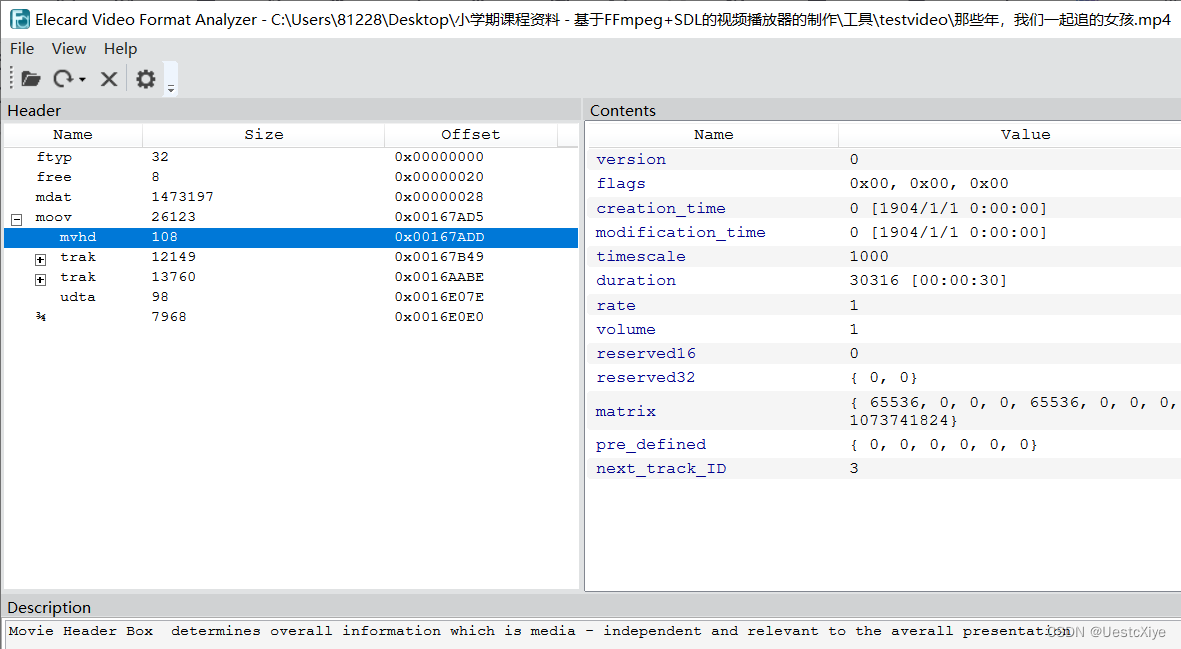
Elecard Stream Eye:


YUV Player:


Adobe Audition 2020:


实验2

答:
- ffmpeg -i test.mkv -t 10 -ss 10 output1.mkv
- ffmpeg -i test.mkv -c:v libx264 -c:a libmp3lame output2.mp4
- ffmpeg -i test.mkv -s 640*360 -r 25 -b:v 600 -b:a 64 output3.avi
- ffmpeg -i test.mkv -c:v libx264 -c:a libmp3lame -ar 44100 output4.flv
- ffmpeg -i test.mkv -s 640*360 -pix_fmt yuv420p output5.yuv
- ffmpeg -i test.mkv -s 640*360 -c h264 output6.h264
- ffmpeg -i test.mkv output7.wav
- ffmpeg -i test.mkv output8.mp3
ffplay test.mkv

实验3

Simplest FFmpeg Decoder.cpp:
// Simplest FFmpeg Decoder.cpp : 定义控制台应用程序的入口点。 // /** * 最简单的基于FFmpeg的解码器 * Simplest FFmpeg Decoder * * 原程序: * 雷霄骅 Lei Xiaohua * leixiaohua1020@126.com * 中国传媒大学/数字电视技术 * Communication University of China / Digital TV Technology * http://blog.csdn.net/leixiaohua1020 * * 修改: * 刘文晨 Liu Wenchen * 812288728@qq.com * 电子科技大学/电子信息 * University of Electronic Science and Technology of China / Electronic and Information Science * https://blog.csdn.net/ProgramNovice * * 本程序实现了视频文件的解码(支持HEVC,H.264,MPEG2等)。 * 是最简单的FFmpeg视频解码方面的教程。 * 通过学习本例子可以了解FFmpeg的解码流程。 * * This software is a simplest video decoder based on FFmpeg. * Suitable for beginner of FFmpeg. * */ #include "stdafx.h" #pragma warning(disable:4996) #include#define __STDC_CONSTANT_MACROS extern "C" { #include "libavcodec/avcodec.h" #include "libavformat/avformat.h" #include "libswscale/swscale.h" }; int main(int argc, char* argv[]) { AVFormatContext *pFormatCtx; int i, videoindex; AVCodecContext *pCodecCtx; AVCodec *pCodec; AVFrame *pFrame, *pFrameYUV; uint8_t *out_buffer; AVPacket *packet; int y_size; int ret, got_picture; struct SwsContext *img_convert_ctx; //输入文件路径 char filepath[] = "Titanic.ts"; int frame_cnt; av_register_all(); avformat_network_init(); // 申请avFormatContext空间,记得要释放 pFormatCtx = avformat_alloc_context(); // 打开媒体文件 if (avformat_open_input(&pFormatCtx, filepath, NULL, NULL) != 0) { printf("Couldn't open input stream.\n"); return -1; } // 读取媒体文件信息,给pFormatCtx赋值 if (avformat_find_stream_info(pFormatCtx, NULL) < 0) { printf("Couldn't find stream information.\n"); return -1; } videoindex = -1; for (i = 0; i < pFormatCtx->nb_streams; i++) { if (pFormatCtx->streams[i]->codec->codec_type == AVMEDIA_TYPE_VIDEO) { videoindex = i; break; } } if (videoindex == -1) { printf("Didn't find a video stream.\n"); return -1; } pCodecCtx = pFormatCtx->streams[videoindex]->codec; // 根据视频流信息的codec_id找到对应的解码器 pCodec = avcodec_find_decoder(pCodecCtx->codec_id); if (pCodec == NULL) { printf("Codec not found.\n"); return -1; } // 使用给定的pCodec初始化pCodecCtx if (avcodec_open2(pCodecCtx, pCodec, NULL) < 0) { printf("Could not open codec.\n"); return -1; } /* * 在此处添加输出视频信息的代码 * 取自于pFormatCtx,使用fprintf() */ FILE *fp_txt = fopen("output.txt", "wb+"); fprintf(fp_txt, "封装格式:%s\n", pFormatCtx->iformat->long_name); fprintf(fp_txt, "比特率:%d\n", pFormatCtx->bit_rate); fprintf(fp_txt, "视频时长:%d\n", pFormatCtx->duration); fprintf(fp_txt, "视频编码方式:%s\n", pFormatCtx->streams[videoindex]->codec->codec->long_name); fprintf(fp_txt, "视频分辨率:%d * %d\n", pFormatCtx->streams[videoindex]->codec->width, pFormatCtx->streams[videoindex]->codec->height); // 在avcodec_receive_frame()函数作为参数,获取到frame // 获取到的frame有些可能是错误的要过滤掉,否则相应帧可能出现绿屏 pFrame = av_frame_alloc(); //作为yuv输出的frame承载者,会进行缩放和过滤出错的帧,YUV相应的数据也是从该对象中读取 pFrameYUV = av_frame_alloc(); // 用于渲染的数据,且格式为YUV420P out_buffer = (uint8_t *)av_malloc(avpicture_get_size(PIX_FMT_YUV420P, pCodecCtx->width, pCodecCtx->height)); avpicture_fill((AVPicture *)pFrameYUV, out_buffer, PIX_FMT_YUV420P, pCodecCtx->width, pCodecCtx->height); packet = (AVPacket *)av_malloc(sizeof(AVPacket)); // Output Info printf("--------------- File Information ----------------\n"); av_dump_format(pFormatCtx, 0, filepath, 0); printf("-------------------------------------------------\n"); // 由于解码出来的帧格式不一定是YUV420P的,在渲染之前需要进行格式转换 img_convert_ctx = sws_getContext(pCodecCtx->width, pCodecCtx->height, pCodecCtx->pix_fmt, pCodecCtx->width, pCodecCtx->height, PIX_FMT_YUV420P, SWS_BICUBIC, NULL, NULL, NULL); FILE *fp_h264 = fopen("output.h264", "wb+"); FILE *fp_yuv = fopen("output.yuv", "wb+"); // 帧计数器 frame_cnt = 0; // 开始一帧一帧读取 while (av_read_frame(pFormatCtx, packet) >= 0) { if (packet->stream_index == videoindex) { /* * 在此处添加输出H264码流的代码 * 取自于packet,使用fwrite() */ fwrite(packet->data, 1, packet->size, fp_h264); // 输出每一个解码前视频帧参数:帧大小 fprintf(fp_txt, "帧%d大小:%d\n", frame_cnt, packet->size); ret = avcodec_decode_video2(pCodecCtx, pFrame, &got_picture, packet); if (ret < 0) { printf("Decode Error.\n"); return -1; } if (got_picture) { // 格式转换,解码后的数据经过sws_scale()函数处理,去除无效像素 sws_scale(img_convert_ctx, (const uint8_t* const*)pFrame->data, pFrame->linesize, 0, pCodecCtx->height, pFrameYUV->data, pFrameYUV->linesize); printf("Decoded frame index: %d\n", frame_cnt); /* * 在此处添加输出YUV的代码 * 取自于pFrameYUV,使用fwrite() */ fwrite(pFrameYUV->data[0], 1, pCodecCtx->width*pCodecCtx->height, fp_yuv);// Y fwrite(pFrameYUV->data[1], 1, pCodecCtx->width*pCodecCtx->height / 4, fp_yuv);// U fwrite(pFrameYUV->data[2], 1, pCodecCtx->width*pCodecCtx->height / 4, fp_yuv);// V // 输出每一个解码后视频帧参数:帧类型 char pict_type_str[10]; switch (pFrame->pict_type) { case AV_PICTURE_TYPE_NONE: sprintf(pict_type_str, "NONE"); break; case AV_PICTURE_TYPE_I: sprintf(pict_type_str, "I"); break; case AV_PICTURE_TYPE_P: sprintf(pict_type_str, "P"); break; case AV_PICTURE_TYPE_B: sprintf(pict_type_str, "B"); break; case AV_PICTURE_TYPE_SI: sprintf(pict_type_str, "SI"); break; case AV_PICTURE_TYPE_S: sprintf(pict_type_str, "S"); break; case AV_PICTURE_TYPE_SP: sprintf(pict_type_str, "SP"); break; case AV_PICTURE_TYPE_BI: sprintf(pict_type_str, "BI"); break; default: break; } fprintf(fp_txt, "帧%d类型:%s\n", frame_cnt, pict_type_str); frame_cnt++; } } av_free_packet(packet); } // 关闭文件 fclose(fp_txt); fclose(fp_h264); fclose(fp_yuv); // 释放相关资源 sws_freeContext(img_convert_ctx); av_frame_free(&pFrameYUV); av_frame_free(&pFrame); avcodec_close(pCodecCtx); avformat_close_input(&pFormatCtx); return 0; } - 1
- 2
- 3
- 4
- 5
- 6
- 7
- 8
- 9
- 10
- 11
- 12
- 13
- 14
- 15
- 16
- 17
- 18
- 19
- 20
- 21
- 22
- 23
- 24
- 25
- 26
- 27
- 28
- 29
- 30
- 31
- 32
- 33
- 34
- 35
- 36
- 37
- 38
- 39
- 40
- 41
- 42
- 43
- 44
- 45
- 46
- 47
- 48
- 49
- 50
- 51
- 52
- 53
- 54
- 55
- 56
- 57
- 58
- 59
- 60
- 61
- 62
- 63
- 64
- 65
- 66
- 67
- 68
- 69
- 70
- 71
- 72
- 73
- 74
- 75
- 76
- 77
- 78
- 79
- 80
- 81
- 82
- 83
- 84
- 85
- 86
- 87
- 88
- 89
- 90
- 91
- 92
- 93
- 94
- 95
- 96
- 97
- 98
- 99
- 100
- 101
- 102
- 103
- 104
- 105
- 106
- 107
- 108
- 109
- 110
- 111
- 112
- 113
- 114
- 115
- 116
- 117
- 118
- 119
- 120
- 121
- 122
- 123
- 124
- 125
- 126
- 127
- 128
- 129
- 130
- 131
- 132
- 133
- 134
- 135
- 136
- 137
- 138
- 139
- 140
- 141
- 142
- 143
- 144
- 145
- 146
- 147
- 148
- 149
- 150
- 151
- 152
- 153
- 154
- 155
- 156
- 157
- 158
- 159
- 160
- 161
- 162
- 163
- 164
- 165
- 166
- 167
- 168
- 169
- 170
- 171
- 172
- 173
- 174
- 175
- 176
- 177
- 178
- 179
- 180
- 181
- 182
- 183
- 184
- 185
- 186
- 187
- 188
- 189
- 190
- 191
- 192
- 193
- 194
- 195
- 196
- 197
- 198
- 199
- 200
- 201
- 202
- 203
- 204
- 205
- 206
- 207
- 208
- 209
- 210
- 211
- 212
- 213
- 214
- 215
- 216
- 217
- 218
- 219
- 220
- 221
- 222
- 223
- 224
- 225
- 226
- 227
- 228
- 229
- 230
- 231
- 232
CSDN资源:FFmpeg视频解码器
实验4

基本练习
Simplest Video Player SDL2 Basic.cpp:
// Simplest Video Player Basic.cpp : 定义控制台应用程序的入口点。 // /** * 最简单的SDL2播放视频的例子(SDL2播放RGB/YUV) * Simplest Video Play SDL2 (SDL2 play RGB/YUV) * * 原程序: * 雷霄骅 Lei Xiaohua * leixiaohua1020@126.com * 中国传媒大学/数字电视技术 * Communication University of China / Digital TV Technology * http://blog.csdn.net/leixiaohua1020 * * 修改: * 刘文晨 Liu Wenchen * 812288728@qq.com * 电子科技大学/电子信息 * University of Electronic Science and Technology of China / Electronic and Information Science * https://blog.csdn.net/ProgramNovice * * 本程序使用SDL2播放RGB/YUV视频像素数据。 * SDL实际上是对底层绘图 API(Direct3D,OpenGL)的封装,使用起来明显简单于直接调用底层API。 * * This software plays RGB/YUV raw video data using SDL2. * SDL is a wrapper of low-level API (Direct3D, OpenGL). * Use SDL is much easier than directly call these low-level API. */ #include "stdafx.h" #includeextern "C" { #include "sdl/SDL.h" }; // 报错: // LNK2019 无法解析的外部符号 __imp__fprintf,该符号在函数 _ShowError 中被引用 // LNK2019 无法解析的外部符号 __imp____iob_func,该符号在函数 _ShowError 中被引用 // 解决办法: // 包含库的编译器版本低于当前编译版本,需要将包含库源码用vs2017重新编译,由于没有包含库的源码,此路不通。 // 然后查到说是stdin, stderr, stdout 这几个函数vs2015和以前的定义得不一样,所以报错。 // 解决方法呢,就是使用{ *stdin,*stdout,*stderr }数组自己定义__iob_func() #pragma comment(lib,"legacy_stdio_definitions.lib") extern "C" { FILE __iob_func[3] = { *stdin,*stdout,*stderr }; } const int bpp = 12; int screen_w = 640, screen_h = 360;// 窗口大小固定为640*360 const int pixel_w = 640, pixel_h = 360; unsigned char buffer[pixel_w*pixel_h*bpp / 8]; int main(int argc, char* argv[]) { // 初始化SDL系统 if (SDL_Init(SDL_INIT_VIDEO)) { printf("Could not initialize SDL - %s\n", SDL_GetError()); return -1; } SDL_Window *screen; // SDL 2.0 Support for multiple windows // 创建窗口SDL_Window screen = SDL_CreateWindow("Simplest Video Play SDL2 Basic", SDL_WINDOWPOS_UNDEFINED, SDL_WINDOWPOS_UNDEFINED, screen_w, screen_h, SDL_WINDOW_OPENGL | SDL_WINDOW_RESIZABLE); if (!screen) { printf("SDL: Couldn't create window - exiting:%s\n", SDL_GetError()); return -1; } // 创建渲染器SDL_Renderer SDL_Renderer* sdlRenderer = SDL_CreateRenderer(screen, -1, 0); Uint32 pixformat = 0; // IYUV: Y + U + V (3 planes) // YV12: Y + V + U (3 planes) pixformat = SDL_PIXELFORMAT_IYUV; // 创建纹理SDL_Texture SDL_Texture* sdlTexture = SDL_CreateTexture(sdlRenderer, pixformat, SDL_TEXTUREACCESS_STREAMING, pixel_w, pixel_h); FILE *fp = NULL; fp = fopen("sintel_640_360.yuv", "rb+"); if (fp == NULL) { printf("Can't open this file\n"); return -1; } SDL_Rect sdlRect; while (1) { if (fread(buffer, 1, pixel_w*pixel_h*bpp / 8, fp) != pixel_w*pixel_h*bpp / 8) { // Loop fseek(fp, 0, SEEK_SET); fread(buffer, 1, pixel_w*pixel_h*bpp / 8, fp); } // 设置纹理的数据 SDL_UpdateTexture(sdlTexture, NULL, buffer, pixel_w); // sdlRect.x和sdlRect.y为画面左上角的坐标 sdlRect.x = 0; sdlRect.y = 0; // sdlRect.w和sdlRect.h为画面的宽度和高度 sdlRect.w = screen_w; sdlRect.h = screen_h; // 实现视频周围包围10像素的“黑框” // sdlRect.x = 10; // sdlRect.y = 10; // sdlRect.w = screen_w - 20; // sdlRect.h = screen_h - 20; // 使用图形颜色清除当前的渲染目标 SDL_RenderClear(sdlRenderer); // 将纹理的数据拷贝给渲染器 SDL_RenderCopy(sdlRenderer, sdlTexture, NULL, &sdlRect); // 显示纹理的数据 SDL_RenderPresent(sdlRenderer); // 正常播放速度:延时40ms SDL_Delay(40); // 2倍播放速度:SDL_Delay(20); } // 退出SDL系统 SDL_Quit(); return 0; } - 1
- 2
- 3
- 4
- 5
- 6
- 7
- 8
- 9
- 10
- 11
- 12
- 13
- 14
- 15
- 16
- 17
- 18
- 19
- 20
- 21
- 22
- 23
- 24
- 25
- 26
- 27
- 28
- 29
- 30
- 31
- 32
- 33
- 34
- 35
- 36
- 37
- 38
- 39
- 40
- 41
- 42
- 43
- 44
- 45
- 46
- 47
- 48
- 49
- 50
- 51
- 52
- 53
- 54
- 55
- 56
- 57
- 58
- 59
- 60
- 61
- 62
- 63
- 64
- 65
- 66
- 67
- 68
- 69
- 70
- 71
- 72
- 73
- 74
- 75
- 76
- 77
- 78
- 79
- 80
- 81
- 82
- 83
- 84
- 85
- 86
- 87
- 88
- 89
- 90
- 91
- 92
- 93
- 94
- 95
- 96
- 97
- 98
- 99
- 100
- 101
- 102
- 103
- 104
- 105
- 106
- 107
- 108
- 109
- 110
- 111
- 112
- 113
- 114
- 115
- 116
- 117
- 118
- 119
- 120
- 121
- 122
- 123
- 124
- 125
- 126
- 127
- 128
- 129
- 130
- 131
- 132
- 133
- 134
- 135
- 136
- 137
- 138
- 139
- 140
- 141
- 142
- 143
完整项目:Simplest Video Player SDL2 Basic
CSDN资源:最简单的SDL2视频播放器(基础版)
进阶练习
在Basic版上新增以下功能:
- 窗口可以移动
- 窗口可以调整大小
- 按下空格键(SPACE)后暂停,再次按下空格后继续播放
- 显示黑白图像
Simplest Video Player SDL2.cpp:
// Simplest Video Player SDL2.cpp : 定义控制台应用程序的入口点。 // /** * 最简单的SDL2播放视频的例子(SDL2播放RGB/YUV) * Simplest Video Play SDL2 (SDL2 play RGB/YUV) * * 原程序: * 雷霄骅 Lei Xiaohua * leixiaohua1020@126.com * 中国传媒大学/数字电视技术 * Communication University of China / Digital TV Technology * http://blog.csdn.net/leixiaohua1020 * * 修改: * 刘文晨 Liu Wenchen * 812288728@qq.com * 电子科技大学/电子信息 * University of Electronic Science and Technology of China / Electronic and Information Science * https://blog.csdn.net/ProgramNovice * * 本程序使用SDL2播放RGB/YUV视频像素数据。 * SDL实际上是对底层绘图API(Direct3D,OpenGL)的封装,使用起来明显简单于直接调用底层API。 * * This software plays RGB/YUV raw video data using SDL2. * SDL is a wrapper of low-level API (Direct3D, OpenGL). * Use SDL is much easier than directly call these low-level API. */ #include "stdafx.h" #includeextern "C" { #include "sdl/SDL.h" }; // 报错: // LNK2019 无法解析的外部符号 __imp__fprintf,该符号在函数 _ShowError 中被引用 // LNK2019 无法解析的外部符号 __imp____iob_func,该符号在函数 _ShowError 中被引用 // 解决办法: // 包含库的编译器版本低于当前编译版本,需要将包含库源码用vs2017重新编译,由于没有包含库的源码,此路不通。 // 然后查到说是stdin, stderr, stdout 这几个函数vs2015和以前的定义得不一样,所以报错。 // 解决方法呢,就是使用{ *stdin,*stdout,*stderr }数组自己定义__iob_func() #pragma comment(lib,"legacy_stdio_definitions.lib") extern "C" { FILE __iob_func[3] = { *stdin,*stdout,*stderr }; } const int bpp = 12; int screen_w = 640, screen_h = 360; const int pixel_w = 320, pixel_h = 180; unsigned char buffer[pixel_w * pixel_h * bpp / 8]; // 自定义消息类型 #define REFRESH_EVENT (SDL_USEREVENT + 1) // Refresh Event #define BREAK_EVENT (SDL_USEREVENT + 2) // Break // 线程标志位 int thread_exit = 0;// 退出标志,等于1则退出 int thread_pause = 0;// 暂停标志,等于1则暂停 // 视频播放相关参数 int delay_time = 40; bool video_gray = false;// 是否显示黑白图像 // 画面刷新线程 int refresh_video(void *opaque) { while (thread_exit == 0) { if (thread_pause == 0) { SDL_Event event; event.type = REFRESH_EVENT; // 向主线程发送刷新事件 SDL_PushEvent(&event); } // 工具函数,用于延时 SDL_Delay(delay_time); } thread_exit = 0; thread_pause = 0; // 需要结束播放 SDL_Event event; event.type = BREAK_EVENT; // 向主线程发送退出循环事件 SDL_PushEvent(&event); return 0; } int main(int argc, char* argv[]) { // 初始化SDL系统 if (SDL_Init(SDL_INIT_VIDEO)) { printf("Couldn't initialize SDL - %s\n", SDL_GetError()); return -1; } SDL_Window *screen; // SDL 2.0 Support for multiple windows // 创建窗口SDL_Window screen = SDL_CreateWindow("Simplest Video Play SDL2", SDL_WINDOWPOS_UNDEFINED, SDL_WINDOWPOS_UNDEFINED, screen_w, screen_h, SDL_WINDOW_OPENGL | SDL_WINDOW_RESIZABLE); if (!screen) { printf("SDL: Couldn't create window - exiting:%s\n", SDL_GetError()); return -1; } // 创建渲染器SDL_Renderer SDL_Renderer* sdlRenderer = SDL_CreateRenderer(screen, -1, 0); Uint32 pixformat = 0; // IYUV: Y + U + V (3 planes) // YV12: Y + V + U (3 planes) pixformat = SDL_PIXELFORMAT_IYUV; // 创建纹理SDL_Texture SDL_Texture* sdlTexture = SDL_CreateTexture(sdlRenderer, pixformat, SDL_TEXTUREACCESS_STREAMING, pixel_w, pixel_h); FILE *fp = NULL; const char file_path[] = "test_yuv420p_320x180.yuv";// 视频文件路径 fp = fopen(file_path, "rb+"); if (fp == NULL) { printf("Can't open this file\n"); return -1; } SDL_Rect sdlRect;// 渲染显示面积 // 创建画面刷新线程 SDL_Thread *refresh_thread = SDL_CreateThread(refresh_video, NULL, NULL); SDL_Event event;// 主线程使用的事件 while (1) { // Wait SDL_WaitEvent(&event);// 从事件队列中取事件 if (event.type == REFRESH_EVENT) { // YUV420P文件格式: // 一帧数据中,Y、U、V连续存储,其中Y占pixel_w*pixel_h长度,U、Y各占pixel_w*pixel_h/4长度 if (fread(buffer, 1, pixel_w * pixel_h * bpp / 8, fp) != pixel_w * pixel_h * bpp / 8) { // Loop fseek(fp, 0, SEEK_SET); fread(buffer, 1, pixel_w * pixel_h * bpp / 8, fp); } // 若选择显示黑白图像,则将buffer的U、V数据设置为128 if (video_gray == true) { // U、V是图像中的经过偏置处理的色度分量 // 在偏置处理前,它的取值范围是-128-127,这时,把U和V数据修改为0代表无色 // 在偏置处理后,它的取值范围变成了0-255,所以这时候需要取中间值,即128 memset(buffer + pixel_w * pixel_h, 128, pixel_w * pixel_h / 2); } // 设置纹理的数据 SDL_UpdateTexture(sdlTexture, NULL, buffer, pixel_w); // FIX: If window is resize sdlRect.x = 0; sdlRect.y = 0; sdlRect.w = screen_w; sdlRect.h = screen_h; // 使用图形颜色清除当前的渲染目标 SDL_RenderClear(sdlRenderer); // 将纹理的数据拷贝给渲染器 SDL_RenderCopy(sdlRenderer, sdlTexture, NULL, &sdlRect); // 显示纹理的数据 SDL_RenderPresent(sdlRenderer); } else if (event.type == SDL_KEYDOWN) { // 根据按下键盘键位决定事件 switch (event.key.keysym.sym) { case SDLK_ESCAPE: thread_exit = 1;// 按下ESC键,直接退出播放器 break; case SDLK_SPACE: thread_pause = !thread_pause;// 按下Space键,控制视频播放暂停 break; case SDLK_F1: delay_time += 10;// 按下F1,视频减速 break; case SDLK_F2: if (delay_time > 10) { delay_time -= 10;// 按下F2,视频加速 } break; case SDLK_LSHIFT: video_gray = !video_gray;// 按下左Shift键,切换显示彩色/黑白图像 break; default: break; } } else if (event.type == SDL_WINDOWEVENT) { // If Resize SDL_GetWindowSize(screen, &screen_w, &screen_h); } else if (event.type == SDL_QUIT) { thread_exit = 1; } else if (event.type == BREAK_EVENT) { break; } } // 释放资源 fclose(fp); SDL_DestroyTexture(sdlTexture); SDL_DestroyRenderer(sdlRenderer); SDL_DestroyWindow(screen); // 退出SDL系统 SDL_Quit(); return 0; } - 1
- 2
- 3
- 4
- 5
- 6
- 7
- 8
- 9
- 10
- 11
- 12
- 13
- 14
- 15
- 16
- 17
- 18
- 19
- 20
- 21
- 22
- 23
- 24
- 25
- 26
- 27
- 28
- 29
- 30
- 31
- 32
- 33
- 34
- 35
- 36
- 37
- 38
- 39
- 40
- 41
- 42
- 43
- 44
- 45
- 46
- 47
- 48
- 49
- 50
- 51
- 52
- 53
- 54
- 55
- 56
- 57
- 58
- 59
- 60
- 61
- 62
- 63
- 64
- 65
- 66
- 67
- 68
- 69
- 70
- 71
- 72
- 73
- 74
- 75
- 76
- 77
- 78
- 79
- 80
- 81
- 82
- 83
- 84
- 85
- 86
- 87
- 88
- 89
- 90
- 91
- 92
- 93
- 94
- 95
- 96
- 97
- 98
- 99
- 100
- 101
- 102
- 103
- 104
- 105
- 106
- 107
- 108
- 109
- 110
- 111
- 112
- 113
- 114
- 115
- 116
- 117
- 118
- 119
- 120
- 121
- 122
- 123
- 124
- 125
- 126
- 127
- 128
- 129
- 130
- 131
- 132
- 133
- 134
- 135
- 136
- 137
- 138
- 139
- 140
- 141
- 142
- 143
- 144
- 145
- 146
- 147
- 148
- 149
- 150
- 151
- 152
- 153
- 154
- 155
- 156
- 157
- 158
- 159
- 160
- 161
- 162
- 163
- 164
- 165
- 166
- 167
- 168
- 169
- 170
- 171
- 172
- 173
- 174
- 175
- 176
- 177
- 178
- 179
- 180
- 181
- 182
- 183
- 184
- 185
- 186
- 187
- 188
- 189
- 190
- 191
- 192
- 193
- 194
- 195
- 196
- 197
- 198
- 199
- 200
- 201
- 202
- 203
- 204
- 205
- 206
- 207
- 208
- 209
- 210
- 211
- 212
- 213
- 214
- 215
- 216
- 217
- 218
- 219
- 220
- 221
- 222
- 223
- 224
- 225
- 226
- 227
- 228
- 229
- 230
- 231
- 232
- 233
- 234
- 235
完整项目:Simplest Video Player SDL2
CSDN资源:最简单的SDL2视频播放器
实验5

新增以下功能:
- 可以提取并打印视频文件相关的信息
- 窗口可以移动,可以调整大小
- 按下空格键(SPACE)后暂停,再次按下空格后继续播放
- 左Shift键控制显示彩色/黑白图像
Simplest FFmpeg Player.cpp:
// Simplest FFmpeg Player.cpp : 定义控制台应用程序的入口点。 // /** * 最简单的基于FFmpeg的视频播放器2(SDL升级版) * Simplest FFmpeg Player 2(SDL Update) * * 原程序: * 雷霄骅 Lei Xiaohua * leixiaohua1020@126.com * 中国传媒大学/数字电视技术 * Communication University of China / Digital TV Technology * http://blog.csdn.net/leixiaohua1020 * * 修改: * 刘文晨 Liu Wenchen * 812288728@qq.com * 电子科技大学/电子信息 * University of Electronic Science and Technology of China / Electronic and Information Science * https://blog.csdn.net/ProgramNovice * * 本程序实现了视频文件的解码和显示(支持HEVC,H.264,MPEG2等)。 * 是最简单的FFmpeg视频解码方面的教程。 * 通过学习本例子可以了解FFmpeg的解码流程。 * 本版本中使用SDL消息机制刷新视频画面。 * * This software is a simplest video player based on FFmpeg. * Suitable for beginner of FFmpeg. * */ #include "stdafx.h" #pragma warning(disable:4996) #include#define __STDC_CONSTANT_MACROS extern "C" { #include "libavcodec/avcodec.h" #include "libavformat/avformat.h" #include "libswscale/swscale.h" #include "SDL2/SDL.h" }; // 报错: // LNK2019 无法解析的外部符号 __imp__fprintf,该符号在函数 _ShowError 中被引用 // LNK2019 无法解析的外部符号 __imp____iob_func,该符号在函数 _ShowError 中被引用 // 解决办法: // 包含库的编译器版本低于当前编译版本,需要将包含库源码用vs2017重新编译,由于没有包含库的源码,此路不通。 // 然后查到说是stdin, stderr, stdout 这几个函数vs2015和以前的定义得不一样,所以报错。 // 解决方法呢,就是使用{ *stdin,*stdout,*stderr }数组自己定义__iob_func() #pragma comment(lib,"legacy_stdio_definitions.lib") extern "C" { FILE __iob_func[3] = { *stdin,*stdout,*stderr }; } // 自定义消息类型 #define REFRESH_EVENT (SDL_USEREVENT + 1) // Refresh Event #define BREAK_EVENT (SDL_USEREVENT + 2) // Break // 线程标志位 int thread_exit = 0;// 退出标志,等于1则退出 int thread_pause = 0;// 暂停标志,等于1则暂停 // 视频播放相关参数 int delay_time = 40; bool video_gray = false;// 是否显示黑白图像 // 画面刷新线程 int refresh_video(void *opaque) { thread_exit = 0; while (thread_exit == 0) { if (thread_pause == 0) { SDL_Event event; event.type = REFRESH_EVENT; // 向主线程发送刷新事件 SDL_PushEvent(&event); } // 工具函数,用于延时 SDL_Delay(delay_time); } thread_exit = 0; thread_pause = 0; // 需要结束播放 SDL_Event event; event.type = BREAK_EVENT; // 向主线程发送退出循环事件 SDL_PushEvent(&event); return 0; } int main(int argc, char* argv[]) { AVFormatContext *pFormatCtx; int i, videoindex; AVCodecContext *pCodecCtx; AVCodec *pCodec; AVFrame *pFrame, *pFrameYUV; uint8_t *out_buffer; AVPacket *packet; int y_size; int ret, got_picture; //------------ SDL ---------------- int screen_w, screen_h; SDL_Window *screen;// 窗口 SDL_Renderer* sdlRenderer;// 渲染器 SDL_Texture* sdlTexture;// 纹理 SDL_Rect sdlRect;// 渲染显示面积 SDL_Thread *refresh_thread;// 画面刷新线程 SDL_Event event;// 主线程使用的事件 struct SwsContext *img_convert_ctx; // 输入文件路径 char filepath[] = "屌丝男士.mov"; int frame_cnt; av_register_all(); avformat_network_init(); // 申请avFormatContext空间,记得要释放 pFormatCtx = avformat_alloc_context(); // 打开媒体文件 if (avformat_open_input(&pFormatCtx, filepath, NULL, NULL) != 0) { printf("Couldn't open input stream.\n"); return -1; } // 读取媒体文件信息,给pFormatCtx赋值 if (avformat_find_stream_info(pFormatCtx, NULL) < 0) { printf("Couldn't find stream information.\n"); return -1; } videoindex = -1; for (i = 0; i < pFormatCtx->nb_streams; i++) { if (pFormatCtx->streams[i]->codec->codec_type == AVMEDIA_TYPE_VIDEO) { videoindex = i; break; } } if (videoindex == -1) { printf("Didn't find a video stream.\n"); return -1; } pCodecCtx = pFormatCtx->streams[videoindex]->codec; // 根据视频流信息的codec_id找到对应的解码器 pCodec = avcodec_find_decoder(pCodecCtx->codec_id); if (pCodec == NULL) { printf("Codec not found.\n"); return -1; } // 使用给定的pCodec初始化pCodecCtx if (avcodec_open2(pCodecCtx, pCodec, NULL) < 0) { printf("Could not open codec.\n"); return -1; } /* * 在此处添加输出视频信息的代码 * 取自于pFormatCtx,使用fprintf() */ FILE *fp_txt = fopen("info.txt", "wb+"); fprintf(fp_txt, "封装格式:%s\n", pFormatCtx->iformat->long_name); fprintf(fp_txt, "比特率:%d\n", pFormatCtx->bit_rate); fprintf(fp_txt, "视频时长:%d\n", pFormatCtx->duration); fprintf(fp_txt, "视频编码方式:%s\n", pFormatCtx->streams[videoindex]->codec->codec->long_name); fprintf(fp_txt, "视频分辨率:%d * %d\n", pFormatCtx->streams[videoindex]->codec->width, pFormatCtx->streams[videoindex]->codec->height); // 在avcodec_receive_frame()函数作为参数,获取到frame // 获取到的frame有些可能是错误的要过滤掉,否则相应帧可能出现绿屏 pFrame = av_frame_alloc(); //作为yuv输出的frame承载者,会进行缩放和过滤出错的帧,YUV相应的数据也是从该对象中读取 pFrameYUV = av_frame_alloc(); // 用于渲染的数据,且格式为YUV420P out_buffer = (uint8_t *)av_malloc(avpicture_get_size(PIX_FMT_YUV420P, pCodecCtx->width, pCodecCtx->height)); avpicture_fill((AVPicture *)pFrameYUV, out_buffer, PIX_FMT_YUV420P, pCodecCtx->width, pCodecCtx->height); packet = (AVPacket *)av_malloc(sizeof(AVPacket)); // Output Info printf("--------------- File Information ----------------\n"); av_dump_format(pFormatCtx, 0, filepath, 0); printf("-------------------------------------------------\n"); // 由于解码出来的帧格式不一定是YUV420P的,在渲染之前需要进行格式转换 img_convert_ctx = sws_getContext(pCodecCtx->width, pCodecCtx->height, pCodecCtx->pix_fmt, pCodecCtx->width, pCodecCtx->height, PIX_FMT_YUV420P, SWS_BICUBIC, NULL, NULL, NULL); // 帧计数器 frame_cnt = 0; // ---------------------- SDL ---------------------- // 初始化SDL系统 if (SDL_Init(SDL_INIT_VIDEO | SDL_INIT_TIMER)) { printf("Couldn't initialize SDL - %s\n", SDL_GetError()); return -1; } // SDL 2.0 Support for multiple windows screen_w = pCodecCtx->width; screen_h = pCodecCtx->height; // 视频像素的宽和高 const int pixel_w = screen_w; const int pixel_h = screen_h; // 创建窗口SDL_Window screen = SDL_CreateWindow("Simplest FFmpeg Player", SDL_WINDOWPOS_UNDEFINED, SDL_WINDOWPOS_UNDEFINED, screen_w, screen_h, SDL_WINDOW_OPENGL | SDL_WINDOW_RESIZABLE); if (!screen) { printf("SDL: Couldn't create window - exiting:%s\n", SDL_GetError()); return -1; } // 创建渲染器SDL_Renderer sdlRenderer = SDL_CreateRenderer(screen, -1, 0); Uint32 pixformat = SDL_PIXELFORMAT_IYUV; // IYUV: Y + U + V (3 planes) // YV12: Y + V + U (3 planes) // 创建纹理SDL_Texture sdlTexture = SDL_CreateTexture(sdlRenderer, pixformat, SDL_TEXTUREACCESS_STREAMING, pCodecCtx->width, pCodecCtx->height); // 创建画面刷新线程 refresh_thread = SDL_CreateThread(refresh_video, NULL, NULL); // ---------------------- SDL End ---------------------- // 开始一帧一帧读取 while (1) { // Wait SDL_WaitEvent(&event);// 从事件队列中取事件 if (event.type == REFRESH_EVENT) { while (1) { if (av_read_frame(pFormatCtx, packet) < 0) { thread_exit = 1; } if (packet->stream_index == videoindex) { break; } } // 输出每一个解码前视频帧参数:帧大小 fprintf(fp_txt, "帧%d大小:%d\n", frame_cnt, packet->size); ret = avcodec_decode_video2(pCodecCtx, pFrame, &got_picture, packet); if (ret < 0) { printf("Decode Error.\n"); return -1; } if (got_picture) { // 格式转换,解码后的数据经过sws_scale()函数处理,去除无效像素 sws_scale(img_convert_ctx, (const uint8_t* const*)pFrame->data, pFrame->linesize, 0, pCodecCtx->height, pFrameYUV->data, pFrameYUV->linesize); printf("Decoded frame index: %d\n", frame_cnt); // 输出每一个解码后视频帧参数:帧类型 char pict_type_str[10]; switch (pFrame->pict_type) { case AV_PICTURE_TYPE_NONE: sprintf(pict_type_str, "NONE"); break; case AV_PICTURE_TYPE_I: sprintf(pict_type_str, "I"); break; case AV_PICTURE_TYPE_P: sprintf(pict_type_str, "P"); break; case AV_PICTURE_TYPE_B: sprintf(pict_type_str, "B"); break; case AV_PICTURE_TYPE_SI: sprintf(pict_type_str, "SI"); break; case AV_PICTURE_TYPE_S: sprintf(pict_type_str, "S"); break; case AV_PICTURE_TYPE_SP: sprintf(pict_type_str, "SP"); break; case AV_PICTURE_TYPE_BI: sprintf(pict_type_str, "BI"); break; default: break; } fprintf(fp_txt, "帧%d类型:%s\n", frame_cnt, pict_type_str); // 若选择显示黑白图像,则将buffer的U、V数据设置为128 if (video_gray == true) { // U、V是图像中的经过偏置处理的色度分量 // 在偏置处理前,它的取值范围是-128-127,这时,把U和V数据修改为0代表无色 // 在偏置处理后,它的取值范围变成了0-255,所以这时候需要取中间值,即128 memset(pFrameYUV->data[0] + pixel_w * pixel_h, 128, pixel_w * pixel_h / 2); //memset(pFrameYUV->data[0] + pFrameYUV->width * pFrameYUV->height, 128, pFrameYUV->width * pFrameYUV->height / 2); } // 设置纹理的数据 SDL_UpdateTexture(sdlTexture, NULL, pFrameYUV->data[0], pFrameYUV->linesize[0]); // FIX: If window is resize sdlRect.x = 0; sdlRect.y = 0; sdlRect.w = screen_w; sdlRect.h = screen_h; // 使用图形颜色清除当前的渲染目标 SDL_RenderClear(sdlRenderer); // 将纹理的数据拷贝给渲染器 SDL_RenderCopy(sdlRenderer, sdlTexture, NULL, &sdlRect); // 显示纹理的数据 SDL_RenderPresent(sdlRenderer); frame_cnt++; } av_free_packet(packet); } else if (event.type == SDL_KEYDOWN) { // 根据按下键盘键位决定事件 switch (event.key.keysym.sym) { case SDLK_ESCAPE: thread_exit = 1;// 按下ESC键,直接退出播放器 break; case SDLK_SPACE: thread_pause = !thread_pause;// 按下Space键,控制视频播放暂停 break; case SDLK_F1: delay_time += 10;// 按下F1,视频减速 break; case SDLK_F2: if (delay_time > 10) { delay_time -= 10;// 按下F2,视频加速 } break; case SDLK_LSHIFT: video_gray = !video_gray;// 按下左Shift键,切换显示彩色/黑白图像 break; default: break; } } else if (event.type == SDL_WINDOWEVENT) { // If Resize SDL_GetWindowSize(screen, &screen_w, &screen_h); } else if (event.type == SDL_QUIT) { thread_exit = 1; } else if (event.type == BREAK_EVENT) { break; } } // 关闭文件 fclose(fp_txt); // 释放FFmpeg相关资源 sws_freeContext(img_convert_ctx); // 释放SDL资源 SDL_DestroyTexture(sdlTexture); SDL_DestroyRenderer(sdlRenderer); SDL_DestroyWindow(screen); // 退出SDL系统 SDL_Quit(); av_frame_free(&pFrameYUV); av_frame_free(&pFrame); avcodec_close(pCodecCtx); avformat_close_input(&pFormatCtx); return 0; } - 1
- 2
- 3
- 4
- 5
- 6
- 7
- 8
- 9
- 10
- 11
- 12
- 13
- 14
- 15
- 16
- 17
- 18
- 19
- 20
- 21
- 22
- 23
- 24
- 25
- 26
- 27
- 28
- 29
- 30
- 31
- 32
- 33
- 34
- 35
- 36
- 37
- 38
- 39
- 40
- 41
- 42
- 43
- 44
- 45
- 46
- 47
- 48
- 49
- 50
- 51
- 52
- 53
- 54
- 55
- 56
- 57
- 58
- 59
- 60
- 61
- 62
- 63
- 64
- 65
- 66
- 67
- 68
- 69
- 70
- 71
- 72
- 73
- 74
- 75
- 76
- 77
- 78
- 79
- 80
- 81
- 82
- 83
- 84
- 85
- 86
- 87
- 88
- 89
- 90
- 91
- 92
- 93
- 94
- 95
- 96
- 97
- 98
- 99
- 100
- 101
- 102
- 103
- 104
- 105
- 106
- 107
- 108
- 109
- 110
- 111
- 112
- 113
- 114
- 115
- 116
- 117
- 118
- 119
- 120
- 121
- 122
- 123
- 124
- 125
- 126
- 127
- 128
- 129
- 130
- 131
- 132
- 133
- 134
- 135
- 136
- 137
- 138
- 139
- 140
- 141
- 142
- 143
- 144
- 145
- 146
- 147
- 148
- 149
- 150
- 151
- 152
- 153
- 154
- 155
- 156
- 157
- 158
- 159
- 160
- 161
- 162
- 163
- 164
- 165
- 166
- 167
- 168
- 169
- 170
- 171
- 172
- 173
- 174
- 175
- 176
- 177
- 178
- 179
- 180
- 181
- 182
- 183
- 184
- 185
- 186
- 187
- 188
- 189
- 190
- 191
- 192
- 193
- 194
- 195
- 196
- 197
- 198
- 199
- 200
- 201
- 202
- 203
- 204
- 205
- 206
- 207
- 208
- 209
- 210
- 211
- 212
- 213
- 214
- 215
- 216
- 217
- 218
- 219
- 220
- 221
- 222
- 223
- 224
- 225
- 226
- 227
- 228
- 229
- 230
- 231
- 232
- 233
- 234
- 235
- 236
- 237
- 238
- 239
- 240
- 241
- 242
- 243
- 244
- 245
- 246
- 247
- 248
- 249
- 250
- 251
- 252
- 253
- 254
- 255
- 256
- 257
- 258
- 259
- 260
- 261
- 262
- 263
- 264
- 265
- 266
- 267
- 268
- 269
- 270
- 271
- 272
- 273
- 274
- 275
- 276
- 277
- 278
- 279
- 280
- 281
- 282
- 283
- 284
- 285
- 286
- 287
- 288
- 289
- 290
- 291
- 292
- 293
- 294
- 295
- 296
- 297
- 298
- 299
- 300
- 301
- 302
- 303
- 304
- 305
- 306
- 307
- 308
- 309
- 310
- 311
- 312
- 313
- 314
- 315
- 316
- 317
- 318
- 319
- 320
- 321
- 322
- 323
- 324
- 325
- 326
- 327
- 328
- 329
- 330
- 331
- 332
- 333
- 334
- 335
- 336
- 337
- 338
- 339
- 340
- 341
- 342
- 343
- 344
- 345
- 346
- 347
- 348
- 349
- 350
- 351
- 352
- 353
- 354
- 355
- 356
- 357
- 358
- 359
- 360
- 361
- 362
- 363
- 364
- 365
- 366
- 367
- 368
- 369
- 370
- 371
- 372
- 373
- 374
- 375
- 376
- 377
- 378
- 379
- 380
- 381
- 382
- 383
- 384
- 385
- 386
- 387
- 388
- 389
- 390
- 391
- 392
- 393
若要实现脱离开发环境,在命令行下播放任意一个视频文件,则将代码:
char filepath[] = "屌丝男士.mov";- 1
修改为:
char *filepath = argv[1];- 1
修改后运行程序,在项目文件夹Debug下移入程序需要的dll文件和视频,在命令行输入:
Simplest FFmpeg Player 屌丝男士.mov- 1
即可播放视频。
CSDN资源:最简单的基于FFmpeg的视频播放器
实验6

Simplest FFmpeg Player MFCDlg.cpp:// Simplest FFmpeg Player MFCDlg.cpp : 实现文件 // /** * 最简单的图形界面的视频播放器 * Simplest FFmpeg Player GUI * * 原程序: * 雷霄骅 Lei Xiaohua * leixiaohua1020@126.com * 中国传媒大学/数字电视技术 * Communication University of China / Digital TV Technology * http://blog.csdn.net/leixiaohua1020 * * 修改: * 刘文晨 Liu Wenchen * 812288728@qq.com * 电子科技大学/电子信息 * University of Electronic Science and Technology of China / Electronic and Information Science * https://blog.csdn.net/ProgramNovice */ #include "stdafx.h" #include "Simplest FFmpeg Player MFC.h" #include "Simplest FFmpeg Player MFCDlg.h" #include "afxdialogex.h" #pragma warning(disable:4996) #define __STDC_CONSTANT_MACROS extern "C" { #include "libavcodec/avcodec.h" #include "libavformat/avformat.h" #include "libswscale/swscale.h" #include "SDL2/SDL.h" }; // 报错: // LNK2019 无法解析的外部符号 __imp__fprintf,该符号在函数 _ShowError 中被引用 // LNK2019 无法解析的外部符号 __imp____iob_func,该符号在函数 _ShowError 中被引用 // 解决办法: // 包含库的编译器版本低于当前编译版本,需要将包含库源码用vs2017重新编译,由于没有包含库的源码,此路不通。 // 然后查到说是stdin, stderr, stdout 这几个函数vs2015和以前的定义得不一样,所以报错。 // 解决方法呢,就是使用{ *stdin,*stdout,*stderr }数组自己定义__iob_func() #pragma comment(lib,"legacy_stdio_definitions.lib") extern "C" { FILE __iob_func[3] = { *stdin,*stdout,*stderr }; } #ifdef _DEBUG #define new DEBUG_NEW #endif // 用于应用程序“关于”菜单项的 CAboutDlg 对话框 class CAboutDlg : public CDialogEx { public: CAboutDlg(); // 对话框数据 #ifdef AFX_DESIGN_TIME enum { IDD = IDD_ABOUTBOX }; #endif protected: virtual void DoDataExchange(CDataExchange* pDX); // DDX/DDV 支持 // 实现 protected: DECLARE_MESSAGE_MAP() }; CAboutDlg::CAboutDlg() : CDialogEx(IDD_ABOUTBOX) { } void CAboutDlg::DoDataExchange(CDataExchange* pDX) { CDialogEx::DoDataExchange(pDX); } BEGIN_MESSAGE_MAP(CAboutDlg, CDialogEx) END_MESSAGE_MAP() // CSimplestFFmpegPlayerMFCDlg 对话框 CSimplestFFmpegPlayerMFCDlg::CSimplestFFmpegPlayerMFCDlg(CWnd* pParent /*=NULL*/) : CDialogEx(IDD_SIMPLESTFFMPEGPLAYERMFC_DIALOG, pParent) { m_hIcon = AfxGetApp()->LoadIcon(IDR_MAINFRAME); } void CSimplestFFmpegPlayerMFCDlg::DoDataExchange(CDataExchange* pDX) { CDialogEx::DoDataExchange(pDX); DDX_Control(pDX, IDC_URL, m_url); } BEGIN_MESSAGE_MAP(CSimplestFFmpegPlayerMFCDlg, CDialogEx) ON_WM_SYSCOMMAND() ON_WM_PAINT() ON_WM_QUERYDRAGICON() ON_BN_CLICKED(IDC_ABOUT, &CSimplestFFmpegPlayerMFCDlg::OnBnClickedAbout) ON_BN_CLICKED(IDC_FILEDIALOG, &CSimplestFFmpegPlayerMFCDlg::OnBnClickedFiledialog) ON_BN_CLICKED(IDC_PLAY, &CSimplestFFmpegPlayerMFCDlg::OnBnClickedPlay) ON_BN_CLICKED(IDC_PAUSE, &CSimplestFFmpegPlayerMFCDlg::OnBnClickedPause) ON_BN_CLICKED(IDC_STOP, &CSimplestFFmpegPlayerMFCDlg::OnBnClickedStop) ON_BN_CLICKED(IDC_CLOSE, &CSimplestFFmpegPlayerMFCDlg::OnBnClickedClose) END_MESSAGE_MAP() // 自定义消息类型 #define REFRESH_EVENT (SDL_USEREVENT + 1) // Refresh Event #define BREAK_EVENT (SDL_USEREVENT + 2) // Break // 线程标志位 int thread_exit = 0;// 退出标志,等于1则退出 int thread_pause = 0;// 暂停标志,等于1则暂停 // 视频播放相关参数 int delay_time = 40; // bool video_gray = false; // 画面刷新线程 int refresh_video(void *opaque) { thread_exit = 0; thread_pause = 0; while (thread_exit == 0) { if (thread_pause == 0) { SDL_Event event; event.type = REFRESH_EVENT; // 向主线程发送刷新事件 SDL_PushEvent(&event); } // 工具函数,用于延时 SDL_Delay(delay_time); } // 需要结束播放 SDL_Event event; event.type = BREAK_EVENT; // 向主线程发送退出循环事件 SDL_PushEvent(&event); thread_exit = 0; thread_pause = 0; return 0; } UINT ffmpegPlayer(LPVOID lpParam) { AVFormatContext *pFormatCtx; int i, videoindex; AVCodecContext *pCodecCtx; AVCodec *pCodec; AVFrame *pFrame, *pFrameYUV; uint8_t *out_buffer; AVPacket *packet; int y_size; int ret, got_picture; //------------ SDL ---------------- int screen_w, screen_h; SDL_Window *screen;// 窗口 SDL_Renderer* sdlRenderer;// 渲染器 SDL_Texture* sdlTexture;// 纹理 SDL_Rect sdlRect;// 渲染显示面积 SDL_Thread *refresh_thread;// 画面刷新线程 SDL_Event event;// 主线程使用的事件 struct SwsContext *img_convert_ctx; //------------MFC---------------- CSimplestFFmpegPlayerMFCDlg *sfp_dlg = (CSimplestFFmpegPlayerMFCDlg *)lpParam; char filepath[250] = { 0 };// 输入文件路径 GetWindowText(sfp_dlg->m_url, (LPSTR)filepath, 250); //----------MFC End-------------- int frame_cnt; av_register_all(); avformat_network_init(); // 申请avFormatContext空间,记得要释放 pFormatCtx = avformat_alloc_context(); // 打开媒体文件 if (avformat_open_input(&pFormatCtx, filepath, NULL, NULL) != 0) { printf("Couldn't open input stream.\n"); return -1; } // 读取媒体文件信息,给pFormatCtx赋值 if (avformat_find_stream_info(pFormatCtx, NULL) < 0) { printf("Couldn't find stream information.\n"); return -1; } videoindex = -1; for (i = 0; i < pFormatCtx->nb_streams; i++) { if (pFormatCtx->streams[i]->codec->codec_type == AVMEDIA_TYPE_VIDEO) { videoindex = i; break; } } if (videoindex == -1) { printf("Didn't find a video stream.\n"); return -1; } pCodecCtx = pFormatCtx->streams[videoindex]->codec; // 根据视频流信息的codec_id找到对应的解码器 pCodec = avcodec_find_decoder(pCodecCtx->codec_id); if (pCodec == NULL) { printf("Codec not found.\n"); return -1; } // 使用给定的pCodec初始化pCodecCtx if (avcodec_open2(pCodecCtx, pCodec, NULL) < 0) { printf("Could not open codec.\n"); return -1; } /* * 在此处添加输出视频信息的代码 * 取自于pFormatCtx,使用fprintf() */ FILE *fp_txt = fopen("info.txt", "wb+"); fprintf(fp_txt, "封装格式:%s\n", pFormatCtx->iformat->long_name); fprintf(fp_txt, "比特率:%d\n", pFormatCtx->bit_rate); fprintf(fp_txt, "视频时长:%d\n", pFormatCtx->duration); fprintf(fp_txt, "视频编码方式:%s\n", pFormatCtx->streams[videoindex]->codec->codec->long_name); fprintf(fp_txt, "视频分辨率:%d * %d\n", pFormatCtx->streams[videoindex]->codec->width, pFormatCtx->streams[videoindex]->codec->height); // 在avcodec_receive_frame()函数作为参数,获取到frame // 获取到的frame有些可能是错误的要过滤掉,否则相应帧可能出现绿屏 pFrame = av_frame_alloc(); //作为yuv输出的frame承载者,会进行缩放和过滤出错的帧,YUV相应的数据也是从该对象中读取 pFrameYUV = av_frame_alloc(); // 用于渲染的数据,且格式为YUV420P out_buffer = (uint8_t *)av_malloc(avpicture_get_size(PIX_FMT_YUV420P, pCodecCtx->width, pCodecCtx->height)); avpicture_fill((AVPicture *)pFrameYUV, out_buffer, PIX_FMT_YUV420P, pCodecCtx->width, pCodecCtx->height); // Output Info printf("--------------- File Information ----------------\n"); av_dump_format(pFormatCtx, 0, filepath, 0); printf("-------------------------------------------------\n"); // 由于解码出来的帧格式不一定是YUV420P的,在渲染之前需要进行格式转换 img_convert_ctx = sws_getContext(pCodecCtx->width, pCodecCtx->height, pCodecCtx->pix_fmt, pCodecCtx->width, pCodecCtx->height, PIX_FMT_YUV420P, SWS_BICUBIC, NULL, NULL, NULL); // 帧计数器 frame_cnt = 0; // ---------------------- SDL ---------------------- // 初始化SDL系统 if (SDL_Init(SDL_INIT_VIDEO | SDL_INIT_TIMER)) { printf("Couldn't initialize SDL - %s\n", SDL_GetError()); return -1; } // SDL 2.0 Support for multiple windows screen_w = pCodecCtx->width; screen_h = pCodecCtx->height; // 视频像素的宽和高 const int pixel_w = screen_w; const int pixel_h = screen_h; // 创建窗口SDL_Window(显示在弹出窗口) // screen = SDL_CreateWindow("Simplest FFmpeg Player", SDL_WINDOWPOS_UNDEFINED, SDL_WINDOWPOS_UNDEFINED, screen_w, screen_h, SDL_WINDOW_OPENGL | SDL_WINDOW_RESIZABLE); //显示在MFC控件上 screen = SDL_CreateWindowFrom(sfp_dlg->GetDlgItem(IDC_SCREEN)->GetSafeHwnd()); if (!screen) { printf("SDL: Couldn't create window - exiting:%s\n", SDL_GetError()); return -1; } // 创建渲染器SDL_Renderer sdlRenderer = SDL_CreateRenderer(screen, -1, 0); Uint32 pixformat = SDL_PIXELFORMAT_IYUV; // IYUV: Y + U + V (3 planes) // YV12: Y + V + U (3 planes) // 创建纹理SDL_Texture sdlTexture = SDL_CreateTexture(sdlRenderer, pixformat, SDL_TEXTUREACCESS_STREAMING, pCodecCtx->width, pCodecCtx->height); sdlRect.x = 0; sdlRect.y = 0; sdlRect.w = screen_w; sdlRect.h = screen_h; packet = (AVPacket *)av_malloc(sizeof(AVPacket)); // 创建画面刷新线程 refresh_thread = SDL_CreateThread(refresh_video, NULL, NULL); // ---------------------- SDL End ---------------------- // 开始一帧一帧读取 while (1) { // Wait SDL_WaitEvent(&event);// 从事件队列中取事件 if (event.type == REFRESH_EVENT) { while (1) { if (av_read_frame(pFormatCtx, packet) < 0) { thread_exit = 1; } if (packet->stream_index == videoindex) { break; } } // 输出每一个解码前视频帧参数:帧大小 fprintf(fp_txt, "帧%d大小:%d\n", frame_cnt, packet->size); ret = avcodec_decode_video2(pCodecCtx, pFrame, &got_picture, packet); if (ret < 0) { printf("Decode Error.\n"); return -1; } if (got_picture) { // 格式转换,解码后的数据经过sws_scale()函数处理,去除无效像素 sws_scale(img_convert_ctx, (const uint8_t* const*)pFrame->data, pFrame->linesize, 0, pCodecCtx->height, pFrameYUV->data, pFrameYUV->linesize); printf("Decoded frame index: %d\n", frame_cnt); // 输出每一个解码后视频帧参数:帧类型 char pict_type_str[10]; switch (pFrame->pict_type) { case AV_PICTURE_TYPE_NONE: sprintf(pict_type_str, "NONE"); break; case AV_PICTURE_TYPE_I: sprintf(pict_type_str, "I"); break; case AV_PICTURE_TYPE_P: sprintf(pict_type_str, "P"); break; case AV_PICTURE_TYPE_B: sprintf(pict_type_str, "B"); break; case AV_PICTURE_TYPE_SI: sprintf(pict_type_str, "SI"); break; case AV_PICTURE_TYPE_S: sprintf(pict_type_str, "S"); break; case AV_PICTURE_TYPE_SP: sprintf(pict_type_str, "SP"); break; case AV_PICTURE_TYPE_BI: sprintf(pict_type_str, "BI"); break; default: break; } fprintf(fp_txt, "帧%d类型:%s\n", frame_cnt, pict_type_str); // 若选择显示黑白图像,则将buffer的U、V数据设置为128 //if (video_gray == true) //{ // // U、V是图像中的经过偏置处理的色度分量 // // 在偏置处理前,它的取值范围是-128-127,这时,把U和V数据修改为0代表无色 // // 在偏置处理后,它的取值范围变成了0-255,所以这时候需要取中间值,即128 // memset(pFrameYUV->data[0] + pixel_w * pixel_h, 128, pixel_w * pixel_h / 2); //} // 设置纹理的数据 SDL_UpdateTexture(sdlTexture, NULL, pFrameYUV->data[0], pFrameYUV->linesize[0]); // FIX: If window is resize sdlRect.x = 0; sdlRect.y = 0; sdlRect.w = screen_w; sdlRect.h = screen_h; // 使用图形颜色清除当前的渲染目标 SDL_RenderClear(sdlRenderer); // 将纹理的数据拷贝给渲染器 SDL_RenderCopy(sdlRenderer, sdlTexture, NULL, &sdlRect); // 显示纹理的数据 SDL_RenderPresent(sdlRenderer); frame_cnt++; } av_free_packet(packet); } else if (event.type == SDL_KEYDOWN) { // 根据按下键盘键位决定事件 switch (event.key.keysym.sym) { case SDLK_ESCAPE: thread_exit = 1;// 按下ESC键,直接退出播放器 break; case SDLK_SPACE: thread_pause = !thread_pause;// 按下Space键,控制视频播放暂停 break; //case SDLK_F1: // delay_time += 10;// 按下F1,视频减速 // break; //case SDLK_F2: // if (delay_time > 10) // { // delay_time -= 10;// 按下F2,视频加速 // } // break; //case SDLK_LSHIFT: // video_gray = !video_gray;// 按下左Shift键,切换显示彩色/黑白图像 // break; default: break; } } else if (event.type == SDL_QUIT) { thread_exit = 1; } else if (event.type == BREAK_EVENT) { break; } } // 关闭文件 fclose(fp_txt); // 释放FFmpeg相关资源 sws_freeContext(img_convert_ctx); // 释放SDL资源 SDL_DestroyTexture(sdlTexture); SDL_DestroyRenderer(sdlRenderer); SDL_DestroyWindow(screen); // 退出SDL系统 SDL_Quit(); //FIX Small Bug //SDL Hide Window When it finished sfp_dlg->GetDlgItem(IDC_SCREEN)->ShowWindow(SW_SHOWNORMAL); av_frame_free(&pFrameYUV); av_frame_free(&pFrame); avcodec_close(pCodecCtx); avformat_close_input(&pFormatCtx); return 0; } // CSimplestFFmpegPlayerMFCDlg 消息处理程序 BOOL CSimplestFFmpegPlayerMFCDlg::OnInitDialog() { CDialogEx::OnInitDialog(); // 将“关于...”菜单项添加到系统菜单中。 // IDM_ABOUTBOX 必须在系统命令范围内。 ASSERT((IDM_ABOUTBOX & 0xFFF0) == IDM_ABOUTBOX); ASSERT(IDM_ABOUTBOX < 0xF000); CMenu* pSysMenu = GetSystemMenu(FALSE); if (pSysMenu != NULL) { BOOL bNameValid; CString strAboutMenu; bNameValid = strAboutMenu.LoadString(IDS_ABOUTBOX); ASSERT(bNameValid); if (!strAboutMenu.IsEmpty()) { pSysMenu->AppendMenu(MF_SEPARATOR); pSysMenu->AppendMenu(MF_STRING, IDM_ABOUTBOX, strAboutMenu); } } // 设置此对话框的图标。 当应用程序主窗口不是对话框时,框架将自动 // 执行此操作 SetIcon(m_hIcon, TRUE); // 设置大图标 SetIcon(m_hIcon, FALSE); // 设置小图标 // TODO: 在此添加额外的初始化代码 return TRUE; // 除非将焦点设置到控件,否则返回 TRUE } void CSimplestFFmpegPlayerMFCDlg::OnSysCommand(UINT nID, LPARAM lParam) { if ((nID & 0xFFF0) == IDM_ABOUTBOX) { CAboutDlg dlgAbout; dlgAbout.DoModal(); } else { CDialogEx::OnSysCommand(nID, lParam); } } // 如果向对话框添加最小化按钮,则需要下面的代码 // 来绘制该图标。 对于使用文档/视图模型的 MFC 应用程序, // 这将由框架自动完成。 void CSimplestFFmpegPlayerMFCDlg::OnPaint() { if (IsIconic()) { CPaintDC dc(this); // 用于绘制的设备上下文 SendMessage(WM_ICONERASEBKGND, reinterpret_cast<WPARAM>(dc.GetSafeHdc()), 0); // 使图标在工作区矩形中居中 int cxIcon = GetSystemMetrics(SM_CXICON); int cyIcon = GetSystemMetrics(SM_CYICON); CRect rect; GetClientRect(&rect); int x = (rect.Width() - cxIcon + 1) / 2; int y = (rect.Height() - cyIcon + 1) / 2; // 绘制图标 dc.DrawIcon(x, y, m_hIcon); } else { CDialogEx::OnPaint(); } } //当用户拖动最小化窗口时系统调用此函数取得光标 //显示。 HCURSOR CSimplestFFmpegPlayerMFCDlg::OnQueryDragIcon() { return static_cast<HCURSOR>(m_hIcon); } void CSimplestFFmpegPlayerMFCDlg::OnBnClickedAbout() { // TODO: 在此添加控件通知处理程序代码 CAboutDlg about_dlg; about_dlg.DoModal(); } void CSimplestFFmpegPlayerMFCDlg::OnBnClickedFiledialog() { // TODO: 在此添加控件通知处理程序代码 CString file_path_name; CFileDialog file_dlg(TRUE, NULL, NULL, NULL, NULL);//TRUE为OPEN对话框,FALSE为SAVE AS对话框 if (file_dlg.DoModal() == IDOK) { file_path_name = file_dlg.GetPathName(); m_url.SetWindowText(file_path_name); } } UINT Thread_Play(LPVOID lpParam) { CSimplestFFmpegPlayerMFCDlg *sfp_dlg = (CSimplestFFmpegPlayerMFCDlg *)lpParam; ffmpegPlayer(lpParam); return 0; } void CSimplestFFmpegPlayerMFCDlg::OnBnClickedPlay() { // TODO: 在此添加控件通知处理程序代码 CString str; m_url.GetWindowText(str); if (str.IsEmpty()) { AfxMessageBox("请输入文件路径!"); return; } AfxBeginThread(Thread_Play, this);//开启线程 } void CSimplestFFmpegPlayerMFCDlg::OnBnClickedPause() { // TODO: 在此添加控件通知处理程序代码 thread_pause = !thread_pause; } void CSimplestFFmpegPlayerMFCDlg::OnBnClickedStop() { // TODO: 在此添加控件通知处理程序代码 thread_exit = 1; } void CSimplestFFmpegPlayerMFCDlg::OnBnClickedClose() { // TODO: 在此添加控件通知处理程序代码 CDialogEx::OnCancel(); }- 1
- 2
- 3
- 4
- 5
- 6
- 7
- 8
- 9
- 10
- 11
- 12
- 13
- 14
- 15
- 16
- 17
- 18
- 19
- 20
- 21
- 22
- 23
- 24
- 25
- 26
- 27
- 28
- 29
- 30
- 31
- 32
- 33
- 34
- 35
- 36
- 37
- 38
- 39
- 40
- 41
- 42
- 43
- 44
- 45
- 46
- 47
- 48
- 49
- 50
- 51
- 52
- 53
- 54
- 55
- 56
- 57
- 58
- 59
- 60
- 61
- 62
- 63
- 64
- 65
- 66
- 67
- 68
- 69
- 70
- 71
- 72
- 73
- 74
- 75
- 76
- 77
- 78
- 79
- 80
- 81
- 82
- 83
- 84
- 85
- 86
- 87
- 88
- 89
- 90
- 91
- 92
- 93
- 94
- 95
- 96
- 97
- 98
- 99
- 100
- 101
- 102
- 103
- 104
- 105
- 106
- 107
- 108
- 109
- 110
- 111
- 112
- 113
- 114
- 115
- 116
- 117
- 118
- 119
- 120
- 121
- 122
- 123
- 124
- 125
- 126
- 127
- 128
- 129
- 130
- 131
- 132
- 133
- 134
- 135
- 136
- 137
- 138
- 139
- 140
- 141
- 142
- 143
- 144
- 145
- 146
- 147
- 148
- 149
- 150
- 151
- 152
- 153
- 154
- 155
- 156
- 157
- 158
- 159
- 160
- 161
- 162
- 163
- 164
- 165
- 166
- 167
- 168
- 169
- 170
- 171
- 172
- 173
- 174
- 175
- 176
- 177
- 178
- 179
- 180
- 181
- 182
- 183
- 184
- 185
- 186
- 187
- 188
- 189
- 190
- 191
- 192
- 193
- 194
- 195
- 196
- 197
- 198
- 199
- 200
- 201
- 202
- 203
- 204
- 205
- 206
- 207
- 208
- 209
- 210
- 211
- 212
- 213
- 214
- 215
- 216
- 217
- 218
- 219
- 220
- 221
- 222
- 223
- 224
- 225
- 226
- 227
- 228
- 229
- 230
- 231
- 232
- 233
- 234
- 235
- 236
- 237
- 238
- 239
- 240
- 241
- 242
- 243
- 244
- 245
- 246
- 247
- 248
- 249
- 250
- 251
- 252
- 253
- 254
- 255
- 256
- 257
- 258
- 259
- 260
- 261
- 262
- 263
- 264
- 265
- 266
- 267
- 268
- 269
- 270
- 271
- 272
- 273
- 274
- 275
- 276
- 277
- 278
- 279
- 280
- 281
- 282
- 283
- 284
- 285
- 286
- 287
- 288
- 289
- 290
- 291
- 292
- 293
- 294
- 295
- 296
- 297
- 298
- 299
- 300
- 301
- 302
- 303
- 304
- 305
- 306
- 307
- 308
- 309
- 310
- 311
- 312
- 313
- 314
- 315
- 316
- 317
- 318
- 319
- 320
- 321
- 322
- 323
- 324
- 325
- 326
- 327
- 328
- 329
- 330
- 331
- 332
- 333
- 334
- 335
- 336
- 337
- 338
- 339
- 340
- 341
- 342
- 343
- 344
- 345
- 346
- 347
- 348
- 349
- 350
- 351
- 352
- 353
- 354
- 355
- 356
- 357
- 358
- 359
- 360
- 361
- 362
- 363
- 364
- 365
- 366
- 367
- 368
- 369
- 370
- 371
- 372
- 373
- 374
- 375
- 376
- 377
- 378
- 379
- 380
- 381
- 382
- 383
- 384
- 385
- 386
- 387
- 388
- 389
- 390
- 391
- 392
- 393
- 394
- 395
- 396
- 397
- 398
- 399
- 400
- 401
- 402
- 403
- 404
- 405
- 406
- 407
- 408
- 409
- 410
- 411
- 412
- 413
- 414
- 415
- 416
- 417
- 418
- 419
- 420
- 421
- 422
- 423
- 424
- 425
- 426
- 427
- 428
- 429
- 430
- 431
- 432
- 433
- 434
- 435
- 436
- 437
- 438
- 439
- 440
- 441
- 442
- 443
- 444
- 445
- 446
- 447
- 448
- 449
- 450
- 451
- 452
- 453
- 454
- 455
- 456
- 457
- 458
- 459
- 460
- 461
- 462
- 463
- 464
- 465
- 466
- 467
- 468
- 469
- 470
- 471
- 472
- 473
- 474
- 475
- 476
- 477
- 478
- 479
- 480
- 481
- 482
- 483
- 484
- 485
- 486
- 487
- 488
- 489
- 490
- 491
- 492
- 493
- 494
- 495
- 496
- 497
- 498
- 499
- 500
- 501
- 502
- 503
- 504
- 505
- 506
- 507
- 508
- 509
- 510
- 511
- 512
- 513
- 514
- 515
- 516
- 517
- 518
- 519
- 520
- 521
- 522
- 523
- 524
- 525
- 526
- 527
- 528
- 529
- 530
- 531
- 532
- 533
- 534
- 535
- 536
- 537
- 538
- 539
- 540
- 541
- 542
- 543
- 544
- 545
- 546
- 547
- 548
- 549
- 550
- 551
- 552
- 553
- 554
- 555
- 556
- 557
- 558
- 559
- 560
- 561
- 562
- 563
- 564
- 565
- 566
- 567
- 568
- 569
- 570
- 571
- 572
- 573
- 574
- 575
- 576
- 577
- 578
- 579
- 580
- 581
- 582
- 583
- 584
- 585
- 586
- 587
- 588
- 589
- 590
- 591
- 592
- 593
- 594
- 595
- 596
- 597
- 598
- 599
- 600
- 601
- 602
- 603
- 604
界面:

运行截图:

上面这个违规的图片是课程 test_video文件夹 里的建国大业.mpg的毛泽东(唐国强饰演)敬礼的片段。

完整项目:Simplest FFmpeg Player MFC
CSDN资源:最简单的图形界面的视频播放器
-
相关阅读:
java异常处理
如何使用 MiniGPT-v2
【日常-bug】文件上传oss报错-跨域- ‘Access-Control-Allow-Origin
金仓数据库KingbaseES服务器应用参考手册--10. sys_test_timing
Linux·网络编程套接字(三)
nfs+rpcbind实现服务器之间的文件共享
websocket--技术文档--spring后台+vue基本使用
【计算机视觉 | 目标检测】arxiv 计算机视觉关于目标检测的学术速递(8 月 30 日论文合集)
基本算法-冒泡排序
3.树莓派4b+ubuntu18.04(ros版本melodic)+arduino mega自制两轮差速小车,实现建图导航功能
- 原文地址:https://blog.csdn.net/ProgramNovice/article/details/133162066
