-
Java+Vue 实现消息通知示例

前端代码部分:
右上方小铃铛组件

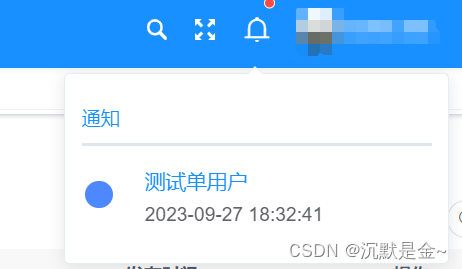

- <template>
- <div>
- <el-popover placement="bottom" :width="280" trigger="click">
- <template #reference>
- <el-badge :is-dot="isDot" class="item" style="line-height: 40px">
- <!-- <svg-icon :icon-class="Bell" @click="toggle" />-->
- <el-icon class="el-icon-bell" style="font-size: 20px;cursor:pointer;transform: translateY(0.6px);" @click="bellClick"></el-icon>
- <!-- <svg-icon class-name="search-icon" icon-class="search" @click.stop="click" />-->
- </el-badge>
- </template>
- <div v-if="noticeList.length>0">
- <el-tabs>
- <el-tab-pane label="通知">
- <div v-for="(item,index) in noticeList.slice(0,5)">
- <table>
- <tr>
- <td rowspan="2">
- <el-avatar icon="message" style="width:20px;height:20px;margin-right: 20px;background-color: #4d88ff"/>
- </td>
- <td>
- <el-tooltip
- class="box-item"
- effect="dark"
- :content="item.messageTitle"
- placement="bottom"
- >
- <el-link type="primary" @click="handleRead(item)" style="font-size: 15px">
- {{item.messageTitle}}
- </el-link>
- </el-tooltip>
- </td>
- </tr>
- <tr>
- <td>
- <span>{{item.createTime}}</span>
- </td>
- </tr>
- </table>
- <hr v-if="index
- </div>
- <div style="text-align: center;margin-top: 10px">
- <el-button v-show="showAllBtn" align="center" type="primary" @click="showAll()">查看更多</el-button>
- </div>
- </el-tab-pane>
- </el-tabs>
- </div>
- <div v-else>
- <div style="text-align: center">暂无未读消息</div>
- </div>
- </el-popover>
- <!-- 添加或修改我的消息对话框 -->
- <el-dialog title="我的消息" :visible.sync="open" width="500px" append-to-body>
- <el-form ref="form" :model="form" :rules="rules" label-width="80px">
- <el-form-item label="消息标题" prop="messageTitle">
- <el-input disabled v-model="form.messageTitle" placeholder="请输入消息标题" />
- </el-form-item>
- <!-- <el-form-item label="用户ID" prop="userId">-->
- <!-- <el-input disabled v-model="form.userId" placeholder="请输入用户ID" />-->
- <!-- </el-form-item>-->
- <el-form-item label="消息内容">
- <editor :readOnly="true" v-model="form.messageContent" :min-height="192"/>
- </el-form-item>
- <!-- <el-form-item label="备注" prop="remark">-->
- <!-- <el-input disabled v-model="form.remark" placeholder="请输入备注" />-->
- <!-- </el-form-item>-->
- </el-form>
- <div slot="footer" class="dialog-footer">
- <!-- <el-button type="primary" @click="submitForm">确 定</el-button>-->
- <el-button @click="cancel">关闭</el-button>
- </div>
- </el-dialog>
- </div>
- </template>
- <script>
- import {mapGetters} from "vuex";
- import router from 'vue-router'
- import {listMyUnreadNotice,getSysmessage,listSysmessage} from "@/api/system/sysmessage";
- import events from '@/utils/events'
- export default {
- name: "index",
- components: {},
- data() {
- return {
- noticeList: [],
- showAllBtn: false,
- form:{},
- rules:{},
- open:false,
- queryParams:{
- id:null,
- status:'0',
- }
- }
- },
- computed: {
- ...mapGetters(["isDot",'id']),
- },
- created() {
- this.getUnRead(); //查询是否有未读消息通知
- events.$on('noticePush', this.getUnRead)
- events.$on('noticePushByMsg', this.getUnRead)
- this.$nextTick(()=>{
- events.$on('noticeCheckByMsg', this.getUnRead)
- })
- },
- mounted() {
- },
- methods: {
- /** 查询是否存在未读消息 根据当前用户匹配消息表中得ID*/
- getUnRead() {
- this.queryParams.id = this.id
- listSysmessage(this.queryParams).then(res => {
- if(res.code == 200){
- if (res.rows.length>0) {
- let object = res.rows
- this.noticeList = object
- if(object.length >5){
- this.showAllBtn=true
- }else{
- this.showAllBtn=false
- }
- this.$store.dispatch('app/setIsDot', true)
- } else {
- this.noticeList = []
- this.$store.dispatch('app/setIsDot', false)
- }
- }
- });
- },
- bellClick() {
- this.getUnRead()
- },
- cancel(){
- this.open = false
- this.getUnRead();
- },
- //查看更多
- showAll() {
- this.$router.push({path: "/monitor/myMessage"});
- },
- //查看消息 弹窗显示
- handleRead(data){
- const messageId = data.messageId
- getSysmessage(messageId).then(response => {
- this.form = response.data;
- // this.form.messageTitle = data.messageTitle
- // this.form.messageContent = data.messageContent
- this.open = true
- });
- }
- }
- }
- </script>
- <style scoped>
- </style>
把是否有消息的状态通过vuex存到公共状态里来管理


this.$store.dispatch('app/setIsDot', true) //设置红点this.$store.dispatch('app/setIsDot', false) //去掉红点首先新建通知公告 发布通知

 我的消息列表
JAVA部分
两个表 通知公告表和我的消息表 做关联
发布消息根据指定的用户类型去插入数据 通过userID分别插入到我的消息表中

全部设置已读 首先去查未读的消息根据userID,在遍历集合更新状态

-
相关阅读:
移动应用数据安全管理要求(一)
百度飞浆环境安装
跨域的解决方案
Spring的bean装配和bean的自动装配
MyBatisPlus 基础Mapperr接口:增删改查
Nodejs+vue+elementui汽车销售网站管理系统
【苍穹外卖 | 项目日记】第四天
Union类型和集合的union()方法-set.union()
Android进阶:5、发送post请求、json数据格式以及okhttp框架的使用
JS中的BOM
- 原文地址:https://blog.csdn.net/huichao199175/article/details/133361858