-
uni-app:实现页面效果2(canvas绘制,根据页面宽度调整元素位置)
效果
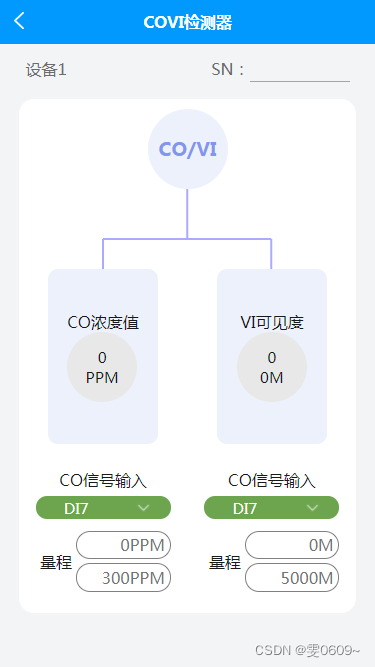
代码
- <template>
- <view>
- <view class="content_position">
- <view class="content">
- <view class="SN">
- <view class="SN_title">设备1view>
- <view class="SN_input">
- SN:
- <input type="text">
- view>
- view>
- <view class="line1">
- <view class="line1_item3">
- <view class="item3_top">
- <view class="item3_top_title_position">
- <view class="item3_top_title">
- <view>CO/VIview>
- view>
- view>
- <view class="item3_top_canvas_position">
- <canvas style="width:100%; height: 80px;" canvas-id="firstCanvas"
- id="firstCanvas">canvas>
- view>
- <view class="item3_top_text_position">
- <view class="top_text1">
- <view>
- <view class="text_center">CO浓度值view>
- <view class="circle">
- <view>
- <view class="text_center">
- 0
- view>
- <view class="text_center">
- PPM
- view>
- view>
- view>
- view>
- view>
- <view class="top_text2">
- <view>
- <view class="text_center">VI可见度view>
- <view class="circle">
- <view>
- <view class="text_center">
- 0
- view>
- <view class="text_center">
- 0M
- view>
- view>
- view>
- view>
- view>
- view>
- view>
- <view class="item3_bottom">
- <view class="line1_item3_block2">
- <view class="block2">
- <view class="title">
- CO信号输入
- view>
- <view class="green_ring_select">
- <view>DI7view>
- <view>
- <image :src="down" mode="">image>
- view>
- view>
- <view class="block2_input">
- <view class="block2_input_title">
- 量程
- view>
- <view class="block2_input_data">
- <input type="text" value="0PPM">
- <input type="text" value="300PPM">
- view>
- view>
- view>
- view>
- <view class="line1_item3_block2">
- <view class="block2">
- <view class="title">
- CO信号输入
- view>
- <view class="green_ring_select">
- <view>DI7view>
- <view>
- <image :src="down" mode="">image>
- view>
- view>
- <view class="block2_input">
- <view class="block2_input_title">
- 量程
- view>
- <view class="block2_input_data">
- <input type="text" value="0M">
- <input type="text" value="5000M">
- view>
- view>
- view>
- view>
- view>
- view>
- view>
- view>
- view>
- view>
- template>
- <script>
- export default {
- data() {
- return {
- down: getApp().globalData.icon + 'look/down.png',
- }
- },
- onReady: function(e) {
- //创建一个画布上下文对象,用于进行绘图操作。'firstCanvas'是一个指定的画布标识符,表示在页面上的哪个
- var context = uni.createCanvasContext('firstCanvas')
- var width = '';
- const query = uni.createSelectorQuery();
- //获取宽度
- query.select('#firstCanvas').fields({
- size: true
- }, (res) => {
- width = res.width;
- }).exec();
- //绘制路径中的线条。
- context.setStrokeStyle("#aaaaff")
- // 设置线条的宽度为2个像素。
- context.setLineWidth(2)
- // 绘制横线
- context.beginPath(); // 开始路径绘制
- context.moveTo(width / 2, 0); // 将起点移动到 (0, 100)
- context.lineTo(width / 2, 50);
- context.stroke(); // 绘制线条
- var x1 = width / 4; // 第一个竖线的起点 x 坐标
- var y1 = 50; // 第一个竖线的起点 y 坐标
- var y2 = 30; // 短竖线的高度
- var horizontalLength = width / 2; // 横线的长度
- context.beginPath();
- context.moveTo(x1, y1 + y2); // 移动到第一个短竖线的起点
- context.lineTo(x1, y1); // 绘制第一个短竖线
- context.moveTo(x1 + horizontalLength, y1 + y2); // 移动到横线的右端下方
- context.lineTo(x1 + horizontalLength, y1); // 绘制第二个短竖线
- context.moveTo(x1, y1); // 移动到横线的左端下方
- context.lineTo(x1 + horizontalLength, y1); // 绘制横线/* */
- context.stroke(); // 绘制线条
- // 将之前的绘图操作渲染到画布上。
- context.draw()
- // 获取父元素的宽度
- var parentWidth = document.querySelector('.item3_top_text_position').offsetWidth;
- console.log(parentWidth);
- // 计算margin-left的值
- var marginLeft = parentWidth / 4;
- // 设置样式
- document.querySelector('.top_text2').style.marginLeft = marginLeft + 'px';
- document.querySelector('.top_text1').style.marginLeft = '-' + marginLeft + 'px';
- },
- methods: {
- }
- }
- script>
- <style lang="scss">
- page {
- background-color: #f3f4f6;
- }
- .text_center {
- display: flex;
- justify-content: center;
- }
- /* 总体样式 */
- .content_position {
- width: 100%;
- display: flex;
- align-items: center;
- justify-content: center;
- }
- .content {
- width: 90%;
- padding: 2% 0;
- }
- /* SN 样式 */
- .SN {
- color: #6b6c6e;
- padding: 2%;
- display: flex;
- // border:1px solid black;
- justify-content: space-between;
- /* 将左右视图分散对齐 */
- .SN_input {
- display: flex;
- // border:1px solid black;
- input {
- border-bottom: 1px solid #a3a4a6;
- width: 200rpx;
- }
- image {
- width: 48rpx;
- height: 48rpx;
- }
- }
- }
- // 行1样式
- .line1 {
- // border: 1px solid black;
- background-color: #fff;
- border-radius: 15px;
- margin: 3% 0;
- padding: 3% 0;
- }
- .line1_item3 {
- // 顶部样式
- .item3_top {
- // position:relative;s
- }
- //第一行标题
- //标题位置
- .item3_top_title_position {
- // border: 1px solid black;
- display: flex;
- align-items: center;
- justify-content: center;
- }
- //标题内容
- .item3_top_title {
- width: 160rpx;
- height: 160rpx;
- border-radius: 50%;
- background-color: #edf1fc;
- color: #8196ec;
- font-size: 120%;
- font-weight: bold;
- display: flex;
- align-items: center;
- justify-content: center;
- // border:1px solid black
- }
- //画布位置
- .item3_top_canvas_position {
- // border: 1px solid black;
- display: flex;
- align-items: center;
- justify-content: center;
- }
- //文本位置
- .item3_top_text_position {
- // border: 1px solid black;
- position: relative;
- height: 400rpx;
- }
- .top_text1 {
- position: absolute;
- left: 50%;
- transform: translateX(-50%);
- margin-left: -85px;
- // border: 1px solid black;
- width: 220rpx;
- height: 350rpx;
- background-color: #edf1fc;
- border-radius: 10px;
- display: flex;
- align-items: center;
- justify-content: center;
- }
- .top_text2 {
- position: absolute;
- left: 50%;
- transform: translateX(-50%);
- margin-left: 85px;
- // border: 1px solid black;
- width: 220rpx;
- height: 350rpx;
- background-color: #edf1fc;
- border-radius: 10px;
- display: flex;
- align-items: center;
- justify-content: center;
- }
- .circle {
- width: 140rpx;
- height: 140rpx;
- border-radius: 50%;
- font-size: 95%;
- display: flex;
- align-items: center;
- justify-content: center;
- background-color: #e8e8e8;
- }
- // 底部样式
- .item3_bottom {
- display: flex;
- justify-content: space-between; //分散排列
- // border: 1px solid black;
- }
- //两列
- .line1_item3_block2 {
- display: flex;
- text-align: center;
- margin: 0 5%; //增加底部两个模块之间的距离
- }
- //两个小块样式
- .block2_input {
- margin: 5% 0;
- display: flex;
- }
- // 底部两小块标题
- .block2_input_title {
- width: 30%;
- display: flex;
- align-items: center; //竖直居中
- justify-content: center; //水平居中
- // border: 1px solid black;
- }
- .block2_input_data {
- width: 70%;
- }
- .block2_input_data input {
- margin: 5% 0;
- border: 1px solid #808080;
- border-radius: 20px;
- padding: 2% 5%;
- color: #737373;
- text-align: right;
- }
- //绿环样式
- .green_ring_select {
- background-color: #6da54f;
- border-radius: 20px;
- color: #fff;
- font-size: 95%;
- display: flex;
- align-items: center;
- padding: 1% 0;
- margin: 5% 0;
- // width:200rpx;
- view:nth-child(1) {
- width: 60%;
- display: flex;
- justify-content: center;
- align-items: center;
- }
- view:nth-child(2) {
- width: 40%;
- display: flex;
- justify-content: center;
- align-items: center;
- image {
- width: 30rpx;
- height: 30rpx;
- }
- }
- }
- }
- style>
上面的额问题或许在手机端执行会出现问题 ,修改后的代码
- <template>
- <view>
- <view class="content_position">
- <view class="content">
- <view class="SN">
- <view class="SN_title">设备1view>
- <view class="SN_input">
- SN:
- <input type="text">
- view>
- view>
- <view class="line1">
- <view class="line1_item3">
- <view class="item3_top">
- <view class="item3_top_title_position">
- <view class="item3_top_title">
- <view>CO/VIview>
- view>
- view>
- <view class="item3_top_canvas_position">
- <canvas style="width:100%; height: 80px;" canvas-id="firstCanvas"
- id="firstCanvas">canvas>
- view>
- <view class="item3_top_text_position">
- <view class="top_text1" ref="myView1" :style="{ marginLeft: marginLeft1 + 'px' }">
- <view>
- <view class="text_center">CO浓度值view>
- <view class="circle">
- <view>
- <view class="text_center">
- 0
- view>
- <view class="text_center">
- PPM
- view>
- view>
- view>
- view>
- view>
- <view class="top_text2" ref="myView2" :style="{ marginLeft: marginLeft2 + 'px'}">
- <view>
- <view class="text_center">VI可见度view>
- <view class="circle">
- <view>
- <view class="text_center">
- 0
- view>
- <view class="text_center">
- 0M
- view>
- view>
- view>
- view>
- view>
- view>
- view>
- <view class="item3_bottom">
- <view class="line1_item3_block2">
- <view class="block2">
- <view class="title">
- CO信号输入
- view>
- <view class="green_ring_select">
- <view>DI7view>
- <view>
- <image :src="down" mode="">image>
- view>
- view>
- <view class="block2_input">
- <view class="block2_input_title">
- 量程
- view>
- <view class="block2_input_data">
- <input type="text" value="0PPM">
- <input type="text" value="300PPM">
- view>
- view>
- view>
- view>
- <view class="line1_item3_block2">
- <view class="block2">
- <view class="title">
- CO信号输入
- view>
- <view class="green_ring_select">
- <view>DI7view>
- <view>
- <image :src="down" mode="">image>
- view>
- view>
- <view class="block2_input">
- <view class="block2_input_title">
- 量程
- view>
- <view class="block2_input_data">
- <input type="text" value="0M">
- <input type="text" value="5000M">
- view>
- view>
- view>
- view>
- view>
- view>
- view>
- view>
- view>
- view>
- template>
- <script>
- export default {
- data() {
- return {
- down: getApp().globalData.icon + 'look/down.png',
- marginLeft1: 0, // 子元素的外边距
- marginLeft2: 0, // 子元素的外边距
- }
- },
- onReady: function(e) {
- //创建一个画布上下文对象,用于进行绘图操作。'firstCanvas'是一个指定的画布标识符,表示在页面上的哪个
- var context = uni.createCanvasContext('firstCanvas')
- var width = '';
- const query = uni.createSelectorQuery();
- //获取宽度
- query.select('#firstCanvas').fields({
- size: true
- }, (res) => {
- width = res.width;
- //获取到宽度进行绘制
- //绘制路径中的线条。
- context.setStrokeStyle("#aaaaff")
- // 设置线条的宽度为2个像素。
- context.setLineWidth(2)
- // 绘制横线
- context.beginPath(); // 开始路径绘制
- context.moveTo(width / 2, 0); // 将起点移动到 (0, 100)
- context.lineTo(width / 2, 50);
- context.stroke(); // 绘制线条
- var x1 = width / 4; // 第一个竖线的起点 x 坐标
- var y1 = 50; // 第一个竖线的起点 y 坐标
- var y2 = 30; // 短竖线的高度
- var horizontalLength = width / 2; // 横线的长度
- context.beginPath();
- context.moveTo(x1, y1 + y2); // 移动到第一个短竖线的起点
- context.lineTo(x1, y1); // 绘制第一个短竖线
- context.moveTo(x1 + horizontalLength, y1 + y2); // 移动到横线的右端下方
- context.lineTo(x1 + horizontalLength, y1); // 绘制第二个短竖线
- context.moveTo(x1, y1); // 移动到横线的左端下方
- context.lineTo(x1 + horizontalLength, y1); // 绘制横线/* */
- context.stroke(); // 绘制线条
- // 将之前的绘图操作渲染到画布上。
- context.draw()
- }).exec();
- //获取父元素宽度
- query.select('.item3_top_text_position').fields({
- size: true
- }, (res) => {
- const parentWidth = res.width;
- // console.log("父元素的宽度:" + parentWidth)
- var marginLeft = parentWidth / 4;
- this.marginLeft1 = marginLeft;
- this.marginLeft2 = '-' + marginLeft;
- }).exec();
- },
- methods: {
- }
- }
- script>
- <style lang="scss">
- page {
- background-color: #f3f4f6;
- }
- .text_center {
- display: flex;
- justify-content: center;
- }
- /* 总体样式 */
- .content_position {
- width: 100%;
- display: flex;
- align-items: center;
- justify-content: center;
- }
- .content {
- width: 90%;
- padding: 2% 0;
- }
- /* SN 样式 */
- .SN {
- color: #6b6c6e;
- padding: 2%;
- display: flex;
- // border:1px solid black;
- justify-content: space-between;
- /* 将左右视图分散对齐 */
- .SN_input {
- display: flex;
- // border:1px solid black;
- input {
- border-bottom: 1px solid #a3a4a6;
- width: 200rpx;
- }
- image {
- width: 48rpx;
- height: 48rpx;
- }
- }
- }
- // 行1样式
- .line1 {
- // border: 1px solid black;
- background-color: #fff;
- border-radius: 15px;
- margin: 3% 0;
- padding: 3% 0;
- }
- .line1_item3 {
- // 顶部样式
- .item3_top {
- // position:relative;s
- }
- //第一行标题
- //标题位置
- .item3_top_title_position {
- // border: 1px solid black;
- display: flex;
- align-items: center;
- justify-content: center;
- }
- //标题内容
- .item3_top_title {
- width: 160rpx;
- height: 160rpx;
- border-radius: 50%;
- background-color: #edf1fc;
- color: #8196ec;
- font-size: 120%;
- font-weight: bold;
- display: flex;
- align-items: center;
- justify-content: center;
- // border:1px solid black
- }
- //画布位置
- .item3_top_canvas_position {
- // border: 1px solid black;
- display: flex;
- align-items: center;
- justify-content: center;
- }
- //文本位置
- .item3_top_text_position {
- // border: 1px solid black;
- position: relative;
- height: 400rpx;
- }
- .top_text1 {
- position: absolute;
- left: 50%;
- transform: translateX(-50%);
- margin-left: -85px;
- // border: 1px solid black;
- width: 220rpx;
- height: 350rpx;
- background-color: #edf1fc;
- border-radius: 10px;
- display: flex;
- align-items: center;
- justify-content: center;
- }
- .top_text2 {
- position: absolute;
- left: 50%;
- transform: translateX(-50%);
- margin-left: 85px;
- // border: 1px solid black;
- width: 220rpx;
- height: 350rpx;
- background-color: #edf1fc;
- border-radius: 10px;
- display: flex;
- align-items: center;
- justify-content: center;
- }
- .circle {
- width: 140rpx;
- height: 140rpx;
- border-radius: 50%;
- font-size: 95%;
- display: flex;
- align-items: center;
- justify-content: center;
- background-color: #e8e8e8;
- }
- // 底部样式
- .item3_bottom {
- display: flex;
- justify-content: space-between; //分散排列
- // border: 1px solid black;
- }
- //两列
- .line1_item3_block2 {
- display: flex;
- text-align: center;
- margin: 0 5%; //增加底部两个模块之间的距离
- }
- //两个小块样式
- .block2_input {
- margin: 5% 0;
- display: flex;
- }
- // 底部两小块标题
- .block2_input_title {
- width: 30%;
- display: flex;
- align-items: center; //竖直居中
- justify-content: center; //水平居中
- // border: 1px solid black;
- }
- .block2_input_data {
- width: 70%;
- }
- .block2_input_data input {
- margin: 5% 0;
- border: 1px solid #808080;
- border-radius: 20px;
- padding: 2% 5%;
- color: #737373;
- text-align: right;
- }
- //绿环样式
- .green_ring_select {
- background-color: #6da54f;
- border-radius: 20px;
- color: #fff;
- font-size: 95%;
- display: flex;
- align-items: center;
- padding: 1% 0;
- margin: 5% 0;
- // width:200rpx;
- view:nth-child(1) {
- width: 60%;
- display: flex;
- justify-content: center;
- align-items: center;
- }
- view:nth-child(2) {
- width: 40%;
- display: flex;
- justify-content: center;
- align-items: center;
- image {
- width: 30rpx;
- height: 30rpx;
- }
- }
- }
- }
- style>
-
相关阅读:
【Halcon图像拟合圆】
麒麟服务器系统挂载磁盘
QSystemTrayIcon——实现系统托盘
C#程序随系统启动例子 - 开源研究系列文章
【Echarts多种曲线实例】Echarts多条曲线不同时间轴对比(附代码)
高德地图JSAPI 2.0使用Java代码代替Nginx进行反向代理产生CORS跨域
设计模式的一些笔记(个人见解参杂各个模式的用途,未完待续0907)
Mysql高可用
MySQL 深度分页性能急剧下降,该如何优化?
TypeReference使用笔记
- 原文地址:https://blog.csdn.net/weixin_46001736/article/details/133345919