-
python算法部署(通信篇)
1.docker+flask方式
# YOLOv5 🚀 by Ultralytics, AGPL-3.0 license """ Run a Flask REST API exposing one or more YOLOv5s models """ import argparse import io import json import torch from flask import Flask, jsonify, request,Response from PIL import Image import numpy as np import cv2 import requests from collections import OrderedDict import os app = Flask(__name__) models = {} DETECTION_URL = '/v1/object-detection/' @app.route(DETECTION_URL, methods=['POST']) # @app.route(DETECTION_URL, methods=['GET']) def predict(model): if request.method != 'POST': # if request.method != 'GET': return jsonify({'error':'Invalid request method'}) print(request.data) if request.data: try: # img = np.frombuffer(request.data,dtype=np.uint8)#转成np矩阵 img = cv2.imdecode(np.frombuffer(request.data,dtype=np.uint8),cv2.IMREAD_COLOR) if img is None: raise Exception("Invalid image data") except Exception as e: # print(f"An error occurred: {str(e)}") return jsonify({'error':'Invalid image data'}) if model in models: # results = models[model](img, size=640) # reduce size=320 for faster inference results = models[model](img) # reduce size=320 for faster inference # return results.pandas().xyxy[0].to_json(orient='records') detection_results = [] for detection in results.pandas().xyxy[0].to_dict(orient='records'): detection_result = { "name": detection["name"], "score": float(detection["confidence"]), "bbox": [ float(detection["xmin"]), float(detection["ymin"]), detection["xmax"] - detection["xmin"], detection["ymax"] - detection["ymin"] ] } detection_results.append(detection_result) response_data = OrderedDict() response_data["imgUrl"] = img response_data["imgSize"] = [img.shape[1], img.shape[0]] response_data["code"] = 0 response_data["msg"] = "" response_data["objects"] = detection_results return Response(json.dumps(response_data), mimetype='application/json') if request.files.get('image'): # Method 1 # with request.files["image"] as f: # im = Image.open(io.BytesIO(f.read())) # Method 2 im_file = request.files['image'] im_filename = os.path.join(os.path.dirname(__file__),im_file.filename) im_bytes = im_file.read() try: im = Image.open(io.BytesIO(im_bytes)) except Exception as e: response_data = OrderedDict() response_data["imgUrl"] = "" response_data["imgSize"] = [0,0] response_data["code"] = 1 response_data["msg"] = "" response_data["objects"] = [] response_data["error"] = 'Invalid image file' return Response(json.dumps(response_data), mimetype='application/json') # if model in models: # results = models[model](im, size=640) # reduce size=320 for faster inference # # return results.pandas().xyxy[0].to_json(orient='records') # detection_results = [] # for detection in results.pandas().xyxy[0].to_dict(orient='records'): # detection_result = { # "name": detection["name"], # "score": float(detection["confidence"]), # "bbox": [ # float(detection["xmin"]), # float(detection["ymin"]), # detection["xmax"] - detection["xmin"], # detection["ymax"] - detection["ymin"] # ] # } # detection_results.append(detection_result) # response_data = OrderedDict() # response_data["imagePath"] = im_filename # response_data["imageSize"] = [im.width, im.height] # response_data["code"] = 0 # response_data["msg"] = "" # response_data["objects"] = detection_results # return Response(json.dumps(response_data), mimetype='application/json') if request.form.get('image_url'): image_url = request.form.get('image_url') try: response = requests.get(image_url) im = Image.open(io.BytesIO(response.content)) except Exception as e: return jsonify({'error':'Failed to download or open image from URL'}) if model in models: results = models[model](im, size=640) # reduce size=320 for faster inference # return results.pandas().xyxy[0].to_json(orient='records') detection_results = [] for detection in results.pandas().xyxy[0].to_dict(orient='records'): detection_result = OrderedDict() detection_result = { "name": detection["name"], "score": float(detection["confidence"]), "bbox": [ float(detection["xmin"]), float(detection["ymin"]), detection["xmax"] - detection["xmin"], detection["ymax"] - detection["ymin"] ] } detection_results.append(detection_result) response_data = OrderedDict() response_data["imgUrl"] = image_url response_data["imgSize"] = [im.width, im.height] response_data["code"] = 0 response_data["msg"] = "" response_data["objects"] = detection_results return Response(json.dumps(response_data), mimetype='application/json') response_data = OrderedDict() response_data["imgUrl"] = "" response_data["imgSize"] = [0,0] response_data["code"] = 1 response_data["msg"] = "" response_data["objects"] = [] response_data["error"] = 'No image file or URL or model found' return Response(json.dumps(response_data), mimetype='application/json') if __name__ == '__main__': parser = argparse.ArgumentParser(description='Flask API exposing YOLOv5 model') parser.add_argument('--port', default=8008, type=int, help='port number') parser.add_argument('--model', nargs='+', default=['yolov5s'], help='model(s) to run, i.e. --model yolov5n yolov5s') opt = parser.parse_args() for m in opt.model: # models[m] = torch.hub.load('ultralytics/yolov5', m, force_reload=True, skip_validation=True) # models[m] = torch.hub.load('./', m, source="local")WWWWWW # models[m] = torch.hub.load('./', 'custom', path='/data1/hzb/yolov5/animals-80.pt', source="local") models[m] = torch.hub.load('./', 'custom', path='/data1/hzb/yolov5/zs_animals.pt', source="local") app.run(host='0.0.0.0', port=opt.port) # debug=True causes Restarting with stat- 1
- 2
- 3
- 4
- 5
- 6
- 7
- 8
- 9
- 10
- 11
- 12
- 13
- 14
- 15
- 16
- 17
- 18
- 19
- 20
- 21
- 22
- 23
- 24
- 25
- 26
- 27
- 28
- 29
- 30
- 31
- 32
- 33
- 34
- 35
- 36
- 37
- 38
- 39
- 40
- 41
- 42
- 43
- 44
- 45
- 46
- 47
- 48
- 49
- 50
- 51
- 52
- 53
- 54
- 55
- 56
- 57
- 58
- 59
- 60
- 61
- 62
- 63
- 64
- 65
- 66
- 67
- 68
- 69
- 70
- 71
- 72
- 73
- 74
- 75
- 76
- 77
- 78
- 79
- 80
- 81
- 82
- 83
- 84
- 85
- 86
- 87
- 88
- 89
- 90
- 91
- 92
- 93
- 94
- 95
- 96
- 97
- 98
- 99
- 100
- 101
- 102
- 103
- 104
- 105
- 106
- 107
- 108
- 109
- 110
- 111
- 112
- 113
- 114
- 115
- 116
- 117
- 118
- 119
- 120
- 121
- 122
- 123
- 124
- 125
- 126
- 127
- 128
- 129
- 130
- 131
- 132
- 133
- 134
- 135
- 136
- 137
- 138
- 139
- 140
- 141
- 142
- 143
- 144
- 145
- 146
- 147
- 148
- 149
- 150
- 151
- 152
- 153
- 154
- 155
- 156
- 157
- 158
- 159
- 160
- 161
- 162
- 163
- 164
- 165
- 166
- 167
- 168
- 169
- 170
- 171
- 172
- 173
- 174
- 175
- 176
- 177
- 178
测试命令:
curl -X POST -F"image_url=https://img0.baidu.com/it/u=3602775810,1537495254&fm=253&fmt=auto&app=138&f=JPEG?w=889&h=500" http://192.168.100.42:8008/v1/object-detection/zs_animals- 1
2.lcm方式
详细教程可以参考官网:(写的很清楚),各种语言
http://lcm-proj.github.io/lcm/- 1
LCM (std::string lcm_url="") 1 参数的含义是一个url,一般使用默认,这个url写了ip地址和端口号,我们查看一下lcm默认的地址: "udpm://239.255.76.67:7667?ttl=1"- 1
- 2
- 3
- 4
- 5
如果要使用多机通信
参考下面链接https://blog.csdn.net/weixin_45467056/article/details/123569027- 1
在 Windows 上还需要关闭防火墙,成功 ping 通后,在 Ubuntu 环境中首先需要运行ifconfig | grep -B 1 | grep “flags”| cut -d ‘:’ -f1,查看该 IP 对应的网络设备,其中 需要用实际获取到的 IP 地址进行替换。
假设我们对应的网络设备是 lo,下面用 代替,使用时需要进行替换。运行下面两条命令来显式使能 UDP 多播和添加路由表。

Ubuntu 配置结束,可以正常进行消息的收发。2.tornado方式
附录:
分布式文件系统from hdfs import InsecureClient # 创建HDFS客户端,连接到集群的namenode client = InsecureClient("http://192.168.100.11:9870", user="root") # 从本地文件系统上传文件到HDFS client.download("/tmp/000008.bin", "C:\\Users\\admin\\Desktop\\000008.bin")1条回复9月25日 10:42from hdfs import InsecureClient -------------------------------------------------------- # 创建HDFS客户端,连接到集群的namenode client = InsecureClient("http://192.168.100.11:9870", user="root") # 从本地文件系统上传文件到HDFS client.upload("/tmp/test.txt", "C:\\Users\\admin\\Desktop\\test.txt")- 1
- 2
- 3
- 4
- 5
- 6
- 7
- 8
- 9
- 10
- 11
- 12
- 13
使用的时候会报如下错误:
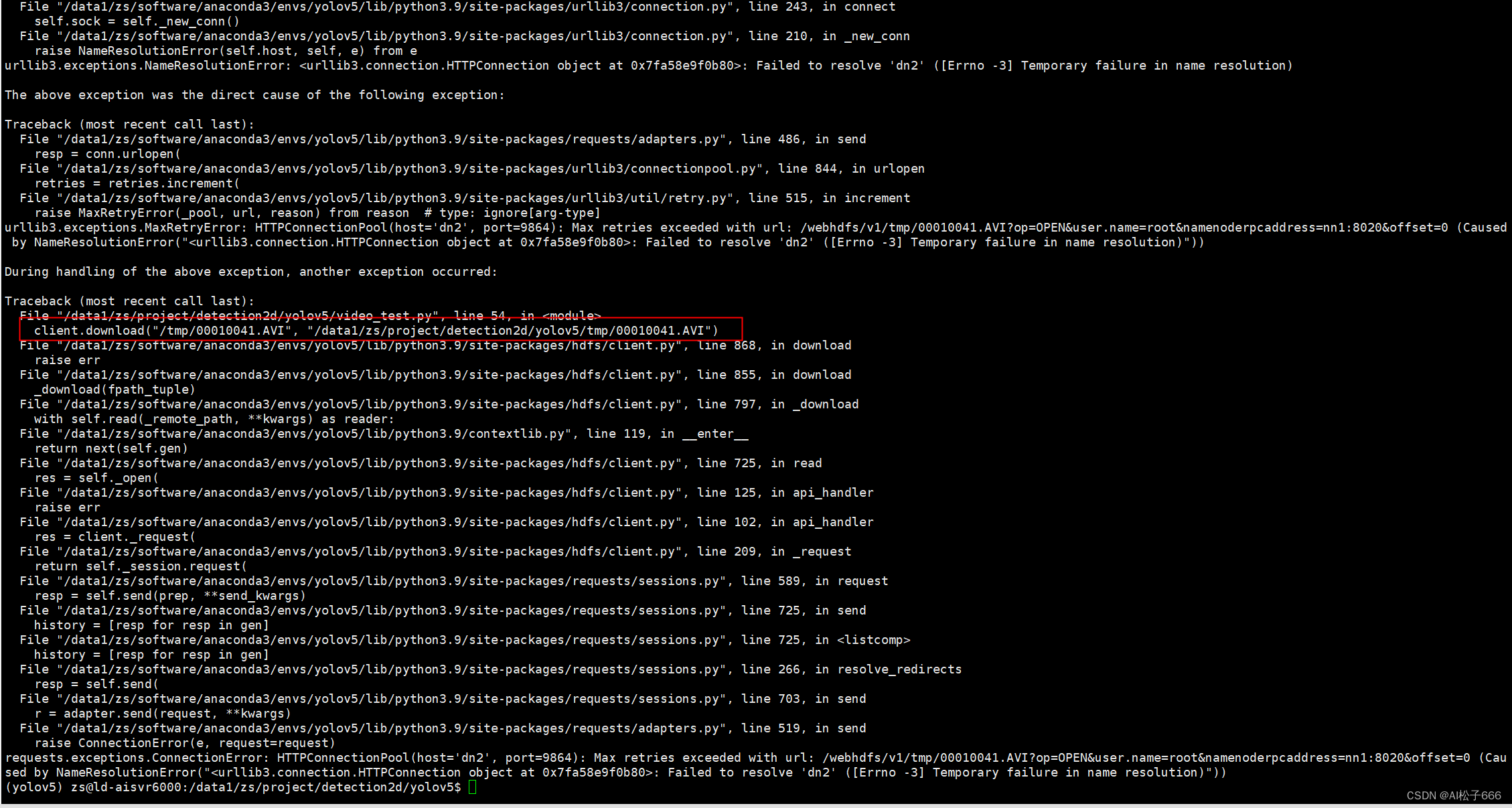
解决方案:你配一下hosts;都配置,这是个集群
10:03192.168.100.11 nn1
192.168.100.12 nn2
192.168.100.13 dn1
192.168.100.14 dn2
192.168.100.15 dn3 -
相关阅读:
2022 Java零基础必备 简单易学 Eclipse免费下载安装+JDK环境搭建一站式捆绑服务到底的教程 足够全、足够详细、足够劲爆
[LeetCode周赛复盘] 第 361 场周赛20230906
【Mybatis源码】XMLConfigBuilder构建器 - 加载XML与创建Configuration对象的过程
【java核心技术】Java知识总结 -- 泛型程序设计一
Python NumPy的基本使用
(Java高级教程)第一章Java多线程基础-第一节4:synchronized关键字(监视器锁monitor lock)和volatile关键字
c/s架构和b/s架构的区别是什么
希望所有计算机学生都知道这些宝藏课程
Maven概述
duilib 实现登录界面 之 样式设计
- 原文地址:https://blog.csdn.net/qq_39523365/article/details/133275610
