-
Unity之NetCode多人网络游戏联机对战教程(4)--连接申请ConnectionApproval
前言
没看过前面的教程请先阅读前面的教程,本期将会讲到Netcode联机的申请,当一个Client想连接进来,应向Server发送申请联机的信息,然后由服务端向客户端下发数据,所有数据应该在服务端,而不是在客户端。
适用场景
举几个常见的例子需要用到
ConnectionApproval的场景- 使用密码加入房间
- 玩家选择不同的角色
- 房间人数
- 各种需要服务端下发的信息等等
1. 准备
需要在第二期上添加多的一个
Player预制体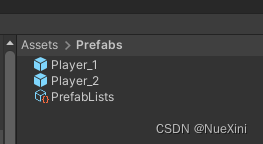
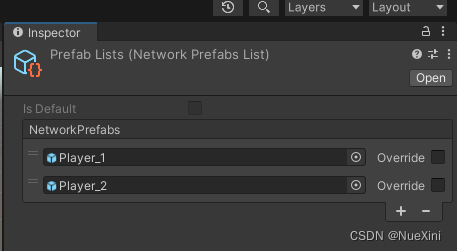
每个
Player都需要挂载上NetworkObject这个组件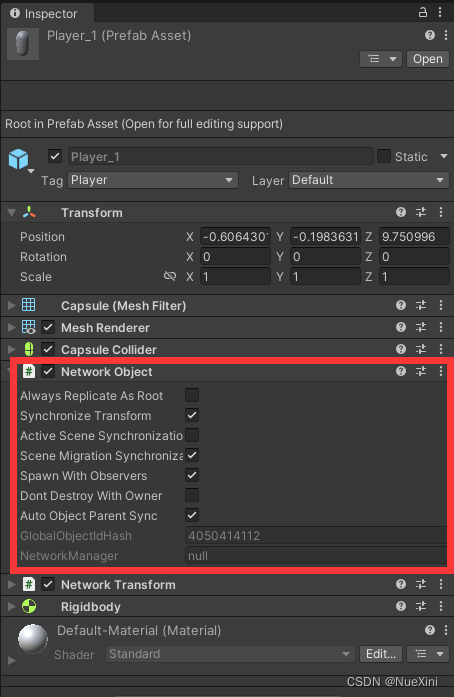
最重要的一点是在
NetworkManager上开启ConnectionApproval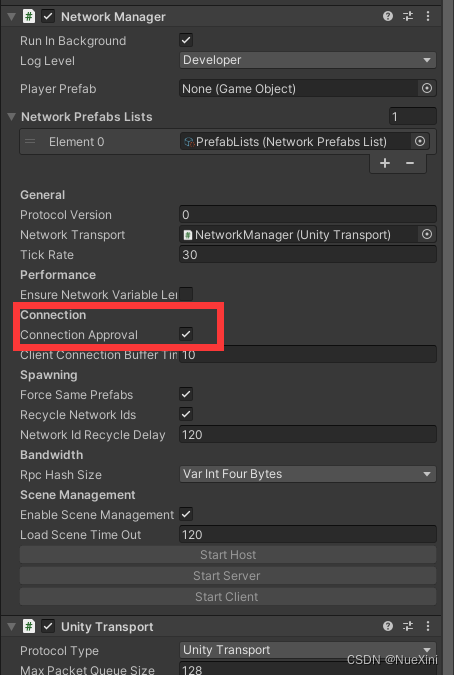
2.新建GameManager
新建一个
GameManager空物体,添加NetworkObject这个组件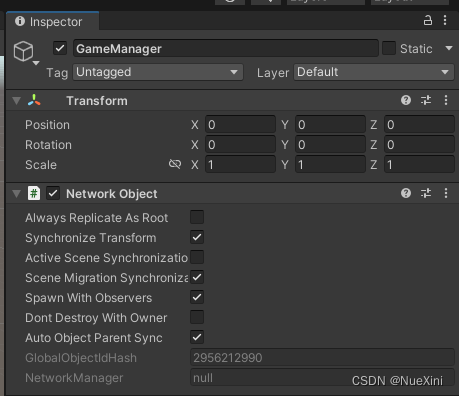
在
Scripts目录下新建一个GameManager脚本,挂载到GameManager的空物体上using UnityEngine; using Unity.Netcode; using System.Text; public class GameManager : NetworkBehaviour { public GameObject Man; public GameObject Girl; public override void OnNetworkSpawn() { if (IsServer) { NetworkManager.ConnectionApprovalCallback = ApprovalCheck; } } private void Update() { if (Input.GetKeyDown(KeyCode.O)) { NetworkManager.Singleton.NetworkConfig.PlayerPrefab = Man; NetworkManager.Singleton.StartHost(); } if (Input.GetKeyDown(KeyCode.P)) { NetworkManager.Singleton.NetworkConfig.ConnectionData = Encoding.UTF8.GetBytes("Girl"); NetworkManager.Singleton.StartClient(); } } private void ApprovalCheck(NetworkManager.ConnectionApprovalRequest request, NetworkManager.ConnectionApprovalResponse response) { // The client identifier to be authenticated var clientId = request.ClientNetworkId; // Additional connection data defined by user code var connectionData = request.Payload; var _character = Encoding.UTF8.GetString(connectionData); if (_character == "Girl") { response.PlayerPrefabHash = Girl.GetComponent<NetworkObject>().PrefabIdHash; } else { response.PlayerPrefabHash = Man.GetComponent<NetworkObject>().PrefabIdHash; } // Your approval logic determines the following values response.Approved = true; response.CreatePlayerObject = true; // Position to spawn the player object (if null it uses default of Vector3.zero) response.Position = Vector3.zero; // Rotation to spawn the player object (if null it uses the default of Quaternion.identity) response.Rotation = Quaternion.identity; // If response.Approved is false, you can provide a message that explains the reason why via ConnectionApprovalResponse.Reason // On the client-side, NetworkManager.DisconnectReason will be populated with this message via DisconnectReasonMessage response.Reason = "Some reason for not approving the client"; // If additional approval steps are needed, set this to true until the additional steps are complete // once it transitions from true to false the connection approval response will be processed. response.Pending = false; } }- 1
- 2
- 3
- 4
- 5
- 6
- 7
- 8
- 9
- 10
- 11
- 12
- 13
- 14
- 15
- 16
- 17
- 18
- 19
- 20
- 21
- 22
- 23
- 24
- 25
- 26
- 27
- 28
- 29
- 30
- 31
- 32
- 33
- 34
- 35
- 36
- 37
- 38
- 39
- 40
- 41
- 42
- 43
- 44
- 45
- 46
- 47
- 48
- 49
- 50
- 51
- 52
- 53
- 54
- 55
- 56
- 57
- 58
- 59
- 60
- 61
- 62
- 63
- 64
- 65
- 66
- 67
- 68
- 69
- 70
- 71
在
Inspector窗口绑定一下两个角色到脚本中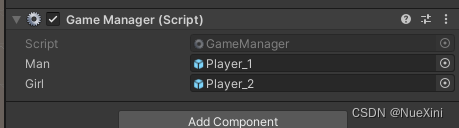
3.编译运行
分别按下
O键与P键,可以看到有两个不同的Player Prefab实例化了。
4.脚本详解
GameManager继承的是NetworkBehaviour而非MonoBehaviour
重写
OnNetworkSpawn()方法,让NetworkManager放入回调方法ApprovalCheck让服务端处理public override void OnNetworkSpawn() { if (IsServer) { NetworkManager.ConnectionApprovalCallback = ApprovalCheck; } }- 1
- 2
- 3
- 4
- 5
- 6
- 7
ApprovalCheck这个回调方法传入两个类型的参数,分别是NetworkManager.ConnectionApprovalRequest和NetworkManager.ConnectionApprovalResponseNetworkManager.ConnectionApprovalRequest是客户端的请求,一共两个字段
–ClientNetworkId是客户端的唯一标识ID
–Payload是客户端发送的信息,封装成byte类型,这也是我们主要使用的
private void ApprovalCheck(NetworkManager.ConnectionApprovalRequest request, NetworkManager.ConnectionApprovalResponse response) { // The client identifier to be authenticated var clientId = request.ClientNetworkId; // Additional connection data defined by user code var connectionData = request.Payload; var _character = Encoding.UTF8.GetString(connectionData); if (_character == "Girl") { response.PlayerPrefabHash = Girl.GetComponent<NetworkObject>().PrefabIdHash; } else { response.PlayerPrefabHash = Man.GetComponent<NetworkObject>().PrefabIdHash; } // Your approval logic determines the following values response.Approved = true; response.CreatePlayerObject = true; // Position to spawn the player object (if null it uses default of Vector3.zero) response.Position = Vector3.zero; // Rotation to spawn the player object (if null it uses the default of Quaternion.identity) response.Rotation = Quaternion.identity; // If response.Approved is false, you can provide a message that explains the reason why via ConnectionApprovalResponse.Reason // On the client-side, NetworkManager.DisconnectReason will be populated with this message via DisconnectReasonMessage response.Reason = "Some reason for not approving the client"; // If additional approval steps are needed, set this to true until the additional steps are complete // once it transitions from true to false the connection approval response will be processed. response.Pending = false; }- 1
- 2
- 3
- 4
- 5
- 6
- 7
- 8
- 9
- 10
- 11
- 12
- 13
- 14
- 15
- 16
- 17
- 18
- 19
- 20
- 21
- 22
- 23
- 24
- 25
- 26
- 27
- 28
- 29
- 30
- 31
- 32
- 33
- 34
- 35
- 36
- 37
NetworkManager.ConnectionApprovalResponse是服务端给客户端的响应,一共有八个字段
–Approved:是否同意客户端加入
–Reason: 如果Approved为false,填写拒绝理由
–CreatePlayerObject是否生成玩家实体
–PlayerPrefabHash如果null则生成在NetworkManager默认的Player Prefab,这个值要填入NetworkObject的PrefabIdHash
–Position生成玩家实体的position
–Rotation生成玩家实体的rotation
–Pending挂起approval延迟授权,直到其他客户端完成approval, 官方解释:Provides the ability to mark the approval as pending to delay the authorization until other user-specific code finishes the approval process.
后话
官方相关的阅读文档:
-
相关阅读:
【深度学习】Windows配置深度学习环境
自己动手写操作系统系列第4篇,完结篇之实现系统调用
linux用户和权限概述
网络安全进阶学习第二十课——CTF之文件操作与隐写
Ubuntu sudo apt update 过程中遇到的报错解决
【408专项篇】C语言笔记-第五章(一维数组与字符数组)
ASP.NET Core依赖注入系统学习教程:关于服务注册使用到的方法
【C++】红黑树
vivo霍金实验平台设计与实践-平台产品系列02
CSS基础知识
- 原文地址:https://blog.csdn.net/a924282761/article/details/133092143
