-
(一)NIO 基础
(一)NIO 基础
non-blocking io:非阻塞 IO
1、三大组件
1.1、Channel & Buffer
Java NIO系统的核心在于:通道(Channel)和缓冲(Buffer)。通道表示打开到 IO 设备(例如:文件、套接字)的连接。若需要使用 NIO 系统,需要获取用于连接 IO 设备的通道以及用于容纳数据的缓冲区。然后操作缓冲区,对数据进行处理。简而言之,通道负责传输,缓冲区负责存储
常见的 Channel 有以下四种,其中 FileChannel 主要用于文件传输,其余三种用于网络通信:
- FileChannel
- DatagramChannel
- SocketChannel
- ServerSocketChannel
Buffer 有以下几种,其中使用较多的是 ByteBuffer:
- ByteBuffer
- MappedByteBuffer
- DirectByteBuffer
- HeapByteBuffer
- ShortBuffer
- IntBuffer
- LongBuffer
- FloatBuffer
- DoubleBuffer
- CharBuffer

1.2、Selector
在使用 Selector 之前,处理 socket 连接有以下两种方法:
1、使用多线程技术**:**为每个连接分别开辟一个线程,分别去处理对应的 socke 连接
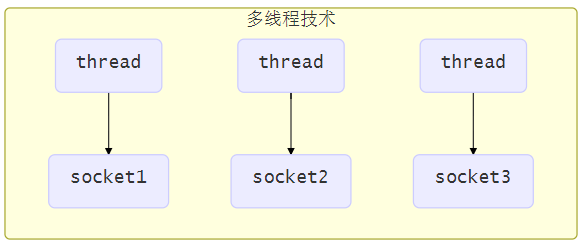
这种方法存在以下几个问题:
- 内存占用高
- 每个线程都需要占用一定的内存,当连接较多时,会开辟大量线程,导致占用大量内存
- 线程上下文切换成本高
- 只适合连接数少的场景
- 连接数过多,会导致创建很多线程,从而出现问题
2、使用线程池技术:使用线程池,让线程池中的线程去处理连接

这种方法存在以下几个问题:
- 阻塞模式下,线程仅能处理一个连接
- 线程池中的线程获取任务(task)后,只有当其执行完任务之后(断开连接后),才会去获取并执行下一个任务
- 若 socke 连接一直未断开,则其对应的线程就无法处理其他的 socke 连接
- 仅适合短连接场景
- 短连接即建立连接发送请求并响应后就立即断开,使得线程池中的线程可以快速处理其他连接
3、使用选择器
selector 的作用就是配合一个线程来管理多个 channel(fileChannel 因为是阻塞式的,所以无法使用 selector),获取这些 channel 上发生的事件,这些 channel 工作在
非阻塞模式下,当一个 channel 中没有执行任务时,线程可以去执行其他 channel 中的任务。适合连接数特别多,但流量较少的场景。
若事件未就绪,调用 selector 的 select( ) 方法会阻塞线程,直到 channel 发生了就绪事件。这些事件就绪后,select 方法就会返回这些事件交给 thread 来处理
2、ByteBuffer
有一个普通文本文件 data.txt,内容为:
1234567890abcd- 1
使用 FileChannel 来读取文件内容:
@Slf4j public class TestByteBuffer { public static void main(String[] args) { // FileChannel // 输入输出流 try (FileChannel channel = new FileInputStream("data.txt").getChannel()) { // 准备缓冲区 ByteBuffer buffer = ByteBuffer.allocate(10); // 缓冲区大小 while (true) { // 从 channel 读取数据,向 buffer 写入 int len = channel.read(buffer); log.debug("读取到的字节数 {}", len); if (len == -1) { // 没有内容了 break; } // 打印 buffer 的内容 buffer.flip(); // 切换到读模式 while (buffer.hasRemaining()) { // 是否还有剩余未读字节 byte b = buffer.get(); log.debug("实际字节 {}", (char) b); } // 切换到写模式,清除已读内容 buffer.clear(); } } catch (IOException e) { throw new RuntimeException(e); } } }- 1
- 2
- 3
- 4
- 5
- 6
- 7
- 8
- 9
- 10
- 11
- 12
- 13
- 14
- 15
- 16
- 17
- 18
- 19
- 20
- 21
- 22
- 23
- 24
- 25
- 26
- 27
- 28
- 29
- 30
- 31
输出:
16:28:48 [DEBUG] [main] c.i.n.c.TestByteBuffer - 读取到的字节数 10 16:28:48 [DEBUG] [main] c.i.n.c.TestByteBuffer - 实际字节 0 16:28:48 [DEBUG] [main] c.i.n.c.TestByteBuffer - 实际字节 1 16:28:48 [DEBUG] [main] c.i.n.c.TestByteBuffer - 实际字节 2 16:28:48 [DEBUG] [main] c.i.n.c.TestByteBuffer - 实际字节 3 16:28:48 [DEBUG] [main] c.i.n.c.TestByteBuffer - 实际字节 4 16:28:48 [DEBUG] [main] c.i.n.c.TestByteBuffer - 实际字节 5 16:28:48 [DEBUG] [main] c.i.n.c.TestByteBuffer - 实际字节 6 16:28:48 [DEBUG] [main] c.i.n.c.TestByteBuffer - 实际字节 7 16:28:48 [DEBUG] [main] c.i.n.c.TestByteBuffer - 实际字节 8 16:28:48 [DEBUG] [main] c.i.n.c.TestByteBuffer - 实际字节 9 16:28:48 [DEBUG] [main] c.i.n.c.TestByteBuffer - 读取到的字节数 4 16:28:48 [DEBUG] [main] c.i.n.c.TestByteBuffer - 实际字节 a 16:28:48 [DEBUG] [main] c.i.n.c.TestByteBuffer - 实际字节 b 16:28:48 [DEBUG] [main] c.i.n.c.TestByteBuffer - 实际字节 c 16:28:48 [DEBUG] [main] c.i.n.c.TestByteBuffer - 实际字节 16:28:48 [DEBUG] [main] c.i.n.c.TestByteBuffer - 读取到的字节数 -1- 1
- 2
- 3
- 4
- 5
- 6
- 7
- 8
- 9
- 10
- 11
- 12
- 13
- 14
- 15
- 16
- 17
- 18
使用方式:
- 向 buffer 写入数据,例如调用 channel.read(buffer)
- 调用 flip( ) 切换至读模式
- flip 会使得 buffer 中的 limit 变为 position,position 变为 0
- 从 buffer 读取数据,例如调用 buffer.get( )
- 调用 clear( ) 或者 compact( ) 切换至写模式
- 调用 clear( ) 方法时 position=0,limit 变为 capacity
- 调用 compact( ) 方法时,会将缓冲区中的未读数据压缩到缓冲区前面
- 重复以上步骤
2.1、ByteBuffer 正确使用姿势
ByteBuffer 有以下重要属性:
- capacity
- position
- limit
步骤:
一开始
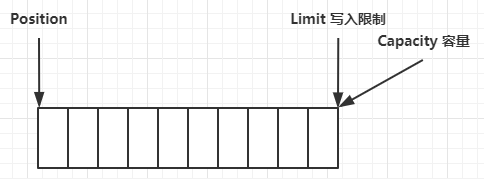
写模式下,position 是写入位置,limit 等于容量,下图表示写入了 4 个字节后的状态
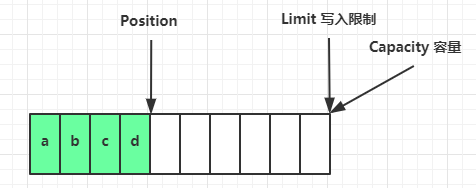
flip 动作发生后,position 切换为读取位置,limit 切换为读取限制

读取 4 个字节后,状态

clear 动作发生后,状态

compact 方法,是把未读完的部分向前压缩,然后切换至写模式

调试工具类
public class ByteBufferUtil { private static final char[] BYTE2CHAR = new char[256]; private static final char[] HEXDUMP_TABLE = new char[256 * 4]; private static final String[] HEXPADDING = new String[16]; private static final String[] HEXDUMP_ROWPREFIXES = new String[65536 >>> 4]; private static final String[] BYTE2HEX = new String[256]; private static final String[] BYTEPADDING = new String[16]; static { final char[] DIGITS = "0123456789abcdef".toCharArray(); for (int i = 0; i < 256; i++) { HEXDUMP_TABLE[i << 1] = DIGITS[i >>> 4 & 0x0F]; HEXDUMP_TABLE[(i << 1) + 1] = DIGITS[i & 0x0F]; } int i; // Generate the lookup table for hex dump paddings for (i = 0; i < HEXPADDING.length; i++) { int padding = HEXPADDING.length - i; StringBuilder buf = new StringBuilder(padding * 3); for (int j = 0; j < padding; j++) { buf.append(" "); } HEXPADDING[i] = buf.toString(); } // Generate the lookup table for the start-offset header in each row (up to 64KiB). for (i = 0; i < HEXDUMP_ROWPREFIXES.length; i++) { StringBuilder buf = new StringBuilder(12); buf.append(NEWLINE); buf.append(Long.toHexString(i << 4 & 0xFFFFFFFFL | 0x100000000L)); buf.setCharAt(buf.length() - 9, '|'); buf.append('|'); HEXDUMP_ROWPREFIXES[i] = buf.toString(); } // Generate the lookup table for byte-to-hex-dump conversion for (i = 0; i < BYTE2HEX.length; i++) { BYTE2HEX[i] = ' ' + StringUtil.byteToHexStringPadded(i); } // Generate the lookup table for byte dump paddings for (i = 0; i < BYTEPADDING.length; i++) { int padding = BYTEPADDING.length - i; StringBuilder buf = new StringBuilder(padding); for (int j = 0; j < padding; j++) { buf.append(' '); } BYTEPADDING[i] = buf.toString(); } // Generate the lookup table for byte-to-char conversion for (i = 0; i < BYTE2CHAR.length; i++) { if (i <= 0x1f || i >= 0x7f) { BYTE2CHAR[i] = '.'; } else { BYTE2CHAR[i] = (char) i; } } } /** * 打印所有内容 * @param buffer */ public static void debugAll(ByteBuffer buffer) { int oldlimit = buffer.limit(); buffer.limit(buffer.capacity()); StringBuilder origin = new StringBuilder(256); appendPrettyHexDump(origin, buffer, 0, buffer.capacity()); System.out.println("+--------+-------------------- all ------------------------+----------------+"); System.out.printf("position: [%d], limit: [%d]\n", buffer.position(), oldlimit); System.out.println(origin); buffer.limit(oldlimit); } /** * 打印可读取内容 * @param buffer */ public static void debugRead(ByteBuffer buffer) { StringBuilder builder = new StringBuilder(256); appendPrettyHexDump(builder, buffer, buffer.position(), buffer.limit() - buffer.position()); System.out.println("+--------+-------------------- read -----------------------+----------------+"); System.out.printf("position: [%d], limit: [%d]\n", buffer.position(), buffer.limit()); System.out.println(builder); } private static void appendPrettyHexDump(StringBuilder dump, ByteBuffer buf, int offset, int length) { if (isOutOfBounds(offset, length, buf.capacity())) { throw new IndexOutOfBoundsException( "expected: " + "0 <= offset(" + offset + ") <= offset + length(" + length + ") <= " + "buf.capacity(" + buf.capacity() + ')'); } if (length == 0) { return; } dump.append( " +-------------------------------------------------+" + NEWLINE + " | 0 1 2 3 4 5 6 7 8 9 a b c d e f |" + NEWLINE + "+--------+-------------------------------------------------+----------------+"); final int startIndex = offset; final int fullRows = length >>> 4; final int remainder = length & 0xF; // Dump the rows which have 16 bytes. for (int row = 0; row < fullRows; row++) { int rowStartIndex = (row << 4) + startIndex; // Per-row prefix. appendHexDumpRowPrefix(dump, row, rowStartIndex); // Hex dump int rowEndIndex = rowStartIndex + 16; for (int j = rowStartIndex; j < rowEndIndex; j++) { dump.append(BYTE2HEX[getUnsignedByte(buf, j)]); } dump.append(" |"); // ASCII dump for (int j = rowStartIndex; j < rowEndIndex; j++) { dump.append(BYTE2CHAR[getUnsignedByte(buf, j)]); } dump.append('|'); } // Dump the last row which has less than 16 bytes. if (remainder != 0) { int rowStartIndex = (fullRows << 4) + startIndex; appendHexDumpRowPrefix(dump, fullRows, rowStartIndex); // Hex dump int rowEndIndex = rowStartIndex + remainder; for (int j = rowStartIndex; j < rowEndIndex; j++) { dump.append(BYTE2HEX[getUnsignedByte(buf, j)]); } dump.append(HEXPADDING[remainder]); dump.append(" |"); // Ascii dump for (int j = rowStartIndex; j < rowEndIndex; j++) { dump.append(BYTE2CHAR[getUnsignedByte(buf, j)]); } dump.append(BYTEPADDING[remainder]); dump.append('|'); } dump.append(NEWLINE + "+--------+-------------------------------------------------+----------------+"); } private static void appendHexDumpRowPrefix(StringBuilder dump, int row, int rowStartIndex) { if (row < HEXDUMP_ROWPREFIXES.length) { dump.append(HEXDUMP_ROWPREFIXES[row]); } else { dump.append(NEWLINE); dump.append(Long.toHexString(rowStartIndex & 0xFFFFFFFFL | 0x100000000L)); dump.setCharAt(dump.length() - 9, '|'); dump.append('|'); } } public static short getUnsignedByte(ByteBuffer buffer, int index) { return (short) (buffer.get(index) & 0xFF); } }- 1
- 2
- 3
- 4
- 5
- 6
- 7
- 8
- 9
- 10
- 11
- 12
- 13
- 14
- 15
- 16
- 17
- 18
- 19
- 20
- 21
- 22
- 23
- 24
- 25
- 26
- 27
- 28
- 29
- 30
- 31
- 32
- 33
- 34
- 35
- 36
- 37
- 38
- 39
- 40
- 41
- 42
- 43
- 44
- 45
- 46
- 47
- 48
- 49
- 50
- 51
- 52
- 53
- 54
- 55
- 56
- 57
- 58
- 59
- 60
- 61
- 62
- 63
- 64
- 65
- 66
- 67
- 68
- 69
- 70
- 71
- 72
- 73
- 74
- 75
- 76
- 77
- 78
- 79
- 80
- 81
- 82
- 83
- 84
- 85
- 86
- 87
- 88
- 89
- 90
- 91
- 92
- 93
- 94
- 95
- 96
- 97
- 98
- 99
- 100
- 101
- 102
- 103
- 104
- 105
- 106
- 107
- 108
- 109
- 110
- 111
- 112
- 113
- 114
- 115
- 116
- 117
- 118
- 119
- 120
- 121
- 122
- 123
- 124
- 125
- 126
- 127
- 128
- 129
- 130
- 131
- 132
- 133
- 134
- 135
- 136
- 137
- 138
- 139
- 140
- 141
- 142
- 143
- 144
- 145
- 146
- 147
- 148
- 149
- 150
- 151
- 152
- 153
- 154
- 155
- 156
- 157
- 158
- 159
- 160
- 161
- 162
- 163
- 164
- 165
- 166
- 167
- 168
public class TestByteBufferReadWrite { public static void main(String[] args) { ByteBuffer buffer = ByteBuffer.allocate(10); // 写入数据到缓冲区 buffer.put((byte) 0x61); // 十六进制0x61 -> 'a' debugAll(buffer); // 写入数据到缓冲区 buffer.put(new byte[]{0x62, 0x63, 0x64}); // b c d debugAll(buffer); // 不切换成读模式,直接读取数据 System.out.println(buffer.get()); // 0 // 切换成读模式 buffer.flip(); System.out.println(buffer.get()); // 0x61(十六进制) = 97(十进制) debugAll(buffer); // 切换成写模式,并把未读到的值往前移 buffer.compact(); debugAll(buffer); // 写入数据到缓冲区 buffer.put(new byte[]{0x65, 0x6f}); debugAll(buffer); } }- 1
- 2
- 3
- 4
- 5
- 6
- 7
- 8
- 9
- 10
- 11
- 12
- 13
- 14
- 15
- 16
- 17
- 18
- 19
- 20
- 21
- 22
- 23
- 24
- 25
2.2、ByteBuffer 常见方法
分配空间
可以使用 allocate 方法为 ByteBuffer 分配空间,其它 buffer 类也有该方法
Bytebuffer buffer = ByteBuffer.allocate(16);- 1
public class TestByteBufferAllocate { public static void main(String[] args) { /** * class java.nio.HeapByteBuffer - java 堆内存,读写效率较低,受到 GC 的影响 * class java.nio.DirectByteBuffer - 系统内存(直接内存),读写效率高(少一次拷贝),不会受 GC 影响,分配的效率低 */ System.out.println(ByteBuffer.allocate(16).getClass()); System.out.println(ByteBuffer.allocateDirect(16).getClass()); } }- 1
- 2
- 3
- 4
- 5
- 6
- 7
- 8
- 9
- 10
- 11
- 12
向 buffer 写入数据
有两种办法:
- 调用 channel 的 read 方法
- 调用 buffer 自己的 put 方法
int readBytes = channel.read(buf); // 和 buffer.put((byte)127);- 1
- 2
- 3
- 4
- 5
从 buffer 读取数据
同样有两种办法
- 调用 channel 的 write 方法
- 调用 buffer 自己的 get 方法
int writeBytes = channel.write(buf); // 和 byte b = buffer.get();- 1
- 2
- 3
- 4
- 5
注意:get 方法会让 position 读指针往后走,如果想重复读取数据
- 可以调用 rewind 方法将 position 重新置为 0
- 或者调用
get(int i)方法获取索引 i 的内容,它不会移动读指针
mark 和 reset
mark 是在读取时,做一个标记,即使 position 改变,只要调用 reset 就能回到 mark 的位置
注意
rewind 和 flip 都会清除 mark 位置
代码示例
public class TestByteBufferRead { public static void main(String[] args) { ByteBuffer buffer = ByteBuffer.allocate(10); buffer.put(new byte[]{'a', 'b', 'c', 'd'}); // 切换到读模式 buffer.flip(); // // 一次性读取 4 个字节 // buffer.get(new byte[4]); // debugAll(buffer); // // rewind 从头开始读 // buffer.rewind(); // System.out.println((char) buffer.get()); // a /** * mark & reset * mark 是做一个标记,记录 position 位置 * reset 是将 position 重置到 mark 的位置 */ // debugAll(buffer); // System.out.println((char) buffer.get()); // a // System.out.println((char) buffer.get()); // b // buffer.mark(); // 加标记,索引 2 的位置 // System.out.println((char) buffer.get()); // c // System.out.println((char) buffer.get()); // d // buffer.reset(); // 将 position 重置到索引 2 // System.out.println((char) buffer.get()); // c // System.out.println((char) buffer.get()); // d // get(i) 不会改变读索引的位置 // debugAll(buffer); // System.out.println((char) buffer.get(3)); } }- 1
- 2
- 3
- 4
- 5
- 6
- 7
- 8
- 9
- 10
- 11
- 12
- 13
- 14
- 15
- 16
- 17
- 18
- 19
- 20
- 21
- 22
- 23
- 24
- 25
- 26
- 27
- 28
- 29
- 30
- 31
- 32
- 33
- 34
- 35
2.3、字符串与 ByteBuffer 互转
public class TestByteBufferString { public static void main(String[] args) { // 1. 字符串转为 ByteBuffer,不会切换到读模式 ByteBuffer buffer1 = ByteBuffer.allocate(16); buffer1.put("hello".getBytes()); debugAll(buffer1); // 2. Charset,会切换到读模式 ByteBuffer buffer2 = StandardCharsets.UTF_8.encode("hello"); debugAll(buffer2); // 3. wrap,会切换到读模式 ByteBuffer buffer3 = ByteBuffer.wrap("hello".getBytes()); debugAll(buffer3); // 4. ByteBuffer 转为字符串 String str1 = StandardCharsets.UTF_8.decode(buffer2).toString(); System.out.println(str1); // 因为 buffer1 不是读模式,所以这里需要手动切换到读模式 buffer1.flip(); String str2 = StandardCharsets.UTF_8.decode(buffer1).toString(); System.out.println(str2); } }- 1
- 2
- 3
- 4
- 5
- 6
- 7
- 8
- 9
- 10
- 11
- 12
- 13
- 14
- 15
- 16
- 17
- 18
- 19
- 20
- 21
- 22
- 23
- 24
- 25
- 26
- 27
+--------+-------------------- all ------------------------+----------------+ position: [5], limit: [16] +-------------------------------------------------+ | 0 1 2 3 4 5 6 7 8 9 a b c d e f | +--------+-------------------------------------------------+----------------+ |00000000| 68 65 6c 6c 6f 00 00 00 00 00 00 00 00 00 00 00 |hello...........| +--------+-------------------------------------------------+----------------+ +--------+-------------------- all ------------------------+----------------+ position: [0], limit: [5] +-------------------------------------------------+ | 0 1 2 3 4 5 6 7 8 9 a b c d e f | +--------+-------------------------------------------------+----------------+ |00000000| 68 65 6c 6c 6f |hello | +--------+-------------------------------------------------+----------------+ +--------+-------------------- all ------------------------+----------------+ position: [0], limit: [5] +-------------------------------------------------+ | 0 1 2 3 4 5 6 7 8 9 a b c d e f | +--------+-------------------------------------------------+----------------+ |00000000| 68 65 6c 6c 6f |hello | +--------+-------------------------------------------------+----------------+ hello hello- 1
- 2
- 3
- 4
- 5
- 6
- 7
- 8
- 9
- 10
- 11
- 12
- 13
- 14
- 15
- 16
- 17
- 18
- 19
- 20
- 21
- 22
- 23
- 24
- 25
- 26
- 27
Buffer 的线程安全
注意:Buffer 是非线程安全的
2.4、Scattering Reads
分散读取,有一个文本文件 words.txt
onetwothree- 1
使用如下方式读取,可以将数据填充至多个 buffer:
public class TestScatteringReads { public static void main(String[] args) { try (FileChannel channel = new RandomAccessFile("words.txt", "r").getChannel()) { ByteBuffer b1 = ByteBuffer.allocate(3); ByteBuffer b2 = ByteBuffer.allocate(3); ByteBuffer b3 = ByteBuffer.allocate(5); channel.read(new ByteBuffer[]{b1, b2, b3}); b1.flip(); b2.flip(); b3.flip(); debugAll(b1); debugAll(b2); debugAll(b3); } catch (IOException e) { } } }- 1
- 2
- 3
- 4
- 5
- 6
- 7
- 8
- 9
- 10
- 11
- 12
- 13
- 14
- 15
- 16
- 17
- 18
- 19
结果:
+--------+-------------------- all ------------------------+----------------+ position: [0], limit: [3] +-------------------------------------------------+ | 0 1 2 3 4 5 6 7 8 9 a b c d e f | +--------+-------------------------------------------------+----------------+ |00000000| 6f 6e 65 |one | +--------+-------------------------------------------------+----------------+ +--------+-------------------- all ------------------------+----------------+ position: [0], limit: [3] +-------------------------------------------------+ | 0 1 2 3 4 5 6 7 8 9 a b c d e f | +--------+-------------------------------------------------+----------------+ |00000000| 74 77 6f |two | +--------+-------------------------------------------------+----------------+ +--------+-------------------- all ------------------------+----------------+ position: [0], limit: [5] +-------------------------------------------------+ | 0 1 2 3 4 5 6 7 8 9 a b c d e f | +--------+-------------------------------------------------+----------------+ |00000000| 74 68 72 65 65 |three | +--------+-------------------------------------------------+----------------+- 1
- 2
- 3
- 4
- 5
- 6
- 7
- 8
- 9
- 10
- 11
- 12
- 13
- 14
- 15
- 16
- 17
- 18
- 19
- 20
- 21
- 22
- 23
2.5、Gathering Writes
使用如下方式写入,可以将多个 buffer 的数据进行集中写入,提高效率
public class TestGatheringWrites { public static void main(String[] args) { ByteBuffer b1 = StandardCharsets.UTF_8.encode("hello"); ByteBuffer b2 = StandardCharsets.UTF_8.encode("world"); ByteBuffer b3 = StandardCharsets.UTF_8.encode("你好"); try (FileChannel channel = new RandomAccessFile("words2.txt", "rw").getChannel()) { channel.write(new ByteBuffer[]{b1, b2, b3}); } catch (IOException e) { } } }- 1
- 2
- 3
- 4
- 5
- 6
- 7
- 8
- 9
- 10
- 11
- 12
- 13
- 14
2.6、粘包与半包
现象
网络上有多条数据要发送给服务端,数据之间使用 \n 进行分隔
但由于某种原因这些数据在接收时,被进行了重新组合,例如原始数据有3条,分别为
- Hello,world\n
- I’m Nyima\n
- How are you?\n
变成了下面的两个 byteBuffer (粘包,半包)
- Hello,world\nI’m Nyima\nHo
- w are you?\n
出现原因
粘包
发送方在发送数据时,并不是一条一条地发送数据,而是将数据整合在一起,当数据达到一定的数量后再一起发送。这就会导致多条信息被放在一个缓冲区中被一起发送出去
半包
接收方的缓冲区的大小是有限的,当接收方的缓冲区满了以后,就需要将信息截断,等缓冲区空了以后再继续放入数据。这就会发生一段完整的数据最后被截断的现象
解决办法
- 通过 get(index) 方法遍历 ByteBuffer,遇到分隔符时进行处理。注意:get(index)不会改变position的值
- 记录该段数据长度,以便于申请对应大小的缓冲区
- 将缓冲区的数据通过get()方法写入到target中
- 调用compact方法切换模式,因为缓冲区中可能还有未读的数据
public class TestByteBufferExam { public static void main(String[] args) { /* 网络上有多条数据发送给服务端,数据之间使用 \n 进行分隔 但由于某种原因这些数据在接收时,被进行了重新组合,例如原始数据有3条为 Hello,world\n I'm zhangsan\n How are you?\n 变成了下面的两个 byteBuffer (黏包,半包) Hello,world\nI'm zhangsan\nHo w are you?\n 现在要求你编写程序,将错乱的数据恢复成原始的按 \n 分隔的数据 */ ByteBuffer source = ByteBuffer.allocate(32); source.put("Hello,world\nI'm zhangsan\nHo".getBytes()); split(source); source.put("w are you?\n".getBytes()); split(source); } private static void split(ByteBuffer source) { // 切换到读模式 source.flip(); // 遍历ByteBuffer的每一个节点 for (int i = 0; i < source.limit(); i++) { // 找到一条完整消息 if (source.get(i) == '\n') { // 每条信息的长度等于:换行符的索引位置 + 1 - 当前position的索引位置 int length = i + 1 - source.position(); // 把这条完整消息存入新的 ByteBuffer ByteBuffer target = ByteBuffer.allocate(length); // 从 source 读,向 target 写 for (int j = 0; j < length; j++) { target.put(source.get()); } debugAll(target); } } // 把未读的数据移到缓冲区的最前面,然后再开启写模式 source.compact(); } }- 1
- 2
- 3
- 4
- 5
- 6
- 7
- 8
- 9
- 10
- 11
- 12
- 13
- 14
- 15
- 16
- 17
- 18
- 19
- 20
- 21
- 22
- 23
- 24
- 25
- 26
- 27
- 28
- 29
- 30
- 31
- 32
- 33
- 34
- 35
- 36
- 37
- 38
- 39
- 40
- 41
- 42
- 43
- 44
结果:
+--------+-------------------- all ------------------------+----------------+ position: [12], limit: [12] +-------------------------------------------------+ | 0 1 2 3 4 5 6 7 8 9 a b c d e f | +--------+-------------------------------------------------+----------------+ |00000000| 48 65 6c 6c 6f 2c 77 6f 72 6c 64 0a |Hello,world. | +--------+-------------------------------------------------+----------------+ +--------+-------------------- all ------------------------+----------------+ position: [13], limit: [13] +-------------------------------------------------+ | 0 1 2 3 4 5 6 7 8 9 a b c d e f | +--------+-------------------------------------------------+----------------+ |00000000| 49 27 6d 20 7a 68 61 6e 67 73 61 6e 0a |I'm zhangsan. | +--------+-------------------------------------------------+----------------+ +--------+-------------------- all ------------------------+----------------+ position: [13], limit: [13] +-------------------------------------------------+ | 0 1 2 3 4 5 6 7 8 9 a b c d e f | +--------+-------------------------------------------------+----------------+ |00000000| 48 6f 77 20 61 72 65 20 79 6f 75 3f 0a |How are you?. | +--------+-------------------------------------------------+----------------+- 1
- 2
- 3
- 4
- 5
- 6
- 7
- 8
- 9
- 10
- 11
- 12
- 13
- 14
- 15
- 16
- 17
- 18
- 19
- 20
- 21
- 22
- 23
3、文件编程
3.1、FileChannel
注意
FileChannel 只能在阻塞模式下工作,所以无法搭配 Selector
获取
不能直接打开 FileChannel,必须通过 FileInputStream、FileOutputStream 或者 RandomAccessFile 来获取 FileChannel,它们都有 getChannel 方法
- 通过 FileInputStream 获取的 channel 只能读
- 通过 FileOutputStream 获取的 channel 只能写
- 通过 RandomAccessFile 是否能读写,根据构造 RandomAccessFile 时的读写模式决定
读取
通过 FileInputStream 获取 channel,通过 read 方法将数据写入到 ByteBuffer 中
read 方法的返回值表示读到了多少字节,若读到了文件末尾则返回-1
int readBytes = channel.read(buffer);- 1
可根据返回值判断是否读取完毕
while(channel.read(buffer) > 0) { // 进行对应操作 ... }- 1
- 2
- 3
- 4
写入
因为 channel 也是有大小限制的,所以 write 方法并不能保证一次性将 buffer 中的内容全部写入 channel。必须按照以下规则进行写入
// 通过hasRemaining()方法查看缓冲区中是否还有数据未写入到通道中 while(buffer.hasRemaining()) { channel.write(buffer); }- 1
- 2
- 3
- 4
关闭
channel 必须关闭,不过调用了 FileInputStream、FileOutputStream 或者 RandomAccessFile 的 close 方法会间接地调用 channel 的 close 方法
一般通过 try-with-resource 进行关闭
public class TestChannel { public static void main(String[] args) throws IOException { try (FileInputStream fis = new FileInputStream("stu.txt"); FileOutputStream fos = new FileOutputStream("student.txt"); FileChannel inputChannel = fis.getChannel(); FileChannel outputChannel = fos.getChannel()) { // 执行对应操作 ... } catch (IOException e) { } } }- 1
- 2
- 3
- 4
- 5
- 6
- 7
- 8
- 9
- 10
- 11
- 12
- 13
- 14
- 15
位置
获取当前位置
long pos = channel.position();- 1
设置当前位置
long newPos = ...; channel.position(newPos);- 1
- 2
设置当前位置时,如果设置为文件的末尾
- 这时读取会返回 -1
- 这时写入,会追加内容,但要注意如果 position 超过了文件末尾,那么写入时在新内容和原末尾之间会有空洞(00)
大小
使用 size 方法获取文件的大小
强制写入
操作系统出于性能的考虑,调用写入时通常不会立刻写入到磁盘,而是会将数据进行缓存(pageCache)。可以调用
force(true)方法将文件内容和元数据(文件的权限等信息)立刻写入磁盘3.2、两个 Channel 传输数据
public class TestFileChannelTransferTo { public static void main(String[] args) { try ( FileChannel from = new FileInputStream("data.txt").getChannel(); FileChannel to = new FileOutputStream("to.txt").getChannel(); ) { // 效率高,底层会利用操作系统的零拷贝进行优化, 一次最多传 2g 数据 long size = from.size(); // left 变量代表还剩余多少字节 for (long left = size; left > 0; ) { System.out.println("position:" + (size - left) + " left:" + left); /** * 第一个参数:传输的起始位置 * 第二个参数:要传输多少数据 * 第三个参数:传输到什么地方 * 返回的是实际传输的字节数 */ left -= from.transferTo((size - left), left, to); } } catch (IOException e) { e.printStackTrace(); } } }- 1
- 2
- 3
- 4
- 5
- 6
- 7
- 8
- 9
- 10
- 11
- 12
- 13
- 14
- 15
- 16
- 17
- 18
- 19
- 20
- 21
- 22
- 23
- 24
- 25
- 26
输出
position:0 left:14- 1
3.3、Path
jdk7 引入了 Path 和 Paths 类
- Path 用来表示文件路径
- Paths 是工具类,用来获取 Path 实例
Path source = Paths.get("1.txt"); // 相对路径 使用 user.dir 环境变量来定位 1.txt Path source = Paths.get("d:\\1.txt"); // 绝对路径 代表了 d:\1.txt Path source = Paths.get("d:/1.txt"); // 绝对路径 同样代表了 d:\1.txt Path projects = Paths.get("d:\\data", "projects"); // 代表了 d:\data\projects- 1
- 2
- 3
- 4
- 5
- 6
- 7
.代表了当前路径..代表了上一级路径
例如目录结构如下:
d: |- data |- projects |- a |- b- 1
- 2
- 3
- 4
- 5
代码:
Path path = Paths.get("d:\\data\\projects\\a\\..\\b"); System.out.println(path); System.out.println(path.normalize()); // 正常化路径- 1
- 2
- 3
会输出:
d:\data\projects\a\..\b d:\data\projects\b- 1
- 2
3.4、Files
检查文件是否存在:
Path path = Paths.get("helloword/data.txt"); System.out.println(Files.exists(path));- 1
- 2
创建一级目录:
Path path = Paths.get("helloword/d1"); Files.createDirectory(path);- 1
- 2
- 如果目录已存在,会抛异常 FileAlreadyExistsException
- 不能一次性创建多级目录,否则会抛异常 NoSuchFileException
创建多级目录用
Path path = Paths.get("helloword/d1/d2"); Files.createDirectories(path);- 1
- 2
拷贝文件
Path source = Paths.get("helloword/data.txt"); Path target = Paths.get("helloword/target.txt"); Files.copy(source, target);- 1
- 2
- 3
- 4
- 如果文件已存在,会抛异常 FileAlreadyExistsException
- 如果希望用 source 覆盖掉 target,需要用 StandardCopyOption 来控制
Files.copy(source, target, StandardCopyOption.REPLACE_EXISTING);- 1
移动文件
Path source = Paths.get("helloword/data.txt"); Path target = Paths.get("helloword/data.txt"); // StandardCopyOption.ATOMIC_MOVE 保证文件移动的原子性 Files.move(source, target, StandardCopyOption.ATOMIC_MOVE);- 1
- 2
- 3
- 4
- 5
删除文件
Path target = Paths.get("helloword/target.txt"); Files.delete(target);- 1
- 2
- 3
如果文件不存在,会抛异常 NoSuchFileException
删除目录
Path target = Paths.get("helloword/d1"); Files.delete(target);- 1
- 2
- 3
如果目录下还有内容,会抛异常 DirectoryNotEmptyException
遍历目录文件
/** * 遍历指定目录下的所有文件夹和所有文件 * * @throws IOException */ private static void m1() throws IOException { // 文件夹个数 AtomicInteger dircount = new AtomicInteger(); // 文件个数 AtomicInteger filecount = new AtomicInteger(); Files.walkFileTree(Paths.get("/Users/xiexu/图灵"), new SimpleFileVisitor<Path>() { /** * 遍历到文件时所做的操作 * @return * @throws IOException */ @Override public FileVisitResult visitFile(Path file, BasicFileAttributes attrs) throws IOException { // 打印文件 System.out.println(file); filecount.incrementAndGet(); return super.visitFile(file, attrs); } /** * 进入文件夹以后所做的操作 * @return * @throws IOException */ @Override public FileVisitResult postVisitDirectory(Path dir, IOException exc) throws IOException { // 打印文件夹 System.out.println("===>" + dir); dircount.incrementAndGet(); return super.postVisitDirectory(dir, exc); } }); System.out.println("filecount = " + filecount); System.out.println("dircount = " + dircount); }- 1
- 2
- 3
- 4
- 5
- 6
- 7
- 8
- 9
- 10
- 11
- 12
- 13
- 14
- 15
- 16
- 17
- 18
- 19
- 20
- 21
- 22
- 23
- 24
- 25
- 26
- 27
- 28
- 29
- 30
- 31
- 32
- 33
- 34
- 35
- 36
- 37
- 38
- 39
- 40
- 41
- 42
- 43
查看指定目录下有多少个jar包
/** * 查看当前目录下有多少个jar包 * * @throws IOException */ private static void m2() throws IOException { AtomicInteger jarCount = new AtomicInteger(); Files.walkFileTree(Paths.get("/Users/xiexu/图灵"), new SimpleFileVisitor<Path>() { /** * 遍历到文件时所做的操作 * @return * @throws IOException */ @Override public FileVisitResult visitFile(Path file, BasicFileAttributes attrs) throws IOException { // 判断文件是否以.jar结尾 if (file.toString().endsWith(".jar")) { System.out.println(file); jarCount.incrementAndGet(); } return super.visitFile(file, attrs); } }); System.out.println("jar count:" + jarCount); }- 1
- 2
- 3
- 4
- 5
- 6
- 7
- 8
- 9
- 10
- 11
- 12
- 13
- 14
- 15
- 16
- 17
- 18
- 19
- 20
- 21
- 22
- 23
- 24
- 25
删除多级目录
/** * 删除多级目录下的所有文件,步骤: * 1、进入目录之前应该不能删除,因为目录下面还有很多文件和子目录 * 2、遍历到文件后就可以挨个删除 * 3、进入目录之后,也就是相当于退出目录的时候,就可以执行删除当前目录的操作了,因为当前目录下的文件和子目录都已经被删除了 */ public static void m3() throws IOException { Files.walkFileTree(Paths.get("/Users/xiexu/图灵"), new SimpleFileVisitor<Path>() { /** * 进入目录之前所做的操作 * @return * @throws IOException */ @Override public FileVisitResult preVisitDirectory(Path dir, BasicFileAttributes attrs) throws IOException { System.out.println("====> 进入" + dir); return super.preVisitDirectory(dir, attrs); } /** * 遍历到文件后所做的操作 * @return * @throws IOException */ @Override public FileVisitResult visitFile(Path file, BasicFileAttributes attrs) throws IOException { Files.delete(file); return super.visitFile(file, attrs); } /** * 进入目录之后的操作 * @return * @throws IOException */ @Override public FileVisitResult postVisitDirectory(Path dir, IOException exc) throws IOException { Files.delete(dir); return super.postVisitDirectory(dir, exc); } }); }- 1
- 2
- 3
- 4
- 5
- 6
- 7
- 8
- 9
- 10
- 11
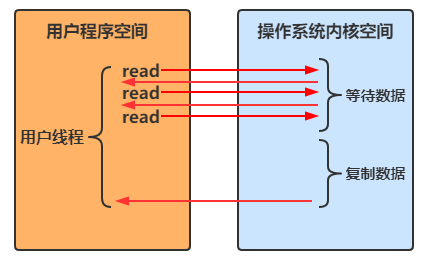
- 12
- 13
- 14
- 15
- 16
- 17
- 18
- 19
- 20
- 21
- 22
- 23
- 24
- 25
- 26
- 27
- 28
- 29
- 30
- 31
- 32
- 33
- 34
- 35
- 36
- 37
- 38
- 39
- 40
- 41
- 42
删除很危险
删除是危险操作,确保要递归删除的目录下没有重要内容,否则一旦删除了,那么这个操作是不可逆的!
拷贝多级目录
public class TestFilesCopy { /** * 拷贝多级目录 * * @param args * @throws IOException */ public static void main(String[] args) throws IOException { long start = System.currentTimeMillis(); String source = "/Users/xiexu/微信公众号开发全套资料"; String target = "/Users/xiexu/微信公众号开发全套资料2"; Files.walk(Paths.get(source)).forEach(path -> { try { /** * 将源文件夹的路径替换成目标文件夹的路径 */ String targetName = path.toString().replace(source, target); // 如果是目录,就需要到目的文件夹上面创建相同的目录 if (Files.isDirectory(path)) { Files.createDirectory(Paths.get(targetName)); } // 如果是普通文件,则拷贝当前文件到目的文件夹中 else if (Files.isRegularFile(path)) { Files.copy(path, Paths.get(targetName)); } } catch (IOException e) { e.printStackTrace(); } }); long end = System.currentTimeMillis(); System.out.println(end - start); } }- 1
- 2
- 3
- 4
- 5
- 6
- 7
- 8
- 9
- 10
- 11
- 12
- 13
- 14
- 15
- 16
- 17
- 18
- 19
- 20
- 21
- 22
- 23
- 24
- 25
- 26
- 27
- 28
- 29
- 30
- 31
- 32
- 33
- 34
- 35
4、网络编程
4.1、阻塞 VS 非阻塞
阻塞
- 阻塞模式下,相关方法都会导致线程暂停
- ServerSocketChannel.accept 会在没有新的连接建立时让线程暂停
- SocketChannel.read 会在没有数据可读时让线程暂停
- 阻塞的表现其实就是线程暂停了,暂停期间不会占用 cpu,但线程相当于闲置
- 单线程下,阻塞方法之间相互影响,几乎不能正常工作,需要多线程支持
- 但多线程下,有新的问题,体现在以下方面
- 32 位 jvm 一个线程 320 k,64 位 jvm 一个线程 1024 k,如果连接数过多,必然导致 OOM,并且线程太多,反而会因为频繁上下文切换导致性能降低
- 可以采用线程池技术来减少线程数和线程上下文切换,但治标不治本,如果有很多连接建立,但长时间 inactive,会阻塞线程池中所有线程,因此不适合长连接,只适合短连接
服务器端
/** * 服务端 */ @Slf4j public class Server { public static void main(String[] args) throws IOException { // 使用 nio 来理解阻塞模式,单线程 // 0、ByteBuffer ByteBuffer buffer = ByteBuffer.allocate(16); // 1、创建服务器 ServerSocketChannel ssc = ServerSocketChannel.open(); // 2、绑定监听端口 ssc.bind(new InetSocketAddress(8080)); // 3、建立一个连接的集合 List<SocketChannel> channels = new ArrayList<>(); while (true) { log.debug("connecting..."); // 4、建立与客户端的连接,SocketChannel 用来与客户端之间通信 SocketChannel sc = ssc.accept(); // 如果没有新的客户端线程建立连接,那么accept方法就会阻塞,线程停止运行(不会占用CPU时间) log.debug("connected...{}", sc); channels.add(sc); for (SocketChannel channel : channels) { // 5、接收客户端发送的数据 log.debug("before read...{}", channel); // channel 读,buffer 写 channel.read(buffer); // 如果没有数据可以读,那么read方法就会阻塞,线程停止运行(不会占用CPU时间) // 切换到读模式 buffer.flip(); debugRead(buffer); buffer.clear(); log.debug("after read...{}", channel); } } } }- 1
- 2
- 3
- 4
- 5
- 6
- 7
- 8
- 9
- 10
- 11
- 12
- 13
- 14
- 15
- 16
- 17
- 18
- 19
- 20
- 21
- 22
- 23
- 24
- 25
- 26
- 27
- 28
- 29
- 30
- 31
- 32
- 33
- 34
- 35
- 36
- 37
- 38
- 39
- 40
- 41
- 42
客户端
/** * 客户端 */ public class Client { public static void main(String[] args) throws IOException { // 创建一个客户端 SocketChannel sc = SocketChannel.open(); // 链接到服务器 sc.connect(new InetSocketAddress("localhost", 8080)); System.out.println("waiting..."); } }- 1
- 2
- 3
- 4
- 5
- 6
- 7
- 8
- 9
- 10
- 11
- 12
- 13
- 14
- 15
运行结果:
- 客户端-服务器建立连接前:服务器端因 accept 阻塞
- 客户端-服务器建立连接后,客户端发送消息前:服务器端因通道为空被阻塞

- 客户端发送数据后,服务器处理通道中的数据。再次进入循环时,再次被 accept 阻塞

- 之前的客户端再次发送消息,服务器端因为被 accept 阻塞,无法处理之前客户端发送到通道中的信息

非阻塞
- 非阻塞模式下,相关方法都不会让线程暂停
- ServerSocketChannel.accept 在没有连接建立时,会返回 null,继续运行
- SocketChannel.read 在没有数据可读时,会返回 0,但线程不必阻塞,可以去执行其它 SocketChannel 的 read 或是去执行 ServerSocketChannel.accept
- 写数据时,线程只是等待数据写入 Channel 即可,无需等 Channel 通过网络把数据发送出去
- 但非阻塞模式下,即使没有连接建立,和可读数据,线程仍然在不断运行,白白浪费了 CPU
- 数据复制过程中,线程实际还是阻塞的(AIO 改进的地方)
/** * 服务端 */ @Slf4j public class Server { public static void main(String[] args) throws IOException { // 使用 nio 来理解非阻塞模式,单线程 // 0、ByteBuffer ByteBuffer buffer = ByteBuffer.allocate(16); // 1、创建服务器 ServerSocketChannel ssc = ServerSocketChannel.open(); // 配置非阻塞模式(默认是阻塞模式) ssc.configureBlocking(false); // 2、绑定监听端口 ssc.bind(new InetSocketAddress(8080)); // 3、建立一个连接的集合 List<SocketChannel> channels = new ArrayList<>(); while (true) { // 4、建立与客户端的连接,SocketChannel 用来与客户端之间通信 SocketChannel sc = ssc.accept(); // 非阻塞,线程还会继续运行,如果没有连接建立,sc返回是null if (sc != null) { log.debug("connected...{}", sc); // 配置非阻塞模式(默认是阻塞模式) sc.configureBlocking(false); channels.add(sc); } for (SocketChannel channel : channels) { // 5、接收客户端发送的数据 // channel 读,buffer 写 int read = channel.read(buffer); // 非阻塞,线程还会继续运行,如果没有数据可读,read返回是0 if (read > 0) { // 切换到读模式 buffer.flip(); debugRead(buffer); buffer.clear(); log.debug("after read...{}", channel); } } } } }- 1
- 2
- 3
- 4
- 5
- 6
- 7
- 8
- 9
- 10
- 11
- 12
- 13
- 14
- 15
- 16
- 17
- 18
- 19
- 20
- 21
- 22
- 23
- 24
- 25
- 26
- 27
- 28
- 29
- 30
- 31
- 32
- 33
- 34
- 35
- 36
- 37
- 38
- 39
- 40
- 41
- 42
- 43
- 44
- 45
- 46
- 47
- 48
这样写存在一个问题,因为设置了非阻塞,会一直执行 while(true) 中的代码,CPU一直处于忙碌状态,会使得性能变低,所以实际情况中不会使用这种方式来处理请求
多路复用
单线程可以配合 Selector 完成对多个 Channel 可读写事件的监控,这称之为多路复用(只有事件发生了,Selector 才会让线程继续运行;如果事件没有发生,那么 Selector 是阻塞的)
- 多路复用仅针对网络 IO,普通文件 IO 是无法利用多路复用的
- 如果不用 Selector 的非阻塞模式,线程大部分时间都在做无用功,而 Selector 能够保证
- 有可连接事件时才去连接
- 有可读事件时才去读取
- 有可写事件时才去写入
- 限于网络传输能力,Channel 未必时时可写,一旦 Channel 可写,会触发 Selector 的可写事件
4.2、Selector
使用 Selector 带来的好处:
- 一个线程配合 selector 就可以监控多个 channel 的事件,事件发生线程才去处理。避免非阻塞模式下所做无用功
- 让这个线程能够被充分利用
- 节约了线程的数量
- 减少了线程上下文切换
创建
Selector selector = Selector.open();- 1
绑定 Channel 事件
将一个 Channel 注册到一个 Selector 上,以便 Selector 可以监听和关心该 Channel 上发生的特定事件。
// 配置非阻塞模式 channel.configureBlocking(false); SelectionKey key = channel.register(selector, 绑定事件);- 1
- 2
- 3
- channel 必须工作在非阻塞模式
- FileChannel 没有非阻塞模式,因此不能配合 selector 一起使用
绑定的事件类型可以有:
- connect:客户端连接成功时触发
- accept:服务器端成功接受连接时触发
- read:数据可读入时触发,是因为接收能力弱,导致数据暂时不能读入的情况
- write:数据可写出时触发,是因为发送能力弱,导致数据暂时不能写出的情况
监听 Channel 事件
可以通过下面三种方法来监听是否有事件发生,方法的返回值代表有多少 channel 发生了事件:
方法一:阻塞直到绑定事件发生
int count = selector.select();- 1
方法二:阻塞直到绑定事件发生,或是超时(时间单位为 ms,比如 1 秒内没有事件发生,那么超过 1 秒后它就会继续运行不会阻塞了)
int count = selector.select(long timeout);- 1
方法三:不会阻塞,也就是不管有没有事件,立刻返回,自己根据返回值检查是否有事件
int count = selector.selectNow();- 1
select 何时不阻塞:
- 事件发生时
- 客户端发起连接请求,会触发 accept 事件
- 客户端发送数据过来,客户端正常、异常关闭时,都会触发 read 事件,另外如果发送的数据大于 buffer 缓冲区,会触发多次 read 事件
- channel 可写,会触发 write 事件
- 在 linux 下 nio bug 发生时
- 调用 selector.wakeup( )
- 调用 selector.close( )
- selector 所在线程 interrupt
4.3、处理 Accpet 事件
客户端代码为:
/** * 客户端 */ public class Client { public static void main(String[] args) throws IOException { // 创建一个客户端 SocketChannel sc = SocketChannel.open(); // 链接到服务器 sc.connect(new InetSocketAddress("localhost", 8080)); System.out.println("waiting..."); } }- 1
- 2
- 3
- 4
- 5
- 6
- 7
- 8
- 9
- 10
- 11
- 12
- 13
- 14
- 15
服务端代码为:
public class SelectServer { public static void main(String[] args) { ByteBuffer buffer = ByteBuffer.allocate(16); // 获得服务器通道 try(ServerSocketChannel server = ServerSocketChannel.open()) { server.bind(new InetSocketAddress(8080)); // 创建选择器 Selector selector = Selector.open(); // 通道必须设置为非阻塞模式 server.configureBlocking(false); // 将通道注册到选择器中,并设置关注的事件 server.register(selector, SelectionKey.OP_ACCEPT); while (true) { // 若没有事件就绪,线程会被阻塞,反之不会被阻塞。从而避免了CPU空转 // select 方法在事件未处理时,它不会阻塞;如果事件已经处理了,它才会阻塞 // 返回值为就绪的事件个数 int ready = selector.select(); System.out.println("selector ready counts : " + ready); // 获取所有事件 Set<SelectionKey> selectionKeys = selector.selectedKeys(); // 使用迭代器遍历所有事件,逐一处理 Iterator<SelectionKey> iterator = selectionKeys.iterator(); while (iterator.hasNext()) { SelectionKey key = iterator.next(); // 判断事件的类型 if(key.isAcceptable()) { // 获得key对应的channel ServerSocketChannel channel = (ServerSocketChannel) key.channel(); System.out.println("before accepting..."); // 获取连接并处理,而且是必须处理,否则需要取消 SocketChannel socketChannel = channel.accept(); System.out.println("after accepting..."); // 处理完毕后移除 iterator.remove(); } } } } catch (IOException e) { e.printStackTrace(); } } }- 1
- 2
- 3
- 4
- 5
- 6
- 7
- 8
- 9
- 10
- 11
- 12
- 13
- 14
- 15
- 16
- 17
- 18
- 19
- 20
- 21
- 22
- 23
- 24
- 25
- 26
- 27
- 28
- 29
- 30
- 31
- 32
- 33
- 34
- 35
- 36
- 37
- 38
- 39
- 40
- 41
- 42
- 43
- 44
- 45
- 46
- 47
- 48
- 49
- 50
- 51
事件发生后能否不处理 ?
事件发生后,要么处理,要么取消(cancel),不能什么都不做,否则下次该事件仍会触发,这是因为 nio 底层使用的是水平触发
4.4、处理 Read 事件
/** * 服务端 */ @Slf4j public class Server { public static void main(String[] args) throws IOException { // 1、创建 selector,管理多个 channel Selector selector = Selector.open(); // 创建选择器 ServerSocketChannel ssc = ServerSocketChannel.open(); // 绑定监听端口 ssc.bind(new InetSocketAddress(8080)); // 通道必须设置为非阻塞模式 ssc.configureBlocking(false); // 2、建立 selector 和 channel 之间的联系(注册) // SelectionKey 就是将来事件发生后,通过它可以知道是和哪个 channel 发生的事件 SelectionKey sscKey = ssc.register(selector, 0, null); // 当前 sscKey 只关注 accept 事件 sscKey.interestOps(SelectionKey.OP_ACCEPT); log.debug("register key: {}", sscKey); while (true) { // 3、select 方法,如果没有事件发生,那么线程阻塞;如果有事件,线程才会恢复运行 // select 方法在事件未处理时,它不会阻塞;如果事件已经处理,它才会阻塞 int ready = selector.select(); log.debug("selected ready counts: {}", ready); // 4、处理事件,selectedKeys 内部包含了所有发生的事件 Set<SelectionKey> selectionKeys = selector.selectedKeys(); // 使用迭代器遍历事件 Iterator<SelectionKey> iter = selectionKeys.iterator(); while (iter.hasNext()) { SelectionKey key = iter.next(); log.debug("key: {}", key); // 5、区分事件类型 if (key.isAcceptable()) { // 如果是 accept 事件 // 获取key对应的channel ServerSocketChannel channel = (ServerSocketChannel) key.channel(); log.debug("before accepting..."); /** * 事件发生后要么处理,要么取消,不能置之不理 * accept 事件只会触发一次,如果不取消,下次 select 的时候,这个事件还会在 selectedKeys 中 * 获取连接 */ SocketChannel sc = channel.accept(); log.debug("after accepting..."); // 设置非阻塞模式 sc.configureBlocking(false); // 将连接的通道注册到 selector 上 SelectionKey scKey = sc.register(selector, 0, null); // 当前 scKey 只关注 read 事件 scKey.interestOps(SelectionKey.OP_READ); log.debug("{}", sc); // 处理完毕后,要记得从迭代器中删除当前的 key,防止重复处理 iter.remove(); } else if (key.isReadable()) { // 如果是 read 事件 try { // 拿到触发事件的 channel SocketChannel channel = (SocketChannel) key.channel(); ByteBuffer buffer = ByteBuffer.allocate(16); // 如果是客户端正常断开,会返回 -1;如果是正常情况,会返回读取的字节数 int read = channel.read(buffer); if (read == -1) { key.channel(); } else { buffer.flip(); debugRead(buffer); } // 处理完毕后,要记得从迭代器中删除当前的 key,防止重复处理 iter.remove(); } catch (IOException e) { e.printStackTrace(); // 如果客户端异常断开了,需要将key取消(从 selector 的 keys 中真正删除 key) key.cancel(); } } } } } }- 1
- 2
- 3
- 4
- 5
- 6
- 7
- 8
- 9
- 10
- 11
- 12
- 13
- 14
- 15
- 16
- 17
- 18
- 19
- 20
- 21
- 22
- 23
- 24
- 25
- 26
- 27
- 28
- 29
- 30
- 31
- 32
- 33
- 34
- 35
- 36
- 37
- 38
- 39
- 40
- 41
- 42
- 43
- 44
- 45
- 46
- 47
- 48
- 49
- 50
- 51
- 52
- 53
- 54
- 55
- 56
- 57
- 58
- 59
- 60
- 61
- 62
- 63
- 64
- 65
- 66
- 67
- 68
- 69
- 70
- 71
- 72
- 73
- 74
- 75
- 76
- 77
- 78
- 79
- 80
- 81
- 82
- 83
- 84
- 85
- 86
- 87
- 88
- 89
开启两个客户端,修改一下发送文字,输出:
sun.nio.ch.ServerSocketChannelImpl[/0:0:0:0:0:0:0:0:8080] 21:16:39 [DEBUG] [main] c.i.n.ChannelDemo6 - select count: 1 21:16:39 [DEBUG] [main] c.i.n.ChannelDemo6 - 连接已建立: java.nio.channels.SocketChannel[connected local=/127.0.0.1:8080 remote=/127.0.0.1:60367] 21:16:39 [DEBUG] [main] c.i.n.ChannelDemo6 - select count: 1 +-------------------------------------------------+ | 0 1 2 3 4 5 6 7 8 9 a b c d e f | +--------+-------------------------------------------------+----------------+ |00000000| 68 65 6c 6c 6f |hello | +--------+-------------------------------------------------+----------------+ 21:16:59 [DEBUG] [main] c.i.n.ChannelDemo6 - select count: 1 21:16:59 [DEBUG] [main] c.i.n.ChannelDemo6 - 连接已建立: java.nio.channels.SocketChannel[connected local=/127.0.0.1:8080 remote=/127.0.0.1:60378] 21:16:59 [DEBUG] [main] c.i.n.ChannelDemo6 - select count: 1 +-------------------------------------------------+ | 0 1 2 3 4 5 6 7 8 9 a b c d e f | +--------+-------------------------------------------------+----------------+ |00000000| 77 6f 72 6c 64 |world | +--------+-------------------------------------------------+----------------+- 1
- 2
- 3
- 4
- 5
- 6
- 7
- 8
- 9
- 10
- 11
- 12
- 13
- 14
- 15
- 16
- 17
为何要 iter.remove( ) ?
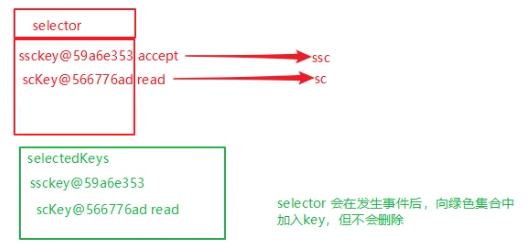
因为 select 在事件发生后,就会将相关的 key 放入 selectedKeys 集合,但不会在处理完成后从 selectedKeys 集合中移除,需要我们自己编码删除。例如:
- 第一次触发了 sscKey 上的 accept 事件,没有移除 sscKey
- 第二次触发了 scKey 上的 read 事件,但这时 selectedKeys 中还有上次的 sscKey ,在处理时因为没有真正的 serverSocket 连上了,就会导致空指针异常
cancel 的作用 ?
cancel 会取消注册在 selector 上的 channel,并从 keys 集合中删除 key 后续不会再监听事件
不处理边界出现的问题
将缓冲区的大小设置为4个字节,发送2个汉字(你好),通过decode解码并打印时,会出现乱码
try { // 拿到触发事件的 channel SocketChannel channel = (SocketChannel) key.channel(); ByteBuffer buffer = ByteBuffer.allocate(4); // 如果是客户端正常断开,会返回 -1;如果是正常情况,会返回读取的字节数 int read = channel.read(buffer); if (read == -1) { key.channel(); } else { buffer.flip(); // 打印客户端发送的数据 System.out.println(Charset.defaultCharset().decode(buffer)); } // 处理完毕后,要记得从迭代器中删除当前的 key,防止重复处理 iter.remove(); } catch (IOException e) { e.printStackTrace(); // 如果是客户端异常断开了,需要将key取消(从 selector 的 keys 中真正删除 key) key.cancel(); }- 1
- 2
- 3
- 4
- 5
- 6
- 7
- 8
- 9
- 10
- 11
- 12
- 13
- 14
- 15
- 16
- 17
- 18
- 19
- 20
- 21
10:51:27 [DEBUG] [main] c.i.n.c4.Server - key: sun.nio.ch.SelectionKeyImpl@29ba4338 你� 10:51:27 [DEBUG] [main] c.i.n.c4.Server - selected ready counts: 1 10:51:27 [DEBUG] [main] c.i.n.c4.Server - key: sun.nio.ch.SelectionKeyImpl@29ba4338 ��- 1
- 2
- 3
- 4
- 5
这是因为在 UTF-8 字符集下,1个汉字占用3个字节,此时缓冲区大小为4个字节,一次读事件无法处理完通道中的所有数据,所以一共会触发两次读事件。这就导致
你好的好字被拆分为了前半部分和后半部分发送,解码时就会出现问题。处理消息边界

- 一种思路是固定消息长度,数据包大小一样,服务器按预定长度读取,缺点是浪费带宽
- 另一种思路是按分隔符拆分,缺点是效率低
- TLV 格式,即 Type 类型、Length 长度、Value 数据,类型和长度已知的情况下,就可以方便获取消息大小,分配合适的 buffer,缺点是 buffer 需要提前分配,如果内容过大,则影响 server 吞吐量
- Http 1.1 是 TLV 格式
- Http 2.0 是 LTV 格式

服务端
/** * 服务端 */ @Slf4j public class Server { private static void split(ByteBuffer source) { // 切换到读模式 source.flip(); for (int i = 0; i < source.limit(); i++) { // 找到一条完整消息 if (source.get(i) == '\n') { int length = i + 1 - source.position(); // 把这条完整消息存入新的 ByteBuffer ByteBuffer target = ByteBuffer.allocate(length); // 从 source 读,向 target 写 for (int j = 0; j < length; j++) { target.put(source.get()); } debugAll(target); } } // 调用 compact 方法之后,position 的位置就等于往前压缩的字节数,limit 等于 capacity source.compact(); } public static void main(String[] args) throws IOException { // 1、创建 selector,管理多个 channel Selector selector = Selector.open(); // 创建选择器 ServerSocketChannel ssc = ServerSocketChannel.open(); // 绑定监听端口 ssc.bind(new InetSocketAddress(8080)); // 通道必须设置为非阻塞模式 ssc.configureBlocking(false); // 2、建立 selector 和 channel 之间的联系(注册) // SelectionKey 就是将来事件发生后,通过它可以知道是和哪个 channel 发生的事件 SelectionKey sscKey = ssc.register(selector, 0, null); // 当前 sscKey 只关注 accept 事件 sscKey.interestOps(SelectionKey.OP_ACCEPT); log.debug("register key: {}", sscKey); while (true) { // 3、select 方法,如果没有事件发生,那么线程阻塞;如果有事件,线程才会恢复运行。从而避免了CPU空转 // select 方法在事件未处理时,它不会阻塞;如果事件已经处理,它才会阻塞 int ready = selector.select(); log.debug("selected ready counts: {}", ready); // 4、处理事件,selectedKeys 内部包含了所有发生的事件 Set<SelectionKey> selectionKeys = selector.selectedKeys(); // 使用迭代器遍历事件 Iterator<SelectionKey> iter = selectionKeys.iterator(); while (iter.hasNext()) { SelectionKey key = iter.next(); log.debug("key: {}", key); // 5、判断事件的类型 if (key.isAcceptable()) { // 如果是 accept 事件 // 获取key对应的channel ServerSocketChannel channel = (ServerSocketChannel) key.channel(); log.debug("before accepting..."); /** * 事件发生后要么处理,要么取消,不能置之不理 * accept 事件只会触发一次,如果不取消,下次 select 的时候,这个事件还会在 selectedKeys 中 * 获取连接 */ SocketChannel sc = channel.accept(); log.debug("after accepting..."); // 设置非阻塞模式 sc.configureBlocking(false); // 将连接的通道注册到 selector 上 ByteBuffer buffer = ByteBuffer.allocate(16); // 将 buffer 作为附件关联到 SelectionKey 上 SelectionKey scKey = sc.register(selector, 0, buffer); // 当前 scKey 只关注 read 事件 scKey.interestOps(SelectionKey.OP_READ); log.debug("{}", sc); // 处理完毕后,要记得从迭代器中删除当前的 key,防止重复处理 iter.remove(); } else if (key.isReadable()) { // 如果是 read 事件 try { // 拿到触发事件的 channel SocketChannel channel = (SocketChannel) key.channel(); // 获取 SelectionKey 关联的附件(ByteBuffer) ByteBuffer buffer = (ByteBuffer) key.attachment(); // 如果是客户端正常断开,会返回 -1;如果是正常情况,会返回读取的字节数 int read = channel.read(buffer); if (read == -1) { key.channel(); } else { split(buffer); if (buffer.position() == buffer.limit()) { // 如果 buffer 满了,将 buffer 扩容 ByteBuffer newBuffer = ByteBuffer.allocate(buffer.capacity() * 2); // 旧的 buffer 需要切换成读模式 buffer.flip(); // 将 buffer 中的数据,转移到 newBuffer 中 newBuffer.put(buffer); // 将新的 buffer 作为附件关联到 key 上 key.attach(newBuffer); } } // 处理完毕后,要记得从迭代器中删除当前的 key,防止重复处理 iter.remove(); } catch (IOException e) { e.printStackTrace(); // 如果是客户端异常断开了,需要将key取消(从 selector 的 keys 中真正删除 key) key.cancel(); } } } } } }- 1
- 2
- 3
- 4
- 5
- 6
- 7
- 8
- 9
- 10
- 11
- 12
- 13
- 14
- 15
- 16
- 17
- 18
- 19
- 20
- 21
- 22
- 23
- 24
- 25
- 26
- 27
- 28
- 29
- 30
- 31
- 32
- 33
- 34
- 35
- 36
- 37
- 38
- 39
- 40
- 41
- 42
- 43
- 44
- 45
- 46
- 47
- 48
- 49
- 50
- 51
- 52
- 53
- 54
- 55
- 56
- 57
- 58
- 59
- 60
- 61
- 62
- 63
- 64
- 65
- 66
- 67
- 68
- 69
- 70
- 71
- 72
- 73
- 74
- 75
- 76
- 77
- 78
- 79
- 80
- 81
- 82
- 83
- 84
- 85
- 86
- 87
- 88
- 89
- 90
- 91
- 92
- 93
- 94
- 95
- 96
- 97
- 98
- 99
- 100
- 101
- 102
- 103
- 104
- 105
- 106
- 107
- 108
- 109
- 110
- 111
- 112
- 113
- 114
- 115
- 116
- 117
- 118
- 119
- 120
客户端
/** * 客户端 */ public class Client { public static void main(String[] args) throws IOException { // 创建一个客户端 SocketChannel sc = SocketChannel.open(); // 链接到服务器 sc.connect(new InetSocketAddress("localhost", 8080)); SocketAddress address = sc.getLocalAddress(); // sc.write(Charset.defaultCharset().encode("hello\nworld\n")); sc.write(Charset.defaultCharset().encode("0123456789abcdef3333\n")); System.in.read(); } }- 1
- 2
- 3
- 4
- 5
- 6
- 7
- 8
- 9
- 10
- 11
- 12
- 13
- 14
- 15
- 16
- 17
ByteBuffer 大小分配
- 每个 channel 都需要记录可能被切分的消息,因为 ByteBuffer 不能被多个 channel 共同使用,因此需要为每个 channel 维护一个独立的 ByteBuffer
- ByteBuffer 不能太大,比如一个 ByteBuffer 1Mb 的话,要支持百万连接就要 1Tb 内存,因此需要设计大小可变的 ByteBuffer
- 一种思路是首先分配一个较小的 buffer,例如 4k,如果发现数据不够,再分配 8k 的 buffer,将 4k buffer 内容拷贝至 8k buffer,优点是消息连续容易处理,缺点是数据拷贝耗费性能,参考实现 http://tutorials.jenkov.com/java-performance/resizable-array.html
- 另一种思路是用多个数组组成 buffer,一个数组不够,把多出来的内容写入新的数组,与前面的区别是消息存储不连续解析复杂,优点是避免了拷贝引起的性能损耗
4.5、处理 write 事件
服务端
public class WriteServer { public static void main(String[] args) throws IOException { ServerSocketChannel ssc = ServerSocketChannel.open(); // 设置非阻塞模式 ssc.configureBlocking(false); Selector selector = Selector.open(); ssc.register(selector, SelectionKey.OP_ACCEPT); ssc.bind(new InetSocketAddress(8080)); while (true) { selector.select(); Iterator<SelectionKey> iter = selector.selectedKeys().iterator(); while (iter.hasNext()) { SelectionKey key = iter.next(); // accept 事件 if (key.isAcceptable()) { // 拿到 ServerSocketChannel SocketChannel sc = ssc.accept(); // 设置非阻塞模式 sc.configureBlocking(false); SelectionKey scKey = sc.register(selector, 0, null); // 1、向客户端发送大量数据 StringBuilder sb = new StringBuilder(); for (int i = 0; i < 5000000; i++) { sb.append("a"); } ByteBuffer buffer = Charset.defaultCharset().encode(sb.toString()); // 2、返回值代表实际写入的字节数 int write = sc.write(buffer); System.out.println(write); // 3、判断是否还有剩余的数据 if (buffer.hasRemaining()) { // 4、关注可写事件(在原来的基础上,再加上可写事件) scKey.interestOps(scKey.interestOps() + SelectionKey.OP_WRITE); // 5、把剩余内容的 buffer 挂到 scKey 上(也就是指未写完的内容) scKey.attach(buffer); } // 事件处理掉了,就需要移除了 iter.remove(); } else if (key.isWritable()) { // 可写事件 // 把剩余内容的 buffer 取出来 ByteBuffer buffer = (ByteBuffer) key.attachment(); SocketChannel sc = (SocketChannel) key.channel(); int write = sc.write(buffer); System.out.println(write); // 6、清理操作 if (!buffer.hasRemaining()) { // 写完了 // 6.1、需要清除 buffer key.attach(null); // 6.2、不需要关注可写事件了 key.interestOps(key.interestOps() - SelectionKey.OP_WRITE); } // 事件处理掉了,就需要移除了 iter.remove(); } } } } }- 1
- 2
- 3
- 4
- 5
- 6
- 7
- 8
- 9
- 10
- 11
- 12
- 13
- 14
- 15
- 16
- 17
- 18
- 19
- 20
- 21
- 22
- 23
- 24
- 25
- 26
- 27
- 28
- 29
- 30
- 31
- 32
- 33
- 34
- 35
- 36
- 37
- 38
- 39
- 40
- 41
- 42
- 43
- 44
- 45
- 46
- 47
- 48
- 49
- 50
- 51
- 52
- 53
- 54
- 55
- 56
- 57
- 58
- 59
- 60
- 61
- 62
- 63
- 64
- 65
- 66
- 67
客户端
public class WriteClient { public static void main(String[] args) throws IOException { SocketChannel sc = SocketChannel.open(); sc.connect(new InetSocketAddress("localhost", 8080)); // 3. 接收数据 int count = 0; while (true) { ByteBuffer buffer = ByteBuffer.allocate(1024 * 1024); // 累加读取的字节数 count += sc.read(buffer); System.out.println(count); // 每读一次,清空一次缓冲区 buffer.clear(); } } }- 1
- 2
- 3
- 4
- 5
- 6
- 7
- 8
- 9
- 10
- 11
- 12
- 13
- 14
- 15
- 16
- 17
- 18
- 19
write 为何要取消
只要向 channel 发送数据时,socket 缓冲可写,这个事件就会频繁触发,因此应当只在 socket 缓冲区写不下时再关注可写事件,数据写完之后再取消关注。
4.6、更进一步
利用多线程优化
现在都是多核 cpu,设计时要充分考虑别让 cpu 的力量被白白浪费
前面的代码只有一个选择器,没有充分利用多核 cpu,如何改进呢?
分两组选择器
- 单线程配一个选择器,专门处理 accept 事件
- 创建 cpu 核心数的线程,每个线程配一个选择器,轮流处理 read 事件
每个 selector 对应一个线程,一个 selector 可以管理多个 SocketChannel 上发生的事件
Boss 只关心 Accept 事件,也就是只负责建立连接(有一个 Boss 就够了)
Worker 关心 read、write 事件,也就是只负责数据的读写,且 Worker 数量不能太多,最好和 cpu 核心数一样

服务端
注意:socketChannel.register(this.selector, SelectionKey.OP_READ, null); 只有在 selector.select(); 阻塞住的时候,它才会注册失败(也就是事件注册不上)
@Slf4j public class MultiThreadServer { public static void main(String[] args) throws IOException { // 修改主线程的名字叫做 boss Thread.currentThread().setName("boss"); ServerSocketChannel ssc = ServerSocketChannel.open(); ssc.configureBlocking(false); // 创建一个 Boss selector Selector boss = Selector.open(); SelectionKey bossKey = ssc.register(boss, 0, null); bossKey.interestOps(SelectionKey.OP_ACCEPT); ssc.bind(new InetSocketAddress(8080)); // 创建固定数量的 worker 并初始化 Worker worker = new Worker("worker-0"); while (true) { // 监听 boss selector 上的事件 boss.select(); Iterator<SelectionKey> iter = boss.selectedKeys().iterator(); while (iter.hasNext()) { SelectionKey key = iter.next(); iter.remove(); // boss selector 只关心 accept 事件 if (key.isAcceptable()) { SocketChannel sc = ssc.accept(); sc.configureBlocking(false); log.debug("connected...{}", sc.getRemoteAddress()); // SocketChannel 关联到 worker selector log.debug("before register...{}", sc.getRemoteAddress()); worker.register(sc); // 这行代码是被 boss 线程所调用,初始化 selector,启动 worker-0 线程 log.debug("after register...{}", sc.getRemoteAddress()); } } } } /** * 每个worker都有一个对应的selector和thread * 一个worker可以对应多个socketChannel */ static class Worker implements Runnable { private Thread thread; private Selector selector; // worker 线程名字 private String name; private volatile boolean start = false; // 还未初始化 // 线程安全的队列 private ConcurrentLinkedQueue<Runnable> queue = new ConcurrentLinkedQueue<>(); public Worker(String name) { this.name = name; } // 初始化线程和 selector public void register(SocketChannel socketChannel) throws IOException { if (!start) { thread = new Thread(this, name); // 启动线程 thread.start(); // 初始化selector selector = Selector.open(); start = true; } /** * 向队列添加任务,但是这个任务并没有被立刻执行 * 注意:这里是boss线程往队列里面添加任务,但是没有执行这个任务,后面会在worker线程里面执行 */ queue.add(() -> { try { // 将socketChannel注册到selector上,并且关注读事件 socketChannel.register(this.selector, SelectionKey.OP_READ, null); } catch (ClosedChannelException e) { e.printStackTrace(); } }); // 唤醒selector,让selector不再阻塞 selector.wakeup(); } /** * 线程要执行的run方法 * worker 只负责监测读写事件 */ @Override public void run() { while (true) { try { selector.select(); // worker-0 Runnable task = queue.poll(); if (task != null) { task.run(); // 这里执行的是队列里面的任务 } // 获取当前selector监听到的所有事件(也就是socketChannel上的读写事件) Iterator<SelectionKey> iter = selector.selectedKeys().iterator(); while (iter.hasNext()) { SelectionKey key = iter.next(); // 可读事件 if (key.isReadable()) { ByteBuffer buffer = ByteBuffer.allocate(16); SocketChannel channel = (SocketChannel) key.channel(); log.debug("read...{}", channel.getRemoteAddress()); channel.read(buffer); // 切换到读模式 buffer.flip(); debugAll(buffer); } // 执行完毕,移除当前事件 iter.remove(); } } catch (IOException e) { e.printStackTrace(); } } } } }- 1
- 2
- 3
- 4
- 5
- 6
- 7
- 8
- 9
- 10
- 11
- 12
- 13
- 14
- 15
- 16
- 17
- 18
- 19
- 20
- 21
- 22
- 23
- 24
- 25
- 26
- 27
- 28
- 29
- 30
- 31
- 32
- 33
- 34
- 35
- 36
- 37
- 38
- 39
- 40
- 41
- 42
- 43
- 44
- 45
- 46
- 47
- 48
- 49
- 50
- 51
- 52
- 53
- 54
- 55
- 56
- 57
- 58
- 59
- 60
- 61
- 62
- 63
- 64
- 65
- 66
- 67
- 68
- 69
- 70
- 71
- 72
- 73
- 74
- 75
- 76
- 77
- 78
- 79
- 80
- 81
- 82
- 83
- 84
- 85
- 86
- 87
- 88
- 89
- 90
- 91
- 92
- 93
- 94
- 95
- 96
- 97
- 98
- 99
- 100
- 101
- 102
- 103
- 104
- 105
- 106
- 107
- 108
- 109
- 110
- 111
- 112
- 113
- 114
- 115
- 116
- 117
- 118
- 119
还有另一种优化方式(不过第一种方式更好一点):
// 初始化线程和 selector public void register(SocketChannel socketChannel) throws IOException { if (!start) { thread = new Thread(this, name); // 启动线程 thread.start(); // 初始化selector selector = Selector.open(); start = true; } // 唤醒selector,让selector不再阻塞 selector.wakeup(); // 将socketChannel注册到selector上,并且关注读事件 socketChannel.register(this.selector, SelectionKey.OP_READ, null); }- 1
- 2
- 3
- 4
- 5
- 6
- 7
- 8
- 9
- 10
- 11
- 12
- 13
- 14
- 15
客户端
public class TestClient { public static void main(String[] args) throws IOException { SocketChannel sc = SocketChannel.open(); sc.connect(new InetSocketAddress("localhost", 8080)); sc.write(Charset.defaultCharset().encode("1234567890abcdef")); System.in.read(); } }- 1
- 2
- 3
- 4
- 5
- 6
- 7
- 8
- 9
- 10
如何拿到 CPU 个数
- Runtime.getRuntime( ).availableProcessors( ) 如果工作在 docker 容器下,因为容器不是物理隔离的,会拿到物理 cpu 个数,而不是容器申请时的个数(jdk8 建议手动设置核心数比较好)
- 这个问题直到 jdk 10 才修复,使用 jvm 参数 UseContainerSupport 配置, 默认开启
多个 worker 的情况
@Slf4j public class MultiThreadServer { public static void main(String[] args) throws IOException { // 修改主线程的名字叫做 boss Thread.currentThread().setName("boss"); ServerSocketChannel ssc = ServerSocketChannel.open(); ssc.configureBlocking(false); // 创建一个 Boss selector Selector boss = Selector.open(); SelectionKey bossKey = ssc.register(boss, 0, null); bossKey.interestOps(SelectionKey.OP_ACCEPT); ssc.bind(new InetSocketAddress(8080)); // 创建固定数量的 worker,并初始化 Worker[] workers = new Worker[Runtime.getRuntime().availableProcessors()]; // 获取当前机器的核数 for (int i = 0; i < workers.length; i++) { workers[i] = new Worker("worker-" + i); } // 计数器 AtomicInteger index = new AtomicInteger(); while (true) { // 监听 boss selector 上的事件 boss.select(); Iterator<SelectionKey> iter = boss.selectedKeys().iterator(); while (iter.hasNext()) { SelectionKey key = iter.next(); iter.remove(); // boss selector 只关心 accept 事件 if (key.isAcceptable()) { SocketChannel sc = ssc.accept(); sc.configureBlocking(false); log.debug("connected...{}", sc.getRemoteAddress()); // SocketChannel 关联到 worker selector log.debug("before register...{}", sc.getRemoteAddress()); // round robin 轮询 workers[index.getAndIncrement() % workers.length].register(sc); // 这行代码是被 boss 线程所调用,初始化 selector,启动 worker-0 线程 log.debug("after register...{}", sc.getRemoteAddress()); } } } } /** * 每个worker都有一个对应的selector和thread * 一个worker可以对应多个socketChannel */ static class Worker implements Runnable { private Thread thread; private Selector selector; // worker 线程名字 private String name; private volatile boolean start = false; // 还未初始化 // 线程安全的队列 private ConcurrentLinkedQueue<Runnable> queue = new ConcurrentLinkedQueue<>(); public Worker(String name) { this.name = name; } // 初始化线程和 selector public void register(SocketChannel socketChannel) throws IOException { if (!start) { thread = new Thread(this, name); // 启动线程 thread.start(); // 初始化selector selector = Selector.open(); start = true; } /** * 向队列添加任务,但是这个任务并没有被立刻执行 * 注意:这里是boss线程往队列里面添加任务,但是没有执行这个任务,后面会在worker线程里面执行 */ queue.add(() -> { try { // 将socketChannel注册到selector上,并且关注读事件 socketChannel.register(this.selector, SelectionKey.OP_READ, null); } catch (ClosedChannelException e) { e.printStackTrace(); } }); // 唤醒selector,让selector不再阻塞 selector.wakeup(); } /** * 线程要执行的run方法 * worker 只负责监测读写事件 */ @Override public void run() { while (true) { try { selector.select(); // worker-0 Runnable task = queue.poll(); if (task != null) { task.run(); // 这里执行的是队列里面的任务 } // 获取当前selector监听到的所有事件(也就是socketChannel上的读写事件) Iterator<SelectionKey> iter = selector.selectedKeys().iterator(); while (iter.hasNext()) { SelectionKey key = iter.next(); // 可读事件 if (key.isReadable()) { ByteBuffer buffer = ByteBuffer.allocate(16); SocketChannel channel = (SocketChannel) key.channel(); log.debug("read...{}", channel.getRemoteAddress()); channel.read(buffer); // 切换到读模式 buffer.flip(); debugAll(buffer); } // 执行完毕,移除当前事件 iter.remove(); } } catch (IOException e) { e.printStackTrace(); } } } } }- 1
- 2
- 3
- 4
- 5
- 6
- 7
- 8
- 9
- 10
- 11
- 12
- 13
- 14
- 15
- 16
- 17
- 18
- 19
- 20
- 21
- 22
- 23
- 24
- 25
- 26
- 27
- 28
- 29
- 30
- 31
- 32
- 33
- 34
- 35
- 36
- 37
- 38
- 39
- 40
- 41
- 42
- 43
- 44
- 45
- 46
- 47
- 48
- 49
- 50
- 51
- 52
- 53
- 54
- 55
- 56
- 57
- 58
- 59
- 60
- 61
- 62
- 63
- 64
- 65
- 66
- 67
- 68
- 69
- 70
- 71
- 72
- 73
- 74
- 75
- 76
- 77
- 78
- 79
- 80
- 81
- 82
- 83
- 84
- 85
- 86
- 87
- 88
- 89
- 90
- 91
- 92
- 93
- 94
- 95
- 96
- 97
- 98
- 99
- 100
- 101
- 102
- 103
- 104
- 105
- 106
- 107
- 108
- 109
- 110
- 111
- 112
- 113
- 114
- 115
- 116
- 117
- 118
- 119
- 120
- 121
- 122
- 123
- 124
- 125
- 126
- 127
- 128
- 129
5、NIO VS BIO
5.1、stream vs channel
- stream 不会自动缓冲数据,channel 会利用系统提供的发送缓冲区、接收缓冲区(更为底层)
- stream 仅支持阻塞 API,channel 同时支持阻塞、非阻塞 API,网络 channel 可配合 selector 实现多路复用
- 二者均为全双工,即读写可以同时进行
5.2、IO 模型
同步阻塞、同步非阻塞、同步多路复用、异步阻塞(没有此情况)、异步非阻塞
- 同步:线程自己去获取结果(一个线程)
- 异步:线程自己不去获取结果,而是由其它线程送结果(至少两个线程)
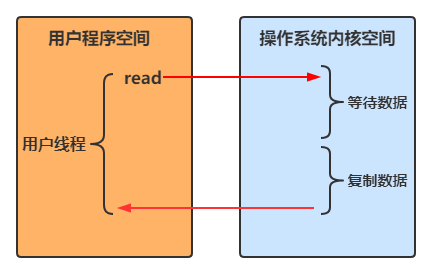
当调用一次 channel.read 或 stream.read 后,会切换至操作系统内核态来完成真正数据读取,而读取又分为两个阶段,分别为:
- 等待数据阶段
- 复制数据阶段

阻塞 IO
用户线程进行read操作时,需要等待操作系统执行实际的read操作,此期间用户线程是被阻塞的,无法执行其他操作
非阻塞 IO
- 用户线程在一个循环中一直调用 read 方法,若内核空间中还没有数据可读,立即返回
- 只是在等待阶段非阻塞
- 用户线程发现内核空间中有数据后,等待内核空间执行复制数据,待复制结束后返回结果
多路复用
Java中通过 Selector 实现多路复用
- 当没有事件是,调用select方法会被阻塞住
- 一旦有一个或多个事件发生后,就会处理对应的事件,从而实现多路复用
多路复用与阻塞IO的区别
- 阻塞IO模式下,若线程因 accept 事件被阻塞,发生 read 事件后,仍需等待 accept 事件执行完成后,才能去处理 read 事件
- 多路复用模式下,一个事件发生后,若另一个事件处于阻塞状态,不会影响该事件的执行


异步 IO
- 线程1调用方法后立刻返回,不会被阻塞也不需要立即获取结果
- 当方法的运行结果出来以后,由线程2将结果返回给线程1


5.3、零拷贝
零拷贝指的是数据无需拷贝到 JVM 内存中,同时具有以下三个优点:
- 更少的用户态与内核态的切换
- 不利用 cpu 计算,减少 cpu 缓存伪共享
- 零拷贝适合小文件传输
传统 IO 问题
传统的 IO 将一个文件通过 socket 写出:
File f = new File("helloword/data.txt"); RandomAccessFile file = new RandomAccessFile(file, "r"); byte[] buf = new byte[(int)f.length()]; file.read(buf); // 用户态 -> 内核态 Socket socket = ...; // 内核态 -> 用户态 socket.getOutputStream().write(buf); // 用户态 -> 内核态- 1
- 2
- 3
- 4
- 5
- 6
- 7
- 8
内部工作流程是这样的:

1、java 本身并不具备 IO 读写能力,因此 read 方法调用后,要从 java 程序的用户态切换至内核态,去调用操作系统(Kernel)的读能力,将数据读入内核缓冲区。这期间用户线程阻塞,操作系统使用 DMA(Direct Memory Access)来实现文件读,其间也不会使用 cpu
DMA 也可以理解为硬件单元,用来解放 cpu 完成文件 IO
2、从内核态切换回用户态,将数据从内核缓冲区读入用户缓冲区(即 byte[] buf),这期间 cpu 会参与拷贝,无法利用 DMA
3、调用 write 方法,这时将数据从用户缓冲区(byte[] buf)写入 socket 缓冲区,cpu 会参与拷贝
4、接下来要向网卡写数据,这项能力 java 又不具备,因此又得从用户态切换至内核态,调用操作系统的写能力,使用 DMA 将 socket 缓冲区的数据写入网卡,不会使用 cpu
可以看到中间环节较多,java 的 IO 实际不是物理设备级别的读写,而是缓存的复制,底层的真正读写是操作系统来完成的
- 用户态与内核态的切换发生了 3 次,这个操作比较重量级
- 数据拷贝了共 4 次
NIO 优化
通过 DirectByteBuf
- ByteBuffer.allocate(10),返回的是 HeapByteBuffer,使用的还是 java 内存
- ByteBuffer.allocateDirect(10) 返回的是 DirectByteBuffer,使用的是操作系统内存

大部分步骤与优化前相同,不再赘述。唯有一点:java 可以使用 DirectByteBuf 将堆外内存映射到 jvm 内存中来直接访问使用
- 这块内存不受 jvm 垃圾回收的影响,因此内存地址固定,有助于 IO 读写
- java 中的 DirectByteBuf 对象仅维护了此内存的虚引用,内存回收分成两步
- DirectByteBuf 对象被垃圾回收,将虚引用加入引用队列
- 通过专门线程访问引用队列,根据虚引用释放堆外内存
- 减少了一次数据拷贝,用户态与内核态的切换次数没有减少
进一步优化(底层采用了 linux 2.1 后提供的 sendFile 方法),java 中对应着两个 channel 调用 transferTo/transferFrom 方法拷贝数据
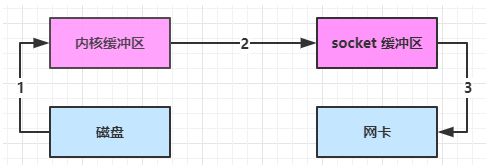
- java 调用 transferTo 方法后,要从 java 程序的用户态切换至内核态,使用 DMA将数据读入内核缓冲区,不会使用 cpu
- 数据从内核缓冲区传输到 socket 缓冲区,cpu 会参与拷贝
- 最后使用 DMA 将 socket 缓冲区的数据写入网卡,不会使用 cpu
可以看到
- 只发生了一次用户态与内核态的切换
- 数据拷贝了 3 次
进一步优化(linux 2.4)

- java 调用 transferTo 方法后,要从 java 程序的用户态切换至内核态,使用 DMA将数据读入内核缓冲区,不会使用 cpu
- 只会将一些 offset 和 length 信息拷入 socket 缓冲区,几乎无消耗
- 使用 DMA 将 内核缓冲区的数据写入网卡,不会使用 cpu
整个过程仅只发生了一次用户态与内核态的切换,数据拷贝了 2 次。所谓的【零拷贝】,并不是真正无拷贝,而是在不会拷贝重复数据到 jvm 内存中,零拷贝的优点有
- 更少的用户态与内核态的切换
- 不利用 cpu 计算,减少 cpu 缓存伪共享
- 零拷贝适合小文件传输
5.4、AIO
AIO 用来解决数据复制阶段的阻塞问题
- 同步意味着,在进行读写操作时,线程需要等待结果,还是相当于闲置
- 异步意味着,在进行读写操作时,线程不必等待结果,而是将来由操作系统来通过回调方式由另外的线程来获得结果
异步模型需要底层操作系统(Kernel)提供支持
- Windows 系统通过 IOCP 实现了真正的异步 IO
- Linux 系统异步 IO 在 2.6 版本引入,但其底层实现还是用多路复用模拟了异步 IO,性能没有优势
文件 AIO
先来看看 AsynchronousFileChannel
@Slf4j public class AioFileChannel { public static void main(String[] args) throws IOException { try (AsynchronousFileChannel channel = AsynchronousFileChannel.open(Paths.get("data.txt"), StandardOpenOption.READ)) { ByteBuffer buffer = ByteBuffer.allocate(16); log.debug("read begin..."); /** * 参数1 ByteBuffer * 参数2 读取的起始位置 * 参数3 附件 * 参数4 回调对象 CompletionHandler */ channel.read(buffer, 0, buffer, new CompletionHandler<Integer, ByteBuffer>() { /** * read 成功,会调用该方法 */ @Override public void completed(Integer result, ByteBuffer attachment) { log.debug("read completed...{}", result); attachment.flip(); debugAll(attachment); } /** * read 失败,会调用该方法 */ @Override public void failed(Throwable exc, ByteBuffer attachment) { exc.printStackTrace(); } }); log.debug("read end..."); } catch (IOException e) { e.printStackTrace(); } System.in.read(); } }- 1
- 2
- 3
- 4
- 5
- 6
- 7
- 8
- 9
- 10
- 11
- 12
- 13
- 14
- 15
- 16
- 17
- 18
- 19
- 20
- 21
- 22
- 23
- 24
- 25
- 26
- 27
- 28
- 29
- 30
- 31
- 32
- 33
- 34
- 35
- 36
- 37
- 38
- 39
- 40
-
相关阅读:
如何批量导出文件名?
关于面试被面试官暴怼:“几年研究生白读” 的前因后果
Pytorch深度学习——线性回归实现 04(未完)
yum使用
基于TensorFlow+CNN+协同过滤算法的智能电影推荐系统——深度学习算法应用(含微信小程序、ipynb工程源码)+MovieLens数据集(四)
设计模式之美——单一职责原则和开闭原则
DTOS帝拓思的3D引擎将取代游戏引擎巨兽,实现国产化替代
untiy 新输入系统 InputSytem
Mac RabbitMq 安装
Allure-pytest功能特性介绍
- 原文地址:https://blog.csdn.net/sj15814963053/article/details/133256034
