-
微服务学习(九):安装OpenOffice
微服务学习(九):安装OpenOffice
一、下载OpenOffice
下载地址:OpenOffice

二、开始安装
上传资源到服务器

解压资源包
tar -zxvf Apache_OpenOffice_4.1.13_Linux_x86-64_install-rpm_zh-CN.tar.gz- 1

进入zh-CN/RPMS目录下安装rpm文件
cd zh-CN/RPMS yum localinstall *.rpm- 1
- 2

进入desktop-integration目录,安装
cd desktop-integration- 1

yum localinstall openoffice4.1.13-redhat-menus-4.1.13-9810.noarch.rpm- 1
安装完成后会在/opt目录下生成openoffice4文件夹

三、启动OpenOffice
临时启动:
/opt/openoffice4/program/soffice -headless -accept="socket,host=0.0.0.0,port=8100;urp;" -nofirststartwizard- 1
后台启动:
nohup /opt/openoffice4/program/soffice -headless -accept="socket,host=0.0.0.0,port=8100;urp;" -nofirststartwizard &- 1
开机自启动:
vim /etc/rc.local nohup /opt/openoffice4/program/soffice -headless -accept="socket,host=0.0.0.0,port=8100;urp;" -nofirststartwizard &- 1
- 2
- 3
四、启动后可能会出现的问题
问题1:缺少lib库文件
错误:/opt/openoffice4/program/soffice.bin: error while loading shared libraries: libXext.so.6: cannot open shared object file: No such file or directory 解决: 安装 yum install libXext.x86_64 安装完成之后复制到openoffice目录 cp -a usr/lib64/libXext.so.6 /opt/openoffice4/program/- 1
- 2
- 3
- 4
- 5
- 6
- 7

问题2:没有图形界面错误:no suitable windowing system found, exiting. 安装:yum groupinstall "Server with GUI" -y- 1
- 2
- 3
五、验证是否启动成功
查看进程
ps -ef | grep openoffice- 1

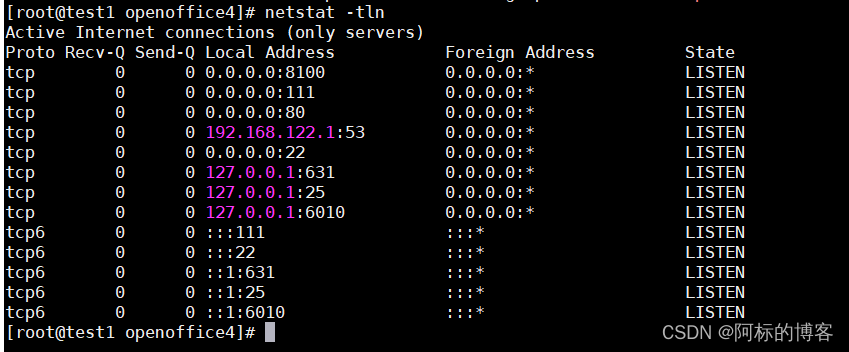
查看默认端口是否启用完成
netstat -tln- 1
-
相关阅读:
leetcode:1154. 一年中的第几天(python3解法)
html5中的canvas还记得吗(4),前端基础
【Web前端】标签大全HTML/CSS/JavaScript
精品基于NET实现的汽配网上商城系统
修改Docker镜像默认下载地址
【EMQX 5.0】2.2 EMQX 5.0 功能菜单简介
Keil代码自动排版配置工具AStyle
Visual Studio Code 常见的配置、常用好用插件以及【vsCode 开发相应项目推荐安装的插件】
JVM在线分析-解决问题的工具二(jcmd, jdb, jhsdb)
17-VMware Horizon 2203 虚拟桌面-Win10 手动桌面池浮动(十七)
- 原文地址:https://blog.csdn.net/weixin_46175652/article/details/133212004