-
Python实现查询一个文件中的pdf文件中的关键字
要求,查询一个文件中的pdf文件中的关键字,输出关键字所在PDF文件的文件名及对应的页数。
- import os
- import PyPDF2
- def search_pdf_files(folder_path, keywords):
- # 初始化结果字典,以关键字为键,值为包含关键字的页面和文件名列表
- results = {keyword: [] for keyword in keywords}
- # 遍历指定文件夹下的所有文件
- for root, dirs, files in os.walk(folder_path):
- for filename in files:
- if filename.endswith(".pdf"):
- # 构建PDF文件的完整路径
- pdf_path = os.path.join(root, filename)
- # 打开PDF文件
- with open(pdf_path, "rb") as pdf_file:
- pdf_reader = PyPDF2.PdfReader(pdf_file)
- # 获取PDF的总页数
- total_pages = len(pdf_reader.pages)
- # 遍历PDF的每一页
- for page_num in range(total_pages):
- # 读取页面内容
- page = pdf_reader.pages[page_num]
- page_text = page.extract_text()
- # 检查所有关键字
- for keyword in keywords:
- if keyword in page_text:
- results[keyword].append({
- "file_name": filename,
- "page_number": page_num + 1 # PDF页码从1开始
- })
- return results
- # 示例用法
- folder_to_search = r"C:\Users\Administrator\Desktop\2"
- search_keywords = ["SVD", "线性回归", "XGBoost", "不存在的关键字"] # 添加多个关键字,包括不存在的关键字
- results = search_pdf_files(folder_to_search, search_keywords)
- # 打印结果
- for keyword, keyword_results in results.items():
- if keyword_results:
- print(f"关键字 '{keyword}' 所在的文件及页数:")
- for result in keyword_results:
- print(f"文件 '{result['file_name']}' 的第 {result['page_number']} 页")
- else:
- print(f"没有找到关键字 '{keyword}'。")
- print() # 输出换行以区分不同关键字的结果
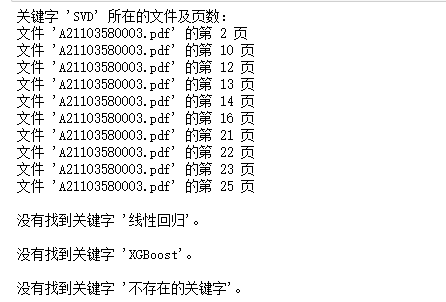
为了方便且高效看论文。
用了上面那个之后发现不太对劲,找到文件后,就可以ctrl+F了,所以去掉了页数。代码如下:
- import os
- import PyPDF2
- def search_pdf_files(folder_path, keywords):
- # Initialize a results dictionary with keywords as keys and lists of files as values
- results = {keyword: [] for keyword in keywords}
- # Initialize a set to keep track of processed files for each keyword
- processed_files = {keyword: set() for keyword in keywords}
- # Traverse all files in the specified folder
- for root, dirs, files in os.walk(folder_path):
- for filename in files:
- if filename.endswith(".pdf"):
- # Build the full path of the PDF file
- pdf_path = os.path.join(root, filename)
- # Open the PDF file
- with open(pdf_path, "rb") as pdf_file:
- pdf_reader = PyPDF2.PdfReader(pdf_file)
- # Get the total number of pages in the PDF
- total_pages = len(pdf_reader.pages)
- # Iterate through each page of the PDF
- for page_num in range(total_pages):
- # Read the page content
- page = pdf_reader.pages[page_num]
- page_text = page.extract_text()
- # Check all keywords
- for keyword in keywords:
- if keyword in page_text:
- # Check if this file has not been processed for this keyword
- if filename not in processed_files[keyword]:
- results[keyword].append({
- "file_name": filename,
- "page_number": page_num + 1 # PDF page numbers start from 1
- })
- processed_files[keyword].add(filename)
- return results
- # 示例用法
- folder_to_search = r"C:\Users\Administrator\Desktop\优秀论文"
- search_keywords = ["ARIMA", "XGBoost", "SVM", "支持向量机","线性回归","决策树","随机森林","模拟退火","粒子群","遗传算法","LSTM","BP神经网络","t-SNE","LightGBM","GMM","距离相关系数","灰色关联分析","互信息","信息熵","递归特征消除","综合评价","熵权法"] # 添加多个关键字,包括不存在的关键字
- results = search_pdf_files(folder_to_search, search_keywords)
- # 打印结果
- for keyword, keyword_results in results.items():
- if keyword_results:
- print(f"关键字 '{keyword}' 所在的文件及页数:")
- for result in keyword_results:
- print(f"文件 '{result['file_name']}'")
- else:
- print(f"没有找到关键字 '{keyword}'。")
- print() # 输出换行以区分不同关键字的结果
-
相关阅读:
PDF能编辑修改吗?教你必备的几种编辑方法
goroutine 调度
Java面试题之并发
BurpSuit官方实验室之SQL注入
Web AP—PC端网页特效
Linux下怎么修改普通用户的权限?
bff层解决了什么痛点
rabbitmq配置windows authentication(windows account)登录
SpringMVC
XILINX XC7A200T-1FBG676C FPGA - 现场可编程门阵列
- 原文地址:https://blog.csdn.net/Catherinemin/article/details/133033211
