-
slam 点云退化
Lidar Slam退化问题分析报告
摘要:激光雷达在空旷区域存在点云采集数据较少,特征无法对机器人的位置起到约束的作用,考虑LIW融合对最终定位的影响。当错误的LIW即发生退化,位姿输出不准存在较大误差,如果未检测到退化,协方差没有及时调整,会导致融合模块位置发生异常。退化检测精度对融合位姿输出影响较大。
- 点云PCA分析(Principle Component Analysis主成分分析)
PCA(Principal Components Analysis)主成分分析,应用于点云预处理,平面检测,法向量求解,降维、分类,解压(升维),用PCA对点云中的点分类,地面点,墙面点,物体上的点等,是一种数据降维技术,用于数据预处理。PCA是将三维投影到某个面上,用于发现其主要方向。面的选择依据是选择尽量使得点的分布方差最大,分布较散的面,方差越大,它的信息量越大。
1.1点云特征形式
点云特征可以分为一维线特征(b)、二维面特征(c)、三维空间特征(a)三种情况,如下图所示。

1.2 点云特征对定位的影响
定位一般包含位置(x,y,z)与姿态(roll,pitch,yaw)的估计,激光雷达采集到的点云数据后,与上一帧数据进行匹配,计算出雷达的相对位姿变化。线特征无法对旋转进行约束,面特征无法对平行与该平面的位置进行约束,若想满足对车的位姿进行全方位的约束就需要为空间特征。
1.3空间特征评估标准
对于直线特征为直线的斜率及截距;对于平面特征,表征平面向量的方法为坐标原点的及法向量;对于三维空间特征相应的以质心和三个法向量表征,即原点和空间的三个基坐标。点云的法向量用特征向量表示。特征向量最直观的解释之一是它总是指向数据方差最大的方向。更准确地说,第一特征向量是数据方差最大的方向,第二特征向量是与第一特征向量垂直的方向上数据方差最大的方向,第三特征向量是与第一和第二特征向量垂直的方向上数据方差最大的方向,类似于空间坐标系下的基坐标系,以此类推。
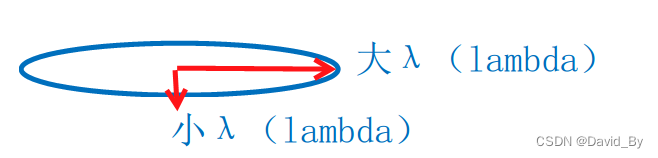
假设在平面坐标系中,每个数据样本都是可以用坐标x、y表示的二维点。这些数据样本的协方差矩阵的特征向量是u和v。较长的u是第一特征向量,较短的v是第二特征向量。特征值的大小用箭头的长度表示。我们可以看到,第一个特征向量(从数据的平均值)指向欧几里德空间中数据方差最大的方向,第二个特征向量跟第一特征向量是垂直的。
下图是二维空间的一个例子:


三维空间中的特征向量就比较复杂,如图所示:

数据在某个基上的投影值(也是在这个基上的坐标值)越分散,方差越大,这个基保留的信息也就越多,信息量保存能力最大的基向量一定是的协方差矩阵的特征向量,并且这个特征向量保存的信息量就是它对应的特征值。
- 实际测试
为验证退化检测的有效性,运行了两组数据并进行了分析。
2.1非退化场景测试
场景一特征比较丰富,特征较多,场景如下图所示:
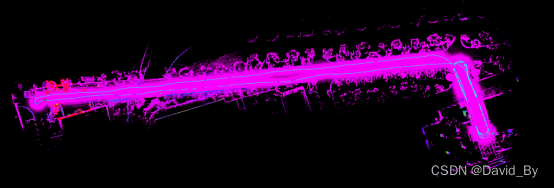
采用此方法检测结果如下:
根据特征值与特征向量的结果,将特征值按从大到小排序特征值大的表示特征较多。其中橙色与黄色的为第一与第二特征值(图中为了显示缩小了1000倍),蓝色为特征值最小的取值范围,设置退化的阈值为sort_degen(2)<500且sort_degen(1)/sort_degen(2)>200,当最小方向的特征值过小且第二方向的特征值大于其200倍时认为发散(主要区分只有一个平面特征的情况,如单独无人车的地面特征无法进行位置估计).

此时的Z方向最高为3米,三个方向特征值为57046、31874、1584,点云分布及特征向量如上图所示。
以RTK为真值,计算相邻两帧的运动的距离l,与融合相邻两帧的距离为l1,计算l-l1的插值,如下图所示:

从图中可以看出,rtk与fusion的结果,两帧之间的变化范围在0.3-0.4m,两个结果匹配较高。
2.2退化场景测试
退化场景二在场景的右侧点云较少,退化严重。

matlab显示的结果如下图所示,圆圈标注部分为检测到退化部分。


退化时点云情况如下:
三个方向的特征值分别为:43307、12635、52.退化较轻,z方向点较少,最高1m。

场景三:场景中的特征值分别为:3787、2399、2.95,不满足约束条件。

下图为添加了退化检测的融合方案,从rtk与融合轨迹对比,未发现由退化引起的位姿输出异常的情况。

参考:https://github.com/TixiaoShan/LIO-SAM.git
https://www.cnblogs.com/chenlinchong/p/14907439.html
https://frc.ri.cmu.edu/~zhangji/publications/ICRA_2016.pdf
《PCL点云库学习&VS2010(X64)》Part 43 协方差矩阵的特征向量_点云协方差矩阵_梁Rio的博客-CSDN博客
点云的基本特征和描述,PCA主成分分析_点云特征值_一抹烟霞的博客-CSDN博客
SLAM中的退化问题_slam退化_Kinetis60的博客-CSDN博客
lio-sam退化检测:
- for (int i = 0; i < laserCloudSelNum; i++) {
- // lidar -> camera
- pointOri.x = laserCloudOri->points[i].y;
- pointOri.y = laserCloudOri->points[i].z;
- pointOri.z = laserCloudOri->points[i].x;
- // lidar -> camera
- coeff.x = coeffSel->points[i].y;
- coeff.y = coeffSel->points[i].z;
- coeff.z = coeffSel->points[i].x;
- coeff.intensity = coeffSel->points[i].intensity;
- // in camera
- float arx = (crx * sry * srz * pointOri.x + crx * crz * sry * pointOri.y - srx * sry * pointOri.z) * coeff.x
- + (-srx * srz * pointOri.x - crz * srx * pointOri.y - crx * pointOri.z) * coeff.y
- + (crx * cry * srz * pointOri.x + crx * cry * crz * pointOri.y - cry * srx * pointOri.z) * coeff.z;
- float ary = ((cry * srx * srz - crz * sry) * pointOri.x
- + (sry * srz + cry * crz * srx) * pointOri.y + crx * cry * pointOri.z)
- * coeff.x
- + ((-cry * crz - srx * sry * srz) * pointOri.x
- + (cry * srz - crz * srx * sry) * pointOri.y - crx * sry * pointOri.z)
- * coeff.z;
- float arz = ((crz * srx * sry - cry * srz) * pointOri.x + (-cry * crz - srx * sry * srz) * pointOri.y) * coeff.x
- + (crx * crz * pointOri.x - crx * srz * pointOri.y) * coeff.y
- + ((sry * srz + cry * crz * srx) * pointOri.x + (crz * sry - cry * srx * srz) * pointOri.y) * coeff.z;
- // camera -> lidar
- matA.at<float>(i, 0) = arz;
- matA.at<float>(i, 1) = arx;
- matA.at<float>(i, 2) = ary;
- matA.at<float>(i, 3) = coeff.z;
- matA.at<float>(i, 4) = coeff.x;
- matA.at<float>(i, 5) = coeff.y;
- matB.at<float>(i, 0) = -coeff.intensity;
- }
- cv::transpose(matA, matAt);
- matAtA = matAt * matA;
- matAtB = matAt * matB;
- cv::solve(matAtA, matAtB, matX, cv::DECOMP_QR);
- if (iterCount == 0) {
- cv::Mat matE(1, 6, CV_32F, cv::Scalar::all(0));
- cv::Mat matV(6, 6, CV_32F, cv::Scalar::all(0));
- cv::Mat matV2(6, 6, CV_32F, cv::Scalar::all(0));
- cv::eigen(matAtA, matE, matV);
- matV.copyTo(matV2);
- isDegenerate = false;
- float eignThre[6] = {100, 100, 100, 100, 100, 100};
- for (int i = 5; i >= 0; i--) {
- if (matE.at<float>(0, i) < eignThre[i]) {
- for (int j = 0; j < 6; j++) {
- matV2.at<float>(i, j) = 0;
- }
- isDegenerate = true;
- } else {
- break;
- }
- }
- matP = matV.inv() * matV2;
- }
fast-lio2打滑检测:
- pcl::compute3DCentroid(*feats_undistort, xyz_centroid);
- pcl::computeCovarianceMatrix(*feats_undistort, xyz_centroid, all_covariance);
- Eigen::EigenSolver<Eigen::Matrix3f> es(all_covariance);
- Eigen::VectorXf eigenvalues = es.eigenvalues().real();
- Eigen::VectorXf sorted_eigen;
- Eigen::VectorXi index;
- sort_vec(eigenvalues, sorted_eigen, index);
- fout_degen << sorted_eigen(0) << " "
- << sorted_eigen(1) << " "
- << sorted_eigen(2) << std::endl;
- if (sorted_eigen(2) < 1000 && log10(abs(sorted_eigen(1)) / abs(sorted_eigen(2))) > ls_map.eskf_stt_.eigen_degen) {
- ls_map.car_stt_.flag_degen = true;
- p_imu->flag_degen_ = true;
- ls_map.lidar_stt_.savepcd++;
- if (feats_undistort->points.size() > 0) {
- std::cerr << "feats_undistort:" << feats_undistort->points.size() << std::endl;
- savepcl(string(root_dir + "/PCD/" + to_string(ls_map.lidar_stt_.savepcd) + ".pcd"), *feats_undistort);
- }
- flag_degen_num = 0;
- }
matlab显示特征值:
- X = load('nodegene/pose_degen.txt');
- b1=X(:,1);
- b2=X(:,2);
- b3=X(:,3);
- Y=load('nodegene/pose_out.txt');
- ax = Y(:,2);
- ay = Y(:,3);
- b4=b3;
- figure(1)
- for i=1:length(b1)
- if(b3(i)<1500&&log10(b2(i) /b3(i) ) > 2.3)%200倍
- plot(ax(i),ay(i),'o');
- b4(i)=0;
- hold on;
- else
- b4(i)=1000;
- end
- end
- plot(ax,ay)
- figure(2)
- plot(b3)
- hold on;
- plot(b1/200)
- hold on;
- plot(b2/200)
- hold on;
- plot(b4)
c++特征值特征向量显示
- #include <Eigen/Core>
- #include <Eigen/Dense>
- #include <boost/thread/thread.hpp>
- #include <iostream>
- #include <pcl/common/centroid.h>
- #include <pcl/common/common_headers.h>
- #include <pcl/console/parse.h>
- #include <pcl/features/feature.h>
- #include <pcl/features/normal_3d.h>
- #include <pcl/filters/voxel_grid.h>
- #include <pcl/io/pcd_io.h>
- #include <pcl/point_cloud.h>
- #include <pcl/point_types.h>
- #include <pcl/visualization/cloud_viewer.h>
- #include <pcl/visualization/pcl_visualizer.h>
- #include <string>
- #include <unistd.h>
- using namespace pcl;
- using namespace pcl::io;
- using namespace Eigen;
- using namespace std;
- #define PRITF 5
- struct VecFeat {
- float val;
- float vec[3];
- };
- int point_size = 0;
- /************************************************************************************************************
- /*****************************可视化单个点云:应用PCL
- Visualizer可视化类显示单个具有XYZ信息的点云****************/
- /************************************************************************************************************/
- // simpleVis函数实现最基本的点云可视化操作,
- boost::shared_ptr<pcl::visualization::PCLVisualizer>
- simpleVis(pcl::PointCloud<pcl::PointXYZ>::ConstPtr cloud) {
- // --------------------------------------------
- // -----Open 3D viewer and add point cloud-----
- // --------------------------------------------
- //创建视窗对象并给标题栏设置一个名称“3D
- // Viewer”并将它设置为boost::shared_ptr智能共享指针,这样可以保证指针在程序中全局使用,而不引起内存错误
- boost::shared_ptr<pcl::visualization::PCLVisualizer> viewer(
- new pcl::visualization::PCLVisualizer("3D Viewer"));
- //设置视窗的背景色,可以任意设置RGB的颜色,这里是设置为黑色
- viewer->setBackgroundColor(0, 0, 0);
- /*这是最重要的一行,我们将点云添加到视窗对象中,并定一个唯一的字符串作为ID
- 号,利用此字符串保证在其他成员中也能
- 标志引用该点云,多次调用addPointCloud可以实现多个点云的添加,,每调用一次就会创建一个新的ID号,如果想更新一个
- 已经显示的点云,必须先调用removePointCloud(),并提供需要更新的点云ID 号,
- *******************************************************************************************/
- viewer->addPointCloud<pcl::PointXYZ>(cloud, "sample cloud");
- //用于改变显示点云的尺寸,可以利用该方法控制点云在视窗中的显示方法,
- viewer->setPointCloudRenderingProperties(
- pcl::visualization::PCL_VISUALIZER_POINT_SIZE, 1, "sample cloud");
- /*******************************************************************************************************
- 查看复杂的点云,经常让人感到没有方向感,为了保持正确的坐标判断,需要显示坐标系统方向,可以通过使用X(红色)
- Y(绿色 )Z
- (蓝色)圆柱体代表坐标轴的显示方式来解决,圆柱体的大小可以通过scale参数来控制,本例中scale设置为1.0
- ******************************************************************************************************/
- viewer->addCoordinateSystem(1.0);
- //通过设置照相机参数使得从默认的角度和方向观察点云
- viewer->initCameraParameters();
- return (viewer);
- }
- /*****************************可视化点云颜色特征******************************************************/
- /**************************************************************************************************
- 多数情况下点云显示不采用简单的XYZ类型,常用的点云类型是XYZRGB点,包含颜色数据,除此之外,还可以给指定的点云定制颜色
- 以示得点云在视窗中比较容易区分。点赋予不同的颜色表征其对应的Z轴值不同,PCL
- Visualizer可根据所存储的颜色数据为点云 赋色,
- 比如许多设备kinect可以获取带有RGB数据的点云,PCL
- Vizualizer可视化类可使用这种颜色数据为点云着色,rgbVis函数中的代码
- 用于完成这种操作。
- ***************************************************************************************************/
- /**************************************************************************
- 与前面的示例相比点云的类型发生了变化,这里使用的点云带有RGB数据的属性字段,
- ****************************************************************************/
- boost::shared_ptr<pcl::visualization::PCLVisualizer>
- rgbVis(pcl::PointCloud<pcl::PointXYZRGB>::ConstPtr cloud) {
- // --------------------------------------------
- // -----Open 3D viewer and add point cloud-----
- // --------------------------------------------
- boost::shared_ptr<pcl::visualization::PCLVisualizer> viewer(
- new pcl::visualization::PCLVisualizer("3D Viewer"));
- viewer->setBackgroundColor(0, 0, 0);
- /***************************************************************************************************************
- 设置窗口的背景颜色后,创建一个颜色处理对象,PointCloudColorHandlerRGBField利用这样的对象显示自定义颜色数据,PointCloudColorHandlerRGBField
- 对象得到每个点云的RGB颜色字段,
- **************************************************************************************************************/
- pcl::visualization::PointCloudColorHandlerRGBField<pcl::PointXYZRGB> rgb(
- cloud);
- viewer->addPointCloud<pcl::PointXYZRGB>(cloud, rgb, "sample cloud");
- viewer->setPointCloudRenderingProperties(
- pcl::visualization::PCL_VISUALIZER_POINT_SIZE, 3, "sample cloud");
- viewer->addCoordinateSystem(1.0);
- viewer->initCameraParameters();
- return (viewer);
- }
- /******************可视化点云自定义颜色特征**********************************************************/
- /****************************************************************************************************
- 演示怎样给点云着上单独的一种颜色,可以利用该技术给指定的点云着色,以区别其他的点云,
- *****************************************************************************************************/
- //点云类型为XYZ类型,customColourVis函数将点云赋值为绿色,
- boost::shared_ptr<pcl::visualization::PCLVisualizer>
- customColourVis(pcl::PointCloud<pcl::PointXYZ>::ConstPtr cloud) {
- // --------------------------------------------
- // -----Open 3D viewer and add point cloud-----
- // --------------------------------------------
- boost::shared_ptr<pcl::visualization::PCLVisualizer> viewer(
- new pcl::visualization::PCLVisualizer("3D Viewer"));
- viewer->setBackgroundColor(0, 0, 0);
- //创建一个自定义的颜色处理器PointCloudColorHandlerCustom对象,并设置颜色为纯绿色
- pcl::visualization::PointCloudColorHandlerCustom<pcl::PointXYZ> single_color(
- cloud, 0, 255, 0);
- // addPointCloud<>()完成对颜色处理器对象的传递
- viewer->addPointCloud<pcl::PointXYZ>(cloud, single_color, "sample cloud");
- viewer->setPointCloudRenderingProperties(
- pcl::visualization::PCL_VISUALIZER_POINT_SIZE, 3, "sample cloud");
- viewer->addCoordinateSystem(1.0);
- viewer->initCameraParameters();
- return (viewer);
- }
- //*******************可视化点云法线和其他特征*************************************************/
- /*********************************************************************************************
- 显示法线是理解点云的一个重要步骤,点云法线特征是非常重要的基础特征,PCL
- visualizer可视化类可用于绘制法线,
- 也可以绘制表征点云的其他特征,比如主曲率和几何特征,normalsVis函数中演示了如何实现点云的法线,
- ***********************************************************************************************/
- boost::shared_ptr<pcl::visualization::PCLVisualizer>
- normalsVis(pcl::PointCloud<pcl::PointXYZRGB>::ConstPtr cloud,
- pcl::PointCloud<pcl::Normal>::ConstPtr normals) {
- // --------------------------------------------------------
- // -----Open 3D viewer and add point cloud and normals-----
- // --------------------------------------------------------
- boost::shared_ptr<pcl::visualization::PCLVisualizer> viewer(
- new pcl::visualization::PCLVisualizer("3D Viewer"));
- viewer->setBackgroundColor(0, 0, 0);
- pcl::visualization::PointCloudColorHandlerRGBField<pcl::PointXYZRGB> rgb(
- cloud);
- viewer->addPointCloud<pcl::PointXYZRGB>(cloud, rgb, "sample cloud");
- viewer->setPointCloudRenderingProperties(
- pcl::visualization::PCL_VISUALIZER_POINT_SIZE, 3, "sample cloud");
- //实现对点云法线的显示
- viewer->addPointCloudNormals<pcl::PointXYZRGB, pcl::Normal>(
- cloud, normals, 10, 0.05, "normals");
- viewer->addCoordinateSystem(1.0);
- viewer->initCameraParameters();
- return (viewer);
- }
- //*****************绘制普通形状************************************************//
- /**************************************************************************************************************
- PCL
- visualizer可视化类允许用户在视窗中绘制一般图元,这个类常用于显示点云处理算法的可视化结果,例如
- 通过可视化球体
- 包围聚类得到的点云集以显示聚类结果,shapesVis函数用于实现添加形状到视窗中,添加了四种形状:从点云中的一个点到最后一个点
- 之间的连线,原点所在的平面,以点云中第一个点为中心的球体,沿Y轴的椎体
- *************************************************************************************************************/
- boost::shared_ptr<pcl::visualization::PCLVisualizer>
- shapesVis(pcl::PointCloud<pcl::PointXYZRGB>::ConstPtr cloud) {
- // --------------------------------------------
- // -----Open 3D viewer and add point cloud添加点云到视窗实例代码-----
- // --------------------------------------------
- boost::shared_ptr<pcl::visualization::PCLVisualizer> viewer(
- new pcl::visualization::PCLVisualizer("3D Viewer"));
- viewer->setBackgroundColor(0, 0, 0);
- pcl::visualization::PointCloudColorHandlerRGBField<pcl::PointXYZRGB> rgb(
- cloud);
- viewer->addPointCloud<pcl::PointXYZRGB>(cloud, rgb, "sample cloud");
- viewer->setPointCloudRenderingProperties(
- pcl::visualization::PCL_VISUALIZER_POINT_SIZE, 3, "sample cloud");
- viewer->addCoordinateSystem(1.0);
- viewer->initCameraParameters();
- /************************************************************************************************
- 绘制形状的实例代码,绘制点之间的连线,
- *************************************************************************************************/
- viewer->addLine<pcl::PointXYZRGB>(cloud->points[0],
- cloud->points[cloud->size() - 1], "line");
- //添加点云中第一个点为中心,半径为0.2的球体,同时可以自定义颜色
- viewer->addSphere(cloud->points[0], 0.2, 0.5, 0.5, 0.0, "sphere");
- //---------------------------------------
- //-----Add shapes at other
- // locations添加绘制平面使用标准平面方程ax+by+cz+d=0来定义平面,这个平面以原点为中心,方向沿着Z方向-----
- //---------------------------------------
- pcl::ModelCoefficients coeffs;
- coeffs.values.push_back(0.0);
- coeffs.values.push_back(0.0);
- coeffs.values.push_back(1.0);
- coeffs.values.push_back(0.0);
- viewer->addPlane(coeffs, "plane");
- //添加锥形的参数
- coeffs.values.clear();
- coeffs.values.push_back(0.3);
- coeffs.values.push_back(0.3);
- coeffs.values.push_back(0.0);
- coeffs.values.push_back(0.0);
- coeffs.values.push_back(1.0);
- coeffs.values.push_back(0.0);
- coeffs.values.push_back(5.0);
- viewer->addCone(coeffs, "cone");
- return (viewer);
- }
- /***************
- * cov show
- *************************************************************************************************************/
- boost::shared_ptr<pcl::visualization::PCLVisualizer>
- CovshapesVis(pcl::PointCloud<pcl::PointXYZRGB>::ConstPtr cloud,
- const Eigen::Vector4f xyz_centroid, VecFeat *vecfeat) {
- // --------------------------------------------
- // -----Open 3D viewer and add point cloud添加点云到视窗实例代码-----
- // --------------------------------------------
- boost::shared_ptr<pcl::visualization::PCLVisualizer> viewer(
- new pcl::visualization::PCLVisualizer("3D Viewer"));
- viewer->setBackgroundColor(1, 1, 1);
- pcl::visualization::PointCloudColorHandlerRGBField<pcl::PointXYZRGB> rgb(
- cloud);
- viewer->addPointCloud<pcl::PointXYZRGB>(cloud, rgb, "sample cloud");
- viewer->setPointCloudRenderingProperties(
- pcl::visualization::PCL_VISUALIZER_POINT_SIZE, 3, "sample cloud");
- // viewer->addCoordinateSystem(1.0);
- // viewer->initCameraParameters();
- pcl::PointXYZRGB center_point, cord_xyz[3];
- center_point.x = xyz_centroid[0];
- center_point.y = xyz_centroid[1];
- center_point.z = xyz_centroid[2];
- double rgb_show[3];
- for (int i = 0; i < 3; i++) {
- rgb_show[i] =
- vecfeat[i].val / (vecfeat[0].val + vecfeat[1].val + vecfeat[2].val);
- cord_xyz[i].x =
- point_size * rgb_show[i] * vecfeat[i].vec[0] + center_point.x;
- cord_xyz[i].y =
- point_size * rgb_show[i] * vecfeat[i].vec[1] + center_point.y;
- cord_xyz[i].z =
- point_size * rgb_show[i] * vecfeat[i].vec[2] + center_point.z;
- string lin_name = to_string(i);
- viewer->addLine<pcl::PointXYZRGB>(center_point, cord_xyz[i], rgb_show[i],
- rgb_show[i], rgb_show[i], lin_name);
- }
- // viewer->addLine<pcl::PointXYZRGB>(center_point,
- // cloud->points[cloud->size() - 1], "line");
- //添加点云中第一个点为中心,半径为0.2的球体,同时可以自定义颜色
- // viewer->addSphere(cloud->points[0], 0.2, 0.5, 0.5, 0.0, "sphere");
- //---------------------------------------
- //-----Add shapes at other
- // locations添加绘制平面使用标准平面方程ax+by+cz+d=0来定义平面,这个平面以原点为中心,方向沿着Z方向-----
- //---------------------------------------
- // pcl::ModelCoefficients coeffs;
- // coeffs.values.push_back(0.0);
- // coeffs.values.push_back(0.0);
- // coeffs.values.push_back(1.0);
- // coeffs.values.push_back(0.0);
- // viewer->addPlane(coeffs, "plane");
- //添加锥形的参数
- // coeffs.values.clear();
- // coeffs.values.push_back(0.3);
- // coeffs.values.push_back(0.3);
- // coeffs.values.push_back(0.0);
- // coeffs.values.push_back(0.0);
- // coeffs.values.push_back(1.0);
- // coeffs.values.push_back(0.0);
- // coeffs.values.push_back(5.0);
- // viewer->addCone(coeffs, "cone");
- return (viewer);
- }
- /******************************************************************************************
- 多视角显示:PCL
- visealizer可视化类允许用户通过不同的窗口(Viewport)绘制多个点云这样方便对点云比较
- viewportsVis函数演示如何用多视角来显示点云计算法线的方法结果对比
- ******************************************************************************************/
- boost::shared_ptr<pcl::visualization::PCLVisualizer>
- viewportsVis(pcl::PointCloud<pcl::PointXYZRGB>::ConstPtr cloud,
- pcl::PointCloud<pcl::Normal>::ConstPtr normals1,
- pcl::PointCloud<pcl::Normal>::ConstPtr normals2) {
- // --------------------------------------------------------
- // -----Open 3D viewer and add point cloud and normals-----
- // --------------------------------------------------------
- boost::shared_ptr<pcl::visualization::PCLVisualizer> viewer(
- new pcl::visualization::PCLVisualizer("3D Viewer"));
- viewer->initCameraParameters();
- //以上是创建视图的标准代码
- int v1(0); //创建新的视口
- viewer->createViewPort(
- 0.0, 0.0, 0.5, 1.0,
- v1); // 4个参数分别是X轴的最小值,最大值,Y轴的最小值,最大值,取值0-1,v1是标识
- viewer->setBackgroundColor(0, 0, 0, v1); //设置视口的背景颜色
- viewer->addText(
- "Radius: 0.01", 10, 10, "v1 text",
- v1); //添加一个标签区别其他窗口 利用RGB颜色着色器并添加点云到视口中
- pcl::visualization::PointCloudColorHandlerRGBField<pcl::PointXYZRGB> rgb(
- cloud);
- viewer->addPointCloud<pcl::PointXYZRGB>(cloud, rgb, "sample cloud1", v1);
- //对第二视口做同样的操作,使得做创建的点云分布于右半窗口,将该视口背景赋值于灰色,以便明显区别,虽然添加同样的点云,给点云自定义颜色着色
- int v2(0);
- viewer->createViewPort(0.5, 0.0, 1.0, 1.0, v2);
- viewer->setBackgroundColor(0.3, 0.3, 0.3, v2);
- viewer->addText("Radius: 0.1", 10, 10, "v2 text", v2);
- pcl::visualization::PointCloudColorHandlerCustom<pcl::PointXYZRGB>
- single_color(cloud, 0, 255, 0);
- viewer->addPointCloud<pcl::PointXYZRGB>(cloud, single_color, "sample cloud2",
- v2);
- //为所有视口设置属性,
- viewer->setPointCloudRenderingProperties(
- pcl::visualization::PCL_VISUALIZER_POINT_SIZE, 3, "sample cloud1");
- viewer->setPointCloudRenderingProperties(
- pcl::visualization::PCL_VISUALIZER_POINT_SIZE, 3, "sample cloud2");
- viewer->addCoordinateSystem(1.0);
- //添加法线 每个视图都有一组对应的法线
- viewer->addPointCloudNormals<pcl::PointXYZRGB, pcl::Normal>(
- cloud, normals1, 10, 0.05, "normals1", v1);
- viewer->addPointCloudNormals<pcl::PointXYZRGB, pcl::Normal>(
- cloud, normals2, 10, 0.05, "normals2", v2);
- return (viewer);
- }
- /*******************************************************************************************************
- 这里是处理鼠标事件的函数,每次相应鼠标时间都会回电函数,需要从event实例提取事件信息,本例中查找鼠标左键的释放事件
- 每次响应这种事件都会在鼠标按下的位置上生成一个文本标签。
- *********************************************************************************************************/
- unsigned int text_id = 0;
- void keyboardEventOccurred(const pcl::visualization::KeyboardEvent &event,
- void *viewer_void) {
- pcl::visualization::PCLVisualizer *viewer =
- static_cast<pcl::visualization::PCLVisualizer *>(viewer_void);
- if (event.getKeySym() == "r" && event.keyDown()) {
- std::cout << "r was pressed => removing all text" << std::endl;
- char str[512];
- for (unsigned int i = 0; i < text_id; ++i) {
- sprintf(str, "text#%03d", i);
- viewer->removeShape(str);
- }
- text_id = 0;
- }
- }
- /********************************************************************************************
- 键盘事件 我们按下哪个按键 如果按下r健
- 则删除前面鼠标所产生的文本标签,需要注意的是,当按下R键时 3D相机仍然会重置
- 所以在PCL中视窗中注册事件响应回调函数,不会覆盖其他成员对同一事件的响应
- **************************************************************************************************/
- void mouseEventOccurred(const pcl::visualization::MouseEvent &event,
- void *viewer_void) {
- pcl::visualization::PCLVisualizer *viewer =
- static_cast<pcl::visualization::PCLVisualizer *>(viewer_void);
- if (event.getButton() == pcl::visualization::MouseEvent::LeftButton &&
- event.getType() == pcl::visualization::MouseEvent::MouseButtonRelease) {
- std::cout << "Left mouse button released at position (" << event.getX()
- << ", " << event.getY() << ")" << std::endl;
- char str[512];
- sprintf(str, "text#%03d", text_id++);
- viewer->addText("clicked here", event.getX(), event.getY(), str);
- }
- }
- /******************自定义交互*****************************************************************************/
- /******************************************************************************************************
- 多数情况下,默认的鼠标和键盘交互设置不能满足用户的需求,用户想扩展函数的某一些功能,
- 比如按下键盘时保存点云的信息, 或者通过鼠标确定点云的位置
- interactionCustomizationVis函数进行演示如何捕捉鼠标和键盘事件,在窗口点击,将会显示
- 一个2D的文本标签,按下r健出去文本
- ******************************************************************************************************/
- boost::shared_ptr<pcl::visualization::PCLVisualizer>
- interactionCustomizationVis() {
- boost::shared_ptr<pcl::visualization::PCLVisualizer> viewer(
- new pcl::visualization::PCLVisualizer("3D Viewer"));
- viewer->setBackgroundColor(0, 0, 0);
- //以上是实例化视窗的标准代码
- viewer->addCoordinateSystem(1.0);
- //分别注册响应键盘和鼠标事件,keyboardEventOccurred
- // mouseEventOccurred回调函数,需要将boost::shared_ptr强制转换为void*
- viewer->registerKeyboardCallback(keyboardEventOccurred, (void *)viewer.get());
- viewer->registerMouseCallback(mouseEventOccurred, (void *)viewer.get());
- return (viewer);
- }
- /********************************************************
- * 计算点云中点坐标
- * 功能与函数相同
- * pcl::compute3DCentroid(*feats_undistort, xyz_centroid);
- */
- Eigen::Vector4f ComputeCent(const pcl::PointCloud<pcl::PointXYZ>::Ptr cloud) {
- //计算中心点坐标
- Eigen::Vector4f pcl_center = Eigen::Vector4f::Zero(4);
- for (int i = 0; i < cloud->points.size(); i++) {
- pcl_center[0] += cloud->points[i].x;
- pcl_center[1] += cloud->points[i].y;
- pcl_center[2] += cloud->points[i].z;
- }
- pcl_center = pcl_center / cloud->points.size();
- pcl_center[3] = 1.0;
- return pcl_center;
- }
- /****************************
- * 根据点云的中点和点云计算点云的方差
- * pcl::computeCovarianceMatrix(*feats_undistort, xyz_centroid,
- all_covariance);
- */
- Eigen::Matrix3f ComputeCov(Eigen::Vector4f ¢er,
- const pcl::PointCloud<pcl::PointXYZ>::Ptr cloud) {
- int cld_sz = 1.0;
- double xx = 0, xy = 0, xz = 0, yy = 0, yz = 0, zz = 0;
- for (int i = 0; i < cloud->points.size(); i++) {
- xx += (cloud->points[i].x - center[0]) * (cloud->points[i].x - center[0]);
- xy += (cloud->points[i].x - center[0]) * (cloud->points[i].y - center[1]);
- xz += (cloud->points[i].x - center[0]) * (cloud->points[i].z - center[2]);
- yy += (cloud->points[i].y - center[1]) * (cloud->points[i].y - center[1]);
- yz += (cloud->points[i].y - center[1]) * (cloud->points[i].z - center[2]);
- zz += (cloud->points[i].z - center[2]) * (cloud->points[i].z - center[2]);
- }
- //大小为3*3的协方差矩阵
- Eigen::Matrix3f covMat(3, 3);
- covMat(0, 0) = xx / cld_sz;
- covMat(0, 1) = covMat(1, 0) = xy / cld_sz;
- covMat(0, 2) = covMat(2, 0) = xz / cld_sz;
- covMat(1, 1) = yy / cld_sz;
- covMat(1, 2) = covMat(2, 1) = yz / cld_sz;
- covMat(2, 2) = zz / cld_sz;
- return covMat;
- }
- /*************************************
- *input: vec特征值
- *output:sorted_vec 排序后的特征值
- * :ind 排序后的特征值对应的特征向量编号
- *
- ***************************************/
- void sort_vec(const Vector3f &vec, Vector3f &sorted_vec, Vector3i &ind) {
- ind = Vector3i::LinSpaced(vec.size(), 0, vec.size() - 1);
- auto rule = [vec](int i, int j) -> bool { return abs(vec(i)) > abs(vec(j)); };
- std::sort(ind.data(), ind.data() + ind.size(), rule);
- sorted_vec.resize(vec.size());
- for (int i = 0; i < vec.size(); i++) {
- sorted_vec(i) = vec(ind(i));
- }
- }
- /******************************************
- * 计算特征值和特征向量
- *input:cloud-点云
- *output:xyz_centroid-点云中心坐标
- * 特征值与特征向量vecfeat为3维数组
- *
- *****************************************/
- void ComputePclVec(const pcl::PointCloud<pcl::PointXYZ>::Ptr cloud,
- Eigen::Vector4f &xyz_centroid, VecFeat *vecfeat) {
- Eigen::Matrix3f all_covariance;
- pcl::compute3DCentroid(*cloud, xyz_centroid);
- pcl::computeCovarianceMatrix(*cloud, xyz_centroid, all_covariance);
- if (PRITF == 1)
- std::cerr << "begin:" << xyz_centroid << ";" << ComputeCent(cloud) << ";"
- << ComputeCov(xyz_centroid, cloud) << ";" << all_covariance
- << std::endl;
- //求特征值与特征向量
- Eigen::EigenSolver<Eigen::Matrix3f> es(all_covariance);
- Eigen::Matrix3f valMat = es.pseudoEigenvalueMatrix(); //特征值矩阵
- Eigen::Vector3f val = es.eigenvalues().real(); //特征值
- Eigen::Matrix3f vec = es.pseudoEigenvectors(); //特征向量
- //找到最小特征值t1
- // val(0,0) val(1,1) val(2,2)协方差矩阵中,就是
- // 只有对角线元素不为零,两个变量是独立的
- //对应三个特征向量
- if (PRITF == 2)
- std::cerr << "特征值" << val << "value 2" << es.eigenvalues().real()
- << " 特征向量" << vec << std::endl;
- Eigen::Vector3f sorted_eigen; //排序后的特征值
- Eigen::Vector3i index; //按特征值大小排序后的特征向量编号
- sort_vec(val, sorted_eigen, index);
- for (int i = 0; i < 3; i++) {
- vecfeat[i].val = sorted_eigen[i];
- std::cerr << "num " << i << " :"
- << "val is :" << vecfeat[i].val << std::endl;
- for (int j = 0; j < 3; j++)
- vecfeat[i].vec[j] = vec(j, i);
- std::cerr << "vec is:" << vecfeat[0].vec[i] << "," << vecfeat[1].vec[i]
- << "," << vecfeat[2].vec[i] << std::endl;
- }
- std::cerr << vecfeat << std::endl;
- }
- /**
- * 保存点云
- * name:a.pcd
- * @return int
- */
- template <typename T> int savepcl(string name, T &incloud) {
- pcl::PointCloud<pcl::PointXYZ> cloud;
- // 创建点云
- cloud.width = 1;
- cloud.height = incloud.points.size();
- cloud.is_dense = false;
- cloud.points.resize(incloud.points.size());
- for (size_t i = 0; i < incloud.points.size(); ++i) {
- // 坐标范围在[0,1024),正方体内随机取点
- cloud.points[i].x = incloud.points[i].x;
- cloud.points[i].y = incloud.points[i].y;
- cloud.points[i].z = incloud.points[i].z;
- }
- pcl::io::savePCDFileASCII(name, cloud);
- return (0);
- }
- /*****
- * 生成点云
- * 形式
- */
- template <typename T> int genpcl(T &cloud, int mode) {
- // pcl::PointCloud<pcl::PointXYZ> cloud;
- // 创建点云
- if (mode == 0) {
- cloud.width = 10000;
- cloud.height = 1;
- cloud.is_dense = false;
- cloud.points.resize(cloud.width * cloud.height);
- for (size_t i = 0; i < cloud.points.size(); ++i) {
- // 坐标范围在[0,1024),正方体内随机取点
- cloud.points[i].x = 1024 * (rand() / (RAND_MAX + 1.0f));
- cloud.points[i].y = 1024 * (rand() / (RAND_MAX + 1.0f));
- cloud.points[i].z = 1024 * (rand() / (RAND_MAX + 1.0f));
- }
- }
- return (0);
- }
- /***
- * 读取点云
- *
- */
- int readpcl(pcl::PointCloud<pcl::PointXYZ>::Ptr cloud, string name) {
- if (pcl::io::loadPCDFile<pcl::PointXYZ>(name, *cloud) == -1) //*打开点云文件
- {
- PCL_ERROR("Couldn't read file test_pcd.pcd\n");
- return (-1);
- }
- } /***
- *删除过远点
- */
- void removefar(pcl::PointCloud<pcl::PointXYZ>::Ptr cloud, float distance,
- float dismin) {
- pcl::PointCloud<pcl::PointXYZ> cloudtmp;
- double maxz = 0;
- for (int i = 0; i < cloud->points.size(); i++) {
- double dis = sqrt(cloud->points[i].x * cloud->points[i].x +
- cloud->points[i].y * cloud->points[i].y);
- if (cloud->points[i].z > maxz)
- maxz = cloud->points[i].z;
- if ((abs(cloud->points[i].x) < distance) &&
- (abs(cloud->points[i].y) < distance) && dis > dismin) {
- cloudtmp.points.push_back(cloud->points[i]);
- }
- }
- std::cerr << "max z:" << maxz << std::endl;
- *cloud = cloudtmp;
- }
- int main(int argc, char **argv) {
- int choose = atoi(argv[1]);
- int points_cloud_mod = atoi(argv[2]);
- if (1) {
- // ------------------------------------
- // -----Create example point cloud-----
- // ------------------------------------
- pcl::PointCloud<pcl::PointXYZ>::Ptr basic_cloud_ptr(
- new pcl::PointCloud<pcl::PointXYZ>);
- pcl::PointCloud<pcl::PointXYZRGB>::Ptr point_cloud_ptr(
- new pcl::PointCloud<pcl::PointXYZRGB>);
- std::cout << "Genarating example point clouds.\n\n";
- // We're going to make an ellipse extruded along the z-axis. The colour for
- // the XYZRGB cloud will gradually go from red to green to blue.
- uint8_t r(255), g(15), b(15);
- /*点云模式选择:
- ***0:圆 45*num
- **1:矩形
- */
- if (points_cloud_mod == 0) {
- int choose_angle = 2.0;
- point_size = 1.0;
- for (float z(-1.0); z <= 1.0; z += 0.05) {
- for (float angle(0.0); angle <= choose_angle * 45; angle += 5.0) {
- pcl::PointXYZ basic_point;
- basic_point.x = 0.5 * cosf(pcl::deg2rad(angle));
- basic_point.y = sinf(pcl::deg2rad(angle));
- basic_point.z = z;
- basic_cloud_ptr->points.push_back(basic_point);
- pcl::PointXYZRGB point;
- point.x = basic_point.x;
- point.y = basic_point.y;
- point.z = basic_point.z;
- uint32_t rgb =
- (static_cast
(r) << 16 | static_cast (g) << 8 | - static_cast
(b)); - point.rgb = *reinterpret_cast
(&rgb); - point_cloud_ptr->points.push_back(point);
- }
- if (z < 0.0) {
- r -= 12;
- g += 12;
- } else {
- g -= 12;
- b += 12;
- }
- }
- } else if (points_cloud_mod == 1) {
- point_size = 1024;
- for (int i = 0; i < 1024; i++) {
- pcl::PointXYZ basic_point;
- basic_point.x = 1024 * (rand() / (RAND_MAX + 1.0f));
- basic_point.y = 1024 * (rand() / (RAND_MAX + 1.0f));
- basic_point.z = 1 * (rand() / (RAND_MAX + 1.0f));
- basic_cloud_ptr->points.push_back(basic_point);
- pcl::PointXYZRGB point;
- point.x = basic_point.x;
- point.y = basic_point.y;
- point.z = basic_point.z;
- uint32_t rgb =
- (static_cast
(r) << 16 | static_cast (g) << 8 | - static_cast
(b)); - point.rgb = *reinterpret_cast
(&rgb); - point_cloud_ptr->points.push_back(point);
- if (basic_point.z < 1024.0) {
- r -= 12;
- g += 12;
- } else {
- g -= 12;
- b += 12;
- }
- }
- } else if (points_cloud_mod == 2) {
- point_size = 1024;
- for (int i = 0; i < 1024; i++) {
- pcl::PointXYZ basic_point;
- basic_point.x = 1024 * (rand() / (RAND_MAX + 1.0f));
- basic_point.y = 1024 * (rand() / (RAND_MAX + 1.0f));
- basic_point.z = 1;
- basic_cloud_ptr->points.push_back(basic_point);
- pcl::PointXYZRGB point;
- point.x = basic_point.x;
- point.y = basic_point.y;
- point.z = basic_point.z;
- uint32_t rgb =
- (static_cast
(r) << 16 | static_cast (g) << 8 | - static_cast
(b)); - point.rgb = *reinterpret_cast
(&rgb); - point_cloud_ptr->points.push_back(point);
- if (basic_point.z < 1024.0) {
- r -= 12;
- g += 12;
- } else {
- g -= 12;
- b += 12;
- }
- }
- } else if (points_cloud_mod == 3) {
- point_size = 50;
- string file_name = "../pcd/" + (string)argv[3];
- readpcl(basic_cloud_ptr, file_name);
- removefar(basic_cloud_ptr, 70, 0);
- pcl::copyPointCloud(*basic_cloud_ptr, *point_cloud_ptr);
- } else if (points_cloud_mod == 4) {
- point_size = 50;
- genpcl(*basic_cloud_ptr, 0);
- savepcl("../pcd/pcl.pcd", *basic_cloud_ptr);
- pcl::copyPointCloud(*basic_cloud_ptr, *point_cloud_ptr);
- }
- basic_cloud_ptr->width = (int)basic_cloud_ptr->points.size();
- basic_cloud_ptr->height = 1;
- point_cloud_ptr->width = (int)point_cloud_ptr->points.size();
- point_cloud_ptr->height = 1;
- // ----------------------------------------------------------------
- // -----Calculate surface normals with a search radius of 0.05-----
- // ----------------------------------------------------------------
- pcl::NormalEstimation
- ne.setInputCloud(point_cloud_ptr);
- pcl::search::KdTree
- new pcl::search::KdTree
- ne.setSearchMethod(tree);
- pcl::PointCloud
- new pcl::PointCloud
- ne.setRadiusSearch(0.05);
- ne.compute(*cloud_normals1);
- // ---------------------------------------------------------------
- // -----Calculate surface normals with a search radius of 0.1-----
- // ---------------------------------------------------------------
- pcl::PointCloud
- new pcl::PointCloud
- ne.setRadiusSearch(0.1);
- ne.compute(*cloud_normals2);
- boost::shared_ptr
- if (choose == 1) {
- viewer = simpleVis(basic_cloud_ptr);
- } else if (choose == 2) {
- viewer = rgbVis(point_cloud_ptr);
- } else if (choose == 3) {
- viewer = customColourVis(basic_cloud_ptr);
- } else if (choose == 4) {
- viewer = normalsVis(point_cloud_ptr, cloud_normals2);
- } else if (choose == 5) {
- viewer = shapesVis(point_cloud_ptr);
- } else if (choose == 6) {
- viewer = viewportsVis(point_cloud_ptr, cloud_normals1, cloud_normals2);
- } else if (choose == 7) {
- viewer = interactionCustomizationVis();
- } else if (choose == 8) {
- Eigen::Vector4f xyz_centroid;
- VecFeat vecfeat[3];
- ComputePclVec(basic_cloud_ptr, xyz_centroid, &vecfeat[0]);
- viewer = CovshapesVis(point_cloud_ptr, xyz_centroid, &vecfeat[0]);
- }
- //--------------------
- // -----Main loop-----
- //--------------------
- while (!viewer->wasStopped()) {
- viewer->spinOnce(100);
- boost::this_thread::sleep(boost::posix_time::microseconds(100000));
- }
- }
- return 0;
- }
特征值求解solver




-
相关阅读:
山与路远程控制 一个基于electron和golang实现的远控软件
通达信交易接口
python的反射机制
大模型培训老师叶梓 AI编程的未来:GitHub Copilot的创新之旅与实践智慧
c++11 智能指针-辅助类 (std::enable_shared_from_this)
ComfyUI中实现反推提示词的多种方案
Spring Cloud Alibaba(Nacos+Open Feign)微服务项目如何在本地调试,每次都调用本地的服务?
PMBOK史上最大的改版,你知道到底有什么精华嘛?
制造企业有了ERP,是否需要MES系统?
2023/9/15 -- C++/QT
- 原文地址:https://blog.csdn.net/JanKin_BY/article/details/132851723

