• 布局设计和实现:计算器UI【TableLayout、GridLayout】


    一、使用TableLayout实现计算器UI

    1.新建一个空白项目布局

    s在这里插入图片描述

    根据自己的需求输入其他信息

    在这里插入图片描述

    填写完成后,点击Finish即可

    2. 设计UI界面

    res/layout文件夹中的XML文件中创建UI界面。在这个XML文件中,您可以使用TableLayout来设计计算器界面。

    2.1 创建layout文件夹

    但是默认创建出来的项目并不会包含layout布局文件夹,因此需要我们自行创建

    在这里插入图片描述

    res目录内,右键单击鼠标,然后选择 “New” -> “Android Resource Directory” 选项。

    在这里插入图片描述

    在弹出的对话框中,将 “Directory name” 设置为 “layout”,然后点击 “OK”。

    在这里插入图片描述

    2.2 创建xml文件

    layout目录内,右键单击鼠标,然后选择 “New” -> “Layout Resource File” 选项。
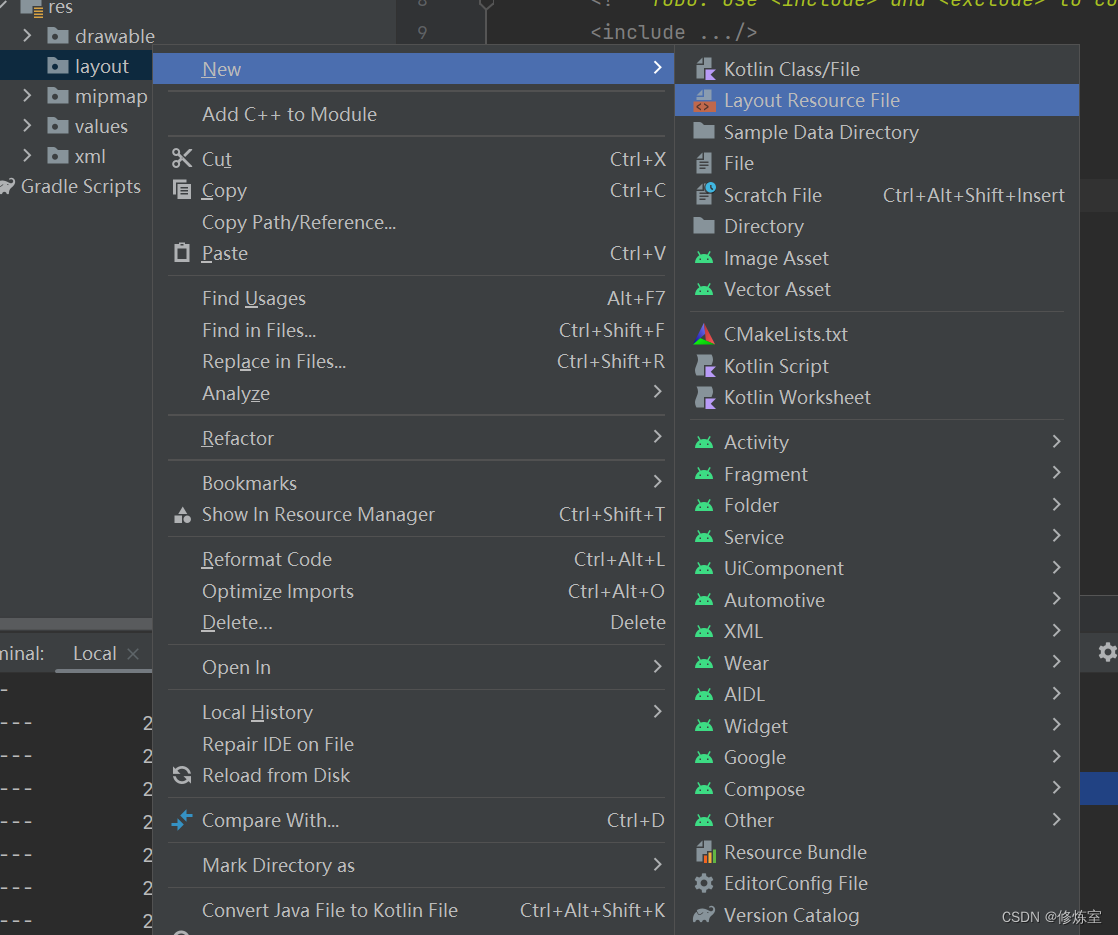
    在这里插入图片描述

    修改一下信息

    在这里插入图片描述

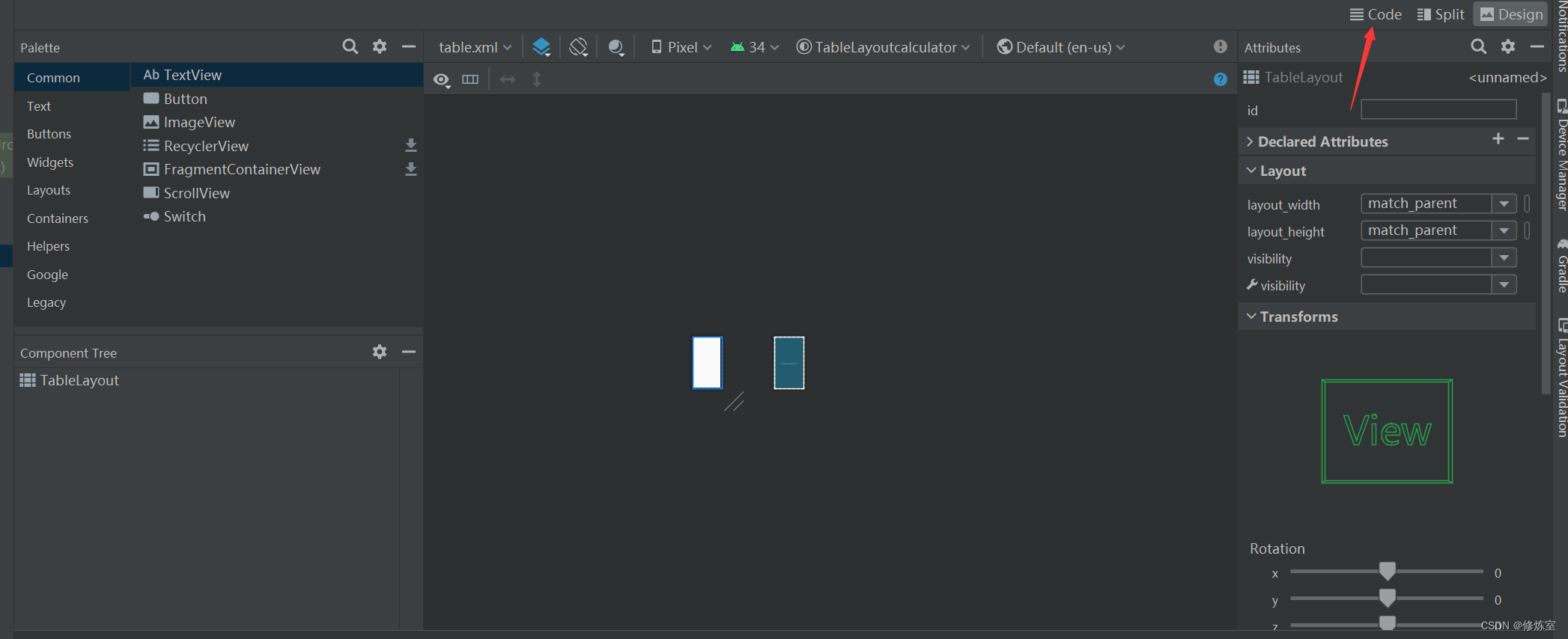
    如果需要直接写XML代码,可点击右上角进行Code切换
    在这里插入图片描述

    2.3编写布局代码

    <?xml version="1.0" encoding="utf-8"?
     xmlns:android="http://schemas.android.com/apk/res/android"
        android:layout_width="match_parent"
        android:layout_height="match_parent"
        android:background="#D8ECF3">
    
        
        <TableRow
            android:layout_width="match_parent"
            android:layout_height="90dp">
    
            <TextView
                android:gravity="bottom|right"
                android:textSize="70dp"
                android:singleLine="true"
                android:layout_margin="15dp"
                android:layout_width="match_parent"
                android:layout_height="120dp"
                android:id="@+id/textView"/>
        TableRow>
    
        <TableRow
            android:layout_width="match_parent"
            android:layout_height="match_parent"
            android:layout_marginTop="10dp" >
    
            <Button
                android:id="@+id/btn_left"
                android:layout_marginLeft="10dp"
                android:gravity="center"
                android:layout_width="0dp"
                android:layout_height="wrap_content"
                android:layout_weight="1"
                android:textSize="25sp"
                android:text="("/>
            <Button
                android:id="@+id/btn_right"
                android:layout_marginLeft="10dp"
                android:gravity="center"
                android:layout_width="0dp"
                android:layout_height="wrap_content"
                android:layout_weight="1"
                android:textSize="25sp"
                android:text=")"/>
    
            <Button
                android:id="@+id/btn_quyu"
                android:layout_marginLeft="10dp"
                android:gravity="center"
                android:layout_width="0dp"
                android:layout_height="wrap_content"
                android:layout_weight="1"
                android:textSize="25sp"
                android:text="%"/>
    
            <Button
                android:id="@+id/btn_CE"
                android:layout_marginLeft="10dp"
                android:gravity="center"
                android:layout_width="0dp"
                android:layout_height="wrap_content"
                android:layout_weight="1"
                android:textSize="25sp"
                android:text="CE"
                />
        TableRow>
        <TableRow
            android:layout_width="match_parent"
            android:layout_height="match_parent"
            android:layout_marginTop="10dp" >
    
            <Button
                android:id="@+id/btn_7"
                android:layout_marginLeft="10dp"
                android:gravity="center"
                android:layout_width="0dp"
                android:layout_height="wrap_content"
                android:layout_weight="1"
                android:textSize="25sp"
                android:text="7"
                />
            <Button
                android:id="@+id/btn_8"
                android:layout_marginLeft="10dp"
                android:gravity="center"
                android:layout_width="0dp"
                android:layout_height="wrap_content"
                android:layout_weight="1"
                android:textSize="25sp"
                android:text="8"
                />
            <Button
                android:id="@+id/btn_9"
                android:layout_marginLeft="10dp"
                android:gravity="center"
                android:layout_width="0dp"
                android:layout_height="wrap_content"
                android:layout_weight="1"
                android:textSize="25sp"
                android:text="9"
                />
            <Button
                android:id="@+id/btn_chu"
                android:layout_marginLeft="10dp"
                android:gravity="center"
                android:layout_width="0dp"
                android:layout_height="wrap_content"
                android:layout_weight="1"
                android:textSize="25sp"
                android:text="÷"
                />
        TableRow>
    
        <TableRow
            android:layout_width="match_parent"
            android:layout_height="match_parent"
            android:layout_marginTop="10dp" >
    
            <Button
                android:id="@+id/btn_4"
                android:layout_marginLeft="10dp"
                android:gravity="center"
                android:layout_width="0dp"
                android:layout_height="wrap_content"
                android:layout_weight="1"
                android:textSize="25sp"
                android:text="4"
                />
            <Button
                android:id="@+id/btn_5"
                android:layout_marginLeft="10dp"
                android:gravity="center"
                android:layout_width="0dp"
                android:layout_height="wrap_content"
                android:layout_weight="1"
                android:textSize="25sp"
                android:text="5"
                />
            <Button
                android:id="@+id/btn_6"
                android:layout_marginLeft="10dp"
                android:gravity="center"
                android:layout_width="0dp"
                android:layout_height="wrap_content"
                android:layout_weight="1"
                android:textSize="25sp"
                android:text="6"
                />
            <Button
                android:id="@+id/btn_cheng"
                android:layout_marginLeft="10dp"
                android:gravity="center"
                android:layout_width="0dp"
                android:layout_height="wrap_content"
                android:layout_weight="1"
                android:textSize="25sp"
                android:text="×"
                />
        TableRow>
    
        <TableRow
            android:layout_width="match_parent"
            android:layout_height="match_parent"
            android:layout_marginTop="10dp" >
    
            <Button
                android:id="@+id/btn_1"
                android:layout_marginLeft="10dp"
                android:gravity="center"
                android:layout_width="0dp"
                android:layout_height="wrap_content"
                android:layout_weight="1"
                android:textSize="25sp"
                android:text="1"
                />
            <Button
                android:id="@+id/btn_2"
                android:layout_marginLeft="10dp"
                android:gravity="center"
                android:layout_width="0dp"
                android:layout_height="wrap_content"
                android:layout_weight="1"
                android:textSize="25sp"
                android:text="2"
                />
            <Button
                android:id="@+id/btn_3"
                android:layout_marginLeft="10dp"
                android:gravity="center"
                android:layout_width="0dp"
                android:layout_height="wrap_content"
                android:layout_weight="1"
                android:textSize="25sp"
                android:text="3"
                />
            <Button
                android:id="@+id/btn_jian"
                android:layout_marginLeft="10dp"
                android:gravity="center"
                android:layout_width="0dp"
                android:layout_height="wrap_content"
                android:layout_weight="1"
                android:textSize="25sp"
                android:text="-"
                />
        TableRow>
    
        <TableRow
            android:layout_width="match_parent"
            android:layout_height="match_parent"
            android:layout_marginTop="10dp" >
    
            <Button
                android:id="@+id/btn_0"
                android:layout_marginLeft="10dp"
                android:gravity="center"
                android:layout_width="0dp"
                android:layout_height="wrap_content"
                android:layout_weight="1"
                android:textSize="25sp"
                android:text="0"
                />
            <Button
                android:id="@+id/btn_dian"
                android:layout_marginLeft="10dp"
                android:gravity="center"
                android:layout_width="0dp"
                android:layout_height="wrap_content"
                android:layout_weight="1"
                android:textSize="25sp"
                android:text="."
                />
            <Button
                android:id="@+id/btn_dengyu"
                android:layout_marginLeft="10dp"
                android:gravity="center"
                android:layout_width="0dp"
                android:layout_height="wrap_content"
                android:layout_weight="1"
                android:textSize="25sp"
                android:text="="
                />
            <Button
                android:id="@+id/btn_jia"
                android:layout_marginLeft="10dp"
                android:gravity="center"
                android:layout_width="0dp"
                android:layout_height="wrap_content"
                android:layout_weight="1"
                android:textSize="25sp"
                android:text="+"
                />
        TableRow>
    
    TableLayout>
    
    • 1
    • 2
    • 3
    • 4
    • 5
    • 6
    • 7
    • 8
    • 9
    • 10
    • 11
    • 12
    • 13
    • 14
    • 15
    • 16
    • 17
    • 18
    • 19
    • 20
    • 21
    • 22
    • 23
    • 24
    • 25
    • 26
    • 27
    • 28
    • 29
    • 30
    • 31
    • 32
    • 33
    • 34
    • 35
    • 36
    • 37
    • 38
    • 39
    • 40
    • 41
    • 42
    • 43
    • 44
    • 45
    • 46
    • 47
    • 48
    • 49
    • 50
    • 51
    • 52
    • 53
    • 54
    • 55
    • 56
    • 57
    • 58
    • 59
    • 60
    • 61
    • 62
    • 63
    • 64
    • 65
    • 66
    • 67
    • 68
    • 69
    • 70
    • 71
    • 72
    • 73
    • 74
    • 75
    • 76
    • 77
    • 78
    • 79
    • 80
    • 81
    • 82
    • 83
    • 84
    • 85
    • 86
    • 87
    • 88
    • 89
    • 90
    • 91
    • 92
    • 93
    • 94
    • 95
    • 96
    • 97
    • 98
    • 99
    • 100
    • 101
    • 102
    • 103
    • 104
    • 105
    • 106
    • 107
    • 108
    • 109
    • 110
    • 111
    • 112
    • 113
    • 114
    • 115
    • 116
    • 117
    • 118
    • 119
    • 120
    • 121
    • 122
    • 123
    • 124
    • 125
    • 126
    • 127
    • 128
    • 129
    • 130
    • 131
    • 132
    • 133
    • 134
    • 135
    • 136
    • 137
    • 138
    • 139
    • 140
    • 141
    • 142
    • 143
    • 144
    • 145
    • 146
    • 147
    • 148
    • 149
    • 150
    • 151
    • 152
    • 153
    • 154
    • 155
    • 156
    • 157
    • 158
    • 159
    • 160
    • 161
    • 162
    • 163
    • 164
    • 165
    • 166
    • 167
    • 168
    • 169
    • 170
    • 171
    • 172
    • 173
    • 174
    • 175
    • 176
    • 177
    • 178
    • 179
    • 180
    • 181
    • 182
    • 183
    • 184
    • 185
    • 186
    • 187
    • 188
    • 189
    • 190
    • 191
    • 192
    • 193
    • 194
    • 195
    • 196
    • 197
    • 198
    • 199
    • 200
    • 201
    • 202
    • 203
    • 204
    • 205
    • 206
    • 207
    • 208
    • 209
    • 210
    • 211
    • 212
    • 213
    • 214
    • 215
    • 216
    • 217
    • 218
    • 219
    • 220
    • 221
    • 222
    • 223
    • 224
    • 225
    • 226
    • 227
    • 228
    • 229
    • 230
    • 231
    • 232
    • 233
    • 234
    • 235
    • 236
    • 237
    • 238
    • 239
    • 240
    • 241
    • 242
    • 243
    • 244
    • 245
    • 246
    • 247
    • 248
    • 249
    • 250
    • 251
    • 252
    • 253
    • 254
    • 255

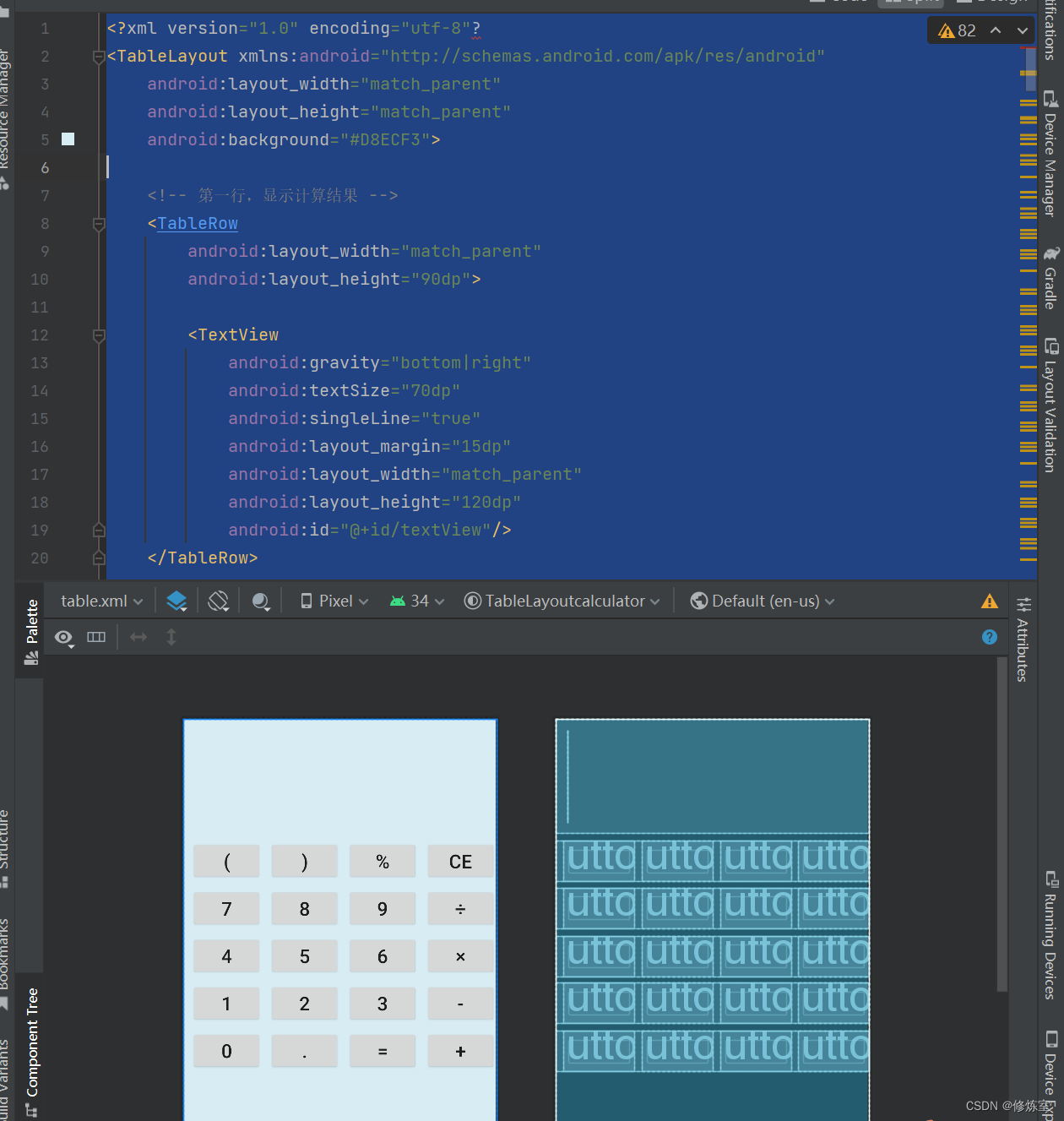
    可以看到实现了这样的一个效果

    在这里插入图片描述

    1. 第一个 TableRow:

      • android:layout_widthandroid:layout_height 属性设置为 match_parent90dp,表示这个 TableRow 的宽度会填满其父容器,并且高度为 90dp。

      • TextView 元素是 TableRow 内的子元素。它有以下属性:

        • android:gravity="bottom|right":文本在 TextView 中的对齐方式,文本在底部和右边对齐。
        • android:textSize="70dp":文本的字体大小为 70dp。
        • android:singleLine="true":文本只显示在一行内。
        • android:layout_margin="15dp":设置 TextView 的外边距为 15dp。
        • android:layout_width="match_parent"android:layout_height="120dp":TextView 的宽度会填满 TableRow,高度为 120dp。
        • android:id="@+id/textView":为 TextView 分配一个唯一的标识符。
    2. 第二个 TableRow:

      • android:layout_widthandroid:layout_height 属性设置为 match_parentmatch_parent,表示这个 TableRow 的宽度会填满其父容器,高度也会填满。

      • 这个 TableRow 包含了四个 Button 元素,每个按钮代表不同的操作。

        • 每个按钮的 android:id 属性用于标识按钮。
        • android:layout_marginLeft="10dp":设置按钮之间的左外边距为 10dp。
        • android:gravity="center":设置按钮内文本的对齐方式为居中。
        • android:layout_width="0dp"android:layout_weight="1":这些属性是使用权重来均分 TableRow 中的宽度。每个按钮的宽度都会根据权重平均分配,以使它们在 TableRow 中平均分布。
        • android:textSize="25sp":按钮内文本的字体大小为 25sp。
        • android:text:按钮上显示的文本内容。这个布局代码的作用是创建一个包含一个文本框和一组操作按钮的界面,可能用于一个简单的计算器或表达式输入界面。

    3.应用布局

    3.1 打开主文件

    打开 Kotlin Activity 文件,通常是在 src/main/java/com/yourpackage/YourActivity.kt

    在这里插入图片描述

    3.2 修改内容视图

    在 Activity 类的 onCreate 方法中,通过 setContentView 方法将布局文件设置为 Activity 的内容视图。假设您的布局文件名为 table.xml,在 onCreate 方法中添加以下代码:

    class MainActivity : ComponentActivity() {
        override fun onCreate(savedInstanceState: Bundle?) {
            super.onCreate(savedInstanceState)
            setContentView(R.layout.table)
        }
    }
    
    • 1
    • 2
    • 3
    • 4
    • 5
    • 6

    需要注意以下几个条件:

    1. 确保替换 "table" 为您的布局文件的实际名称(不包括文件扩展名)。这样,Android 就会将该布局文件加载到 Activity 中并显示出来。
    2. 确保您的 table.xml 文件位于 res/layout 目录中。通常,它应该是这个目录的子目录下的一个 XML 布局文件。
    3. 在您的 Kotlin 代码中,您可以通过 findViewById 方法来获取布局中的视图元素,例如,如果要获取布局中的某个按钮,可以这样做:

    实现效果

    在这里插入图片描述

    二、使用GridLayout实现计算器UI

    其他实现方式一样,对应的布局xml如下

    
    <GridLayout
        xmlns:android="http://schemas.android.com/apk/res/android"
        android:layout_width="match_parent"
        android:layout_height="match_parent"
        android:columnCount="4"
        android:rowCount="6"
        android:padding="16dp"
        android:layout_gravity="center"
        android:background="#D8ECF3">
    
    
        <TextView
            android:gravity="bottom|right"
            android:textSize="70dp"
            android:singleLine="true"
            android:layout_margin="15dp"
            android:layout_width="match_parent"
            android:layout_height="120dp"
            android:layout_columnSpan="4"
            android:layout_rowSpan="2" />
    
        <Button
            android:gravity="center"
            android:layout_height="wrap_content"
            android:text="("
            android:textSize="24sp"
            android:layout_columnSpan="1"/>
    
        <Button
            android:gravity="center"
            android:layout_height="wrap_content"
            android:text=")"
            android:textSize="24sp"
            android:layout_columnSpan="1"/>
        <Button
            android:gravity="center"
            android:layout_height="wrap_content"
            android:text="%"
            android:textSize="24sp"
            android:layout_columnSpan="1"/>
    
        <Button
            android:gravity="center"
            android:layout_height="wrap_content"
            android:layout_weight="1"
            android:text="CE"
            android:textSize="24sp"
            android:layout_columnSpan="1"/>
    
        
        <Button
            android:layout_height="wrap_content"
            android:text="7"
            android:gravity="center"
            android:textSize="24sp"/>
        <Button
            android:layout_height="wrap_content"
            android:text="8"
            android:gravity="center"
            android:textSize="24sp"/>
        <Button
            android:layout_height="wrap_content"
            android:text="9"
            android:gravity="center"
            android:textSize="24sp"/>
        <Button
            android:layout_height="wrap_content"
            android:text="÷"
            android:gravity="center"
            android:textSize="24sp"/>
    
        
        <Button
            android:layout_height="wrap_content"
            android:text="4"
            android:gravity="center"
            android:textSize="24sp"/>
        <Button
            android:layout_height="wrap_content"
            android:text="5"
            android:gravity="center"
            android:textSize="24sp"/>
        <Button
            android:layout_height="wrap_content"
            android:text="6"
            android:gravity="center"
            android:textSize="24sp"/>
        <Button
            android:layout_height="wrap_content"
            android:text="×"
            android:gravity="center"
            android:textSize="24sp"/>
    
        
        <Button
            android:layout_height="wrap_content"
            android:text="1"
            android:gravity="center"
            android:textSize="24sp"/>
        <Button
            android:layout_height="wrap_content"
            android:text="2"
            android:gravity="center"
            android:textSize="24sp"/>
        <Button
            android:layout_height="wrap_content"
            android:text="3"
            android:gravity="center"
            android:textSize="24sp"/>
        <Button
            android:layout_height="wrap_content"
            android:text="-"
            android:gravity="center"
            android:textSize="24sp"/>
    
        
        <Button
            android:layout_height="wrap_content"
            android:text="0"
            android:gravity="center"
            android:textSize="24sp"
            android:layout_columnSpan="1"/>
        <Button
            android:layout_height="wrap_content"
            android:text="."
            android:gravity="center"
            android:textSize="24sp"/>
        <Button
            android:layout_height="wrap_content"
            android:text="="
            android:gravity="center"
            android:textSize="24sp"
            android:layout_columnSpan="1"/>
        <Button
            android:layout_height="wrap_content"
            android:text="+"
            android:gravity="center"
            android:textSize="24sp"/>
    
    GridLayout>
    
    
    • 1
    • 2
    • 3
    • 4
    • 5
    • 6
    • 7
    • 8
    • 9
    • 10
    • 11
    • 12
    • 13
    • 14
    • 15
    • 16
    • 17
    • 18
    • 19
    • 20
    • 21
    • 22
    • 23
    • 24
    • 25
    • 26
    • 27
    • 28
    • 29
    • 30
    • 31
    • 32
    • 33
    • 34
    • 35
    • 36
    • 37
    • 38
    • 39
    • 40
    • 41
    • 42
    • 43
    • 44
    • 45
    • 46
    • 47
    • 48
    • 49
    • 50
    • 51
    • 52
    • 53
    • 54
    • 55
    • 56
    • 57
    • 58
    • 59
    • 60
    • 61
    • 62
    • 63
    • 64
    • 65
    • 66
    • 67
    • 68
    • 69
    • 70
    • 71
    • 72
    • 73
    • 74
    • 75
    • 76
    • 77
    • 78
    • 79
    • 80
    • 81
    • 82
    • 83
    • 84
    • 85
    • 86
    • 87
    • 88
    • 89
    • 90
    • 91
    • 92
    • 93
    • 94
    • 95
    • 96
    • 97
    • 98
    • 99
    • 100
    • 101
    • 102
    • 103
    • 104
    • 105
    • 106
    • 107
    • 108
    • 109
    • 110
    • 111
    • 112
    • 113
    • 114
    • 115
    • 116
    • 117
    • 118
    • 119
    • 120
    • 121
    • 122
    • 123
    • 124
    • 125
    • 126
    • 127
    • 128
    • 129
    • 130
    • 131
    • 132
    • 133
    • 134
    • 135
    • 136
    • 137
    • 138
    • 139
    • 140
    • 141
    • 142

    修改成下图即可在这里插入图片描述
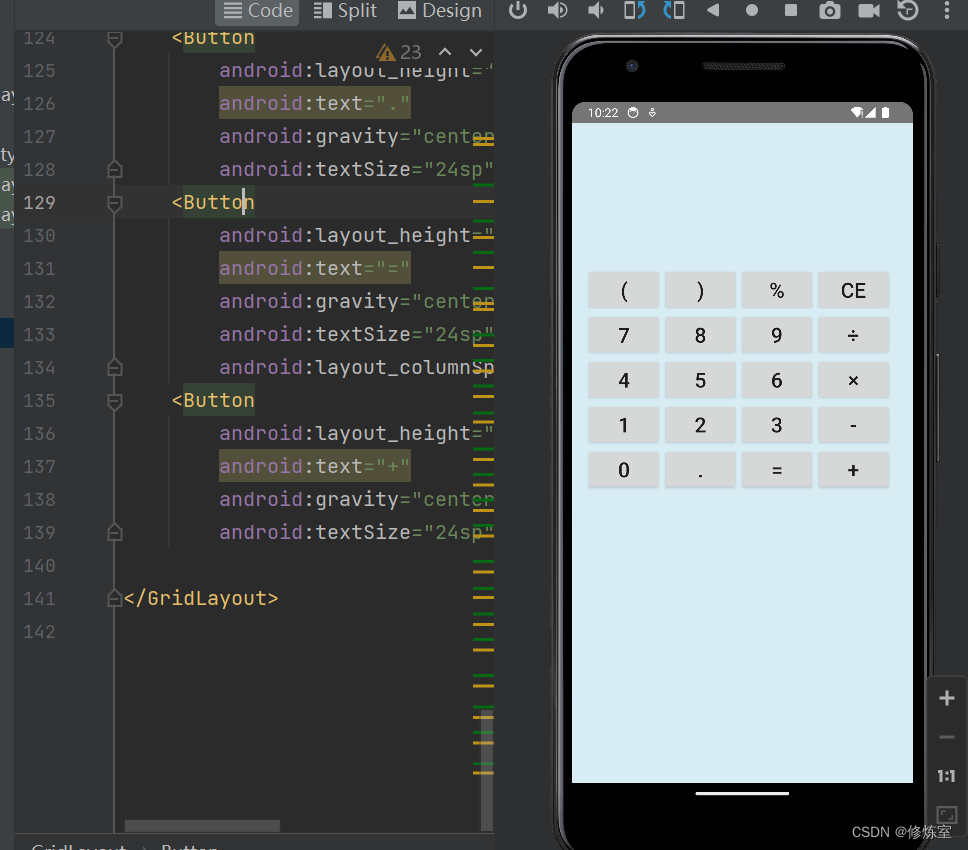
    实现效果

    在这里插入图片描述

  • 相关阅读:
    洛谷P5613 黑蚊子多
    常用PC,移动浏览器User-Agent大全
    java毕业设计——基于java+Jsp+Tomcat的牙科诊所管理系统设计与实现(毕业论文+程序源码)——牙科诊所管理系统
    每 日 练 习
    数据库选型与优化:策略与技巧的探讨
    csp 202203-2 出行计划
    【SpringCloud】Ribbon负载均衡原理、负载均衡策略、饥饿加载
    【Linux】基础:进程的概念
    (赠源码)基于SSM&Mysql网上购物系统12503-计算机毕业设计
    Centos7 Redis安装
  • 原文地址:https://blog.csdn.net/qq_22841387/article/details/132989267