-
Labelme分割标注软件
Labelme分割标注软件
相关重要博文链接:
MS COCO数据集介绍以及pycocotools使用
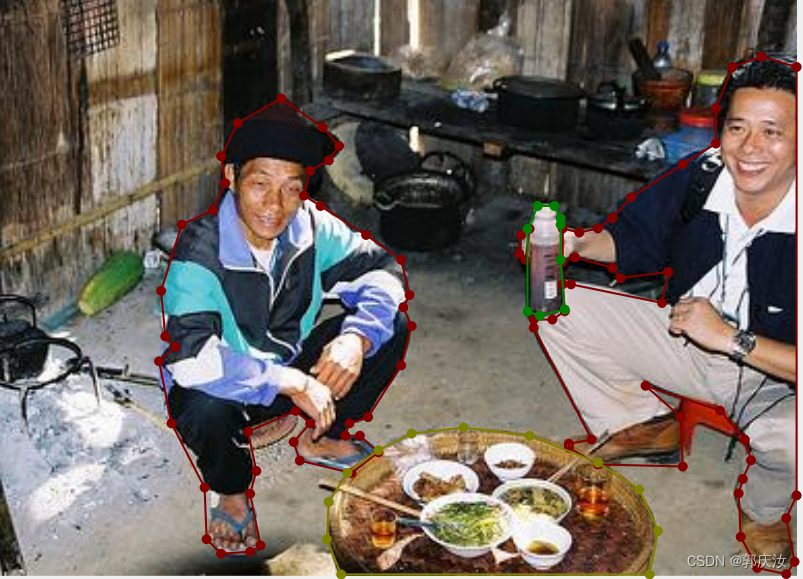
Labelme项目源代码Labelme是一款经典的标注工具,支持目标检测、语义分割、实例分割等任务。今天针对分割任务的数据标注进行简单的介绍。开源项目地址
1、环境配置与安装
1.1 创建conda虚拟环境(建议)
为了不影响其他python环境,建议新建一个环境。(不想新建可以跳过)
这里以创建一个名为labelme_env,python版本为3.8的环境为例:conda create -n labelme_env python=3.8- 1
创建完成后,进入新环境:
conda activate labelme_env- 1
1.2 安装Labelme
安装非常简单,直接使用pip安装即可:
pip install labelme- 1
# ubutnu pip install pycocotools # Windows pip install pycocotools-windows- 1
- 2
- 3
- 4
安装完成后在终端输入labelme即可启动:
labelme- 1

2、简单使用

├── img_data: 存放你要标注的所有图片 ├── data_annotated: 存放后续标注好的所有json文件 └── labels.txt: 所有类别信息- 1
- 2
- 3
2.1 创建label标签文件
__ignore__ _background_ dog cat- 1
- 2
- 3
- 4

2.2 启动labelme

labelme --labels labels.txt- 1

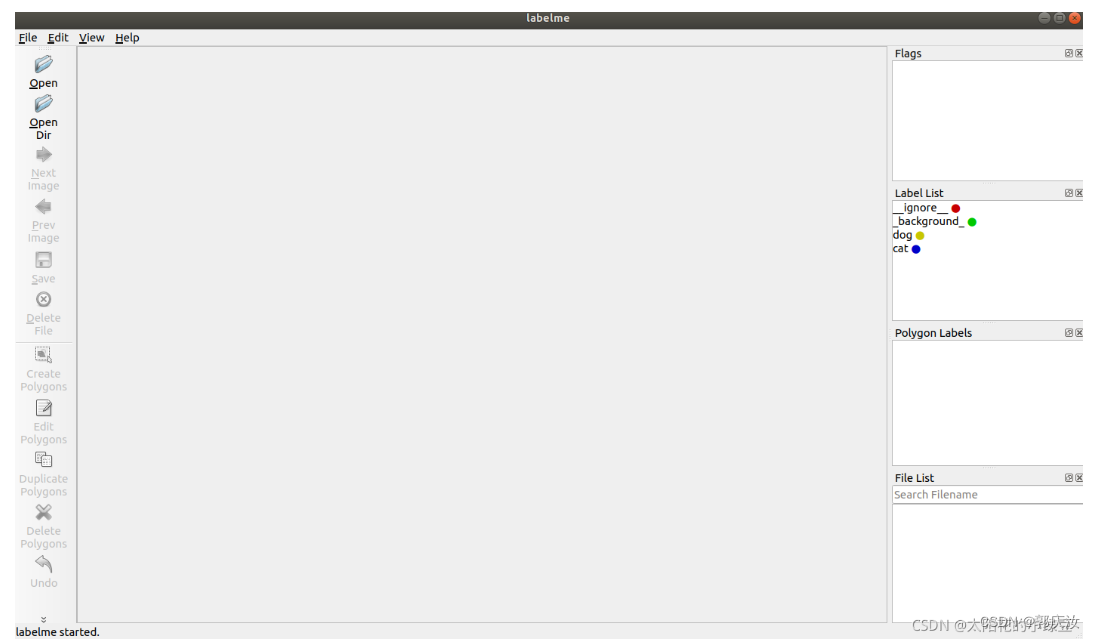
2.3 打开文件/文件夹


2.4 设置保存结果路径


2.5 标注目标

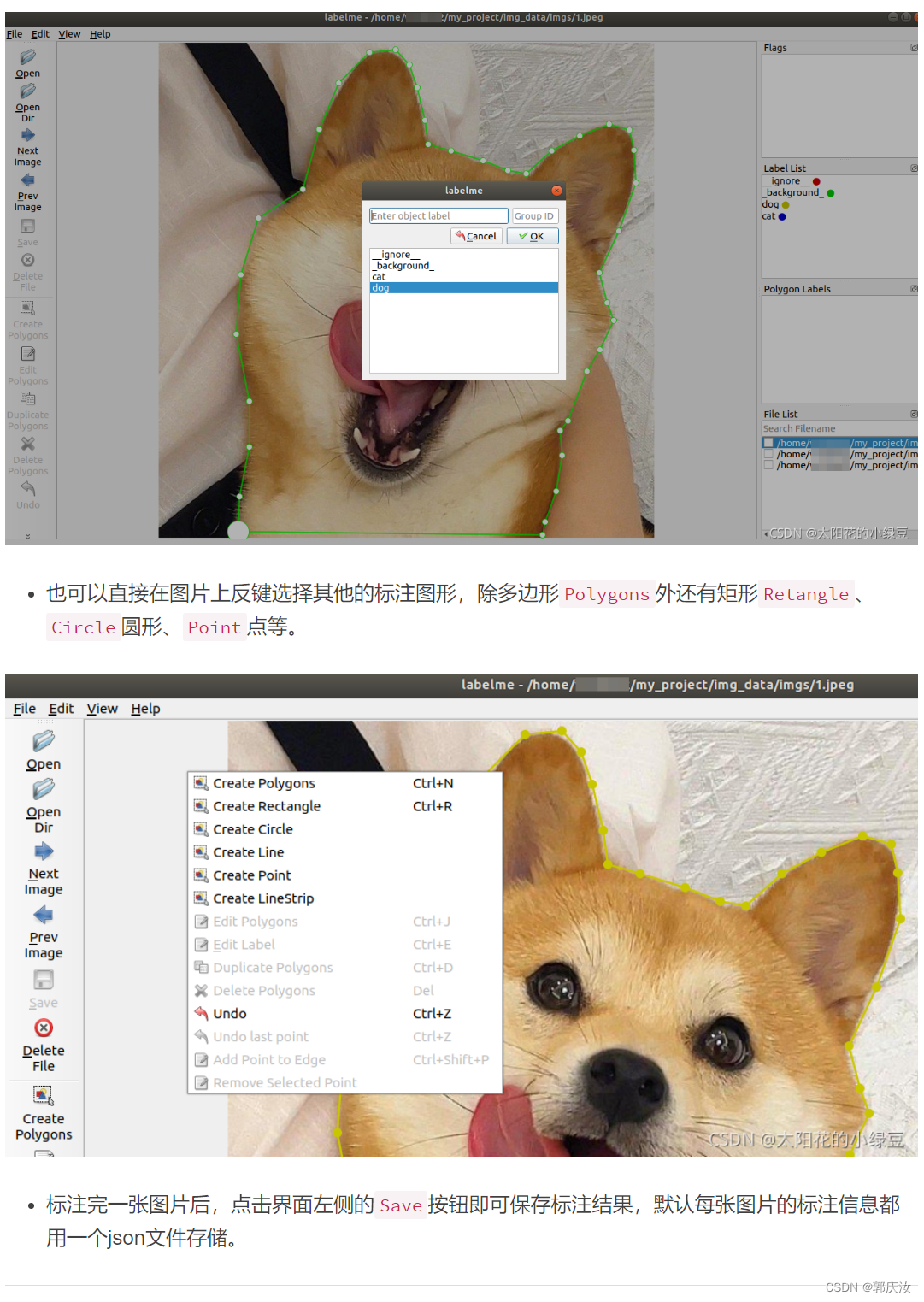
2.6 保存json文件格式

{ "version": "4.5.9", "flags": {}, "shapes": [ { "label": "dog", "points": [ [ 108.09090909090907, 687.1818181818181 ], .... [ 538.090909090909, 668.090909090909 ], [ 534.4545454545454, 689.0 ] ], "group_id": null, "shape_type": "polygon", "flags": {} } ], "imagePath": "../img_data/1.jpg", "imageData": null, "imageHeight": 690, "imageWidth": 690 }- 1
- 2
- 3
- 4
- 5
- 6
- 7
- 8
- 9
- 10
- 11
- 12
- 13
- 14
- 15
- 16
- 17
- 18
- 19
- 20
- 21
- 22
- 23
- 24
- 25
- 26
- 27
- 28
- 29
- 30
- 31
- 32
3 格式转换
3.1 转换语义分割标签
原作者为了方便,也提供了一个脚本,帮我们方便的将json文件转换成PASCAL VOC的语义分割标签格式。示例项目链接:
https://github.com/wkentaro/labelme/tree/master/examples/semantic_segmentation

python labelme2voc.py data_annotated data_dataset_voc --labels labels.txt- 1
执行后会生成如下目录:
- data_dataset_voc/JPEGImages - data_dataset_voc/SegmentationClass - data_dataset_voc/SegmentationClassPNG - data_dataset_voc/SegmentationClassVisualization - data_dataset_voc/class_names.txt- 1
- 2
- 3
- 4
- 5


class_names.txt存储的是所有的类别信息,包括背景。_background_ dog cat- 1
- 2
- 3

#!/usr/bin/env python from __future__ import print_function import argparse import glob import os import os.path as osp import sys import imgviz import numpy as np import labelme def main(): parser = argparse.ArgumentParser( formatter_class=argparse.ArgumentDefaultsHelpFormatter ) parser.add_argument("input_dir", help="Input annotated directory") parser.add_argument("output_dir", help="Output dataset directory") parser.add_argument( "--labels", help="Labels file or comma separated text", required=True ) parser.add_argument( "--noobject", help="Flag not to generate object label", action="store_true" ) parser.add_argument( "--nonpy", help="Flag not to generate .npy files", action="store_true" ) parser.add_argument( "--noviz", help="Flag to disable visualization", action="store_true" ) args = parser.parse_args() if osp.exists(args.output_dir): print("Output directory already exists:", args.output_dir) sys.exit(1) os.makedirs(args.output_dir) os.makedirs(osp.join(args.output_dir, "JPEGImages")) os.makedirs(osp.join(args.output_dir, "SegmentationClass")) if not args.nonpy: os.makedirs(osp.join(args.output_dir, "SegmentationClassNpy")) if not args.noviz: os.makedirs(osp.join(args.output_dir, "SegmentationClassVisualization")) if not args.noobject: os.makedirs(osp.join(args.output_dir, "SegmentationObject")) if not args.nonpy: os.makedirs(osp.join(args.output_dir, "SegmentationObjectNpy")) if not args.noviz: os.makedirs(osp.join(args.output_dir, "SegmentationObjectVisualization")) print("Creating dataset:", args.output_dir) if osp.exists(args.labels): with open(args.labels) as f: labels = [label.strip() for label in f if label] else: labels = [label.strip() for label in args.labels.split(",")] class_names = [] class_name_to_id = {} for i, label in enumerate(labels): class_id = i - 1 # starts with -1 class_name = label.strip() class_name_to_id[class_name] = class_id if class_id == -1: print("------",class_name) assert class_name == "__ignore__" continue elif class_id == 0: assert class_name == "_background_" class_names.append(class_name) class_names = tuple(class_names) print("class_names:", class_names) out_class_names_file = osp.join(args.output_dir, "class_names.txt") with open(out_class_names_file, "w") as f: f.writelines("\n".join(class_names)) print("Saved class_names:", out_class_names_file) for filename in sorted(glob.glob(osp.join(args.input_dir, "*.json"))): print("Generating dataset from:", filename) label_file = labelme.LabelFile(filename=filename) base = osp.splitext(osp.basename(filename))[0] out_img_file = osp.join(args.output_dir, "JPEGImages", base + ".jpg") out_clsp_file = osp.join(args.output_dir, "SegmentationClass", base + ".png") if not args.nonpy: out_cls_file = osp.join( args.output_dir, "SegmentationClassNpy", base + ".npy" ) if not args.noviz: out_clsv_file = osp.join( args.output_dir, "SegmentationClassVisualization", base + ".jpg", ) if not args.noobject: out_insp_file = osp.join( args.output_dir, "SegmentationObject", base + ".png" ) if not args.nonpy: out_ins_file = osp.join( args.output_dir, "SegmentationObjectNpy", base + ".npy" ) if not args.noviz: out_insv_file = osp.join( args.output_dir, "SegmentationObjectVisualization", base + ".jpg", ) img = labelme.utils.img_data_to_arr(label_file.imageData) imgviz.io.imsave(out_img_file, img) cls, ins = labelme.utils.shapes_to_label( img_shape=img.shape, shapes=label_file.shapes, label_name_to_value=class_name_to_id, ) ins[cls == -1] = 0 # ignore it. # class label labelme.utils.lblsave(out_clsp_file, cls) if not args.nonpy: np.save(out_cls_file, cls) if not args.noviz: clsv = imgviz.label2rgb( cls, imgviz.rgb2gray(img), label_names=class_names, font_size=15, loc="rb", ) imgviz.io.imsave(out_clsv_file, clsv) if not args.noobject: # instance label labelme.utils.lblsave(out_insp_file, ins) if not args.nonpy: np.save(out_ins_file, ins) if not args.noviz: instance_ids = np.unique(ins) instance_names = [str(i) for i in range(max(instance_ids) + 1)] insv = imgviz.label2rgb( ins, imgviz.rgb2gray(img), label_names=instance_names, font_size=15, loc="rb", ) imgviz.io.imsave(out_insv_file, insv) if __name__ == "__main__": main()- 1
- 2
- 3
- 4
- 5
- 6
- 7
- 8
- 9
- 10
- 11
- 12
- 13
- 14
- 15
- 16
- 17
- 18
- 19
- 20
- 21
- 22
- 23
- 24
- 25
- 26
- 27
- 28
- 29
- 30
- 31
- 32
- 33
- 34
- 35
- 36
- 37
- 38
- 39
- 40
- 41
- 42
- 43
- 44
- 45
- 46
- 47
- 48
- 49
- 50
- 51
- 52
- 53
- 54
- 55
- 56
- 57
- 58
- 59
- 60
- 61
- 62
- 63
- 64
- 65
- 66
- 67
- 68
- 69
- 70
- 71
- 72
- 73
- 74
- 75
- 76
- 77
- 78
- 79
- 80
- 81
- 82
- 83
- 84
- 85
- 86
- 87
- 88
- 89
- 90
- 91
- 92
- 93
- 94
- 95
- 96
- 97
- 98
- 99
- 100
- 101
- 102
- 103
- 104
- 105
- 106
- 107
- 108
- 109
- 110
- 111
- 112
- 113
- 114
- 115
- 116
- 117
- 118
- 119
- 120
- 121
- 122
- 123
- 124
- 125
- 126
- 127
- 128
- 129
- 130
- 131
- 132
- 133
- 134
- 135
- 136
- 137
- 138
- 139
- 140
- 141
- 142
- 143
- 144
- 145
- 146
- 147
- 148
- 149
- 150
- 151
- 152
- 153
- 154
- 155
- 156
3.2 转换实例分割标签

https://github.com/wkentaro/labelme/tree/main/examples/instance_segmentation

python labelme2voc.py data_annotated data_dataset_voc --labels labels.txt- 1
执行后会生成如下目录:
- data_dataset_voc/JPEGImages - data_dataset_voc/SegmentationClass - data_dataset_voc/SegmentationClassPNG - data_dataset_voc/SegmentationClassVisualization - data_dataset_voc/SegmentationObject - data_dataset_voc/SegmentationObjectPNG - data_dataset_voc/SegmentationObjectVisualization - data_dataset_voc/class_names.txt- 1
- 2
- 3
- 4
- 5
- 6
- 7
- 8


#!/usr/bin/env python from __future__ import print_function import argparse import glob import os import os.path as osp import sys import imgviz import numpy as np import labelme def main(): parser = argparse.ArgumentParser( formatter_class=argparse.ArgumentDefaultsHelpFormatter ) parser.add_argument("input_dir", help="Input annotated directory") parser.add_argument("output_dir", help="Output dataset directory") parser.add_argument( "--labels", help="Labels file or comma separated text", required=True ) parser.add_argument( "--noobject", help="Flag not to generate object label", action="store_true" ) parser.add_argument( "--nonpy", help="Flag not to generate .npy files", action="store_true" ) parser.add_argument( "--noviz", help="Flag to disable visualization", action="store_true" ) args = parser.parse_args() if osp.exists(args.output_dir): print("Output directory already exists:", args.output_dir) sys.exit(1) os.makedirs(args.output_dir) os.makedirs(osp.join(args.output_dir, "JPEGImages")) os.makedirs(osp.join(args.output_dir, "SegmentationClass")) if not args.nonpy: os.makedirs(osp.join(args.output_dir, "SegmentationClassNpy")) if not args.noviz: os.makedirs(osp.join(args.output_dir, "SegmentationClassVisualization")) if not args.noobject: os.makedirs(osp.join(args.output_dir, "SegmentationObject")) if not args.nonpy: os.makedirs(osp.join(args.output_dir, "SegmentationObjectNpy")) if not args.noviz: os.makedirs(osp.join(args.output_dir, "SegmentationObjectVisualization")) print("Creating dataset:", args.output_dir) if osp.exists(args.labels): with open(args.labels) as f: labels = [label.strip() for label in f if label] else: labels = [label.strip() for label in args.labels.split(",")] class_names = [] class_name_to_id = {} for i, label in enumerate(labels): class_id = i - 1 # starts with -1 class_name = label.strip() class_name_to_id[class_name] = class_id if class_id == -1: print("------",class_name) assert class_name == "__ignore__" continue elif class_id == 0: assert class_name == "_background_" class_names.append(class_name) class_names = tuple(class_names) print("class_names:", class_names) out_class_names_file = osp.join(args.output_dir, "class_names.txt") with open(out_class_names_file, "w") as f: f.writelines("\n".join(class_names)) print("Saved class_names:", out_class_names_file) for filename in sorted(glob.glob(osp.join(args.input_dir, "*.json"))): print("Generating dataset from:", filename) label_file = labelme.LabelFile(filename=filename) base = osp.splitext(osp.basename(filename))[0] out_img_file = osp.join(args.output_dir, "JPEGImages", base + ".jpg") out_clsp_file = osp.join(args.output_dir, "SegmentationClass", base + ".png") if not args.nonpy: out_cls_file = osp.join( args.output_dir, "SegmentationClassNpy", base + ".npy" ) if not args.noviz: out_clsv_file = osp.join( args.output_dir, "SegmentationClassVisualization", base + ".jpg", ) if not args.noobject: out_insp_file = osp.join( args.output_dir, "SegmentationObject", base + ".png" ) if not args.nonpy: out_ins_file = osp.join( args.output_dir, "SegmentationObjectNpy", base + ".npy" ) if not args.noviz: out_insv_file = osp.join( args.output_dir, "SegmentationObjectVisualization", base + ".jpg", ) img = labelme.utils.img_data_to_arr(label_file.imageData) imgviz.io.imsave(out_img_file, img) cls, ins = labelme.utils.shapes_to_label( img_shape=img.shape, shapes=label_file.shapes, label_name_to_value=class_name_to_id, ) ins[cls == -1] = 0 # ignore it. # class label labelme.utils.lblsave(out_clsp_file, cls) if not args.nonpy: np.save(out_cls_file, cls) if not args.noviz: clsv = imgviz.label2rgb( cls, imgviz.rgb2gray(img), label_names=class_names, font_size=15, loc="rb", ) imgviz.io.imsave(out_clsv_file, clsv) if not args.noobject: # instance label labelme.utils.lblsave(out_insp_file, ins) if not args.nonpy: np.save(out_ins_file, ins) if not args.noviz: instance_ids = np.unique(ins) instance_names = [str(i) for i in range(max(instance_ids) + 1)] insv = imgviz.label2rgb( ins, imgviz.rgb2gray(img), label_names=instance_names, font_size=15, loc="rb", ) imgviz.io.imsave(out_insv_file, insv) if __name__ == "__main__": main()- 1
- 2
- 3
- 4
- 5
- 6
- 7
- 8
- 9
- 10
- 11
- 12
- 13
- 14
- 15
- 16
- 17
- 18
- 19
- 20
- 21
- 22
- 23
- 24
- 25
- 26
- 27
- 28
- 29
- 30
- 31
- 32
- 33
- 34
- 35
- 36
- 37
- 38
- 39
- 40
- 41
- 42
- 43
- 44
- 45
- 46
- 47
- 48
- 49
- 50
- 51
- 52
- 53
- 54
- 55
- 56
- 57
- 58
- 59
- 60
- 61
- 62
- 63
- 64
- 65
- 66
- 67
- 68
- 69
- 70
- 71
- 72
- 73
- 74
- 75
- 76
- 77
- 78
- 79
- 80
- 81
- 82
- 83
- 84
- 85
- 86
- 87
- 88
- 89
- 90
- 91
- 92
- 93
- 94
- 95
- 96
- 97
- 98
- 99
- 100
- 101
- 102
- 103
- 104
- 105
- 106
- 107
- 108
- 109
- 110
- 111
- 112
- 113
- 114
- 115
- 116
- 117
- 118
- 119
- 120
- 121
- 122
- 123
- 124
- 125
- 126
- 127
- 128
- 129
- 130
- 131
- 132
- 133
- 134
- 135
- 136
- 137
- 138
- 139
- 140
- 141
- 142
- 143
- 144
- 145
- 146
- 147
- 148
- 149
- 150
- 151
- 152
- 153
- 154
- 155
- 156

python labelme2coco.py data_annotated data_dataset_coco --labels labels.txt- 1
执行后会生成如下目录:
- data_dataset_coco/JPEGImages - data_dataset_coco/annotations.json- 1
- 2
代码:

#!/usr/bin/env python import argparse import collections import datetime import glob import json import os import os.path as osp import sys import uuid import imgviz import numpy as np import labelme try: import pycocotools.mask except ImportError: print("Please install pycocotools:\n\n pip install pycocotools\n") sys.exit(1) def main(): parser = argparse.ArgumentParser( formatter_class=argparse.ArgumentDefaultsHelpFormatter ) parser.add_argument("input_dir", help="input annotated directory") parser.add_argument("output_dir", help="output dataset directory") parser.add_argument("--labels", help="labels file", required=True) parser.add_argument( "--noviz", help="no visualization", action="store_true" ) args = parser.parse_args() if osp.exists(args.output_dir): print("Output directory already exists:", args.output_dir) sys.exit(1) os.makedirs(args.output_dir) os.makedirs(osp.join(args.output_dir, "JPEGImages")) if not args.noviz: os.makedirs(osp.join(args.output_dir, "Visualization")) print("Creating dataset:", args.output_dir) now = datetime.datetime.now() data = dict( info=dict( description=None, url=None, version=None, year=now.year, contributor=None, date_created=now.strftime("%Y-%m-%d %H:%M:%S.%f"), ), licenses=[ dict( url=None, id=0, name=None, ) ], images=[ # license, url, file_name, height, width, date_captured, id ], type="instances", annotations=[ # segmentation, area, iscrowd, image_id, bbox, category_id, id ], categories=[ # supercategory, id, name ], ) class_name_to_id = {} for i, line in enumerate(open(args.labels).readlines()): class_id = i - 1 # starts with -1 class_name = line.strip() if class_id == -1: assert class_name == "__ignore__" continue class_name_to_id[class_name] = class_id data["categories"].append( dict( supercategory=None, id=class_id, name=class_name, ) ) out_ann_file = osp.join(args.output_dir, "annotations.json") label_files = glob.glob(osp.join(args.input_dir, "*.json")) for image_id, filename in enumerate(label_files): print("Generating dataset from:", filename) label_file = labelme.LabelFile(filename=filename) base = osp.splitext(osp.basename(filename))[0] out_img_file = osp.join(args.output_dir, "JPEGImages", base + ".jpg") img = labelme.utils.img_data_to_arr(label_file.imageData) imgviz.io.imsave(out_img_file, img) data["images"].append( dict( license=0, url=None, file_name=osp.relpath(out_img_file, osp.dirname(out_ann_file)), height=img.shape[0], width=img.shape[1], date_captured=None, id=image_id, ) ) masks = {} # for area segmentations = collections.defaultdict(list) # for segmentation for shape in label_file.shapes: points = shape["points"] label = shape["label"] group_id = shape.get("group_id") shape_type = shape.get("shape_type", "polygon") mask = labelme.utils.shape_to_mask( img.shape[:2], points, shape_type ) if group_id is None: group_id = uuid.uuid1() instance = (label, group_id) if instance in masks: masks[instance] = masks[instance] | mask else: masks[instance] = mask if shape_type == "rectangle": (x1, y1), (x2, y2) = points x1, x2 = sorted([x1, x2]) y1, y2 = sorted([y1, y2]) points = [x1, y1, x2, y1, x2, y2, x1, y2] if shape_type == "circle": (x1, y1), (x2, y2) = points r = np.linalg.norm([x2 - x1, y2 - y1]) # r(1-cos(a/2))- 1
- 2
- 3
- 4
- 5
- 6
- 7
- 8
- 9
- 10
- 11
- 12
- 13
- 14
- 15
- 16
- 17
- 18
- 19
- 20
- 21
- 22
- 23
- 24
- 25
- 26
- 27
- 28
- 29
- 30
- 31
- 32
- 33
- 34
- 35
- 36
- 37
- 38
- 39
- 40
- 41
- 42
- 43
- 44
- 45
- 46
- 47
- 48
- 49
- 50
- 51
- 52
- 53
- 54
- 55
- 56
- 57
- 58
- 59
- 60
- 61
- 62
- 63
- 64
- 65
- 66
- 67
- 68
- 69
- 70
- 71
- 72
- 73
- 74
- 75
- 76
- 77
- 78
- 79
- 80
- 81
- 82
- 83
- 84
- 85
- 86
- 87
- 88
- 89
- 90
- 91
- 92
- 93
- 94
- 95
- 96
- 97
- 98
- 99
- 100
- 101
- 102
- 103
- 104
- 105
- 106
- 107
- 108
- 109
- 110
- 111
- 112
- 113
- 114
- 115
- 116
- 117
- 118
- 119
- 120
- 121
- 122
- 123
- 124
- 125
- 126
- 127
- 128
- 129
- 130
- 131
- 132
- 133
- 134
- 135
- 136
- 137
- 138
- 139
- 140
- 141
- 142
- 143
- 144
- 145
- 146
- 147
- 148
- 149
- 150
- 151
- 152
- 153
- 154
- 155
- 156
- 157
- 158
- 159
- 160
- 161
- 162
- 163
- 164
- 165
- 166
- 167
- 168
- 169
- 170
- 171
- 172
- 173
- 174
- 175
- 176
- 177
- 178
- 179
- 180
- 181
- 182
- 183
- 184
- 185
- 186
- 187
- 188
- 189
- 190
- 191
- 192
- 193
- 194
- 195
- 196
- 197
- 198
- 199
- 200
- 201
- 202
- 203
- 204
- 205
- 206
- 207
- 208
- 209
-
相关阅读:
CommandInvokationFailure: Gradle build failed.
Qt/C++音视频开发55-加密保存到文件并解密播放
黄仁勋的元宇宙梦想:虚拟世界将如同互联网站那样不断涌现
EDA实验-----3-8译码器设计(QuartusII)
MySql密码增强策略
每日一练——
AI生成PPT:如何轻松制作专业的答辩PPT?
6.1二叉树的递归遍历(LC144,LC15,LC94)
小微风控中客群分类和授信策略
rabbitMQ (1)
- 原文地址:https://blog.csdn.net/guoqingru0311/article/details/133089939
